lights Seat Ateca 2016 Workshop Manual
[x] Cancel search | Manufacturer: SEAT, Model Year: 2016, Model line: Ateca, Model: Seat Ateca 2016Pages: 328, PDF Size: 6.32 MB
Page 166 of 328
Operation
WARNING
Never programme the auxiliary heater so that
it sw
itches itself on and is running in an en-
closed space or an area with no ventilation.
The auxiliary heater exhaust fumes contain
carbon monoxide, an odourless and colour-
less toxic gas. Carbon monoxide can cause
people to lose consciousness. It can also
cause death. Operating instructions
The auxiliary heater exhaust system located
belo
w the
vehicle must be kept clear of snow,
mud and other objects. The exhaust fumes
must be able to exit freely. The emissions
generated by the auxiliary heater are re-
moved via an exhaust pipe fitted underneath
the vehicle.
On heating the vehicle interior, depending on
the outside temperature, the warm air is first
directed at the windscreen and then to the
rest of the vehicle interior through the air
vents. Directing the diffusers – towards the
windows for example – can affect air distribu-
tion.
When will the auxiliary heater not be activa-
ted?
● The auxiliary heater requires about as
muc h po
wer as the dipped beam headlights.
If the 12-volt battery charge is too low, the auxiliary heater switches off automatically
and c
annot
be switched on. This avoids prob-
lems when starting the engine.
● The heating must be activated every time
you w
ant to set off. Similarly, the departure
time must reactivate each time.
● The control lamp (fuel
level indicator)
lights up. Note
● Noi se
s will be heard while the auxiliary
heater is running.
● When the air humidity is high and the in-
side t
emperature low, condensation from the
heating and ventilating system may evapo-
rate when the auxiliary heater is switched on.
In this case, steam may be released from un-
derneath the vehicle. This does not mean
that there is a vehicle malfunction.
● If the vehicle is tilted, e.g. if parked on a
slope, the oper
ation of the auxiliary heater
may be restricted if the fuel tank level is low
(just above the reserve level).
● If the auxiliary heater is used a number of
times
for a long period of time, the 12-volt
battery will lose its charge. To recharge the
battery, the vehicle must be driven for a num-
ber of kilometres from time to time. As a
guideline: The journey should last approxi-
mately as long as the heater was connected.
● At temperatures below +5°C (+41°F), the
auxi
liary heater may switch itself on automat-
ically when the engine is switched on. The auxiliary heater is switched off again after a
c
er
tain time.164
Page 169 of 328
Driving
remains switched on. Make sure that the igni-
tion i
s
switched off before leaving the
vehicle, otherwise the battery could dis-
charge. Starter button*
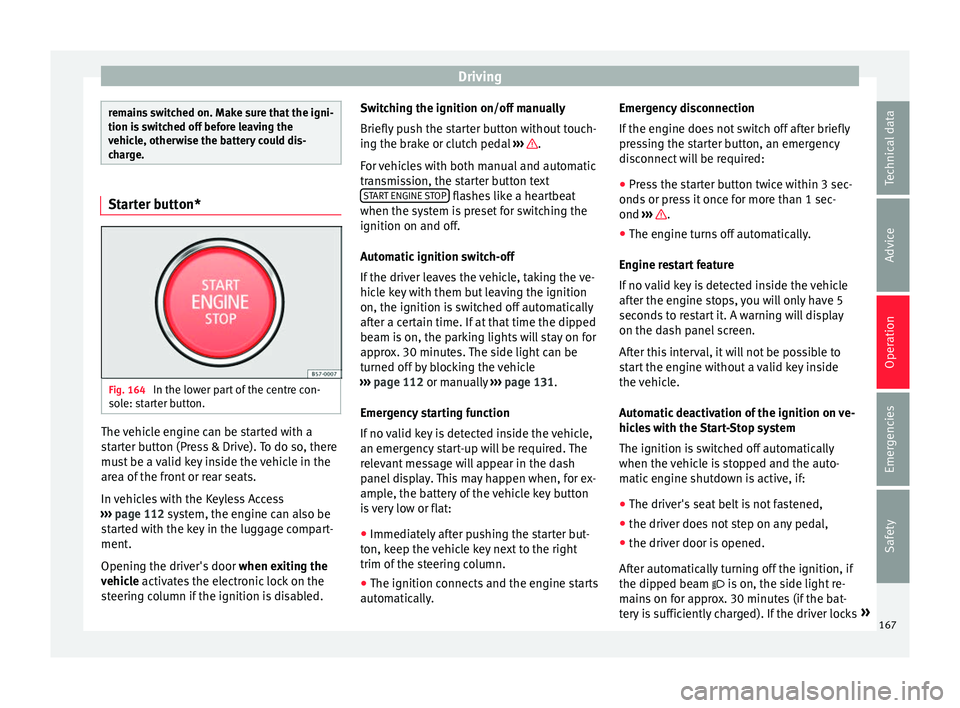
Fig. 164
In the lower part of the centre con-
so l
e: starter button. The vehicle engine can be started with a
s
t
arter button (Press & Drive). To do so, there
must be a valid key inside the vehicle in the
area of the front or rear seats.
In vehicles with the Keyless Access
››› page 112 system, the engine can also be
started with the key in the luggage compart-
ment.
Opening the driver's door when exiting the
vehicle activates the electronic lock on the
steering column if the ignition is disabled. Switching the ignition on/off manually
Briefly p
ush the starter button without touch-
ing the brake or clutch pedal ››› .
F or
vehicles with both manual and automatic
transmission, the starter button text START ENGINE STOP flashes like a heartbeat
when the sy s
tem is preset for switching the
ignition on and off.
Automatic ignition switch-off
If the driver leaves the vehicle, taking the ve-
hicle key with them but leaving the ignition
on, the ignition is switched off automatically
after a certain time. If at that time the dipped
beam is on, the parking lights will stay on for
approx. 30 minutes. The side light can be
turned off by blocking the vehicle
››› page 112 or manually ››› page 131.
Emergency starting function
If no valid key is detected inside the vehicle,
an emergency start-up will be required. The
relevant message will appear in the dash
panel display. This may happen when, for ex-
ample, the battery of the vehicle key button
is very low or flat: ● Immediately after pushing the starter but-
ton, k
eep the vehicle key next to the right
trim of the steering column.
● The ignition connects and the engine starts
autom
atically. Emergency disconnection
If the en
gine does not switch off after briefly
pressing the starter button, an emergency
disconnect will be required:
● Press the starter button twice within 3 sec-
onds
or press it once for more than 1 sec-
ond ››› .
● The engine turns off automatically.
En gine r
estart feature
If no valid key is detected inside the vehicle
after the engine stops, you will only have 5
seconds to restart it. A warning will display
on the dash panel screen.
After this interval, it will not be possible to
start the engine without a valid key inside
the vehicle.
Automatic deactivation of the ignition on ve-
hicles with the Start-Stop system
The ignition is switched off automatically
when the vehicle is stopped and the auto-
matic engine shutdown is active, if:
● The driver's seat belt is not fastened,
● the driver does not step on any pedal,
● the driver door is opened.
Aft
er automatically turning off the ignition, if
the dipped beam is on, the side light re-
mains on for approx. 30 minutes (if the bat-
tery is sufficiently charged). If the driver locks »
167
Technical data
Advice
Operation
Emergencies
Safety
Page 176 of 328
Operation
situations the torque delivered to the inner
wheel i
s too high, causing the wheels to
spin. On the other hand, the outer wheel is
receiving a lower drive torque than it could
transmit. This causes an overall loss of lateral
grip on the front axle, resulting in understeer
or “lengthening” of the trajectory.
The XDS system can detect and correct this
effect via the sensors and signals of the ESC.
Via the ESC, the XDS will brake the inside
wheel and counter the excess driving torque
of that wheel. This means that the driver's
desired trajectory is much more precise.
The XDS system works in combination with
the ESC and is always active, even when ASR
traction control is disconnected, or the ESC in
Sport mode or disconnected.
Multi-collision brake
In an accident, the multi-collision brake can
help the driver by braking to avoid the risk of
skidding during the accident, which could
lead to further collisions.
The multi-collision brake works for front, side
or rear accidents, when the airbag control
unit records its activation level and the acci-
dent takes place at a speed of over 10 km/h
(6 mph). The ESC automatically brakes the
vehicle, as long as the accident has not dam-
aged the ESC, the brake hydraulics or the on-
board network The following actions control automatic brak-
ing durin
g the accident:
● When the driver presses the accelerator,
the autom
atic braking does not take place.
● When the braking pressure through press-
ing the br
ake pedal is greater than the sys-
tem’s braking pressure the vehicle will brake
automatically.
● Multi-collision braking will not be available
if E
SC is malfunctioning. WARNING
● The E SC, ABS, ASR, ED
S and the electronic
torque control system cannot exceed the lim-
its imposed by the laws of physics. Always
bear this in mind, especially on wet or slip-
pery roads. If you notice the systems cutting
in, you should reduce your speed immediate-
ly to suit the road and traffic conditions. Do
not be encouraged to take risks by the pres-
ence of more safety systems. If you do, an ac-
cident may occur.
● Please remember that the accident risk al-
wa
ys increases if you drive fast, especially in
corners or on a slippery road, or if you follow
too close behind the vehicle in front of you.
The ESC, ABS, brake assist, EDS and the elec-
tronic torque control system cannot prevent
accidents: risk of accidents!
● Accelerate with caution on slippery surfa-
ce
s (for example, icy or snow-covered). De-
spite the control systems, the driven wheels could spin, affecting the stability of the vehi-
c
l
e: risk of accident! Note
● The ABS and ASR w
ill only operate correctly
if the four wheels have identical tyres. Any
differences in the rolling radius of the tyres
can cause the system to reduce engine power
when this is not desired.
● The regulating processes of the systems
can m
ake noises when they intervene.
● If the warning lamp lights
up, or alter-
natively, there could be a fault ››› page 106. Switching on/off the ESC and ASR
The ESC is switched on automatically when
the en
gine i
s started, and only works when
the engine is running and includes the ABS,
EDS and ASR systems.
The ASR function should only be switched off
in situations in which traction is insufficient,
including:
● When driving in deep snow or on surfaces
that
are not very firm.
● To “free” the vehicle if it gets stuck.
Then swit
ch the ASR function back on.
174
Page 177 of 328
Driving
Depending on the finishes and versions,
ther e i
s the possibility of disconnecting only
the ASR or activating the ESC Sport mode.
Disable ASR
The Easy Connect system menu is used to
switch off the ASR ››› page 108. The traction
control system will be disabled.
The control lamp lights up. For vehicles
with a driver information system* the driver
will be informed that ASR is disabled.
Activate ASR
The Easy Connect system menu ››› page 108
is used to switch on the ASR. The traction
control system will be enabled.
The control lamp switches off. For vehicles
with a driver information system* the driver
will be informed that ASR is enabled.
ESC in “Sport” mode
Sport mode can be connected via the Easy
Connect ››› page 108 system menu. The ac-
tion of the ESC and the ASR is limited ››› .
The c ontr
ol lamp lights up. For vehicles
with a driver information system* the driver
will be informed that: Electronic Stability Control
(ESC): sport. Warning! Limited
stability
Dis
able ESC “Sport” mode
Through the Easy Connect system menu
››› page 108. The warning lamp will switch
off. For vehicles with a driver information sys-
tem* the driver will be informed that:
Electronic Stability Control
(ESC): On
ESC in “Offroad” 1)
mode
Turn the Driving Experience button to select
the Offroad mode and connect it
››› page 226. The interventions of the ESC, as
well as of the ASR, EDS and the ABS, adapt to
irregular terrain.
The control lamp lights up. In the dash
panel, the driver will be informed that:
Electronic Stability Control
(ESC): Offroad. Warning! Limited
stability
In the following exceptional situations it may
make sense to activate the Offroad mode to
allow the wheels to spin: ●
When “swin ging” the vehicle to get it un-
stuck.
● Driving in deep snow or on loose surfaces.
● When driving on rough terrain with much of
the car's
weight is lifted off the wheels (axle
articulation).
● Steep descents with braking on unpaved
terr
ain.
For your safety we recommend that you turn
off the Offroad mode when it is not absolute-
ly necessary.
Disable the ESC Offroad mode
Turn the Driving Experience button to select a
different driving mode ››› page 226. The
warning lamp will switch off. The driver will
be informed that:
Electronic Stability Control
(ESC): On
ESC in “Snow” mode 1)
Turn the Driving Experience button to select
the “Snow” mode and connect it
››› page 226. Traction control system (ASR)
interventions adjust to the adhesion of
snowy roads. »1)
Only for 4Drive models.
175
Technical data
Advice
Operation
Emergencies
Safety
Page 179 of 328
Driving
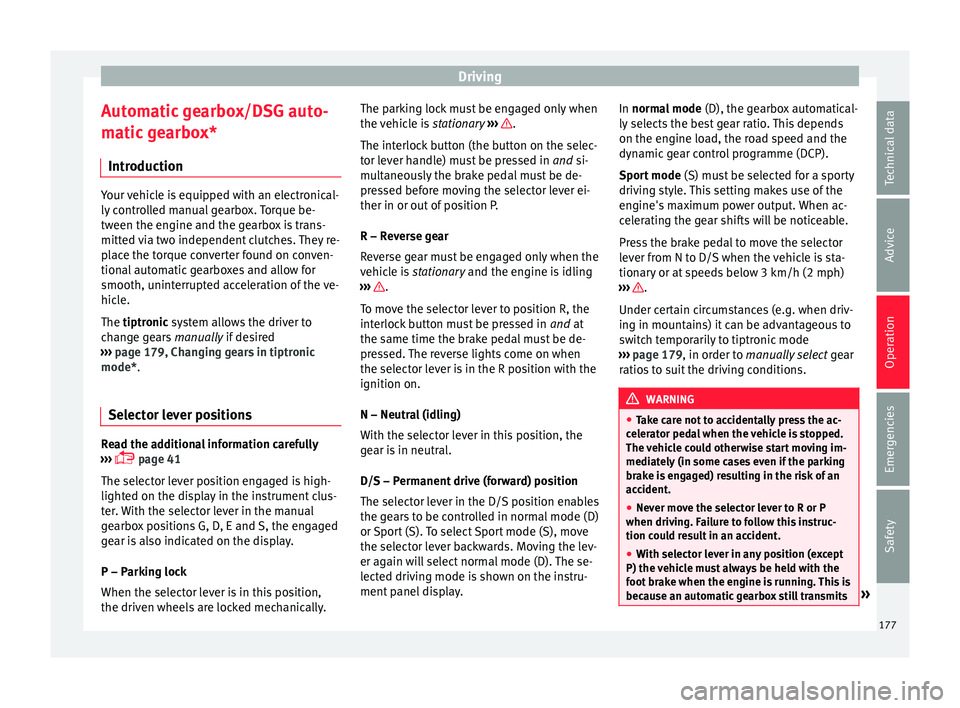
Automatic gearbox/DSG auto-
m atic
gearbox*
Introduction Your vehicle is equipped with an electronical-
ly
c
ontrolled manual gearbox. Torque be-
tween the engine and the gearbox is trans-
mitted via two independent clutches. They re-
place the torque converter found on conven-
tional automatic gearboxes and allow for
smooth, uninterrupted acceleration of the ve-
hicle.
The tiptronic system allows the driver to
change gears manually if desired
››› page 179, Changing gears in tiptronic
mode*.
Selector lever positions Read the additional information carefully
› ›
› page 41
The selector lever position engaged is high-
lighted on the display in the instrument clus-
ter. With the selector lever in the manual
gearbox positions G, D, E and S, the engaged
gear is also indicated on the display.
P – Parking lock
When the selector lever is in this position,
the driven wheels are locked mechanically. The parking lock must be engaged only when
the v
ehicle is stationary ››› .
The int erloc
k button (the button on the selec-
tor lever handle) must be pressed in and si-
multaneously the brake pedal must be de-
pressed before moving the selector lever ei-
ther in or out of position P.
R – Reverse gear
Reverse gear must be engaged only when the
vehicle is stationary and the engine is idling
››› .
T o mo
ve the selector lever to position R, the
interlock button must be pressed in and at
the same time the brake pedal must be de-
pressed. The reverse lights come on when
the selector lever is in the R position with the
ignition on.
N – Neutral (idling)
With the selector lever in this position, the
gear is in neutral.
D/S – Permanent drive (forward) position
The selector lever in the D/S position enables
the gears to be controlled in normal mode (D)
or Sport (S). To select Sport mode (S), move
the selector lever backwards. Moving the lev-
er again will select normal mode (D). The se-
lected driving mode is shown on the instru-
ment panel display. In normal mode
(D), the g
earbox automatical-
ly selects the best gear ratio. This depends
on the engine load, the road speed and the
dynamic gear control programme (DCP).
Sport mode (S) must be selected for a sporty
driving style. This setting makes use of the
engine's maximum power output. When ac-
celerating the gear shifts will be noticeable.
Press the brake pedal to move the selector
lever from N to D/S when the vehicle is sta-
tionary or at speeds below 3 km/h (2 mph)
››› .
Under c er
tain circumstances (e.g. when driv-
ing in mountains) it can be advantageous to
switch temporarily to tiptronic mode
››› page 179, in order to manually select gear
ratios to suit the driving conditions. WARNING
● Tak
e care not to accidentally press the ac-
celerator pedal when the vehicle is stopped.
The vehicle could otherwise start moving im-
mediately (in some cases even if the parking
brake is engaged) resulting in the risk of an
accident.
● Never move the selector lever to R or P
when drivin
g. Failure to follow this instruc-
tion could result in an accident.
● With selector lever in any position (except
P) the v
ehicle must always be held with the
foot brake when the engine is running. This is
because an automatic gearbox still transmits » 177
Technical data
Advice
Operation
Emergencies
Safety
Page 182 of 328
Operation
When accelerating, the gearbox automatical-
ly shif
ts up into the next gear shortly before
the maximum engine speed is reached.
If you select a lower gear, the automatic gear-
box will not shift down until there is no risk of
over-revving the engine.
When the kick-down feature is used, the
gearbox shifts down to a lower gear, depend-
ing on road speed and engine speed.
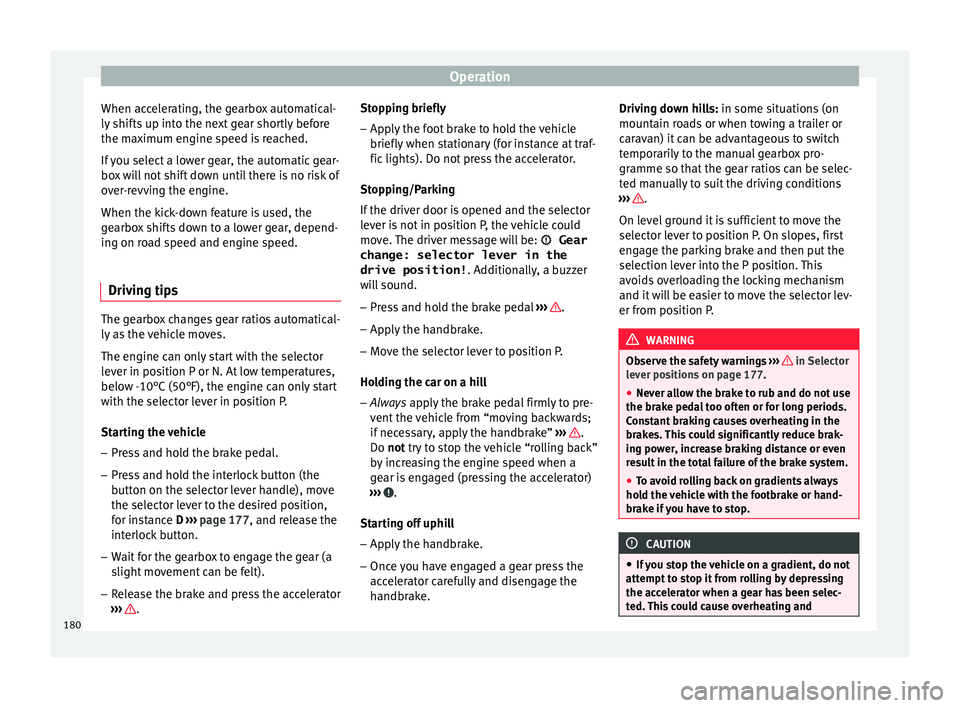
Driving tips The gearbox changes gear ratios automatical-
ly
a
s the vehicle moves.
The engine can only start with the selector
lever in position P or N. At low temperatures,
below -10°C (50°F), the engine can only start
with the selector lever in position P.
Starting the vehicle
– Press and hold the brake pedal.
– Press and hold the interlock button (the
butt
on on the selector lever handle), move
the selector lever to the desired position,
for instance D ›››
page 177, and release the
interlock button.
– Wait for the gearbox to engage the gear (a
slight
movement can be felt).
– Release the brake and press the accelerator
››
› . Stopping briefly
– Apply the foot brake to hold the vehicle
briefly when s
tationary (for instance at traf-
fic lights). Do not press the accelerator.
Stopping/Parking
If the driver door is opened and the selector
lever is not in position P, the vehicle could
move. The driver message will be: Gear
change: selector lever in the
drive position! . Additionally, a buzzer
will sound.
– Press and hold the brake pedal ››
› .
– Apply the handbrake.
– Move the selector lever to position P.
Ho l
ding the car on a hill
– Always apply the brake pedal firmly to pre-
v
ent the vehicle from “moving backwards;
if necessary, apply the handbrake” ››› .
Do not tr y
to stop the vehicle “rolling back”
by increasing the engine speed when a
gear is engaged (pressing the accelerator)
››› .
St ar
ting off uphill
– Apply the handbrake.
– Once you have engaged a gear press the
acc
elerator carefully and disengage the
handbrake. Driving down hills: in some sit
uations (on
mountain roads or when towing a trailer or
caravan) it can be advantageous to switch
temporarily to the manual gearbox pro-
gramme so that the gear ratios can be selec-
ted manually to suit the driving conditions
››› .
On l ev
el ground it is sufficient to move the
selector lever to position P. On slopes, first
engage the parking brake and then put the
selection lever into the P position. This
avoids overloading the locking mechanism
and it will be easier to move the selector lev-
er from position P. WARNING
Observe the safety warnings ››
› in Selector
l ev
er positions on page 177.
● Never allow the brake to rub and do not use
the brak
e pedal too often or for long periods.
Constant braking causes overheating in the
brakes. This could significantly reduce brak-
ing power, increase braking distance or even
result in the total failure of the brake system.
● To avoid rolling back on gradients always
hol
d the vehicle with the footbrake or hand-
brake if you have to stop. CAUTION
● If
you stop the vehicle on a gradient, do not
attempt to stop it from rolling by depressing
the accelerator when a gear has been selec-
ted. This could cause overheating and 180
Page 183 of 328
Driving
damage the automatic gearbox. Apply the
h
andbr
ake firmly or press the brake pedal in
order to prevent the vehicle from rolling back.
● If you allow the car to roll with the selector
lev
er in position N with the engine switched
off, the automatic gearbox will be damaged
as it will not be lubricated.
● In certain driving situations or traffic condi-
tions, s
uch as frequently starting, prolonged
“creeping” of the vehicle or traffic jams with
continuous stoppages, the gearbox could
overheat causing damage! If the warning
lamp lights up, stop the vehicle as soon as
possible and wait for the gearbox to cool
››› page 183. Kick-down feature
The kick-down feature allows maximum ac-
c
el
eration to be reached.
When the accelerator pedal is pressed right
down past the point of resistance at full throt-
tle, the gearbox will shift down to a lower
gear, depending on road speed and engine
speed. The upshift to the next higher gear is
delayed until the engine reaches maximum
rpm. WARNING
Please note that if the road surface is slip-
per y
or wet, the kick-down feature could
cause the driving wheels to spin, which could
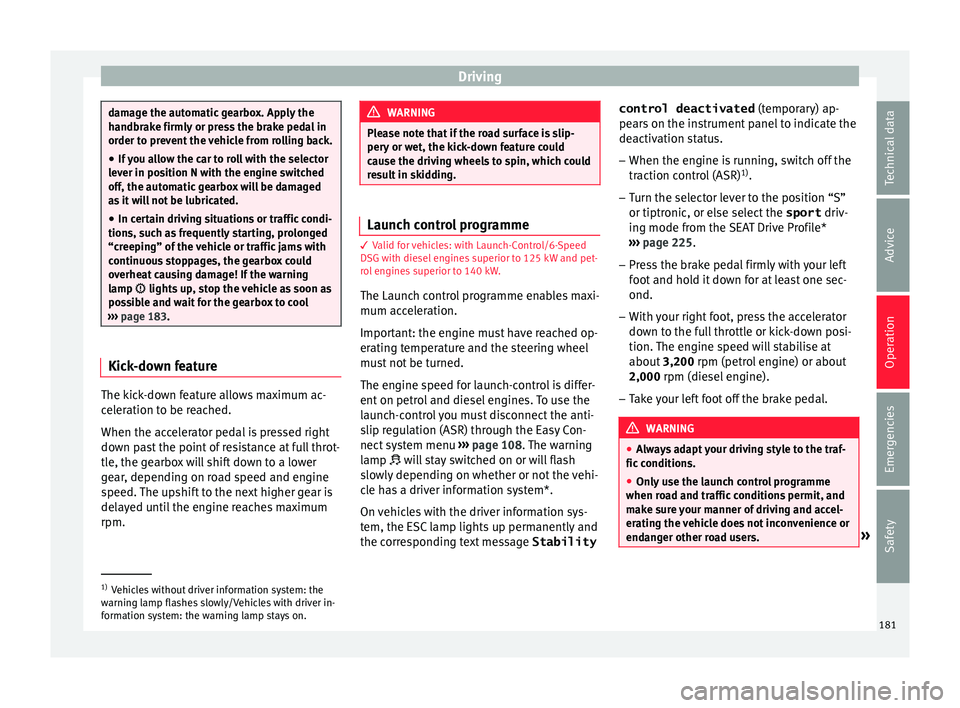
result in skidding. Launch control programme
3
Valid for vehicles: with Launch-Control/6-Speed
D
SG with diesel engines superior to 125 kW and pet-
rol engines superior to 140 kW.
The Launch control programme enables maxi-
mum acceleration.
Important: the engine must have reached op-
erating temperature and the steering wheel
must not be turned.
The engine speed for launch-control is differ-
ent on petrol and diesel engines. To use the
launch-control you must disconnect the anti-
slip regulation (ASR) through the Easy Con-
nect system menu ›››
page 108. The warning
lamp will stay switched on or will flash
slowly depending on whether or not the vehi-
cle has a driver information system*.
On vehicles with the driver information sys-
tem, the ESC lamp lights up permanently and
the corresponding text message Stabilitycontrol deactivated
(tempor
ary) ap-
pears on the instrument panel to indicate the
deactivation status.
– When the engine is running, switch off the
traction c
ontrol (ASR) 1)
.
– Turn the selector lever to the position “S”
or tiptronic, or el
se select the sport driv-
ing mode from the SEAT Drive Profile*
››› page 225.
– Press the brake pedal firmly with your left
foot
and hold it down for at least one sec-
ond.
– With your right foot, press the accelerator
down t
o the full throttle or kick-down posi-
tion. The engine speed will stabilise at
about 3,200 rpm (petrol engine) or about
2,000 rpm (diesel engine).
– Take your left foot off the brake pedal. WARNING
● Alw
ays adapt your driving style to the traf-
fic conditions.
● Only use the launch control programme
when ro
ad and traffic conditions permit, and
make sure your manner of driving and accel-
erating the vehicle does not inconvenience or
endanger other road users. »1)
Vehicles without driver information system: the
w arnin
g lamp flashes slowly/Vehicles with driver in-
formation system: the warning lamp stays on. 181
Technical data
Advice
Operation
Emergencies
Safety
Page 187 of 328
Driving
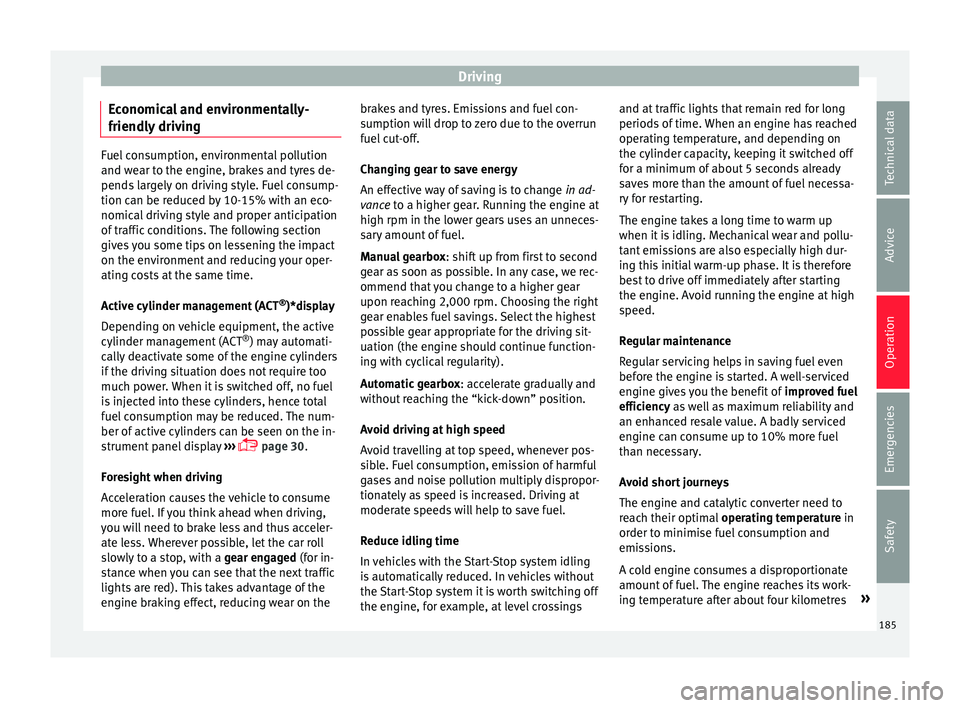
Economical and environmentally-
friendly driv
ingFuel consumption, environmental pollution
and w
e
ar to the engine, brakes and tyres de-
pends largely on driving style. Fuel consump-
tion can be reduced by 10-15% with an eco-
nomical driving style and proper anticipation
of traffic conditions. The following section
gives you some tips on lessening the impact
on the environment and reducing your oper-
ating costs at the same time.
Active cylinder management (ACT ®
)*display
Depending on vehicle equipment, the active
cylinder management (ACT ®
) may automati-
cally deactivate some of the engine cylinders
if the driving situation does not require too
much power. When it is switched off, no fuel
is injected into these cylinders, hence total
fuel consumption may be reduced. The num-
ber of active cylinders can be seen on the in-
strument panel display ›››
page 30.
Foresight when driving
Acceleration causes the vehicle to consume
more fuel. If you think ahead when driving,
you will need to brake less and thus acceler-
ate less. Wherever possible, let the car roll
slowly to a stop, with a gear engaged (for in-
stance when you can see that the next traffic
lights are red). This takes advantage of the
engine braking effect, reducing wear on the brakes and tyres. Emissions and fuel con-
s
umption w
ill drop to zero due to the overrun
fuel cut-off.
Changing gear to save energy
An effective way of saving is to change in ad-
vance to a higher gear. Running the engine at
high rpm in the lower gears uses an unneces-
sary amount of fuel.
Manual gearbox : shift up from first to second
gear as soon as possible. In any case, we rec-
ommend that you change to a higher gear
upon reaching 2,000 rpm. Choosing the right
gear enables fuel savings. Select the highest
possible gear appropriate for the driving sit-
uation (the engine should continue function-
ing with cyclical regularity).
Automatic gearbox : accelerate gradually and
without reaching the “kick-down” position.
Avoid driving at high speed
Avoid travelling at top speed, whenever pos-
sible. Fuel consumption, emission of harmful
gases and noise pollution multiply dispropor-
tionately as speed is increased. Driving at
moderate speeds will help to save fuel.
Reduce idling time
In vehicles with the Start-Stop system idling
is automatically reduced. In vehicles without
the Start-Stop system it is worth switching off
the engine, for example, at level crossings and at traffic lights that remain red for long
periods
of time. When an engine has reached
operating temperature, and depending on
the cylinder capacity, keeping it switched off
for a minimum of about 5 seconds already
saves more than the amount of fuel necessa-
ry for restarting.
The engine takes a long time to warm up
when it is idling. Mechanical wear and pollu-
tant emissions are also especially high dur-
ing this initial warm-up phase. It is therefore
best to drive off immediately after starting
the engine. Avoid running the engine at high
speed.
Regular maintenance
Regular servicing helps in saving fuel even
before the engine is started. A well-serviced
engine gives you the benefit of improved fuel
efficiency as well as maximum reliability and
an enhanced resale value. A badly serviced
engine can consume up to 10% more fuel
than necessary.
Avoid short journeys
The engine and catalytic converter need to
reach their optimal operating temperature in
order to minimise fuel consumption and
emissions.
A cold engine consumes a disproportionate
amount of fuel. The engine reaches its work-
ing temperature after about four kilometres »
185
Technical data
Advice
Operation
Emergencies
Safety
Page 189 of 328
Driving
(automatic gearbox: gear S). Maintain the en-
gine s peed at
approximately 2,000 rpm. The
rise in temperature causes the soot on the fil-
ter to burn. On completion of the cleaning
the warning lamp will switch off. If the warn-
ing lamp does not switch off, go immediately
to a specialised workshop to rectify the prob-
lem.
Engine management* This warning lamp monitors the engine man-
ag
ement
system for petrol engines.
The warning lamp (Electronic Power Con-
trol) lights up when the ignition is switched
on while system operation is being verified. It
should go out once the engine is started.
If there is a fault in the electronic engine
management system while you are driving,
this warning lamp will light up. Take the vehi-
cle to a specialised workshop as soon as
possible and have the engine checked.
Emission control system* Control lamp
fla
shes:
When there is misfiring that can damage the
catalytic converter. Reduce speed and drive
carefully to the nearest specialised workshop
to have the engine checked. The control lamp
lights
up:
If a fault has developed during driving which
has reduced the quality of the exhaust gas
(e.g. lambda probe fault). Reduce speed and
drive carefully to the nearest specialised
workshop to have the engine checked.
Engine pre-heating/fault system* The warning lamp lights up to show that the
glo
w p
lugs are preheating the diesel engine.
The control lamp lights up
If the control lamp lights up when the en-
gine is started it means that the glow plugs
are preheating. The engine can be started
straight away when the lamp switches off.
Control lamp flashes
If a fault develops in the engine management
system while you are driving, the glow plug
system lamp will flash . Take the vehicle to
a specialised workshop as soon as possible
and have the engine checked. Driving tips
Driv in
g on flooded roads To prevent damage to the vehicle when driv-
in
g thr
ough water, for example, along a floo-
ded road, please observe the following:
● The water should never come above the
low
er edge of the bodywork.
● Drive at pedestrian speed. WARNING
After driving through water, mud, sludge,
et c
., the braking effect can be delayed slight-
ly due to moisture build-up on the discs and
brake pads. Applying the brakes carefully
several times will remove the moisture and
restore the full braking effect. CAUTION
● Driv in
g through flooded areas may severely
damage vehicle components such as the en-
gine, transmission, running gear or electrical
system.
● Whenever driving through water, the Start-
Stop sy
stem* must be switched off
››› page 188. Note
● Chec k
the depth of the water before enter-
ing the flooded zone. » 187
Technical data
Advice
Operation
Emergencies
Safety
Page 190 of 328
Operation
●
Do not s
top in the water, drive in reverse, or
stop the engine in any situation.
● Note that vehicles travelling in the opposite
direction m
ay splash water that could exceed
the maximum permitted water height for your
vehicle.
● Avoid driving through salt water (corro-
sion). Driver assistance systems
St ar
t-Stop System*
Description and operation The Start-Stop system helps save fuel and re-
duc
e C
O2 emissions.
In Start-Stop mode, the engine will automati-
cally switch off when the vehicle stops, when
stopping at traffic lights for example. The ig-
nition remains switched on during the stop-
ping phase. The engine automatically
switches back on when required. In this sit-
uation the light of the START ENGINE STOP but-
t on s
tays on.
As soon as the ignition is switched on, the
Start-Stop function is automatically activa-
ted.
Basic requirements for the Start-Stop mode
● The driver door must be closed.
● The driver must have their seat belt fas-
tened.
● The bonnet
must be closed.
● The engine must have reached a minimum
serv
ice temperature.
● The reverse gear must not be engaged.
● The vehicle must not be on a very steep
slope. WARNING
● Nev er sw
itch the engine off until the vehi-
cle is stationary. The brake servo and power
steering functions will not be completely cov-
ered under warranty. More force may also be
needed to turn the steering wheel or to brake.
As you cannot steer and brake in the normal
manner, there is a greater risk of accidents
and serious injury.
● Never remove the key from the ignition if
the v
ehicle is in motion. Otherwise, the steer-
ing could lock making it impossible to steer
the vehicle.
● To avoid injury, make sure that the Start-
Stop sy
stem is switched off when working in
the engine compartment ››› page 190. CAUTION
The Start-Stop system must always be
sw it
ched off when driving through flooded
areas ››› page 190. Stopping/Starting the engine
Vehicles with a manual gearbox
– When the vehicle is stopped, put it into
neutr al
and release the clutch pedal. The
engine will switch off. The warning lamp
will appear on the instrument panel dis-
play.
188