brake Seat Ateca 2016 Owner's Manual
[x] Cancel search | Manufacturer: SEAT, Model Year: 2016, Model line: Ateca, Model: Seat Ateca 2016Pages: 328, PDF Size: 6.32 MB
Page 6 of 328
Table of Contents
Adaptive Cruise Control ACC* . . . . . . . . . . . . . . 197
Front Assist system including City emergency
br ak
ing and pedestrian monitoring* . . . . . . . . 207
Lane Assist system* . . . . . . . . . . . . . . . . . . . . . . 213
Traffic Jam Assist . . . . . . . . . . . . . . . . . . . . . . . . 216
Emergency Assist . . . . . . . . . . . . . . . . . . . . . . . . 218
Blind spot detector (BSD) with parking assis-
tanc
e (RCTA)* . . . . . . . . . . . . . . . . . . . . . . . . . . . 220
SEAT Drive Profile* . . . . . . . . . . . . . . . . . . . . . . . 225
Traffic sign detection system* . . . . . . . . . . . . . . 228
Fatigue detection (break recommendation)* . . 231
Park Assist* . . . . . . . . . . . . . . . . . . . . . . . . . . . . 232
Parking System Plus (ParkPilot)* . . . . . . . . . . . 239
Parking aid (ParkPilot)* . . . . . . . . . . . . . . . . . . . 244
Area View* . . . . . . . . . . . . . . . . . . . . . . . . . . . . . 247
Rear Assist (Rear View Camera)* . . . . . . . . . . . . 252
Towing bracket device* . . . . . . . . . . . . . . . . . . . 255
Trailer mode . . . . . . . . . . . . . . . . . . . . . . . . . . . . 255
Advice . . . . . . . . . . . . . . . . . . . . . . . . . . . . . . . . 265
Care and maintenance . . . . . . . . . . . . . . . . . . . . 265
Accessories and modifications to the vehi-
cl
e . . . . . . . . . . . . . . . . . . . . . . . . . . . . . . . . . . . . 265
Care and cleaning . . . . . . . . . . . . . . . . . . . . . . . 266
Vehicle exterior care . . . . . . . . . . . . . . . . . . . . . . 266
Caring for the vehicle interior . . . . . . . . . . . . . . 270
Intelligent technology . . . . . . . . . . . . . . . . . . . . 273
Electromechanical steering . . . . . . . . . . . . . . . . 273
Four-wheel drive . . . . . . . . . . . . . . . . . . . . . . . . . 273
Power Management . . . . . . . . . . . . . . . . . . . . . . 274
Checking and refilling levels . . . . . . . . . . . . . . . 276
Filling the tank . . . . . . . . . . . . . . . . . . . . . . . . . . 276
Fuel . . . . . . . . . . . . . . . . . . . . . . . . . . . . . . . . . . . 277
Exhaust purification system for vehicles with
diesel
engines (AdBlue ®
) . . . . . . . . . . . . . . . . . 279
Engine compartment . . . . . . . . . . . . . . . . . . . . . 282
Engine oil . . . . . . . . . . . . . . . . . . . . . . . . . . . . . . 284
Cooling system . . . . . . . . . . . . . . . . . . . . . . . . . . 286 Brake fluid . . . . . . . . . . . . . . . . . . . . . . . . . . . . . 287
Windscreen washer reservoir . . . . . . . . . . . . . . 288
Battery . . . . . . . . . . . . . . . . . . . . . . . . . . . . . . . . . 289
Wheels
. . . . . . . . . . . . . . . . . . . . . . . . . . . . . . . . 291
Wheels and tyres . . . . . . . . . . . . . . . . . . . . . . . . 291
Tyre monitoring systems . . . . . . . . . . . . . . . . . . 295
Temporary spare wheel . . . . . . . . . . . . . . . . . . . 298
Winter service . . . . . . . . . . . . . . . . . . . . . . . . . . . 299
Technical data . . . . . . . . . . . . . . . . . . . . . . . . 301
Technical specifications . . . . . . . . . . . . . . . . . . 301
Important . . . . . . . . . . . . . . . . . . . . . . . . . . . . . . 301
Vehicle identification data . . . . . . . . . . . . . . . . . 301
Information on fuel consumption . . . . . . . . . . . 302
Trailer mode . . . . . . . . . . . . . . . . . . . . . . . . . . . . 303
Wheels . . . . . . . . . . . . . . . . . . . . . . . . . . . . . . . . 303
Engine data . . . . . . . . . . . . . . . . . . . . . . . . . . . . . 304
Dimensions . . . . . . . . . . . . . . . . . . . . . . . . . . . . . 307
Index . . . . . . . . . . . . . . . . . . . . . . . . . . . . . . . . . 309
4
Page 25 of 328
The essentials
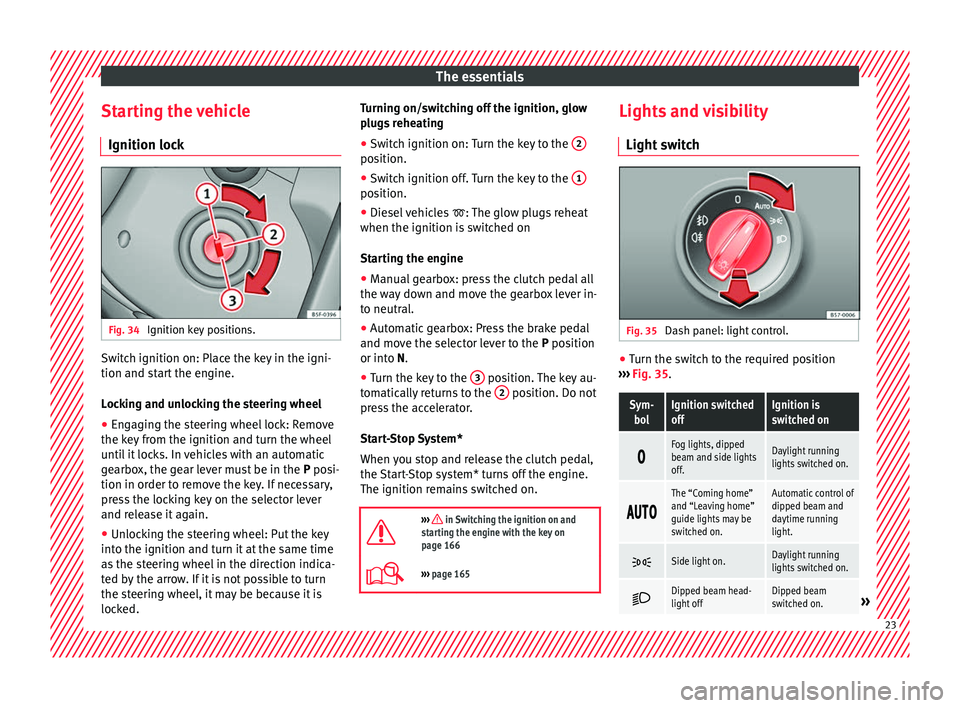
Starting the vehicle Ignition loc kFig. 34
Ignition key positions. Switch ignition on: Place the key in the igni-
tion and s
t
art the engine.
Locking and unlocking the steering wheel
● Engaging the steering wheel lock: Remove
the key
from the ignition and turn the wheel
until it locks. In vehicles with an automatic
gearbox, the gear lever must be in the P posi-
tion in order to remove the key. If necessary,
press the locking key on the selector lever
and release it again.
● Unlocking the steering wheel: Put the key
into the ignition and t
urn it at the same time
as the steering wheel in the direction indica-
ted by the arrow. If it is not possible to turn
the steering wheel, it may be because it is
locked. Turning on/switching off the ignition, glow
plug
s reheating
● Switch ignition on: Turn the key to the 2 position.
●
Switch ignition off. Turn the key to the 1 position.
●
Diesel vehicles : The glo
w plugs reheat
when the ignition is switched on
Starting the engine
● Manual gearbox: press the clutch pedal all
the wa
y down and move the gearbox lever in-
to neutral.
● Automatic gearbox: Press the brake pedal
and mov
e the selector lever to the P position
or into N.
● Turn the key to the 3 position. The key au-
t om
atically returns to the 2 position. Do not
pr e
ss the accelerator.
Start-Stop System*
When you stop and release the clutch pedal,
the Start-Stop system* turns off the engine.
The ignition remains switched on.
››› in Switching the ignition on and
starting the engine with the key on
page 166
››› page 165 Lights and visibility
Light sw
itch Fig. 35
Dash panel: light control. ●
Turn the switch to the required position
› ›
› Fig. 35.
Sym-
bolIgnition switched
offIgnition is
switched on
Fog lights, dipped
beam and side lights
off.Daylight running
lights switched on.
The “Coming home”
and “Leaving home”
guide lights may be
switched on.Automatic control of
dipped beam and
daytime running
light.
Side light on.Daylight running
lights switched on.
Dipped beam head-
light offDipped beam
switched on.»
23
Page 39 of 328
The essentials
Operation of the turn signal lever
● Switching on the CCS: Move switch
› ›
› Fig. 47 1 to .
The system is on. If no
s
peed has been programmed, the system will
not control it.
● Activating the CCS: Press button ››
› Fig. 47
2 in the ar
e
a. The current speed is
memorised and controlled.
● Temporarily switching off the CCS: Move
swit
ch ››› Fig. 47 1 to
or push the
br
ake. The cruise control system is switched
off temporarily.
● Reactivating the CCS: Press button
››
› Fig. 47 2 in
. The memorised speed
is saved and controlled again.
● Increasing stored speed during CCS regula-
tion: pre
ss button 2 in
. The vehicle ac-
celerates until the new stored speed. ●
Reduc
ing stored speed during CCS regula-
tion: press button 2 in t
o lower the
s
peed by 1 km/h (1 mph). Speed is reduced
until reaching the new stored speed.
● Switching off the CCS: Move switch
››
› Fig. 47 1 to .
The system is disconnec-
t
ed and the memorised speed is deleted.
Operation using the third lever
● Switching on the CCS: move the third lever
to
››› Fig. 48. The system switches on but it
does not control the speed as no speed has
been programmed.
● Activating the CCS: press the ››
› Fig. 48
button. It memorises and maintains the cur-
rent speed.
● Temporarily switching off the CCS: move
the lev
er to ››› Fig. 48 and release it or press the brake pedal. The cruise control sys-
tem i
s switched off temporarily.
● Reactivating the CCS: move the lever to
››› Fig. 48 and release it. The memo-
rised speed is saved and controlled again.
● Switching off the CCS: move the third lever
to po
sition ››› Fig. 48. The system is dis-
connected and the memorised speed is de-
leted.
››› in Operation on page 193
››› page 193 37
Page 40 of 328
The essentials
Warning lamps On the in s
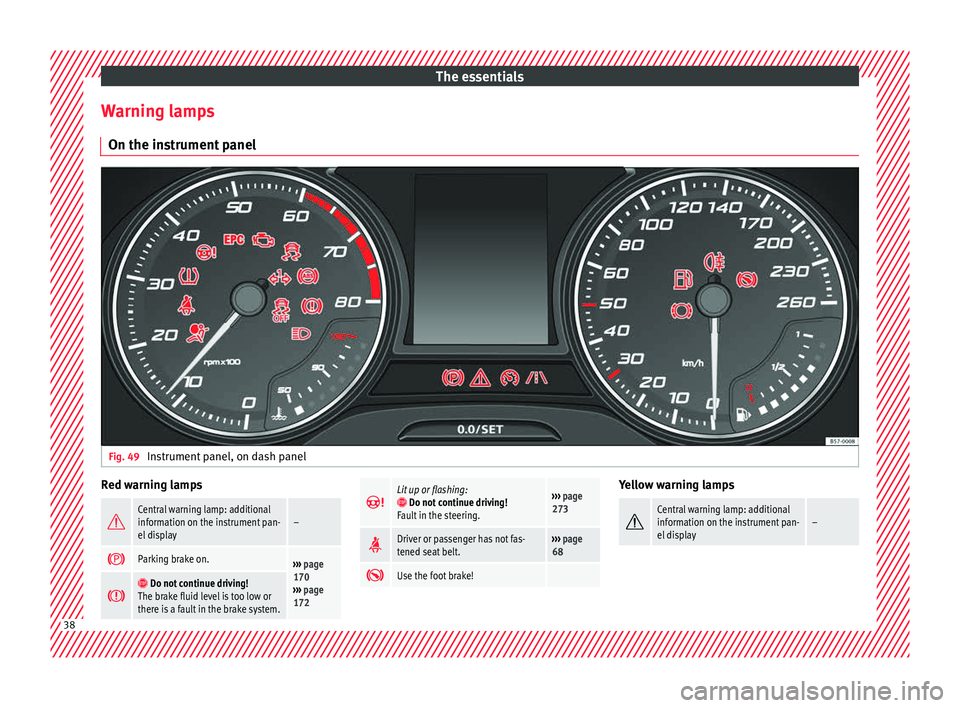
trument panelFig. 49
Instrument panel, on dash panel Red warning lamps
Central warning lamp: additional
information on the instrument pan-
el display–
Parking brake on.›››
page
170
››› page
172
Do not continue driving!
The brake fluid level is too low or
there is a fault in the brake system.
Lit up or flashing: Do not continue driving!
Fault in the steering.››› page
273
Driver or passenger has not fas-
tened seat belt.›››
page
68
Use the foot brake! Yellow warning lamps
Central warning lamp: additional
information on the instrument pan-
el display–
38
Page 41 of 328
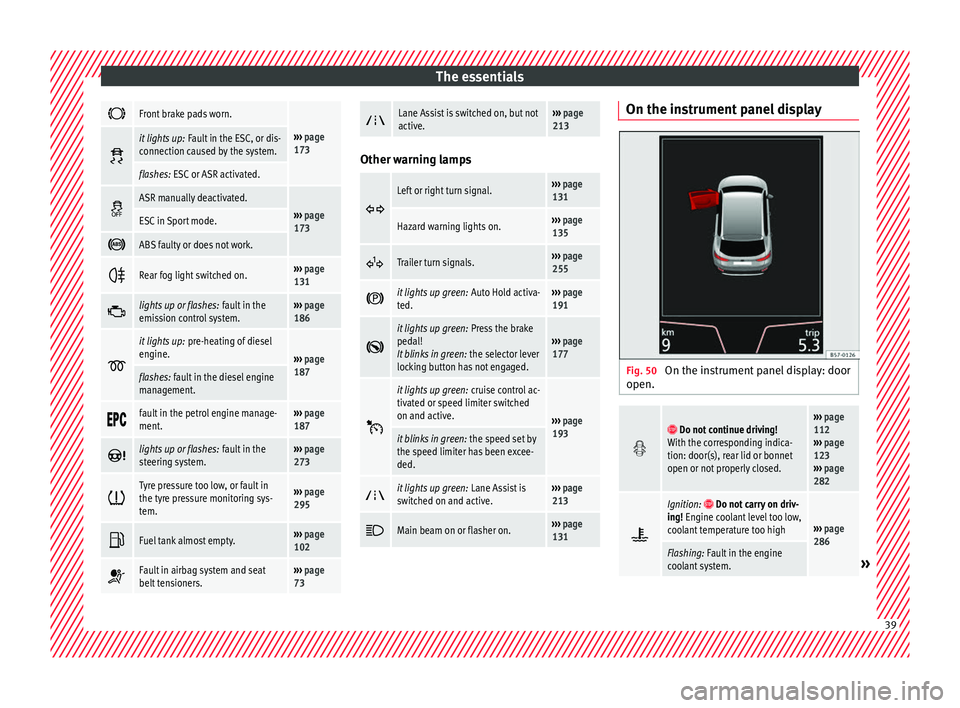
The essentials
Front brake pads worn.
›››
page
173 it lights up:
Fault in the ESC, or dis-
connection caused by the system.
flashes: ESC or ASR activated.
ASR manually deactivated.›››
page
173ESC in Sport mode.
ABS faulty or does not work.
Rear fog light switched on.›››
page
131
lights up or flashes:
fault in the
emission control system.››› page
186
it lights up:
pre-heating of diesel
engine.
››› page
187
flashes: fault in the diesel engine
management.
fault in the petrol engine manage-
ment.›››
page
187
lights up or flashes:
fault in the
steering system.››› page
273
Tyre pressure too low, or fault in
the tyre pressure monitoring sys-
tem.›››
page
295
Fuel tank almost empty.›››
page
102
Fault in airbag system and seat
belt tensioners.›››
page
73
Lane Assist is switched on, but not
active.›››
page
213 Other warning lamps
Left or right turn signal.›››
page
131
Hazard warning lights on.››› page
135
Trailer turn signals.›››
page
255
it lights up green:
Auto Hold activa-
ted.››› page
191
it lights up green:
Press the brake
pedal!
It blinks in green: the selector lever
locking button has not engaged.››› page
177
it lights up green:
cruise control ac-
tivated or speed limiter switched
on and active.
››› page
193
it blinks in green: the speed set by
the speed limiter has been excee-
ded.
it lights up green:
Lane Assist is
switched on and active.››› page
213
Main beam on or flasher on.›››
page
131 On the instrument panel display
Fig. 50
On the instrument panel display: door
open.
Do not continue driving!
With the corresponding indica-
tion: door(s), rear lid or bonnet
open or not properly closed.››› page
112
››› page
123
››› page
282
Ignition: Do not carry on driv-
ing! Engine coolant level too low,
coolant temperature too high
››› page
286
Flashing: Fault in the engine
coolant system.» 39
Page 43 of 328
The essentials
● Pr e
ss the clutch pedal and keep your foot
right down.
● Move the gearbox lever to the required po-
sition.
● R
elease the clutch.
Selectin
g reverse gear
● Press the clutch pedal and keep your foot
right do
wn.
● With the gearbox lever in neutral, push it
upw
ards, move it to the left as far as it will go
and then forwards to select reverse ››› Fig. 52
R .
● Release the clutch.
››› in Changing gear on page 176
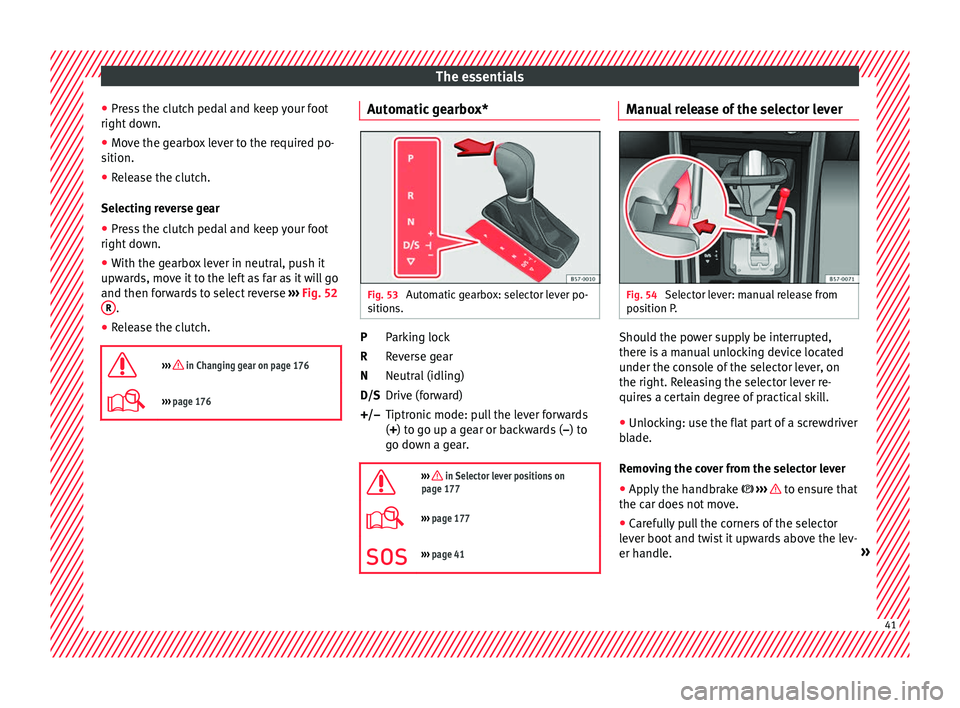
››› page 176 Automatic gearbox*
Fig. 53
Automatic gearbox: selector lever po-
s ition
s. Parking lock
R
ev
erse gear
Neutral (idling)
Drive (forward)
Tiptronic mode: pull the lever forwards
(+) to go up a gear or backwards ( –) to
go down a gear.
››› in Selector lever positions on
page 177
››› page 177
››› page 41 P
R
N
D/S
+/–
Manual release of the selector lever Fig. 54
Selector lever: manual release from
po s
ition P. Should the power supply be interrupted,
ther
e i
s a manual unlocking device located
under the console of the selector lever, on
the right. Releasing the selector lever re-
quires a certain degree of practical skill.
● Unlocking: use the flat part of a screwdriver
bl
ade.
Removing the cover from the selector lever
● Apply the handbrake ››
› to ensure that
the c ar doe
s not move.
● Carefully pull the corners of the selector
lev
er boot and twist it upwards above the lev-
er handle. » 41
Page 44 of 328
The essentials
Releasing the selector lever
● Using a screwdriver, press and hold the yel-
lo w u
nlocking tab sideways ››› Fig. 54.
● Press the interlock button on the selector
lev
er and move the selector lever to posi-
tion N.
● After carrying out the manual release, at-
tac
h the selector lever boot on the gearbox
console again. If the power supply should ever fail (e.g. dis-
ch
arged battery) and the vehicle has to be
pushed or towed, the selector lever must first
be moved to position N, after operating the
manual release mechanism. WARNING
The selector lever may be moved out of posi-
tion P on ly
when the handbrake is firmly ap-
plied. If this does not work, secure the vehi-
cle with the brake pedal. On a slope the vehi- cle could otherwise start to move inadver-
t
ently
after shifting the selector lever out of
position P - accident risk! Air conditioning
Ho w doe
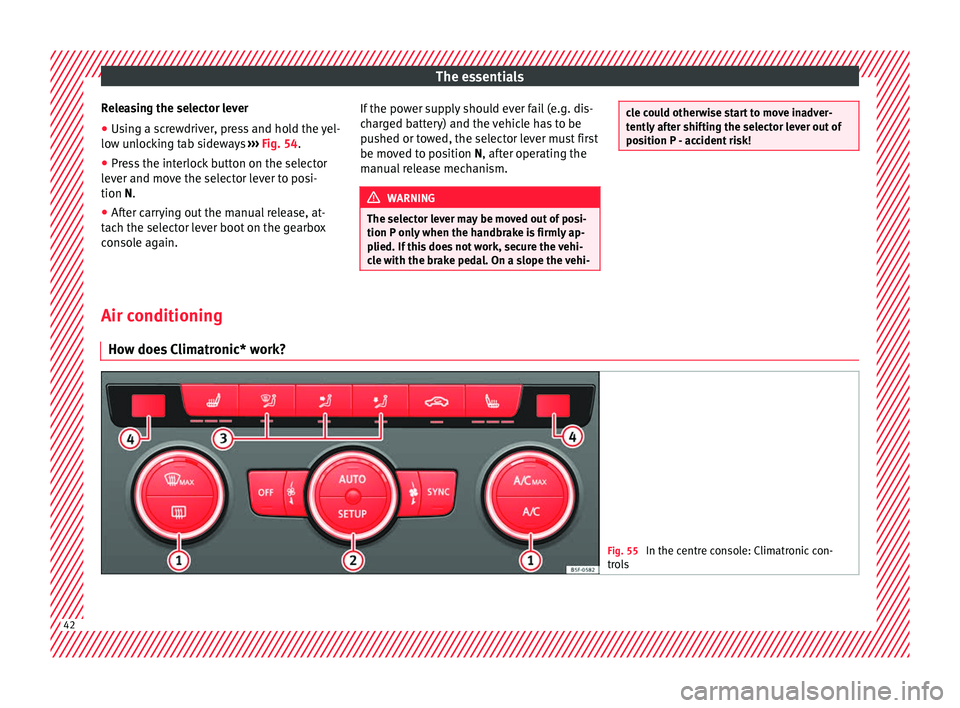
s Climatronic* work? Fig. 55
In the centre console: Climatronic con-
tr o
ls 42
Page 52 of 328
The essentials
››› in Topping up coolant on page 287
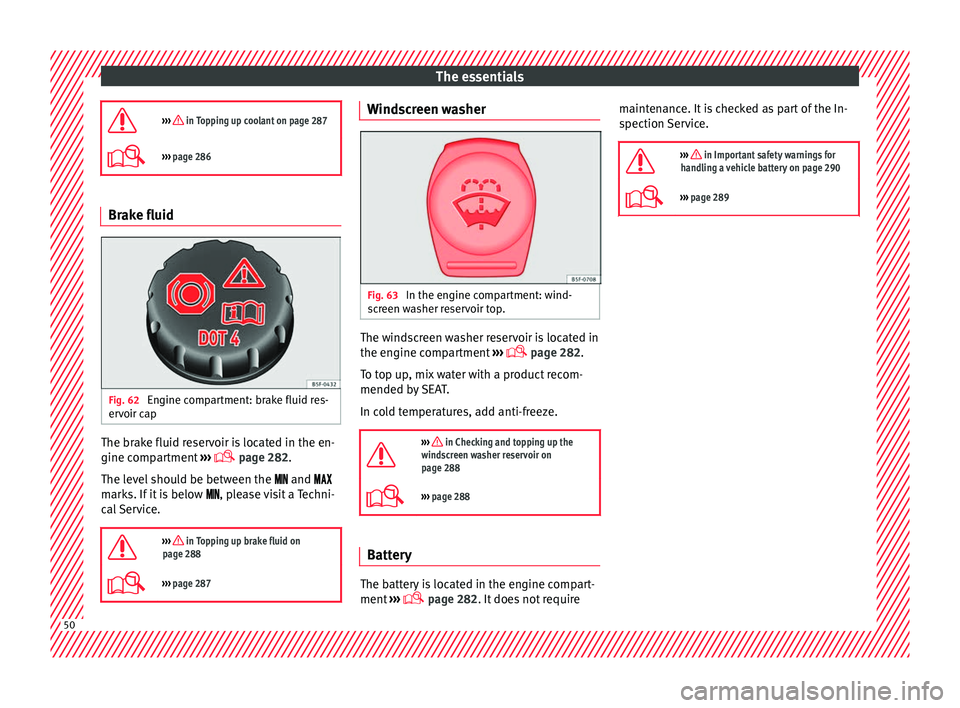
››› page 286 Brake fluid
Fig. 62
Engine compartment: brake fluid res-
er v
oir cap The brake fluid reservoir is located in the en-
gine c
omp
artment ›››
page 282.
The level should be between the and
marks. If it is below , please visit a Techni-
cal Service.
››› in Topping up brake fluid on
page 288
››› page 287 Windscreen washer
Fig. 63
In the engine compartment: wind-
s c
reen washer reservoir top. The windscreen washer reservoir is located in
the en
gine c
ompartment ›››
page 282.
To top up, mix water with a product recom-
mended by SEAT.
In cold temperatures, add anti-freeze.
››› in Checking and topping up the
windscreen washer reservoir on
page 288
››› page 288 Battery
The battery is located in the engine compart-
ment
›
›› page 282. It does not require maintenance. It is checked as part of the In-
spection
Service.
››› in Important safety warnings for
handling a vehicle battery on page 290
››› page 289 50
Page 54 of 328
The essentials
● Rep
lace the cover again or close the fuse
box lid.
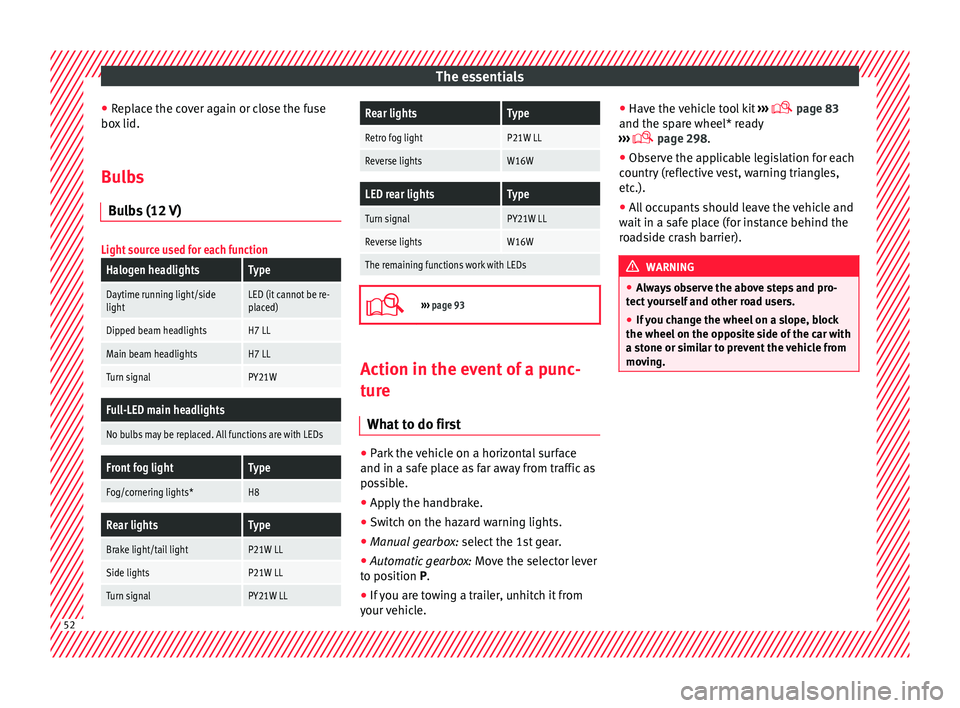
Bulbs Bu
lbs (12 V)
Light source used for each function
Halogen headlightsType
Daytime running light/side
lightLED (it cannot be re-
placed)
Dipped beam headlightsH7 LL
Main beam headlightsH7 LL
Turn signalPY21W
Full-LED main headlights
No bulbs may be replaced. All functions are with LEDs
Front fog lightType
Fog/cornering lights*H8
Rear lightsType
Brake light/tail lightP21W LL
Side lightsP21W LL
Turn signalPY21W LL
Rear lightsType
Retro fog lightP21W LL
Reverse lightsW16W
LED rear lightsType
Turn signalPY21W LL
Reverse lightsW16W
The remaining functions work with LEDs
›››
page 93 Action in the event of a punc-
t
ur
e
What to do first ●
Park the vehicle on a horizontal surface
and in a s af
e place as far away from traffic as
possible.
● Apply the handbrake.
● Switch on the hazard warning lights.
● Manual gearbox: select
the 1st gear.
● Automatic gearbox: Mov
e the selector lever
to position P.
● If you are towing a trailer, unhitch it from
your
vehicle. ●
Have the
vehicle tool kit ›››
page 83
and the spare wheel* ready
››› page 298.
● Observe the applicable legislation for each
cou
ntry (reflective vest, warning triangles,
etc.).
● All occupants should leave the vehicle and
wait
in a safe place (for instance behind the
roadside crash barrier). WARNING
● Alw
ays observe the above steps and pro-
tect yourself and other road users.
● If you change the wheel on a slope, block
the wheel on the op
posite side of the car with
a stone or similar to prevent the vehicle from
moving. 52
Page 60 of 328
The essentials
Do not pull too hard with the towing vehicle
and t ak
e care to avoid jerking the tow rope.
When towing on an unpaved road, there is al-
ways a risk of overloading and damaging the
anchorage points.
Switch on the ignition so that the turn sig-
nals, windscreen wipers and windscreen
washer can work. Ensure that the steering
wheel is unlocked and moves freely.
Place the gear lever in neutral on vehicles
with a manual gearbox. With an automatic
gearbox, place the lever in N.
To brake, press the brake pedal firmly. The
brake servo does not work when the engine
is switched off.
The power steering only works when the igni-
tion is switched on and the vehicle is moving,
provided that the battery is sufficiently charg-
ed. Otherwise, it will need more force.
Ensure that the tow rope remains taut at all
times.
››› in Introduction on page 86
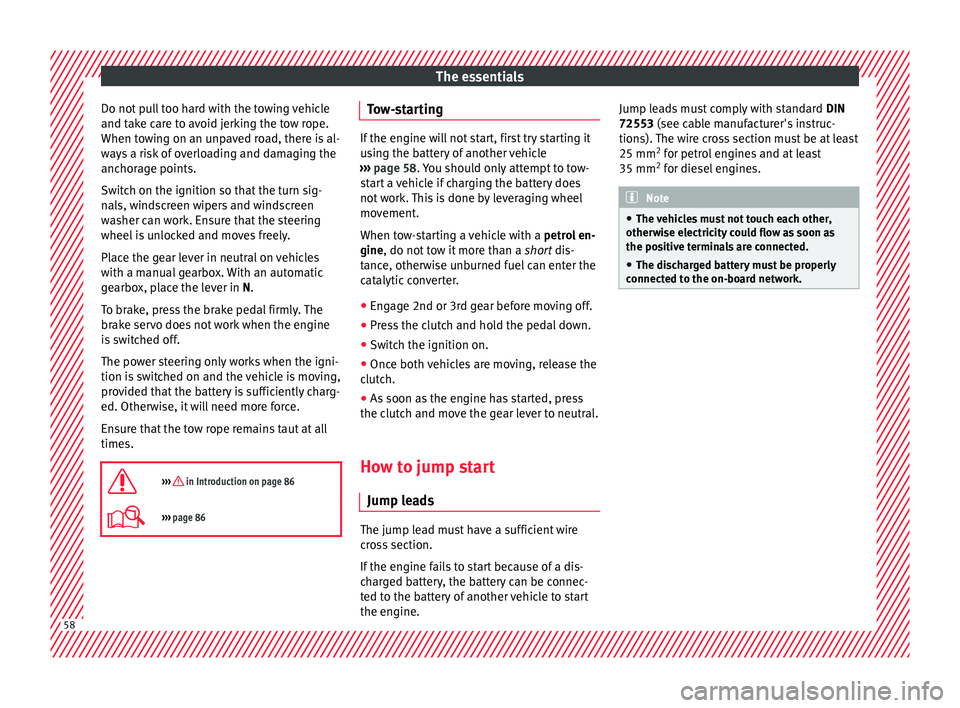
››› page 86 Tow-starting
If the engine will not start, first try starting it
u
s
ing the battery of another vehicle
››› page 58. You should only attempt to tow-
start a vehicle if charging the battery does
not work. This is done by leveraging wheel
movement.
When tow-starting a vehicle with a petrol en-
gine, do not tow it more than a short dis-
tance, otherwise unburned fuel can enter the
catalytic converter.
● Engage 2nd or 3rd gear before moving off.
● Press the clutch and hold the pedal down.
● Switch the ignition on.
● Once both vehicles are moving, release the
c lut
ch.
● As soon as the engine has started, press
the clut
ch and move the gear lever to neutral.
How to jump start Jump le
ads The jump lead must have a sufficient wire
c
r
oss section.
If the engine fails to start because of a dis-
charged battery, the battery can be connec-
ted to the battery of another vehicle to start
the engine. Jump leads must comply with standard
DIN
72553 (see cab
le manufacturer's instruc-
tions). The wire cross section must be at least
25 mm 2
for petrol engines and at least
35 mm 2
for diesel engines. Note
● The v
ehicles must not touch each other,
otherwise electricity could flow as soon as
the positive terminals are connected.
● The discharged battery must be properly
connect
ed to the on-board network.58