parking brake Seat Ateca 2018 Owner's Guide
[x] Cancel search | Manufacturer: SEAT, Model Year: 2018, Model line: Ateca, Model: Seat Ateca 2018Pages: 348, PDF Size: 7.32 MB
Page 198 of 348
Operation
Changing gear manually with the selector
l ev
er
It
is possible to change to tiptronic mode,
both when the vehicle is stopped and while
driving.
– To switch to tiptronic mode, move the se-
lector l
ever from position D/S to the right.
As soon as the change is made the selector
level will be shown in the position M on the
instrument panel display (for example M4
means that the fourth gear is engaged).
– Move the selector lever forwards + to se-
l ect
a higher g
ear ››› Fig. 182.
– Move the selector lever backwards – to
sel ect
a lo
wer gear.
Changing gear manually with the gearshift
paddles*
The gearshift paddles can be used when the
selector lever is in the position D/S or M.
– Press the gearshift paddle + to select a
higher g e
ar ›
›› Fig. 183.
– Press the gearshift paddle – to select a
lo w
er g
ear.
– With the selector lever in position D/S, if no
pad
dle is operated during a short period of
time, the gearbox control system switches
back to automatic mode. To switch to per-
manent manual gear change using the
gearshift paddles, move the selector lever
from position D/S to the right. When accelerating, the gearbox automatical-
ly shifts
up into the next gear shortly before
the maximum engine speed is reached.
If you select a lower gear, the automatic gear-
box will not shift down until there is no risk of
over-revving the engine.
When the kick-down feature is used, the
gearbox shifts down to a lower gear, depend-
ing on road speed and engine speed.
Driving tips The gearbox changes gear ratios automatical-
ly
a
s
the vehicle moves.
The engine can only start with the selector
lever in position P or N. At low temperatures,
below -10°C (50°F), the engine can only start
with the selector lever in position P.
Starting the vehicle
– Press and hold the brake pedal.
– Press and hold the interlock button (the
button on the sel
ector lever handle), move
the selector lever to the desired position,
for instance D ›››
page 193, and release the
interlock button.
– Wait for the gearbox to engage the gear (a
slight mo
vement can be felt).
– Release the brake and press the accelerator
›››
.Stopping briefly
– Apply the foot brake to hold the vehicle
briefly when s
t
ationary (for instance at traf-
fic lights). Do not press the accelerator.
Stopping/Parking
If the driver door is opened and the selector
lever is not in position P, the vehicle could
move. The driver message will be: Gear
change: selector lever in the
drive position! . Additionally, a buzzer
will sound.
– Press and hold the brake pedal ›››
.
– Apply the handbrake.
– Move the selector lever to position P.
Ho l
din
g the car on a hill
– Always apply the brake pedal firmly to pre-
vent
the vehicle from “moving backwards;
if necessary, apply the handbrake” ››› .
Do not tr y
t
o stop the vehicle “rolling back”
by increasing the engine speed when a
gear is engaged (pressing the accelerator)
››› .
St ar
tin
g off uphill
– Apply the handbrake.
– Once you have engaged a gear press the
accel
erator carefully and disengage the
handbrake.
196
Page 199 of 348
Driving
Driving down hills: in some s it
uation s (on
mountain roads or when towing a trailer or
caravan) it can be advantageous to switch
temporarily to the manual gearbox pro-
gramme so that the gear ratios can be selec-
ted manually to suit the driving conditions
››› .
On l ev
el
ground it is sufficient to move the
selector lever to position P. On slopes, first
engage the parking brake and then put the
selection lever into the P position. This
avoids overloading the locking mechanism
and it will be easier to move the selector lev-
er from position P. WARNING
Observe the safety warnings ›››
in Selector
lev er po
sitions on page 194.
● Never allow the brake to rub and do not use
the brake ped
al too often or for long periods.
Constant braking causes overheating in the
brakes. This could significantly reduce brak-
ing power, increase braking distance or even
result in the total failure of the brake system.
● To avoid rolling back on gradients always
hold the
vehicle with the footbrake or hand-
brake if you have to stop. CAUTION
● If y
ou stop the vehicle on a gradient, do not
attempt to stop it from rolling by depressing
the accelerator when a gear has been selec-
ted. This could cause overheating and dam- age the automatic gearbox. Apply the hand-
brak
e firm
ly or press the brake pedal in order
to prevent the vehicle from rolling back.
● If you allow the car to roll with the selector
lever in po
sition N with the engine switched
off, the automatic gearbox will be damaged as it will not be lubricated.
● In certain driving situations or traffic condi-
tions, suc
h as frequently starting, prolonged
“creeping” of the vehicle or traffic jams with
continuous stoppages, the gearbox could
overheat causing damage! If the warning
lamp lights up, stop the vehicle as soon as
possible and wait for the gearbox to cool
››› page 200. Kick-down feature
The kick-down feature allows maximum ac-
c
el
er
ation to be reached.
When the accelerator pedal is pressed right
down past the point of resistance at full throt-
tle, the gearbox will shift down to a lower
gear, depending on road speed and engine
speed. The upshift to the next higher gear is
delayed until the engine reaches maximum
rpm. WARNING
Please note that if the road surface is slip-
pery or w
et, the kick-down feature could cause the driving wheels to spin, which could
re
s
ult in skidding. Launch control program
3 Valid for vehicles: with Launch-Control/6-Speed
D SG w
ith diesel engines superior to 125 kW and pet-
rol engines superior to 140 kW.
The Launch control programme enables maxi-
mum acceleration.
Important: the engine must have reached op-
erating temperature and the steering wheel
must not be turned.
The engine speed for launch-control is differ-
ent on petrol and diesel engines. To use the
launch-control you must disconnect the anti-
slip regulation (ASR) through the Easy Con-
nect system menu ››› page 120. The warning
lamp will stay switched on or will flash
slowly depending on whether or not the vehi-
cle has a driver information system*.
On vehicles with the driver information sys-
tem, the ESC lamp lights up permanently and
the corresponding text message Stability
control deactivated (temporary) ap-
pears on the instrument panel to indicate the
deactivation status. »
197Technical data
Advice
Operation
Emergencies
Safety
Page 211 of 348
Driver assistance systems
Additional information related to the auto-
m atic
g
earbox
The engine stops when the selector lever is in
the positions P, D, N and S, in addition to
when in manual mode. With the selector lev-
er in position P, the engine will also remain
switched off when you take your foot off the
brake pedal. In order to start the engine up
again the accelerator must be pressed, or an-
other gear engaged or the brake released.
If the selector lever is placed in position R
during the stopping phase, the engine will
start up again.
Change from position D to P to prevent the
engine from accidentally starting when
changing and passing by position R.
Additional information about vehicles with
Adaptive Cruise Control (ACC)
In vehicles with ACC function, the engine will
start up again in certain operating conditions
if the radar sensor detects that the vehicle
ahead drives off again. Note
● In v ehic
les with an automatic gearbox, you
can control whether the engine should switch
off or not by reducing or increasing the brake
force applied. While the vehicle remains stop-
ped, the engine will not stop if the brake ped-
al is slightly pressed, in traffic jams with fre-
quent stopping and starting for example. As soon as strong pressure is applied to the
brak
e ped
al, the engine will stop.
● In vehicles with manual gearbox, during
the stop
ping phases the brake pedal must re-
main depressed to prevent the vehicle from
moving.
● If the engine “stalls” in vehicles with man-
ual g
earbox, it can be directly started up
again by immediately pressing the clutch
pedal. General notes
The system can interrupt the Start-Stop mode
fr
equently
f
or different reasons.
The engine does not switch off
Before the stopping phase, the system veri-
fies whether certain conditions are met. The
engine does not switch off, in the following
situations for example:
● The engine has not yet reached the mini-
mum required t
emperature for the Start-Stop
mode.
● The interior temperature selected for the air
conditioner ha
s not yet been reached.
● The interior temperature is very high/low.
● Defrost function button activated
›› ›
page 51.
● The parking aid* is switched on. ●
The batt er
y is very low.
● The steering wheel is overly turned or is be-
ing turned.
● If
there is a danger of misting.
● After engaging reverse gear.
● In case of a very steep gradient.
The indication
is shown on the instrument
panel display, and in addition, the driver in-
formation system* shows, .
The engine starts by itself
During a stopping phase the normal Start-
Stop mode can be interrupted in the follow-
ing situations: The engine restarts by itself
without involvement from the driver.
● The interior temperature differs from the
value select
ed on the air conditioner.
● Defrost function button activated
›››
page 51.
● The brake has been pressed several times
consec
utively.
● The battery is too low.
● High power consumption. Note
In vehicles with an automatic gearbox, if the
select or l
ever is placed in position D, N or S
after engaging reverse gear, the vehicle must
be driven at a speed faster than 10 km/h (6 » 209
Technical data
Advice
Operation
Emergencies
Safety
Page 213 of 348
Driver assistance systems
disconnected manually in the Easy Connect
sy s
t
em by pressing the button and the
HDC function button
››
›
Fig. 42.
Control lamps
››› in Warning and control lamps on
p ag
e 119
.
It lights up white
Hill Descent Control is active.
It lights up grey
Hill Descent Control is not active. The system is switched
on, but is not adjusting.
Some warning and control lamps will light up
briefly
when the ignition i
s
switched on to
check certain functions. They will switch off
after a few seconds. WARNING
Observe the safety warnings ›››
in Warning
and contr o
l lamps on page 119. WARNING
Always be ready to brake. Otherwise, an acci-
dent c ou
ld occur and cause injury.
● Hill Descent Control is only an auxiliary
syst
em that in some situations may not suffi-
ciently brake the vehicle when going down a
slope. ●
The speed of the
vehicle may increase de-
spite the intervention of Hill Descent Control. Auto Hold Function
De s
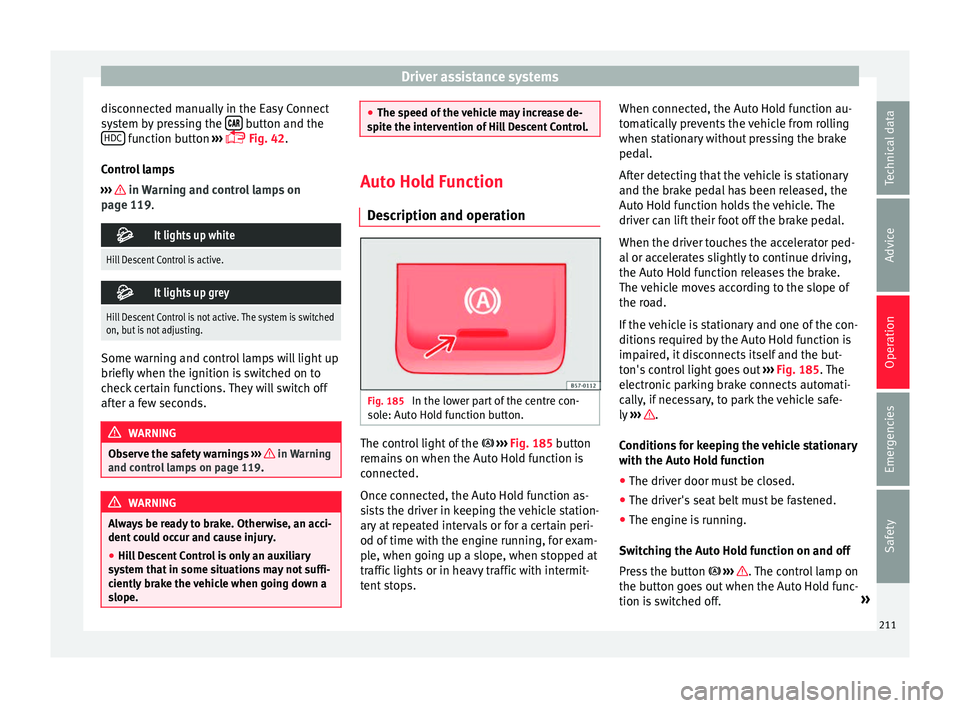
cription and operation Fig. 185
In the lower part of the centre con-
so l
e: Aut
o Hold function button. The control light of the
› ›
›
Fig. 185 button
remains on when the Auto Hold function is
connected.
Once connected, the Auto Hold function as-
sists the driver in keeping the vehicle station-
ary at repeated intervals or for a certain peri-
od of time with the engine running, for exam-
ple, when going up a slope, when stopped at
traffic lights or in heavy traffic with intermit-
tent stops. When connected, the Auto Hold function au-
tomatic
ally prevents the vehicle from rolling
when stationary without pressing the brake
pedal.
After detecting that the vehicle is stationary
and the brake pedal has been released, the
Auto Hold function holds the vehicle. The
driver can lift their foot off the brake pedal.
When the driver touches the accelerator ped-
al or accelerates slightly to continue driving,
the Auto Hold function releases the brake.
The vehicle moves according to the slope of
the road.
If the vehicle is stationary and one of the con-
ditions required by the Auto Hold function is
impaired, it disconnects itself and the but-
ton's control light goes out ››› Fig. 185. The
electronic parking brake connects automati-
cally, if necessary, to park the vehicle safe-
ly ››› .
C ondition
s
for keeping the vehicle stationary
with the Auto Hold function
● The driver door must be closed.
● The driver's seat belt must be fastened.
● The engine is running.
Switc
hing the Auto Hold function on and off
Press the button ››› . The control lamp on
the b utt
on g
oes out when the Auto Hold func-
tion is switched off. »
211
Technical data
Advice
Operation
Emergencies
Safety
Page 214 of 348
Operation
Automatically engaging and disengaging the
Aut o Ho
l
d function
If the Auto Hold function was switched on
with the button before disengaging the ig-
nition, the function will remain on after the
ignition is re-engaged.
If the Auto Hold function was not switched
on, it will automatically remain off next time
the ignition is engaged.
The Auto Hold function is automatically
switched on if the following conditions are
met:
All conditions must be met at the same time
››› :
Manual gearboxAutomatic gearbox
1.The vehicle is kept stationary with the brake ped-
al on a flat surface or on a slope.
2.The engine rotates “correctly”.
Upon pressing the
clutch and accelerating
at the same time, the
brake releases gradu-
ally.Upon accelerating, the
brake releases gradu-
ally. The Auto Hold function is automatically
t
urned off
if
the following conditions are
met:
Manual gearboxAutomatic gearbox
1.
If any of the conditions mentioned on
››› page 211, Conditions for keeping the vehicle
stationary with the Auto Hold function are no lon- ger met.
2.If the engine is running irregularly or an anomalyis detected.
3.If the engine is turnedoff or stalls.If the engine is switch- ed off.
4.The clutch and the ac-
celerator are pressed at the same time.If the accelerator is pressed.
5.
If any of the tyres hasonly minimal contact
with the ground, e.g. in the case of axle articu- lation. WARNING
The smart technology incorporated into the
Auto Ho l
d function cannot defy the laws of
physics; it only works within the limits of the
system. The greater convenience provided by
the Auto Hold function should never tempt
you to take any risk that may compromise
safety.
● Never leave the vehicle running and with
the Auto Hol
d function switched on. ●
The Auto Ho l
d function cannot always keep
the vehicle stationary uphill or downhill or
stop it sufficiently, for example, on slippery
or frozen surfaces. Note
Before entering a car wash, always switch off
the Aut o Hol
d function, because if the elec-
tronic parking brake is automatically connec-
ted, it may cause damage. Cruise control system (CCS)*
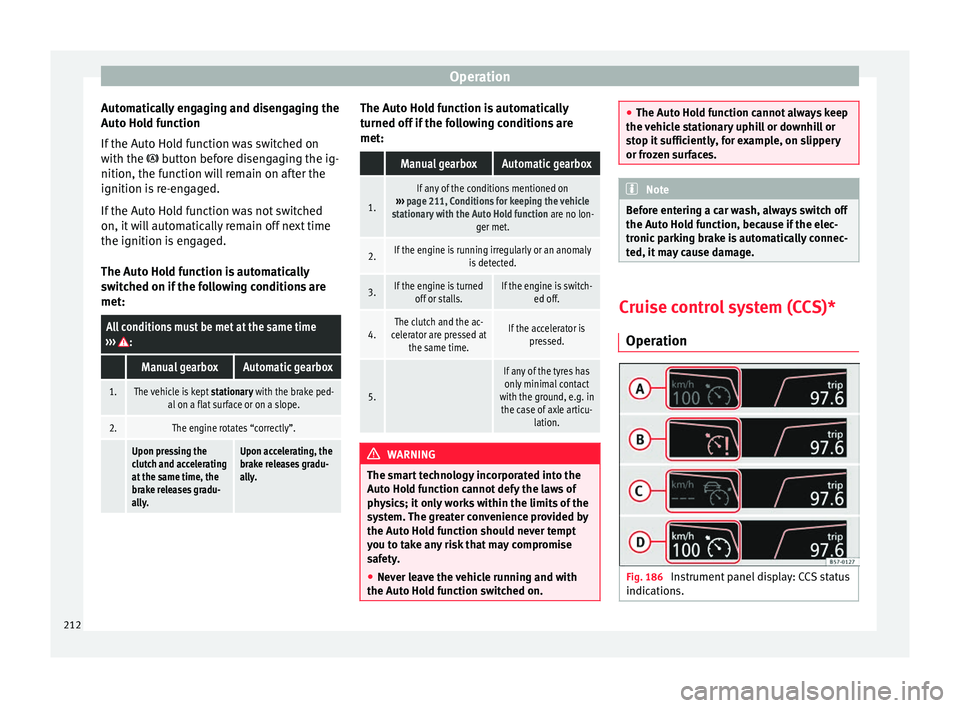
Oper ation Fig. 186
Instrument panel display: CCS status
indic ation s.212
Page 228 of 348
Operation
● If the driv
er i
s not wearing his/her seat
belt.
● If several brake lights of the vehicle or elec-
trically
connected trailer are damaged.
● If the vehicle is reversing.
● Driving faster than 210 km/h (150 mph).
Driver mes
sages
ACC not available
The system can no longer continue to guar-
antee safe vehicle detection and will be de-
activated. The sensor has lost its setting or is
damaged. Take the vehicle to a specialised
workshop and have the fault repaired. ACC and Front Assist: cur-
rently not available. No sensor
vision
This message will be displayed to the driver if
the radar sensor's vision is impaired due, for
example, to leaves, snow, heavy fog or dirt.
Clean the SEAT badge ››› Fig. 196.
ACC: currently not available.
Gradient too steep
The maximum road slope has been excee-
ded, hence safe ACC operation cannot be
guaranteed. The ACC cannot be switched on. ACC: only available in D, S
or M
Select the D/S or M position on the selector
lever.
ACC: parking brake applied
The AC
C is deactivated if the parking brake is
applied. The ACC is available once again after
the parking brake is released.
ACC: currently not available.
Intervention of stability con-
trol
The message for the driver is displayed when
the electronic stability control (ESC) inter-
venes. In this case, the ACC is automatically
switched off. ACC: Take action!
The message for the driver is displayed if,
when the vehicle starts up on a hill with a
mild slope, the vehicle rolls back even al-
though the ACC is activated. Apply the brake
to stop the vehicle from moving/colliding
with another vehicle. ACC: speed limit
The message for the driver is displayed if, in
vehicles with manual gearbox, the current
speed is too low for the ACC mode.
The speed to be stored must be at least
30 km/h (18 mph). The speed limiter
switches off if the speed falls below 20 km/h
(12 mph). ACC: available as of the 2nd
gear The ACC is operational as of the 2nd gear
(manual g
earbox).
ACC: engine speed
The message for the driver is displayed if,
when the ACC accelerates or brakes, the driv-
er does not shift up or down a gear in time,
which means exceeding or not reaching the
permissible engine speed. The ACC switches
itself off. A buzzer warning is heard. ACC: clutch pressed
Vehicles with a manual gearbox: pressing the
clutch pedal for longer abandons control
mode. Door open
Vehicles with automatic gearbox: the ACC
cannot be activated with the vehicle station-
ary and the door open. WARNING
There is a danger of rear collision when the
minimum dis t
ance to the vehicle in front is
exceeded and the speed difference between
both vehicles is so great that a speed reduc-
tion by the ACC will not suffice. In this case
the brake pedal should be applied immedi-
ately.
● The ACC may not be able to detect all situa-
tions pr
operly.
● “Stepping” on the accelerator may cause
the ACC
not to intervene in braking. Driver226
Page 237 of 348
Driver assistance systems
Operation of Emergency Assist
Emer g
ency
Assist detects when the driver
ceases to perform any activity and repeatedly
requests that he/she regain active control of
the vehicle, through the use of optical and
acoustic warnings and by applying the
brakes.
If the driver continues to do nothing, the sys-
tem automatically takes over the accelerator,
brakes and steering in order to brake the ve-
hicle and keep it in its lane ››› . When the
Emer g
ency
Assist is actively adjusting, the
hazard warning lights come on ››› page 149
and the vehicle makes slight zigzag move-
ments in the lane in order to warn other driv-
ers.
If the remaining braking distance is suffi-
cient, if necessary the system slows down the
vehicle until it stops completely and auto-
matically switches on the electronic parking
brake ››› page 186.
Switching the Emergency Assist on and off
The Emergency Assist is switched on auto-
matically when the Lane Assist is switched on
››› page 230.
Technical requirements for using the Emer-
gency Assist ● The adaptive cruise control (ACC) must be
switc
hed on ››› page 221. ●
The Lane Assi
st must be switched on
››› page 230.
● The selector lever must be in the D/S posi-
tion or in the
Tiptronic selector gate.
● The system must have detected a lane sep-
aration line on both side
s of the vehicle
››› Fig. 204.
The following conditions may cause the
Emergency Assist not to react or to switch off
automatically:
● If the driver accelerates, brakes or moves
the steerin
g wheel.
● If any of the conditions mentioned in
›››
page 235, Technical requirements for us-
ing the Emergency Assist are not fulfilled.
● If any of the conditions required for opera-
tion of the Lane Ass
ist are not met
››› page 230.
● If any of the conditions necessary for the
adaptiv
e cruise control (ACC) to work are no
longer fulfilled ››› page 221. WARNING
The smart technology incorporated into the
Emerg ency
Assist cannot overcome the limits
imposed by the laws of physics; it only works
within the limits of the system. The driver is
responsible for driving the vehicle.
● Adapt your speed and safe distance to the
vehicl
e in front of you at all times to suit the visibility, weather, road and traffic condi-
tions.
● Keep
your hands on the wheel at all times
to be re
ady to intervene in the steering at any
time.
● The Emergency Assist alone cannot always
avoid acc
idents or serious injuries.
● If the operation of the Emergency Assist is
impaired, f
or example if the radar sensor of
the adaptive cruise control (ACC) or the Lane
Assist camera are covered or have lost their
settings, the system may intervene inoppor-
tunely in braking or in steering.
● The Emergency Assist does not react to
people or anim
al or vehicles crossing your
path or which approach you head-on in the
same lane. WARNING
If the Emergency Assist Intervenes inoppor-
tu nely
, serious accidents and injuries may oc-
cur.
● If the Emergency Assist does not operate
properly, sw
itch off the Lane Assist
››› page 230. Doing so will also switch off the
Emergency Assist.
● Have the system checked by a specialised
workshop
. SEAT recommends visiting a SEAT
dealership for this. » 235
Technical data
Advice
Operation
Emergencies
Safety
Page 243 of 348
Driver assistance systems
● in the c a
se of
special constructions to the
side of the vehicle, e.g., high or irregular di-
viders.
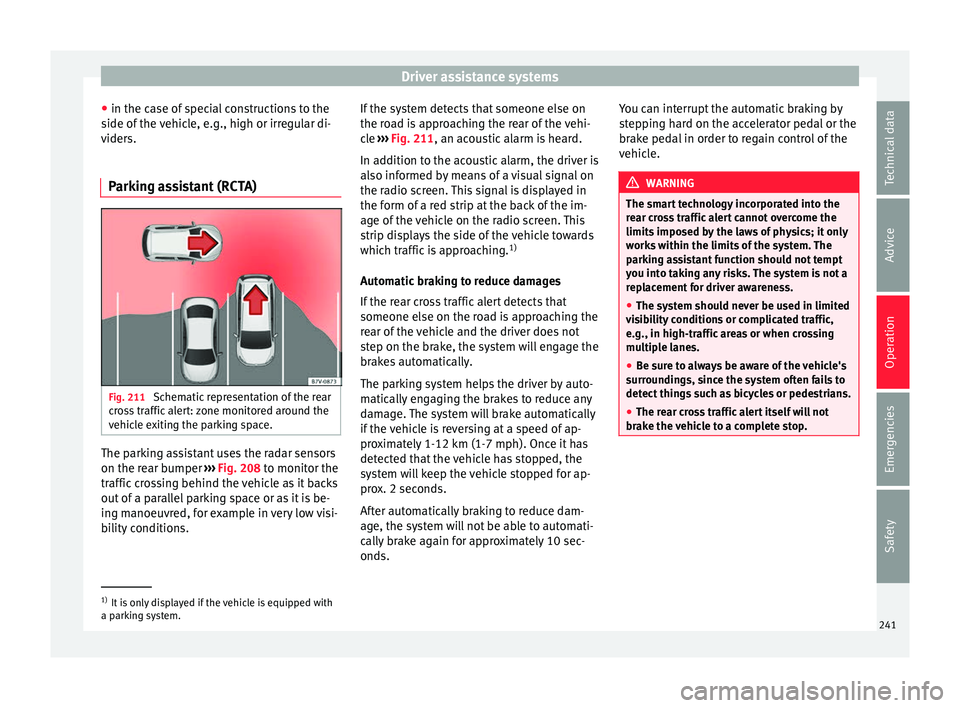
Parking assistant (RCTA) Fig. 211
Schematic representation of the rear
c r
o
ss traffic alert: zone monitored around the
vehicle exiting the parking space. The parking assistant uses the radar sensors
on the r
e
ar b
umper ››› Fig. 208 to monitor the
traffic crossing behind the vehicle as it backs
out of a parallel parking space or as it is be-
ing manoeuvred, for example in very low visi-
bility conditions. If the system detects that someone else on
the roa
d is approaching the rear of the vehi-
cle ››› Fig. 211, an acoustic alarm is heard.
In addition to the acoustic alarm, the driver is
also informed by means of a visual signal on
the radio screen. This signal is displayed in
the form of a red strip at the back of the im-
age of the vehicle on the radio screen. This
strip displays the side of the vehicle towards
which traffic is approaching. 1)
Automatic braking to reduce damages
If the rear cross traffic alert detects that
someone else on the road is approaching the
rear of the vehicle and the driver does not
step on the brake, the system will engage the
brakes automatically.
The parking system helps the driver by auto-
matically engaging the brakes to reduce any
damage. The system will brake automatically
if the vehicle is reversing at a speed of ap-
proximately 1-12 km (1-7 mph). Once it has
detected that the vehicle has stopped, the
system will keep the vehicle stopped for ap-
prox. 2 seconds.
After automatically braking to reduce dam-
age, the system will not be able to automati-
cally brake again for approximately 10 sec-
onds. You can interrupt the automatic braking by
step
ping hard on the accelerator pedal or the
brake pedal in order to regain control of the
vehicle. WARNING
The smart technology incorporated into the
re ar c
ross traffic alert cannot overcome the
limits imposed by the laws of physics; it only
works within the limits of the system. The
parking assistant function should not tempt
you into taking any risks. The system is not a
replacement for driver awareness.
● The system should never be used in limited
vis
ibility conditions or complicated traffic,
e.g., in high-traffic areas or when crossing
multiple lanes.
● Be sure to always be aware of the vehicle's
surrou
ndings, since the system often fails to
detect things such as bicycles or pedestrians.
● The rear cross traffic alert itself will not
brake the
vehicle to a complete stop. 1)
It is only displayed if the vehicle is equipped with
a park in
g system. 241
Technical data
Advice
Operation
Emergencies
Safety
Page 253 of 348
Driver assistance systems
● The p ark
in
g manoeuvre does not end with-
in approximately 6 minutes following activa-
tion of the automatic steering.
● There is a fault in the system (the system is
temporari
ly unavailable).
● ASR is switched off.
● ASR or ESC intervene with regulation.
● The driver door is opened.
To re
start the manoeuvre it is necessary that
none of these things occur and that the
button is pressed again.
Special Characteristics
The Park Assist system is subject to certain
limitations inherent to the system. For exam-
ple, it is therefore not possible to enter or exit
a parking space on sharp bends. While entering or exiting a parking space, a
brief sign
al sounds to prompt the driver to
change between forward and reverse gears
(depending on the case). In successive ma-
noeuvres, the assistant tells the driver to
change gears, at the latest, when the contin-
uous audible signal is given (object present
at a distance of ≤30 cm) by Park Pilot.
When the Park Assist system turns the steer-
ing wheel with the vehicle stationary, the in-
strument panel also displays the symbol .
Keep the brake pedal depressed while the
symbol remains on the dash panel display to
turn the wheels with the vehicle stopped.
This way, the system will require fewer ma-
noeuvres to complete the parking action. Trailer mode
The Park As
sist system cannot be switched
on if the factory-fitted towing bracket
››› page 273 is electrically connected to a
trailer.
After changing a wheel
If, after changing a wheel, the vehicle stops
entering and exiting parking spaces correctly,
the circumference of the new wheel may be
different and the system may need to adapt
to it. The adaptation is automatic and takes
place during driving. Making turns slowly and
in both directions (20 km/h [12 mph]) for a
few minutes may contribute to this adapta-
tion process ››› in Introduction on
p ag
e 249
.
251
Technical data
Advice
Operation
Emergencies
Safety
Page 256 of 348
Operation
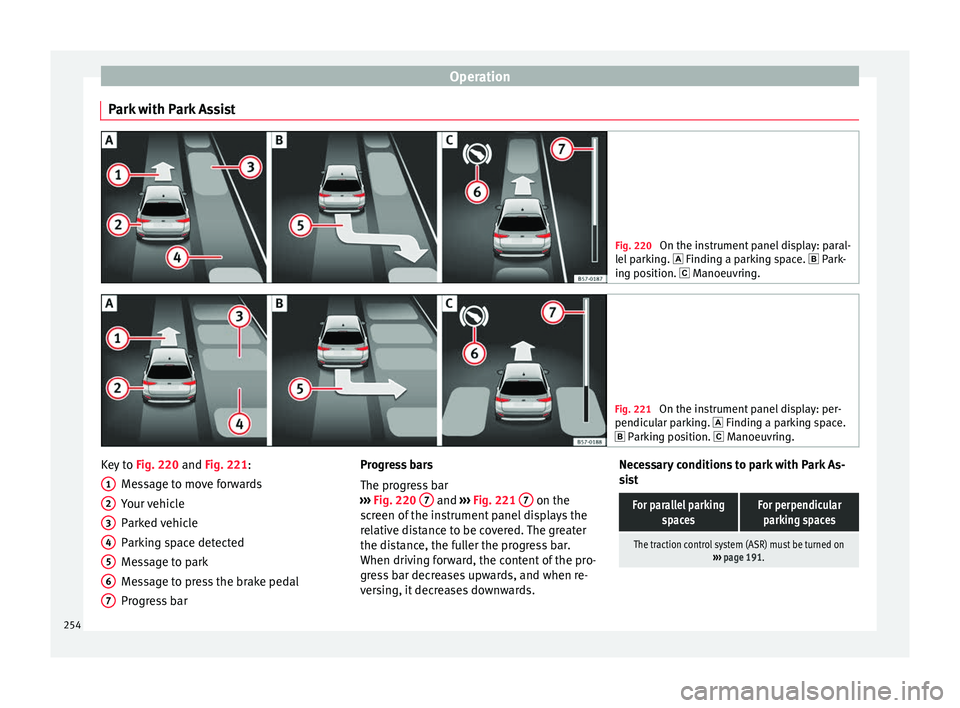
Park with Park Assist Fig. 220
On the instrument panel display: paral-
lel p
arking. Finding a parking space. Park-
ing position. Manoeuvring. Fig. 221
On the instrument panel display: per-
pendicu l
ar parking. Finding a parking space.
Parking position. Manoeuvring. Key to
Fig. 220 and Fig. 221:
M e
s
sage to move forwards
Your vehicle
Parked vehicle
Parking space detected
Message to park
Message to press the brake pedal
Progress bar
1 2
3
4
5
6
7 Progress bars
The pr
ogr
e
ss bar
››› Fig. 220 7 and
›››
Fig. 221 7 on the
s c
r
een of the instrument panel displays the
relative distance to be covered. The greater
the distance, the fuller the progress bar.
When driving forward, the content of the pro-
gress bar decreases upwards, and when re-
versing, it decreases downwards. Necessary conditions to park with Park As-
sis
t
For parallel parking spacesFor perpendicularparking spaces
The traction control system (ASR) must be turned on ››› page 191. 254