acc Seat Ateca 2018 Owner's Manual
[x] Cancel search | Manufacturer: SEAT, Model Year: 2018, Model line: Ateca, Model: Seat Ateca 2018Pages: 348, PDF Size: 7.32 MB
Page 2 of 348

SEAT S.A. is permanently concerned about continuous development of its t\
ypes and models. For this reason we ask you to under-
stand, that at any given time, changes regarding shape, equipment and te\
chnique may take place on the car delivered. For this reason
no right at all may derive based on the data, drawings and descriptions \
in this current handbook.
All texts, illustrations and standards in this handbook are based on the\
status of information at the time of printing. Except for error
or omission, the information included in the current handbook is valid a\
s of the date of closing print.
Re-printing, copying or translating, whether total or partial is not all\
owed unless SEAT allows it in written form.
SEAT reserves all rights in accordance with the “Copyright” Act.
All rights on changes are reserved.
❀This paper has been manufactured using bleached non-chlorine cellulose.
© SEAT S.A. - Reprint: 15.11.17
About this manual
This manual contains a description of the
equipment supplied with the vehicle at the
time this manual was published. Some of the
units described herein will not be available
until a later date or are only available in cer -
tain markets.
Because this is a general manual for the
ATECA , some of the equipment and functions
that are described in this manual are not in-
cluded in all types or variants of the model;
they may vary or be modied depending on
the technical requirements and on the mar -
ket; this is in no way deceptive advertising.
The illustrations are intended as a general
guide and may vary from the equipment tted
in your vehicle in some details.
The steering indications (left, right, forward,
reverse) appearing in this manual refer to the
normal driving movements of the vehicle ex -
cept when otherwise indicated.
The audiovisual material only is intended to
help users to understand certain car function -
alities better. It does not replace the instruc -
tion manual. Please use the instruction manu -
al to obtain more comprehensive information
and indications.
The equipment marked with an aster -
isk* is tted as standard only in certain
versions, and is only supplied as op -
tional extras for some versions, or are
only offered in certain countries.
® All registered marks are indicated with
®. Although the copyright symbol does
not appear, it is a copyrighted mark.
>> The section is continued on the follow -
ing page.
Important warnings on a given page
Detailed contents on a given page
General information on a given page
Emergency information on a given page
WARNING
Texts preceded by this symbol contain infor -
mation on safety. They warn you about possi -
ble dangers of accident or injury.
CAUTION
Texts with this symbol draw your attention to
potential sources of damage to your vehicle.
For the sake of the environment
Texts preceded by this symbol contain rele-
vant information concerning environmental
protection.
Note
Texts preceded by this symbol contain additio -
nal information.
This manual is divided into six large parts,
which are:
1. The essentials
2. Safety
3. Emergencies
4. Operation
5. Tips
6. Technical data
At the end of this manual, there is a detailed
alphabetical index that will help you quickly
nd the information you require.
Page 3 of 348
Foreword
Thi s
In
struction Manual and its correspond-
ing supplements should be read carefully to
familiarise yourself with your vehicle.
Besides the regular care and maintenance of
the vehicle, its correct handling will help pre-
serve its value.
For safety reasons, always note the informa-
tion concerning accessories, modifications
and part replacements.
If selling the vehicle, give all of the on-board
documentation to the new owner, as it
should be kept with the vehicle.
You can access the information in this man-
ual using:
● Thematic table of contents that follows the
manual’s g
eneral chapter structure.
● Visual table of contents that uses graphics
to indicat
e the pages containing “essential”
information, which is detailed in the corre-
sponding chapters.
● Alphabetical index with many terms and
synonyms
to help you find information. WARNING
Read and always observe safety informa-
tion conc ernin
g the passenger's front air-
bag ››› page 90, Important information
regarding the front passenger's airbag .
Thank you for trusting in us.
We wish you safe and enjoya-
ble motoring.
SEAT, S.A.
Page 8 of 348
Table of Contents
Automatic gearbox/DSG automatic gear-
bo x*
. . . . . . . . . . . . . . . . . . . . . . . . . . . . . . . . . . . 193
Ad
dress . . . . . . . . . . . . . . . . . . . . . . . . . . . . . . . . 200
Run-in and economical driving . . . . . . . . . . . . . 201
Power management . . . . . . . . . . . . . . . . . . . . . . 203
Engine management and exhaust gas purifica-
tion syst
em . . . . . . . . . . . . . . . . . . . . . . . . . . . . . 204
Driving tips . . . . . . . . . . . . . . . . . . . . . . . . . . . . . 206
Driver assistance systems . . . . . . . . . . . . . . . . . 208
Start-Stop System* . . . . . . . . . . . . . . . . . . . . . . . 208
Hill Descent Control (HDC) . . . . . . . . . . . . . . . . . 210
Auto Hold Function . . . . . . . . . . . . . . . . . . . . . . . 211
Cruise control system (CCS)* . . . . . . . . . . . . . . . 212
Speed limiter . . . . . . . . . . . . . . . . . . . . . . . . . . . 214
Emergency brake assist system (Front As-
sis
t)* . . . . . . . . . . . . . . . . . . . . . . . . . . . . . . . . . . 217
Adaptive Cruise Control ACC* . . . . . . . . . . . . . . 221
Lane Assist system* . . . . . . . . . . . . . . . . . . . . . . 230
Traffic Jam Assist . . . . . . . . . . . . . . . . . . . . . . . . 233
Emergency Assist . . . . . . . . . . . . . . . . . . . . . . . . 234
Blind spot detector (BSD) with parking assis-
tance (RCT
A)* . . . . . . . . . . . . . . . . . . . . . . . . . . . 237
SEAT Drive Profile* . . . . . . . . . . . . . . . . . . . . . . . 242
Traffic sign detection system* . . . . . . . . . . . . . . 245
Fatigue detection (break recommendation)* . . 248
Park Assist* . . . . . . . . . . . . . . . . . . . . . . . . . . . . 249
Parking System Plus (ParkPilot)* . . . . . . . . . . . 257
Parking aid (Park Pilot)* . . . . . . . . . . . . . . . . . . 262
Top View Camera* . . . . . . . . . . . . . . . . . . . . . . . 265
Rear Assist (Rear View Camera)* . . . . . . . . . . . . 270
Towing bracket device* . . . . . . . . . . . . . . . . . . . 273
Trailer mode . . . . . . . . . . . . . . . . . . . . . . . . . . . . 273
Advice . . . . . . . . . . . . . . . . . . . . . . . . . . . . . . . . 284
Care and maintenance . . . . . . . . . . . . . . . . . . . . 284
Accessories and modifications to the vehi-
cle
. . . . . . . . . . . . . . . . . . . . . . . . . . . . . . . . . . . . 284
Care and cleaning . . . . . . . . . . . . . . . . . . . . . . . 285 Vehicle exterior care . . . . . . . . . . . . . . . . . . . . . . 285
Caring for the vehicle interior . . . . . . . . . . . . . . 289
Checking and refilling levels
. . . . . . . . . . . . . . . 292
Filling the tank . . . . . . . . . . . . . . . . . . . . . . . . . . 292
Fuel . . . . . . . . . . . . . . . . . . . . . . . . . . . . . . . . . . . 293
AdBlue ®
. . . . . . . . . . . . . . . . . . . . . . . . . . . . . . . 295
Engine compartment . . . . . . . . . . . . . . . . . . . . . 298
Engine oil . . . . . . . . . . . . . . . . . . . . . . . . . . . . . . 300
Cooling system . . . . . . . . . . . . . . . . . . . . . . . . . . 302
Brake fluid . . . . . . . . . . . . . . . . . . . . . . . . . . . . . 303
Windscreen washer reservoir . . . . . . . . . . . . . . 304
Battery . . . . . . . . . . . . . . . . . . . . . . . . . . . . . . . . . 305
Wheels . . . . . . . . . . . . . . . . . . . . . . . . . . . . . . . . 307
Wheels and tyres . . . . . . . . . . . . . . . . . . . . . . . . 307
Tyre monitoring systems . . . . . . . . . . . . . . . . . . 311
Temporary spare wheel . . . . . . . . . . . . . . . . . . . 314
Winter service . . . . . . . . . . . . . . . . . . . . . . . . . . . 315
Technical data . . . . . . . . . . . . . . . . . . . . . . . . 317
Technical specifications . . . . . . . . . . . . . . . . . . 317
Important . . . . . . . . . . . . . . . . . . . . . . . . . . . . . . 317
Vehicle identification data . . . . . . . . . . . . . . . . . 317
Information on fuel consumption . . . . . . . . . . . 318
Trailer mode . . . . . . . . . . . . . . . . . . . . . . . . . . . . 319
Wheels . . . . . . . . . . . . . . . . . . . . . . . . . . . . . . . . 319
Engine data . . . . . . . . . . . . . . . . . . . . . . . . . . . . . 320
Dimensions . . . . . . . . . . . . . . . . . . . . . . . . . . . . . 327
Index . . . . . . . . . . . . . . . . . . . . . . . . . . . . . . . . . 329
6
Page 19 of 348
The essentials
››› in Rear lid automatic locking on
page 139
››› page 137
››› page 17 Manual release mechanism for the
rear lid
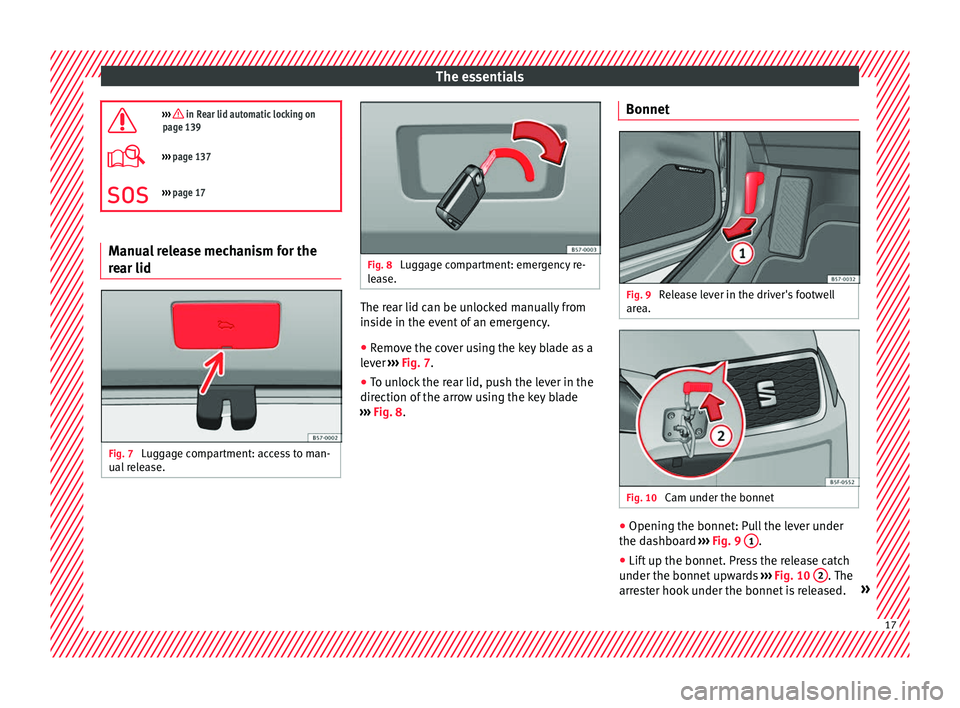
Fig. 7
Luggage compartment: access to man-
ual r
el
ease. Fig. 8
Luggage compartment: emergency re-
le a
se. The rear lid can be unlocked manually from
in
s
ide in the ev
ent of an emergency.
● Remove the cover using the key blade as a
lever ›
›› Fig. 7.
● To unlock the rear lid, push the lever in the
direction of the arr
ow using the key blade
››› Fig. 8. Bonnet Fig. 9
Release lever in the driver's footwell
ar e
a. Fig. 10
Cam under the bonnet ●
Opening the bonnet: Pull the lever under
the d a
shbo
ard ››› Fig. 9 1 .
● Lift up the bonnet. Press the release catch
u nder the bonnet
up
wards ››› Fig. 10 2 . The
arr e
s
ter hook under the bonnet is released. » 17
Page 22 of 348
The essentials
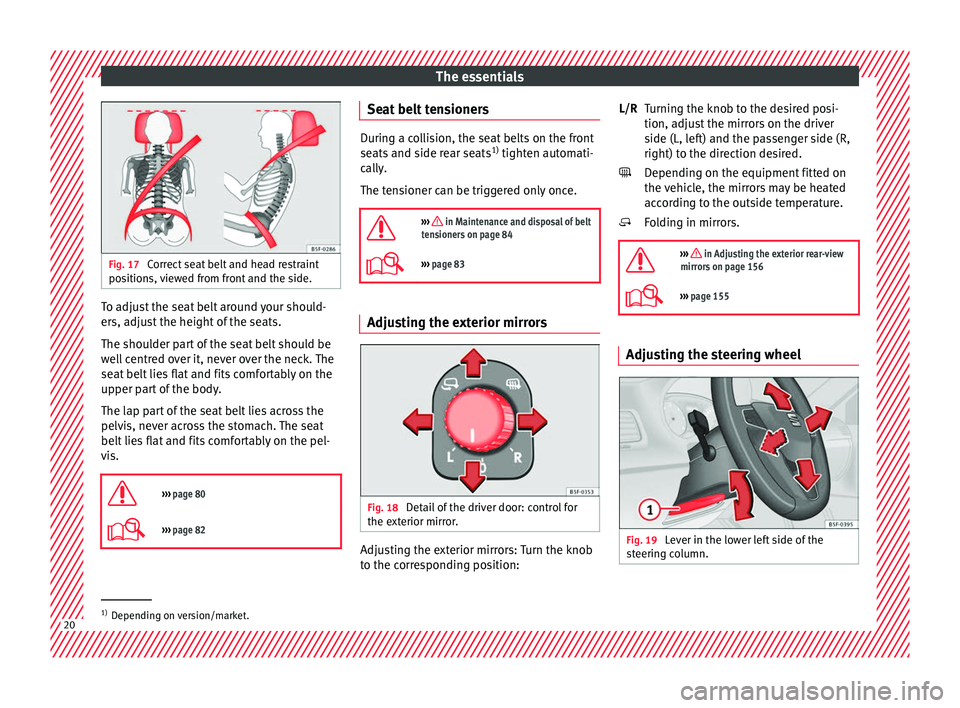
Fig. 17
Correct seat belt and head restraint
pos ition
s, viewed from front and the side. To adjust the seat belt around your should-
er
s, a
dju
st the height of the seats.
The shoulder part of the seat belt should be
well centred over it, never over the neck. The
seat belt lies flat and fits comfortably on the
upper part of the body.
The lap part of the seat belt lies across the
pelvis, never across the stomach. The seat
belt lies flat and fits comfortably on the pel-
vis.
››› page 80
››› page 82 Seat belt tensioners
During a collision, the seat belts on the front
seats
and s
ide rear seats 1)
tighten automati-
cally.
The tensioner can be triggered only once.
››› in Maintenance and disposal of belt
tensioners on page 84
››› page 83 Adjusting the exterior mirrors
Fig. 18
Detail of the driver door: control for
the e xt
erior mirr
or. Adjusting the exterior mirrors: Turn the knob
t
o the c
orr
esponding position: Turning the knob to the desired posi-
tion, adjus
t the mirrors on the driver
side (L, left) and the passenger side (R,
right) to the direction desired.
Depending on the equipment fitted on
the vehicle, the mirrors may be heated
according to the outside temperature.
Folding in mirrors.
››› in Adjusting the exterior rear-view
mirrors on page 156
››› page 155 Adjusting the steering wheel
Fig. 19
Lever in the lower left side of the
s t
eerin
g column. L/R
1)
Depending on version/market. 20
Page 27 of 348
The essentials
Securing child seats Fig. 31
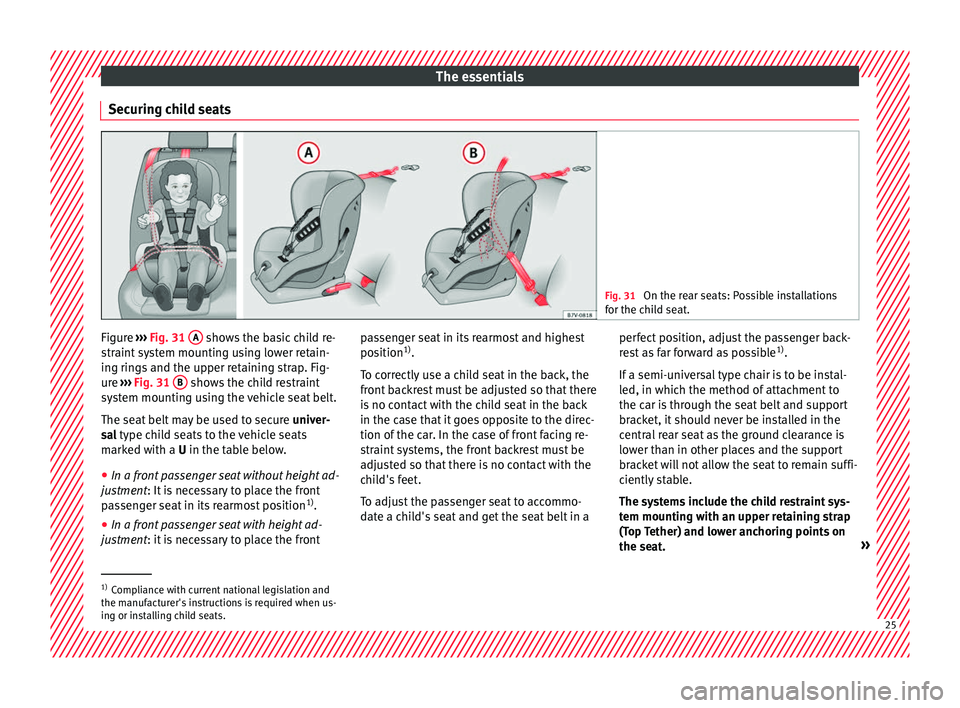
On the rear seats: Possible installations
for the c hi
ld seat. Figure
›››
Fig. 31
A shows the basic child re-
s tr
aint
system mounting using lower retain-
ing rings and the upper retaining strap. Fig-
ure ››› Fig. 31 B shows the child restraint
sy s
t
em mounting using the vehicle seat belt.
The seat belt may be used to secure univer-
sal type child seats to the vehicle seats
marked with a U in the table below.
● In a front passenger seat without height ad-
justment
: It is necessary to place the front
passenger seat in its rearmost position 1)
.
● In a front passenger seat with height ad-
justment
: it is necessary to place the front passenger seat in its rearmost and highest
position
1)
.
T
o correctly use a child seat in the back, the
front backrest must be adjusted so that there
is no contact with the child seat in the back
in the case that it goes opposite to the direc-
tion of the car. In the case of front facing re-
straint systems, the front backrest must be
adjusted so that there is no contact with the
child's feet.
To adjust the passenger seat to accommo-
date a child's seat and get the seat belt in a perfect position, adjust the passenger back-
res
t as far forward as possible 1)
.
If a semi-universal type chair is to be instal-
led, in which the method of attachment to
the car is through the seat belt and support
bracket, it should never be installed in the
central rear seat as the ground clearance is
lower than in other places and the support
bracket will not allow the seat to remain suffi-
ciently stable.
The systems include the child restraint sys-
tem mounting with an upper retaining strap
(Top Tether) and lower anchoring points on
the seat. »1)
Compliance with current national legislation and
the manuf act
urer's instructions is required when us-
ing or installing child seats. 25
Page 28 of 348
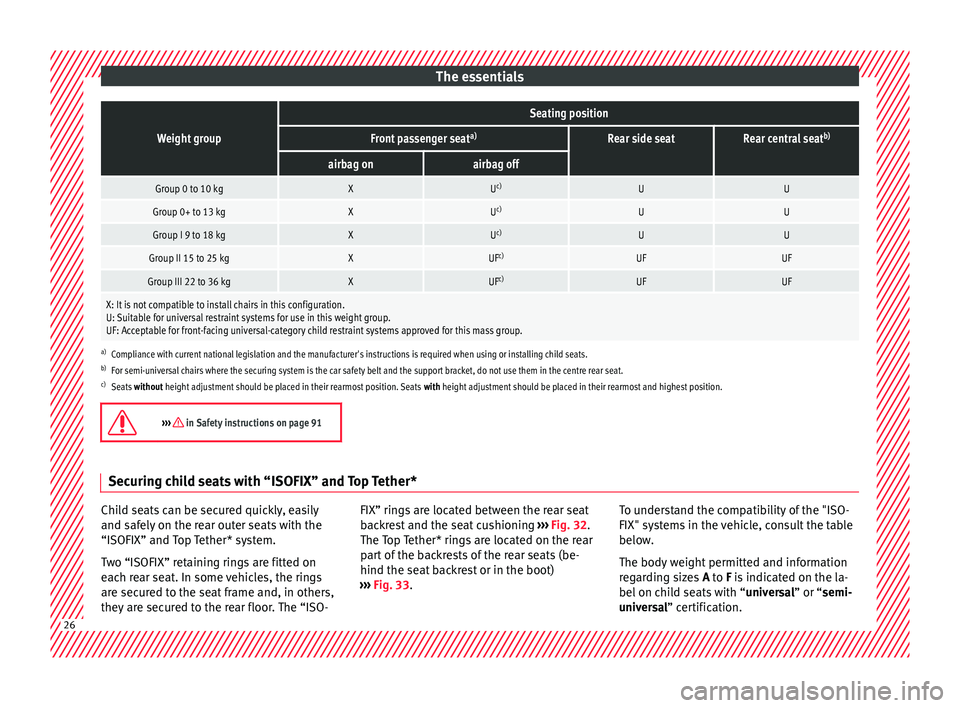
The essentialsWeight group
Seating position
Front passenger seat
a)Rear side seatRear central seatb)
airbag onairbag off
Group 0 to 10 kgXU
c)UU
Group 0+ to 13 kgXUc)UU
Group I 9 to 18 kgXUc)UU
Group II 15 to 25 kgXUF c)UFUF
Group III 22 to 36 kgXUFc)UFUF
X: It is not compatible to install chairs in this configuration.
U: Suitable for universal restraint systems for use in this weight group.
UF: Acceptable for front-facing universal-category child restraint systems approved for this mass group.
a)
Compliance with current national legislation and the manufacturer's instructions is required when using or installing child seats.
b) For semi-universal chairs where the securing system is the car safety belt and the support bracket, do not use them in the centre rear seat.
c) Seats without height adjustment should be placed in their rearmost position. Seats with height adjustment should be placed in their rearmost and highest position.
››› in Safety instructions on page 91Securing child seats with “ISOFIX” and Top Tether*
Child seats can be secured quickly, easily
and s
af
ely
on the rear outer seats with the
“ISOFIX” and Top Tether* system.
Two “ISOFIX” retaining rings are fitted on
each rear seat. In some vehicles, the rings
are secured to the seat frame and, in others,
they are secured to the rear floor. The “ISO- FIX” rings are located between the rear seat
back
rest and the seat cushioning ››› Fig. 32.
The Top Tether* rings are located on the rear
part of the backrests of the rear seats (be-
hind the seat backrest or in the boot)
››› Fig. 33. To understand the compatibility of the "ISO-
FIX" syst
ems in the vehicle, consult the table
below.
The body weight permitted and information
regarding sizes A to F is indicated on the la-
bel on child seats with “ universal” or “semi-
universal” certification. 26
Page 32 of 348
The essentials
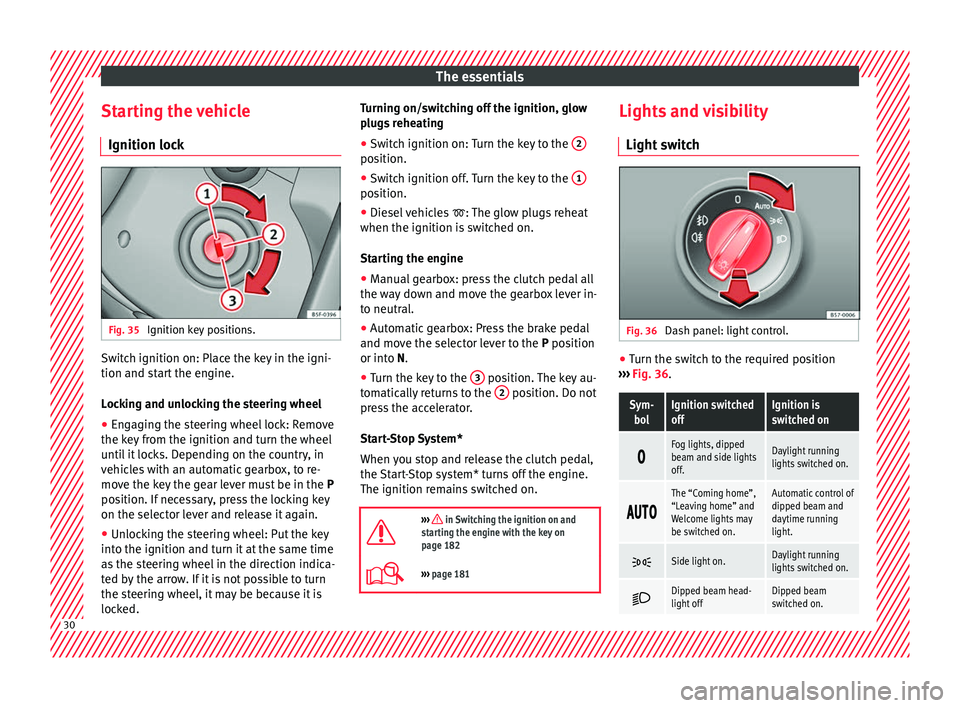
Starting the vehicle Ignition loc kFig. 35
Ignition key positions. Switch ignition on: Place the key in the igni-
tion and s
t
ar
t the engine.
Locking and unlocking the steering wheel
● Engaging the steering wheel lock: Remove
the key fr
om the ignition and turn the wheel
until it locks. Depending on the country, in
vehicles with an automatic gearbox, to re-
move the key the gear lever must be in the P
position. If necessary, press the locking key
on the selector lever and release it again.
● Unlocking the steering wheel: Put the key
into the ignition and turn it
at the same time
as the steering wheel in the direction indica-
ted by the arrow. If it is not possible to turn
the steering wheel, it may be because it is
locked. Turning on/switching off the ignition, glow
plugs
reheating
● Switch ignition on: Turn the key to the 2 position.
●
Switch ignition off. Turn the key to the 1 position.
●
Diesel vehicles : The glo
w p
lugs reheat
when the ignition is switched on.
Starting the engine
● Manual gearbox: press the clutch pedal all
the way
down and move the gearbox lever in-
to neutral.
● Automatic gearbox: Press the brake pedal
and move the sel
ector lever to the P position
or into N.
● Turn the key to the 3 position. The key au-
t om
atic
ally returns to the 2 position. Do not
pr e
s
s the accelerator.
Start-Stop System*
When you stop and release the clutch pedal,
the Start-Stop system* turns off the engine.
The ignition remains switched on.
››› in Switching the ignition on and
starting the engine with the key on
page 182
››› page 181 Lights and visibility
Light sw
it
ch Fig. 36
Dash panel: light control. ●
Turn the switch to the required position
› ›
›
Fig. 36.
Sym-
bolIgnition switched
offIgnition is
switched on
Fog lights, dipped
beam and side lights
off.Daylight running
lights switched on.
The “Coming home”,
“Leaving home” and
Welcome lights may
be switched on.Automatic control of
dipped beam and
daytime running
light.
Side light on.Daylight running
lights switched on.
Dipped beam head-
light offDipped beam
switched on.
30
Page 36 of 348
The essentialsMenuSubmenuPossible settingDescription
Lights
Light assistDynamic Light Assist, Light Assist, motorway function, turning-on time, headlamp
range adjustment, automatic lights when raining, one-touch signalling, travel mode.›››
page 144
Vehicle interior lightingBrightness of instrument panel and controls››› page 151
Coming Home/Leaving Home functionSwitch-on time of the “Coming home” and “Leaving home” functions››› page 148
››› page 149
Driver assistance
ACC (adaptive cruise control)Activation and deactivation: default distance level, driving profiles.››› page 221
Front Assist (emergency brake as-
sist system)Activation and deactivation: Front Assist, advance warning, distance warning display››› page 217
Lane Assist (system warning you
if you leave the lane)Activation and deactivation of lane departure warning, adaptive lane guidance››› page 230
Detection of traffic signsDisplay on the instrument panel, activation and deactivation of the speed warning››› page 245
TrailerTrailer recognition (display of traffic signs for vehicles with trailer), use to calculate the
route, maximum speed for trailer››› page 273
Fatigue detectionActivation and deactivation››› page 248
Parking and ma-
noeuvring
ParkPilotAutomatic activation, front volume, front sound treble, rear volume, rear sound treble,
adjust Infotainment volume››› page 257,
››› page 262
Auto HoldSwitching on and off when starting off››› page 211
Electric parking brakeSwitching on and off automatically››› page 186
Braking while manoeuvring func-
tionSwitching on and off››› page 262
Displaying the parking spaceSwitching on and off
Ambient lighting–Switching on and off, selecting brightness, colour, area or total››› page 152 34
Page 38 of 348
The essentials
Driver information System Intr oduction With the ignition switched on, it is possible
to r
e
ad the different functions of the display
by scrolling through the menus.
In vehicles with multifunction steering wheel,
the multifunction display can only be operat-
ed with the steering wheel buttons.
The number of menus displayed on the in-
strument panel will vary according to the ve-
hicle electronics and equipment.
A specialised workshop will be able to pro-
gramme or modify additional functions, ac-
cording to the vehicle equipment. SEAT rec-
ommends visiting a SEAT Official Service.
Some menu options can only be read when
the vehicle is at a standstill.
As long as a priority 1 warning is displayed, it
will not be possible to read the menus
››› page 40. Some warning messages can
be confirmed and made to disappear with the
windscreen wiper lever button or the multi-
function steering wheel button.
The information system also provides the fol-
lowing information and displays (depending
on the vehicle's equipment):
Driving data ›››
page 38
■ MFD from departure ■
MFD from r ef
uelling
■ MFD total calculation
Assist systems ››› page 39
Navigation ››› Booklet Navigation system
Audio ››› Booklet Radio or ››› Booklet Naviga-
tion system
Telephone ››› Booklet Radio or ››› Booklet
Navigation system
Vehicle status ››› page 33 WARNING
Any distraction may lead to an accident, with
the risk of
injury.
● Do not operate the instrument panel con-
trol
s when driving. Using the menus on the instrument
p
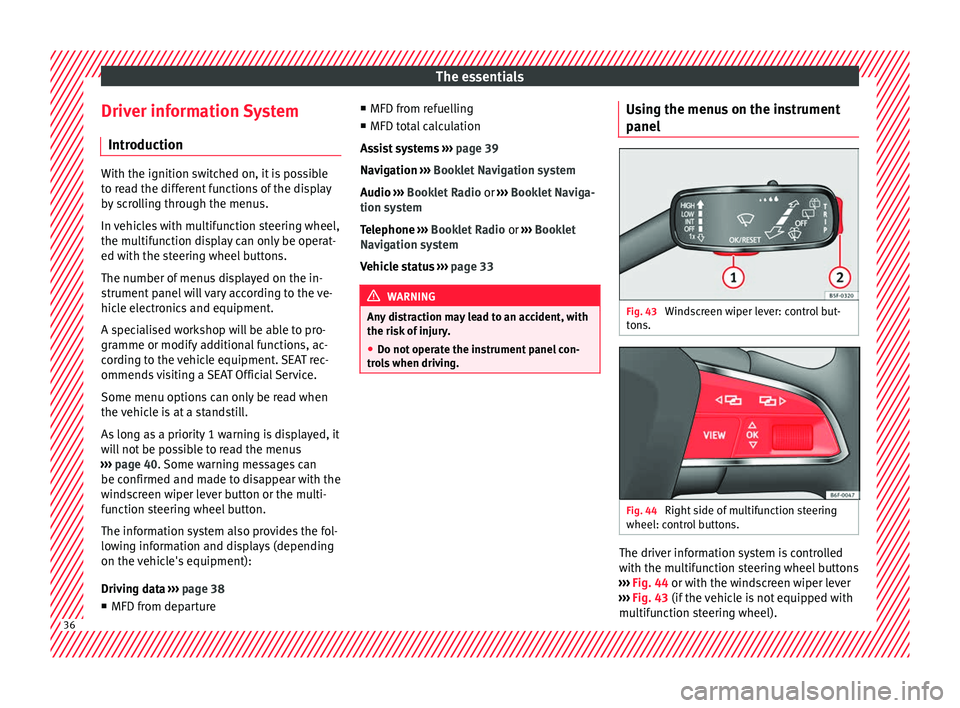
anel Fig. 43
Windscreen wiper lever: control but-
t on
s. Fig. 44
Right side of multifunction steering
wheel: c ontr
o
l buttons. The driver information system is controlled
w
ith the mu
ltif
unction steering wheel buttons
››› Fig. 44 or with the windscreen wiper lever
››› Fig. 43 (if the vehicle is not equipped with
multifunction steering wheel). 36