warning light Seat Cordoba 2007 Owner's Guide
[x] Cancel search | Manufacturer: SEAT, Model Year: 2007, Model line: Cordoba, Model: Seat Cordoba 2007Pages: 256, PDF Size: 7.75 MB
Page 72 of 256
Unlocking and locking
70
WARNING
No one should remain in the vehicle if the “Safe” deadlock mechanism has
been activated. It is not possible to open the doors from the inside or the
outside and this would make any outsid e intervention difficult in case of
emergency. Danger of death. People could become trapped inside in an
emergency.Selective unlocking system*
This system allows for unlocking only the driver’s door, or all
the vehicle.Driver’s door unlock button
This is done by a simple unlocking (on ce). This can be done with the key or
the remote control.
With the key, rotate the key once in the lock cylinder in the unlock direction.
The driver’s door will be released from the “Safe” system and unlocked and
may be opened and the indicator light will switch off. For vehicles fitted with
an alarm, this system is deactivated.
Using the remote control, press the unlock button on the remote once. The
“Safe” system is deactivated for all the vehicle, only the driver’s door is
unlocked for opening, the alarm is turned off as is the light indicator.
Unlocking all doors and the boot
So that all the doors and the boot can be opened, the unlock button on
the remote must be pressed twice.
The button must be pressed twice in under 2 seconds and this will deactivate
the “Safe” system for all the vehicle, all doors will be unlocked and the boot
will be activated. The indicator will be turned off as will be the alarm for those
vehicles fitted with one. Unlocking the boot
See
⇒page 76 and ⇒page 81.
Locking system for involuntary unlocking
This is an anti-theft system and will avoid situations where
the vehicle is opened uninte ntionally.The vehicle will be re-locked automatically, if it is unlocked and neither the
boot nor any of the doors are opened within 30 seconds. This function
prevents the vehicle from remaining unlocked if the unlocking button is
pressed by mistake.Automatic speed dependent locking and unlocking system*
This is a safety system to prevent access to the vehicle from
the exterior when the vehicle is in transit (for example, when
stopped at a traffic light).Locking
The doors and the boot are automatically locked when vehicle speed exceeds
15 km/h.
If the vehicle is stopped and one of the doors is opened, when the vehicle
moves off again and exceeds a speed of 15 km/h the unlocked door(s) will be
locked once more.
Unlocking
The driver’s door automatically unlocks when the key is removed from the
ignition.
cordoba_ingles_0706 Seite 70 Montag, 28. August 2006 1:18 13
Page 73 of 256
Unlocking and locking71
Safety First
Operating instructions
Tips and Maintenance
Te c h n i c a l D a t a
Each door may be unlocked and opened
from the interior (for example when
a passenger gets out). For this, simply operate the lever on the inside of the
door twice.
WARNING
When the vehicle is in motion, the internal door release levers should not
be operated, this could cause a door to open.Emergency unlocking systemThe entire vehicle is unlocked if the airbags are triggered during an accident,
except for the boot. It is possible to lock the vehicle from inside using the
central locking, after turning the ignition off and back on again.
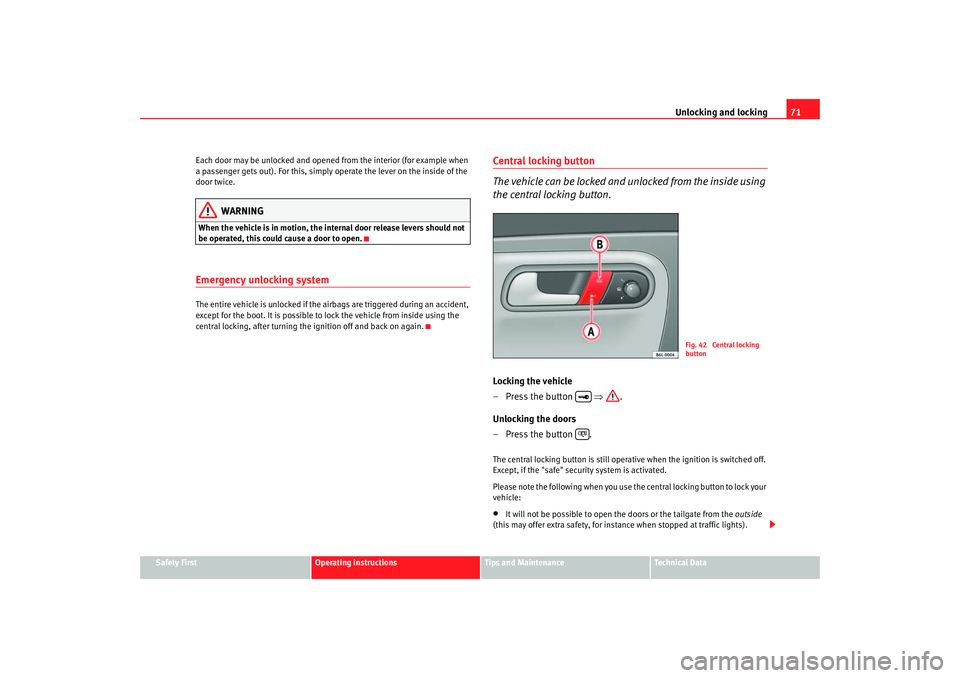
Central locking button
The vehicle can be locked and unlocked from the inside using
the central locking button.Locking the vehicle
– Press the button ⇒.
Unlocking the doors
– Press the button .The central locking button is still operative when the ignition is switched off.
Except, if the "safe" security system is activated.
Please note the following when you use the central locking button to lock your
vehicle:•
It will not be possible to open th e doors or the tailgate from the outside
(this may offer extra safety, for instance when stopped at traffic lights).
Fig. 42 Central locking
button
cordoba_ingles_0706 Seite 71 Montag, 28. August 2006 1:18 13
Page 79 of 256
Unlocking and locking77
Safety First
Operating instructions
Tips and Maintenance
Te c h n i c a l D a t a
close
the vehicle, press the close button briefly ⇒fig. 47 . The indica-
tors flash once.
By pressing the locking button twice ⇒page 76, fig. 47 both the
locking security mechanism (double) and the volumetric alarm* are deacti-
vated but the perimetric alarm* remains active and this is indicated by the
indicator light on the driver’s door.
Selective unlocking*
When the button ⇒page 76, fig. 47 is used the driver’s door is
unlocked, all others remain locked.
Press the button ⇒page 76, fig. 47 twice to unlock all doors.
WARNING
•
Incorrect use of the key can result in critical injuries.
•
Never leave children or disabled persons in the vehicle; in case of emer-
gency they may not be able to leave the vehicle or look after themselves.
•
Never leave any of the vehicle keys in the vehicle. This could result in
serious injuries, accidents or the theft of your vehicle. Always take the key
with you when you leave the vehicle.
•
Unsupervised use of a key could me an that the engine is started or that
electrical equipment is used (e.g. elec tric windows). Risk of accident. The
vehicle can be locked using the remote control key. This could result in
people being trapped in the vehicle in an emergency.Note
•
The radio-frequency remote control ca n also be programmed so that only
the driver’s door is unlocked the first time that the unlocking button on the
radio frequency remote control key is pressed. When the button is pressed
once more, all doors and the tailgate will be unlocked.
•
The remote control functions only when you are in range ⇒page 76,
fig. 48 (red area).
•
If the vehicle is unlocked using the button, the vehicle will be
locked again automatically if any of the doors or the tailgate are not opened
within 30 seconds of unlocking the vehicle. This function prevents the vehicle
from remaining unlocked if the unlocking button is pressed by mistake.
•
If the vehicle cannot be opened and closed using the remote control, the
remote control key will have to be re-synchronised ⇒page 77.
Changing the batteryIf the battery indicator does not flash when the buttons are pushed, the
battery must be replaced.
Caution
Use of inappropriate batteries may damage the radio frequency remote
control. For this reason, always replac e the dead battery with another of the
same size and power.
For the sake of the environment
The flat batteries must be disposed of in accordance with regulations
governing the protection of the environment.Synchronising the remote control keySynchronising the remote control key
– Use both keys that have been delivered with the vehicle; the key with the remote and the normal key ⇒page 76, fig. 47
⇒ page 76, fig. 48 .
A2
A2
A1
A1
A1
cordoba_ingles_0706 Seite 77 Montag, 28. August 2006 1:18 13
Page 89 of 256
Lights and visibility87
Safety First
Operating instructions
Tips and Maintenance
Te c h n i c a l D a t a
Lights and visibilityLightsSwitching lights on and off
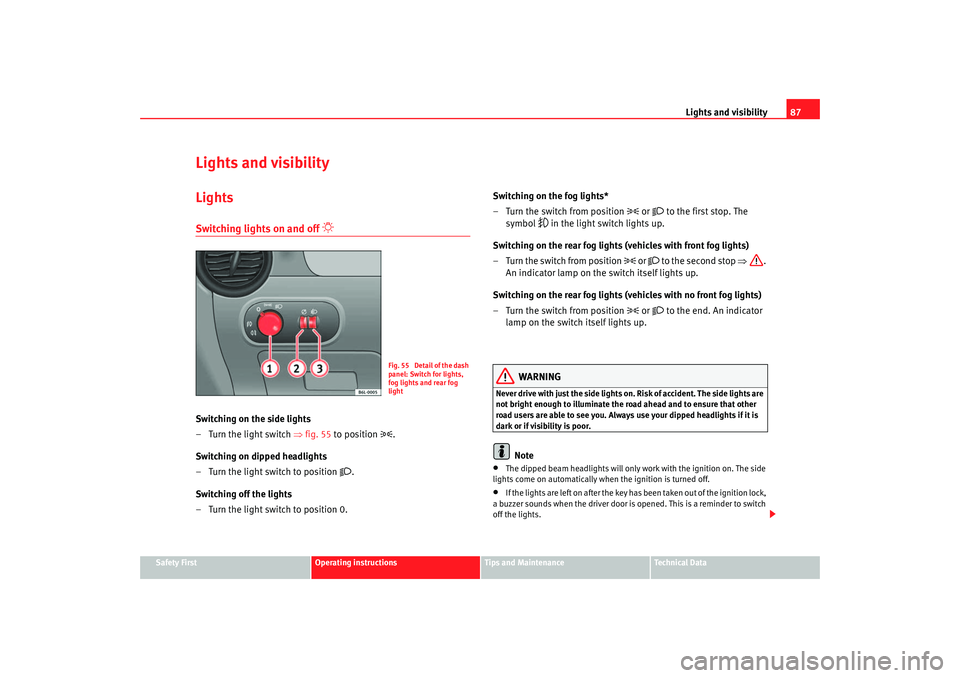
Switching on the side lights
– Turn the light switch ⇒ fig. 55 to position
.
Switching on dipped headlights
– Turn the light switch to position
.
Switching off the lights
– Turn the light switch to position 0. Switching on the fog lights*
– Turn the switch from position
or
to the first stop. The
symbol
in the light switch lights up.
Switching on the rear fog lights (vehicles with front fog lights)
– Turn the switch from position
or
to the second stop ⇒.
An indicator lamp on the switch itself lights up.
Switching on the rear fog lights (vehicles with no front fog lights)
– Turn the switch from position
or
to the end. An indicator
lamp on the switch itself lights up.
WARNING
Never drive with just the side lights on . Risk of accident. The side lights are
not bright enough to illuminate the road ahead and to ensure that other
road users are able to see you. Always use your dipped headlights if it is
dark or if visibility is poor.
Note
•
The dipped beam headlights will only work with the ignition on. The side
lights come on automatically when the ignition is turned off.
•
If the lights are left on after the key has been taken out of the ignition lock,
a buzzer sounds when the driver door is opened. This is a reminder to switch
off the lights.
Fig. 55 Detail of the dash
panel: Switch for lights,
fog lights and rear fog
light
cordoba_ingles_0706 Seite 87 Montag, 28. August 2006 1:18 13
Page 91 of 256
Lights and visibility89
Safety First
Operating instructions
Tips and Maintenance
Te c h n i c a l D a t a
The rear window heating only works when
the engine is running. When it is
switched on, a lamp lights up on the switch.
After 20 minutes, the heati ng device of the rear window switches off automat-
ically. If the button is pushed again, after 20 minutes the rear window heater
stays on continuously until the ignition is switched off.
For the sake of the environment
The rear window heater should be disconnected as soon as the glass is
demisted. By saving electrical power you can also save fuel.
Note
To avoid possible damage to the battery, an automatic temporary disconnec-
tion of this function is possible, coming back on when normal operating
conditions are re-established.
Hazard warning lights
The hazard warning lights are used to draw the attention of
other road users to your vehicle in emergencies.
If your vehicle breaks down:
1. Park your vehicle at a safe distance from moving traffic.
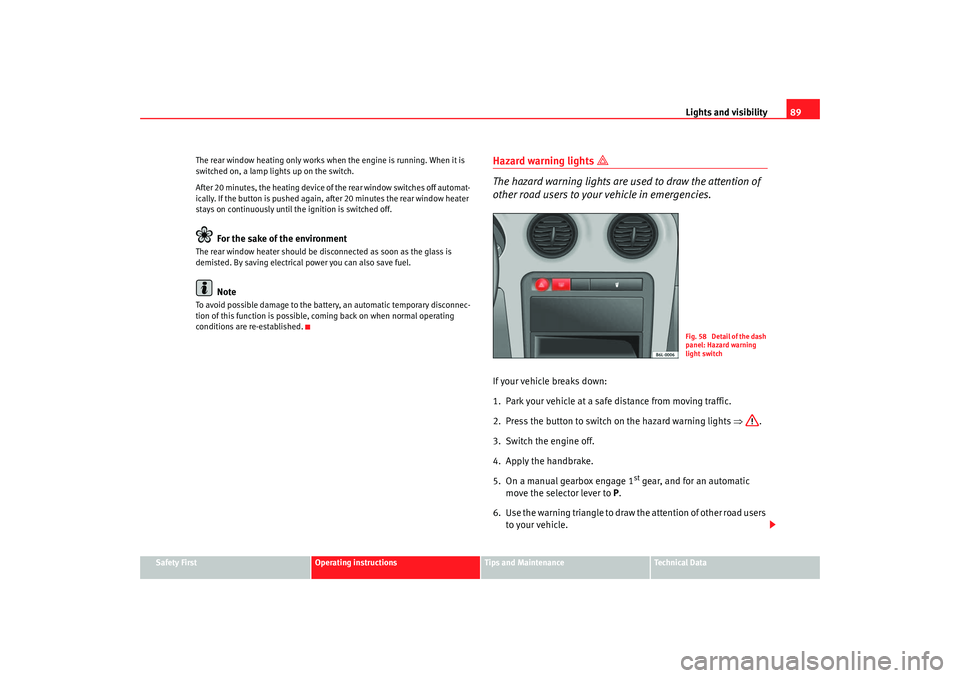
2. Press the button to switch on the hazard warning lights ⇒.
3. Switch the engine off.
4. Apply the handbrake.
5. On a manual gearbox engage 1
st gear, and for an automatic
move the selector lever to P.
6. Use the warning triangle to draw the attention of other road users to your vehicle.
Fig. 58 Detail of the dash
panel: Hazard warning
light switch
cordoba_ingles_0706 Seite 89 Montag, 28. August 2006 1:18 13
Page 92 of 256
Lights and visibility
90
7. Always take the vehicle key with you when you leave the vehicle.You should switch on the hazard warning lights to warn other road users, for
instance when:•
reaching the tail end of a traffic jam
•
there is an emergency
•
your vehicle breaks down due to a technical defect
•
you are towing another vehicle or your vehicle is being towed.
All turn signals flash simultaneously when the hazard warning lights are
switched on. That is that the two turn signal indicator lamps
and the
indicator lamp in the switch
will flash at the same time. The hazard
warning lights also work when the ignition is switched off.
WARNING
•
The risk of an accident increases if your vehicle breaks down. Always
use the hazard warning lights and a warning triangle to draw the attention
of other road users to your stationary vehicle.
•
Never park where the catalytic converter could come into contact with
inflammable materials under the vehicle, for example dry grass or spilt
petrol. This could start a fire!Note
•
The battery will run down if the hazard warning lights are left on for a long
time, even if the ignition is switched off.
•
The use of the hazard warning lights de scribed here is subject to the rele-
vant statutory requirements.
Turn signal and main beam headlight lever
The turn signal and main beam lever also operates the
parking lights and the headlight flasher.The turn signal and main beam headlight lever has the following
functions:
Switching on the turn signals
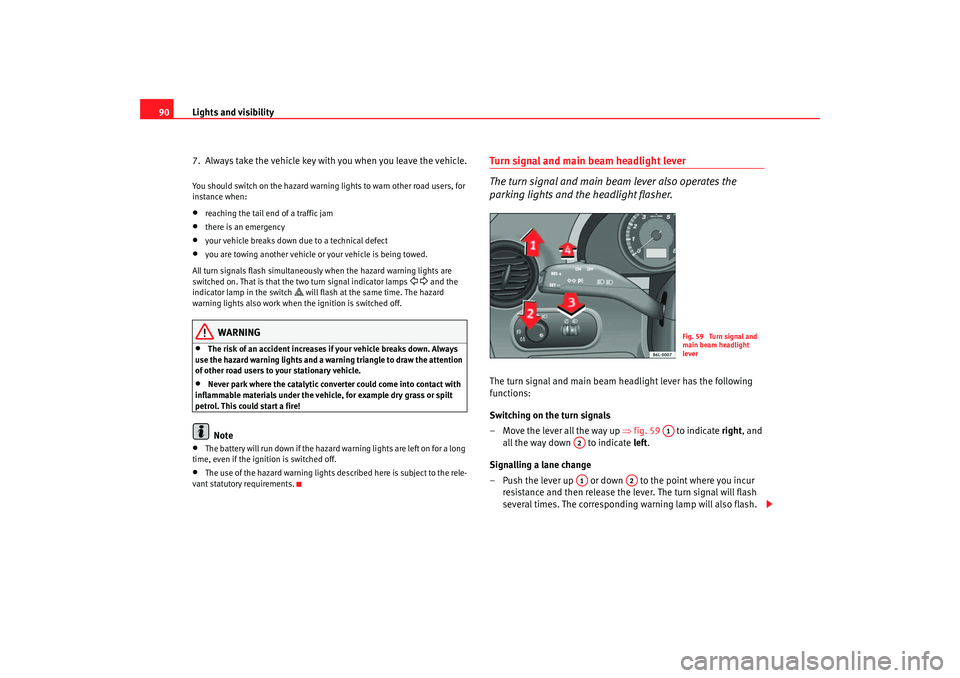
– Move the lever all the way up ⇒fig. 59 to indicate right , and
all the way down to indicate left.
Signalling a lane change
– Push the lever up or down to the point where you incur resistance and then release the lever. The turn signal will flash
several times. The corresponding warning lamp will also flash.
Fig. 59 Turn signal and
main beam headlight
lever
A1
A2A1
A2
cordoba_ingles_0706 Seite 90 Montag, 28. August 2006 1:18 13
Page 93 of 256
Lights and visibility91
Safety First
Operating instructions
Tips and Maintenance
Te c h n i c a l D a t a
Switching main beam on and off
– Turn the light switch to position
.
– Press the lever forward ⇒ page 90, fig. 59 to switch on the
main beams.
– Pull the lever back towards you to switch the main beam head- lights off again.
Headlight flasher
– Pull the lever towards the steering wheel to operate the flasher.
Switching on parking lights
– Switch off the ignition and remove the key from the lock.
– Move the lever up or down to turn on the right or left-hand parking lights respectively.
WARNING
The main beam can dazzle other driver s. Risk of accident! Never use the
main beam headlights or the headli ght flasher if they could dazzle other
drivers.
Note
•
The turn signals only work when the ignition is switched on. The corre-
sponding warning lamp
or flashes in the combi-instrument. The
warning lamp
flashes when the turn signals are operated, provided a
trailer is correctly attached and connected to the vehicle. If a turn signal bulb
is defective, the warning lamp flashes at double speed. If the trailer turn signal bulbs are damaged, warning lamp
does not light up. You should
have the bulb replaced.
•
The main beam headlights can only be switched on if the dipped beam
headlights are alrea dy on. The warning lamp
then comes on in the combi-
instrument.
•
The headlight flasher comes on for as long as you pull the lever – even if
no other lights are switched on. The warning lamp
then comes on in the
combi-instrument.
•
When the parking lights are switched on, the headlight and the rear light
on the corresponding side of the vehicle light up. The parking lights will only
work if the key is removed from the ignition. If the lights are switched on, a
buzzer gives an audible warning while the driver door is open.
•
If the turn signal lever is left on after the key has been taken out of the
ignition lock, an acoustic signal sounds when the driver door is opened. This
is a reminder to switch off the turn signal, unless of course you wish to leave
the parking light on.
A4A3
cordoba_ingles_0706 Seite 91 Montag, 28. August 2006 1:18 13
Page 96 of 256
Lights and visibility
94Windscreen washersFront windscreen wipers
The windscreen wiper lever controls the windscreen wipers
and the automatic wash and wipe.
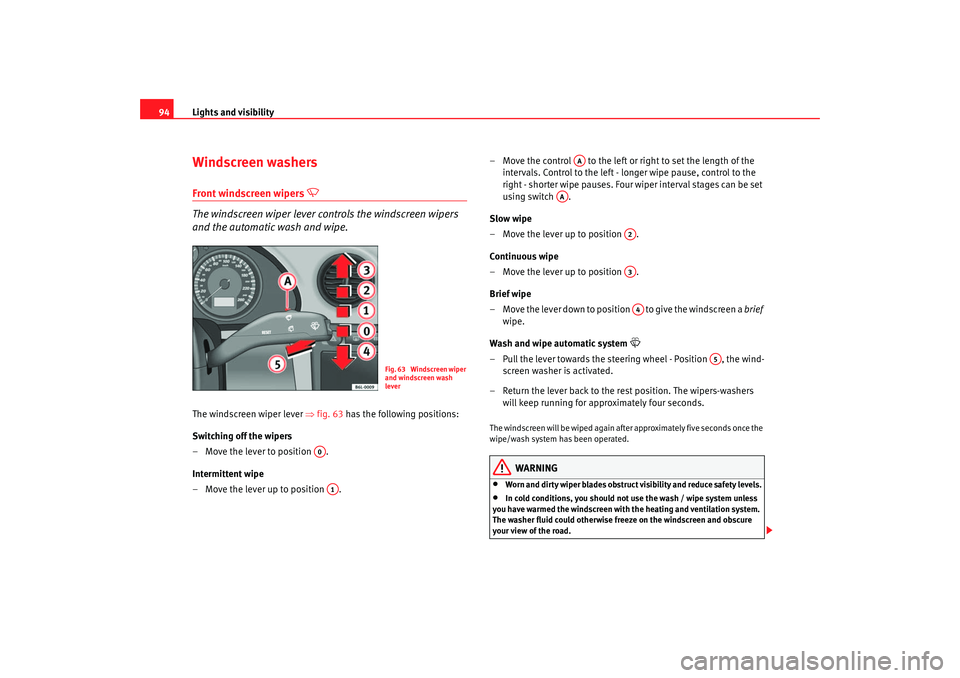
The windscreen wiper lever ⇒fig. 63 has the following positions:
Switching off the wipers
– Move the lever to position .
Intermittent wipe
– Move the lever up to position . – Move the control to the left or right to set the length of the
intervals. Control to the left - longer wipe pause, control to the
right - shor ter wipe pauses. Four wiper inter val stages can be set
using switch .
Slow wipe
– Move the lever up to position .
Continuous wipe
– Move the lever up to position .
Brief wipe
– Move the lever down to position to give the windscreen a brief
wipe.
Wash and wipe automatic system
– Pull the lever towards the steeri ng wheel - Position , the wind-
screen washer is activated.
– Return the lever back to the rest position. The wipers-washers will keep running for approximately four seconds.The windscreen will be wiped again after approximately five seconds once the
wipe/wash system has been operated.
WARNING
•
Worn and dirty wiper blades obstruct visibility and reduce safety levels.
•
In cold conditions, you should not use the wash / wipe system unless
you have warmed the windscreen with the heating and ventilation system.
The washer fluid could otherwise fr eeze on the windscreen and obscure
your view of the road.
Fig. 63 Windscreen wiper
and windscreen wash
lever
A0A1
AA
AA
A2A3A4
A5
cordoba_ingles_0706 Seite 94 Montag, 28. August 2006 1:18 13
Page 97 of 256
Lights and visibility95
Safety First
Operating instructions
Tips and Maintenance
Te c h n i c a l D a t a
•
Always note the corresponding warnings on ⇒page 182.Caution
In icy conditions, always check that th e wiper blades are not frozen to the
glass before using the wipers for the fi rst time. If you switch on the wipers
when the wiper blades are frozen to the windscreen, you could damage both
the wiper blades and the wiper motor.
Note
•
The windscreen wipers will only work when the ignition is switched on.
•
The heat output of the heated jets* is controlled automatically when the
ignition is switched on, dependi ng upon the outside temperature.
Rain sensor*
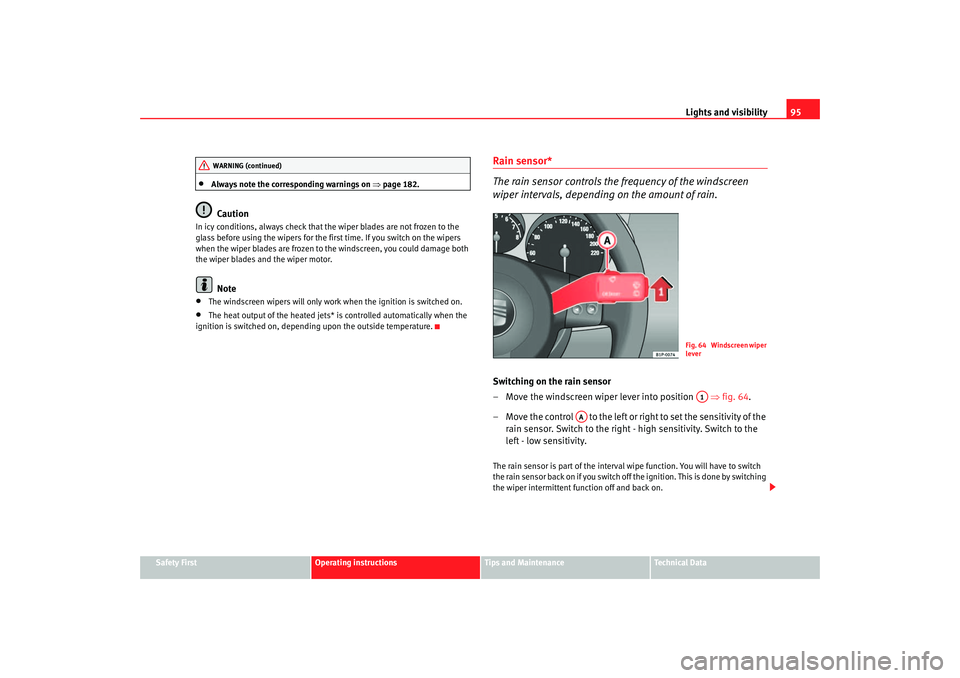
The rain sensor controls the frequency of the windscreen
wiper intervals, depending on the amount of rain.Switching on the rain sensor
– Move the windscreen wiper lever into position ⇒fig. 64 .
– Move the control to the left or right to set the sensitivity of the rain sensor. Switch to the right - high sensitivity. Switch to the
left - low sensitivity.The rain sensor is part of the interval wipe function. You will have to switch
the rain sensor back on if you switch off the ignition. This is done by switching
the wiper intermittent function off and back on.
WARNING (continued)
Fig. 64 Windscreen wiper
leverA1
AA
cordoba_ingles_0706 Seite 95 Montag, 28. August 2006 1:18 13
Page 99 of 256
Lights and visibility97
Safety First
Operating instructions
Tips and Maintenance
Te c h n i c a l D a t a
MirrorsAdjusting the head restraintsBefore beginning any journey, adjust the rear-view mirrors for correct
visibility.Interior mirror
It is dangerous to drive if you cannot see clearly through the
rear window.Manual anti-dazzle function for interior mirror
In the basic mirror position, the lever at the bottom edge of the mirror should
be at the front. Pull the lever to the back to select the anti-dazzle function.
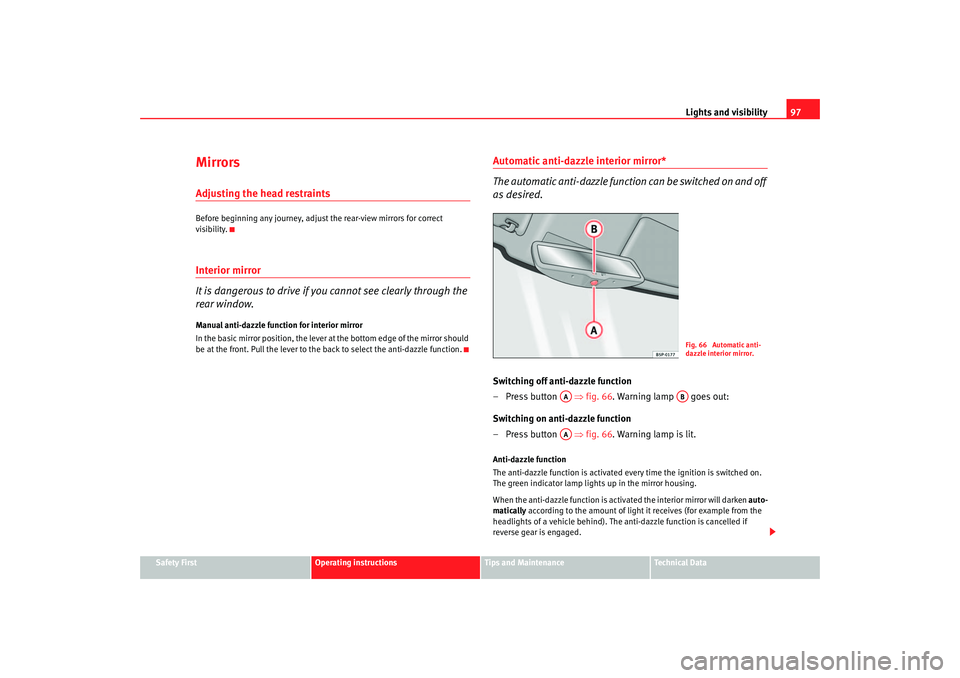
Automatic anti-dazzle interior mirror*
The automatic anti-da zzle function can be switched on and off
as desired.Switching off anti-dazzle function
– Press button ⇒ fig. 66. Warning lamp goes out:
Switching on anti-dazzle function
– Press button ⇒ fig. 66. Warning lamp is lit.Anti-dazzle function
The anti-dazzle function is activated every time the ignition is switched on.
The green indicator lamp ligh ts up in the mirror housing.
When the anti-dazzle function is activa ted the interior mirror will darken auto-
matically according to the amount of light it receives (for example from the
headlights of a vehicle behind). The anti-dazzle function is cancelled if
reverse gear is engaged.
Fig. 66 Automatic anti-
dazzle interior mirror.
AA
AB
AA
cordoba_ingles_0706 Seite 97 Montag, 28. August 2006 1:18 13