clock Seat Cordoba 2008 Owner's Manual
[x] Cancel search | Manufacturer: SEAT, Model Year: 2008, Model line: Cordoba, Model: Seat Cordoba 2008Pages: 258, PDF Size: 7.87 MB
Page 12 of 258
Safe driving
10
– Fasten your seat belt correctly ⇒page 16.
– Keep both feet in the foot well so that you have the vehicle under control at all times.Adjustment of the driver's seat ⇒page 102.
WARNING
•
An incorrect sitting position of the driver can lead to severe injuries.
•
Adjust the driver's seat so that the re is at least 25 cm distance between
the centre of the chest and the hub of the steering wheel ⇒page 9, fig. 1 .
If you are sitting nearer than 25 cm, the airbag system cannot protect you
properly.
•
If your physical constitution prevents you from maintaining the
minimum distance of 25 cm, contact a qualified workshop. The workshop
will help you decide if special specific modifications are necessary.
•
When driving, always hold the steer ing wheel with both hands on the
outside of the ring at the 9 o'clock and 3 o'clock positions. This reduces the
risk of injury when the driver airbag is triggered.
•
Never hold the steering wheel at the 12 o'clock position, or in any other
manner (e.g. in the centre of the stee ring wheel). In such cases, you may
sustain injuries to the arms, hands and head.
•
To reduce the risk of injury to the driver during sudden braking manoeu-
vres or an accident, never drive with the backrest tilted far back! The airbag
system and seat belts can only provide optimal protection when the back-
rest is in an upright position and the dr iver is wearing his or her seat belt
properly. The further the backrests are ti lted to the rear, the greater the risk
of injury due to incorrect positioning of the belt web or the incorrect sitting
position!
•
Adjust the head restraint properly to achieve optimal protection.
Proper sitting position for front passenger
The front passenger must sit at least 25 cm away from the
dash panel so that the airbag can provide the greatest
possible protection in the event that it is triggered.For your own safety and to reduce the risk of injur y in the event of an
accident, we recommend the following adjustments for the front
passenger:
– Move the front passenger seat back as far as possible ⇒.
– Move the backrest to an upright position so that your back rests completely against it.
– Adjust the head restraint so that its upper edge is at the same level as the top of your head, or as close as possible to the same
level as the top of your head ⇒page 12.
– Keep both feet in the foot well in front of the front passenger seat.
– Fasten your seat belt correctly ⇒page 16.It is possible to deactivate the passenger airbag in exceptional circum-
stances ⇒page 40.
For detailed information on how to adjust the front passenger's seat, see
⇒ page 105.
WARNING
•
An incorrect sitting position of the front passenger can lead to severe
injuries.
COR_ING_0707 Seite 10 Mittwoch, 1. August 2007 6:25 18
Page 54 of 258
Cockpit
52InstrumentsInstrument overview
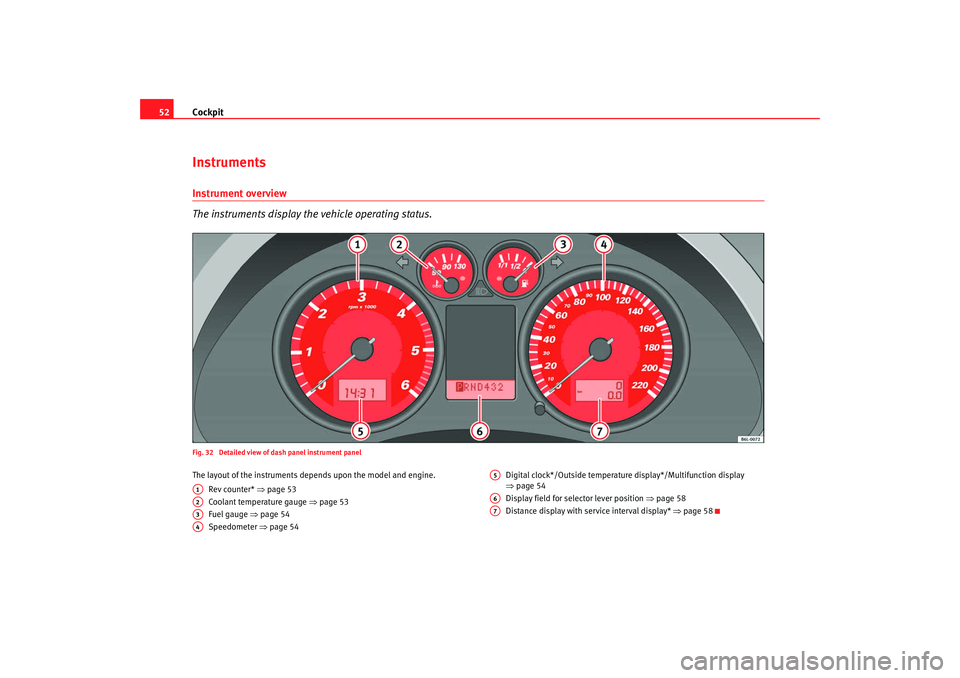
The instruments display the vehicle operating status.Fig. 32 Detailed view of dash panel instrument panelThe layout of the instruments depends upon the model and engine.
Rev counter* ⇒ page 53
Coolant temperature gauge ⇒page 53
Fuel gauge ⇒ page 54
Speedometer ⇒page 54 Digital clock*/Outside temperature display*/Multifunction display
⇒
page 54
Display field for selector lever position ⇒page 58
Distance display with service interval display* ⇒page 58A1A2A3A4
A5A6A7
COR_ING_0707 Seite 52 Mittwoch, 1. August 2007 6:25 18
Page 56 of 258
Cockpit
54
WARNING
When working in the engine compartment, always bear in mind the safety
warnings ⇒ page 175.
Caution
Accessories in front of the air inlet reduce the cooling effect of the coolant. At
high outside temperatures and high engine loads, there is a risk of the
engine overheating.Fuel gauge
and reserve indicator
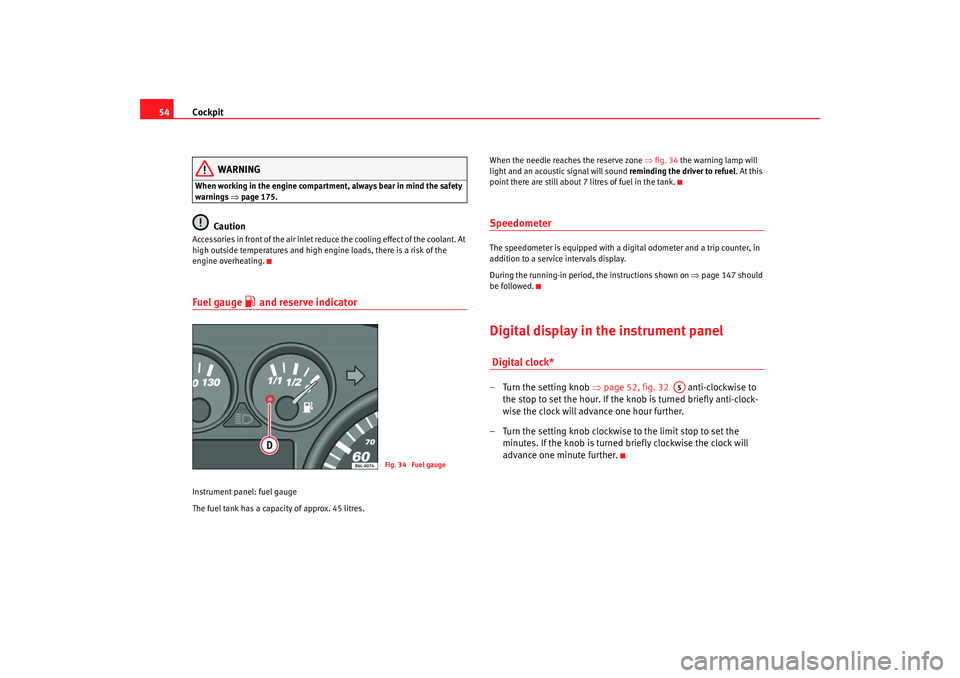
Instrument panel: fuel gauge
The fuel tank has a capacity of approx. 45 litres. When the needle reaches the reserve zone
⇒fig. 34 the warning lamp will
light and an acoustic signal will sound reminding the driver to refuel. At this
point there are still about 7 litres of fuel in the tank.
SpeedometerThe speedometer is equipped with a digital odometer and a trip counter, in
addition to a service intervals display.
During the running-in period, the instructions shown on ⇒page 147 should
be followed.Digital display in the instrument panel Digital clock* – Turn the setting knob ⇒page 52, fig. 32 anti-clockwise to
the stop to set the hour. If the kn ob is turned briefly anti-clock-
wise the clock will advance one hour further.
– Turn the setting knob clockwise to the limit stop to set the minutes. If the knob is turned briefly clockwise the clock will
advance one minute further.
Fig. 34 Fuel gauge
A5
COR_ING_0707 Seite 54 Mittwoch, 1. August 2007 6:25 18
Page 59 of 258
Cockpit57
Safety First
Operating instructions
Tips and Maintenance
Te c h n i c a l D a t a
Memory displays
•
Time
•
Journey duration
•
Average speed
•
Distance
•
Distance to empty (the distance you can travel with the remaining fuel)
•
Average fuel consumption
•
Current fuel consumption
•
Ambient temperature display
Time
The time is also displayed when the ignition is switched off. The clock can be
set with the right-hand rotating button below the rev counter “digital clock”.
min - Journey duration
The display shows the amount of time which has elapsed since the ignition
was switched on.
The maximum display value in both me mories is 99 hours and 59 minutes.
The memory will automatically be deleted once this value has been reached.
Ø km/h - Average speed
The average speed will be shown after a distance of approximately 100
metres has been travelled. Dashes will appear in the display until that time.
The display will be updated every 5 seconds whilst the vehicle is in motion.
Miles - Distance travelled
The display shows the distance travelled since the ignition was switched on.
The maximum display value in both memories is 9999 miles. The memory will
automatically be deleted once this value has been reached.
Miles - Fuel range
The fuel range is calculated using the fi gures for tank content and current fuel
consumption. It shows how far the vehicle can travel using the same condi-
tions as a reference.
Ø litre/100km - Average fuel consumption
The average fuel consumption will be shown ⇒page 56, fig. 38 after a
distance of approximately 100 metres has been travelled. Dashes will appear
in the display until that time. The display will be updated every 5 seconds
whilst the vehicle is in motion. The amount of fuel used will not be shown.
ltr/100km or lt r/hr - Current fuel consumption
The display will show the current fuel consumption in litre/km whilst the
vehicle is in motion or in litre/hour when the vehicle is in a stationary position
with the engine running.
Using this display you can see how your driving style affects fuel consump-
tion ⇒page 156.
Ambient temperature display
The measurement margin extends from -45°C to +58°C. At temperatures
lower than +4°C, an “ice crystal symbol” is displayed and a “warning” sounds
if the vehicle is moving at more than 10 km/h (ice warning). This symbol will
flash for about 10 seconds and remains lit until the exterior temperature rises
above +4°C or 6°C if it was already lit.
WARNING
There could be black ice on the road surface even if the “snowflake symbol”
is not shown. You should, for this reason, not rely exclusively on this
display - Risk of accident!
COR_ING_0707 Seite 57 Mittwoch, 1. August 2007 6:25 18
Page 60 of 258
Cockpit
58
NoteWhen the vehicle is stationary or travelling at very low speeds, the tempera-
ture displayed may be slightly higher than the actual ambient temperature as
a result of the heat radiated from the engine.Display field for selector lever position*The position of the automatic gearbox selector lever is shown on the display
⇒page 135.Mileage display or Service Interval DisplayDistance display
The upper counter in the display registers the total distance covered by the
vehicle. The lower counter registers the short journeys. The last digit indicates steps
of 100 metres. The trip recorder counter may be reset by the reset button
⇒
page 52, fig. 32 .
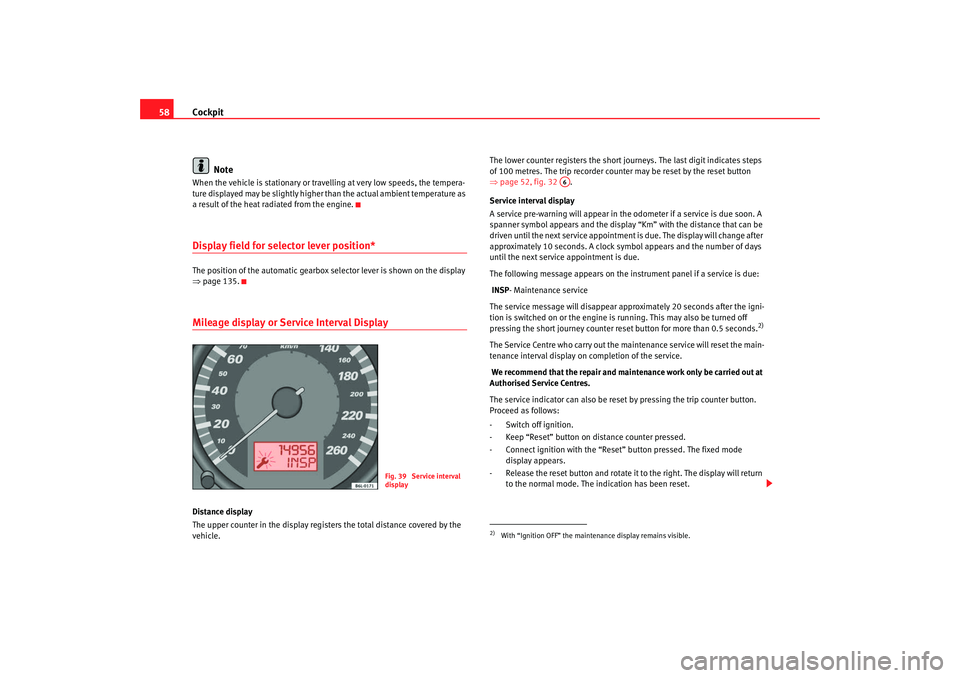
Service interval display
A service pre-warning will appear in the odometer if a service is due soon. A
spanner symbol appears and the display “Km” with the distance that can be
driven until the next service appointment is due. The display will change after
approximately 10 seconds. A clock symbol appears and the number of days
until the next service appointment is due.
The following message appears on the instrument panel if a service is due:
INSP - Maintenance service
The service message will disappear approximately 20 seconds after the igni-
tion is switched on or the engine is running. This may also be turned off
pressing the short journey counter reset button for more than 0.5 seconds.
2)
The Service Centre who carry out the maintenance service will reset the main-
tenance interval display on completion of the service.
We recommend that the repair and maintenance work only be carried out at
Authorised Service Centres.
The service indicator can also be reset by pressing the trip counter button.
Proceed as follows:
- Switch off ignition.
- Keep “Reset” button on distance counter pressed.
- Connect ignition with the “Reset ” button pressed. The fixed mode
display appears.
- Release the reset button and rotate it to the right. The display will return to the normal mode. The indication has been reset.
Fig. 39 Service interval
display
2)With “Ignition OFF” the mainte nance display remains visible.
A6
COR_ING_0707 Seite 58 Mittwoch, 1. August 2007 6:25 18
Page 77 of 258
Unlocking and locking75
Safety First
Operating instructions
Tips and Maintenance
Te c h n i c a l D a t a
This function is independent of the electronic opening and locking
systems of the vehicle. It only affects the rear doors. It is only
possible to activate it and deactivate it manually, as described
below:
Activating the childproof lock
– Unlock the car and open the door you wish to childproof.
– With the door open, rotate the gr oove in the door using the igni-
tion key, anti-clockwise for the left hand side doors, and clock-
wise for the right hand side doors ⇒page 74, fig. 44 ,
⇒ page 74, fig. 45.
Deactivating the childproof lock
– Unlock the car and open the door for which you wish to deacti- vate the childproof lock.
– With the door open, rotate the gr oove in the door using the igni-
tion key, anti-clockwise for the right-hand side doors, and clock-
wise for the left-hand side doors ⇒page 74, fig. 44 , ⇒ page 74,
fig. 45 .When the childproof lock is activated, the door can be opened from the
outside only. The childproof lock can be activated and deactivated using the
key in the groove when the door is open, as described above.
COR_ING_0707 Seite 75 Mittwoch, 1. August 2007 6:25 18
Page 119 of 258
Heating, Ventilation and Air conditioning 117
Safety First
Operating instructions
Tips and Maintenance
Te c h n i c a l D a t a
•
In air recirculation mode, no ambient air enters the vehicle interior. The
windows can quickly fog over if the heating is switched off. Therefore, you
should never leave the air recirculat ion mode switched on for longer
periods, as this increases the risk of an accident.Note
•
Please observe the general notes ⇒page 125.
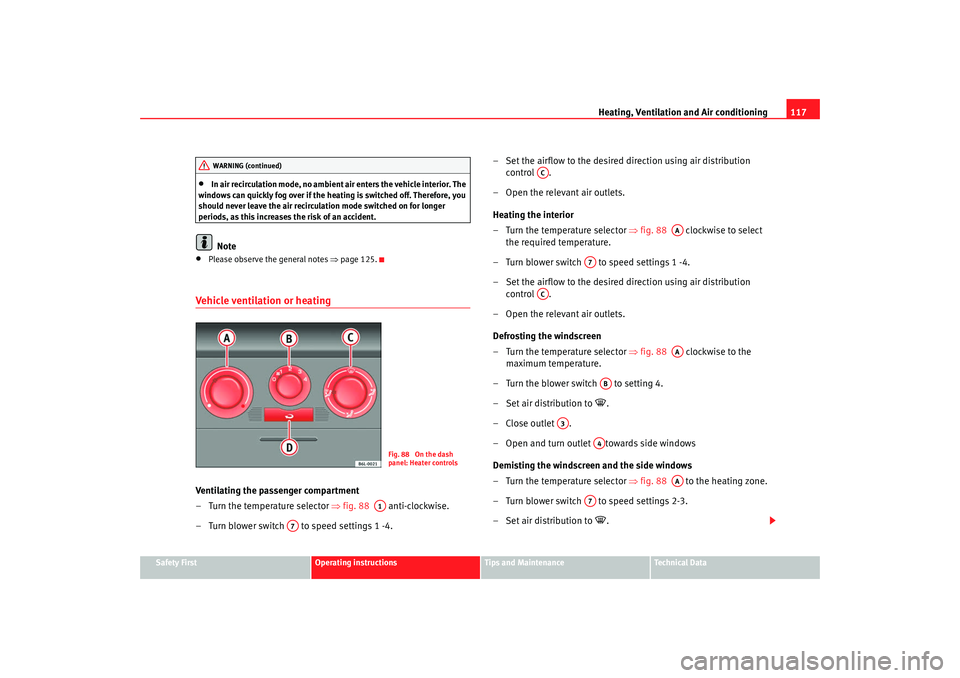
Vehicle ventilation or heatingVentilating the passenger compartment
– Turn the temperature selector ⇒ fig. 88 anti-clockwise.
– Turn blower switch to speed settings 1 -4. – Set the airflow to the desired direction using air distribution
control .
– Open the relevant air outlets.
Heating the interior
– Turn the temperature selector ⇒ fig. 88 clockwise to select
the required temperature.
– Turn blower switch to speed settings 1 -4.
– Set the airflow to the desired direction using air distribution control .
– Open the relevant air outlets.
Defrosting the windscreen
– Turn the temperature selector ⇒ fig. 88 clockwise to the
maximum temperature.
– Turn the blower switch to setting 4.
– Set air distribution to
.
–Close outlet .
– Open and turn outlet towards side windows
Demisting the windscreen and the side windows
– Turn the temperature selector ⇒ fig. 88 to the heating zone.
– Turn blower switch to speed settings 2-3.
– Set air distribution to
.
WARNING (continued)
Fig. 88 On the dash
panel: Heater controls
A1
A7
AC
AA
A7
AC
AA
AB
A3
A4
AA
A7
COR_ING_0707 Seite 117 Mittwoch, 1. August 2007 6:25 18
Page 130 of 258
Driving
128•
Adjust the driver seat or steering wheel so that there is a distance of at
least 25 cm between the steering wheel and your breast bone ⇒page 127,
fig. 94. If you fail to observe the minimum distance, the airbag will not
protect you. Risk of fatal injury.
•
If your physical constitution prevents you from maintaining the
minimum distance of 25 cm, contact an Authorised Service Centre. The
Authorised Service Centre will help you decide if special specific modifica-
tions are necessary.
•
If you adjust the steering wheel so tha t it points towards your face, the
driver airbag will not protect you properly in the event of an accident. Make
sure that the steering wheel points towards your chest.
•
When driving, always hold the steer ing wheel with both hands on the
outside of the ring at the 9 o'clock and 3 o'clock positions. Never hold the
steering wheel at the 12 o'clock positi on, or in any other manner (e.g. in
the centre of the steering wheel, or on the inside of the rim). In such cases,
you could receive severe injuries to the arms, hands and head.
SafetyElectronic stabilisation programme (ESP)*
ESP helps make driving safer in certain situations.The Electronic Stabilisation Program (ESP ) contains the electronic differential
lock (EDL) and the traction control syst em (TCS). The ESP function works in
conjunction with the ABS. Both warning lamps will light up if the ESP or ABS
systems are faulty.
The ESP is started automatically when the engine is started.
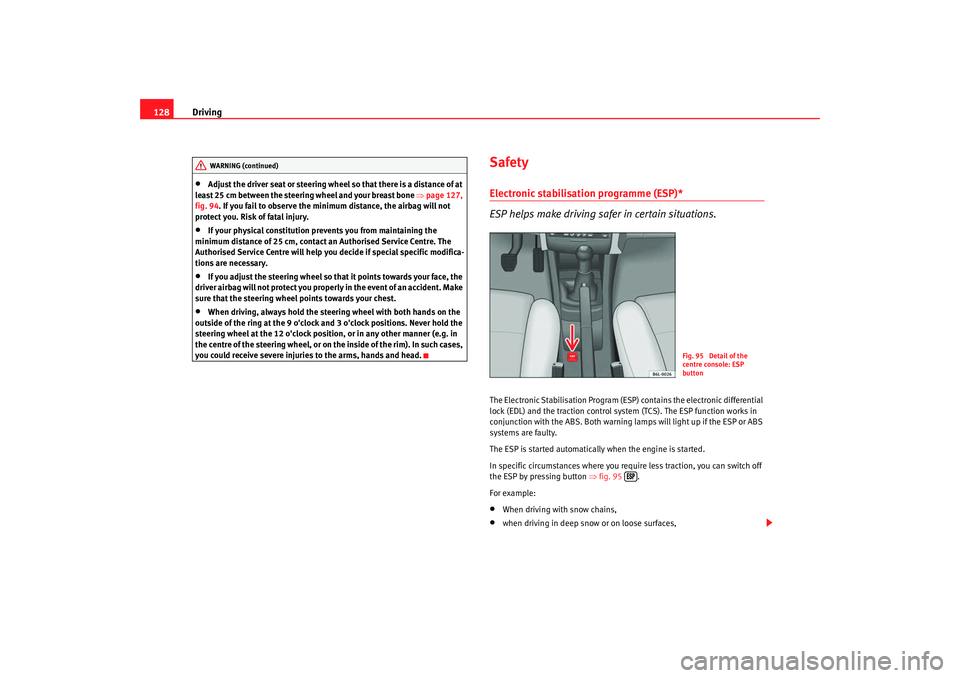
In specific circumstances where you require less traction, you can switch off
the ESP by pressing button ⇒fig. 95 .
For example:•
When driving with snow chains,
•
when driving in deep snow or on loose surfaces,
WARNING (continued)
Fig. 95 Detail of the
centre console: ESP
button
COR_ING_0707 Seite 128 Mittwoch, 1. August 2007 6:25 18
Page 174 of 258
Checking and refilling levels
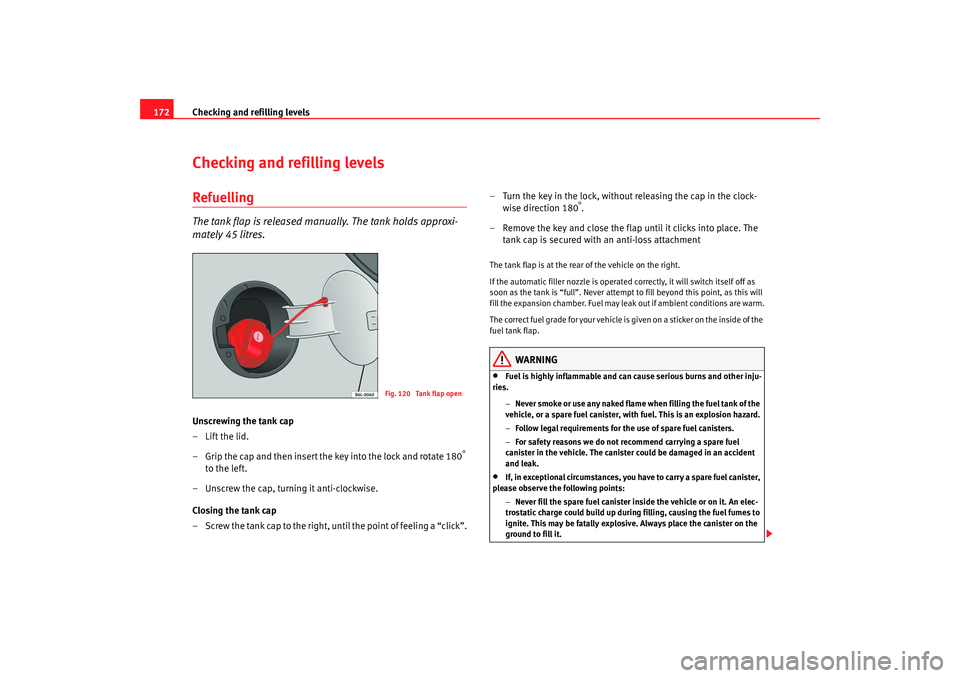
172Checking and refilling levelsRefuellingThe tank flap is released manually. The tank holds approxi-
mately 45 litres.Unscrewing the tank cap
–Lift the lid.
– Grip the cap and then insert the key into the lock and rotate 180
°
to the left.
– Unscrew the cap, turning it anti-clockwise.
Closing the tank cap
– Screw the tank cap to the right, until the point of feeling a “click”. – Turn the key in the lock, without releasing the cap in the clock-
wise direction 180
°.
– Remove the key and close the flap until it clicks into place. The tank cap is secured with an anti-loss attachment
The tank flap is at the rear of the vehicle on the right.
If the automatic filler nozzle is operated correctly, it will switch itself off as
soon as the tank is “full”. Never attempt to fill beyond this point, as this will
fill the expansion chamber. Fuel may leak out if ambient conditions are warm.
The correct fuel grade for your vehicle is given on a sticker on the inside of the
fuel tank flap.
WARNING
•
Fuel is highly inflammable and can cause serious burns and other inju-
ries.
−Never smoke or use any naked flame when filling the fuel tank of the
vehicle, or a spare fuel canister, with fuel. This is an explosion hazard.
− Follow legal requirements for the use of spare fuel canisters.
− For safety reasons we do not recommend carrying a spare fuel
canister in the vehicle. The canister could be damaged in an accident
and leak.
•
If, in exceptional circumstances, you have to carry a spare fuel canister,
please observe the following points:
−Never fill the spare fuel canister inside the vehicle or on it. An elec-
trostatic charge could build up during filling, causing the fuel fumes to
ignite. This may be fatally explosive. Always place the canister on the
ground to fill it.
Fig. 120 Tank flap open
COR_ING_0707 Seite 172 Mittwoch, 1. August 2007 6:25 18
Page 250 of 258
Index
248CCar care
Exterior . . . . . . . . . . . . . . . . . . . . . . . . . . . . . 159
Car care products . . . . . . . . . . . . . . . . . . . . . . . 158
Car phone . . . . . . . . . . . . . . . . . . . . . . . . . . . . . 168
Car washes . . . . . . . . . . . . . . . . . . . . . . . . . . . . 159
Catalytic converter . . . . . . . . . . . . . . . . . . . . . . 148
Central locking . . . . . . . . . . . . . . . . . . . . . . . . . . 70 Automatic speed dependent locking and un-locking system* . . . . . . . . . . . . . . . . . . . . . 72
Emergency unlocking system . . . . . . . . . . . . 73
Locking system for invo luntary unlocking . . 72
Selective unlocking system* . . . . . . . . . . . . 72
Unlocking system* . . . . . . . . . . . . . . . . . . . . 72
Central locking button Central locking . . . . . . . . . . . . . . . . . . . . . . . 73
unlocking . . . . . . . . . . . . . . . . . . . . . . . . . . . . 73
Cetane number . . . . . . . . . . . . . . . . . . . . . . . . . 174
Change lamps dipped headlight lamp . . . . . . . . . . . . . . . . 213
Changing gear See Manual gearbox . . . . . . . . . . . . . . . . . . 133
Changing lamps interior light and reading light . . . . . . . . . . 220
changing lamps rear lights on frame . . . . . . . . . . . . . . . . . . . 219
rearlights on tailgate . . . . . . . . . . . . . . . . . 218
Changing the lamps glovebox light* . . . . . . . . . . . . . . . . . . . . . . 220
indicator lights . . . . . . . . . . . . . . . . . . . . . . 216 main beam lights . . . . . . . . . . . . . . . . . . . . 214
Main headlight lamps . . . . . . . . . . . . . . . . . 212
number plate light . . . . . . . . . . . . . . . . . . . 220
side beam lights . . . . . . . . . . . . . . . . . . . . . 215
Side indicator lights . . . .
. . . . . . . . . . . . . . 218
Changing windscreen wiper blades . . . . . . . . . 186
Chassis number . . . . . . . . . . . . . . . . . . . . . . . . 228
Checking . . . . . . . . . . . . . . . . . . . . . . . . . . . . . . 189
Checking battery electrolyte level . . . . . . . . . . 189
Checking engine oil level . . . . . . . . . . . . . . . . . 180
Child safety . . . . . . . . . . . . . . . . . . . . . . . . . . . . . 42
Child seat . . . . . . . . . . . . . . . . . . . . . . . . . . . . . . . 44 Categorisation in groups . . . . . . . . . . . . . . . 44
Group 1 . . . . . . . . . . . . . . . . . . . . . . . . . . . . . 45
Group 2 . . . . . . . . . . . . . . . . . . . . . . . . . . . . . 45
Group 3 . . . . . . . . . . . . . . . . . . . . . . . . . . . . . 45
Groups 0 and 0+ . . . . . . . . . . . . . . . . . . . . . . 44
Safety notes . . . . . . . . . . . . . . . . . . . . . . . . . . 43
Securing . . . . . . . . . . . . . . . . . . . . . . . . . . . . . 47
Child seats ISOFIX and Toptether system . . . . . . . . . . . . 48
on the front passenger seat . . . . . . . . . . . . . 28
Cigarette lighter . . . . . . . . . . . . . . . . . . . . . . . . 111
Cleaning alloy wheels . . . . . . . . . . . . . . . . . . . . 163
Cleaning and caring for your vehicle . . . . . . . . 158
Cleaning chrome . . . . . . . . . . . . . . . . . . . . . . . . 162
Cleaning cloth seat covers . . . . . . . . . . . . . . . . 165
Cleaning dash panel . . . . . . . . . . . . . . . . . . . . . 164
Cleaning engine compartment . . . . . . . . . . . . . 164
Cleaning fabric trim . . . . . . . . . . . . . . . . . . . . . . 165 Cleaning leather . . . . . . . . . . . . . . . . . . . . . . . . 165
Cleaning plastic parts . . . . . . . . . . . . . . . . . . . . 164
Cleaning seat belts . . . . . . . . . . . . . . . . . . . . . . 166
Cleaning steel wheels . . . . . . . . . . . . . . . . . . . . 163
Cleaning windows . . . . . . . . . . . . . . . . . . . . . . . 161
Cleaning wooden trim . . . . . . . . . . . . . . . . . . . . 165
Climatronic
automatic mode . . . . . . . . . . . . . . . . . . . . . 123
controls . . . . . . . . . . . . . . . . . . . . . . . . . . . . 122
General notes . . . . . . . . . . . . . . . . . . . . . . . 125
manual mode . . . . . . . . . . . . . . . . . . . . . . . 124
Clock . . . . . . . . . . . . . . . . . . . . . . . . . . . . . . . . . . 54
Cockpit . . . . . . . . . . . . . . . . . . . . . . . . . . . . . . . . . 51
Connector for Apple iPod . . . . . . . . . . . . . . . . . 113
Control Light switches . . . . . . . . . . . . . . . . . . . . . . . . 89
wing mirrors . . . . . . . . . . . . . . . . . . . . . . . . 100
Control lamps . . . . . . . . . . . . . . . . . . . . . . . . . . . 60
Control lighting . . . . . . . . . . . . . . . . . . . . . . . . . . 51
Controls Electric windows . . . . . . . . . . . . . . . . . . . . . . 84
Convenience closing Sliding/tilting roof . . . . . . . . . . . . . . . . . . . . 88
Windows . . . . . . . . . . . . . . . . . . . . . . . . . . . . 86
Convenience opening Windows . . . . . . . . . . . . . . . . . . . . . . . . . . . . 86
Coolant . . . . . . . . . . . . . . . . . . . . . . . . . . . 182, 183
Coolant Level . . . . . . . . . . . . . . . . . . . . . . . . . . . 183
Coolant level warning light . . . . . . . . . . . . . . . . . . . . . . . . . 63
COR_ING_0707 Seite 248 Mittwoch, 1. August 2007 6:25 18