remote control Seat Exeo 2008 User Guide
[x] Cancel search | Manufacturer: SEAT, Model Year: 2008, Model line: Exeo, Model: Seat Exeo 2008Pages: 303, PDF Size: 10.02 MB
Page 109 of 303
Unlocking and locking107
Safety First
Operating instructions
Practical tips
Te c h n i c a l D a t a
Safety switch
The safety switch
⇒page 106, fig. 78 can deactivate the rear door
switches. The windows can only be operated from the rear when the safety
switch is pressed in.
The symbol
lights up on the safety switch when the electric windows in the
rear doors are disabled (switch not pressed in).
Note
The windows will work for about ten minutes after the ignition has been
switched off. The window switches are only disabled when the driver's door
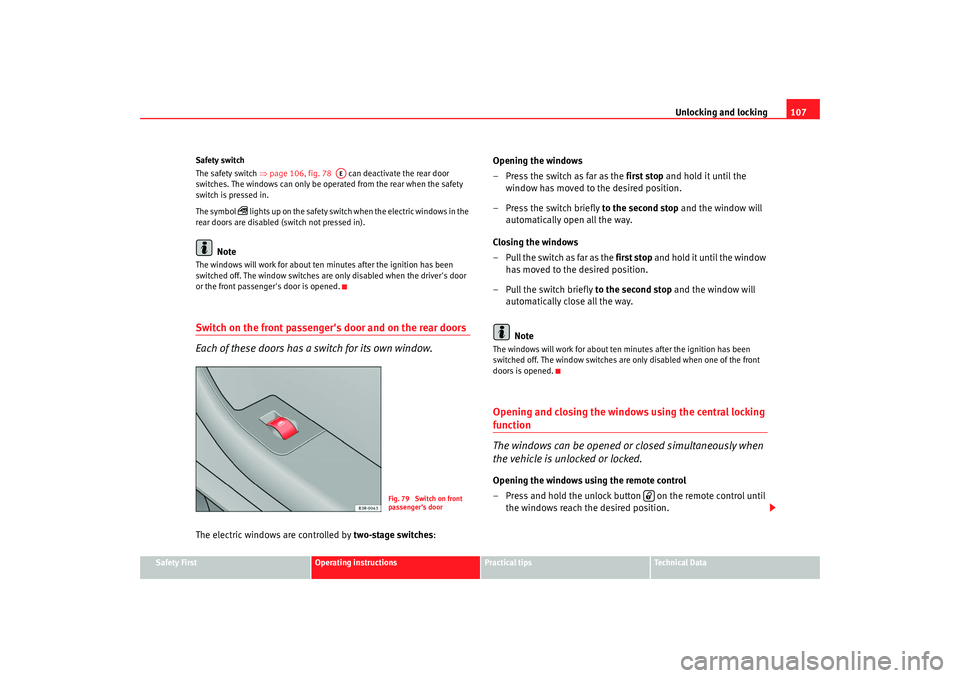
or the front passenger's door is opened.Switch on the front passenger's door and on the rear doors
Each of these doors has a switch for its own window.The electric windows are controlled by two-stage switches :Opening the windows
– Press the switch as far as the
first stop and hold it until the
window has moved to the desired position.
– Press the switch briefly to the second stop and the window will
automatically open all the way.
Closing the windows
– Pull the switch as far as the first stop and hold it until the window
has moved to the desired position.
– Pull the switch briefly to the second stop and the window will
automatically close all the way.
Note
The windows will work for about ten minutes after the ignition has been
switched off. The window switches are only disabled when one of the front
doors is opened.Opening and closing the windows using the central locking function
The windows can be opened or closed simultaneously when
the vehicle is unlocked or locked.Opening the windows using the remote control
– Press and hold the unlock button on the remote control until the windows reach the desired position.
AE
Fig. 79 Switch on front
passenger's door
Exeo_EN.book Seite 107 Freitag, 17. Oktober 2008 11:24 11
Page 110 of 303
Unlocking and locking
108
Opening the windows using the ignition key
– unlock the driver's door with the key and hold the key in the unlock position until all the windows are open.
Closing the windows using the remote control
– Press and hold the lock button until all windows are closed ⇒ .
Closing the windows using the ignition key
– Lock the driver's door with the key and hold the key in the lock position until all the windows are closed ⇒.The windows will stop moving when you release the remote control button or
turn the key back to its initial position in the door lock.
WARNING
•
Be careful when closing the windows to ensure nobody is hurt.
•
For safety reasons, you should only use the remote control open and
close functions within about 2 metres of the vehicle. To avoid injuries,
always keep an eye on the windows wh en pressing the button to close
them. The windows stop moving as soon as the button is released.
Possible malfunctionsAutomatic open and close function not working
The automatic open and close function will not work if the battery has been
temporarily disconnected. The function can be restored as follows:•
Close the window as far as it will go by lifting and holding the window
switch.
•
Release the switch and then lift it again for one second. This will re-enable
the automatic function.
Sun roof / deflector*DescriptionThe sliding/tilting sun roof is o perated using the rotary control ⇒page 109,
fig. 80 . The rotary control for sliding the ro of open can be adjusted to several
different settings (with click stops). This control only works when the ignition
is switched on. The rotary control must be in the position if you want to tilt
the roof up at the rear.
The sun roof will work for about ten minutes after the ignition has been
switched off. However, it is immediatel y disabled when one of the front doors
is opened.
A0
Exeo_EN.book Seite 108 Freitag, 17. Oktober 2008 11:24 11
Page 112 of 303
Unlocking and locking
110
WARNING
Take care when closing the sliding/tilting roof. There is a risk of suffering
injury. For this reason, always take out the ignition key when leaving the
vehicle.Automatic close function
The sun roof can also be closed from outside the vehicle.– Turn the key in the lock on the driver's door and hold it in the lock
position or press the lock button on the remote control until the
roof has closed all the way ⇒.
WARNING
Take care when closing the sunroof. There is a risk of suffering injury.Sunroof / deflector*The solar cells in the roof power the climate control fan.
The solar roof is operated in the same way as the normal sliding/tilting sun
roof.
The interior trim is fixed to the solar roof and cannot be opened and closed
separately.
Closing the sunroof by overriding the safety cut-out
It is possible to override the safety cut-out to close the
sunroof.The sliding sunroof mechanism is equipped with a safety cut-out. If
the roof should fail to close normally, it can be closed by overriding
the safety cut-out.
– Turn the control to position ⇒page 109, fig. 80 .
– Pull on the control switch until the roof closes.
WARNING
Take care when closing the sunroof. There is a risk of suffering injury. For
this reason, always take out the ignition key when leaving the vehicle.
A0
Exeo_EN.book Seite 110 Freitag, 17. Oktober 2008 11:24 11
Page 117 of 303

Lights and visibility115
Safety First
Operating instructions
Practical tips
Te c h n i c a l D a t a
Coming home and leaving home functions*
The coming home and leaving home functions are used to
light up the surroundings in th e dark. The front fog lights, the
rear side lights and the number plate light switch on.Enabling the functions
– Briefly press the knob ⇒fig. 85 to release it from its set position.
– Turn the knob to position 1.
– Press the knob in again to prevent the setting from being changed unintentionally.
Disabling the functions
– Briefly press the knob ⇒fig. 85 to release it from its set position.
– Turn the knob to position 0. – Press the knob in again to prevent the setting from being
changed unintentionally.
The coming home and leaving home functions are controlled by light sensors
in the rear view mirror housing. The sy stem will function when the following
requirements are met:•
The knob is set to position 1.
•
The headlights and the ignition are switched off.
•
Dark conditions; the sensors register little or no light.
Coming home
When the system is enabled and it is dark, the corresponding exterior lights
switch on as soon as the driver's door is opened.
The exterior lights will stay on for up to a maximum of 2 minutes as long as
one of the doors or the tailgate is open.
The exterior lights stay on for about 30 seconds to light up the area in front of
the car after all the doors and the tailgate have been closed.
This time interval is factory-set, but you can have it changed by a specialist
garage to suit your own requirements (max. setting is 60 seconds).
Leaving home
The exterior lights are switched on wh en the vehicle is unlocked with the
button on the remote control key.
The exterior lights go out when the dr iver's door is opened or after 60
seconds when the vehicle locks itself again automatically ⇒page 102.
WARNING
Before leaving the vehicle, remove the key from the ignition, as the lights
will not go out if the coming home is enabled. This will lead to battery
discharge and vehicle breakdown.
Fig. 85 Detailed view of
the instrument panel:
Coming home and leaving
home functions
Exeo_EN.book Seite 115 Freitag, 17. Oktober 2008 11:24 11
Page 137 of 303
Seats and stowage135
Safety First
Operating instructions
Practical tips
Te c h n i c a l D a t a
adjustment. Use of the button is
recommended to disable the memory
system when the vehicle is being driven temporarily by a different driver
whose settings do not need to be stored in the memory.
Note
You can also use the remote control to call up the stored settings
⇒ page 136.Storing settingsThe button must be in its down position (pressed in) before
you can store the desired settings.
– Adjust the driver's seat as required ⇒page 132.
– Adjust both exterior mirrors ⇒page 128.
– Press and hold the button. At the same time, press one of
the memory buttons fo r at least a second.
– Release both buttons. The setting is now stored on the selected memory button.Any new setting selected automatically cancels the existing setting stored on
the memory button. It is best to begi n with memory button No. 1 for the first
driver and then assign the other memory buttons to each subsequent driver.
The seat and mirror positions are stored when the car is locked with the
remote control and are assigned to th e remote control key. The exterior
mirrors adjust automatically to the previous position when you unlock the
car; the driver's seat adjusts automatically when you open the driver's door. However, this does not delete the settings stored in memory buttons 1 to 4.
These settings can be enabled at any time.
Enabling settings
Stored settings can be recalled using either the memory
buttons or the remote control (remote control key).Using the memory buttons
– If the driver's door is open, press the desired memory button
briefly.
– If the driver's door is closed, press and hold down the appro- priate memory button until the seat and exterior mirrors reach
their programmed positions.
Using the remote control
– Unlock the vehicle using the remote control and open the driver's door within the next ten minutes.The seat adjustment will have to be called up using the memory buttons if the
driver's door is not opened within 10 minutes after unlocking the vehicle with
the remote control.
WARNING
•
For safety reasons, the seat must only be adjusted when the vehicle is
at a standstill. Failure to do so could result in an accident.
•
In an emergency, the memory function can be stopped at any time by
pressing the STOP button or by briefly pressing any of the memory
buttons.
STOP
STOP
MEMO
Exeo_EN.book Seite 135 Freitag, 17. Oktober 2008 11:24 11
Page 138 of 303
Seats and stowage
136Assigning remote control keys
The key must be assigned to a memory button so that the
p o s i t i o ns st o red i n t h e m e m o r y ca n al s o b e recall ed u s i ng t h e
remote control key.Assigning the remote control key to a memory button
– Using the memory button, recall the settings that are to be
programmed onto the key.
– Keeping the memory button pressed down, press the unlock button on the remote control key within 10 seconds.
– Wait for about 2 seconds before releasing the memory button.
Deleting assignment of the remote control key to the memory
button
– Press and hold the button and press the unlock button on the remote control key within 10 seconds.
– Wait for about 2 seconds befo re releasing the button.The previous settings are automatically cancelled when the keys are re-
assigned to different memory buttons.
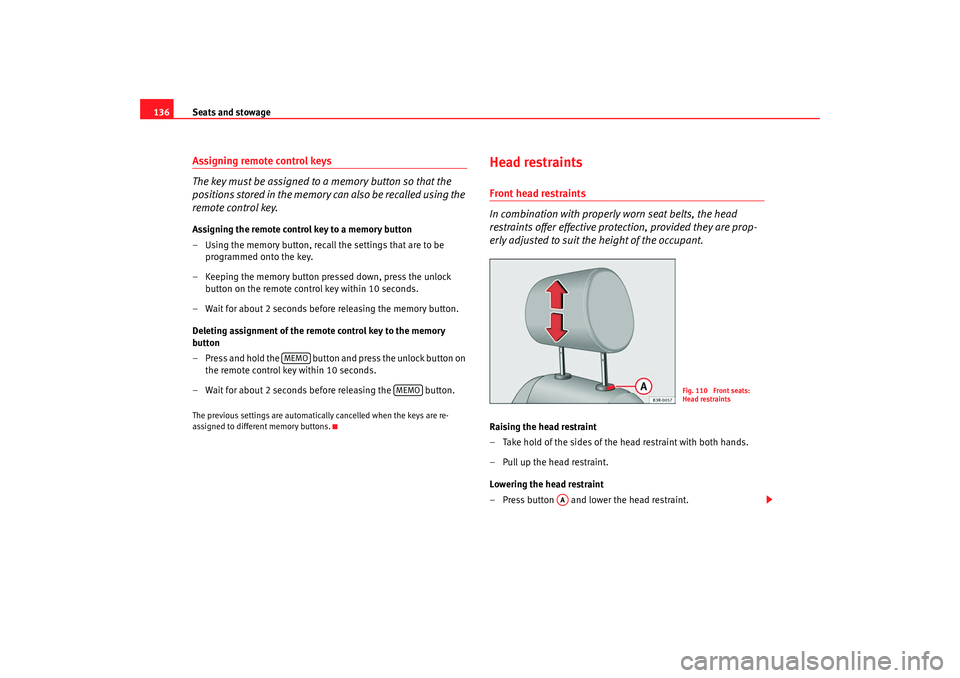
Head restraintsFront head restraints
In combination with properly worn seat belts, the head
restraints offer effective protection, provided they are prop-
erly adjusted to suit the height of the occupant.Raising the head restraint
– Take hold of the sides of the head restraint with both hands.
–Pull up the head restraint.
Lowering the head restraint
– Press button and lower the head restraint.
MEMO
MEMO
Fig. 110 Front seats:
Head restraints
AA
Exeo_EN.book Seite 136 Freitag, 17. Oktober 2008 11:24 11
Page 297 of 303

Index295
Luggage compartment . . . . . . . . . . . . . . . . 122
Rear . . . . . . . . . . . . . . . . . . . . . . . . . . . . . . . . 122
Interior monitoring . . . . . . . . . . . . . . . . . . . . . . . 105
Intermittent wipe . . . . . . . . . . . . . . . . . . . . . . . . 125
ISOFIX . . . . . . . . . . . . . . . . . . . . . . . . . . . . . . . . . . 52
JJack . . . . . . . . . . . . . . . . . . . . . . . . . . . . . . 236, 241
Jump leads . . . . . . . . . . . . . . . . . . . . . . . . . . . . . 271
Jump-starting . . . . . . . . . . . . . . . . . . . . . . . . . . . 271KKey tab . . . . . . . . . . . . . . . . . . . . . . . . . . . . . . . . . 94
Keys . . . . . . . . . . . . . . . . . . . . . . . . . . . . . . . . . . . 93 Battery . . . . . . . . . . . . . . . . . . . . . . . . . . . . . . 95
Climate control settings . . . . . . . . . . . . . . . 160
Remote control key . . . . . . . . . . . . . . . . . . . 102
Settings for the driver's seat . . . . . . . . . . . . 136LLeather cleaning . . . . . . . . . . . . . . . . . . . . . . . . 204
Light sensor faulty . . . . . . . . . . . . . . . . . . . . . . . . 79
LightingInstruments . . . . . . . . . . . . . . . . . . . . . 62, 116
Lights . . . . . . . . . . . . . . . . . . . . . . . . . . . . . . . . . 112 Automatic headlight control . . . . . . . . . . . . 112
Cornering light . . . . . . . . . . . . . . . . . . . . . . . 118
Dipped headlights faulty . . . . . . . . . . . . . . . . 81
Dynamic headlight range control . . . . . . . . 117 Headlight flasher . . . . . . . . . . . . . . . . . . . . . 120
Parking light . . . . . . . . . . . . . . . . . . . . . . . . . 120
Rear lights faulty . . . . . . . . . . . . . . . . . . . . . . 81
Self-directing headlights . . . . . . . . . . . . . . 118
Switching on and off . . . . . . . . . . . . . . . . . . 112
Xenon lights . . . . . . . . . . . . . . . . . . . . . . . . . 117
Liquid coolant Anti-freeze . . . . . . . . . . . . . . . . . . . . . . . . . . 217
Checking the level . . . . . . . . . . . . . . . . . . . . 218
Liquid coolant additive . . . . . . . . . . . . . . . . 217
Topping up . . . . . . . . . . . . . . . . . . . . . . . . . . 218
Load compartment in the boot See Luggage compartment . . . . . . . . . . . . . . 16
Locking the doors manually if the central locking
fails to work
Locking the doors manually if the central lock- ing fails to work . . . . . . . . . . . . . . . . . . . . . 99
Locks . . . . . . . . . . . . . . . . . . . . . . . . . . . . . . . . . 201
Long periods of non-use Battery . . . . . . . . . . . . . . . . . . . . . . . . . . . . . 223
Luggage compartment . . . . . . . . . . . . . . . . 16, 139 Extending . . . . . . . . . . . . . . . . . . . . . . . . . . . 141
Fastening rings . . . . . . . . . . . . . . . . . . . . . . 140
Light . . . . . . . . . . . . . . . . . . . . . . . . . . . . . . . 122
Loading . . . . . . . . . . . . . . . . . . . . . . . . . . . . 139
Ski bag . . . . . . . . . . . . . . . . . . . . . . . . . . . . . 143
Stretch net . . . . . . . . . . . . . . . . . . . . . . . . . . 140
See also Luggage compartment . . . . . . . . . . 16
Luggage rack See Roof carrier . . . . . . . . . . . . . . . . . . . . . . 144
MMain beam headlights . . . . . . . . . . . . . . . . . . . 119
Maintenance
airbags . . . . . . . . . . . . . . . . . . . . . . . . . . . . . . 30
Maintenance and cleaning . . . . . . . . . . . . . . . . 197
Manual gearbox . . . . . . . . . . . . . . . . . . . . . . . . . 173
Manual operation Closing the sunroof manually . . . . . . . . . . . 111
Fuel tank flap . . . . . . . . . . . . . . . . . . . . . . . . 209
Mirrors Anti-dazzle interior rear -view mirror with auto-
matic adjustment . . . . . . . . . . . . . . . . . . . 127
Automatic exterior mirror adjustment . . . . 134
Enabling stored settings . . . . . . . . . . . . . . . 135
Heated exterior mirrors . . . . . . . . . . . . . . . . 128
Make-up mirrors . . . . . . . . . . . . . . . . . . . . . 123
Storing settings . . . . . . . . . . . . . . . . . . . . . . 135
Mobile telephones and radiotelephones . . . . 207NNumber of seats . . . . . . . . . . . . . . . . . . . . . . . . . 18OObservations . . . . . . . . . . . . . . . . . . . . . . . . . . . 185
Octane number . . . . . . . . . . . . . . . . . . . . . . . . . 210
Oil consumption . . . . . . . . . . . . . . . . . . . . . . . . 215
Oil dipstick . . . . . . . . . . . . . . . . . . . . . . . . . . . . . 215
Oil properties . . . . . . . . . . . . . . . . . . . . . . . . . . . 215
Exeo_EN.book Seite 295 Freitag, 17. Oktober 2008 11:24 11
Page 298 of 303

Index
296On-board computer . . . . . . . . . . . . . . . . . . . . . . . 84
Override function
Sunroof override function . . . . . . . . . . . . . . 110
Overview Cockpit . . . . . . . . . . . . . . . . . . . . . . . . . . . . . . 57PPaintworkPolishing . . . . . . . . . . . . . . . . . . . . . . . . . . . 200
Parking . . . . . . . . . . . . . . . . . . . . . . . . . . . . . . . . 167
Parking aid . . . . . . . . . . . . . . . . . . . . . . . . . . . . . 167 SEAT parking system . . . . . . . . . . . . . . . . . . 168
SEAT parking system plus . . . . . . . . . . . . . 168
Pedals . . . . . . . . . . . . . . . . . . . . . . . . . . . . . . . . . 15
Petrol . . . . . . . . . . . . . . . . . . . . . . . . . . . . . . . . . 210 Driving abroad . . . . . . . . . . . . . . . . . . . . . . . 185
Petrol additives . . . . . . . . . . . . . . . . . . . . . . . . . 210
Physical principles of a frontal collision . . . . . . 19
Plastic key tab . . . . . . . . . . . . . . . . . . . . . . . . . . . 94
Plastic parts . . . . . . . . . . . . . . . . . . . . . . . . . . . . 200
Plastic parts cleaning . . . . . . . . . . . . . . . . . . . . 203
Power steering . . . . . . . . . . . . . . . . . . . . . . . . . . 179
Products for vehicle maintenance . . . . . . . . . . 197QQuartz clock . . . . . . . . . . . . . . . . . . . . . . . . . . . . . 61
RRadiator fan . . . . . . . . . . . . . . . . . . . . . . . . . . . . 219
Radio display . . . . . . . . . . . . . . . . . . . . . . . . . . . . 72
Rain sensor . . . . . . . . . . . . . . . . . . . . . . . . . . . . 125
Rain sensor faulty . . . . . . . . . . . . . . . . . . . . . . . . 79
Reading lights Front . . . . . . . . . . . . . . . . . . . . . . . . . . . . . . . 120
Rear . . . . . . . . . . . . . . . . . . . . . . . . . . . . . . . 122
Rear drink holder . . . . . . . . . . . . . . . . . . . . . . . . 146
Rear fog light . . . . . . . . . . . . . . . . . . . . . . . . . . . 114
Rear side window sun blind . . . . . . . . . . . . . . . 124
Rear view mirror With manual anti-dazzle setting . . . . . . . . 127
Rear view mirrors Anti-dazzle setting . . . . . . . . . . . . . . . . . . . 127
Interior rear view mirror . . . . . . . . . . . . . . . 127
Rear window heating Heating element wires . . . . . . . . . . . . . . . . 201
Rear window sun blind . . . . . . . . . . . . . . . . . . . 124
Refuelling . . . . . . . . . . . . . . . . . . . . . . . . . . . . . . 208
Registration light . . . . . . . . . . . . . . . . . . . . . . . . 270
Remote control key Indicator light . . . . . . . . . . . . . . . . . . . . . . . . 94
Locking and unlocking . . . . . . . . . . . . . . . . 102
Locking and unlocking the vehicle . . . . . . 102
Replacing the battery . . . . . . . . . . . . . . . . . . 94
Remote control keys . . . . . . . . . . . . . . . . . . . . . . 93 Re-synchronising . . . . . . . . . . . . . . . . . . . . 103
Removing and fitting the wheel . . . . . . . . . . . . 242 Repairs
airbags . . . . . . . . . . . . . . . . . . . . . . . . . . . . . . 30
Replacement of parts . . . . . . . . . . . . . . . . . . . . 206
Replacing rear bulbs . . . . . . . . . . . . . . . . . . . . . 262
Rev counter . . . . . . . . . . . . . . . . . . . . . . . . . . . . . 61
Reverse gear Manual gearbox . . . . . . . . . . . . . . . . . . . . . 173
Roof carrier . . . . . . . . . . . . . . . . . . . . . . . . . . . . 144 Attachment points . . . . . . . . . . . . . . . . . . . 144
Roof load . . . . . . . . . . . . . . . . . . . . . . . . . . . 144
Rubber seals . . . . . . . . . . . . . . . . . . . . . . . . . . . 201
Running in Engine . . . . . . . . . . . . . . . . . . . . . . . . . . . . . 181
SSAFE . . . . . . . . . . . . . . . . . . . . . . . . . . . . . . . . . . . 95
Safe driving . . . . . . . . . . . . . . . . . . . . . . . . . . . . . . 7Aspects to take into account . . . . . . . . . . . . . 8
Before setting off . . . . . . . . . . . . . . . . . . . . . . 8
Driving safety . . . . . . . . . . . . . . . . . . . . . . . . . 8
Safety . . . . . . . . . . . . . . . . . . . . . . . . . . . . . . . . . . . 9
Safety equipment . . . . . . . . . . . . . . . . . . . . . . . . . 7
Safety instructions Engine compartment . . . . . . . . . . . . . . . . . 213
Safety notes Airbags . . . . . . . . . . . . . . . . . . . . . . . . . . . . . . 30
Belt tension devices . . . . . . . . . . . . . . . . . . . 27
Curtain airbags . . . . . . . . . . . . . . . . . . . . . . . 42
Disabling front passenger airbag . . . . . . . . 45
frontal airbags . . . . . . . . . . . . . . . . . . . . . . . . 35
Exeo_EN.book Seite 296 Freitag, 17. Oktober 2008 11:24 11