steering Seat Exeo 2008 User Guide
[x] Cancel search | Manufacturer: SEAT, Model Year: 2008, Model line: Exeo, Model: Seat Exeo 2008Pages: 303, PDF Size: 10.02 MB
Page 39 of 303
Airbag system37
Safety First
Operating instructions
Practical tips
Te c h n i c a l D a t a
If the front airbag deploys, the knee airbag also deploys in frontal collisions
above a certain severity.
When the system is deployed, the airbag starts to fill with a propellant gas,
and inflates between the lower part of the instrument panel and the driver
⇒
page 36, fig. 22 .
Although they are not a soft pillow, they can “cushion” the impact and in this
way they can help to reduce the risk of injury to the lower extremities.
All this takes place instantaneously, so fast that many people don't even
realize that the airbags have deployed. The airbags also inflate with a great
deal of force and it is important for occupant safety that nothing should be in
their way when they deploy.
Fully inflated airbags in combination with properly worn safety belts slow
down and limit the occupant's forward movement and help to reduce the
risk.
Important safety notes on the knee airbag system
Airbags are only supplemental restraints.Always wear safety belts correctly and ride in a proper seating position. There
is a lot that you and your passengers must know and do to help the safety
belts and airbags to provide supplemental protection.
WARNING
An inflating knee airbag can cause serious injury. Wearing safety belts
incorrectly and improper seating posi tions increase the risk of serious
personal injury and death whenever a vehicle is being used.•
The airbag system cannot protect you properly if you are seated too
close to any of the airbag locations. Wh en adjusting their seat positions, it is important that the driver keep
their upper bodies and knees at the
following minimum safe distances:
−25 cm between the chest and the steering wheel/instrument panel.
− 10 cm between the knees and the lowe r part of the instrument panel.
•
The risk of personal injury increases if you lean forward or to the side,
or if the seat is improperly positioned and you are not wearing your safety
belt. The risk increases even more should the airbag deploy.
•
Always make sure that the knee airb ag can inflate without interference.
Objects between yourself and the airbag can increase the risk of injury in
an accident by interfering with the way the airbag deploys or by being
pushed into you as the airbag deploys.
−No objects of any kind should be carried in the footwell area in front
of the driver’s seat. Bulky objects (shopping bags, for example) can
hamper or prevent proper deployment of the airbag. Small objects can
be thrown through the vehicle if the airbag deploys and injure you or
your passengers.
•
Make sure there are no cracks, deep scratches or other damage in the
area of the instrument panel where the knee airbag is located.
•
If children are incorrectly seated, their risk of injury increases in the
case of an accident ⇒page 46.WARNING (continued)
Exeo_EN.book Seite 37 Freitag, 17. Oktober 2008 11:24 11
Page 59 of 303
Cockpit57
Safety First
Operating instructions
Practical tips
Te c h n i c a l D a t a
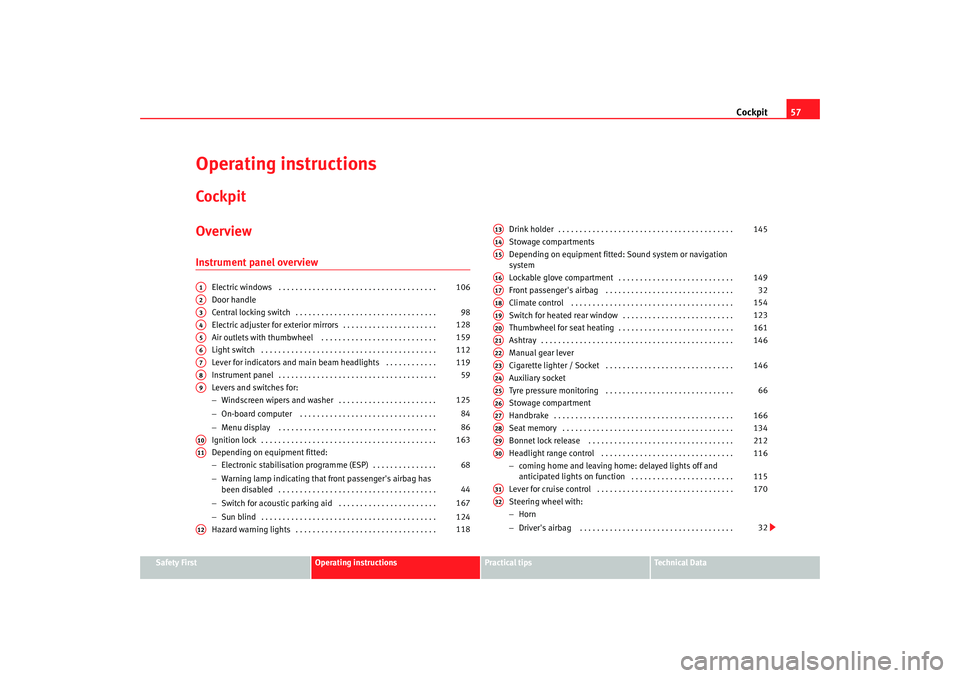
Operating instructionsCockpitOverviewInstrument panel overview
Electric windows . . . . . . . . . . . . . . . . . . . . . . . . . . . . . . . . . . . . .
Door handle
Central locking switch . . . . . . . . . . . . . . . . . . . . . . . . . . . . . . . . .
Electric adjuster for exterior mirrors . . . . . . . . . . . . . . . . . . . . . .
Air outlets with thumbwheel . . . . . . . . . . . . . . . . . . . . . . . . . . .
Light switch . . . . . . . . . . . . . . . . . . . . . . . . . . . . . . . . . . . . . . . . .
Lever for indicators and main beam headlights . . . . . . . . . . . .
Instrument panel . . . . . . . . . . . . . . . . . . . . . . . . . . . . . . . . . . . . .
Levers and switches for:
−Windscreen wipers and washer . . . . . . . . . . . . . . . . . . . . . . .
− On-board computer . . . . . . . . . . . . . . . . . . . . . . . . . . . . . . . .
− Menu display . . . . . . . . . . . . . . . . . . . . . . . . . . . . . . . . . . . . .
Ignition lock . . . . . . . . . . . . . . . . . . . . . . . . . . . . . . . . . . . . . . . . .
Depending on equipment fitted:
− Electronic stabilisation programme (ESP) . . . . . . . . . . . . . . .
− Warning lamp indicating that front passenger's airbag has
been disabled . . . . . . . . . . . . . . . . . . . . . . . . . . . . . . . . . . . . .
− Switch for acoustic parking aid . . . . . . . . . . . . . . . . . . . . . . .
− Sun blind . . . . . . . . . . . . . . . . . . . . . . . . . . . . . . . . . . . . . . . . .
Hazard warning lights . . . . . . . . . . . . . . . . . . . . . . . . . . . . . . . . . Drink holder . . . . . . . . . . . . . . . . . . . . . . . . . . . . . . . . . . . . . . . . .
Stowage compartments
Depending on equipment fitted: Sound system or navigation
system
Lockable glove compartment . . . . . . . . . . . . . . . . . . . . . . . . . . .
Front passenger's airbag . . . . . . . . . . . . . . . . . . . . . . . . . . . . . .
Climate control . . . . . . . . . . . . . . . . . . . . . . . . . . . . . . . . . . . . . .
Switch for heated rear window . . . . . . . . . . . . . . . . . . . . . . . . . .
Thumbwheel for seat heating . . . . . . . . . . . . . . . . . . . . . . . . . . .
Ashtray . . . . . . . . . . . . . . . . . . . . . . . . . . . . . . . . . . . . . . . . . . . . .
Manual gear lever
Cigarette lighter / Socket . . . . . . . . . . . . . . . . . . . . . . . . . . . . . .
Auxiliary socket
Tyre pressure monitoring . . . . . . . . . . . . . . . . . . . . . . . . . . . . . .
Stowage compartment
Handbrake . . . . . . . . . . . . . . . . . . . . . . . . . . . . . . . . . . . . . . . . . .
Seat memory . . . . . . . . . . . . . . . . . . . . . . . . . . . . . . . . . . . . . . . .
Bonnet lock release . . . . . . . . . . . . . . . . . . . . . . . . . . . . . . . . . .
Headlight range control . . . . . . . . . . . . . . . . . . . . . . . . . . . . . . .
−
coming home and leaving home : delayed lights off and
anticipated lights on function . . . . . . . . . . . . . . . . . . . . . . . .
Lever for cruise control . . . . . . . . . . . . . . . . . . . . . . . . . . . . . . . .
Steering wheel with:
− Horn
− Driver's airbag . . . . . . . . . . . . . . . . . . . . . . . . . . . . . . . . . . . .
A1
106
A2A3
98
A4
128
A5
159
A6
112
A7
119
A8
59
A9
125
84
86
A10
163
A11
68
44
167
124
A12
118
A13
145
A14A15A16
149
A17
32
A18
154
A19
123
A20
161
A21
146
A22A23
146
A24A25
66
A26A27
166
A28
134
A29
212
A30
116
115
A31
170
A32
32
Exeo_EN.book Seite 57 Freitag, 17. Oktober 2008 11:24 11
Page 60 of 303

Cockpit
58
− Controls for radio and telephone*
Adjustable steering column . . . . . . . . . . . . . . . . . . . . . . . . . . . .
Vehicle wallet compartment / knee airbag* . . . . . . . . . . . . . . . Note
•
Separate operating instructions are enclosed if the vehicle is equipped
with a factory-fitted radio or navigation system.
•
The arrangement of switches and controls on right-hand drive models*
may be slightly different from the layout shown in ⇒page 56, fig. 36 .
However, the symbols used to identify the controls are the same.
A33
162
A34
32
Exeo_EN.book Seite 58 Freitag, 17. Oktober 2008 11:24 11
Page 71 of 303

Cockpit69
Safety First
Operating instructions
Practical tips
Te c h n i c a l D a t a
•
It will start flashing to indicate that ESP is counteracting an unstable
driving condition.
•
It lights up when the ignition is switched on for approx. 2 seconds while
the function is checked.
•
The warning lamp will light up if there is a malfunction in the ESP.
•
It will light up after the battery has been disconnected.
•
The warning lamp will light up if the ESP is switched off.
•
It will also come on if a fault should occur in the ABS because the ESP
operates in conjunction with the ABS.
If the ESP warning lamp lights up and stays on after the engine is started, this
may mean that the control system has temporarily switched off the ESP. In this
case the ESP can be reactivated by switching the ignition off and then on
again. After this the warning lamp should go out to show that the system is
fully functional.
The warning lamp will light up when the ignition is switched on if the battery
has been disconnected and then reconnected. It should go out again after
driving a short distance if the steering wheel is turned slightly.
For further information on the ESP, see ⇒ page 177.
Alternator
The warning lamp signals a fault in the alternator or in the
vehicle's electrical system.The warning lamp
lights up when the ignition is switched on. It should
switch off after the engine has started.
If the warning lamp lights up when you are driving, you can normally
continue as far as the nearest specialist garage. However, given that the
battery will be running down, any electr ical consumption not absolutely vital
should be switched off.
Caution
If the coolant warning lamp
in the instrument panel lig h t s u p a s w e l l a s t h e
alternator waning lamp while driving ⇒page 77, stop the vehicle immedi-
ately and switch off the engine. In this case the coolant pump is no longer
being driven, and there is a risk of engine damage.
Main beam headlights
The indicator lamp
lights up when the main beams are on or when the
headlight flasher is operated.
For further information on the main beam headlights, see ⇒page 119.
Engine management
This warning lamp monitors the engine management system
for petrol engines.The warning lamp
(Electronic Power Control) li ghts up while the function
is being checked.
Note
If the warning lamp lights up while the vehicle is moving, this indicates a fault
in the engine management system. The vehicle must be taken immediately to
a specialist garage to have the engine serviced.
Exeo_EN.book Seite 69 Freitag, 17. Oktober 2008 11:24 11
Page 92 of 303

Steering wheel controls
90Steering wheel controlsThe multi-function steering wheelIntroduction
You can use the multi-function steering wheel to quickly and
easily operate selected functi ons of the radio, CD, TV* and
telephone*.
The functions are operated by pressing or scrolling the controls to on
the multi-function steering wheel ⇒ fig. 63:•
Press the button repeatedly to switch between modes, which
are then displayed in the driver information system ⇒fig. 64 .
•
Scroll and press the left thumbwheel to select a function from one of
the menus.
•
The speech control system* for the on-board phone system is enabled by
pressing the talk button . Pressing th e talk button again disables speed
control*.
•
Scroll the right thumbwheel up/down to raise/lower the volume as
desired.
Fig. 63 Controls on the
multi-function steering
wheel
Fig. 64 Driver informa-
tion system
AA
AD
MODE
AB
AA
AC
AD
Exeo_EN.book Seite 90 Freitag, 17. Oktober 2008 11:24 11
Page 93 of 303
Steering wheel controls91
Safety First
Operating instructions
Practical tips
Te c h n i c a l D a t a
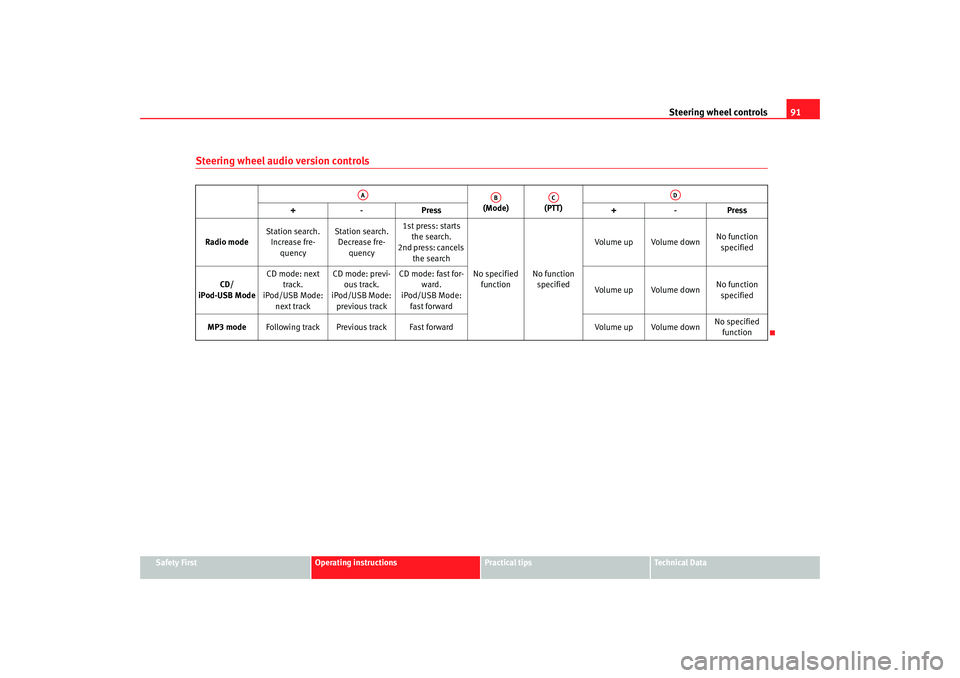
Steering wheel audio version controls
(Mode) (PTT)
+-P re ss +-Pre ss
Radio mode Station search.
Increase fre- quency Station search.
Decrease fre- quency 1st press: starts
the search.
2nd press: cancels
the search
No specified function No function
specified Volume up Volume down
No function
specified
CD/
iPod-USB Mode CD mode: next
track.
iPod/USB Mode:
next track CD mode: previ-
ous track.
iPod/USB Mode:
previous track CD mode: fast for-
ward.
iPod/USB Mode:
fast forward Volume up Volume down
No function
specified
MP3 mode Following track Previous track Fast forward Volume up Volume downNo specified
function
AA
AB
AC
AD
Exeo_EN.book Seite 91 Freitag, 17. Oktober 2008 11:24 11
Page 94 of 303
Steering wheel controls
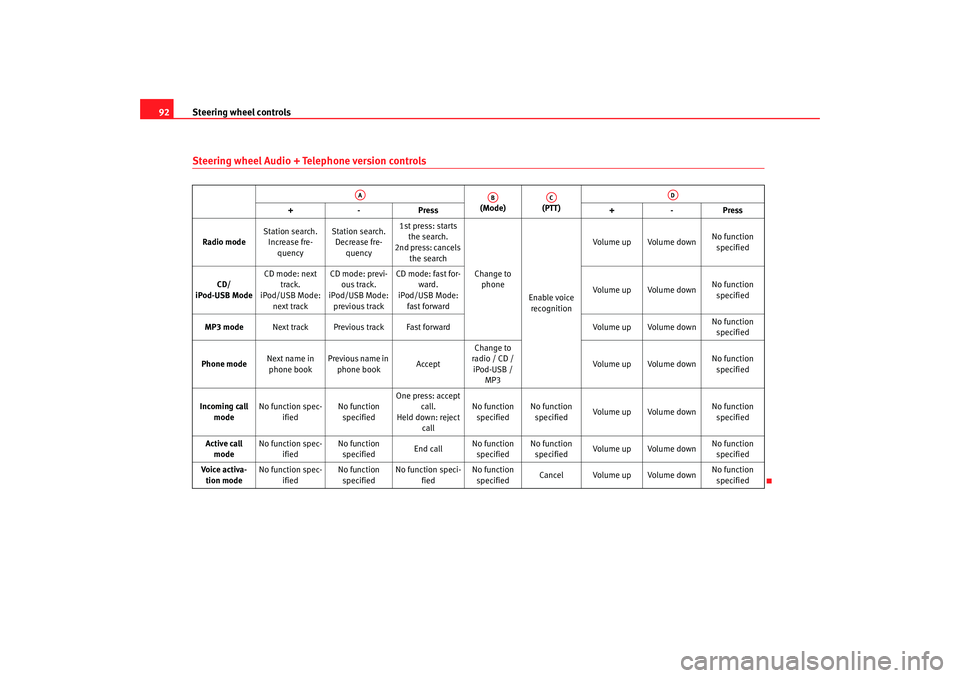
92Steering wheel Audio + Telephone version controls
(Mode) (PTT)
+-P re ss +-Pre ss
Radio mode Station search.
Increase fre- quency Station search.
Decrease fre- quency 1st press: starts
the search.
2nd press: cancels
the search
Change to phone
Enable voice recognition Volume up Volume down
No function
specified
CD/
iPod-USB Mode CD mode: next
track.
iPod/USB Mode:
next track CD mode: previ-
ous track.
iPod/USB Mode:
previous track CD mode: fast for-
ward.
iPod/USB Mode:
fast forward Volume up Volume down
No function
specified
MP3 mode Next track Previous track Fast forward Volume up Volume downNo function
specified
Phone mode Next name in
phone book Previous name in
phone book AcceptChange to
radio / CD /
iPod-USB / MP3 Volume up Volume down
No function
specified
Incoming call mode No function spec-
ified No function
specified One press: accept
call.
Held down: reject call No function
specified No function
specified Volume up Volume down
No function
specified
Active call mode No function spec-
ified No function
specified End callNo function
specified No function
specified Volume up Volume down No function
specified
Voice activa- tion mode No function spec-
ified No function
specified No function speci-
fied No function
specified Cancel Volume up Volume down
No function
specified
AA
AB
AC
AD
Exeo_EN.book Seite 92 Freitag, 17. Oktober 2008 11:24 11
Page 96 of 303

Unlocking and locking
94Plastic key tab
Spare keys cannot be issued without the key number on the plastic key tab.
Therefore:•
Always keep the key tab in a safe place.
•
Never leave the key tab in the vehicle.
•
If you sell the vehicle, please give the plastic key tab to the new owner.
Replacing a key
If you lose a key, please contact the Technical Service. Have the remote
control coding for that key disabled. You should therefore bring the plastic
key tab and all available keys with you. It is also important to notify your
insurance company if a key or the plastic key tab has been lost.
WARNING
•
Always take the key with you when leaving the vehicle, even if you only
intend to be gone for a short time. This is particularly important if there are
children in the car, as they might otherwise be able to start the engine or
use power-operated equipment (e.g. the electric windows), which could
lead to injuries.
•
Wait for the vehicle to come to a standstill before removing the ignition
key from the lock! Otherwise, the steering lock could engage suddenly,
causing an accident.
Indicator light on the remote control key
The condition of the battery in the remote control key is moni-
tored by the indicator light.Condition of the key battery
The indicator light ⇒fig. 67 (arrow) flashes when one of the buttons is
pressed. If the indicator light does not light up or flash, this means that the
battery is exhausted and must be replaced.
Replacing the batteries ⇒ page 95.
Fig. 67 LED on the remote
control key
Exeo_EN.book Seite 94 Freitag, 17. Oktober 2008 11:24 11
Page 120 of 303
Lights and visibility
118
– Press the knob in again to prevent the setting from being changed unintentionally.This function enables or disables the switch for daytime running lights When
the function is enabled, the daytime ru nning lights are switched on automat-
ically when the ignition is switched on.
Note
Please observe any relevant legal requirements which may apply in your
country.Self-directing headlights*
When driving around bends, the headlights will light the
most important areas of the road.
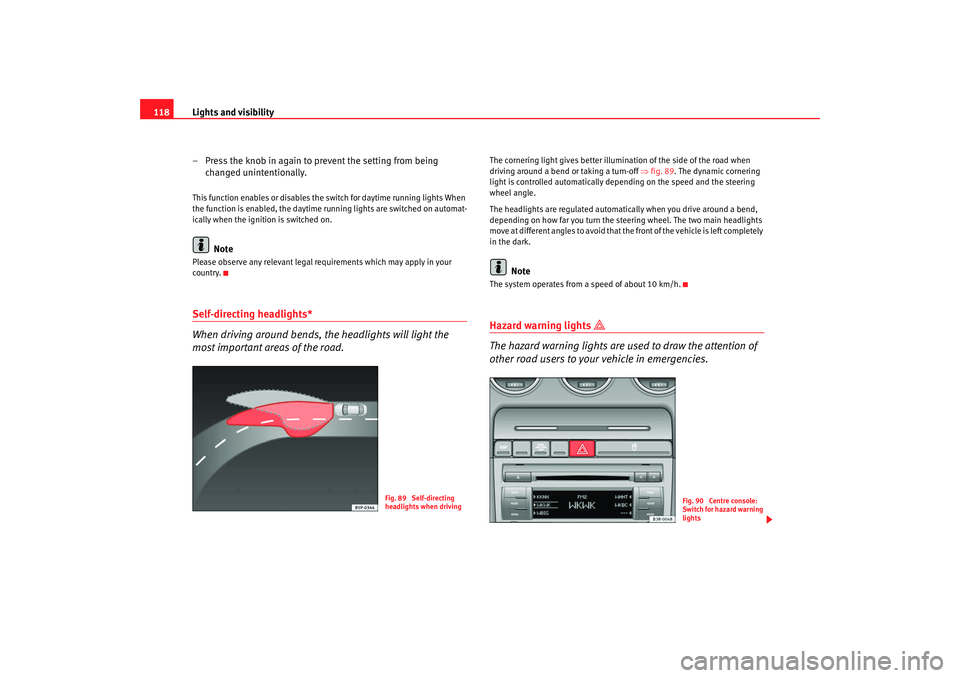
The cornering light gives better illumination of the side of the road when
driving around a bend or taking a turn-off ⇒fig. 89 . The dynamic cornering
light is controlled automatically depending on the speed and the steering
wheel angle.
The headlights are regulated automatically when you drive around a bend,
depending on how far you turn the steering wheel. The two main headlights
move at different angles to avoid that the front of the vehicle is left completely
in the dark.
Note
The system operates from a speed of about 10 km/h.Hazard warning lights
The hazard warning lights are used to draw the attention of
other road users to your vehicle in emergencies.
Fig. 89 Self-directing
headlights when driving
Fig. 90 Centre console:
Switch for hazard warning
lights
Exeo_EN.book Seite 118 Freitag, 17. Oktober 2008 11:24 11
Page 122 of 303
Lights and visibility
120
Main beam headlights
– Press the lever forward to switch on the main beams.
– Pull the lever back towards you to switch the main beam head-lights off again.
Headlight flasher
– Pull the lever towards the steering wheel to operate the flasher.
Parking light
– Switch the ignition off.
– Move the lever up or down to turn on the right or left-hand parking lights respectively.Notes on these functions•
The indicators only work when the ignition is switched on. The indicator
lamp or flashes in the instrument panel when the turns signals
⇒ page 65 are working.
•
The indicators are cancelled automatically when the steering wheel is
returned to the straight-ahead position.
•
The main beam headlights can only be switched on if the dipped beam
headlights are already on. The main beam headlight indicator lamp
then
comes on in the instrument panel.
•
The headlight flasher comes on for as long as you pull the lever, even if no
other lights are switched on. The main beam headlight indicator lamp
then comes on in the instrument panel.
•
When the parking lights are switched on, the headlight and the rear light
on one side of the car light up with re duced intensity. The parking lights will
only work with the ignition off.
Caution
Never use the main beam headlights or the headlight flasher if this would
dazzle oncoming traffic.Interior lightsFront interior lights and glove compartment light
The front interior light also incorporates the reading lights for
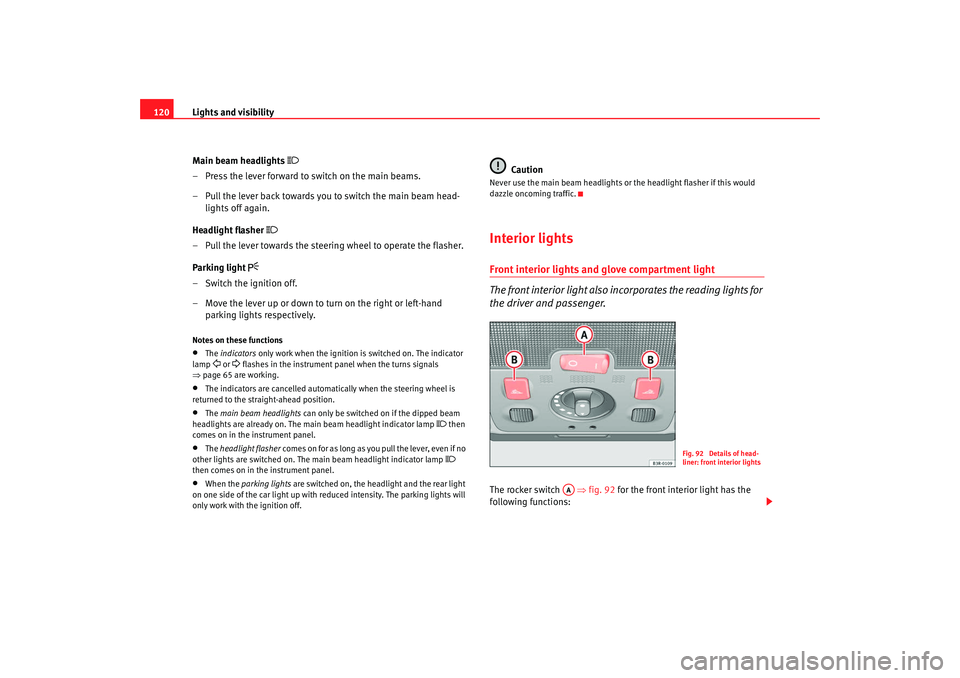
the driver and passenger.The rocker switch ⇒fig. 92 for the front interior light has the
following functions:
Fig. 92 Details of head-
liner: front interior lights
AA
Exeo_EN.book Seite 120 Freitag, 17. Oktober 2008 11:24 11