phone Seat Exeo 2008 Owner's manual
[x] Cancel search | Manufacturer: SEAT, Model Year: 2008, Model line: Exeo, Model: Seat Exeo 2008Pages: 303, PDF Size: 10.02 MB
Page 6 of 303
Contents
4Trailer towing
. . . . . . . . . . . . . . . . . . . . . . . . . . . . .
Trailer towing . . . . . . . . . . . . . . . . . . . . . . . . . . . .
Removable towing bracket . . . . . . . . . . . . . . . . .
Your vehicle maintenance and cleaning
. . . .
General notes . . . . . . . . . . . . . . . . . . . . . . . . . . .
Vehicle exterior maintenance . . . . . . . . . . . . . . .
Vehicle interior maintenance . . . . . . . . . . . . . . .
Accessories, parts replacement and
modifications
. . . . . . . . . . . . . . . . . . . . . . . . . . . .
Accessories and spare parts . . . . . . . . . . . . . . . .
Technical modifications . . . . . . . . . . . . . . . . . . .
Mobile telephones and radiotelephones . . . . .
Athermic windscreen* . . . . . . . . . . . . . . . . . . . . .
Checking and refilling levels
. . . . . . . . . . . . . .
Refuelling . . . . . . . . . . . . . . . . . . . . . . . . . . . . . . .
Releasing the tank flap manually . . . . . . . . . . . .
Petrol . . . . . . . . . . . . . . . . . . . . . . . . . . . . . . . . . .
Diesel . . . . . . . . . . . . . . . . . . . . . . . . . . . . . . . . . .
The bonnet . . . . . . . . . . . . . . . . . . . . . . . . . . . . . .
Engine oil . . . . . . . . . . . . . . . . . . . . . . . . . . . . . . .
Cooling system . . . . . . . . . . . . . . . . . . . . . . . . . .
Washer fluid and windscreen wiper blades . . . .
Brake fluid . . . . . . . . . . . . . . . . . . . . . . . . . . . . . .
Battery . . . . . . . . . . . . . . . . . . . . . . . . . . . . . . . . .
Wheels and tyres
. . . . . . . . . . . . . . . . . . . . . . . . .
Wheels . . . . . . . . . . . . . . . . . . . . . . . . . . . . . . . . .
If and when
. . . . . . . . . . . . . . . . . . . . . . . . . . . . . .
Tools, tyre repair kit and spare wheel . . . . . . . .
Changing a wheel . . . . . . . . . . . . . . . . . . . . . . . .
Tyre repair* (Tyre-Mobility-System) . . . . . . . . . .
Fuses . . . . . . . . . . . . . . . . . . . . . . . . . . . . . . . . . .
Bulbs . . . . . . . . . . . . . . . . . . . . . . . . . . . . . . . . . .
Changing bulbs Halogen headlights . . . . . . . . .
Changing bulbs. Bi-Xenon AFS headlights . . . .
Changing rear bulbs (in side panel) . . . . . . . . . .
Changing rear light bulbs (i n boot lid) . . . . . . . . Side indicators . . . . . . . . . . . . . . . . . . . . . . . . . .
Luggage compartment lights . . . . . . . . . . . . . . .
Registration light . . . . . . . . . . . . . . . . . . . . . . . . .
Sunroof light . . . . . . . . . . . . . . . . . . . . . . . . . . . .
Jump-starting . . . . . . . . . . . . . . . . . . . . . . . . . . . .
Towing and tow-starting . . . . . . . . . . . . . . . . . . .
Te c h n i c a l D a t a
. . . . . . . . . . . . . . . . . . . . . . .
General notes on the technical data
. . . . . . .
Outstanding information . . . . . . . . . . . . . . . . . .
Data on fuel consumption . . . . . . . . . . . . . . . . .
Towing a trailer . . . . . . . . . . . . . . . . . . . . . . . . . .
Wheels . . . . . . . . . . . . . . . . . . . . . . . . . . . . . . . . .
Techn ical Data
. . . . . . . . . . . . . . . . . . . . . . . . . . . .
Checking fluid levels . . . . . . . . . . . . . . . . . . . . . .
Petrol engine 1.6l 75 kW (102 HP) . . . . . . . . . . .
Petrol engine 1.8l 110 kW (150 HP) . . . . . . . . .
Petrol engine 2.0l 147 kW (200 HP) . . . . . . . . .
Diesel engine 2.0l 105 kW (143 hp) . . . . . . . . .
Diesel engine 2.0l 125 kW (170 hp) . . . . . . . . .
Dimensions and capacities . . . . . . . . . . . . . . . .
Index
. . . . . . . . . . . . . . . . . . . . . . . . . . . . . . . . . .
186
186
189
197
197
198
203
206
206
206
207
207
208
208
209
210
210
212
214
217
220
222
223
227
227
236
236
238
243
247
249
249
256
262
266 268
269
270
271
271
274
277
277
277
279
280
280
282
282
283
284
285
287
288
290
291
Exeo_EN.book Seite 4 Freitag, 17. Oktober 2008 11:24 11
Page 10 of 303
Safe driving
8However, they can only be effective if you and your passengers sit in the
correct position and adjust and u se the safety equipment properly.
Therefore, this chapter explains why th ese safety features are so important,
how they can protect you, what you n eed to remember when using them and
how you and your passengers can gain the most benefit from them. There are
also a number of important safety warnings that you and your passengers
should always observe in order to minimise the risk of injury.
Safety is everyone's responsibility!Before setting off
The driver is responsible for th e safety of the passengers and
the safe operation of the vehicle at all times.For your own safety and the safety of your passengers, always note
the following points before setting off:
– Make sure that all lights and indicators are working properly.
– Check tyre pressure.
– Make sure that all windows are clean and give good visibility to
the outside.
– Secure all luggage and other items carefully ⇒page 16.
– Make sure that no objects can interfere with the pedals.
– Adjust the front seat, head restraint and mirrors correctly.
– Make sure that the head restraints for all passengers are adjusted to the correct position. – Make sure that children are protected with suitable safety seats
and properly worn seat belts ⇒page 46.
– Sit in a correct position. Make sure that your passengers are seated correctly ⇒page 10.
– Fasten your seat belt correctly. Make sure that your passengers do the same ⇒page 18.
What affects safe driving?
Safety on the road is directly related to how you drive, and can
also be affected by the passengers in the vehicle.The driver is responsible for the safety of the vehicle and all its occu-
pants. If your ability to drive is impaired in any way, you endanger
yourself and other road users ⇒. Therefore:
– Do not let yourself be distracted by passengers or by using a mobile phone, etc.
– Never drive when your driving ab ility is impaired (by medication,
alcohol, drugs, etc.).
– Obey all traffic regulations and speed limits and always maintain a safe distance to the vehicle in front.
– Always adjust your speed to suit the road, traffic and weather conditions.
– Take frequent breaks on long trips. Do not drive for more than two hours without a stop.
Exeo_EN.book Seite 8 Freitag, 17. Oktober 2008 11:24 11
Page 11 of 303
Safe driving9
Safety First
Operating instructions
Practical tips
Te c h n i c a l D a t a
– If possible, avoid driving when you are tired or stressed.
WARNING
When driving safety is impaired during a trip, the risk of injury and acci-
dents increases.What affects driving safety?
Driving safety is largely determined by your driving style and
the personal behaviour of all occupants.As a driver, you are responsible for yourself and your passengers.
When your concentration or driving safety is affected by any circum-
stance, you endanger yourself as well as others on the road ⇒,
for this reason:
– Do not allow yourself to be distracted from the traffic around you, e.g. by passengers or telephone conversations.
– Never drive when your driving ability is impaired (e.g. by medica- tion, alcohol, drugs).
– Observe traffic laws and speed limits.
– Always reduce your speed as appropriate for road, traffic and weather conditions.
– When travelling long distances, take breaks regularly - at least every two hours.
– If possible, avoid driving when you are tired or are in tension.
WARNING
When driving safety is impaired during a trip, the risk of injury and acci-
dents increases.
Exeo_EN.book Seite 9 Freitag, 17. Oktober 2008 11:24 11
Page 32 of 303

Airbag system
30Monitoring of airbag and belt tension device system
Both the airbag and belt tension device systems operation is constantly
monitored electronically. Each time th e ignition is switched on, the warning
lamp
lights for several seconds and the display in the instrument panel*
shows AIRBAG / TENSIONER .
The system must be checked when the warning lamp
:
•
does not light up when the ignition is switched on,
•
after the ignition is switched on, it turns off after 4 seconds,
•
it turns off and then lights up again after the ignition is switched on,
•
lights up or flashes while the car is moving.
In the event of a malfunction, the warning lamp remains on continuously. In
addition, depending on the malfunctio n, a fault message appears in the
display of the combi-instrument for approx. 10 seconds and a short acoustic
signal is given. In this event, you should have a qualified workshop check the
system immediately.
If any of the airbags are de-activated by the Authorised Service Centre, the
indicator lights for several seconds more after the veri fication and will turn off
if there is no fault.
WARNING
•
If there is a malfunction, the air bag and belt tension device system
cannot properly perform its protective function.
•
If a malfunction occured, have the system checked immediately by a
qualified workshop. Otherwise, in the event of an accident, the airbag
system and belt tension devices may no t be triggered, or may not be trig-
gered correctly.
Repairs, maintenance and disposal of the airbagsThe parts of the airbag system are installed in various places in your vehicle.
If you work on the airbag system or remove and fit parts of the system when
performing other repair work, parts of the airbag system may be damaged.
The consequence may be that, in the event of an accident, the airbag inflates
incorrectly or does not inflate at all.
The relevant safety requirements must be observed when the vehicle or
components of the airbag are scrapped . The specialist workshops and the
Vehicle disposal centres are familiar with these requirements.
WARNING
•
If repairs are not carried out by a professional, or if the airbags are used
incorrectly, the risk of severe or fatal injuries is increased. The airbags may
fail to inflate, or could inflate in the wrong circumstances.
•
Do not cover or stick anything on the steering wheel hub or the soft
plastic surface of the airbag unit on the passenger side of the dashboard,
and do not obstruct or modify them in any way.
•
It is important not to attach any objects such as cup holders or tele-
phone mountings to the surfaces covering the airbag units.
•
To clean the steering wheel or dash panel, you may use only a dry or a
water-moistened cloth. Never clean the dash panel and the airbag module
surface with cleansers containing solvents. Solvents cause the surface to
become porous. If the airbag trigger ed, disintegrating plastic parts could
cause substantial injuries.
•
Never attempt to repair, adjust, remove or install parts of the airbag
system.
•
Any work on the airbag system or re moval and installation of the airbag
components for other repairs (such as repairs to the steering wheel) should
be performed only by a qualified workshop. Qualified workshops have the
necessary tools, repair information and qualified personnel.
Exeo_EN.book Seite 30 Freitag, 17. Oktober 2008 11:24 11
Page 37 of 303
Airbag system35
Safety First
Operating instructions
Practical tips
Te c h n i c a l D a t a
Safety notes on the frontal airbag system
If you use airbags correctly, they can considerably reduce the
risk of injury in many kinds of accident.
WARNING
•
It is important for the driver and front passenger to keep a distance of
at least 25 cm from the steering wheel or dash panel. If the minimum
distance is not observed then the airbags do not correctly protect the
vehicle occupants; risk of fatal injuries! In addition, the front seats and
head restraints must always be positioned correctly for the height of the
occupant.
•
If you are not wearing a seat belt, if you lean forward or to the side while
travelling or assume an incorrect sitting position, there is a substantially
increased risk of injury. This increased risk of injury will be further
increased if you are struck by an inflating airbag.
•
Never let a child travel on the front seat without an appropriate restraint
system. If the airbag is triggered in an accident, children can sustain
serious or fatal injuries from the airbag as it inflates ⇒page 46, “Child
safety”.
•
The deployment space between the front passengers and the airbags
must not in any case be occupied by other passenger, pets and objects.
•
The airbags provide protection for just one accident; replace them once
they have deployed.
•
It is also important not to attach any objects such as cup holders or
telephone mountings to the surfaces covering the airbag units.
•
Do not attempt to modify components of the airbag system in any
way.
Knee airbagDescription of the knee airbag
The airbag system provides additional protection to the front
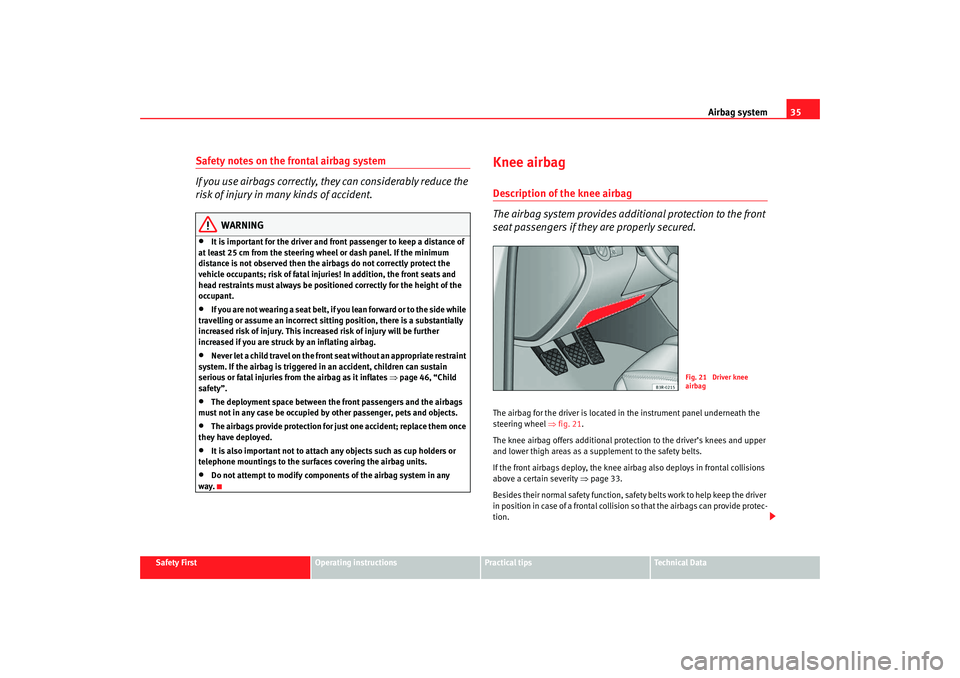
seat passengers if they are properly secured.The airbag for the driver is located in the instrument panel underneath the
steering wheel ⇒ fig. 21.
The knee airbag offers additional protection to the driver’s knees and upper
and lower thigh areas as a supplement to the safety belts.
If the front airbags deploy, the knee airbag also deploys in frontal collisions
above a certain severity ⇒page 33.
Besides their normal safety function, safety belts work to help keep the driver
in position in case of a frontal collision so that the airbags can provide protec-
tion.
Fig. 21 Driver knee
airbag
Exeo_EN.book Seite 35 Freitag, 17. Oktober 2008 11:24 11
Page 60 of 303

Cockpit
58
− Controls for radio and telephone*
Adjustable steering column . . . . . . . . . . . . . . . . . . . . . . . . . . . .
Vehicle wallet compartment / knee airbag* . . . . . . . . . . . . . . . Note
•
Separate operating instructions are enclosed if the vehicle is equipped
with a factory-fitted radio or navigation system.
•
The arrangement of switches and controls on right-hand drive models*
may be slightly different from the layout shown in ⇒page 56, fig. 36 .
However, the symbols used to identify the controls are the same.
A33
162
A34
32
Exeo_EN.book Seite 58 Freitag, 17. Oktober 2008 11:24 11
Page 92 of 303

Steering wheel controls
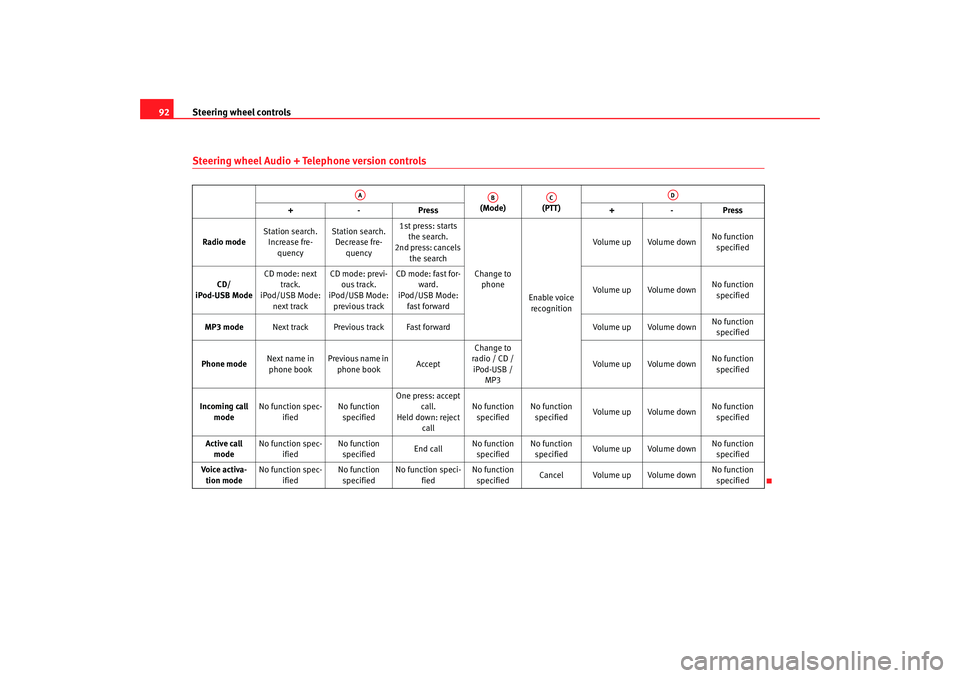
90Steering wheel controlsThe multi-function steering wheelIntroduction
You can use the multi-function steering wheel to quickly and
easily operate selected functi ons of the radio, CD, TV* and
telephone*.
The functions are operated by pressing or scrolling the controls to on
the multi-function steering wheel ⇒ fig. 63:•
Press the button repeatedly to switch between modes, which
are then displayed in the driver information system ⇒fig. 64 .
•
Scroll and press the left thumbwheel to select a function from one of
the menus.
•
The speech control system* for the on-board phone system is enabled by
pressing the talk button . Pressing th e talk button again disables speed
control*.
•
Scroll the right thumbwheel up/down to raise/lower the volume as
desired.
Fig. 63 Controls on the
multi-function steering
wheel
Fig. 64 Driver informa-
tion system
AA
AD
MODE
AB
AA
AC
AD
Exeo_EN.book Seite 90 Freitag, 17. Oktober 2008 11:24 11
Page 94 of 303
Steering wheel controls
92Steering wheel Audio + Telephone version controls
(Mode) (PTT)
+-P re ss +-Pre ss
Radio mode Station search.
Increase fre- quency Station search.
Decrease fre- quency 1st press: starts
the search.
2nd press: cancels
the search
Change to phone
Enable voice recognition Volume up Volume down
No function
specified
CD/
iPod-USB Mode CD mode: next
track.
iPod/USB Mode:
next track CD mode: previ-
ous track.
iPod/USB Mode:
previous track CD mode: fast for-
ward.
iPod/USB Mode:
fast forward Volume up Volume down
No function
specified
MP3 mode Next track Previous track Fast forward Volume up Volume downNo function
specified
Phone mode Next name in
phone book Previous name in
phone book AcceptChange to
radio / CD /
iPod-USB / MP3 Volume up Volume down
No function
specified
Incoming call mode No function spec-
ified No function
specified One press: accept
call.
Held down: reject call No function
specified No function
specified Volume up Volume down
No function
specified
Active call mode No function spec-
ified No function
specified End callNo function
specified No function
specified Volume up Volume down No function
specified
Voice activa- tion mode No function spec-
ified No function
specified No function speci-
fied No function
specified Cancel Volume up Volume down
No function
specified
AA
AB
AC
AD
Exeo_EN.book Seite 92 Freitag, 17. Oktober 2008 11:24 11
Page 104 of 303

Unlocking and locking
102When the childproof lock is enabled, the inside door handle will not work and
the door can only be opened from the outside.Remote control keyDescription
The remote control key will lock and unlock the vehicle
without having to insert the key in the lock.The following functions are available:•
Locking and and unlocking the vehicle
•
Unlocking the tailgate
All the indicators will flash as confirmation when the vehicle is locked or
unlocked. Furthermore, the interior lights will automatically light up when the
vehicle is unlocked and go out when the vehicle is locked, provided that the
switches are in the courtesy light position.
The remote control transmitter and the battery are integrated into the handle
of the key. The receiver is in the interior of the vehicle. The maximum range
depends on different circumstances. The range is reduced when the battery
starts to lose power.
The remote control incorporates a foldaway key that can be used to manually
lock or unlock the vehicle, as well as to start the engine.
If the receiver has been repaired or replaced, or if a replacement key is used,
the system will need re-programming by a specialist garage. Only then will
you be able use the remote control again.
The remote control meets all relevant authorisation requirements and has
been approved by the Federal Approvals Office for Telecommunications of the
Federal Republic of Germany. All components are marked in accordance with the current legal requiremen
ts. This certification forms the basis for official
approval for use in other countries.
Note
•
The remote control is automatically disabled when the ignition is
switched on.
•
The function of the remote control may be impaired by interference from
other nearby radio signals (e.g. from a mobile phone or TV transmitter) if
these are in the same frequency range.
Locking and unlocking the vehicleUnlocking the vehicle
– Press button ⇒fig. 76 for about 1 second.
Fig. 76 Remote control
key: Control buttons
AA
Exeo_EN.book Seite 102 Freitag, 17. Oktober 2008 11:24 11
Page 208 of 303

Accessories, parts replacement and modifications
206Accessories, parts replacement and modificationsAccessories and spare partsAlways consult an Authorised Service Centre before
purchasing accessories and parts.Your vehicle is designed to offer a high standard of active and passive safety.
Before purchasing accessories and parts, and before making technical
changes to your car, we recommend you to consult your Authorised Service
Centre.
SEAT dealerships will be happy to provide you with the latest information
about the use, legal requirements and recommendations from the manufac-
turer regarding accessories and parts.
We recommend you use only SEAT Approved Accessories
® and SEAT
Approved Spare Parts
®. This way, SEAT can guarantee that the product in
question is suitable, reliable and safe. SEAT Authorised Service Centres have
the necessary experience and facilities to ensure that parts are correctly and
professionally installed.
Despite a continuous observation of the market, SEAT is not able to assess
the reliability, safety and suitability of those parts SEAT has not approved. For
this reason, SEAT cannot assume responsibility for any non-genuine parts
used, even if these parts have been approv ed by an official testing agency or
are covered by an official approval certificate.
Any equipment subsequently installed which has a direct effect on the
vehicle and/or the way it is driven (e.g. cruise control system or electronically-
controlled suspension) must be approved by SEAT and bear the e mark (the
European Union's authorisation symbol).
If any additional electrical components are fitted so that they do not serve to
control the vehicle itself (for instance a refrigerator box, laptop or ventilator fan, etc.), then they must bear the
CE mark (European Union manufacturer
conformity declaration).
WARNING
Accessories, for example telephone holders or drink holders, should never
be fitted on the covers of, or within the working range of the airbags. Other-
wise, there is a danger of injury if the airbag is triggered in an accident.Technical modificationsModifications must always be carried out according to our
specifications.Unauthorised modifications to the electr onic components or software in the
vehicle may cause malfunctions. Due to the way the electronic components
are linked together in networks, other indirect systems may be affected by the
faults. This can seriously impair safety, lead to excessive wear of compo-
nents, and also invalidate your vehicle registration documents.
SEAT Authorised Service Centres cannot be held liable for any damage
caused by modifications and/ or work incorrectly performed.
For this reason, we recommend you that all work should be performed by an
Authorised Service Centre using genuine and SEAT
® approved parts and
accessories.
Exeo_EN.book Seite 206 Freitag, 17. Oktober 2008 11:24 11