mirror Seat Exeo 2009 User Guide
[x] Cancel search | Manufacturer: SEAT, Model Year: 2009, Model line: Exeo, Model: Seat Exeo 2009Pages: 310, PDF Size: 8.54 MB
Page 139 of 310

Seats and stowage137
Safety First
Controls and equipment
Practical tips
Technical Data
Adjusting the contour of lumbar support
– Press the front part of the adjuster switch ⇒page 136, fig. 109
to increase the contour of the lumbar support.
– Press the rear part of the adjuster switch to decrease the contour of the lumbar support.
Adjusting the height of lumbar support
– Press the top part of the adjuster switch to move the lumbar support upwards.
– Press the bottom part of the adjuster switch to move the lumbar support down.The lumbar support provides effective support for the natural curvature of the
spine to give a more relaxed seating position, especially on long journeys.
Memory for driver's seat*Description
The recall buttons in the driver's door can be used to store
and recall up to four different positions for the driver's seat
and exterior mirrors.Memory buttons
Using the recall buttons 1, 2, 3 and 4 ⇒fig. 110 , you can store and recall the
seat and exterior mirror positions for up to four different drivers.
button
The seat memory will be disabled if the button is in the up position
(press and release). The word
will light up next to the button (only
visible when the lights are switched on).
The stored settings will all remain in the memory. However, the seat and the
exterior mirrors can now only be adjusted using the conventional electrical
Fig. 110 Driver's door:
Memory system
STOP
STOP
STOP
Exeo_EN.book Seite 137 Freitag, 28. August 2009 10:14 10
Page 140 of 310
Seats and stowage
138adjustment. Use of the button is recommended to disable the memory
system when the vehicle is being driven temporarily by a different driver
whose settings do not need to be stored in the memory.
Note
You can also use the remote control to call up the stored settings
⇒ page 139.Storing settingsThe button must be in its down position (pressed in) before
you can store the desired settings.
– Adjust the driver's seat as required ⇒page 135.
– Adjust both exterior mirrors ⇒page 131.
– Press and hold the button. At the same time, press one of the memory buttons for at least a second.
– Release both buttons. The setting is now stored on the selected memory button.Any new setting selected automatically cancels the existing setting stored on
the memory button. It is best to begin with memory button No. 1 for the first
driver and then assign the other memory buttons to each subsequent driver.
The seat and mirror positions are stored when the car is locked with the
remote control and are assigned to the remote control key. The exterior
mirrors adjust automatically to the previous position when you unlock the
car; the driver's seat adjusts automatically when you open the driver's door. However, this does not delete the settings stored in memory buttons 1 to 4.
These settings can be enabled at any time.
Enabling settings
Stored settings can be recalled using either the memory
buttons or the remote control (remote control key).Using the memory buttons
– If the driver's door is open, press the desired memory button
briefly.
– If the driver's door is closed, press and hold down the appro- priate memory button until the seat and exterior mirrors reach
their programmed positions.
Using the remote control
– Unlock the vehicle using the remote control and open the driver's door within the next ten minutes.The seat adjustment will have to be called up using the memory buttons if the
driver's door is not opened within 10 minutes after unlocking the vehicle with
the remote control.
WARNING
•For safety reasons, the seat must only be adjusted when the vehicle is
at a standstill. Failure to do so could result in an accident.•In an emergency, the memory function can be stopped at any time by
pressing the STOP button or by br iefly pressing any of the memory
buttons.
STOP
STOP
MEMO
Exeo_EN.book Seite 138 Freitag, 28. August 2009 10:14 10
Page 172 of 310

Driving
170SEAT parking system*
The SEAT parking system is an acoustic parking aid.Sensors are located in the rear bumper. When the sensors detect an obstacle,
you are alerted by acoustic signals (beeps). The measuring range of the
sensors starts at about:
The acoustic signals sound with increasing frequency as you approach the
obstacle. When the vehicle is less than approx. 0.30 m away from the
obstacle, the warning tone will sound continuously. Do not drive on!
The volume of the warning beeps will be gradually reduced after about 4
seconds if the vehicle remains at a constant distance from a detected
obstacle (it will not be reduced if the obstacle is closer than 0.30 m).
The parking aid is switched on automatically when reverse gear is engaged.
You will hear a brief acknowledgement tone.
WARNING
•The parking aid is not a replacement for driver awareness. The driver is
personally responsible for safe parking and other manoeuvres.•The sensors have blind spots in which obstacles are not registered.
Always look out for small children and animals because the system will not
always detect them. Always pay attention when reversing to avoid acci-
dents.•Always keep a close watch on the area around the vehicle and make full
use of the rear-view mirrors.
Caution
Please note that low obstacles detected by the system may no longer be
registered by the sensors as the car moves closer, so the system will not give
any further warning. Certain kinds of obstacles (such as wire fences, chains,
thin painted posts or trailer draw bars, etc) may not always be detected by the
system, so take care not to damage the vehicle in such cases.
Note
•Please refer to the notes on towing ⇒page 171.SEAT parking system plus*
The SEAT parking system plus is an acoustic parking aid.Sensors are located in the front and rear bumpers. When the sensors detect
an obstacle, you are alerted by acoustic signals (beeps). The measuring
range of the sensors starts at about:
The acoustic signals sound with increasing frequency as you approach the
obstacle. When the vehicle is less than approx. 0.30 m away from the
obstacle the warning tone will sound continuously. Stop moving immedi-
ately!
The volume of the warning beeps will be gradually reduced after about 4
seconds if the vehicle remains at a constant distance from a detected
obstacle (it will not be reduced if the obstacle is closer than 0.30 m).
Rear
Side
0.60 m
Centre
1.60 m
Front
Side
0.90 m
Centre
1.20 m
Rear
Side
0.60 m
Centre
1.60 m
Exeo_EN.book Seite 170 Freitag, 28. August 2009 10:14 10
Page 173 of 310

Driving171
Safety First
Controls and equipment
Practical tips
Technical Data
Enabling/DisablingEnabling
– Engage reverse gear or
– Press the button
on the central console ⇒fig. 141 or on the
gear selector gate. You will hear a brief acknowledgement tone
and the LED on the switch will light up.
Disabling
– Drive forwards faster than 10 km/h, or
– Press the button or
– disconnect the on button or
– go out of reverse gear.
WARNING
•The parking aid is not a replacement for driver awareness. The driver is
personally responsible for safe parking and other manoeuvres.•The sensors have blind spots in which obstacles are not registered.
Always look out for small children and animals because the system will not
always detect them. Always pay attention when reversing to avoid acci-
dents.•Always keep a close eye on the area around the vehicle and make full
use of the rear-view mirrors.Caution
Please note that low obstacles detected by the system may no longer be
registered by the sensors as the car moves closer, so the system will not give
any further warning. Certain kinds of obstacles (such as wire fences, chains,
thin painted posts or trailer draw bars, etc) may not always be detected by the
system, so take care not to damage the vehicle in such cases.
Note
•Please refer to the notes on towing ⇒page 171.•There is a slight delay in the picture display.To w i n g b r a c k e t *In towing mode, the rear parking sensors are not enabled when you select
reverse gear or press the switch
. This function may not be guaranteed on
towing brackets that are not factory fitted. This results in the following restric-
tions:
Fig. 141 Centre console:
switch for parking aid
Exeo_EN.book Seite 171 Freitag, 28. August 2009 10:14 10
Page 197 of 310
Trailer towing195
Safety First
Controls and equipment
Practical tips
Technical Data
Where possible, operate the trailer with the maximum permitted
draw bar
weight on the ball joint of the towing bracket, but do not exceed the specified
limit.
Tyre pressure
Check the tyre pressures on your car, and adjust for “full load” conditions
(refer to the sticker listing the tyre pressures on the door pillar). It may also be
necessary to adjust the tyre pressures on the trailer according to the recom-
mendations of the trailer manufacturer.
Exterior mirrors
Check whether you can see enough of the road behind the trailer with the
standard mirrors. If this is not the case you should have additional mirrors
fitted. The two exterior mirrors should be fitted on folding arms. Adjust the
mirrors to give sufficient rear vision.
Headlights
Before starting a journey, check the headlight beam settings with the trailer
hitched up. If necessary, alter the height of the headlight beams by means of
the headlight range control. See ⇒page 119.
Power supply
When you remove the ignition key, the power supply to the trailer is inter-
rupted.
Removable ball joint coupling
Vehicles with a factory-fitted towing bracket are equipped with a removable
ball joint coupling. This is stored in the spare wheel well in the luggage
compartment together with the necessary fitting instructions.
Note
If you frequently tow, we recommend you also have vehicle ser viced between
services.
Notes on towing
Towing a trailer involves additional attention by the driver.Weight distribution
The weight distribution of a loaded trailer with an unladen vehicle is very
unfavourable. However, if this cannot be avoided, drive extra slowly to allow
for the unbalanced weight distribution.
Speed
The stability of the car and trailer is reduced with increasing speed. Therefore,
it is advisable not to drive at the maximum permissible speed in an unfavour-
able road, weather or wind conditions. This especially applies when driving
downhill.
You should always reduce speed immediately if the trailer shows the slightest
sign of swaying . Never try to stop the “snaking” by increasing speed.
Anticipate hazards and brake in good time. If towing a trailer with an inertia
brake , first brake gently and then more severely. This will prevent brake
tapping by the trailer wheels when they lock. Select a low gear in due course
before going down a steep downhill. This enables you to use the engine
braking to slow down the vehicle.
Swaying and pitching can be reduced by stabiliser aids. We recommend
having stabiliser aids installed when towing trailers with a high trailer load.
They can be purchased and installed at a Dealer.
Reheating
When climbing long hills in hot weather with the engine running fast in low
gear, you should keep an eye on the coolant temperature gauge ⇒page 60.
Reduce speed immediately if the needle moves to the right end of the scale.
If the temperature warning light
in the instrument cluster should start
flashing, stop the car and let the engine cool down by running it at idling
speed for a few minutes.
Exeo_EN.book Seite 195 Freitag, 28. August 2009 10:14 10
Page 210 of 310
Your vehicle maintenance and cleaning
208Regular wax applications help to protect the paintwork from environmental
contaminants ⇒page 205. It is also effective in protecting against minor
scratches.
Even if a wax solution is used regularly in the car washing tunnel, it is advis-
able to protect the paint with a hard wax coating at least twice a year.Polishing the paintwork
Polishing brings back gloss to the paintwork.Polishing is only necessary if the paint has lost its shine, and the gloss cannot
be brought back by applying wax. Polishing products can be purchased in
your Authorised Service Centre.
The car must be waxed after polishing if the polish used does not contain wax
compounds to seal the paint ⇒page 207, “Vehicle paint maintenance
requirements”.
Caution
To prevent damage to the paintwork:•Do not use polishes and hard wax on painted parts with a matte finish or
on plastic parts.•Do not polish your vehicle in a sandy or dusty environment.Caring for plastic parts
Solvents damage plastic parts.If normal washing fails to clean plastic parts, clean them with approved
solvent-free plastic cleaning and care products.
Caution
•The use of liquid air freshener directly over the air vents of the vehicle may
damage the plastic parts if the liquid is accidentally spilled.•Cleaning products which contain solvents will damage the material.Cleaning windows and exterior mirrorsCleaning windows
– Moisten the windows with commercially available, alcohol based glass cleaner.
– Dry the windows with a clean chamois leather or a lint-free cloth.
Removing snow
– Use a small brush to remove sn ow from the windows and mirrors.
Removing ice
–Use a de-icer spray.Use a clean cloth or chamois leather to dry the windows. The chamois
leathers used on painted surfaces are not suitable to clean windows because
they are soiled with wax deposits which could smear the windows.
If possible, use a de-icing spray to remove ice. If you use an ice scraper, push
it in one direction only without swinging it.
Use window cleaner or a silicone remover to clean rubber, oil, grease and sili-
cone deposits off.
Wax deposits can be removed with a special cleaner available in your Author-
ised Service Centre. Wax deposits on the windscreen could cause the wiper
blades to judder. If a window cleanser, specifically for removing wax, is added
Exeo_EN.book Seite 208 Freitag, 28. August 2009 10:14 10
Page 211 of 310
Your vehicle maintenance and cleaning209
Safety First
Controls and equipment
Practical tips
Technical Data
to the windscreen washer fluid prevents wiper blades from juddering. Wax
deposits are not removed.
Caution
•Never use warm or hot water to remove snow and ice from windows and
mirrors. This could cause the glass to crack!•The heating element for the rear window is located on the inner side of the
window. To prevent damage, do not put stickers on the heating elements
inside the window.Cleaning windscreen wiper bladesClean wiper blades are essent ial to provide clear vision.
1. Use a soft cloth to remove dust and dirt from the windscreen wiper blades.
2. Use window cleanser to clean the windscreen wiper blades. Use
a sponge or a cloth to remove stubborn stains.Rubber seals maintenance
If rubber seals are well looked after, they will not freeze so
quickly.1. Use a soft cloth to remove dust and dirt from the rubber seals.
2. Apply a specialist care product to the rubber seals.
The strips on the doors, windows, bonnet and rear lid will remain pliable and
last longer if they are treated with a suitable care product (for example sili-
cone spray).
Caring for rubber seals will also prevent premature ageing and leaks. The
doors will be easier to open. If rubber seals are well looked after, they will not
freeze so quickly in winter.Door lock cylinders
The door lock cylinders can freeze up in winter.To de-ice the lock cylinders you should only use spray with lubricating and
anti-corrosive properties.Cleaning chrome parts1. Clean chrome parts with a damp cloth.
2. Polish chrome parts with a soft, dry cloth.If this does not provide satisfying results, use a specialist chrome cleaning
product . Chrome cleaning products will remove stains and coatings from the
surface.
Caution
To prevent scratching chrome surfaces:•Never use an abrasive care product on chrome.•Do not clean or polish chrome parts in a sandy or dusty environment.
Exeo_EN.book Seite 209 Freitag, 28. August 2009 10:14 10
Page 217 of 310
Accessories, replacement of parts and modifications215
Safety First
Controls and equipment
Practical tips
Technical Data
WARNING
Incorrectly performed modifications or other kind of work on your vehicle
can lead to malfunctions and cause accidents.Mobile telephones and radiotelephonesFirst consult your Authorised Service Centre if you wish to use a mobile tele-
phone or a two-way radio with a transmitting power output in excess of
10 watts. Here you will receive information concerning the technical possibil-
ities for retrofitting this equipment.
Mobile telephones and two-way radios should be only fitted by a qualified
workshop, for example an Authorised Service Centre.
WARNING
•Always concentrate primarily on driving. If you are distracted while
driving you could have an accident.•Never attach the telephone mountings to the surfaces covering the
airbag units or within the range of the airbags. There is a high danger of
injury if the airbag is triggered.Note
Please observe the operating instructions of your mobile telephone / two-way
radio.
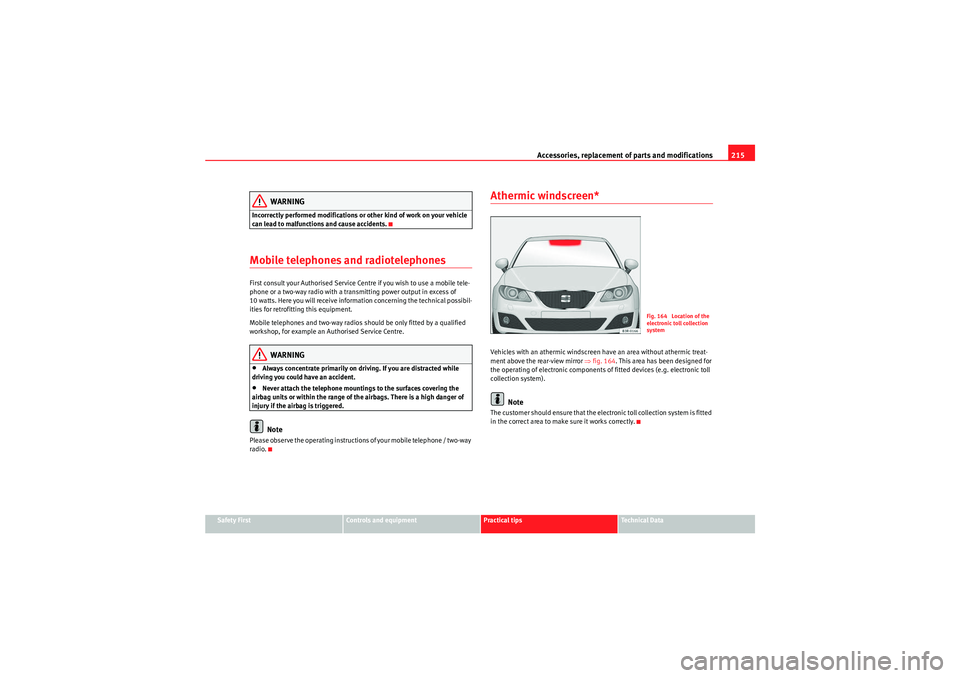
Athermic windscreen*Vehicles with an athermic windscreen have an area without athermic treat-
ment above the rear-view mirror ⇒fig. 164 . This area has been designed for
the operating of electronic components of fitted devices (e.g. electronic toll
collection system).
Note
The customer should ensure that the electronic toll collection system is fitted
in the correct area to make sure it works correctly.
Fig. 164 Location of the
electronic toll collection
system
Exeo_EN.book Seite 215 Freitag, 28. August 2009 10:14 10
Page 258 of 310
If and when
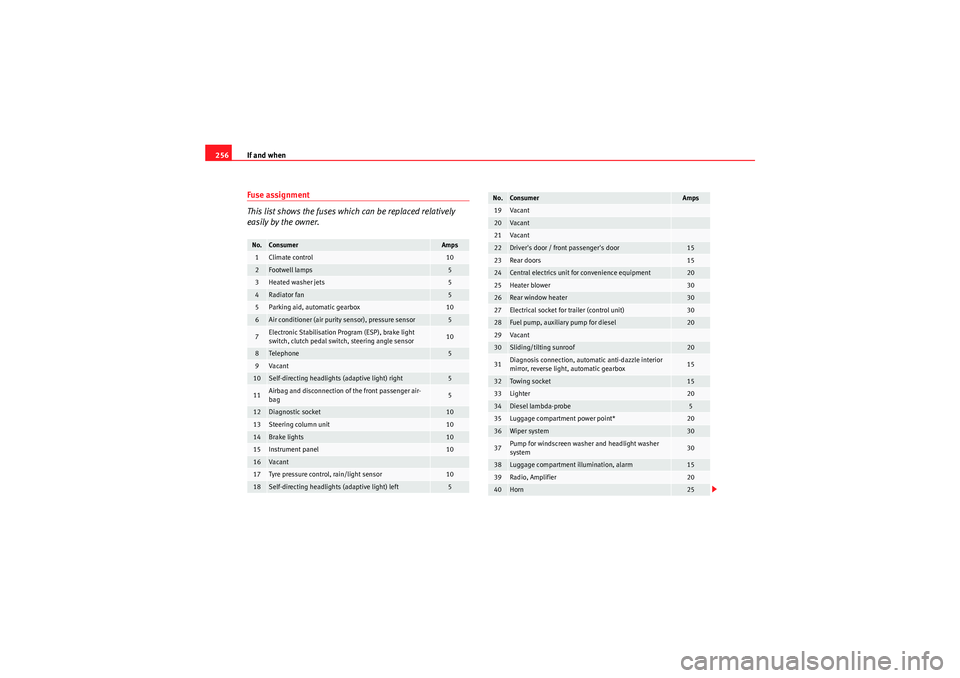
256Fuse assignment
This list shows the fuses which can be replaced relatively
easily by the owner.No.
Consumer
Amps
1
Climate control
10
2
Footwell lamps
5
3
Heated washer jets
5
4
Radiator fan
5
5
Parking aid, automatic gearbox
10
6
Air conditioner (air purity sensor), pressure sensor
5
7
Electronic Stabilisation Program (ESP), brake light
switch, clutch pedal switch, steering angle sensor
10
8
Tele ph one
5
9
Va can t
10
Self-directing headlights (adaptive light) right
5
11
Airbag and disconnection of the front passenger air-
bag
5
12
Diagnostic socket
10
13
Steering column unit
10
14
Brake lights
10
15
Instrument panel
10
16
Va can t
17
Tyre pressure control, rain/light sensor
10
18
Self-directing headlights (adaptive light) left
5
19
Va can t
20
Va can t
21
Va can t
22
Driver's door / front passenger's door
15
23
Rear doors
15
24
Central electrics unit for convenience equipment
20
25
Heater blower
30
26
Rear window heater
30
27
Electrical socket for trailer (control unit)
30
28
Fuel pump, auxiliary pump for diesel
20
29
Va can t
30
Sliding/tilting sunroof
20
31
Diagnosis connection, automatic anti-dazzle interior
mirror, reverse light, automatic gearbox
15
32
Towing socket
15
33
Lighter
20
34
Diesel lambda-probe
5
35
Luggage compartment power point*
20
36
Wiper system
30
37
Pump for windscreen washer and headlight washer
system
30
38
Luggage compartment illumination, alarm
15
39
Radio, Amplifier
20
40
Horn
25
No.
Consumer
Amps
Exeo_EN.book Seite 256 Freitag, 28. August 2009 10:14 10
Page 304 of 310
Index
302Engine oil . . . . . . . . . . . . . . . . . . . . . . . . . . . . . . 222
Checking oil level . . . . . . . . . . . . . . . . . . . . 224
Consumption . . . . . . . . . . . . . . . . . . . . . . . . 224
Oil pressure too low . . . . . . . . . . . . . . . . . . . 78
Oil properties . . . . . . . . . . . . . . . . . . . . . . . . 223
Oil sensor defective . . . . . . . . . . . . . . . . . . . 80
Topping up . . . . . . . . . . . . . . . . . . . . . . . . . . 224
Environment . . . . . . . . . . . . . . . . . . . . . . . . . . . 191 Environmental friendliness . . . . . . . . . . . . 192
Environmental tip Avoiding pollution . . . . . . . . . . . . . . . . . . . . 217
Environmentally friendly driving . . . . . . . . . . . 191
Exhaust gas purification system . . . . . . . . . . . 190
Exterior mirrors . . . . . . . . . . . . . . . . . . . . . . . . . 208FFabric trim cleaning . . . . . . . . . . . . . . . . . . . . . 212
Fastening rings . . . . . . . . . . . . . . . . . . . . . . . . . . 17
Filling the tank Releasing the tank flap manually . . . . . . . 217
Floor mats . . . . . . . . . . . . . . . . . . . . . . . . . . . . . . 16
Fog lights . . . . . . . . . . . . . . . . . . . . . . . . . . . . . . 117
Front airbags . . . . . . . . . . . . . . . . . . . . . . . . . . . . 31 Description . . . . . . . . . . . . . . . . . . . . . . . . . . 31
Front drink holders . . . . . . . . . . . . . . . . . . . . . . 147
Front passenger airbag deactivation . . . . . . . . . 44
Frontal airbags Operation . . . . . . . . . . . . . . . . . . . . . . . . . . . . 32
safety notes . . . . . . . . . . . . . . . . . . . . . . . . . . 34 Fuel
Diesel . . . . . . . . . . . . . . . . . . . . . . . . . . . . . . 218
Fuel gauge . . . . . . . . . . . . . . . . . . . . . . . . . . . 63
Fuel level low . . . . . . . . . . . . . . . . . . . . . . . . . 80
Instantaneous fuel consumption . . . . . . . . . 85
Petrol . . . . . . . . . . . . . . . . . . . . . . . . . . . . . . 218
Fuel range . . . . . . . . . . . . . . . . . . . . . . . . . . . 73, 85
Fuel tank opening the fuel tank flap . . . . . . . . . . . . . 216
Fuel: save . . . . . . . . . . . . . . . . . . . . . . . . . . . . . . 191
Fuse Assignment . . . . . . . . . . . . . . . . . . . . . . . . . 256
Changing . . . . . . . . . . . . . . . . . . . . . . . . . . . 255
GGear display . . . . . . . . . . . . . . . . . . . . . . . . . . . . . 73
Gear shift pattern . . . . . . . . . . . . . . . . . . . . . . . 175
General overview of the engine compartment 289
Glove compartment . . . . . . . . . . . . . . . . . . . . . . 151Cool box . . . . . . . . . . . . . . . . . . . . . . . . . . . . 152
Light . . . . . . . . . . . . . . . . . . . . . . . . . . . . . . . 123
GRA . . . . . . . . . . . . . . . . . . . . . . . . . . . . . . . . . . . 172HHandbrake . . . . . . . . . . . . . . . . . . . . . . . . . . . . . 168
Hazard warning lights . . . . . . . . . . . . . . . . . . . . 121
Head restraint Rear seat . . . . . . . . . . . . . . . . . . . . . . . . . . . 141 Head restraints
Front seats . . . . . . . . . . . . . . . . . . . . . . . . . . 139
Rear seats . . . . . . . . . . . . . . . . . . . . . . . . . . 140
Removing and fitting . . . . . . . . . . . . . . . . . 140
head restraints, correct adjustment . . . . . . . . . 13 In-use and non-use positions . . . . . . . . . . . 14
Headlight range control . . . . . . . . . . . . . . . . . . 119 Dynamic . . . . . . . . . . . . . . . . . . . . . . . . . . . . 120
Faulty . . . . . . . . . . . . . . . . . . . . . . . . . . . . . . . 81
Headlights . . . . . . . . . . . . . . . . . . . . . . . . . . . . . 115 Adaptive headlights . . . . . . . . . . . . . . . . . . 121
Automatic headlight control . . . . . . . . . . . 116
Automatic headlight control photo sensors . . .116
Coming home function . . . . . . . . . . . . . . . . 118
Driving abroad . . . . . . . . . . . . . . . . . . . . . . . 193
Front fog lights . . . . . . . . . . . . . . . . . . . . . . 117
Headlight range control . . . . . . . . . . . . . . . 119
Headlight washer system . . . . . . . . . . . . . . 129
Leaving home function . . . . . . . . . . . . . . . . 118
Heated Seats . . . . . . . . . . . . . . . . . . . . . . . . . . . . . . 163
Heated rear window . . . . . . . . . . . . . . . . . . . . . 126
Heated seat . . . . . . . . . . . . . . . . . . . . . . . . . . . . 163
High pressure cleaners . . . . . . . . . . . . . . . . . . . 207
Horn . . . . . . . . . . . . . . . . . . . . . . . . . . . . . . . . . . . 57
IIdentification number . . . . . . . . . . . . . . . . . . . . 286
Exeo_EN.book Seite 302 Freitag, 28. August 2009 10:14 10