ECU Seat Exeo 2009 Owner's Guide
[x] Cancel search | Manufacturer: SEAT, Model Year: 2009, Model line: Exeo, Model: Seat Exeo 2009Pages: 310, PDF Size: 8.54 MB
Page 100 of 310
Unlocking and locking
98
– Remove the used battery from the cover.
– Insert the new battery. Make sure that the “+” symbol on the battery is facing downwards. The co rrect polarity is indicated on
the cover.
– After inserting the battery, align the cover and key and press the two parts together.
For the sake of the environmentUsed batteries must be disposed of appropriately and must not be discarded
with ordinary household waste.
Note
•The system must be re-synchronised after each battery replacement to be
able to lock and unlock the car using the remote control ⇒page 106.•The new battery must be of the same type as the original.Electronic immobiliser
The electronic immobiliser is designed to prevent unauthor-
ised persons from starting up the vehicle.There is an electronic chip inside the key which automatically deactivates the
immobiliser when the key is inserted into the ignition lock. The electronic
immobiliser is enabled automatically when the ignition key is removed from
the ignition lock after coming to a stop.
If an uncoded key is used, the message SAFE will appear in the trip recorder
display.
Note
•The engine can only be started using an original SEAT key with the correct
code.•It may not be possible to start the engine with the key if there is another
ignition key from a different make of vehicle on the same key tab.Central lockingDescription
The central locking system enables you to lock and unlock all
the doors, the tailgate and the tank flap together.The central locking system on your vehicle locks and unlocks all the doors
and the tank flap simultaneously. The tailgate is unlocked when the vehicle
is opened. However, the handle must be used to open it. The vehicle can be
locked and unlocked using the remote control ⇒ page 104 or by turning the
key in the lock in the driver's door.
The windows can also be centrally opened or closed using the central locking
system ⇒page 110. The sun roof* can be closed but not opened using the
central locking system.
The central locking system is combined with an anti-theft security system. If
the vehicle is locked with the key from the outside, the interior opening levers
stop working, which prevents unauthorised persons from entering the
vehicle.
Should the central locking system fail to work, you can still normally enable
all the locks individually. The fuel tank flap can be released manually if neces-
sary. For manual release of the tank flap ⇒page 217.
Exeo_EN.book Seite 98 Freitag, 28. August 2009 10:14 10
Page 101 of 310
Unlocking and locking99
Safety First
Controls and equipment
Practical tips
Technical Data
Automatic locking function (Auto Lock)*
The
Auto Lock* function automatically locks all doors and the tailgate when
the vehicle exceeds a speed of about 15 km/h.
The vehicle is unlocked again automatically when the ignition key is
removed. Alternatively, the driver can also unlock the vehicle using the
central locking switch
or by opening one of the doors.
WARNING
Do not leave anyone (especially children) inside the car if it is locked from
the outside and the anti-theft security system is enabled, as the doors and
windows cannot then be opened from the inside. Locked doors could delay
assistance in an emergency, potentially putting lives at risk.
Note
•Should the central locking system fail to work, you can still lock and
unlock the driver's door and the tailgate using the key. For manual release of
the tank flap ⇒page 217. Locking the doors manually if central locking fails
to work ⇒page 102.•The anti-theft mechanism and the anti-theft alarm* cannot be enabled if
the central locking is not working.•Never leave any valuable items in the vehicle unattended. Even a locked
vehicle is not a safe.
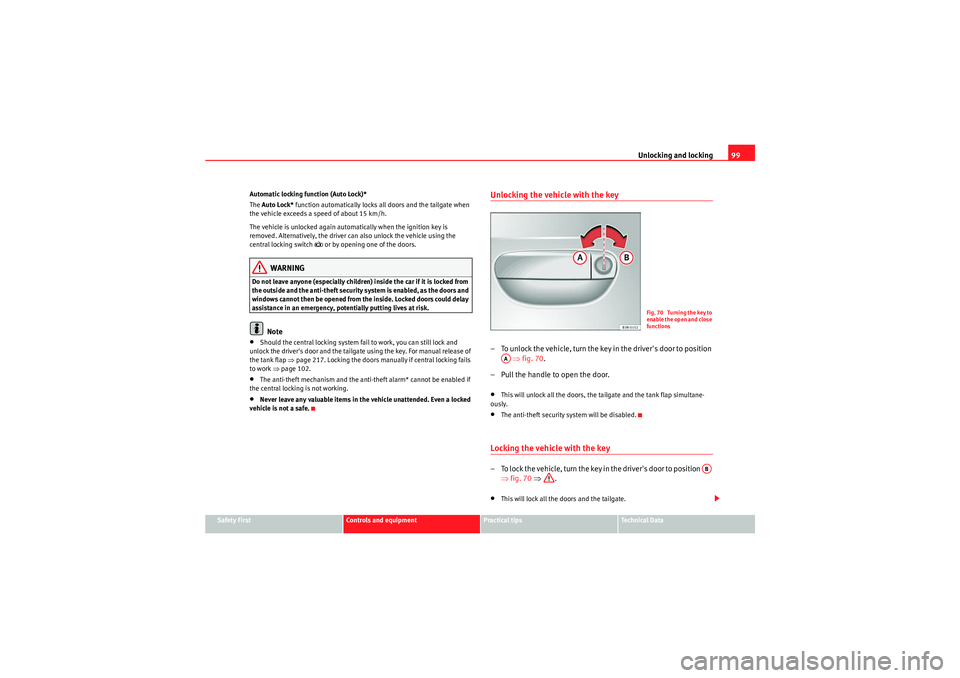
Unlocking the vehicle with the key– To unlock the vehicle, turn the key in the driver's door to position ⇒ fig. 70 .
– Pull the handle to open the door.•This will unlock all the doors, the tailgate and the tank flap simultane-
ously.•The anti-theft security system will be disabled.Locking the vehicle with the key– To lock the vehicle, turn the key in the driver's door to position ⇒fig. 70 ⇒ .•This will lock all the doors and the tailgate.
Fig. 70 Turning the key to
enable the open and close
functions
AA
AB
Exeo_EN.book Seite 99 Freitag, 28. August 2009 10:14 10
Page 102 of 310
Unlocking and locking
100•The interior lights are switched off, provided the light switch is in the cour-
tesy light position.•The windows and the sun roof* will close as the key is held in the locking
position.•The anti-theft security system will be enabled immediately.
Locking the vehicle without enabling the anti-theft security system
With the anti-theft security system enabled, it is more difficult to break into
the vehicle. If the anti-theft security system has been enabled, the inside
door handles and the central locking switch will not work ⇒.
If you are leaving passengers in the vehicle while it is parked, it is possible to
lock the vehicle without enabling the anti-theft security system.
To do so, turn the key in the driver's door twice in quick succession to position
⇒ page 99, fig. 70.WARNING
Do not leave anyone (especially children) in the car if it is locked from the
outside and the anti-theft security system is enabled, as the doors and
windows cannot then be opened from the inside. Locked doors could delay
assistance in an emergency, potentially putting lives at risk.
Caution
If the driver's door is locked using the key while open, the car will be automat-
ically immobilised and the alarm triggered.
Note
•Please note that when the vehicle is locked without enabling the anti-
theft mechanism, the anti-theft alarm* remains operative. You should there-
fore switch off the interior monitor* before locking the vehicle, as otherwise
the alarm* could be triggered unintentionally.
•The driver's door cannot be locked using the central locking system when
it is still open. The door must be locked separately after it has been closed.
This helps to prevent you from being locked out of the vehicle.Central locking switch
The central locking system can be enabled from inside the
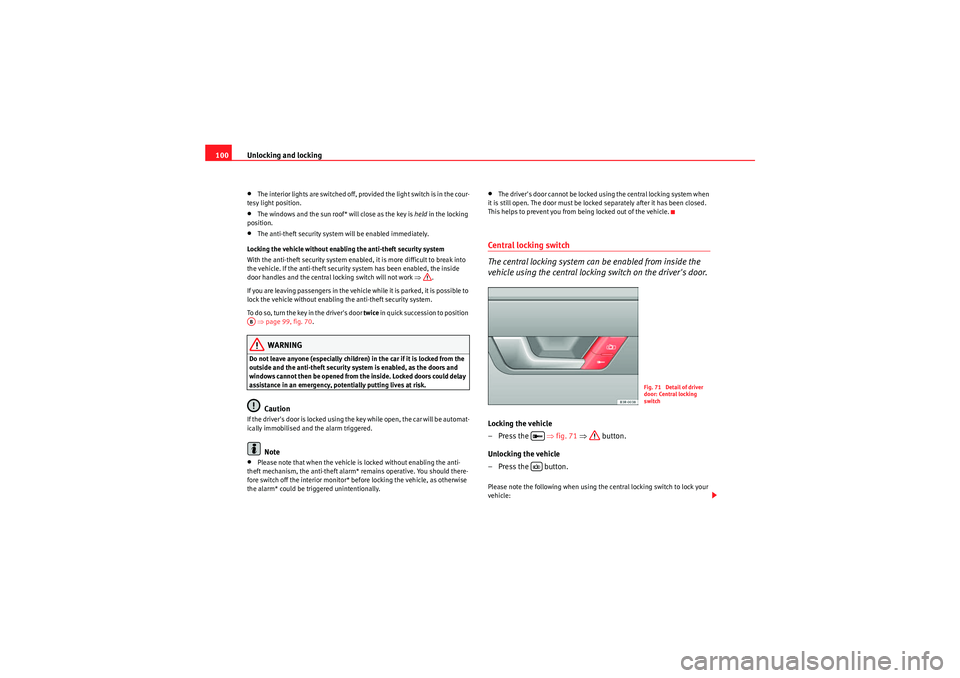
vehicle using the central locking switch on the driver's door.Locking the vehicle
–Press the ⇒fig. 71 ⇒ button.
Unlocking the vehicle
–Press the button.Please note the following when using the central locking switch to lock your
vehicle:
AB
Fig. 71 Detail of driver
door: Central locking
switch
Exeo_EN.book Seite 100 Freitag, 28. August 2009 10:14 10
Page 103 of 310
Unlocking and locking101
Safety First
Controls and equipment
Practical tips
Technical Data
•The doors and the tailgate cannot be opened from the outside (for secu-
rity reasons, e.g. when stopped at traffic lights).•You can open the doors individually from the inside by pulling the inside
door handle.•When the driver's door is open, it cannot be locked by pressing the central
locking switch and then closing the door. This helps to prevent you from
being locked out of the vehicle. The door has to be locked separately after it
has been closed.•In the event of an accident in which the airbags inflate, doors locked from
the inside will be automatically unlocked to facilitate access and assistance.WARNING
The central locking switch is still operative when the ignition is switched
off. This switch can be used to automatically lock all the doors and the tail-
gate. However, since this makes it difficult to enter the car from the
outside, you should never leave children unattended in the vehicle. Locked
doors could delay assistance in an emergency, potentially putting lives at
risk.
Note
The central locking switch inside the vehicle will not be operative if the anti-
theft mechanism has been enabled.
Security central locking*
The security central locking feature allows you to only unlock
the driver's door and the tank flap. All other doors and the
tailgate remain locked.Unlocking the driver's door and tank flap
–Turn the key once to the unlock position, or press the unlock
button on the remote control once.
Unlocking all the doors, the tailgate and the tank flap
simultaneously.
–Turn the key twice within five seconds, or press the unlock button
on the remote control twice within five seconds.The security system and the anti-theft alarm* are immediately disabled if you
unlock only the driver's door, without unlocking the other doors
⇒page 106.
Exeo_EN.book Seite 101 Freitag, 28. August 2009 10:14 10
Page 107 of 310
Unlocking and locking105
Safety First
Controls and equipment
Practical tips
Technical Data
the current legal requirements. This certification forms the basis for official
approval for use in other countries.
Note
•The remote control is automatically disabled when the ignition is
switched on.•The function of the remote control may be impaired by interference from
other nearby radio signals (e.g. from a mobile phone or TV transmitter) if
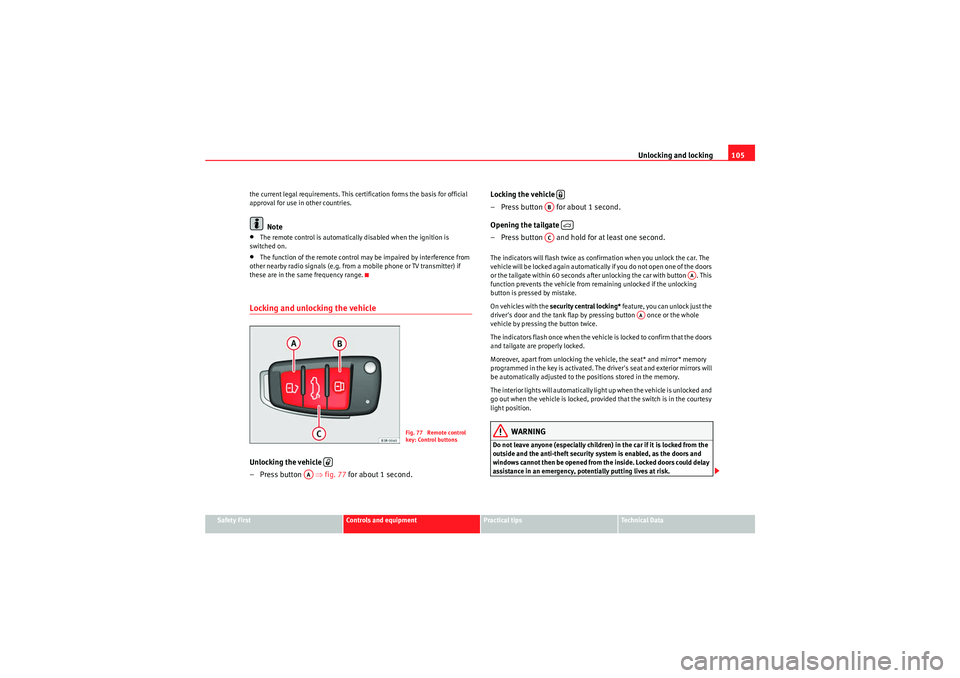
these are in the same frequency range.Locking and unlocking the vehicleUnlocking the vehicle
– Press button ⇒fig. 77 for about 1 second. Locking the vehicle
– Press button for about 1 second.
Opening the tailgate
– Press button and hold for at least one second.
The indicators will flash twice as confirmation when you unlock the car. The
vehicle will be locked again automatically if you do not open one of the doors
or the tailgate within 60 seconds after unlocking the car with button . This
function prevents the vehicle from remaining unlocked if the unlocking
button is pressed by mistake.
On vehicles with the
security central locking* feature, you can unlock just the
driver's door and the tank flap by pressing button once or the whole
vehicle by pressing the button twice.
The indicators flash once when the vehicle is locked to confirm that the doors
and tailgate are properly locked.
Moreover, apart from unlocking the vehicle, the seat* and mirror* memory
programmed in the key is activated. The driver's seat and exterior mirrors will
be automatically adjusted to the positions stored in the memory.
The interior lights will automatically light up when the vehicle is unlocked and
go out when the vehicle is locked, provided that the switch is in the courtesy
light position.
WARNING
Do not leave anyone (especially children) in the car if it is locked from the
outside and the anti-theft security system is enabled, as the doors and
windows cannot then be opened from the inside. Locked doors could delay
assistance in an emergency, potentially putting lives at risk.
Fig. 77 Remote control
key: Control buttons
AA
AB
AC
AA
AA
Exeo_EN.book Seite 105 Freitag, 28. August 2009 10:14 10
Page 110 of 310
Unlocking and locking
108
Disabling the interior monitor
– Open the door and pull out the switch (with the symbol
) to
one side of the storage compartment, in the driver's door
⇒ page 107, fig. 78.
– Then lock the vehicle.
Disabling the tow-away protection
– Open the door and pull out switch (with the symbol
) to one
side of the storage compartment, in the driver's door
⇒ page 107, fig. 78.
– Then lock the vehicle.
The LED on switch will light up when the interior monitor is disabled. The
LED on the top of the driver's door trim will also light up for about 3 seconds.
When the vehicle is locked, the LED on the top of the driver's door trim will
flash rapidly for about 3 seconds. After about 30 seconds it flashes more
slowly. The interior monitor is automatically enabled again the next time the
vehicle is locked.
The LED on switch will light up when the tow-away protection function is
disabled. The LED on the top of the driver's door trim will also light up for
about 3 seconds. When the vehicle is locked, the LED on the top of the
driver's door trim will flash rapidly for about 3 seconds. The tow-away protec-
tion is automatically enabled again the next time the vehicle is locked.
WARNING
Do not leave anyone (especially children) in the car if it is locked from the
outside and the anti-theft security system is enabled, as the doors and
windows cannot then be opened from the inside. Locked doors could delay
assistance in an emergency, potentially putting lives at risk.
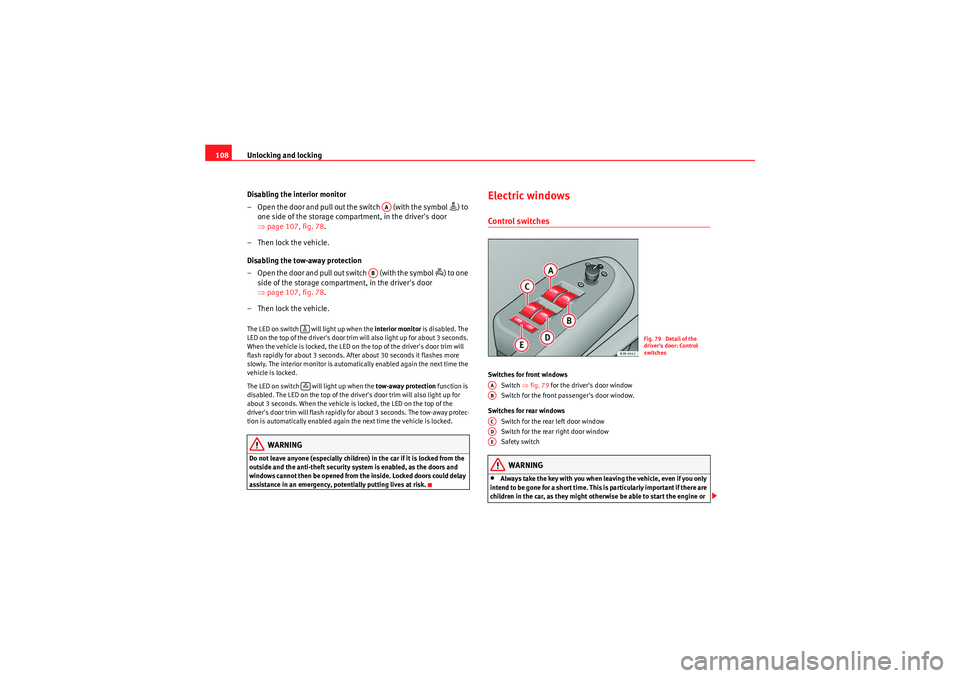
Electric windowsControl switchesSwitches for front windows
Switch ⇒fig. 79 for the driver's door window
Switch for the front passenger's door window.
Switches for rear windows Switch for the rear left door window
Switch for the rear right door window
Safety switch
WARNING
•Always take the key with you when leaving the vehicle, even if you only
intend to be gone for a short time. This is particularly important if there are
children in the car, as they might otherwise be able to start the engine or
AA
AB
Fig. 79 Detail of the
driver's door: Control
switches
AAABACADAE
Exeo_EN.book Seite 108 Freitag, 28. August 2009 10:14 10
Page 144 of 310
Seats and stowage
142Please note that the armrest can restrict the driver's movements when it is
lowered. The armrest should therefore be raised when driving in city traffic.Luggage compartmentLoading the luggage compartment
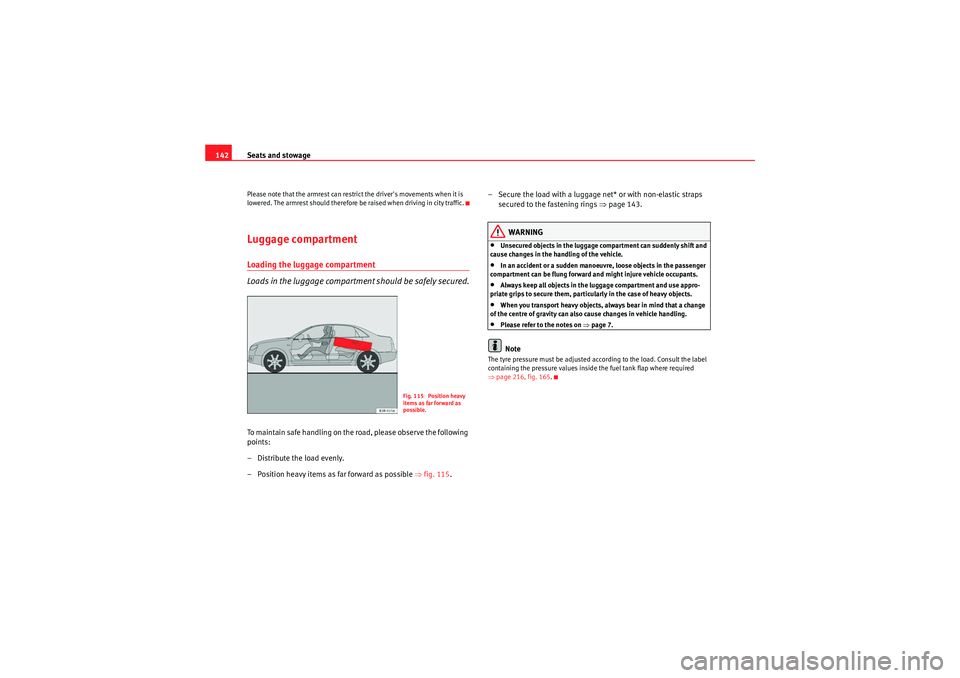
Loads in the luggage compartment should be safely secured.To ma intain sa fe ha nd l in g o n th e ro ad , please o bse r ve t h e fo ll owin g
points:
– Distribute the load evenly.
– Position heavy items as far forward as possible ⇒fig. 115 . – Secure the load with a luggage net* or with non-elastic straps
secured to the fastening rings ⇒page 143.
WARNING
•Unsecured objects in the luggage compartment can suddenly shift and
cause changes in the handling of the vehicle.•In an accident or a sudden manoeuvre, loose objects in the passenger
compartment can be flung forward and might injure vehicle occupants.•Always keep all objects in the luggage compartment and use appro-
priate grips to secure them, particularly in the case of heavy objects.•When you transport heavy objects, always bear in mind that a change
of the centre of gravity can also cause changes in vehicle handling.•Please refer to the notes on ⇒page 7.Note
The tyre pressure must be adjusted according to the load. Consult the label
containing the pressure values inside the fuel tank flap where required
⇒ page 216, fig. 165.
Fig. 115 Position heavy
items as far forward as
possible.
Exeo_EN.book Seite 142 Freitag, 28. August 2009 10:14 10
Page 145 of 310
Seats and stowage143
Safety First
Controls and equipment
Practical tips
Technical Data
Fastening rings*
There are four fastening rings in the luggage compartment,
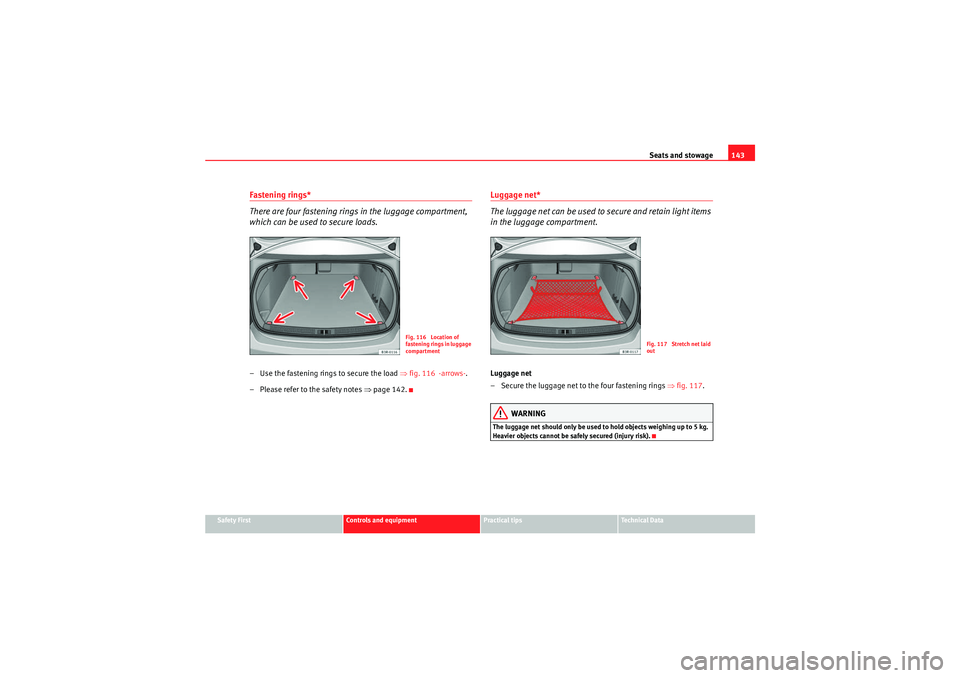
which can be used to secure loads.– Use the fastening rings to secure the load ⇒fig. 116 -arrows- .
– Please refer to the safety notes ⇒page 142.
Luggage net*
The luggage net can be used to secure and retain light items
in the luggage compartment.Luggage net
– Secure the luggage net to the four fastening rings ⇒fig. 117 .
WARNING
The luggage net should only be used to hold objects weighing up to 5 kg.
Heavier objects cannot be safely secured (injury risk).
Fig. 116 Location of
fastening rings in luggage
compartment
Fig. 117 Stretch net laid
out
Exeo_EN.book Seite 143 Freitag, 28. August 2009 10:14 10
Page 146 of 310
Seats and stowage
144Extending the luggage compartment
The two sections of the backrest can be folded forwards either
together or separately to increase the capacity of the luggage
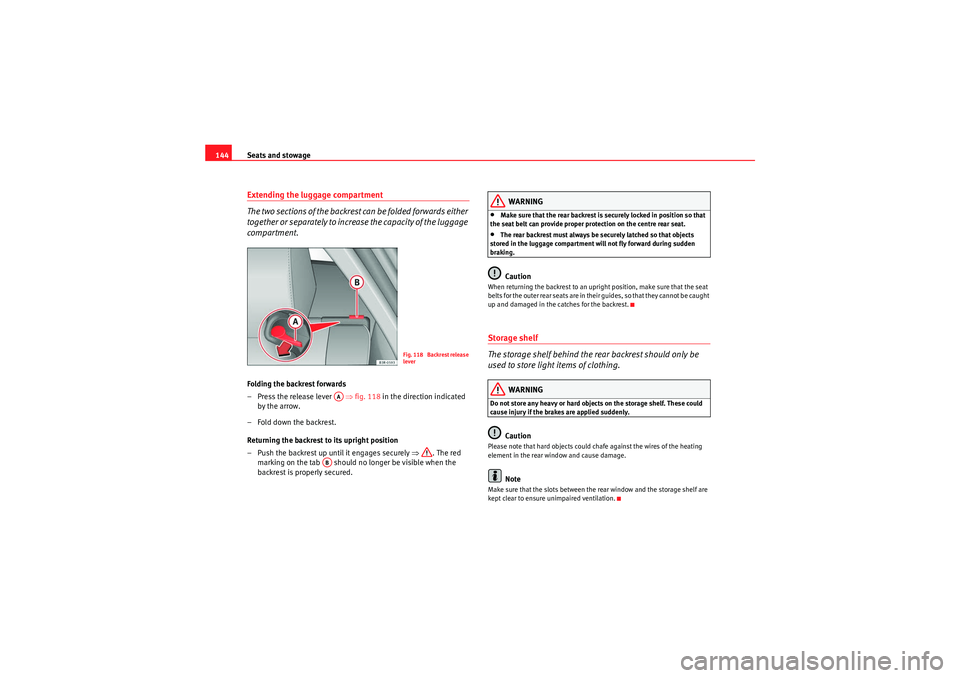
compartment.Folding the backrest forwards
– Press the release lever ⇒fig. 118 in the direction indicated
by the arrow.
– Fold down the backrest.
Returning the backrest to its upright position
– Push the backrest up until it engages securely ⇒ . The red
marking on the tab should no longer be visible when the
backrest is properly secured.
WARNING
•Make sure that the rear backrest is securely locked in position so that
the seat belt can provide proper protection on the centre rear seat.•The rear backrest must always be securely latched so that objects
stored in the luggage compartment will not fly forward during sudden
braking.Caution
When returning the backrest to an upright position, make sure that the seat
b e l t s f o r t h e o u t e r r e a r s e a t s a r e i n t h e i r g u i d e s , s o t ha t t h e y ca n n o t b e ca u g h t
up and damaged in the catches for the backrest.Storage shelf
The storage shelf behind the rear backrest should only be
used to store light items of clothing.
WARNING
Do not store any heavy or hard objects on the storage shelf. These could
cause injury if the brakes are applied suddenly.
Caution
Please note that hard objects could chafe against the wires of the heating
element in the rear window and cause damage.
Note
Make sure that the slots between the rear window and the storage shelf are
kept clear to ensure unimpaired ventilation.
Fig. 118 Backrest release
lever
AA
AB
Exeo_EN.book Seite 144 Freitag, 28. August 2009 10:14 10
Page 147 of 310
Seats and stowage145
Safety First
Controls and equipment
Practical tips
Technical Data
Ski bag*
You can use the "ski bag" to transport skis or other extra-long
objects safely inside the vehicle without soiling or damaging
the upholstery.
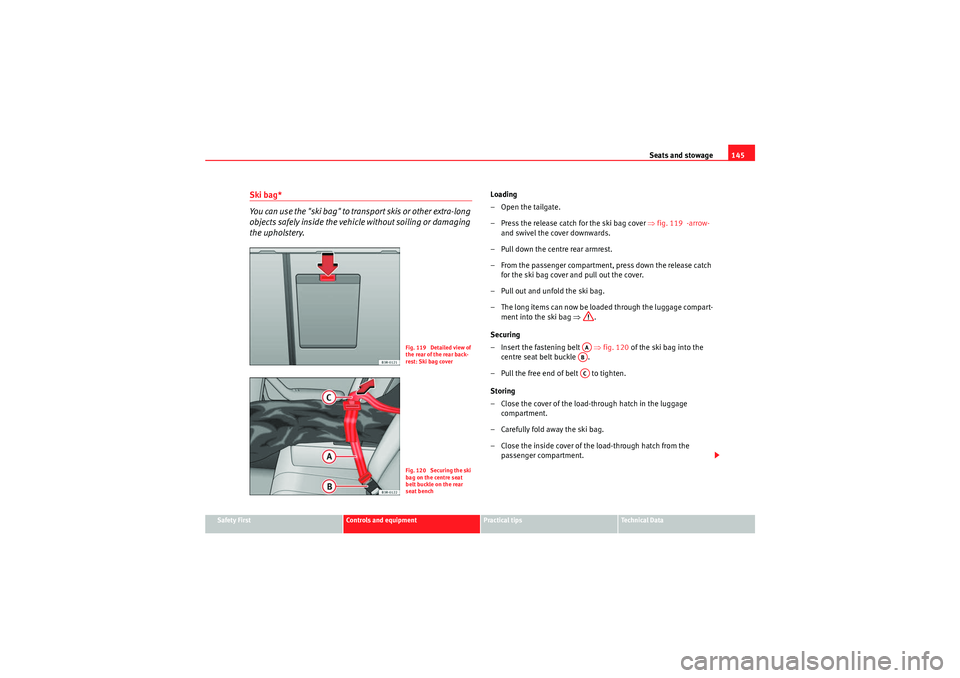
Loading
–Open the tailgate.
– Press the release catch for the ski bag cover ⇒fig. 119 -arrow-
and swivel the cover downwards.
– Pull down the centre rear armrest.
– From the passenger compartment, press down the release catch for the ski bag cover and pull out the cover.
– Pull out and unfold the ski bag.
– The long items can now be loaded through the luggage compart- ment into the ski bag ⇒.
Securing
– Insert the fastening belt ⇒fig. 120 of the ski bag into the
centre seat belt buckle .
– Pull the free end of belt to tighten.
Storing
– Close the cover of the load-through hatch in the luggage compartment.
– Carefully fold away the ski bag.
– Close the inside cover of the load-through hatch from the passenger compartment.
Fig. 119 Detailed view of
the rear of the rear back-
rest: Ski bag coverFig. 120 Securing the ski
bag on the centre seat
belt buckle on the rear
seat bench
AAABAC
Exeo_EN.book Seite 145 Freitag, 28. August 2009 10:14 10