wheel Seat Exeo 2009 Owner's Guide
[x] Cancel search | Manufacturer: SEAT, Model Year: 2009, Model line: Exeo, Model: Seat Exeo 2009Pages: 310, PDF Size: 8.54 MB
Page 94 of 310
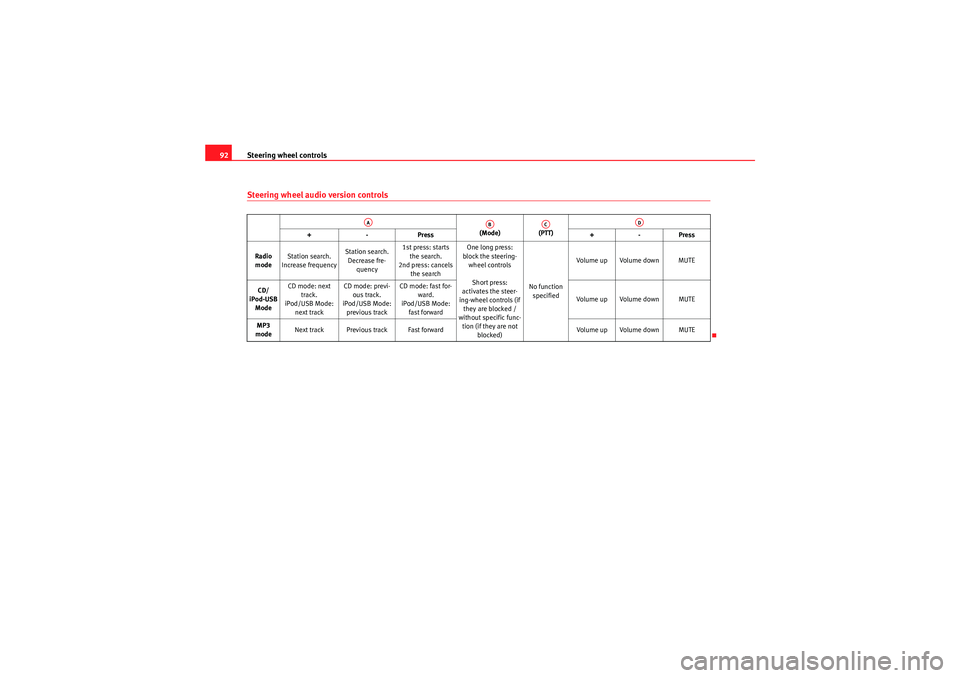
Steering wheel controls
92Steering wheel audio version controls
(Mode) (PTT)
+-P re ss +-Pre ss
Radio mode Station search.
Increase frequency Station search.
Decrease fre- quency 1st press: starts
the search.
2nd press: cancels the search One long press:
block the steering- wheel controls
Short press:
activates the steer-
ing-wheel controls (if they are blocked /
without specific func-
tion (if they are not blocked) No function
specified Volume up Volume down MUTE
CD/
iPod-USB Mode CD mode: next
track.
iPod/USB Mode: next track CD mode: previ-
ous track.
iPod/USB Mode: previous track CD mode: fast for-
ward.
iPod/USB Mode: fast forward Volume up Volume down MUTE
MP3
mode Next track Previous track Fast forward
Volume up Volume down MUTE
AA
AB
AC
AD
Exeo_EN.book Seite 92 Freitag, 28. August 2009 10:14 10
Page 95 of 310
Steering wheel controls93
Safety First
Controls and equipment
Practical tips
Technical Data
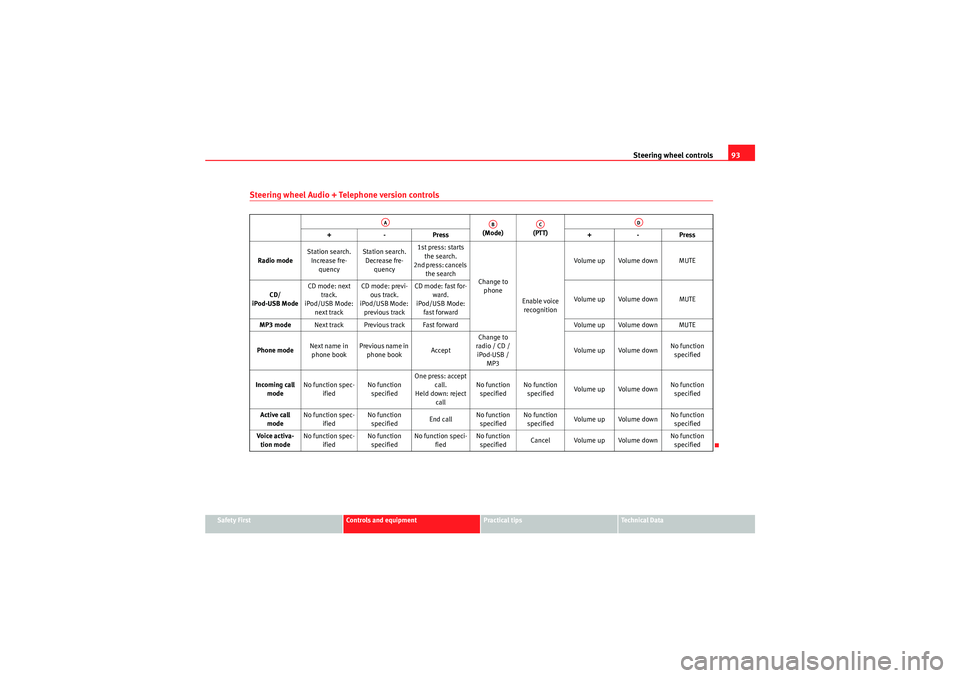
Steering wheel Audio + Telephone version controls
(Mode) (PTT)
+-P re ss +-Pre ss
Radio mode Station search.
Increase fre- quency Station search.
Decrease fre- quency 1st press: starts
the search.
2nd press: cancels the search Change to
phone
Enable voice recognition Volume up Volume down MUTE
CD/
iPod-USB Mode CD mode: next
track.
iPod/USB Mode: next track CD mode: previ-
ous track.
iPod/USB Mode: previous track CD mode: fast for-
ward.
iPod/USB Mode: fast forward Volume up Volume down MUTE
MP3 mode Next track Previous track Fast forward Volume up Volume down MUTE
Phone mode Next name in
phone book Previous name in
phone book AcceptChange to
radio / CD / iPod-USB / MP3 Volume up Volume down
No function
specified
Incoming call mode No function spec-
ified No function
specified One press: accept
call.
Held down: reject call No function
specified No function
specified Volume up Volume down No function
specified
Active call mode No function spec-
ified No function
specified End callNo function
specified No function
specified Volume up Volume down No function
specified
Voice activa- tion mode No function spec-
ified No function
specified No function speci-
fied No function
specified Cancel Volume up Volume down No function
specified
AA
AB
AC
AD
Exeo_EN.book Seite 93 Freitag, 28. August 2009 10:14 10
Page 96 of 310
Steering wheel controls
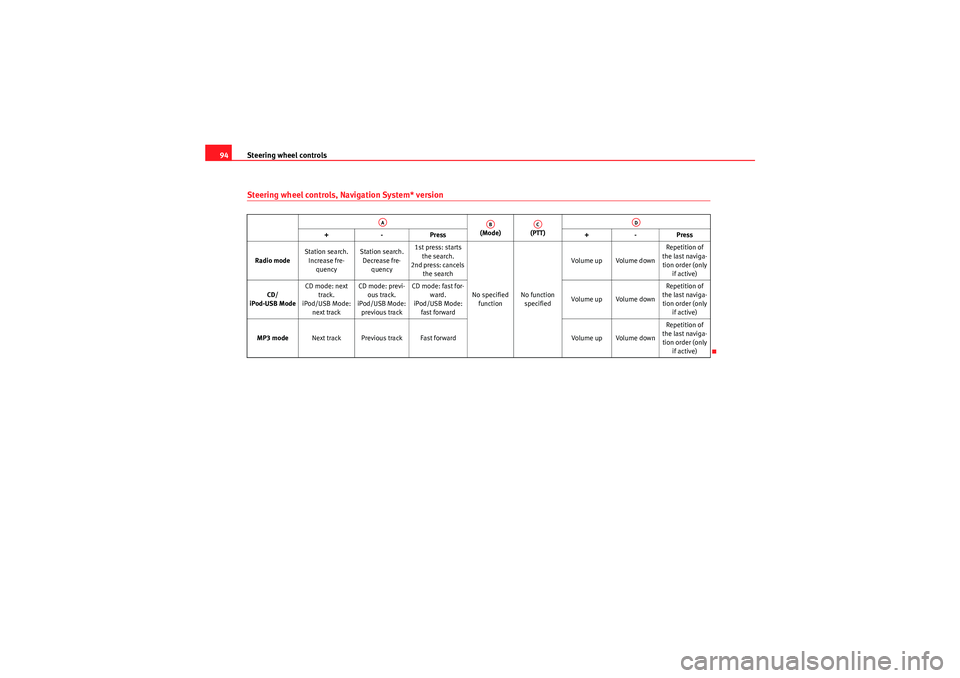
94Steering wheel controls, Navigation System* version
(Mode) (PTT)
+-P re ss +-Pre ss
Radio mode Station search.
Increase fre- quency Station search.
Decrease fre- quency 1st press: starts
the search.
2nd press: cancels the search
No specified function No function
specified Volume up Volume down
Repetition of
the last naviga- tion order (only if active)
CD/
iPod-USB Mode CD mode: next
track.
iPod/USB Mode: next track CD mode: previ-
ous track.
iPod/USB Mode: previous track CD mode: fast for-
ward.
iPod/USB Mode: fast forward Volume up Volume downRepetition of
the last naviga- tion order (only if active)
MP3 mode Next track Previous track Fast forward Volume up Volume downRepetition of
the last naviga- tion order (only if active)
AA
AB
AC
AD
Exeo_EN.book Seite 94 Freitag, 28. August 2009 10:14 10
Page 97 of 310
Steering wheel controls95
Safety First
Controls and equipment
Practical tips
Technical Data
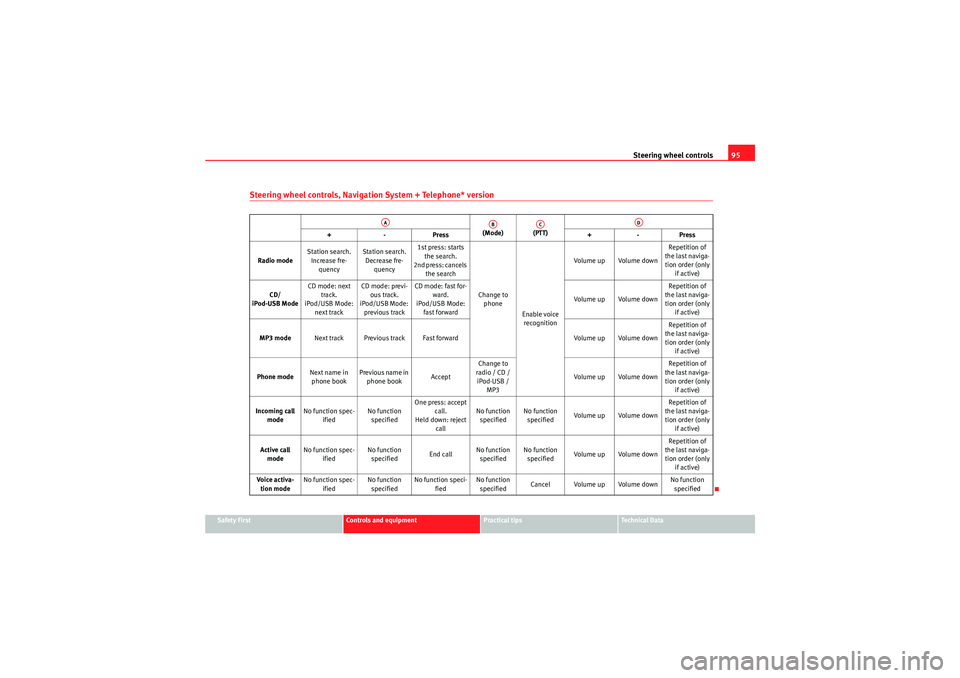
Steering wheel controls, Navigation System + Telephone* version
(Mode) (PTT)
+-P re ss +-Pre ss
Radio mode Station search.
Increase fre- quency Station search.
Decrease fre- quency 1st press: starts
the search.
2nd press: cancels the search
Change to phone
Enable voice recognition Volume up Volume down
Repetition of
the last naviga- tion order (only if active)
CD/
iPod-USB Mode CD mode: next
track.
iPod/USB Mode: next track CD mode: previ-
ous track.
iPod/USB Mode: previous track CD mode: fast for-
ward.
iPod/USB Mode: fast forward Volume up Volume downRepetition of
the last naviga- tion order (only if active)
MP3 mode Next track Previous track Fast forward Volume up Volume downRepetition of
the last naviga- tion order (only if active)
Phone mode Next name in
phone book Previous name in
phone book AcceptChange to
radio / CD / iPod-USB / MP3 Volume up Volume down Repetition of
the last naviga- tion order (only if active)
Incoming call mode No function spec-
ified No function
specified One press: accept
call.
Held down: reject call No function
specified No function
specified Volume up Volume down Repetition of
the last naviga- tion order (only if active)
Active call mode No function spec-
ified No function
specified End callNo function
specified No function
specified Volume up Volume down Repetition of
the last naviga- tion order (only if active)
Voice activa- tion mode No function spec-
ified No function
specified No function speci-
fied No function
specified Cancel Volume up Volume down No function
specified
AA
AB
AC
AD
Exeo_EN.book Seite 95 Freitag, 28. August 2009 10:14 10
Page 123 of 310
Lights and visibility121
Safety First
Controls and equipment
Practical tips
Technical Data
– Press the knob in again to prevent the setting from being
changed unintentionally.This button activates or deactivates the daytime running lights function. With
the function activated, when the ignition is switched on the daytime running
lights are turned on automatically.
Note
Please observe any relevant legal requirements which may apply in your
country.Adaptive headlights* (for cornering)
When driving around bends, the headlights will light the
most important areas of the road.
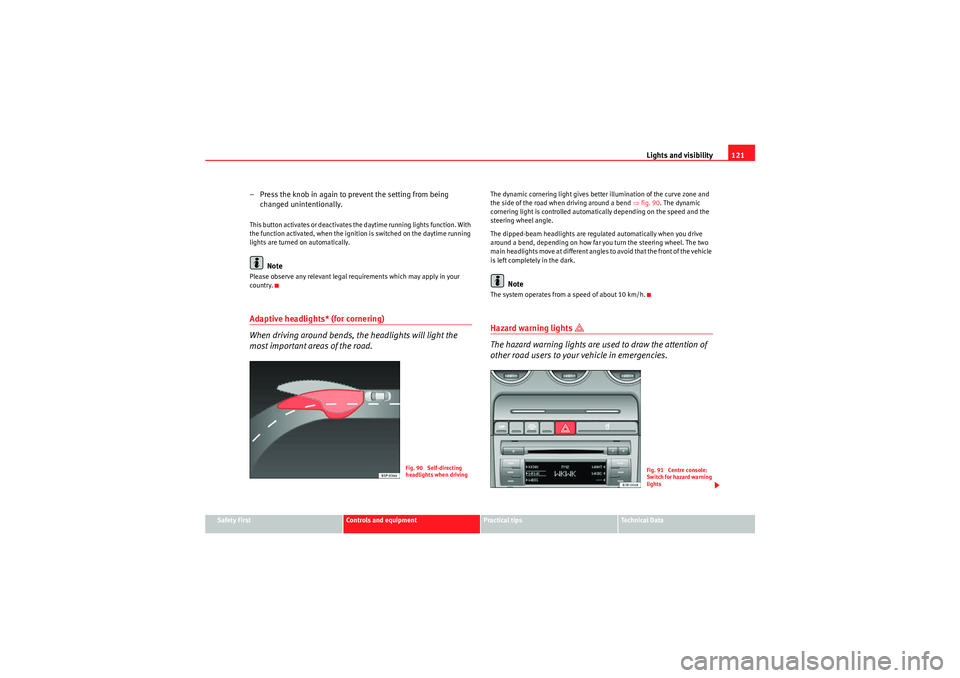
The dynamic cornering light gives better illumination of the curve zone and
the side of the road when driving around a bend ⇒fig. 90 . The dynamic
cornering light is controlled automatically depending on the speed and the
steering wheel angle.
The dipped-beam headlights are regulated automatically when you drive
around a bend, depending on how far you turn the steering wheel. The two
main headlights move at different angles to avoid that the front of the vehicle
is left completely in the dark.
Note
The system operates from a speed of about 10 km/h.Hazard warning lights
The hazard warning lights are used to draw the attention of
other road users to your vehicle in emergencies.
Fig. 90 Self-directing
headlights when driving
Fig. 91 Centre console:
Switch for hazard warning
lights
Exeo_EN.book Seite 121 Freitag, 28. August 2009 10:14 10
Page 125 of 310
Lights and visibility123
Safety First
Controls and equipment
Practical tips
Technical Data
Main beam headlights
– Press the lever forward to switch on the main beams.
– Pull the lever back towards you to switch the main beam head-
lights off again.
Headlight flasher
– Pull the lever towards the steering wheel to operate the flasher.
Parking light
– Switch the ignition off.
– Move the lever up or down to turn on the right or left-hand
parking lights respectively.Notes on these functions•The indicators only work when the ignition is switched on. The indicator
lamp or flashes in the instrument panel when the turns signals
⇒ page 65 are working.
•The indicators are cancelled automatically when the steering wheel is
returned to the straight-ahead position.•The main beam headlights can only be switched on if the dipped beam
headlights are already on. The main beam headlight indicator lamp
then
comes on in the instrument panel.
•The headlight flasher co m es on for as lo ng as yo u pull th e le ve r, e ve n if no
other lights are switched on. The main beam headlight indicator lamp
then comes on in the instrument panel.
•When the parking lights are switched on, the headlight and the rear light
on one side of the car light up with re duced intensity. The parking lights will
only work with the ignition off.
Caution
Never use the main beam headlights or the headlight flasher if this would
dazzle oncoming traffic.Interior lightsFront interior lights and glove compartment light
The front interior light also incorporates the reading lights for
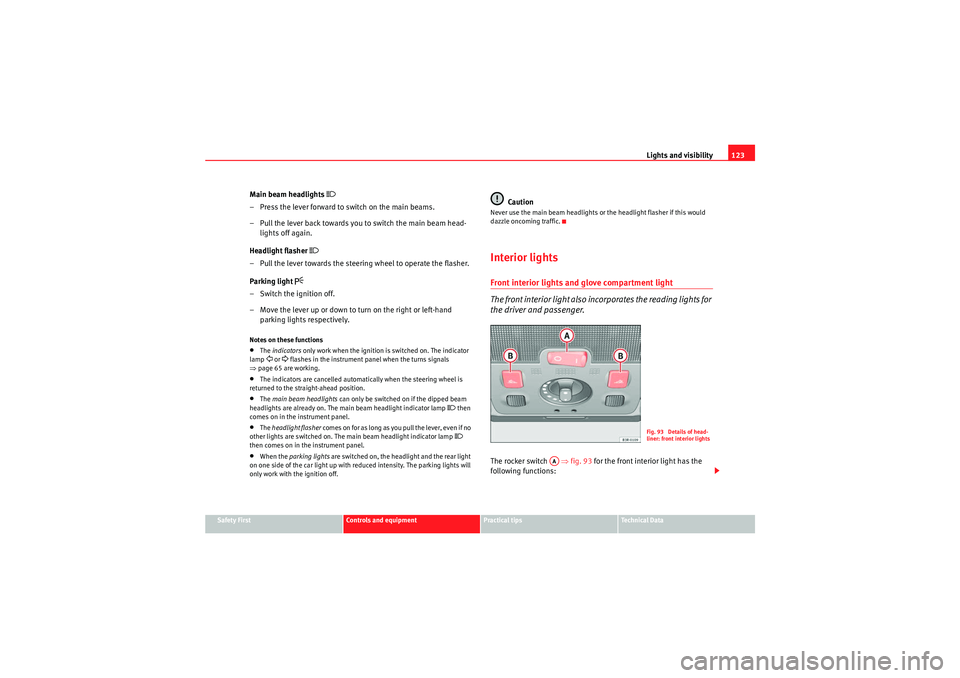
the driver and passenger.The rocker switch ⇒fig. 93 for the front interior light has the
following functions:
Fig. 93 Details of head-
liner: front interior lights
AA
Exeo_EN.book Seite 123 Freitag, 28. August 2009 10:14 10
Page 130 of 310
Lights and visibility
128Windscreen wipersWindscreen wipers
The windscreen wiper lever controls the windscreen wipers
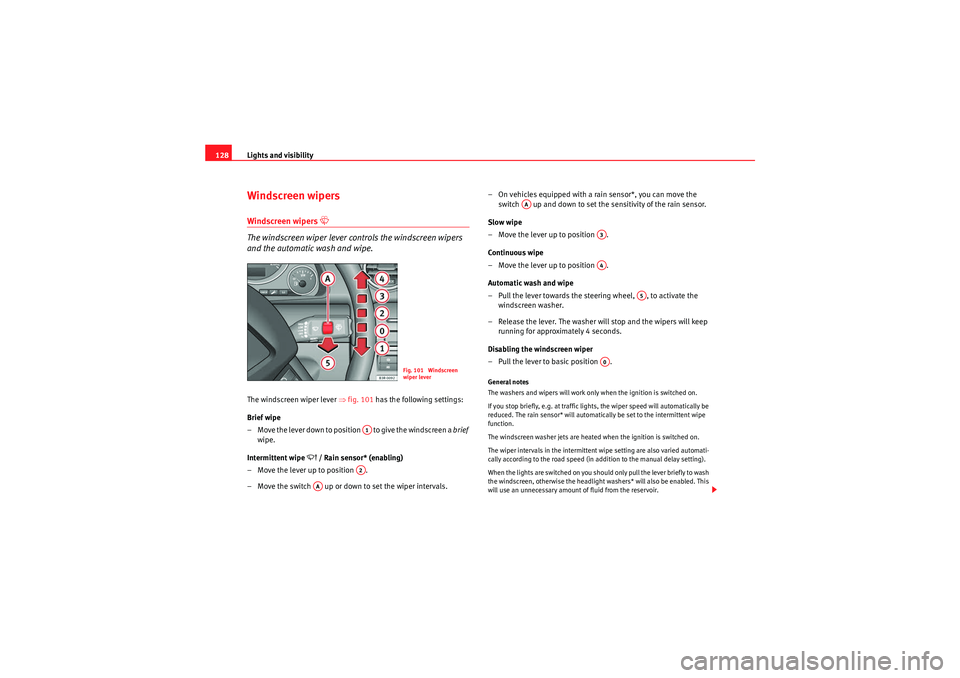
and the automatic wash and wipe.The windscreen wiper lever ⇒fig. 101 has the following settings:
Brief wipe
– Move the lever down to position to give the windscreen a brief
wipe.
Intermittent wipe
/ Rain sensor* (enabling)
– Move the lever up to position .
– Move the switch up or down to set the wiper intervals. – On vehicles equipped with a rain sensor*, you can move the
switch up and down to set the sensitivity of the rain sensor.
Slow wipe
– Move the lever up to position .
Continuous wipe
– Move the lever up to position .
Automatic wash and wipe
– Pull the lever towards the steering wheel, , to activate the windscreen washer.
– Release the lever. The washer will stop and the wipers will keep running for approximately 4 seconds.
Disabling the windscreen wiper
– Pull the lever to basic position .
General notes
The washers and wipers will work only when the ignition is switched on.
If you stop briefly, e.g. at traffic lights, the wiper speed will automatically be
reduced. The rain sensor* will automatically be set to the intermittent wipe
function.
The windscreen washer jets are heated when the ignition is switched on.
The wiper intervals in the intermittent wipe setting are also varied automati-
cally according to the road speed (in addition to the manual delay setting).
When the lights are switched on you should only pull the lever briefly to wash
the windscreen, otherwise the headlight washers* will also be enabled. This
will use an unnecessary amount of fluid from the reservoir.
Fig. 101 Windscreen
wiper lever
A1A2
AA
AA
A3A4
A5
A0
Exeo_EN.book Seite 128 Freitag, 28. August 2009 10:14 10
Page 136 of 310

Seats and stowage
134•Be careful when adjusting the seat height. Injuries can be caused if the
height is adjusted without due care and attention.
Adjusting the backrest angle– Lean forwards to take your weight off the backrest.
– Turn the adjuster wheel ⇒ page 133, fig. 105 to set the angle
of the backrest as required.
WARNING
The front backrests must not be reclined for driving. Otherwise, safety
belts and the airbag system might not protect as they should, with the
subsequent danger of injury.Adjusting lumbar support*– Do not exert any pressure on the backrest and turn adjuster wheel ⇒page 133, fig. 105 to adjust lumbar support.As you make the adjustments, the curvature of the cushioned area of the
lumbar region becomes more or less acute. In this way, it adapts to the
natural curvature of the spine.
WARNING (continued)
A3
A4
Exeo_EN.book Seite 134 Freitag, 28. August 2009 10:14 10
Page 163 of 310
Heating, Ventilation and Air conditioning161
Safety First
Controls and equipment
Practical tips
Technical Data
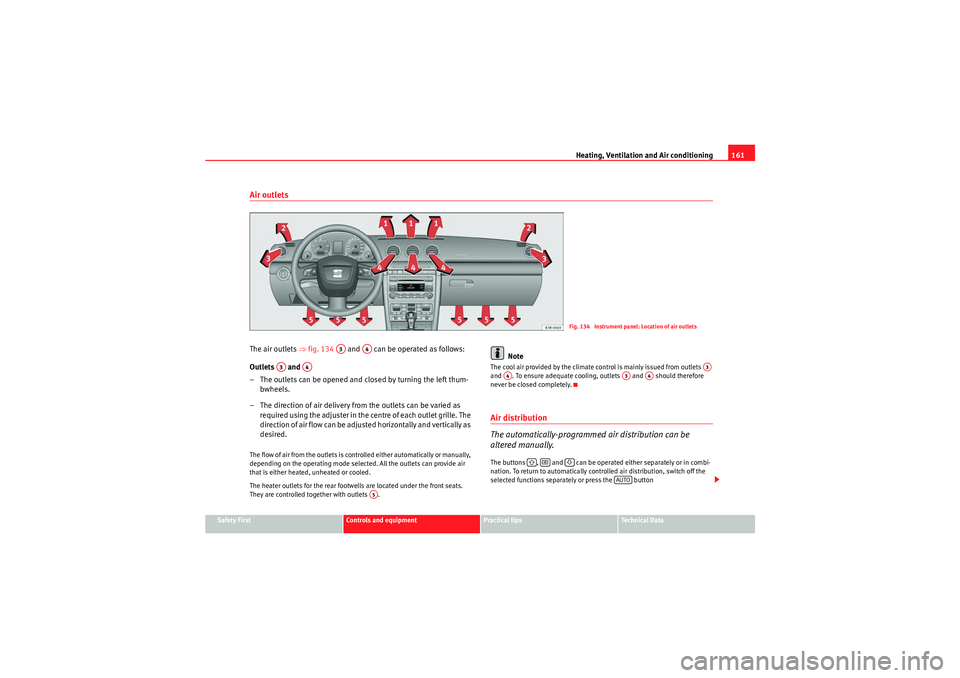
Air outletsThe air outlets ⇒fig. 134 and can be operated as follows:
Outlets and
– The outlets can be opened and closed by turning the left thum- bwheels.
– The direction of air delivery from the outlets can be varied as re quire d using the adjuster in the ce n tre o f ea ch o u t let g rille. The
direction of air flow can be adjusted horizontally and vertically as
desired.The flow of air from the outlets is controlled either automatically or manually,
depending on the operating mode selected. All the outlets can provide air
that is either heated, unheated or cooled.
The heater outlets for the rear footwells are located under the front seats.
They are controlled together with outlets .
Note
The cool air provided by the climate control is mainly issued from outlets
and . To ensure adequate cooling, outlets and should therefore
never be closed completely.Air distribution
The automatically-programmed air distribution can be
altered manually.The buttons , and can be operated either separately or in combi-
nation. To return to automatically controlled air distribution, switch off the
selected functions separately or press the button
Fig. 134 Instrument panel: Location of air outlets
A3
A4
A3
A4
A5
A3
A4
A3
A4
AUTO
Exeo_EN.book Seite 161 Freitag, 28. August 2009 10:14 10
Page 165 of 310
Heating, Ventilation and Air conditioning163
Safety First
Controls and equipment
Practical tips
Technical Data
Solar-powered blower/solar roof*
If the vehicle is parked in sufficiently strong sunlight, the
blower will operate in solar-powered mode when the ignition
is switched off.After the ignition is switched off, the blower is supplied with electrical power
from the solar roof. Please ensure that outlets 3 and 4 are open ⇒page 161,
fig. 134 to ensure the best possible ventilation.
The blower only works when the sun roof is closed or tilted open at the rear.
If the air recirculation mode is on when you switch off the engine, the climate
control will automatically switch to fresh air ventilation.Supplementary heating*Diesel vehicles are fitted with supplementary heating
2) to raise the tempera-
ture of the interior as quickly as possible. At outdoor temperatures below
+5°C and with the engine running, the supplementary heating will switch on
and off automatically depending on the temperature of the coolant.
In order to save fuel, the supplementary heating can be can be switched off
by briefly pressing the button on the climate control.
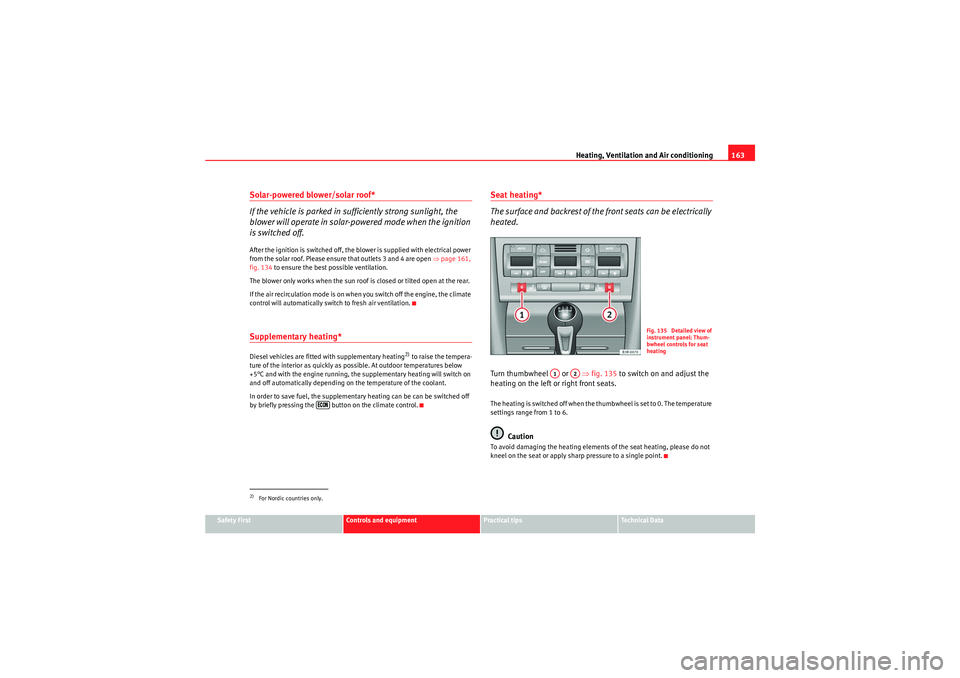
Seat heating*
The surface and backrest of the front seats can be electrically
heated.Turn thumbwheel or ⇒fig. 135 to switch on and adjust the
heating on the left or right front seats.The heating is switched off when the thumbwheel is set to 0. The temperature
settings range from 1 to 6.
Caution
To avoid damaging the heating elements of the seat heating, please do not
kneel on the seat or apply sharp pressure to a single point.
2)For Nordic countries only.
Fig. 135 Detailed view of
instrument panel: Thum-
bwheel controls for seat
heating
A1
A2
Exeo_EN.book Seite 163 Freitag, 28. August 2009 10:14 10