lights Seat Exeo 2009 Workshop Manual
[x] Cancel search | Manufacturer: SEAT, Model Year: 2009, Model line: Exeo, Model: Seat Exeo 2009Pages: 310, PDF Size: 8.54 MB
Page 167 of 310
Driving165
Safety First
Controls and equipment
Practical tips
Technical Data
The Electronic Stabilisation Program (ESP) contains the electronic differential
lock (EDL) and the traction control system (TCS). The ESP function works
together with the ABS. If a fault in the ABS occurs, both warning lamps light
up, but if the ESP fails, only the ESP warning lamp lights up.
The ESP is started automatically when the engine is started.
The ESP switch deactivates both TCS and ESP functions. The ESP, in spite of
being deactivated, will always self-connect when necessary if brakes are
being used.
The TCS can be deactivated when in cases where wheel sliding is desirable.
For example:
•When driving with snow chains,•when driving in deep snow or on loose surfaces,•when rocking the vehicle backwards and forwards to free it from mud, for
example.
Next, the button should be pressed to reactivate the TCS.
When does the warning light switch on or flash ?•On switching the ignition on, it lights up for about two seconds to carry
out a function control.•The warning lamp will start flashing when the vehicle is moving if the ESP
or the TCS is activated.•It will light up continuously if there is a malfunction in the ESP.WARNING
•The electronic stabilisation programme (ESP) cannot defy the laws of
physics. This should be kept in mind, particularly on slippery and wet
roads and when towing a trailer.•Always adapt your driving style to suit the condition of the roads and
the traffic situation. Do not let the extra safety afforded by ESP tempt you
into taking any risks when driving, this can cause accidents.
•Please refer to the corresponding warning notes on ESP in ⇒page 183,
“Intelligent technology”.
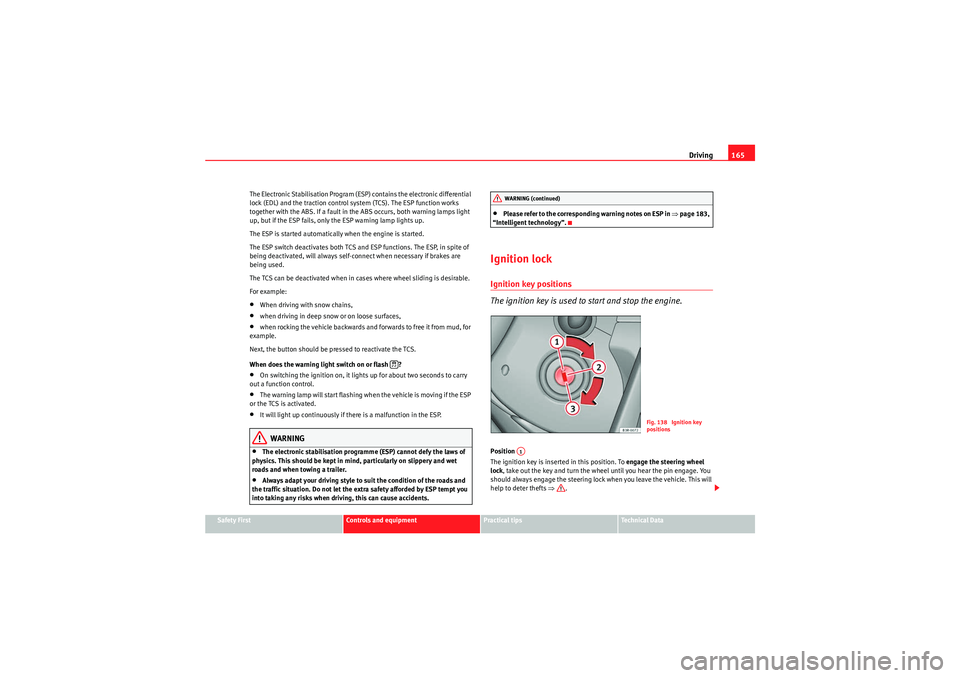
Ignition lockIgnition key positions
The ignition key is used to start and stop the engine.Position
The ignition key is inserted in this position. To engage the steering wheel
lock , take out the key and turn the wheel until you hear the pin engage. You
should always engage the steering lock when you leave the vehicle. This will
help to deter thefts ⇒.
WARNING (continued)
Fig. 138 Ignition key
positions
A1
Exeo_EN.book Seite 165 Freitag, 28. August 2009 10:14 10
Page 171 of 310
Driving169
Safety First
Controls and equipment
Practical tips
Technical Data
If you drive by mistake with the handbrake still applied, you will hear a
warning buzzer and the display will show the message:
Handbrake applied
The handbrake warning is enabled after driving for 3 seconds at a speed
above 5 km/h.
The handbrake warning lamp
lights up when the handbrake is applied
with the ignition on.
WARNING
Please note that the handbrake should be released all the way. If it is only
partially released, this will cause rear brakes overheating, which can
impair the function of the brake system and could lead to an accident.
Caution
Once the vehicle has come to a standstill, always apply the handbrake firmly
and then, on a manual gearbox, engage a gear, or select P on an automatic.Parking
The following points will ensure there is no risk of the car
rolling away accidentally after it is parked.– Use the foot brake to stop the vehicle.
– Apply handbrake firmly.
– Switch the engine off.
– On a manual gearbox engage 1st gear or on an automatic move the selector lever to P ⇒ .
When parking on slopes:
Turn the steering wheel so that the, if the vehicle moves, it will do so towards
the curb.
WARNING
•Do not leave anyone (especially children) in the vehicle when it is
locked. Locked doors could delay assistance in an emergency, potentially
putting lives at risk.•Never leave children unsupervised in the vehicle. They could release
e.g. the handbrake or gear lever, moving the vehicle and causing an
accident.
Parking aid acoustic systemGeneral notesVarious systems are available to help you when parking or manoeuvring in
tight spaces, depending on the equipment fitted on your vehicle.
The SEAT parking system gives an acoustic warning if there are any obstacles
behind your car ⇒ page 170.
When you are parking, SEAT parking system plus warns you acoustically and
optically about obstacles in front of and behind the vehicle ⇒page 170.
Note
To ensure the acoustic parking aid works properly, the sensors must be kept
clean and free of snow and ice.
Exeo_EN.book Seite 169 Freitag, 28. August 2009 10:14 10
Page 174 of 310
Driving
172SEAT parking system*
There is no distance warning.
SEAT parking system plus*
There is no rear distance warning. The system will still give a warning when
obstacles are detected while driving forwards.Fault messages*If you hear a long beep for a few seconds and the LED on the switch
* starts
flashing when you switch on the parking aid, a system fault has occurred.
Please have the fault corrected by a Dealer or specialist garage.
Note
If the fault is not corrected before you switch off the ignition, it will only be
indicated by the flashing LED on the switch
* the next time you switch on
the parking aid.
Cruise control (GRA)Introduction
The cruise control system allows you to maintain a constant
speed.Using this equipment, any speed over 30 km/h can be kept constant up to the
power output of the engine. This is subject to power output and braking
ability of the engine. This helps to reduce fatigue, especially on long jour-
neys. The indicator light
in the instrument panel lights up when the cruise
control system is operating.
WARNING
For safety reasons, the cruise control system should not be used in dense
traffic or poor road conditions (such as slippery surfaces, heavy rain, loose
grit or gravel), as this could cause an accident.
Caution
On vehicles with a manual gearbox: do not go into neutral if the device is
enabled without previously releasing the clutch, as the engine will increase
its revs and, under certain conditions, could break down.
Note
The cruise control cannot maintain a constant speed when travelling down
steep hills. The vehicle tends to accelerate under its own weight. Change
down to a lower gear in good time or use the foot brake to slow the vehicle.
Exeo_EN.book Seite 172 Freitag, 28. August 2009 10:14 10
Page 177 of 310
Driving175
Safety First
Controls and equipment
Practical tips
Technical Data
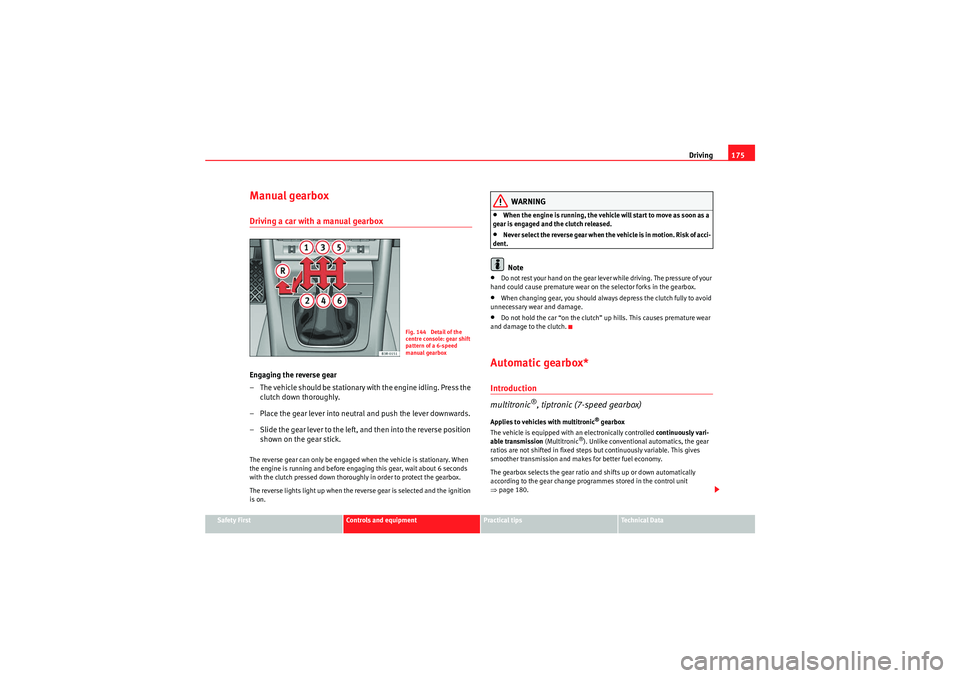
Manual gearboxDriving a car with a manual gearboxEngaging the reverse gear
– The vehicle should be stationary with the engine idling. Press the
clutch down thoroughly.
– Place the gear lever into neutral and push the lever downwards.
– Slide the gear lever to the left, and then into the reverse position shown on the gear stick.The reverse gear can only be engaged when the vehicle is stationary. When
the engine is running and before engaging this gear, wait about 6 seconds
with the clutch pressed down thoroughly in order to protect the gearbox.
The reverse lights light up when the reverse gear is selected and the ignition
is on.
WARNING
•When the engine is running, the vehicle will start to move as soon as a
gear is engaged and the clutch released.•Never select the reverse gear when the vehicle is in motion. Risk of acci-
dent.Note
•Do not rest your hand on the gear lever while driving. The pressure of your
hand could cause premature wear on the selector forks in the gearbox.•When changing gear, you should always depress the clutch fully to avoid
unnecessary wear and damage.•Do not hold the car “on the clutch” up hills. This causes premature wear
and damage to the clutch.Automatic gearbox*Introduction
multitronic
®, tiptronic (7-speed gearbox)
Applies to vehicles with multitronic
® gearbox
The vehicle is equipped with an electronically controlled continuously vari-
able transmission (Multitronic
®). Unlike conventional automatics, the gear
ratios are not shifted in fixed steps but continuously variable. This gives
smoother transmission and makes for better fuel economy.
The gearbox selects the gear ratio and shifts up or down automatically
according to the gear change programmes stored in the control unit
⇒ page 180.
Fig. 144 Detail of the
centre console: gear shift
pattern of a 6-speed
manual gearbox
Exeo_EN.book Seite 175 Freitag, 28. August 2009 10:14 10
Page 178 of 310
Driving
176If desired, you can also select the gears manually (tiptronic mode)
⇒ page 181.
Please note that on vehicles with a multitronic® gearbox, torque is trans-
mitted via a multi-plate clutch, and not via a torque converter as on conven-
tional automatics. This means that the car will not “creep” as much as
conventional automatics when the engine is idling if you stop temporarily
with the selector lever in position D, S or R.
Applies to vehicles with tiptronic gearbox
The vehicle is equipped with an electronically controlled 7-speed automatic
gearbox. The gearbox changes up and down automatically .
If desired, you can also select the gears manually (tiptronic mode)
⇒ page 181.Driving instructions
The gears are changed automatically.
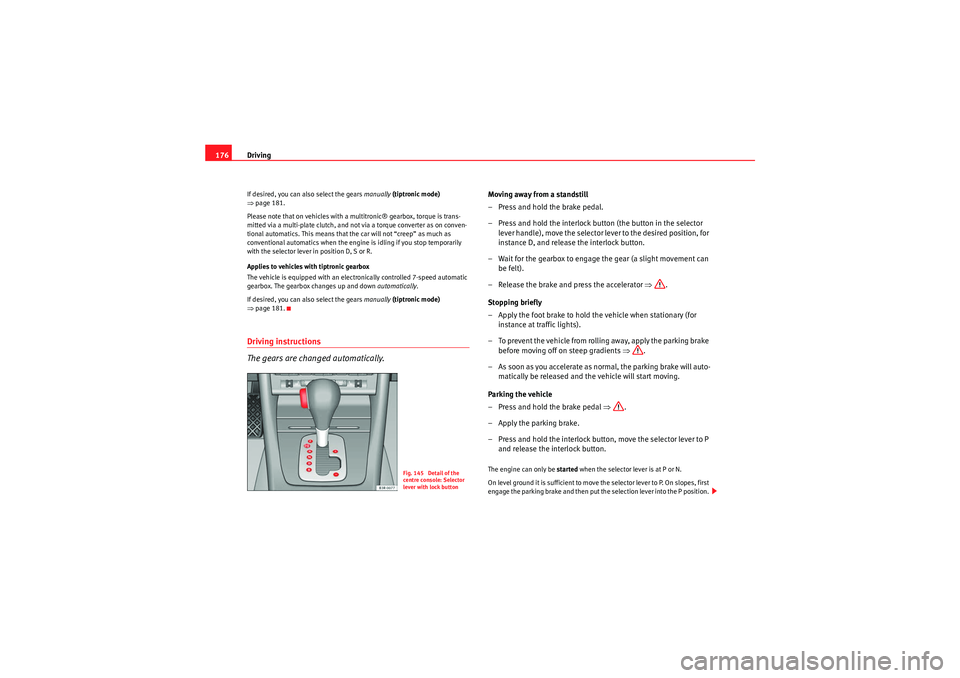
Moving away from a standstill
–Press and hold the brake pedal.
– Press and hold the interlock button (the button in the selector
lever handle), move the selector lever to the desired position, for
instance D, and release the interlock button.
– Wait for the gearbox to engage the gear (a slight movement can be felt).
– Release the brake and press the accelerator ⇒.
Stopping briefly
– Apply the foot brake to hold the vehicle when stationary (for instance at traffic lights).
– To prevent the vehicle from rolling away, apply the parking brake before moving off on steep gradients ⇒.
– As soon as you accelerate as normal, the parking brake will auto- matically be released and the vehicle will start moving.
Parking the vehicle
–Press and hold the brake pedal ⇒.
– Apply the parking brake.
– Press and hold the interlock button, move the selector lever to P and release the interlock button.The engine can only be started when the selector lever is at P or N.
On level ground it is sufficient to move the selector lever to P. On slopes, first
engage the parking brake and then put the selection lever into the P position.
Fig. 145 Detail of the
centre console: Selector
lever with lock button
Exeo_EN.book Seite 176 Freitag, 28. August 2009 10:14 10
Page 180 of 310
Driving
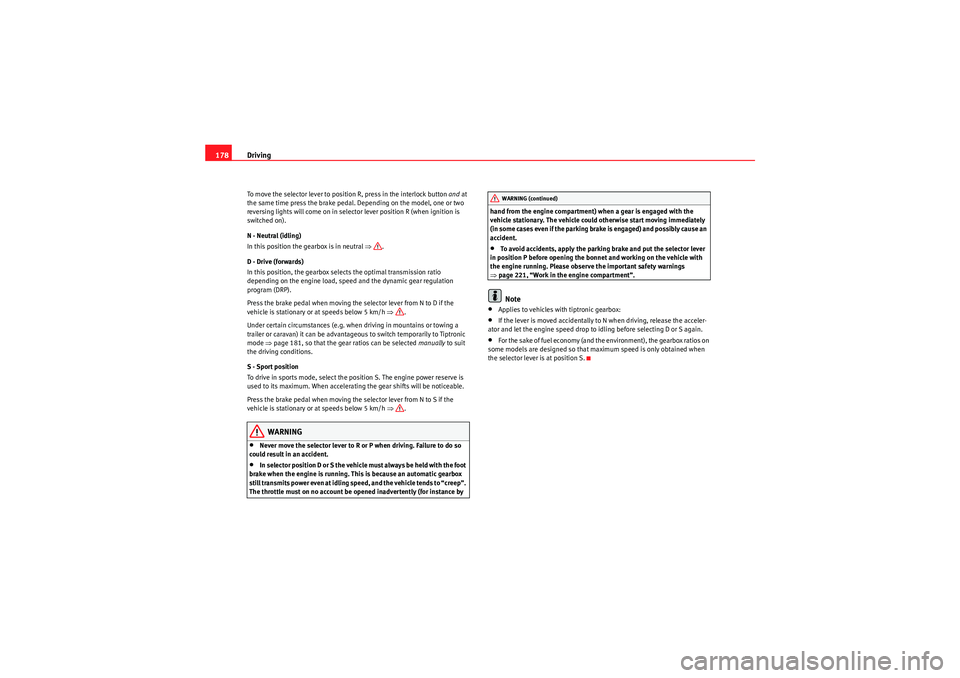
178To move the selector lever to position R, press in the interlock button and at
the same time press the brake pedal. Depending on the model, one or two
reversing lights will come on in selector lever position R (when ignition is
switched on).
N - Neutral (idling)
In this position the gearbox is in neutral ⇒.
D - Drive (forwards)
In this position, the gearbox selects the optimal transmission ratio
depending on the engine load, speed and the dynamic gear regulation
program (DRP).
Press the brake pedal when moving the selector lever from N to D if the
vehicle is stationary or at speeds below 5 km/h ⇒.
Under certain circumstances (e.g. when driving in mountains or towing a
trailer or caravan) it can be advantageous to switch temporarily to Tiptronic
mode ⇒page 181, so that the gear ratios can be selected manually to suit
the driving conditions.
S - Sport position
To drive in sports mode, select the position S. The engine power reserve is
used to its maximum. When accelerating the gear shifts will be noticeable.
Press the brake pedal when moving the selector lever from N to S if the
vehicle is stationary or at speeds below 5 km/h ⇒.
WARNING
•Never move the selector lever to R or P when driving. Failure to do so
could result in an accident.•In selector position D or S the vehicle must always be held with the foot
brake when the engine is running. This is because an automatic gearbox
still transmits power even at idling speed, and the vehicle tends to “creep”.
The throttle must on no account be opened inadvertently (for instance by hand from the engine compartment) when a gear is engaged with the
vehicle stationary. The vehicle could otherwise start moving immediately
(in some cases even if the parking brake is engaged) and possibly cause an
accident.
•To avoid accidents, apply the parking brake and put the selector lever
in position P before opening the bonnet and working on the vehicle with
the engine running. Please observe the important safety warnings
⇒ page 221, “Work in the engine compartment”.Note
•Applies to vehicles with tiptronic gearbox:•If the lever is moved accidentally to N when driving, release the acceler-
ator and let the engine speed drop to idling before selecting D or S again.•For the sake of fuel economy (and the environment), the gearbox ratios on
some models are designed so that maximum speed is only obtained when
the selector lever is at position S.WARNING (continued)
Exeo_EN.book Seite 178 Freitag, 28. August 2009 10:14 10
Page 184 of 310
Driving
182Back-up programme
A back-up system is in place if a fault should occur in the
control system.The automatic gearbox switches to the back-up programme if a fault should
occur in the control system. This is indicated by a gear-wheel symbol which
lights up on the dash panel display (the symbol represents a gear pinion).
It is still possible to move the selector lever to all positions. The manual shift
programme (Tiptronic) is not available when the back-up programme is
active.
Vehicles with tiptronic gearbox: When the selector lever is in position D or S
or in the manual shift programme, the gearbox will remain in 3rd gear if 1st,
2nd or 3rd gears were engaged when the fault occurred. The gearbox will
remain in 5th gear if 4th, 5th or 6th gears were engaged. The gearbox will
then engage 3rd gear when you drive away from a standstill or after the
engine is restarted.
It will still be possible to use reverse gear in the normal way. However, the
electronic lock for reverse gear will be switched off.
Caution
Should the gearbox ever switch into the back-up programme, you should take
the vehicle to a technical service or qualified workshop as soon as possible.
Steering wheel with paddle levers
The paddle levers on the steering wheel enable the driver to
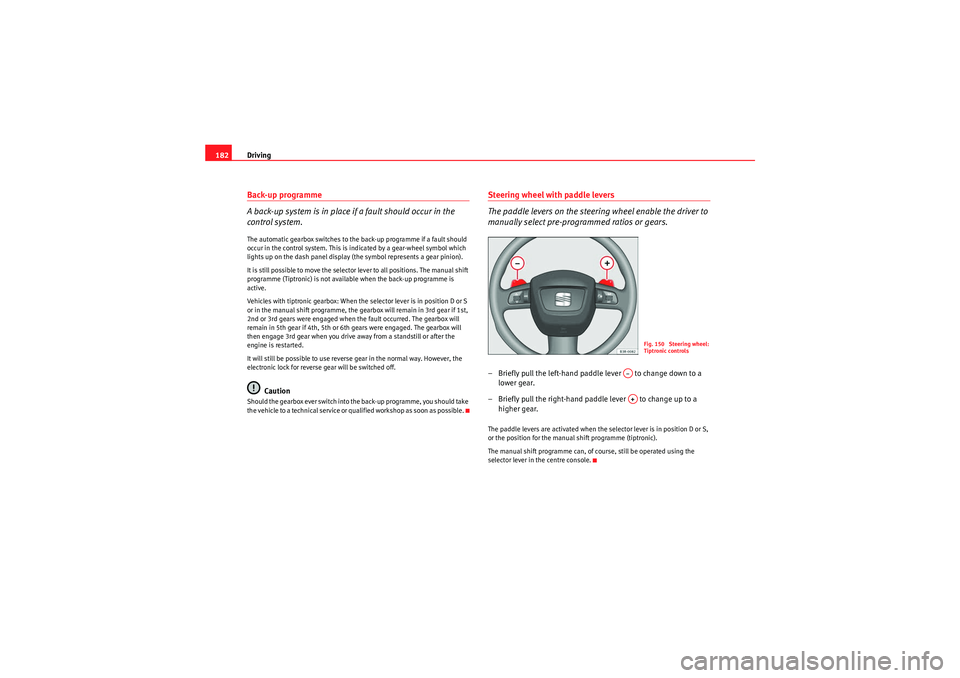
manually select pre-programmed ratios or gears.– Briefly pull the left-hand paddle lever to change down to a
lower gear.
– Briefly pull the right-hand paddle lever to change up to a higher gear.The paddle levers are activated when the selector lever is in position D or S,
or the position for the manual shift programme (tiptronic).
The manual shift programme can, of course, still be operated using the
selector lever in the centre console.
Fig. 150 Steering wheel:
Tiptronic controls
A–A+
Exeo_EN.book Seite 182 Freitag, 28. August 2009 10:14 10
Page 186 of 310
Intelligent technology
184If required, the ESP can also be enabled and disabled manually by briefly
pressing the switch ⇒page 183, fig. 151. The ESP warning lamp lights
up when the system is switched off, see ⇒page 68.
In general, the ESP should be left switched on at all times. In particular
circumstances where a certain amount of wheel slip is desirable, it may be
advisable to switch off the ESP. Examples:•when driving with snow chains•when driving in deep snow or on loose surfaces•when rocking the car backwards and forwards to free it.
The ESP should be switched on again afterwards as soon as possible.WARNING
The ESP is not able to overcome the physical limits of adhesion. Even with
ESP, you should always adjust your speed to suit the conditions. Please
b ea r t h is i n m i n d , e s p e ciall y o n w e t o r s l i pp e r y roa d s u r fa ces . D o n o t l e t t h e
extra safety features tempt you into taking any risks when driving. Failure
to do so could result in an accident.Anti-lock brake system (ABS)
ABS prevents the wheels from locking up under braking.The anti-lock brake system (ABS) is an important part of the car's active safety
system. However, the ABS will not necessarily guarantee shorter stopping
distances in all conditions. For instance, on loose gravel or fresh snow on top
of an icy surface (conditions which anyway require extreme care and reduced
speed), the stopping distance with ABS may even be slightly longer. How the ABS works
The system runs an automatic self-check when the car reaches a road speed
of about 6 km/h. This may be accompanied by a noise from the ABS pump.
When one of the wheels is turning very slowly in relation to the road speed
and is close to locking up, the system will reduce the pressure in the brake
line to this wheel. The driver is made aware of this adjustment process by a
vibration of the brake pedal
and an audible noise. This is a deliberate
warning to the driver that one or more of the wheels is tending to lock up and
the ABS control function has intervened. In this situation it is important to
keep the brake pedal fully depressed so the ABS can regulate the brake appli-
cation, but do not “pump” the brake pedal.
WARNING
The grip provided by ABS is still subjec t to the physical limits of adhesion.
Always bear this in mind, especially on wet or slippery roads. If you notice
that the ABS is working (to counteract locked wheels under braking), you
should reduce speed immediately to suit the road and traffic conditions. Do
not let the extra safety features tempt you into taking any risks when
driving. Failure to do so could result in an accident.
Note
If a malfunction should occur in the ABS, this is indicated by a warning lamp
⇒ page 67.Brake assist system
The brake assist system helps the driver to achieve optimum
braking effect.The brake assist system helps to increase braking power and thus to achieve
a shorter stopping distance. If the driver presses the brake pedal very quickly,
ESP
Exeo_EN.book Seite 184 Freitag, 28. August 2009 10:14 10
Page 187 of 310
Intelligent technology185
Safety First
Controls and equipment
Practical tips
Technical Data
the brake assist system automatically boosts the braking force to the
maximum level, up to the point where the anti-lock brake function (ABS) inter-
venes to stop the wheels from locking. You should then keep the brake pedal
pressed until the vehicle has braked to the required speed. The brake assist
system switches itself off as soon as you release the brake pedal.
The brake assist system will not be operative if there is a malfunction in the
ABS or the ESP.
WARNING
Please remember that the accident risk always increases if you drive too
fast, especially in corners or on a slippery road, or if you follow too close
behind the vehicle in front of you. An increased accident risk cannot be
compensated even by the brake assist system. Risk of accident.Electronic differential lock (EDL)
The electronic differential lock prevents the loss of traction
caused if one wheel starts spinning.General notes
The electronic differential lock (EDL) helps the car to start moving, accelerate
and climb a gradient in slippery conditions where this may otherwise be diffi-
cult or even impossible.
How it works
The EDL works automatically, i.e. without the driver's involvement. With the
aid of the ABS sensors, the system monitors the rotational speed of the
driven wheels ⇒
page 184. If a considerable difference in revs is detected
(approx. 100 rpm) in the speed of the driven wheels, e.g. when only one part
of the surface supporting the wheels is slippery, the system applies the brake
to slow down the skidding wheel so that more of the power is directed to the other wheels. The systems works up to a speed of approx. 80 km/h. The
system will make noises while it is working.
Moving away from a standstill
If one wheel has less grip and starts spinning (for instance, if one of the
driven wheels is on ice), keep pressing the accelerator gradually until the car
starts moving.
Overheating of the brakes
To prevent the brake disk of the braked wheel from overheating, the EDL cuts
out automatically if subjected to excessive loads. In this case, the vehicle will
continue to run and will have the same running properties as those of another
without EDL.
The EDL will switch on again automatically when the brake has cooled down.
WARNING
•When accelerating on a uniformly slippery surface (for instance all four
wheels on ice or snow), press the accelerator gradually and carefully.
Despite EDL, the driven wheels may otherwise start to spin. This could
impair the car's stability. Risk of accident.•Even with EDL, you should always adjust your speed to suit the condi-
tions. Do not let the extra safety features tempt you into taking any risks
when driving. Failure to do so could result in an accident.Note
If the ABS warning lamp lights up, this can also mean there is a fault in the
EDL. Please take the vehicle to a specialist garage as soon as possible.
Exeo_EN.book Seite 185 Freitag, 28. August 2009 10:14 10
Page 193 of 310
Driving and the environment191
Safety First
Controls and equipment
Practical tips
Technical Data
Diesel engine particulate filter*
The diesel engine particulate filter eliminates soot produced
by burning diesel.The diesel engine dust filter eliminates most of the soot from the exhaust gas
system. Under normal driving conditions, the filter cleans itself. If the driving
conditions do not allow the filter to clean itself (for example, multiple short
trips) the filter will be obstructed by dust and pollen and the indicator
for
the diesel engine particulate filter indicator will light up. See section on
Warning Lights.
WARNING
•The diesel engine particulate filter may reach extremely high tempera-
tures; it should not enter into contact with flammable materials under-
neath the vehicle. Failure to comply could result in fire.Caution
•The vehicle is not designed for refuelling with mixtures of FAME fuel
(biodiesel) over 7% in accordance with DIN 51628. The diesel particle filter
will be damaged if this mixture percentage is exceeded.Economical and environmentally friendly
drivingEconomical and environmen tally friendly drivingFuel consumption, environmental pollution and wear to the engine, brakes
and tyres depends in large part on your driving style. By adopting an econom- ical driving style and anticipating the traffic situation ahead, you can easily
reduce fuel consumption by 10-15%. Some tips on how to help you reduce
pollution while saving money are listed below.
As you drive try to anticipate the traffic situation
A vehicle uses most fuel when accelerating. When you anticipate the situa-
tion, you have to brake less often and, thus, accelerate less. If it is possible,
let the vehicle roll with a gear engaged
, for example, if you see a red light
ahead. The braking effect achieved in this way helps to reduce the wear of
brakes and tyres; emissions and fuel consumption are reduced to zero
(disconnection due to inertia).
Change gear early to save energy
An effective way of saving fuel is to change up quickly through the gears.
Running the engine at high rpm in the lower gears uses an unnecessary
amount of fuel.
Manual gearbox: Change from first to second gear as quickly as possible. We
recommend that, whenever possible, you change to a higher gear upon
reaching 2,000 rpm.
Avoid driving at high speed
We advise you not to drive at the top speed permitted by the vehicle. Fuel
consumption, exhaust emissions and noise levels all increase very rapidly at
higher speeds. Driving at moderate speeds will help to save fuel.
Avoid idling
It is worthwhile switching off the engine when waiting in a traffic jam, at level
crossings or at traffic lights with a long red phase. The fuel saved after only
30 - 40 seconds is greater than the amount of fuel needed to restart the
engine.
The engine takes a very long time to warm up when it is running at idling
speed. Mechanical wear and pollutant emissions are also especially high
during this initial warm-up phase. It is therefore best to drive off immediately
after starting the engine. Avoid running the engine at high speed.
Exeo_EN.book Seite 191 Freitag, 28. August 2009 10:14 10