radio Seat Exeo 2010 User Guide
[x] Cancel search | Manufacturer: SEAT, Model Year: 2010, Model line: Exeo, Model: Seat Exeo 2010Pages: 319, PDF Size: 9.64 MB
Page 97 of 319
Steering wheel controls95
Safety First
Operating Instructions
Practical Tips
Technical Specifications
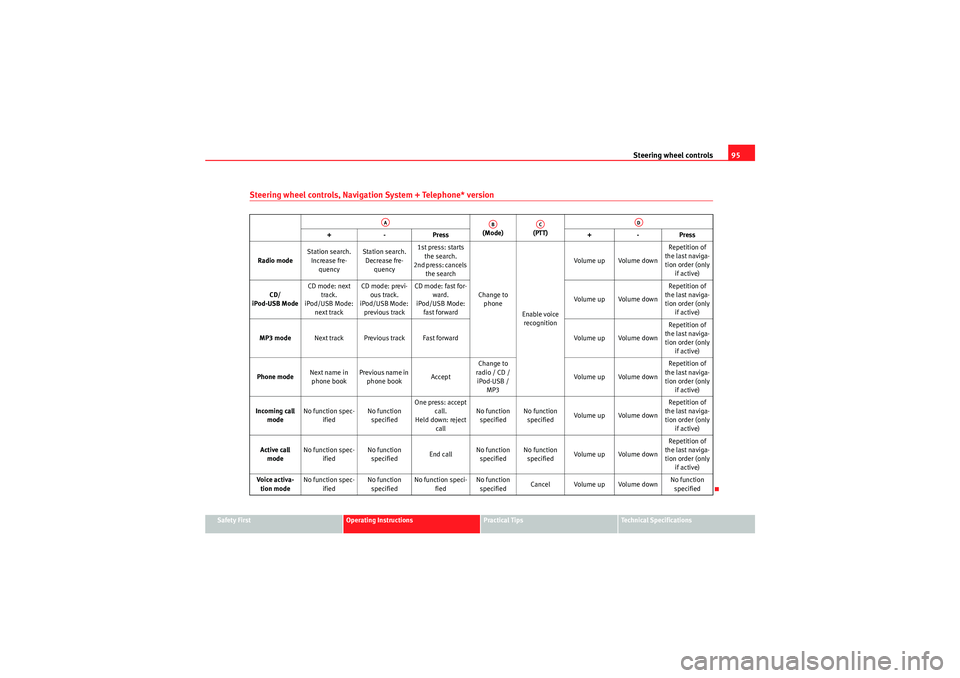
Steering wheel controls, Navigation System + Telephone* version
(Mode) (PTT)
+-P re ss +-Pre ss
Radio mode Station search.
Increase fre- quency Station search.
Decrease fre- quency 1st press: starts
the search.
2nd press: cancels the search
Change to phone
Enable voice recognition Volume up Volume down
Repetition of
the last naviga- tion order (only if active)
CD/
iPod-USB Mode CD mode: next
track.
iPod/USB Mode: next track CD mode: previ-
ous track.
iPod/USB Mode: previous track CD mode: fast for-
ward.
iPod/USB Mode: fast forward Volume up Volume downRepetition of
the last naviga- tion order (only if active)
MP3 mode Next track Previous track Fast forward Volume up Volume downRepetition of
the last naviga- tion order (only if active)
Phone mode Next name in
phone book Previous name in
phone book AcceptChange to
radio / CD / iPod-USB / MP3 Volume up Volume down Repetition of
the last naviga- tion order (only if active)
Incoming call mode No function spec-
ified No function
specified One press: accept
call.
Held down: reject call No function
specified No function
specified Volume up Volume down Repetition of
the last naviga- tion order (only if active)
Active call mode No function spec-
ified No function
specified End callNo function
specified No function
specified Volume up Volume down Repetition of
the last naviga- tion order (only if active)
Voice activa- tion mode No function spec-
ified No function
specified No function speci-
fied No function
specified Cancel Volume up Volume down No function
specified
AA
AB
AC
AD
exeo_EN.book Seite 95 Montag, 30. August 2010 4:45 16
Page 107 of 319

Unlocking and locking105
Safety First
Operating Instructions
Practical Tips
Technical Specifications
the current legal requirements. This certification forms the basis for official
approval for use in other countries.
Note
•The remote control is automatically disabled when the ignition is
switched on.•The function of the remote control may be impaired by interference from
other nearby radio signals (e.g. from a mobile phone or TV transmitter) if
these are in the same frequency range.Locking and unlocking the vehicleUnlocking the vehicle
– Press button ⇒fig. 77 for about 1 second. Locking the vehicle
– Press button for about 1 second.
Opening the tailgate
– Press button and hold for at least one second.
The turn signals will flash twice as confirmation when you unlock the vehicle.
The vehicle will be locked again automatically if you do not open one of the
doors or the tailgate within 60 seconds after unlocking the vehicle with
button . This function prevents the vehicle from remaining unlocked if the
unlocking button is pressed by mistake.
In vehicles with the
security central locking* feature, you can unlock just the
driver door and the tank flap by pressing button once or the whole vehicle
by pressing the button twice.
The turn signals flash once when the vehicle is locked to confirm that the
doors and tailgate are properly locked.
Moreover, apart from unlocking the vehicle, the seat* and mirror* memory
programmed in the key is activated. The driver seat and exterior mirrors will
be automatically adjusted to the positions stored in the memory.
The interior lights will automatically light up when the vehicle is unlocked and
go out when the vehicle is locked, provided that the switch is in the courtesy
light position.
WARNING
Do not leave anyone (especially children) in the vehicle if it is locked from
the outside and the anti-theft security system is enabled, as the doors and
windows cannot then be opened from the inside. Locked doors could delay
assistance in an emergency, potentially putting lives at risk.
Fig. 77 Remote control
key: Control buttons
AA
AB
˜
AC
AA
AA
exeo_EN.book Seite 105 Montag, 30. August 2010 4:45 16
Page 109 of 319
Unlocking and locking107
Safety First
Operating Instructions
Practical Tips
Technical Specifications
•Doors•Tilt angle (tow-away protection)•Ignition•Radio (only with a factory-fitted SEAT radio)•Interior ⇒page 107
If any of these areas are entered, the alarm will be triggered.
How is the alarm disabled?
The alarm can be switched off by unlocking the vehicle using the remote
control, or by switching on the ignition with the key, thus “disabling” the
alarm system. The alarm will also switch off when it comes to the end of its
cycle.
Turn sig nals
The turn signals flash briefly when the vehicle is locked to confirm that the
doors, the engine bonnet and the tailgate are properly closed and locked.
If the turn signals do not flash, check the doors, the bonnet and the tailgate
to make sure they are properly closed. The turn signals will also flash briefly
if one of the doors or the tailgate or engine bonnet is closed after the alarm
system has been enabled.
LED
When the vehicle is locked, the LED on the top of the driver door trim will flash
rapidly for about 30 seconds and then continue flashing slowly. This is to
indicate that the anti-theft alarm system (including the interior monitoring
and tow-away protection ) is operative. If the LED lights up continuously for
about 30 seconds when the vehicle is locked instead of flashing, this means
the alarm system is not working properly.Note
•To make sure that the alarm is fully operative when leaving the vehicle,
briefly check that all the doors and windows and the sunroof* are closed.
•The alarm is triggered immediately if one of the battery cables is discon-
nected while the alarm system is enabled.Interior monitoring*
The interior monitoring triggers an alarm if it detects move-
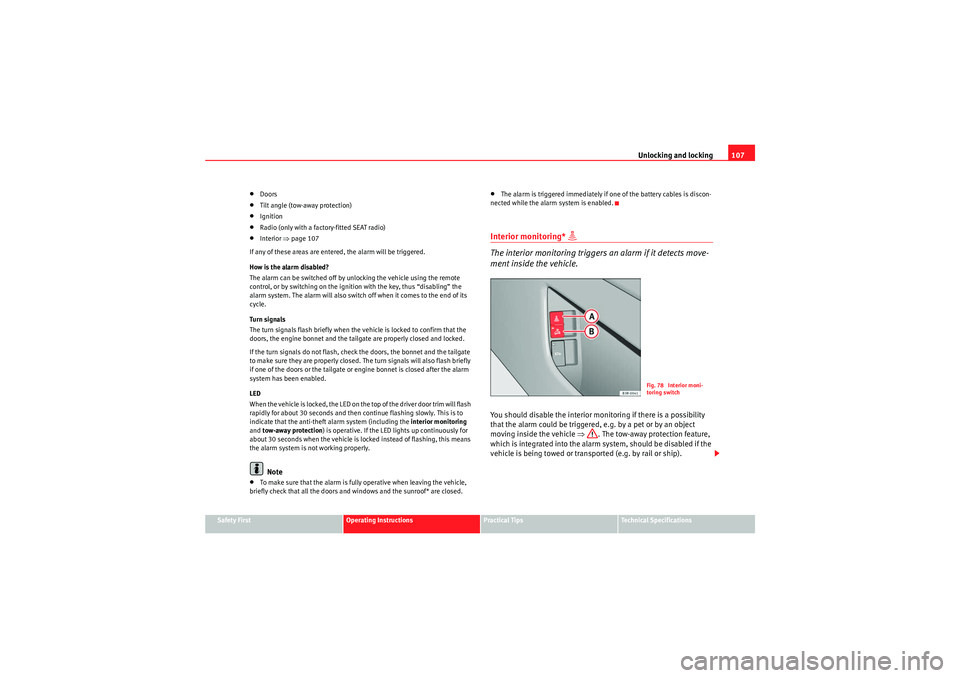
ment inside the vehicle.You should disable the interior monitoring if there is a possibility
that the alarm could be triggered, e.g. by a pet or by an object
moving inside the vehicle ⇒ . The tow-away protection feature,
which is integrated into the alarm system, should be disabled if the
vehicle is being towed or transp orted (e.g. by rail or ship).
Fig. 78 Interior moni-
toring switch
exeo_EN.book Seite 107 Montag, 30. August 2010 4:45 16
Page 154 of 319

Seats and storage compartments
152•Ensure that appliances connected to the socket are secure to prevent
them from being thrown around the vehicle in the event of sharp braking or
an accident. This could result in severe injury or loss of life ⇒page 16,
“Storing objects”.•Never spill liquid over the socket – there is a risk of death. If any mois-
ture enters the socket, ensure that it is thoroughly dry before using.•Improper use of the sockets or electrical accessories can lead to serious
injuries or cause a fire, with the resultant risk of injury.•Children must never be left alone in the vehicle with the engine
running. They could cause an accident.•Appliances connected to the socket do not behave in the same way as
when they are connected to the mains power supply. They may overheat
during use and cause injury.•When using adapters and extension leads, the childproof safety device
on the 230 volt socket is disconnected and the socket is live. Risk of injury!.•Never insert objects which conduct electricity, such as a needle, in the
pins of the 230 volt socket. There is a risk of death.•Always switch off electrical appliances connected to the socket if the
inverter goes off as a result of overheating. Failure to comply could result
in injuries.Caution
•The instructions for handling appliances connected to the socket must be
observed.•If the power consumption of the appliances connected exceeds 150
watts, the socket inverter will overheat. If the temperature exceeds a certain
value, the inverter will switch off. It may also switch off if the outside temper-
ature is very high, even if the power consumption is normal. The inverter will
switch on again automatically after it has cooled down. Appliances connected to the socket, and which have been left switched on, will automat-
ically come back on
⇒.
•Do not connect neon lamps to the socket. For technical reasons, these
could break down.•Do not connect 115 volt appliances to the 230 volt power socket, as they
could be damaged. If you have any queries, please check the manufacturer’s
label for details of the power supply accepted by the appliance.•With some adapters, for example for laptops, their built-in overload
disconnection system prevents the equipment from switching on in the event
of an excessive star t-up current. In this case, disconnect the adapter from the
power supply and try to reconnect after ten seconds.Note
•Non-insulated equipment may cause interference to the radio or vehicle
electronics.•The Europlug socket has a built-in childproof device and only carries live
current when the Europlug is correctly plugged in.•Some appliances may not operate correctly in the absence of adequate
power (watts).•In some countries this socket is 115 volts. Therefore the socket should
have a different inverter installed at the factory. You can obtain retrofit kits
from your Authorised Technical Service. Do not connect 115 Volt appliances
to the 230 Volt socket.•The use of electrical equipment in the vicinity of the aerial in the rear
window may cause interference to the reception of stations broadcasting in
AM.
WARNING (continued)
exeo_EN.book Seite 152 Montag, 30. August 2010 4:45 16
Page 212 of 319
Vehicle maintenance and cleaning
210Vehicle exterior maintenanceAutomatic car wash tunnel
The vehicle can normally be washed without problem in an
automatic car wash.The vehicle paintwork is so durable that the vehicle can normally be washed
without problems in an automatic car wash tunnel. However, the paintwork
wear depends to a large extent on the kind of the car wash tunnel, the
brushes used, its water filtering and the type of cleaning and preservative
products.
Before going through a vehicle wash, be sure to take the usual precautions
such as closing the windows and sunroof.
If the vehicle has special accessories such as spoilers or a roof rack or two-
way radio aerial, etc., it is advisable to consult the car wash tunnel operator.
After washing, the brakes could take some time to respond as the brake discs
and pads could be wet, or even frozen in winter. Dry the brakes by braking
several times.
WARNING
Water, ice and salt on the brakes can reduce braking efficiency. Risk of
accident.Washing by handVehicle washing
– First soften the dirt with plenty of water and rinse it off. – Clean your vehicle from top to bottom with a soft sponge, a glove
or a brush. Use very light pressure.
– Rinse the sponge or glove often with clean water.
– Special car shampoo should only be used for very stubborn dirt.
– Leave the wheels, sill panels etc. until last, using a different sponge or glove.
– Rinse the vehicle thoroughly with water.
– Dry the vehicle surface gently with a chamois leather.
–In cold temperature , dry the rubber seals and their surfaces to
prevent them from freezing. Apply silicone spray to the rubber
seals.
After washing
– After washing, avoid sudden and sharp braking. Dry the brakes by braking several times ⇒page 192, “Braking capacity and
braking distance”.
WARNING
•Wash your vehicle with the ignition switched off.•Protect your hands and arms from cuts on sharp metal edges when
cleaning the underbody, the inside of the wheel housings etc. Risk of
injury.•Water, ice and salt on the brakes can reduce braking efficiency. Risk of
accident.
exeo_EN.book Seite 210 Montag, 30. August 2010 4:45 16
Page 221 of 319
Accessories, parts replacement and modifications219
Safety First
Operating Instructions
Practical Tips
Technical Specifications
WARNING
Incorrectly performed modifications or other kind of work on your vehicle
can lead to malfunctions and cause accidents.Mobile phones and two-way radiosFirst consult your Authorised Service Centre if you wish to use a mobile tele-
phone or a two-way radio with a transmitting power output in excess of 10
watts. Here you will receive information concerning the technical possibilities
for retrofitting this equipment.
Mobile telephones and two-way radios should be only fitted by a specialised
workshop, for example an Authorised Service Centre.
WARNING
•Always concentrate primarily on driving. If you are distracted while
driving you could have an accident.•Never attach the telephone mountings to the surfaces covering the
airbag units or within the range of the airbags. There is a high danger of
injury if the airbag is triggered.Note
Please observe the operating instructions of your mobile telephone / two-way
radio.
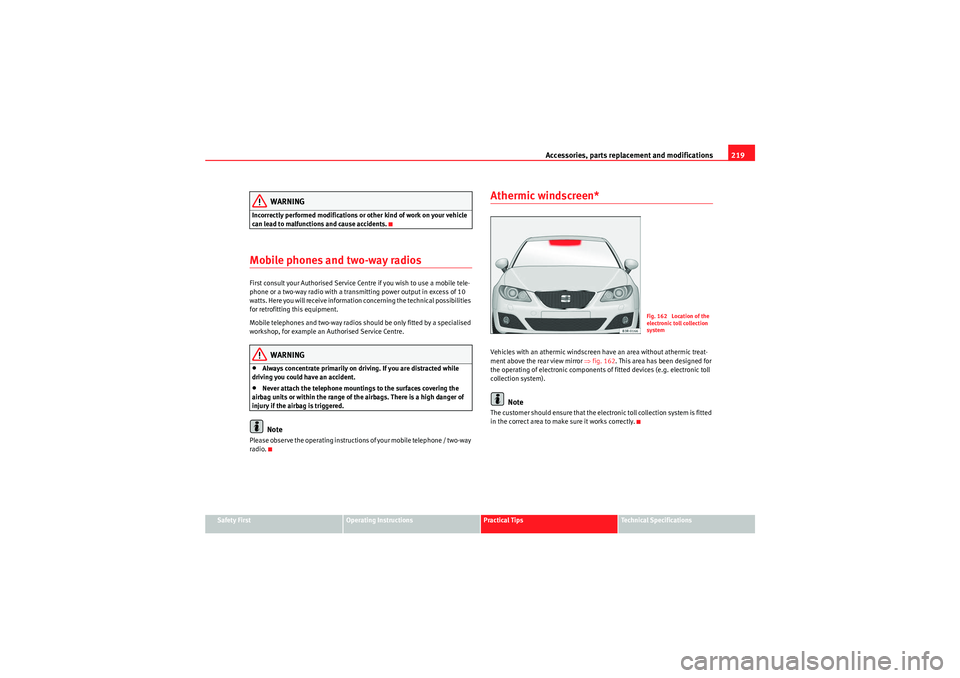
Athermic windscreen*Vehicles with an athermic windscreen have an area without athermic treat-
ment above the rear view mirror ⇒fig. 162 . This area has been designed for
the operating of electronic components of fitted devices (e.g. electronic toll
collection system).
Note
The customer should ensure that the electronic toll collection system is fitted
in the correct area to make sure it works correctly.
Fig. 162 Location of the
electronic toll collection
system
exeo_EN.book Seite 219 Montag, 30. August 2010 4:45 16
Page 261 of 319
If and when259
Safety First
Operating Instructions
Practical Tips
Technical Specifications
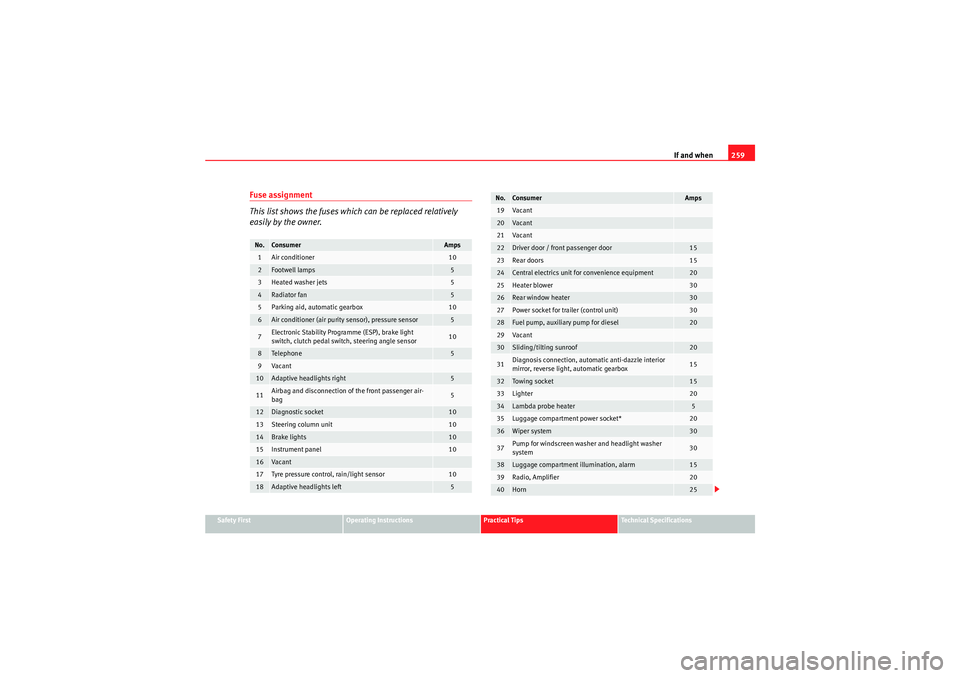
Fuse assignment
This list shows the fuses which can be replaced relatively
easily by the owner.No.
Consumer
Amps
1
Air conditioner
10
2
Footwell lamps
5
3
Heated washer jets
5
4
Radiator fan
5
5
Parking aid, automatic gearbox
10
6
Air conditioner (air purity sensor), pressure sensor
5
7
Electronic Stability Programme (ESP), brake light
switch, clutch pedal switch, steering angle sensor
10
8
Te le p hon e
5
9
Va can t
10
Adaptive headlights right
5
11
Airbag and disconnection of the front passenger air-
bag
5
12
Diagnostic socket
10
13
Steering column unit
10
14
Brake lights
10
15
Instrument panel
10
16
Va can t
17
Tyre pressure control, rain/light sensor
10
18
Adaptive headlights left
5
19
Va can t
20
Va can t
21
Va can t
22
Driver door / front passenger door
15
23
Rear doors
15
24
Central electrics unit for convenience equipment
20
25
Heater blower
30
26
Rear window heater
30
27
Power socket for trailer (control unit)
30
28
Fuel pump, auxiliary pump for diesel
20
29
Va can t
30
Sliding/tilting sunroof
20
31
Diagnosis connection, automatic anti-dazzle interior
mirror, reverse light, automatic gearbox
15
32
Towi ng s ocke t
15
33
Lighter
20
34
Lambda probe heater
5
35
Luggage compartment power socket*
20
36
Wiper system
30
37
Pump for windscreen washer and headlight washer
system
30
38
Luggage compartment illumination, alarm
15
39
Radio, Amplifier
20
40
Horn
25
No.
Consumer
Amps
exeo_EN.book Seite 259 Montag, 30. August 2010 4:45 16
Page 311 of 319
Index309
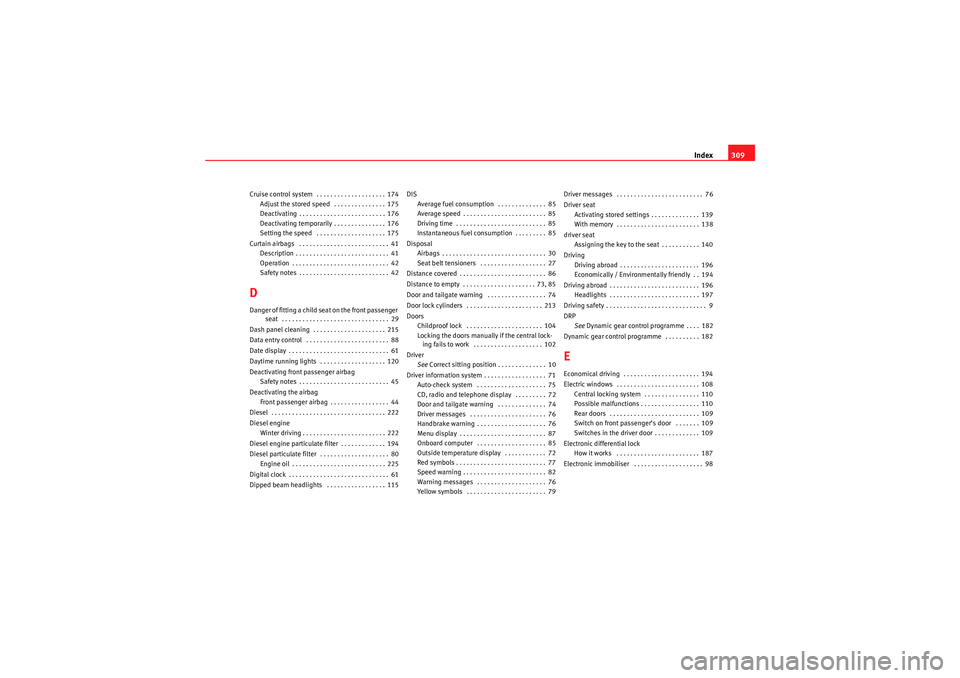
Cruise control system . . . . . . . . . . . . . . . . . . . . 174
Adjust the stored speed . . . . . . . . . . . . . . . 175
Deactivating . . . . . . . . . . . . . . . . . . . . . . . . . 176
Deactivating temporarily . . . . . . . . . . . . . . . 176
Setting the speed . . . . . . . . . . . . . . . . . . . . 175
Curtain airbags . . . . . . . . . . . . . . . . . . . . . . . . . . 41 Description . . . . . . . . . . . . . . . . . . . . . . . . . . . 41
Operation . . . . . . . . . . . . . . . . . . . . . . . . . . . . 42
Safety notes . . . . . . . . . . . . . . . . . . . . . . . . . . 42DDanger of fitting a child seat on the front passenger seat . . . . . . . . . . . . . . . . . . . . . . . . . . . . . . . 29
Dash panel cleaning . . . . . . . . . . . . . . . . . . . . . 215
Data entry control . . . . . . . . . . . . . . . . . . . . . . . . 88
Date display . . . . . . . . . . . . . . . . . . . . . . . . . . . . . 61
Daytime running lights . . . . . . . . . . . . . . . . . . . 120
Deactivating front passenger airbag Safety notes . . . . . . . . . . . . . . . . . . . . . . . . . . 45
Deactivating the airbag Front passenger airbag . . . . . . . . . . . . . . . . . 44
Diesel . . . . . . . . . . . . . . . . . . . . . . . . . . . . . . . . . 222
Diesel engine Winter driving . . . . . . . . . . . . . . . . . . . . . . . . 222
Diesel engine particulate filter . . . . . . . . . . . . . 194
Diesel particulate filter . . . . . . . . . . . . . . . . . . . . 80 Engine oil . . . . . . . . . . . . . . . . . . . . . . . . . . . 225
Digital clock . . . . . . . . . . . . . . . . . . . . . . . . . . . . . 61
Dipped beam headlights . . . . . . . . . . . . . . . . . 115 DIS
Average fuel consumption . . . . . . . . . . . . . . 85
Average speed . . . . . . . . . . . . . . . . . . . . . . . . 85
Driving time . . . . . . . . . . . . . . . . . . . . . . . . . . 85
Instantaneous fuel consumption . . . . . . . . . 85
Disposal Airbags . . . . . . . . . . . . . . . . . . . . . . . . . . . . . . 30
Seat belt tensioners . . . . . . . . . . . . . . . . . . . 27
Distance covered . . . . . . . . . . . . . . . . . . . . . . . . . 86
Distance to empty . . . . . . . . . . . . . . . . . . . . . 73, 85
Door and tailgate warning . . . . . . . . . . . . . . . . . 74
Door lock cylinders . . . . . . . . . . . . . . . . . . . . . . 213
Doors Childproof lock . . . . . . . . . . . . . . . . . . . . . . 104
Locking the doors manually if the central lock-ing fails to work . . . . . . . . . . . . . . . . . . . . 102
Driver See Correct sitting position . . . . . . . . . . . . . . 10
Driver information system . . . . . . . . . . . . . . . . . . 71 Auto-check system . . . . . . . . . . . . . . . . . . . . 75
CD, radio and telephone display . . . . . . . . . 72
Door and tailgate warning . . . . . . . . . . . . . . 74
Driver messages . . . . . . . . . . . . . . . . . . . . . . 76
Handbrake warning . . . . . . . . . . . . . . . . . . . . 76
Menu display . . . . . . . . . . . . . . . . . . . . . . . . . 87
Onboard computer . . . . . . . . . . . . . . . . . . . . 85
Outside temperature display . . . . . . . . . . . . 72
Red symbols . . . . . . . . . . . . . . . . . . . . . . . . . . 77
Speed warning . . . . . . . . . . . . . . . . . . . . . . . . 82
Warning messages . . . . . . . . . . . . . . . . . . . . 76
Yellow symbols . . . . . . . . . . . . . . . . . . . . . . . 79 Driver messages . . . . . . . . . . . . . . . . . . . . . . . . . 76
Driver seat
Activating stored settings . . . . . . . . . . . . . . 139
With memory . . . . . . . . . . . . . . . . . . . . . . . . 138
driver seat Assigning the key to the seat . . . . . . . . . . . 140
Driving Driving abroad . . . . . . . . . . . . . . . . . . . . . . . 196
Economically / Environmentally friendly . . 194
Driving abroad . . . . . . . . . . . . . . . . . . . . . . . . . . 196 Headlights . . . . . . . . . . . . . . . . . . . . . . . . . . 197
Driving safety . . . . . . . . . . . . . . . . . . . . . . . . . . . . . 9
DRP See Dynamic gear control programme . . . . 182
Dynamic gear control programme . . . . . . . . . . 182
EEconomical driving . . . . . . . . . . . . . . . . . . . . . . 194
Electric windows . . . . . . . . . . . . . . . . . . . . . . . . 108 Central locking system . . . . . . . . . . . . . . . . 110
Possible malfunctions . . . . . . . . . . . . . . . . . 110
Rear doors . . . . . . . . . . . . . . . . . . . . . . . . . . 109
Switch on front passenger’s door . . . . . . . 109
Switches in the driver door . . . . . . . . . . . . . 109
Electronic differential lock How it works . . . . . . . . . . . . . . . . . . . . . . . . 187
Electronic immobiliser . . . . . . . . . . . . . . . . . . . . 98
exeo_EN.book Seite 309 Montag, 30. August 2010 4:45 16
Page 314 of 319
Index
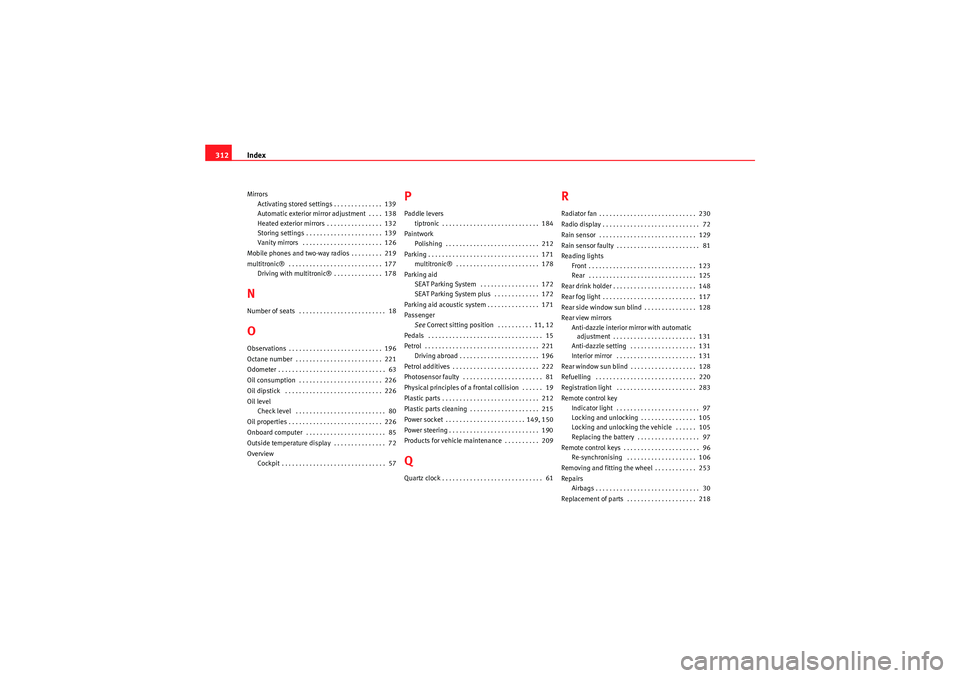
312Mirrors
Activating stored settings . . . . . . . . . . . . . . 139
Automatic exterior mirror adjustment . . . . 138
Heated exterior mirrors . . . . . . . . . . . . . . . . 132
Storing settings . . . . . . . . . . . . . . . . . . . . . . 139
Vanity mirrors . . . . . . . . . . . . . . . . . . . . . . . 126
Mobile phones and two-way radios . . . . . . . . . 219
multitronic® . . . . . . . . . . . . . . . . . . . . . . . . . . . 177 Driving with multitronic® . . . . . . . . . . . . . . 178NNumber of seats . . . . . . . . . . . . . . . . . . . . . . . . . 18OObservations . . . . . . . . . . . . . . . . . . . . . . . . . . . 196
Octane number . . . . . . . . . . . . . . . . . . . . . . . . . 221
Odometer . . . . . . . . . . . . . . . . . . . . . . . . . . . . . . . 63
Oil consumption . . . . . . . . . . . . . . . . . . . . . . . . 226
Oil dipstick . . . . . . . . . . . . . . . . . . . . . . . . . . . . 226
Oil level
Check level . . . . . . . . . . . . . . . . . . . . . . . . . . 80
Oil properties . . . . . . . . . . . . . . . . . . . . . . . . . . . 226
Onboard computer . . . . . . . . . . . . . . . . . . . . . . . 85
Outside temperature display . . . . . . . . . . . . . . . 72
Overview Cockpit . . . . . . . . . . . . . . . . . . . . . . . . . . . . . . 57
PPaddle leverstiptronic . . . . . . . . . . . . . . . . . . . . . . . . . . . . 184
Paintwork Polishing . . . . . . . . . . . . . . . . . . . . . . . . . . . 212
Parking . . . . . . . . . . . . . . . . . . . . . . . . . . . . . . . . 171 multitronic® . . . . . . . . . . . . . . . . . . . . . . . . 178
Parking aid SEAT Parking System . . . . . . . . . . . . . . . . . 172
SEAT Parking System plus . . . . . . . . . . . . . 172
Parking aid acoustic system . . . . . . . . . . . . . . . 171
Passenger See Correct sitting position . . . . . . . . . . 11, 12
Pedals . . . . . . . . . . . . . . . . . . . . . . . . . . . . . . . . . 15
Petrol . . . . . . . . . . . . . . . . . . . . . . . . . . . . . . . . . 221 Driving abroad . . . . . . . . . . . . . . . . . . . . . . . 196
Petrol additives . . . . . . . . . . . . . . . . . . . . . . . . . 222
Photosensor faulty . . . . . . . . . . . . . . . . . . . . . . . 81
Physical principles of a frontal collision . . . . . . 19
Plastic parts . . . . . . . . . . . . . . . . . . . . . . . . . . . . 212
Plastic parts cleaning . . . . . . . . . . . . . . . . . . . . 215
Power socket . . . . . . . . . . . . . . . . . . . . . . . 149, 150
Power steering . . . . . . . . . . . . . . . . . . . . . . . . . . 190
Products for vehicle maintenance . . . . . . . . . . 209QQuartz clock . . . . . . . . . . . . . . . . . . . . . . . . . . . . . 61
RRadiator fan . . . . . . . . . . . . . . . . . . . . . . . . . . . . 230
Radio display . . . . . . . . . . . . . . . . . . . . . . . . . . . . 72
Rain sensor . . . . . . . . . . . . . . . . . . . . . . . . . . . . 129
Rain sensor faulty . . . . . . . . . . . . . . . . . . . . . . . . 81
Reading lights Front . . . . . . . . . . . . . . . . . . . . . . . . . . . . . . . 123
Rear . . . . . . . . . . . . . . . . . . . . . . . . . . . . . . . 125
Rear drink holder . . . . . . . . . . . . . . . . . . . . . . . . 148
Rear fog light . . . . . . . . . . . . . . . . . . . . . . . . . . . 117
Rear side window sun blind . . . . . . . . . . . . . . . 128
Rear view mirrors Anti-dazzle interior mirror with automatic adjustment . . . . . . . . . . . . . . . . . . . . . . . . 131
Anti-dazzle setting . . . . . . . . . . . . . . . . . . . 131
Interior mirror . . . . . . . . . . . . . . . . . . . . . . . 131
Rear window sun blind . . . . . . . . . . . . . . . . . . . 128
Refuelling . . . . . . . . . . . . . . . . . . . . . . . . . . . . . 220
Registration light . . . . . . . . . . . . . . . . . . . . . . . 283
Remote control key Indicator light . . . . . . . . . . . . . . . . . . . . . . . . 97
Locking and unlocking . . . . . . . . . . . . . . . . 105
Locking and unlocking the vehicle . . . . . . 105
Replacing the battery . . . . . . . . . . . . . . . . . . 97
Remote control keys . . . . . . . . . . . . . . . . . . . . . . 96 Re-synchronising . . . . . . . . . . . . . . . . . . . . 106
Removing and fitting the wheel . . . . . . . . . . . . 253
Repairs Airbags . . . . . . . . . . . . . . . . . . . . . . . . . . . . . . 30
Replacement of parts . . . . . . . . . . . . . . . . . . . . 218
exeo_EN.book Seite 312 Montag, 30. August 2010 4:45 16