phone Seat Exeo 2011 MEDIA SYSTEM E
[x] Cancel search | Manufacturer: SEAT, Model Year: 2011, Model line: Exeo, Model: Seat Exeo 2011Pages: 167, PDF Size: 5.48 MB
Page 77 of 167

Mobile phone system*
76Ending a call– To end a call or stop dialling a number, press the control button
for End call ⇒ fig. 91 .Switching the microphone on and off
Switching the microphone off
–Press the Options control button any time during a call.
– Select Micro off ⇒ fig. 92 . The microphone is switched off and
the caller cannot hear you.
Switching the microphone on
–Press the Options control button any time during a call.
– Select Micro on. The microphone is switched back on and the call
can be continued.When the microphone is switched off, you will see the message Mute and the
total duration of the call on the display ⇒fig. 93 .
The speaker cannot hear you while the sound is off (Mute). Even so, you will
be able to hear him/her.
Fig. 91 Telephone:
Ending a callFig. 92 Telephone:
Switching microphone
on/off
Fig. 93 Telephone: Micro-
phone off
media_systemE_EN.book Seite 76 Montag, 21. September 2009 1:48 13
Page 78 of 167

Mobile phone system*77
Operating
RADIO, MEDIA (audiovisual
systems)
NAME, TEL
NAV, INFO
CAR, SETUP
"Memory" MenuIntroductionYou can access phone numbers in the directory, phone book and call lists and
place calls using the Memory function. You can store entries from the call lists
in the directory.
The following functions are available:•Numbers dialled ⇒page 77•Call voice mailbox ⇒page 78
•Directory ⇒page 78•Phone book ⇒page 79•Received calls ⇒page 80•Missed calls ⇒page 80•Store current number ⇒page 81Note
•Some of these functions may be not be active, and will then be greyed-
out . For example, if you have not stored a phone number for your voice
mailbox under Setup Telephone ⇒page 85, the option for Call voice mailbox
will be greyed-out and cannot be selected.•The relevant functions will be greyed-out in the display while the phone
book entries are being loaded into the memory ⇒page 79.•It is possible that no entries for “Numbers dialled”, “Received calls” and
“Missed calls” are shown in the display.Numbers dialled–Press the Memory control button in a telephone menu.
– Select Numbers dialled ⇒ fig. 94 to display a list of the last
numbers dialled.
– Select the number required using the control knob. The number will be included in the keyboard.
–Press the Dial control button.The Numbers dialled list stores the last ten
7) names or numbers you have
dialled. This is independent to whether the call to that specific number was
established or not.
Fig. 94 Telephone:
MemoryFig. 95 Telephone: Store
current number
media_systemE_EN.book Seite 77 Montag, 21. September 2009 1:48 13
Page 79 of 167

Mobile phone system*
78Depending on your mobile phone, the number last dialled is displayed at the
top or bottom of the list.
You can access the Numbers dialled list from the telephone main menu by
pressing the control button for Dial when the keyboard entry space is
empty.Voi ce ma ilbox– Press the Memory control button in a telephone menu.
– Select Call voice mailbox ⇒ page 77, fig. 94 . The voice mailbox
number you have stored will be dialled.
– Press the Dial control button. The call will then be started.You can also call your mailbox by selecting the mailbox symbol ⇒fig. 96
in the keypad for numbers. If you select the mailbox symbol
⇒fig. 96 in the keyboard for numbers
before you have stored a number for your mailbox, the system will automati-
cally direct you to the number entry screen ⇒page 85.
You can also store, edit or delete your voice mailbox number in the Telephone
Setup menu ⇒page 85.
Note
This function must be selected and set up beforehand through your mobile
phone network. For more information, contact your service provider.Directory–Press the Memory control button in a telephone menu.
– By rotating and pressing the control knob, select Directory
⇒ page 77, fig. 94 .
– Select Find entry . The keyboard will be displayed. Enter the data
or
7)The total number of previously dialled numbers that can be stored may vary depend-
ing on your type of mobile phone.
Fig. 96 Telephone: Voice
mailbox symbol
A1
A1
Fig. 97 Telephone: Direc-
tory
media_systemE_EN.book Seite 78 Montag, 21. September 2009 1:48 13
Page 80 of 167

Mobile phone system*79
Operating
RADIO, MEDIA (audiovisual
systems)
NAME, TEL
NAV, INFO
CAR, SETUP
– Select a name from the list.
–Select OK using the alphanumeric keyboard, or
– Press the Dial control button.If you have stored more than one number for one of your contacts, all the
numbers will be listed.
If no telephone numbers have been stored in the directory, the directory will
appear greyed out on the display. it cannot be selected.
Note
Use the button to access and edit your directory data ⇒page 63.Phone book– Press the Memory control button in a telephone menu.
– By rotating and pressing the control knob, select Phone book.
–Select Find entry . The alphanumeric keyboard will appear, or
– Select a name from the list.
–Select OK using the alphanumeric keyboard, or
– Press the Dial control button.Loading the phone book entries
Provided your mobile phone supports this function, the phone book entries
will be automatically scanned into the memory of the mobile phone adapter
after you have switched on the ignition and inserted the mobile phone in the adapter. It may take several minutes to load the entries, depending on how
many entries are stored on the mobile phone. The message
Please wait... will
appear on the instrument panel display during this process.
The last four phone books loaded into the mobile phone adapter remain
stored there. When you link a fifth mobile phone to the mobile phone
adapter, the phone book from the mobile phone which has not been used for
the longest time is deleted from the mobile phone adapter. Up to 500 phone
book entries per phone book can be stored in the memory.
Using the mobile phone again later
If the SIM card is identical, the phone b ook entries are already stored in the
mobile phone adapter. You can use the phone book almost immediately.
The system automatically searches for changes or new entries and stores
them automatically. This process can take several minutes. If your vehicle is
equipped with the speech control system* ⇒page 86, you cannot record any
spoken names in the phone book for the speech control system while phone
book entries are being loaded from the mobile phone.
Displaying the phone book entries
The phone book entries are displayed in alphabetical order together with a
category symbol, e.g. SIM card, private, business, mobile phone or telephone
symbol.
Note
•Which phone book entries are displayed by the navigation system will
depend on the mobile phone you are using.•In certain cases, phone book entries from a mobile phone may not be
transmitted in alphabetical order. If more than 500 phone book entries exist,
entries with certain initial letters may not appear on the navigation system
display.
NAME
media_systemE_EN.book Seite 79 Montag, 21. September 2009 1:48 13
Page 81 of 167

Mobile phone system*
80Received calls– Press the Memory control button in a telephone menu.
– Select Received calls ⇒ page 77, fig. 94 . The last ten calls that
have been answered will be stored.
– Select the number required using the control knob. The number will be included in the keyboard.
– Press the Dial control button.The last ten
8) names or numbers of the calls you have answered are stored in
the Calls received list.
Depending on your type of mobile phone, the telephone number and name of
the most recent received call will appear either at the first position or last
position in the list.
Missed calls–Press the Memory control button.
– Select Missed calls ⇒ fig. 98.
– Select the number required using the control knob. The number will be included in the keyboard.
–Press the Dial control button.The last ten
9) names or numbers of the calls you have missed are stored in
the Missed calls list.
Depending on your type of mobile phone, the telephone number and name of
the most recent missed call will appear either at the first position or last posi-
tion in the list.
8)The total number of phone numbers for received calls that can be stored may vary de-
pending on your service provider.
9)The total number of phone numbers for missed calls that can be stored may vary de-
pending on your service provider.
Fig. 98 Telephone:
Missed calls
media_systemE_EN.book Seite 80 Montag, 21. September 2009 1:48 13
Page 82 of 167
Mobile phone system*81
Operating
RADIO, MEDIA (audiovisual
systems)
NAME, TEL
NAV, INFO
CAR, SETUP
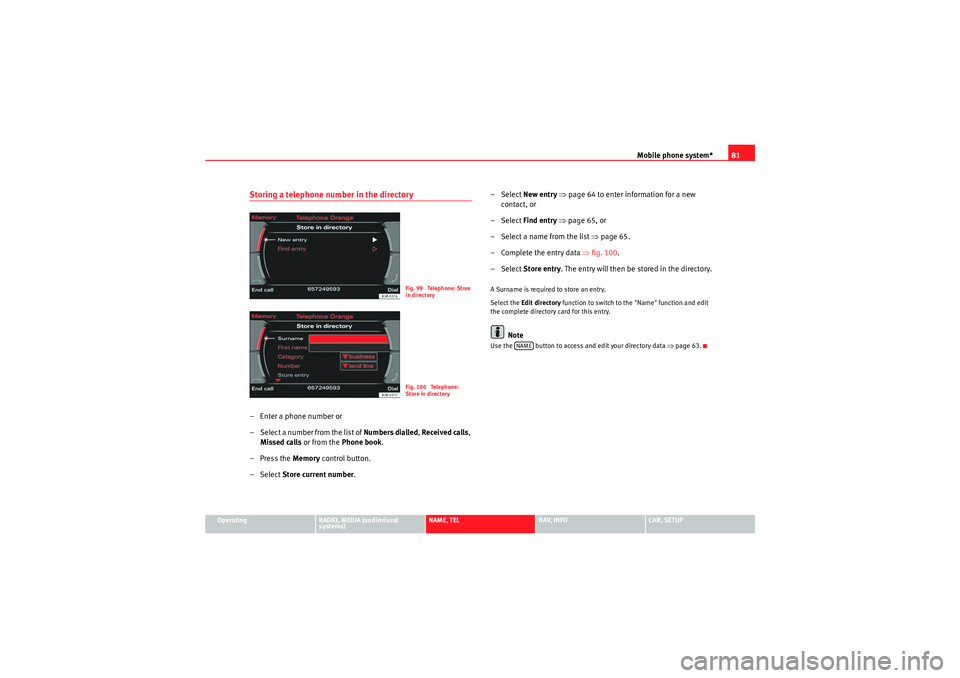
Storing a telephone number in the directory– Enter a phone number or
– Select a number from the list of Numbers dialled, Received calls ,
Missed calls or from the Phone book.
– Press the Memory control button.
–Select Store current number. – Select New entry
⇒ page 64 to enter information for a new
contact, or
– Select Find entry ⇒ page 65, or
– Select a name from the list ⇒page 65.
– Complete the entry data ⇒fig. 100.
– Select Store entry . The entry will then be stored in the directory.
A Surname is required to store an entry.
Select the Edit directory function to switch to the "Name" function and edit
the complete directory card for this entry.
Note
Use the button to access and edit your directory data ⇒page 63.
Fig. 99 Telephone: Store
in directoryFig. 100 Telephone:
Store in directory
NAME
media_systemE_EN.book Seite 81 Montag, 21. September 2009 1:48 13
Page 83 of 167
Mobile phone system*
82Telephone on the instrument panel display
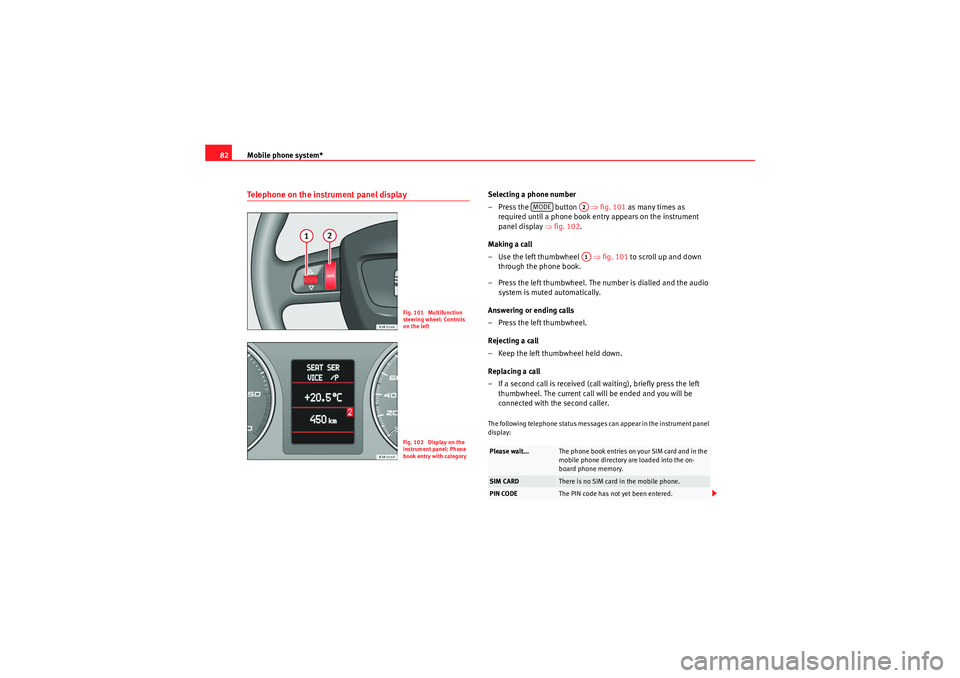
Selecting a phone number
– Press the button ⇒fig. 101 as many times as
required until a phone book entry appears on the instrument
panel display ⇒fig. 102 .
Making a call
– Use the left thumbwheel ⇒fig. 101 to scroll up and down
through the phone book.
– Press the left thumbwheel. The number is dialled and the audio system is muted automatically.
Answering or ending calls
–Press the left thumbwheel.
Rejecting a call
– Keep the left thumbwheel held down.
Replacing a call
– If a second call is received (call waiting), briefly press the left thumbwheel. The current call will be ended and you will be
connected with the second caller.The following telephone status messages can appear in the instrument panel
display:
Fig. 101 Multifunction
steering wheel: Controls
on the leftFig. 102 Display on the
instrument panel: Phone
book entry with category
Please wait...
The phone book entries on your SIM card and in the
mobile phone directory are loaded into the on-
board phone memory.
SIM CARD
There is no SIM card in the mobile phone.
PIN CODE
The PIN code has not yet been entered.
MODE
A2A1
media_systemE_EN.book Seite 82 Montag, 21. September 2009 1:48 13
Page 84 of 167

Mobile phone system*83
Operating
RADIO, MEDIA (audiovisual
systems)
NAME, TEL
NAV, INFO
CAR, SETUP
Phone numbers can be stored in different categories in the mobile phone
directory. These categories are displayed as follows:
P Private phone number
W Work phone number
M Mobile phone number
Scroll the left thumbwheel downwards to scroll down the list of stored names
from
A to Z . Scroll the left thumbwheel upwards to scroll up the list of stored
names from Z to A. If you "flick" the left thumbwheel you can jump to the next
letter of the alphabet.
Note
The information shown on the instrument panel display depends on the type
of mobile phone used.
Phone settingsOpening and closing the phone setup menu– While in any telephone menu, press the function button to access the main Telephone setup menu.
– Press the button again to close the main setup menu.The following submenus are available in the telephone setup menu:•Telephone settings ⇒page 84•Call options ⇒page 84•Voice mailbox number ⇒ page 85
The sound and tuning settings and the brightness of the display can be
altered using the control buttons ⇒page 153.Note
We recommend that you enter these settings when the vehicle is stationary.
Please note ⇒ page 6, “Notes on road safety”.
NO SERVICE
No network connection
CALL
A call is being made. If the caller's telephone
number is available, the display will alternately
give the caller's number and the message CALL.
LINE ENGAGED
Number dialled is engaged.
TELEPHONE OFF
The telephone is switched off.
CALLING
The connection is being established.
NO ENTRIES
The on-board phone memory has no SIM card
entries or mobile phone directory entries.
Fig. 103 Telephone
setup: Main menuSETUP
SETUP
media_systemE_EN.book Seite 83 Montag, 21. September 2009 1:48 13
Page 85 of 167

Mobile phone system*
84Phone settings– Press the button in a telephone menu.
– Select Te l e p h o n e s e t u p .
– Select the desired setting.Default settings
When changing the settings back to the default settings make sure there is
no ongoing telephone call, no mobile phone is connected via Bluetooth and
the mobile phone is not inserted in the mobile phone adapter. Reverting to the default settings deletes all stored phone books for the
mobile phones
⇒page 79, the list of Bluetooth devices ⇒page 71 and the
mailbox number. In addition, any existing Bluetooth connections will be
disconnected and the Bluetooth PIN will be reset to 1234 ⇒page 71. The
Automatic answer ⇒ page 84 function is switched off .
Select Bluetooth PIN entry
Bluetooth is a wireless connection between your mobile telephone and the
navigation system in your vehicle ⇒page 71. The factory-stored Bluetooth
PIN is 1234. Use the Enter Bluetooth PIN function to edit the Bluetooth PIN as
required.
Call options– Press the button in a telephone menu.
– Select Call options .
– Select the desired setting.
Fig. 104 Telephone
setup: Telephone settingsFig. 105 Telephone
settings: Select Bluetooth
PIN entry
SETUP
Fig. 106 Telephone
setup: Call options
SETUP
media_systemE_EN.book Seite 84 Montag, 21. September 2009 1:48 13
Page 86 of 167

Mobile phone system*85
Operating
RADIO, MEDIA (audiovisual
systems)
NAME, TEL
NAV, INFO
CAR, SETUP
When "Automatic answer" is on, an incoming call is answered automatically.
However, you do have the opportunity to quickly select
Reject if you wish to
reject the call.
Voice mailboxStoring the voice mailbox number
– Press the button in a telephone menu.
–Select Voice mailbox number .
– Press the rotary pushbutton to enter the number using the alpha- numeric keyboard.
–Select OK in the alphanumeric keyboard to store the new mailbox
number.
Editing the voice mailbox number
– Press the button in a telephone menu.
–Select Voice mailbox number .
– Press the control knob to edit the number using the alphanu- meric keypad.
–Select OK in the alphanumeric keyboard to store the new voice
mailbox number.
Deleting the voice mailbox number
– Press the button in a telephone menu.
–Select Voice mailbox number . – Press the control knob. The alph
anumeric keyboard will appear.
– Select DEL in the alphanumeric keyboard.
– Press the control knob until the voice mailbox number has been deleted.
– Select OK in the alphanumeric keyboard to confirm deletion of
the number.
If you have stored your voice mailbox number, you can consult it using the
Memory control button ⇒page 78. You can listen to any voice messages left
in your mailbox.
This function must be selected and se t up beforehand. For more information,
contact your service provider.
Note
•You can also use the alphanumeric keyboard to call your voice mailbox
⇒ page 78.•If you are abroad, do not forget to dial the necessary country codes.
SETUPSETUPSETUP
media_systemE_EN.book Seite 85 Montag, 21. September 2009 1:48 13