child lock Seat Exeo 2011 User Guide
[x] Cancel search | Manufacturer: SEAT, Model Year: 2011, Model line: Exeo, Model: Seat Exeo 2011Pages: 313, PDF Size: 5.02 MB
Page 103 of 313
101
Unlocking and locking
Central locking switch
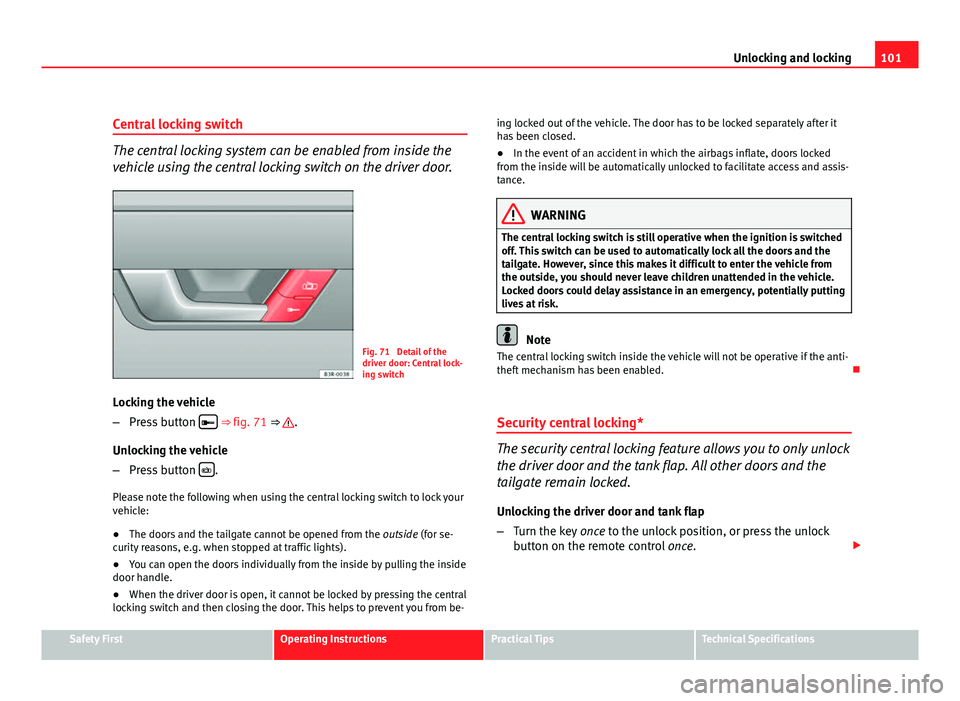
The central locking system can be enabled from inside the
vehicle using the central locking switch on the driver door.
Fig. 71 Detail of the
driver door: Central lock-
ing switch
Locking the vehicle
– Press button
⇒
fig. 71 ⇒ .
Unlocking the vehicle
– Press button
.
Please note the following when using the central locking switch to lock your
vehicle:
● The doors and the tailgate cannot be opened from the outside (for se-
curity reasons, e.g. when stopped at traffic lights).
● You can open the doors individually from the inside by pulling the inside
door handle.
● When the driver door is open, it cannot be locked by pressing the central
locking switch and then closing the door. This helps to prevent you from be- ing locked out of the vehicle. The door has to be locked separately after it
has been closed.
●
In the event of an accident in which the airbags inflate, doors locked
from the inside will be automatically unlocked to facilitate access and assis-
tance.
WARNING
The central locking switch is still operative when the ignition is switched
off. This switch can be used to automatically lock all the doors and the
tailgate. However, since this makes it difficult to enter the vehicle from
the outside, you should never leave children unattended in the vehicle.
Locked doors could delay assistance in an emergency, potentially putting
lives at risk.
Note
The central locking switch inside the vehicle will not be operative if the anti-
theft mechanism has been enabled.
Security central locking*
The security central locking feature allows you to only unlock
the driver door and the tank flap. All other doors and the
tailgate remain locked.
Unlocking the driver door and tank flap
– Turn the key once to the unlock position, or press the unlock
button on the remote control once.
Safety FirstOperating InstructionsPractical TipsTechnical Specifications
Page 104 of 313
102Unlocking and locking
Unlocking all the doors, the tailgate and the tank flap
simultaneously.
–Turn the key twice within five seconds, or press the unlock but-
ton on the remote control twice within five seconds.
The security system and the anti-theft alarm* are immediately disabled if
you unlock only the driver door, without unlocking the other doors
⇒ page 106.
Locking the doors manually if the central locking fails to
work
Should the central locking system fail to work at any time
(for instance if there is no electrical power supply), each
door will have to be locked separately.
Fig. 72 Manual lock-
ing device
Fig. 73 Activating
manual locking
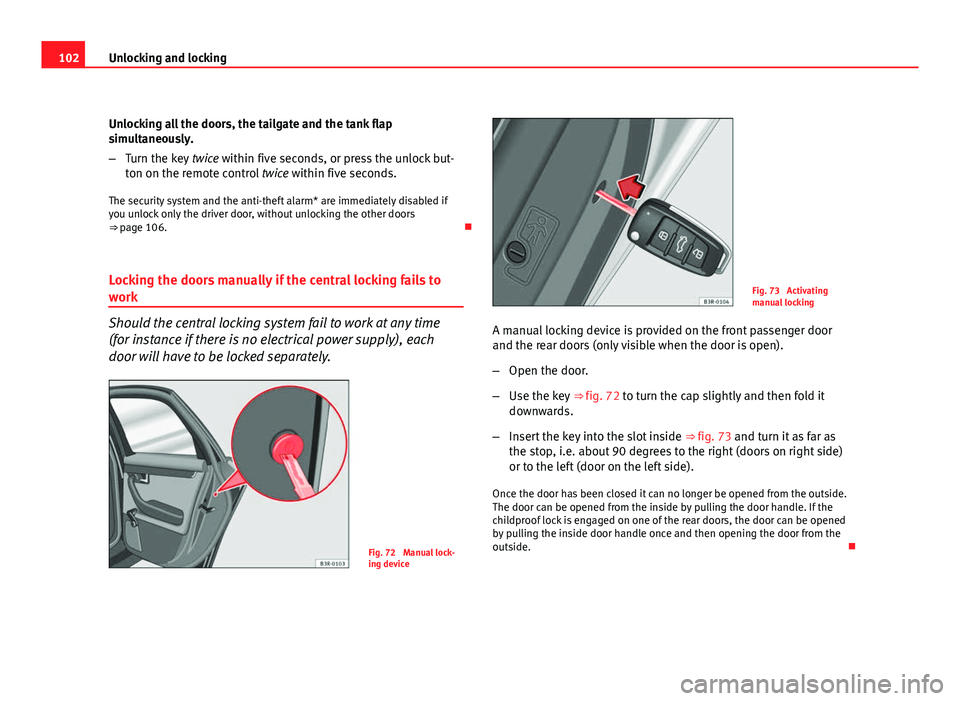
A manual locking device is provided on the front passenger door
and the rear doors (only visible when the door is open).
– Open the door.
– Use the key ⇒ fig. 72 to turn the cap slightly and then fold it
downwards.
– Insert the key into the slot inside ⇒ fig. 73 and turn it as far as
the stop, i.e. about 90 degrees to the right (doors on right side)
or to the left (door on the left side).
Once the door has been closed it can no longer be opened from the outside.
The door can be opened from the inside by pulling the door handle. If the
childproof lock is engaged on one of the rear doors, the door can be opened
by pulling the inside door handle once and then opening the door from the
outside.
Page 106 of 313
104Unlocking and locking
Childproof lock
Childproof locks on rear doors
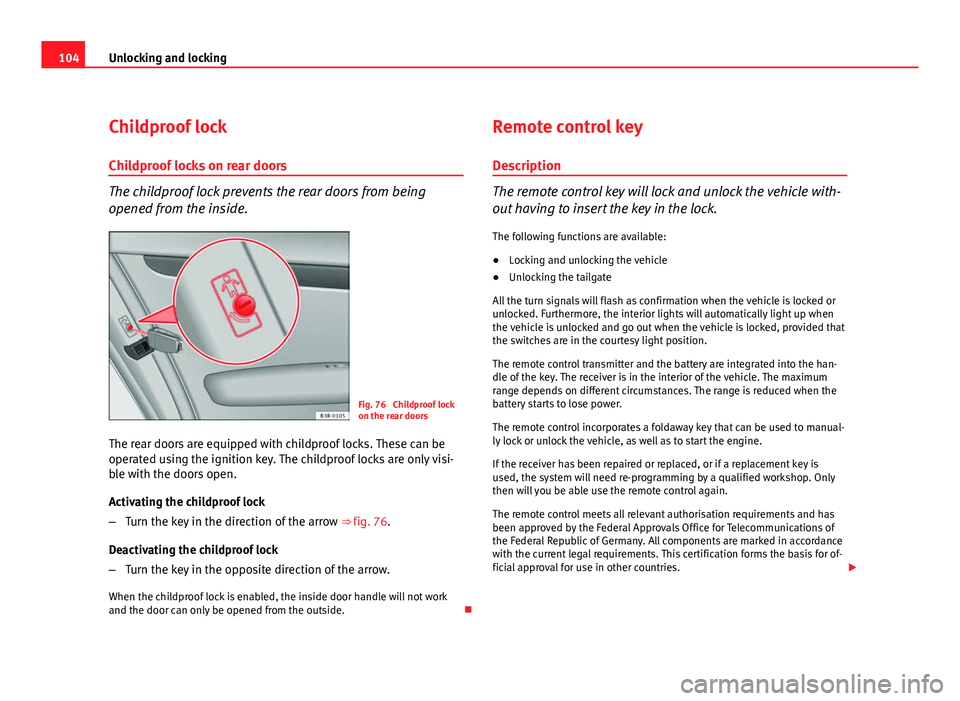
The childproof lock prevents the rear doors from being
opened from the inside.
Fig. 76 Childproof lock
on the rear doors
The rear doors are equipped with childproof locks. These can be
operated using the ignition key. The childproof locks are only visi-
ble with the doors open.
Activating the childproof lock
– Turn the key in the direction of the arrow ⇒ fig. 76.
Deactivating the childproof lock
– Turn the key in the opposite direction of the arrow.
When the childproof lock is enabled, the inside door handle will not work
and the door can only be opened from the outside. Remote control key
Description
The remote control key will lock and unlock the vehicle with-
out having to insert the key in the lock. The following functions are available:
● Locking and unlocking the vehicle
● Unlocking the tailgate
All the turn signals will flash as confirmation when the vehicle is locked or
unlocked. Furthermore, the interior lights will automatically light up when
the vehicle is unlocked and go out when the vehicle is locked, provided that
the switches are in the courtesy light position.
The remote control transmitter and the battery are integrated into the han-
dle of the key. The receiver is in the interior of the vehicle. The maximum
range depends on different circumstances. The range is reduced when the
battery starts to lose power.
The remote control incorporates a foldaway key that can be used to manual-
ly lock or unlock the vehicle, as well as to start the engine.
If the receiver has been repaired or replaced, or if a replacement key is
used, the system will need re-programming by a qualified workshop. Only
then will you be able use the remote control again.
The remote control meets all relevant authorisation requirements and has
been approved by the Federal Approvals Office for Telecommunications of
the Federal Republic of Germany. All components are marked in accordance
with the current legal requirements. This certification forms the basis for of-
ficial approval for use in other countries.
Page 107 of 313
105
Unlocking and locking
Note
● The remote control is automatically disabled when the ignition is switch-
ed on.
● The function of the remote control may be impaired by interference from
other nearby radio signals (e.g. from a mobile phone or TV transmitter) if
these are in the same frequency range.
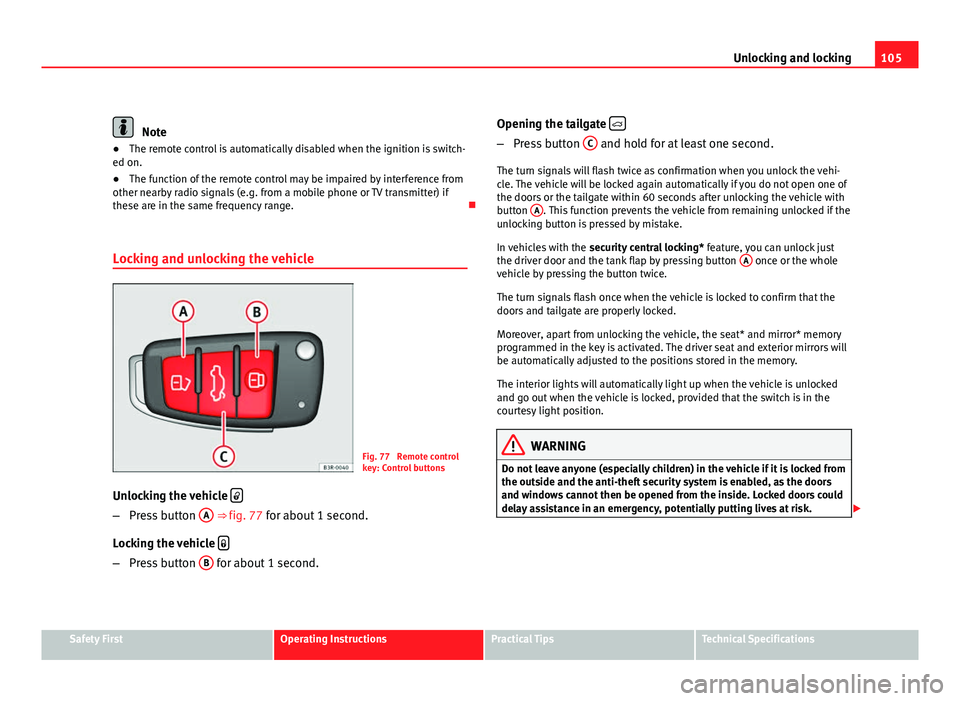
Locking and unlocking the vehicle
Fig. 77 Remote control
key: Control buttons
Unlocking the vehicle
–
Press button A ⇒ fig. 77 for about 1 second.
Locking the vehicle
–
Press button B for about 1 second. Opening the tailgate
–
Press button C and hold for at least one second.
The turn signals will flash twice as confirmation when you unlock the vehi-
cle. The vehicle will be locked again automatically if you do not open one of
the doors or the tailgate within 60 seconds after unlocking the vehicle with
button A
. This function prevents the vehicle from remaining unlocked if the
unlocking button is pressed by mistake.
In vehicles with the security central locking* feature, you can unlock just
the driver door and the tank flap by pressing button A
once or the whole
vehicle by pressing the button twice.
The turn signals flash once when the vehicle is locked to confirm that the
doors and tailgate are properly locked.
Moreover, apart from unlocking the vehicle, the seat* and mirror* memory
programmed in the key is activated. The driver seat and exterior mirrors will
be automatically adjusted to the positions stored in the memory.
The interior lights will automatically light up when the vehicle is unlocked
and go out when the vehicle is locked, provided that the switch is in the
courtesy light position.
WARNING
Do not leave anyone (especially children) in the vehicle if it is locked from
the outside and the anti-theft security system is enabled, as the doors
and windows cannot then be opened from the inside. Locked doors could
delay assistance in an emergency, potentially putting lives at risk.
Safety FirstOperating InstructionsPractical TipsTechnical Specifications
Page 110 of 313
108Unlocking and locking
You should disable the interior monitoring if there is a possibility
that the alarm could be triggered, e.g. by a pet or by an object
moving inside the vehicle ⇒
. The tow-away protection feature,
which is integrated into the alarm system, should be disabled if
the vehicle is being towed or transported (e.g. by rail or ship).
Deactivating the interior monitoring
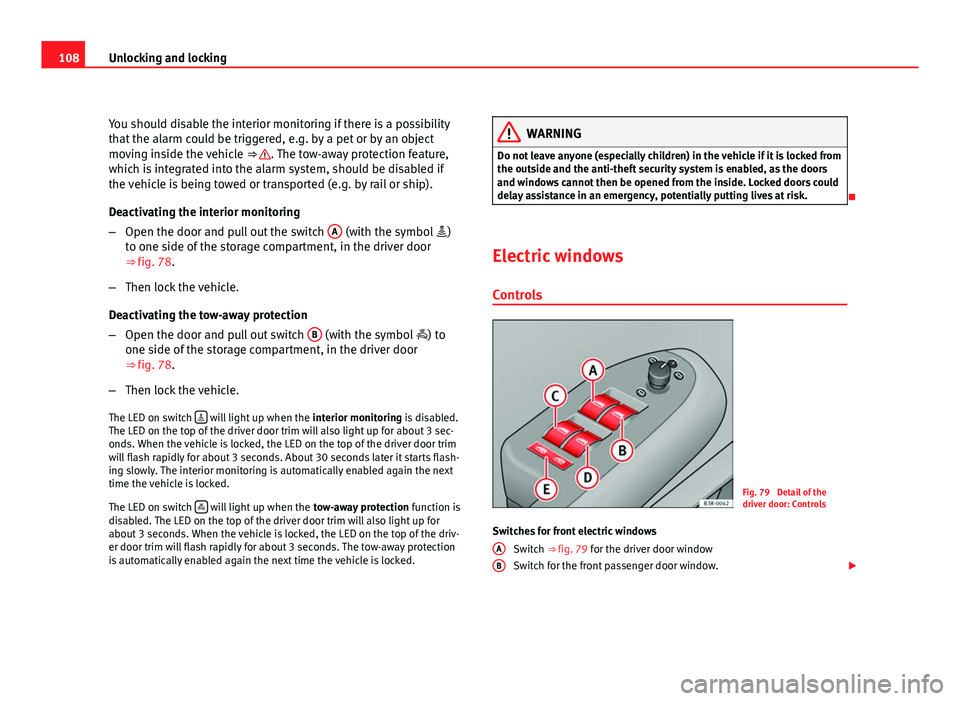
– Open the door and pull out the switch A
(with the symbol
)
to one side of the storage compartment, in the driver door
⇒ fig. 78.
– Then lock the vehicle.
Deactivating the tow-away protection
– Open the door and pull out switch B
(with the symbol
) to
one side of the storage compartment, in the driver door
⇒ fig. 78.
– Then lock the vehicle.
The LED on switch
will light up when the
interior monitoring is disabled.
The LED on the top of the driver door trim will also light up for about 3 sec-
onds. When the vehicle is locked, the LED on the top of the driver door trim
will flash rapidly for about 3 seconds. About 30 seconds later it starts flash-
ing slowly. The interior monitoring is automatically enabled again the next
time the vehicle is locked.
The LED on switch
will light up when the
tow-away protection function is
disabled. The LED on the top of the driver door trim will also light up for
about 3 seconds. When the vehicle is locked, the LED on the top of the driv-
er door trim will flash rapidly for about 3 seconds. The tow-away protection
is automatically enabled again the next time the vehicle is locked.
WARNING
Do not leave anyone (especially children) in the vehicle if it is locked from
the outside and the anti-theft security system is enabled, as the doors
and windows cannot then be opened from the inside. Locked doors could
delay assistance in an emergency, potentially putting lives at risk.
Electric windows Controls
Fig. 79 Detail of the
driver door: Controls
Switches for front electric windows Switch ⇒ fig. 79 for the driver door window
Switch for the front passenger door window.
A
B
Page 111 of 313

109
Unlocking and locking
Switches for rear electric windows Switch for the rear left door window
Switch for the rear right door window
Safety switch
WARNING
● Always take the key with you when leaving the vehicle, even if you
only intend to be gone for a short time. This is particularly important if
there are children in the vehicle, as they might otherwise be able to start
the engine or use power-operated equipment (e.g. the electric windows),
which could cause injuries. The electric window switches are only disa-
bled when the driver door or the front passenger door is opened.
● Never close the windows in a careless or uncontrolled manner, as
there is a risk of causing injuries.
● When locking the vehicle from the outside, make sure that nobody is
inside the vehicle, as the windows cannot be opened from the inside in
an emergency.
Switches on the driver door
The driver can operate all the electric windows in the vehi-
cle. The electric windows are controlled by two-stage switches:
Opening the windows
– Press the switch as far as the first stop and hold it until the win-
dow has moved to the desired position.
– Press the switch briefly to the second stop and the window will
automatically open all the way.
C
DE
Closing the windows
–
Pull the switch as far as the first stop and hold it until the win-
dow has moved to the desired position.
– Pull the switch briefly to the second stop and the window will
automatically close all the way.
Safety switch
The safety switch ⇒ fig. 79 E
can deactivate the rear door switches. The
windows can only be operated from the rear when the safety switch is press-
ed in.
The symbol lights up on the safety switch when the electric windows in
the rear doors are disabled (switch not pressed in).
Note
The windows will work for about ten minutes after the ignition has been
switched off. The electric window switches are only disabled when the driver
door or the front passenger door is opened.
Safety FirstOperating InstructionsPractical TipsTechnical Specifications
Page 169 of 313

167
Driving
Position 1
The ignition key is inserted in this position. To
engage the steering wheel
lock, take out the key and turn the wheel until you hear the pin engage. You
should always engage the steering lock when you leave the vehicle. This
will help to deter thefts ⇒
.
Switching on the ignition/pre-heating glow plugs 2
If the key is difficult to turn in the lock, move the steering wheel (to take the
load off the steering lock mechanism) until the key turns freely. In the case
of vehicles with a diesel engine, the key is turned to this position to preheat
the glow plugs.
Starting the engine 3
The engine is started in this position. Electrical components with a high
power consumption are switched off temporarily.
After the engine has started, the ignition key returns to position 2
by itself.
The ignition key has to be turned back to position 1
before re-starting the
engine. The starter inhibitor in the ignition lock prevents the starter motor
from engaging when the engine is running, as this could cause damage.
Switching off the ignition 1
Turn the ignition key to this position.
WARNING
● Never remove the ignition key until the vehicle is stationary! Other-
wise the steering lock could engage suddenly, which could cause an acci-
dent.
● Always take the key with you when leaving the vehicle, even if you
only intend to be gone for a short time. This is particularly important if
there are children in the vehicle, as they might otherwise be able to start
the engine or use power-operated equipment (e.g. the electric windows),
which could cause injuries.
Note
● If the battery has been disconnected and then reconnected, it will be
necessary to leave the key in position 2
for about 5 seconds before start-
ing the engine.
● Vehicles with automatic gearbox: After switching off the ignition, you
can only remove the ignition key if the selector lever is in position “P” (park-
ing lock). The selector lever is locked after the ignition key has been re-
moved.
Starting and stopping the engine Starting the engine
The engine can only be started with an original SEAT key.
Fig. 137 Ignition key po-
sitions
Safety FirstOperating InstructionsPractical TipsTechnical Specifications
Page 172 of 313
170Driving
Handbrake on
The handbrake warning switches on after driving for 3 seconds at speeds
above 5 km/h.
The handbrake warning lamp lights up when the handbrake is applied
with the ignition on.
WARNING
Please note that the handbrake should be released all the way. If it is on-
ly partially released, this will cause rear brakes overheating, which can
impair the function of the brake system and could lead to an accident.
CAUTION
Once the vehicle has come to a standstill, always apply the handbrake firm-
ly and then, on a manual gearbox, engage a gear, or select P on an auto-
matic.
Parking
The following points will ensure there is no risk of the vehi-
cle rolling away accidentally after it is parked:
– Use the foot brake to stop the vehicle.
– Apply the handbrake firmly.
– Switch the engine off.
– On a manual gearbox engage 1st gear or on an automatic move
the selector lever to P ⇒
. When parking on slopes:
Turn the steering wheel so that the, if the vehicle moves, it will do so to-
wards the curb.
WARNING
● Do not leave anyone (especially children) in the vehicle when it is
locked. Locked doors could delay assistance in an emergency, potentially
putting lives at risk.
● Never leave children unsupervised in the vehicle. They could release
e.g. the handbrake or gear lever, moving the vehicle and causing an acci-
dent.
Parking aid acoustic system General notes
Various systems are available to help you when parking or manoeuvring in
tight spaces, depending on the equipment fitted on your vehicle.
The SEAT Parking System gives an acoustic warning if there are any obsta-
cles behind your vehicle ⇒ page 171.
When you are parking, SEAT Parking System Plus warns you acoustically
and optically about obstacles in front of and behind the vehicle
⇒ page 171.
Note
To ensure the acoustic parking aid works properly, the sensors must be kept
clean and free of snow and ice.
Page 229 of 313

227
Checking and refilling levels
– Check the coolant level on coolant fluid expansion tank
⇒ fig. 168. When the engine is cold, it should be between the
“min” and “max” marks. When the engine is hot, it may be
slightly above the “max” mark.
Its location is shown in the corresponding general overview of the engine
compartment.
The coolant level should be checked with the engine switched off.
The coolant level is monitored by a warning lamp on the instrument panel
display ⇒ page 78. However, we recommend that it should be checked oc-
casionally.
Coolant fluid loss
Any loss of coolant fluid normally indicates a leak in the cooling system. In
this case the cooling system should be inspected by a qualified workshop
without delay. It is not sufficient merely to top up the coolant fluid.
If there are no leaks in the system, a loss of coolant fluid can only occur if
the coolant boils and is forced out of the system as a result of overheating.
CAUTION
Radiator sealants must not be added to the coolant fluid. Such additives
could seriously impair the function of the cooling system.
Topping up the coolant fluid
Be careful when topping up with coolant fluid. – Switch the engine off.
– Wait for the engine to cool down. –
Cover the cap on the expansion tank ⇒ fig. 168 with a cloth,
and carefully unscrew the cap anti-clockwise ⇒
.
– Add coolant fluid.
– Screw on the cap tightly.
Make sure that the coolant fluid meets the required specifications
⇒ page 225, Coolant fluid. Do not use a different type of antifreeze if G12++
antifreeze is not available. In this case, use only water and bring the anti-
freeze concentration back up to the correct level as soon as possible.
Always top up with new coolant fluid.
Do not fill above the “max” mark. Excess coolant fluid is forced out of the
system through the valve in the filler cap when the engine gets hot.
If a lot of coolant fluid has been lost, wait for the engine to cool down before
putting in cold coolant. Failure to do so could result in serious engine dam-
age.
WARNING
● The cooling system is under pressure. Do not unscrew the cap on the
expansion tank when the engine is hot. Failure to comply could result in
burns.
● The antifreeze and coolant fluid can be a health hazard. Therefore,
the antifreeze should be stored in the original container in a safe place
out of reach of children. Failure to comply could result in poisoning.
For the sake of the environment
Drained off coolant should not be used again. Drain off the used coolant in-
to a suitable container and dispose of it in the proper manner (observe envi-
ronmental regulations).
Safety FirstOperating InstructionsPractical TipsTechnical Specifications
Page 235 of 313

233
Checking and refilling levels
WARNING (Continued)
● A highly explosive mixture of gases is released when the battery is
under charge. The batteries should be charged in a well-ventilated room
only.
● Keep children away from acid and batteries.
● Before working on the electrical system, you must switch off the en-
gine, the ignition and all consumers. The negative cable on the battery
must be disconnected. When a light bulb is changed, you need only
switch off the light.
● Deactivate the anti-theft alarm by unlocking the vehicle before you
disconnect the battery! The alarm will otherwise be triggered.
● When disconnecting the battery from the vehicle electrical system,
disconnect first the negative cable and then the positive cable.
● Switch off all electrical consumers before reconnecting the battery.
Reconnect first the positive cable and then the negative cable. Never re-
verse the polarity of the connections. This could cause an electrical fire.
● Never charge a frozen battery, or one which has thawed. This could
result in explosions and chemical burns. Always replace a battery which
has frozen. A flat battery can freeze at temperatures around 0 °C.
● Ensure that the vent hose is always connected to the battery.
● Never use a defective battery. This could cause an explosion. Replace
a damaged battery immediately.
CAUTION
● Never disconnect the battery if the ignition is switched on or if the en-
gine is running. This could damage the electrical system or electronic com-
ponents.
● Do not expose the battery to direct sunlight over a long period of time,
as the intense ultraviolet radiation can damage the battery housing.
● If the vehicle is left standing in cold conditions for a long period, protect
the battery from freezing. If it freezes it will be damaged. Charging the battery
A fully-charged battery is important for reliable starting.
– Note the warnings ⇒
in Important safety warnings for han-
dling a vehicle battery on page 232 and ⇒ .
– Switch off the ignition and all electrical equipment.
– Only if fast-charging: both battery cables must be disconnected
(first the negative cable, then the positive cable).
– Connect the charger cables to the battery terminals, noting the
colour code (red = positive; black or brown = negative).
– Now connect the battery charger to the power socket and switch
on.
– After charging the battery: switch off the battery charger and
disconnect the power point cable.
– Finally disconnect the charger cables from the battery.
– If necessary, reconnect both battery cables to the battery (first
the positive cable, then the negative cable).
When charging with a low current (for instance with a small battery charger)
the battery does not normally have to be disconnected. However, both bat-
tery cables must be disconnected before fast-charging the battery with a
high current. However, always follow the instructions given by the manufac-
turer of the battery charger.
The fast-charging procedure for a battery is dangerous ⇒
in Important
safety warnings for handling a vehicle battery on page 232, as it requires a
special charger and the corresponding level of knowledge. We therefore rec-
ommend that this work should only be performed by a qualified workshop.
Safety FirstOperating InstructionsPractical TipsTechnical Specifications