gearbox Seat Exeo 2011 User Guide
[x] Cancel search | Manufacturer: SEAT, Model Year: 2011, Model line: Exeo, Model: Seat Exeo 2011Pages: 313, PDF Size: 5.02 MB
Page 180 of 313

178Driving
–To prevent the vehicle from rolling away, apply the parking
brake before moving off on steep gradients ⇒
.
Parking the vehicle
– Press and hold the brake pedal ⇒
.
– Apply the parking brake.
– Press and hold the interlock button, move the selector lever to P
and release the interlock button.
The engine can only be started when the selector lever is at P or N.
On level ground it is sufficient to move the selector lever to P. On slopes,
first engage the parking brake and then put the selection lever into the P
position. This avoids overloading the locking mechanism and it will be eas-
ier to move the selector lever from position P.
Vehicles with multitronic® gearbox: Your vehicle is equipped with the hill
hold assist function which makes it easier to start off on a slope. The sys-
tem is activated when you press and hold the brake pedal for a few sec-
onds. When you release the brake pedal the braking force will be main-
tained for a short moment in order to prevent the vehicle rolling back when
you drive away.
WARNING
● While you are selecting a gear and the vehicle is stopped with the en-
gine running, do not accelerate. Failure to do so could result in an acci-
dent.
● Please note that some power will still be transmitted when you stop
temporarily with the selector lever in position D, S or R. Therefore, when
stopping you will need to press the brake with the force required to hold
the vehicle still. Failure to do so could result in an accident.
● Never move the selector lever to R or P when driving, as this could
cause an accident.
Selector lever positions
This section covers all the selector lever positions.
Fig. 144 Display: Selec-
tor lever positions
The current selector lever position is shown on the instrument panel dis-
play.
P - parking lock
This locks the driving wheels mechanically. The parking brake should only
be used when the vehicle is already stopped ⇒
.
The interlock button (the button on the selector lever handle) must be
pressed in and the brake pedal must be depressed before moving the selec-
tor lever either in or out of position P. This is only possible when the ignition
is on.
R - Reverse gear
When reverse gear is engaged the gearbox automatically selects the lowest
gear ratio.
The reverse gear may be engaged only when the vehicle is stationary and
the engine is idling ⇒
.
Page 181 of 313
179
Driving
To move the selector lever to position R, press in the interlock button and at
the same time press the brake pedal. Depending on the model, one or two
reverse lights will come on in selector lever position R (when ignition is
switched on).
N - Neutral (idling)
In this position the gearbox is in neutral ⇒
.
D - Drive (forward)
In this position, the gearbox selects the optimal transmission ratio depend-
ing on the engine load, speed and the dynamic gear regulation programme
(DRP).
Press the brake pedal when moving the selector lever from N to D if the ve-
hicle is stationary or at speeds below 5 km/h ⇒
.
Under certain circumstances (e.g. when driving in mountains or towing a
trailer or caravan) it can be advantageous to switch temporarily to tiptronic
mode ⇒ page 182, so that the gear ratios can be selected manually to suit
the driving conditions.
S - Sport position
To drive in sports mode, select the position S. The engine power reserve is
used to its maximum. When accelerating the gear shifts will be noticeable.
Press the brake pedal when moving the selector lever from N to S if the vehi-
cle is stationary or at speeds below 5 km/h ⇒
.
WARNING
● Never move the selector lever to R or P when driving. Failure to do so
could result in an accident.
● In selector position D or S the vehicle must always be held with the
foot brake when the engine is running. This is because an automatic
gearbox still transmits power even at idling speed, and the vehicle tends
WARNING (Continued)
to “creep”. The throttle must on no account be opened inadvertently (for
instance by hand from the engine compartment) when a gear is engaged
with the vehicle stationary. The vehicle could otherwise start moving im-
mediately (in some cases even if the parking brake is engaged) and pos-
sibly cause an accident.
● To avoid accidents, apply the parking brake and put the selector lever
in position P before opening the bonnet and working on the vehicle with
the engine running. Please observe the important safety warnings
⇒ page 221, Work in the engine compartment.
Note
● Applies to vehicles with tiptronic gearbox:
● If the lever is moved accidentally to N when driving, release the accelera-
tor and let the engine speed drop to idling before selecting D or S again.
● For the sake of fuel economy (and the environment), the gearbox ratios
on some models are designed so that maximum speed is only obtained
when the gear lever is in position S.
Safety FirstOperating InstructionsPractical TipsTechnical Specifications
Page 182 of 313
180Driving
Selector lever lock
The selector lever lock prevents gears from being engaged
inadvertently, so that the vehicle is not set in motion unin-
tentionally.
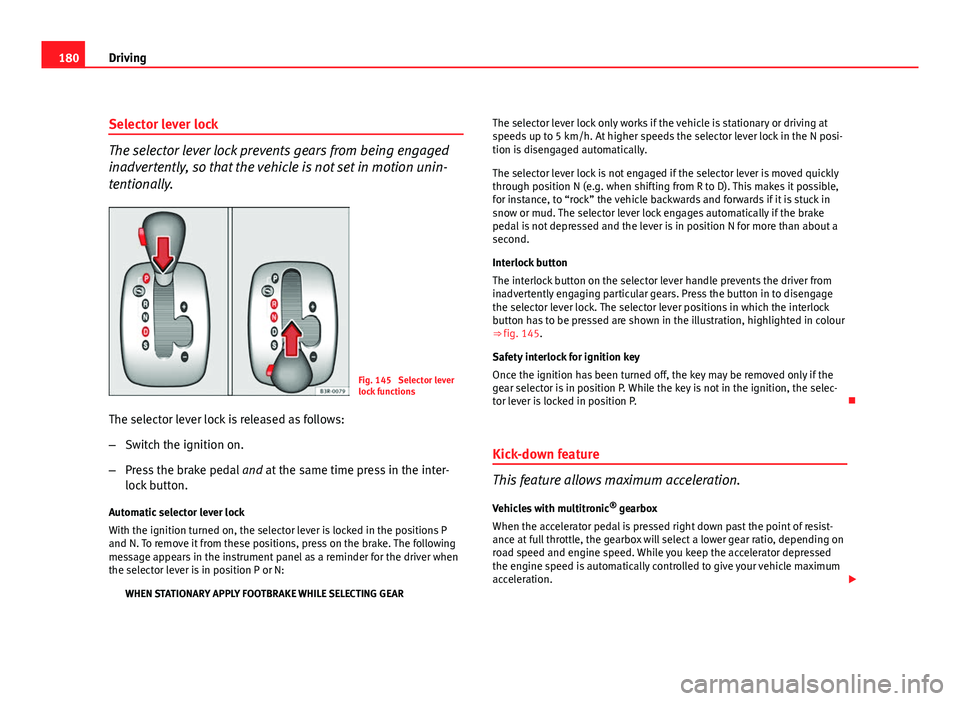
Fig. 145 Selector lever
lock functions
The selector lever lock is released as follows:
– Switch the ignition on.
– Press the brake pedal and at the same time press in the inter-
lock button.
Automatic selector lever lock
With the ignition turned on, the selector lever is locked in the positions P
and N. To remove it from these positions, press on the brake. The following
message appears in the instrument panel as a reminder for the driver when
the selector lever is in position P or N: WHEN STATIONARY APPLY FOOTBRAKE WHILE SELECTING GEAR The selector lever lock only works if the vehicle is stationary or driving at
speeds up to 5 km/h. At higher speeds the selector lever lock in the N posi-
tion is disengaged automatically.
The selector lever lock is not engaged if the selector lever is moved quickly
through position N (e.g. when shifting from R to D). This makes it possible,
for instance, to “rock” the vehicle backwards and forwards if it is stuck in
snow or mud. The selector lever lock engages automatically if the brake
pedal is not depressed and the lever is in position N for more than about a
second.
Interlock button
The interlock button on the selector lever handle prevents the driver from
inadvertently engaging particular gears. Press the button in to disengage
the selector lever lock. The selector lever positions in which the interlock
button has to be pressed are shown in the illustration, highlighted in colour
⇒
fig. 145.
Safety interlock for ignition key
Once the ignition has been turned off, the key may be removed only if the
gear selector is in position P. While the key is not in the ignition, the selec-
tor lever is locked in position P.
Kick-down feature
This feature allows maximum acceleration. Vehicles with multitronic ®
gearbox
When the accelerator pedal is pressed right down past the point of resist-
ance at full throttle, the gearbox will select a lower gear ratio, depending on
road speed and engine speed. While you keep the accelerator depressed
the engine speed is automatically controlled to give your vehicle maximum
acceleration.
Page 183 of 313
181
Driving
Vehicles with tiptronic gearbox
When the accelerator pedal is pressed right down past the point of resist-
ance at full throttle, the gearbox will shift down to a lower gear, depending
on road speed and engine speed. The upshift to the next higher gear is de-
layed until the engine reaches maximum rpm.
WARNING
Please note that if the road surface is slippery or wet, the kick-down fea-
ture could cause the driving wheels to spin, which could result in skid-
ding.
Dynamic gear control programme (DCP)
The automatic gearbox is controlled electronically.
The vehicle is equipped with an electronically controlled gearbox. The gear
ratios are selected automatically according to preset gearshift programmes.
When you drive at moderate speeds the gearbox will select the most eco-
nomical shift programme. It will then change up early and delay the down-
shifts to give better fuel economy.
If you drive at higher speeds with heavy acceleration, if you open the throt-
tle quickly, or if you use the kick-down or the vehicle's maximum speed, the
gearbox will automatically select the sport programme.
The gearbox is self-adapting, and continuously selects the most suitable
shift programme. At the same time, the driver can also make the gearbox
switch to the sport programme by pressing the accelerator quickly. This
makes the gearbox shift down into a lower gear ratio, allowing a more rapid
acceleration (for instance to pass another vehicle), without having to press
the accelerator all the way down into the kick-down position. After the gear-
box has shifted back up it returns to the original programme, depending on
your style of driving. Vehicles with multitronic® gearbox: the gearbox continuously adapts the
gear ratios to gradients. If the brake pedal is pressed on a downhill gradient
the gearbox automatically shifts to a lower gear ratio. This increases the en-
gine braking effect.
Vehicles with tiptronic gearbox: in mountainous areas, the gearbox adapts
the gears for uphill and downhill gradients. This helps to avoid constant
gear changes on uphill gradients.
Safety FirstOperating InstructionsPractical TipsTechnical Specifications
Page 184 of 313

182Driving
Manual gear selection (tiptronic mode)
With the manual shift programme (tiptronic) the driver can
manually select pre-programmed gears.
Fig. 146 Centre console:
Manual gear selection
(tiptronic mode)
Fig. 147 Display: Man-
ual gear selection (tip-
tronic mode) Switching over to the manual programme
–
Move the selector lever from the position D to the right-hand
side. As soon as the selector lever has entered the tiptronic rail,
the gear engaged is displayed on the screen.
Shifting up a gear
– Briefly push the selector lever forwards (in the tiptronic gate)
⇒ fig. 146 +
.
Shifting down a gear
– Briefly pull the selector lever backwards (in the tiptronic gate)
-
.
With the tiptronic system, the driver can manually choose between eight (in
vehicles with multitronic) or seven (in vehicles with tiptronic) different gear
programmes. The manual programme can be selected either with the vehi-
cle stationary or on the move.
When accelerating, the gearbox automatically shifts up into the next gear
shortly before the maximum engine speed is reached.
If you select a gear which is lower than the gear shown on the instrument
panel display ⇒ fig. 147, the gearbox will only shift down when there is no
longer a risk of over-revving the engine.
When the vehicle slows down (for instance when braking), the gearbox au-
tomatically shifts down into the next gear when the minimum engine speed
is reached.
Changing down to a lower gear increases the engine braking effect on
downhill gradients.
When the accelerator pedal is pressed right down past the point of resist-
ance at full throttle, the gearbox will select a lower gear ratio, depending on
road speed and engine speed.
Page 185 of 313

183
Driving
Back-up programme
A back-up system is in place if a fault should occur in the
control system.
The automatic gearbox switches to the back-up programme if a fault should
occur in the control system. This is indicated by a gear pinion symbol which
lights up on the instrument panel display.
It is still possible to move the selector lever to all positions. The manual
shift programme (tiptronic) is not available when the back-up programme is
active.
Vehicles with tiptronic gearbox: When the selector lever is in position D or S
or in the manual shift programme, the gearbox will remain in 3rd gear if 1st,
2nd or 3rd gears were engaged when the fault occurred. The gearbox will
remain in 5th gear if 4th, 5th or 6th gears were engaged. The gearbox will
then engage 3rd gear when you drive away from a standstill or after the en-
gine is restarted.
It will still be possible to use reverse gear in the normal way. However, the
electronic lock for reverse gear will be switched off.
CAUTION
Should the gearbox ever switch into the back-up programme, you should
take the vehicle to a technical service or qualified workshop as soon as pos-
sible. Steering wheel with paddle levers
The paddle levers on the steering wheel enable the driver to
manually select pre-programmed ratios or gears.
Fig. 148 Steering wheel:
tiptronic controls
– Briefly pull the left-hand paddle lever –
to change down to a
lower gear.
– Briefly pull the right-hand paddle lever +
to change up to a
higher gear.
The paddle levers are activated when the selector lever is in position D or S,
or the position for the manual shift programme (tiptronic).
The manual shift programme can, of course, still be operated using the gear
lever in the centre console.
Safety FirstOperating InstructionsPractical TipsTechnical Specifications
Page 195 of 313

193
Driving and the environment
Diesel engine particulate filter*
The diesel engine particulate filter eliminates soot produced
by burning diesel.
The diesel engine particulate filter eliminates most of the soot from the ex-
haust gas system. Under normal driving conditions, the filter cleans itself. If
the driving conditions do not allow the filter to clean itself (for example,
multiple short trips) the filter will be obstructed by dust and pollen and the
indicator for the diesel engine particulate filter indicator will light up.
This does not represent a fault, it is a warning that indicates that the filter
has not been able to regenerate automatically and that you must carry out a
cleaning cycle, as indicated in ⇒ page 80.
WARNING
● The diesel engine particulate filter may reach extremely high temper-
atures; the vehicle should be parked so that the exhaust pipe does not
come into contact with flammable materials underneath the vehicle. Oth-
erwise there is a risk of fire.
CAUTION
● Your vehicle is not designed to use biodiesel fuel. Never, under any cir-
cumstances refuel with biodiesel. The use of biodiesel fuel could damage
the engine and the fuel system. The addition of biodiesel to diesel by the
diesel producer in accordance with standard EN 590 is authorised and will
not cause damage to the engine or the fuel system.
● Using diesel fuel with a high sulphur content may significantly reduce
the working life of the diesel particulate filter. Your Authorised Service Cen-
tre will be able to tell you which countries have diesel with a high sulphur
content. Economical and environmentally friendly
driving
Economical and environmentally friendly driving
Fuel consumption, environmental pollution and wear to the engine, brakes
and tyres depends in large part on your driving style. By adopting an eco-
nomical driving style and anticipating the traffic situation ahead, you can
easily reduce fuel consumption by 10-15%. Some tips on how to help you
reduce pollution while saving money are listed below.
Drive anticipating the traffic situation
A vehicle uses most fuel when accelerating. When you anticipate the situa-
tion, you have to brake less often and, thus, accelerate less. If it is possible,
let the vehicle roll with a
gear engaged, for example, if you see a red light
ahead. The braking effect achieved in this way helps to reduce the wear of
brakes and tyres; emissions and fuel consumption are reduced to zero (dis-
connection due to inertia).
Change gear early to save energy
An effective way of saving fuel is to change up quickly through the gears.
Running the engine at high rpm in the lower gears uses an unnecessary
amount of fuel.
Manual gearbox: Change from first to second gear as quickly as possible.
We recommend that, whenever possible, you change to a higher gear upon
reaching 2000 rpm. Follow the “recommended gear” indication that ap-
pears on the instrument panel ⇒ page 73.
Avoid driving at high speed
We advise you not to drive at the top speed permitted by the vehicle. Fuel
consumption, exhaust emissions and noise levels all increase very rapidly
at higher speeds. Driving at moderate speeds will help to save fuel.
Safety FirstOperating InstructionsPractical TipsTechnical Specifications
Page 223 of 313

221
Checking and refilling levels
Opening the bonnet
Fig. 165 Release catch
under the bonnet
Before opening the bonnet make sure that the windscreen wiper
arms are not lifted away from the glass. Otherwise the paint may
be damaged.
– Lift the bonnet slightly ⇒
.
– Press the release catch under the bonnet upwards ⇒ fig. 165.
This will release the arrester hook under the bonnet.
– Open the bonnet.
The bonnet is held in position by a gas-filled strut.
WARNING
Never open the bonnet if you see steam or drips of coolant being re-
leased from the engine compartment. Failure to comply could result in
burns. Wait until no steam or coolant can be seen before opening the
bonnet.
Work in the engine compartment
Extra caution is necessary when working on components in
the engine compartment.
Always be aware of the danger of injury and scalding as well as the risk of
accident or even fire when working in the engine compartment (e.g. when
checking and refilling fluids). Always observe the warnings listed below
and follow all general safety precautions. The engine compartment of the
vehicle is a potentially hazardous area ⇒
WARNING
● Switch the engine off.
● Remove the ignition key.
● Apply the handbrake firmly.
● If your vehicle is equipped with a manual gearbox, place the gear lev-
er in neutral. If you are driving an automatic vehicle, place the selector
lever in position P.
● Wait for the engine to cool down.
● Children should not be allowed to approach the engine compartment.
● Never spill liquids used for vehicle operation on the engine compart-
ment, as these may catch fire (e.g. coolant).
● Take care not to cause short circuits in the electrical system, especial-
ly when working on the battery.
● Never touch the radiator fan while the engine is hot, as the fan could
start up suddenly.
● Never open the expansion tank when the engine is hot. The cooling
system is under pressure.
● Protect face, hands and arms from any hot steam or hot coolant fluid
released by covering the cap with a large, thick rag when opening the ex-
pansion tank.
Safety FirstOperating InstructionsPractical TipsTechnical Specifications
Page 259 of 313
257
If and when
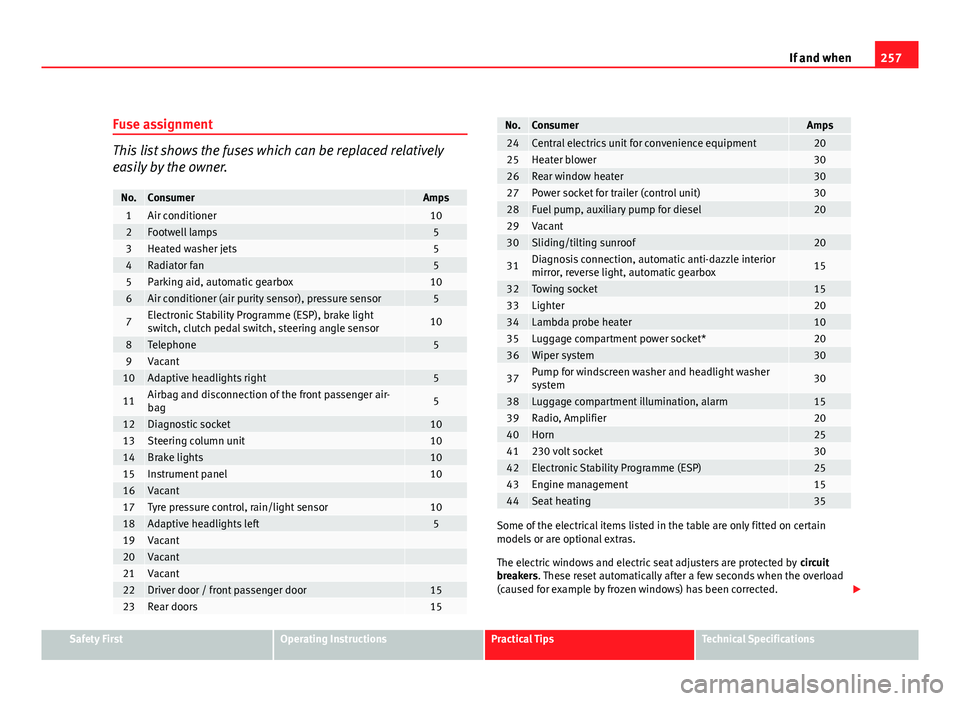
Fuse assignment
This list shows the fuses which can be replaced relatively
easily by the owner.
No.ConsumerAmps1Air conditioner102Footwell lamps53Heated washer jets54Radiator fan55Parking aid, automatic gearbox106Air conditioner (air purity sensor), pressure sensor5
7Electronic Stability Programme (ESP), brake light
switch, clutch pedal switch, steering angle sensor10
8Telephone59Vacant 10Adaptive headlights right5
11Airbag and disconnection of the front passenger air-
bag5
12Diagnostic socket1013Steering column unit1014Brake lights1015Instrument panel1016Vacant 17Tyre pressure control, rain/light sensor1018Adaptive headlights left519Vacant 20Vacant 21Vacant 22Driver door / front passenger door1523Rear doors15
No.ConsumerAmps24Central electrics unit for convenience equipment2025Heater blower3026Rear window heater3027Power socket for trailer (control unit)3028Fuel pump, auxiliary pump for diesel2029Vacant 30Sliding/tilting sunroof20
31Diagnosis connection, automatic anti-dazzle interior
mirror, reverse light, automatic gearbox15
32Towing socket1533Lighter2034Lambda probe heater1035Luggage compartment power socket*2036Wiper system30
37Pump for windscreen washer and headlight washer
system30
38Luggage compartment illumination, alarm1539Radio, Amplifier2040Horn2541230 volt socket3042Electronic Stability Programme (ESP)2543Engine management1544Seat heating35
Some of the electrical items listed in the table are only fitted on certain
models or are optional extras.
The electric windows and electric seat adjusters are protected by circuit
breakers. These reset automatically after a few seconds when the overload
(caused for example by frozen windows) has been corrected.
Safety FirstOperating InstructionsPractical TipsTechnical Specifications
Page 286 of 313
284If and when
Do not pull too hard with the towing vehicle and take care to avoid jerking
the tow-rope. When towing on an unpaved road, there is always a risk of
overloading and damaging the anchorage points.
The ignition of the vehicle being towed must be switched on to prevent the
steering wheel from locking and also to allow the use of the turn signals,
horn, windscreen wipers and washers.
As the brake servo does not work if the engine is not running, you must ap-
ply considerably more pressure to the brake pedal than you normally would.
As the power assisted steering does not work if the engine is not running,
you will need more strength to steer than you normally would.
Towing vehicles with an automatic gearbox
● Put the selector lever into position “N”.
● Do not drive faster than 50 km/h.
● Do not tow further than 50 km.
● If a breakdown vehicle is used, the vehicle must be towed with the front
wheels raised.
Note
● Observe legal requirements when towing or tow-starting.
● Switch on the hazard warning lights of both vehicles. However, observe
any regulations to the contrary.
● For technical reasons, vehicles with an automatic gearbox must not be
tow-started.
● If damage to your vehicle means that there is no lubricant in the gear-
box, you must raise the drive wheels while the vehicle is being towed.
● If the vehicle has to be towed more than 50 km, the front wheels should
be raised during towing, and towing should be carried out by a qualified
person. ●
The steering wheel is locked when the vehicle has no electrical power.
The vehicle must then be towed with the front wheels raised. Towing should
be carried out by a qualified person.
● The towing eye should always be kept in the vehicle. Please refer to the
notes ⇒ page 283, Tow-starting.
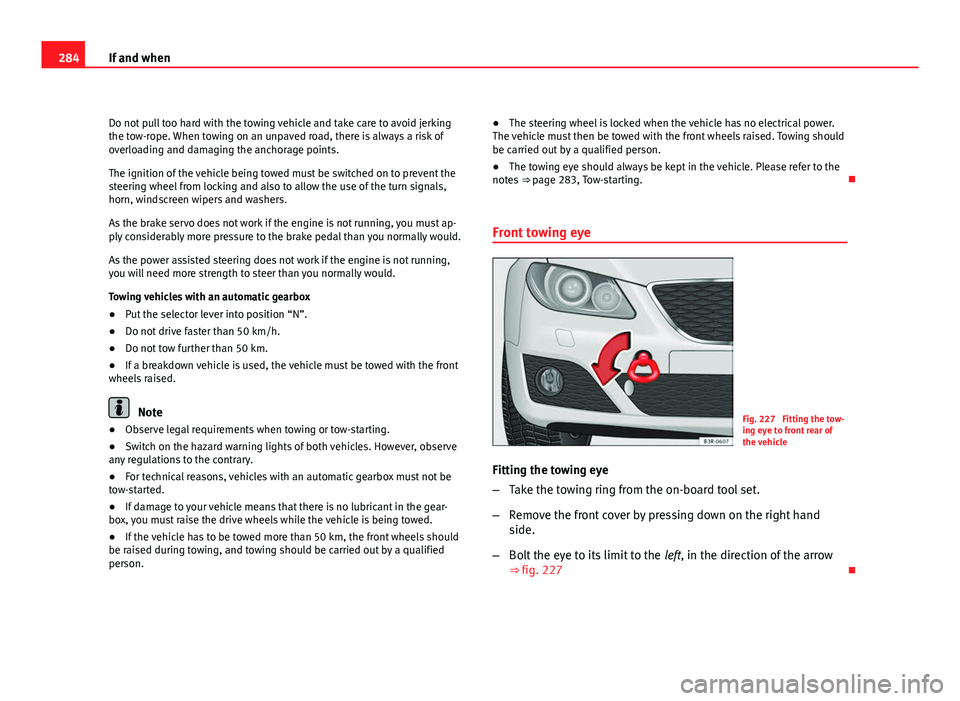
Front towing eyeFig. 227 Fitting the tow-
ing eye to front rear of
the vehicle
Fitting the towing eye
– Take the towing ring from the on-board tool set.
– Remove the front cover by pressing down on the right hand
side.
– Bolt the eye to its limit to the left, in the direction of the arrow
⇒ fig. 227