instrument panel Seat Exeo 2012 User Guide
[x] Cancel search | Manufacturer: SEAT, Model Year: 2012, Model line: Exeo, Model: Seat Exeo 2012Pages: 317, PDF Size: 5.29 MB
Page 65 of 317

63
Cockpit
Speedometer with odometer
The speedometer indicates the speed of the vehicle and the
distance travelled.
Fig. 42 Detailed view of
the instrument panel:
Odometer
The distance is normally stated in kilometres (km). On some models, how-
ever, the odometer will show “miles”.
Lower odometer
The lower odometer records the vehicle's total mileage.
Upper odometer (trip recorder)
The upper odometer shows the distance that has been travelled since the
trip recorder was last reset. It is used to measure short trips. The last digit of
the trip recorder indicates distances of 100 metres or tenths of a mile. The
upper odometer can be reset to zero by pressing the reset button ⇒ Fig. 42.
Fault display
If there is a fault in the instrument panel, the letters DEF will appear perma-
nently in the trip recorder display. Please have the fault repaired as soon as
possible. Electronic immobiliser
The vehicle key data is consulted when the ignition is switched on.
If an uncoded key is used, the message
SAFE will appear in the trip recorder
display. The vehicle can no longer be started if that happens.
Fuel reserve
The display only works when the ignition is switched on.
When the needle reaches the reserve zone, the symbol lights up in the
instrument panel display ⇒ page 81. At this point there are still about 8 to
10 litres of fuel left in the tank. This is your reminder to fill up soon.
You can consult the tank capacity of your vehicle in the ⇒ page 304, Di-
mensions and capacities section.
CAUTION
Never run the tank completely dry. If there is an irregular fuel supply, misfir-
ing can occur. This means that fuel could reach the exhaust system without
burning. This may lead to the catalytic converter reheating and being dam-
aged.
Safety FirstOperating InstructionsPractical TipsTechnical Specifications
Page 66 of 317

64Cockpit
CHECK button
Fig. 43 Detailed view of
the instrument panel:
CHECK button
The CHECK
button has the following functions:
Activating the digital clock and the odometer
When the ignition is switched off, the odometer and the digital clock with
date display can be enabled for a few seconds by pressing the CHECK
but-
ton ⇒ Fig. 43.
Starting check procedure (auto-check control)
The auto-check control ⇒ page 76 checks important components and ve-
hicle systems. These background checks are run constantly, as long as the
ignition is switched on.
You can start the “check procedure” manually by pressing the CHECK
button
with the ignition switched on. This function check can be started with the
engine either stationary or running, but not at road speeds above 5 km/h.
Calling up driver messages
If a Priority 1 symbol flashes in the display ⇒ page 76, or if the bulb moni-
tor detects a failure of one of the lights ⇒ page 83, the relevant driver in- formation can be called up again by briefly pressing the
CHECK
button. For
example:
Switch off engine, check oil level
The message will disappear from the display after about 5 seconds.
Setting the speed warning
You can press the CHECK
button to set speed limit warning 1
⇒ page 84,
Setting speed limit warning 1 while the vehicle is moving . Speed limit warn-
ing 2* ⇒ page 85, Setting speed limit warning 2 can only be set when the
ignition is switched off .
Page 67 of 317

65
Cockpit
Warning and indicator lamps General description
The warning and indicator lamps indicate a number of dif-
ferent functions and possible faults.
Fig. 44 Instrument panel with warning and indicator lamps
Exhaust emission control system⇒ page 66
Airbag system⇒ page 66
Tyre pressure too low⇒ page 67
Cruise speed (Cruise control)⇒ page 67
Trailer turn signals⇒ page 67
Anti-lock brake system (ABS)⇒ page 68
Seat belt warning⇒ page 68
If it stays lit: ASR switched off⇒ page 69
⇒ page 69
⇒ page 165
Left turn signals⇒ page 69
If flashing: the Electronic Stability Control
(ESC) is working or the ASR is working
If the following remain lit: ESC or ASR
faulty⇒ page 69
⇒ page 69
⇒ page 165
Alternator⇒ page 70
Main beam headlights⇒ page 70
Handbrake on⇒ page 70
⇒ page 77
Engine management (alternative to )⇒ page 70
Glow plug system (alternative to )⇒ page 70
Fault in brake system⇒ page 71
Right turn signals⇒ page 69
Safety FirstOperating InstructionsPractical TipsTechnical Specifications
Page 68 of 317

66Cockpit
Note
A number of functions are monitored by the auto-check control
⇒ page 76. If a malfunction should occur, this will be shown by the dis-
play in the instrument panel either with a red symbol (priority 1 - danger) or
a yellow symbol (priority 2 - warning).
Exhaust emission control system
If the warning lamp lights up continuously you should take your vehicle to a
specialised workshop as soon as possible in order to have the fault re-
paired.
If the warning lamp flashes drive on at reduced speed and seek professio-
nal help in order to avoid damage to the catalytic converter.
For further information on the catalytic converter, see ⇒ page 195.
Airbag system
This warning lamp monitors the airbag and belt tension de-
vice system.
The warning lamp should light up for a few seconds when the ignition is
switched on.
If the warning lamp does not go out, or if it lights up, flashes or flickers
when the vehicle is moving, this indicates a malfunction in the system.
WARNING
If a malfunction should occur, have the system checked immediately by a
specialised workshop. Otherwise there is a risk that the airbag system
and/or belt tensioners may not be triggered in an accident.
Page 69 of 317
67
Cockpit
Tyre pressure warning lamp*
The tyre pressure should be corrected as soon as possible if
it is too low.
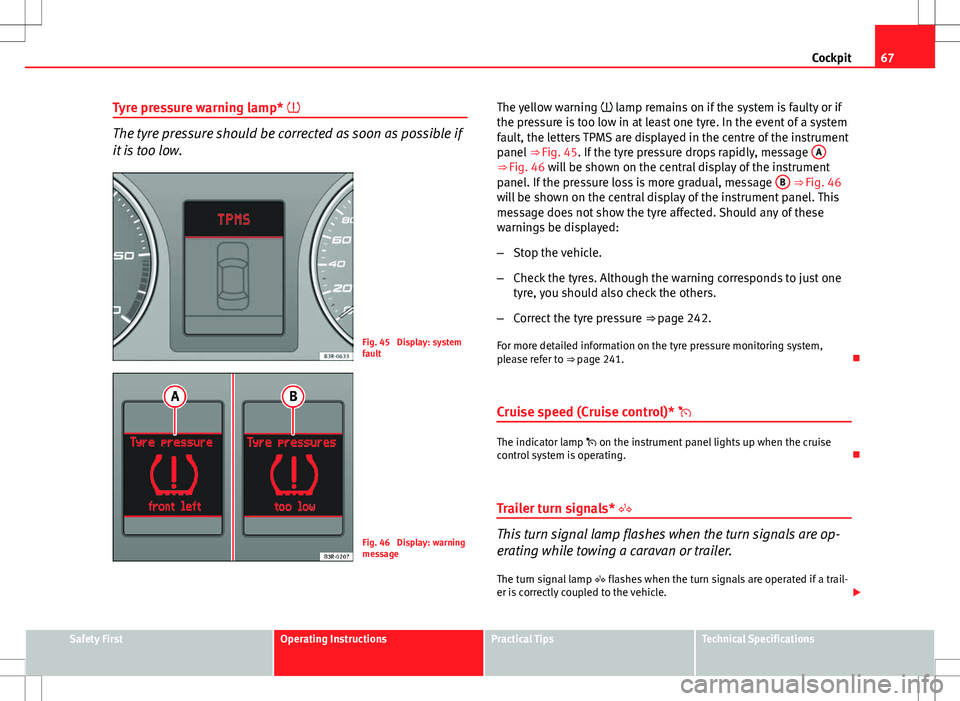
Fig. 45 Display: system
fault
Fig. 46 Display: warning
message The yellow warning
lamp remains on if the system is faulty or if
the pressure is too low in at least one tyre. In the event of a system
fault, the letters TPMS are displayed in the centre of the instrument
panel ⇒ Fig. 45. If the tyre pressure drops rapidly, message A
⇒ Fig. 46 will be shown on the central display of the instrument
panel. If the pressure loss is more gradual, message B ⇒ Fig. 46
will be shown on the central display of the instrument panel. This
message does not show the tyre affected. Should any of these
warnings be displayed:
– Stop the vehicle.
– Check the tyres. Although the warning corresponds to just one
tyre, you should also check the others.
– Correct the tyre pressure ⇒ page 242.
For more detailed information on the tyre pressure monitoring system,
please refer to ⇒ page 241.
Cruise speed (Cruise control)*
The indicator lamp on the instrument panel lights up when the cruise
control system is operating.
Trailer turn signals*
This turn signal lamp flashes when the turn signals are op-
erating while towing a caravan or trailer. The turn signal lamp flashes when the turn signals are operated if a trail-
er is correctly coupled to the vehicle.
Safety FirstOperating InstructionsPractical TipsTechnical Specifications
Page 70 of 317

68Cockpit
Where a turn signal bulb does not work, either on the trailer or on the tow-
ing vehicle, the turn signal bulb will not flash.
Anti-lock brake system (ABS)
The warning lamp monitors the ABS and the integrated elec-
tronic differential lock (EDL).
The warning lamp lights up for a few seconds when the ignition is switch-
ed on and while the engine is being started. The lamp goes out again after
the system has run through an automatic test sequence.
There is a fault in the ABS if:
● The warning lamp does not light up when the ignition is switched on
● The warning lamp does not go out again after a few seconds
● The warning lamp lights up when the vehicle is moving
The vehicle can still brake in the normal way (except that the ABS control
function is out of action). Please take the vehicle to a specialised workshop
as soon as possible. For further information on the ABS, see ⇒ page 189.
If a malfunction should occur in the ABS, the ESC warning lamp will also
light up.
Entire brake system fault
If the ABS warning lamp lights up together with the brake warning lamp
⇒ page 71 (with the handbrake released), this indicates not only a
fault in the ABS function, but probably also a malfunction in the main brake
system ⇒
.
The symbol will light up on the instrument panel if there if a fault in the
brake system. Please refer to ⇒ page 78. Electronic differential lock (EDL) fault
The EDL works in conjunction with the ABS. The ABS indicator lamp will light
up to indicate an EDL fault. Please take the vehicle to a specialised work-
shop as soon as possible. For further information on the EDL, see
⇒ page 190.
WARNING
● Before opening the bonnet and checking the brake fluid level, ob-
serve the warning information in ⇒ page 227, Work in the engine com-
partment.
● If the brake warning lamp should light up together with the ABS
warning lamp , stop the vehicle immediately and check the brake fluid
level in the reservoir. If the fluid level has dropped below the "MIN" mark
you must not drive on, as there is a risk of accident. Obtain technical as-
sistance.
● If the brake fluid level is correct, the fault in the brake system may
have been caused by a fault in the ABS control function. As a result, the
rear wheels can lock relatively easily when braking. Under certain cir-
cumstances, the rear of the vehicle could suddenly sway from side to
side, with the subsequent danger of skidding. Drive carefully to the near-
est specialised workshop and have the fault repaired.
Seat belt warning lamp*
The warning lamp acts as a reminder to the driver to fasten
the seat belt. After switching on the ignition, the warning lamp will remain lit until the
driver and front passenger (if applicable) have fastened their seat belts.
When the vehicle has reached a certain speed, you will also hear a warning
signal and the warning light will flash.
For further information on the seat belts, see ⇒ page 23.
Page 72 of 317

70Cockpit
Alternator
The warning lamp signals a fault in the alternator or in the
vehicle's electrical system.
The warning lamp lights up when the ignition is switched on. It should
switch off after the engine has started.
If the warning lamp lights up when you are driving, you can normally
continue as far as the nearest specialised workshop. However, given that
the battery will be running down, any electrical consumption not absolutely
vital should be switched off.
CAUTION
If the coolant warning lamp in the instrument panel lights up as well as
the alternator waning lamp while driving ⇒ page 79, stop the vehicle im-
mediately and switch off the engine. In this case the coolant pump is no
longer working, and there is a risk of engine damage.
Main beam headlights
The indicator lamp lights up when the main beams are on or when the
headlight flasher is operated.
For further information on the main beam headlights, see ⇒ page 122.Handbrake
This lamp lights up when the handbrake is applied.
If you drive faster than 5 km/h with the handbrake on, the following mes-
sage will appear on the instrument panel display 1)
: HANDBRAKE ON. You will
also hear an acoustic warning signal ⇒ page 77.
Engine management
This warning lamp monitors the engine management sys-
tem for petrol engines.
The warning lamp (Electronic Power Control) lights up while the function
is being checked.
Note
If the warning lamp lights up while the vehicle is moving, this indicates a
fault in the engine management system. The vehicle must be taken immedi-
ately to a specialised workshop to have the engine serviced.
Glow plug system
The control lamp lights up while the glow plugs are preheat-
ing the diesel engine. The indicator lamp lights up while the glow plugs are preheating. When
the indicator lamp goes out the engine should be started straight away.
1)
Depending on the version of the model.
Page 74 of 317

72Cockpit
Driver information system
General notes
The driver information system in the instrument panel
shows the status of various on-board systems at a glance.
Fig. 47 Cockpit: Digital
instrument panel display
The display for the driver information system is in the centre of the instru-
ment panel.
The system runs a check on certain components and functions when the ig-
nition is switched on and while the vehicle is moving. The DIS system gives
an audible warning if a fault should occur or if servicing is required, and a
red or yellow warning symbol (in some cases with a corresponding driver
message) appears in the instrument panel display.
The driver is informed on the audio system.
The driver information system includes the following functions:
CD player, radio and telephone display*⇒ page 73Outside temperature display⇒ page 73Gear indicator*⇒ page 74Selector lever positions for the 7-speed automatic
gearbox*⇒ page 185
Selector lever positions with multitronic ®
*⇒ page 182Distance to empty⇒ page 74Door and rear lid warning⇒ page 75Service indicator⇒ page 75auto-check control⇒ page 76Driving tips⇒ page 77Handbrake warning⇒ page 77Bulb monitor*⇒ page 83Onboard computer*⇒ page 86Tyre pressure monitoring*⇒ page 90Navigation information*Separate Instruc-
tion Manual
Note
● If a fault should occur, the display will show a red or yellow warning
symbol. A red warning symbol indicates a serious malfunction ⇒ page 78.
A yellow warning symbol indicates a less serious malfunction ⇒ page 80.
Page 76 of 317

74Cockpit
Note
When the display shows route guidance instructions from the navigation
system, the outside temperature appears in the second line of the radio dis-
play.
Gear display*
This display helps to save fuel.
Fig. 50 Gear display
Use the gear display to save fuel. The indication ⇒ Fig. 50 on the instrument
panel display recommends that you select the gear indicated by the arrow.
It may also skip a gear, and recommend changing up from 4th gear to 6th
gear, for example.
Note
● The display may not recommend any gear-change while you are acceler-
ating.
● The gear change indication should not be taken into account the accel-
eration is required (for example when overtaking).
● If desired, you can have the gear-change display deactivated by a Tech-
nical Service.
Distance to empty
The distance to empty display can help you to plan your trip.
The estimated distance to empty is displayed in km. It shows how far the
vehicle can be driven with the amount of fuel left in the tank, assuming the
same style of driving. The distance to empty is displayed in increments of
10 km.
The distance to empty is calculated on the basis of the fuel consumption
over the last 30 kilometres. The distance to empty will increase if you drive
in a more economical manner.
Page 77 of 317

75
Cockpit
Door and rear lid warning
Fig. 51 Display: Door
and rear lid warning
The door and rear lid warning symbol lights up if one or more of the doors,
or the bonnet or rear lid are not properly closed when the ignition is on. The
symbol also indicates which of these is not properly closed. The display in
the illustration ⇒ Fig. 51 shows that the driver door is open.
The corresponding part of the pictogram will flash if either the bonnet or
rear lid are open. The warning symbol goes out when the bonnet, rear lid
and all the doors are closed.
In vehicles with a driver information system and an onboard computer* the
door catches/rear lid warning symbol can be switched off by briefly press-
ing one of the control switches for the onboard computer ⇒ page 87. How-
ever, the warning symbol will appear again if any of the doors or the bonnet
or rear lid is opened or closed. Service indicator
This display reminds the driver when the next routine serv-
ice is due.
Fig. 52 Detailed view of
the instrument panel:
Service indicator
Displaying distance to next service
When you press the service button 1
briefly with the ignition switched on,
the display will show how far the vehicle can be driven before the next serv-
ice is due. This check can be carried out with the engine stopped or running
up to 5 km/h. Before the first 500 km and after the ignition cycle, the kilo-
metres and days before the service inspection are not displayed.
If the service button 1
is pressed before the first 500 km the following indi-
cation appears on screen:
Service in ----- km --- days
This is only valid for vehicles with “LongLife Service Intervals”*.
Safety FirstOperating InstructionsPractical TipsTechnical Specifications