lock Seat Exeo 2012 User Guide
[x] Cancel search | Manufacturer: SEAT, Model Year: 2012, Model line: Exeo, Model: Seat Exeo 2012Pages: 317, PDF Size: 5.29 MB
Page 61 of 317

59
Cockpit
Instruments Instrument panel overview
The instrument panel is the driver's information centre.
Fig. 37 Overview of instrument panel Coolant temperature gauge . . . . . . . . . . . . . . . . . . . . . . . . . . . . . . . . 60
Rev counter incorporating digital clock and date . . . . . . . . . . . .61, 61
Warning and indicator lamps . . . . . . . . . . . . . . . . . . . . . . . . . . . . . . 65
Speedometer (incorporating odometer display) . . . . . . . . . . . . .63
Fuel gauge . . . . . . . . . . . . . . . . . . . . . . . . . . . . . . . . . . . . . . . . . . . . . . . . 63
1
2345
Adjuster buttons for
–
Digital clock and date . . . . . . . . . . . . . . . . . . . . . . . . . . . . . . . . . . . 61
– Instrument lighting . . . . . . . . . . . . . . . . . . . . . . . . . . . . . . . . . . . . . 62
Digital display with
– Service interval display . . . . . . . . . . . . . . . . . . . . . . . . . . . . . . . . . 75
– Driver information system . . . . . . . . . . . . . . . . . . . . . . . . . . . . . . . 72
6
7
Safety FirstOperating InstructionsPractical TipsTechnical Specifications
Page 63 of 317

61
Cockpit
Rev counter
The rev counter indicates the number of engine revolutions
per minute.
Fig. 39 Detailed view of
the instrument panel:
Rev counter
You should select a lower gear if the engine speed drops below 1500 rpm.
The start of the red zone on the dial indicates the maximum engine speed
which may be used when the engine is warm and after it has been run in
properly. Before reaching this zone, a higher gear must be selected or your
foot must be removed from the accelerator.
CAUTION
To prevent possible engine malfunctions, the rev counter needle should not
reach the red zone. The start of the red zone on the dial is different for some
engine versions.
For the sake of the environment
Changing up into higher gears sooner following the recommended gear in-
dications ⇒ Fig. 50 will help you to reduce fuel consumption, emissions and
also engine noise. Digital clock and date
Your vehicle is equipped with a quartz clock.
Fig. 40 Detailed view of
the instrument panel:
Digital clock
The time and date are set using the +
and - buttons.
Setting the hour
– Press the MODE
button. The hour display will start to flash.
– Use the +
and - buttons to set the hour.
Setting the minutes
– Keep pressing the MODE
button until the minutes display flash-
es.
– Use the +
and - buttons to set the minutes.
Setting the date
– Keep pressing the MODE
button until the date display (day)
flashes.
Safety FirstOperating InstructionsPractical TipsTechnical Specifications
Page 64 of 317

62Cockpit
–Use the +
and - buttons to set the day.
– Keep pressing the MODE
button until the month display flashes.
– Use the +
and - buttons to set the month.
– Keep pressing the MODE
button until the year display flashes.
– Use the +
and - buttons to set the year.
Deactivating the date display
– Keep pressing the MODE
button until the complete date display
flashes.
– Use the -
button to disable the date display.
Activating the date display
– Keep pressing the MODE
button until the complete date display
flashes.
– Use the +
button to enable the date display.
When the display stops flashing, this means the setting you are performing
is completed and the time and date have been successfully stored.
When the ignition is switched off, the odometer and the digital clock with
date display can be switched on for a few seconds by pressing the CHECK
button ⇒ Fig. 37 8
. Instrument lighting
The brightness of the instrument lighting can be adjusted as
required.
Fig. 41 Instrument panel
lighting
– Press the "+" button to increase the brightness of the instru-
ment lighting.
– Press the "-" button to reduce the brightness of the instrument
lighting.
The instrument lighting (dials and needles), the centre console illumination
and the illumination of the displays are regulated by a photodiode incorpo-
rated in the instrument panel, depending on the outside light.
Page 66 of 317

64Cockpit
CHECK button
Fig. 43 Detailed view of
the instrument panel:
CHECK button
The CHECK
button has the following functions:
Activating the digital clock and the odometer
When the ignition is switched off, the odometer and the digital clock with
date display can be enabled for a few seconds by pressing the CHECK
but-
ton ⇒ Fig. 43.
Starting check procedure (auto-check control)
The auto-check control ⇒ page 76 checks important components and ve-
hicle systems. These background checks are run constantly, as long as the
ignition is switched on.
You can start the “check procedure” manually by pressing the CHECK
button
with the ignition switched on. This function check can be started with the
engine either stationary or running, but not at road speeds above 5 km/h.
Calling up driver messages
If a Priority 1 symbol flashes in the display ⇒ page 76, or if the bulb moni-
tor detects a failure of one of the lights ⇒ page 83, the relevant driver in- formation can be called up again by briefly pressing the
CHECK
button. For
example:
Switch off engine, check oil level
The message will disappear from the display after about 5 seconds.
Setting the speed warning
You can press the CHECK
button to set speed limit warning 1
⇒ page 84,
Setting speed limit warning 1 while the vehicle is moving . Speed limit warn-
ing 2* ⇒ page 85, Setting speed limit warning 2 can only be set when the
ignition is switched off .
Page 67 of 317

65
Cockpit
Warning and indicator lamps General description
The warning and indicator lamps indicate a number of dif-
ferent functions and possible faults.
Fig. 44 Instrument panel with warning and indicator lamps
Exhaust emission control system⇒ page 66
Airbag system⇒ page 66
Tyre pressure too low⇒ page 67
Cruise speed (Cruise control)⇒ page 67
Trailer turn signals⇒ page 67
Anti-lock brake system (ABS)⇒ page 68
Seat belt warning⇒ page 68
If it stays lit: ASR switched off⇒ page 69
⇒ page 69
⇒ page 165
Left turn signals⇒ page 69
If flashing: the Electronic Stability Control
(ESC) is working or the ASR is working
If the following remain lit: ESC or ASR
faulty⇒ page 69
⇒ page 69
⇒ page 165
Alternator⇒ page 70
Main beam headlights⇒ page 70
Handbrake on⇒ page 70
⇒ page 77
Engine management (alternative to )⇒ page 70
Glow plug system (alternative to )⇒ page 70
Fault in brake system⇒ page 71
Right turn signals⇒ page 69
Safety FirstOperating InstructionsPractical TipsTechnical Specifications
Page 70 of 317

68Cockpit
Where a turn signal bulb does not work, either on the trailer or on the tow-
ing vehicle, the turn signal bulb will not flash.
Anti-lock brake system (ABS)
The warning lamp monitors the ABS and the integrated elec-
tronic differential lock (EDL).
The warning lamp lights up for a few seconds when the ignition is switch-
ed on and while the engine is being started. The lamp goes out again after
the system has run through an automatic test sequence.
There is a fault in the ABS if:
● The warning lamp does not light up when the ignition is switched on
● The warning lamp does not go out again after a few seconds
● The warning lamp lights up when the vehicle is moving
The vehicle can still brake in the normal way (except that the ABS control
function is out of action). Please take the vehicle to a specialised workshop
as soon as possible. For further information on the ABS, see ⇒ page 189.
If a malfunction should occur in the ABS, the ESC warning lamp will also
light up.
Entire brake system fault
If the ABS warning lamp lights up together with the brake warning lamp
⇒ page 71 (with the handbrake released), this indicates not only a
fault in the ABS function, but probably also a malfunction in the main brake
system ⇒
.
The symbol will light up on the instrument panel if there if a fault in the
brake system. Please refer to ⇒ page 78. Electronic differential lock (EDL) fault
The EDL works in conjunction with the ABS. The ABS indicator lamp will light
up to indicate an EDL fault. Please take the vehicle to a specialised work-
shop as soon as possible. For further information on the EDL, see
⇒ page 190.
WARNING
● Before opening the bonnet and checking the brake fluid level, ob-
serve the warning information in ⇒ page 227, Work in the engine com-
partment.
● If the brake warning lamp should light up together with the ABS
warning lamp , stop the vehicle immediately and check the brake fluid
level in the reservoir. If the fluid level has dropped below the "MIN" mark
you must not drive on, as there is a risk of accident. Obtain technical as-
sistance.
● If the brake fluid level is correct, the fault in the brake system may
have been caused by a fault in the ABS control function. As a result, the
rear wheels can lock relatively easily when braking. Under certain cir-
cumstances, the rear of the vehicle could suddenly sway from side to
side, with the subsequent danger of skidding. Drive carefully to the near-
est specialised workshop and have the fault repaired.
Seat belt warning lamp*
The warning lamp acts as a reminder to the driver to fasten
the seat belt. After switching on the ignition, the warning lamp will remain lit until the
driver and front passenger (if applicable) have fastened their seat belts.
When the vehicle has reached a certain speed, you will also hear a warning
signal and the warning light will flash.
For further information on the seat belts, see ⇒ page 23.
Page 73 of 317

71
Cockpit
When the engine is warm, or at outside temperatures above +8 °C, the
warning lamp will only light up very briefly.
Note
● If the glow plug indicator lamp should start flashing while the vehicle is
moving, this indicates a fault in the engine management system. The en-
gine should be serviced without delay.
● If the indicator lamp fails to light up when the ignition is switched on,
this can mean that the glow plug system is defective. The engine should be
serviced.
Brake system
The warning lamp flashes when the handbrake is applied, or
if the brake fluid level is too low or if there is a fault in the
ABS system. If the warning lamp flashes (and the handbrake is not applied), stop the
vehicle and check the brake fluid level ⇒
⇒ page 236.
If a failure should occur in the ABS, the ABS warning lamp will light up
together with the brake warning lamp ⇒
.
Handbrake on
The warning lamp also lights up when the handbrake is applied. In addi-
tion to this, the handbrake warning ⇒ page 77 switches on after driving
for 3 seconds at a speed above 5 km/h.
WARNING
● Before opening the bonnet and checking the brake fluid level, ob-
serve the warning information in ⇒ page 227, Work in the engine com-
partment.
● If the brake warning lamp does not go out, or if it lights up when driv-
ing, the brake fluid level in the reservoir is too low and this may cause an
increased accident risk. Stop the vehicle and do not drive on. Obtain
technical assistance.
● If the brake warning lamp lights up together with the ABS warning
lamp, this can mean that there is a fault in the ABS control function. As a
result, the rear wheels can lock relatively easily when braking. Under cer-
tain circumstances, the rear of the vehicle could suddenly sway from side
to side, with the subsequent danger of skidding. Drive carefully to the
nearest specialised workshop and have the fault repaired.
Safety FirstOperating InstructionsPractical TipsTechnical Specifications
Page 81 of 317

79
Cockpit
WARNING
● Before opening the bonnet and checking the brake fluid level, ob-
serve the warning information in ⇒ page 227, Work in the engine com-
partment.
● If the brake fluid level in the reservoir is too low, this could result in
an accident. Do not drive on! Obtain technical assistance.
● If the brake warning lamp lights up together with the ABS warning
lamp, this can mean that there is a fault in the ABS control function. As a
result, the rear wheels can lock relatively easily when braking. Under cer-
tain circumstances, the rear of the vehicle could suddenly sway from side
to side, with the subsequent danger of skidding. Drive carefully to the
nearest specialised workshop and have the fault repaired.
Fault in the cooling system
Faults in the cooling system must be repaired immediately.
If the symbol flashes in the display, this means that either the
coolant temperature is too high or the coolant level is too low. The
following message will appear in the display together with the
symbol:
Switch off engine and check coolant level
– Stop the vehicle.
– Switch the engine off.
– Check the coolant level ⇒ page 232.
– Add more coolant if necessary ⇒ page 233.
– Wait for the symbol to go out before driving on. –
Obtain professional assistance if necessary.
If the coolant level is correct, the overheating may be caused by a malfunc-
tion of the radiator fan.
If the alternator warning lamp lights up as well ⇒ page 70, it is possible that
the drive belt has broken.
CAUTION
Do not drive on if the symbol has come on to indicate a fault in the cool-
ing system, otherwise there is a risk of engine damage.
Engine oil pressure too low
If the engine oil pressure is too low the fault must be re-
paired immediately.
If the symbol flashes in the display, the oil pressure is too low.
The following message will appear in the display together with the
symbol:
Switch off engine, check oil level
– Stop the vehicle.
– Switch the engine off.
– Check the engine oil level ⇒ page 230.
– Obtain professional assistance if necessary.
Engine oil level too low
If the engine oil level is too low, add more oil ⇒ page 231.
Safety FirstOperating InstructionsPractical TipsTechnical Specifications
Page 87 of 317
85
Cockpit
– Press the CHECK button for at least two seconds.
The speed warning symbol lights up briefly in the display when the but-
ton is released to confirm that the selected speed has been stored. The
speed limit that has been selected remains stored until another speed is se-
lected with a brief push of the button, or until the memory is cleared with a
long push of the button.
Setting speed limit warning 2
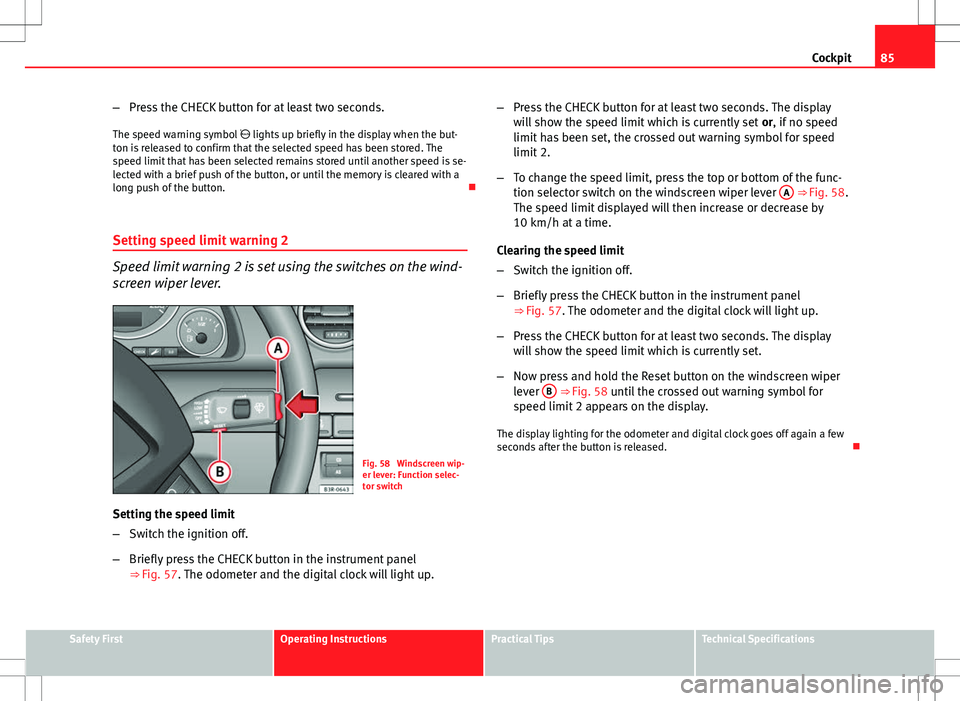
Speed limit warning 2 is set using the switches on the wind-
screen wiper lever.
Fig. 58 Windscreen wip-
er lever: Function selec-
tor switch
Setting the speed limit
– Switch the ignition off.
– Briefly press the CHECK button in the instrument panel
⇒ Fig. 57. The odometer and the digital clock will light up. –
Press the CHECK button for at least two seconds. The display
will show the speed limit which is currently set or, if no speed
limit has been set, the crossed out warning symbol for speed
limit 2.
– To change the speed limit, press the top or bottom of the func-
tion selector switch on the windscreen wiper lever A
⇒ Fig. 58.
The speed limit displayed will then increase or decrease by
10 km/h at a time.
Clearing the speed limit
– Switch the ignition off.
– Briefly press the CHECK button in the instrument panel
⇒ Fig. 57. The odometer and the digital clock will light up.
– Press the CHECK button for at least two seconds. The display
will show the speed limit which is currently set.
– Now press and hold the Reset button on the windscreen wiper
lever B
⇒ Fig. 58 until the crossed out warning symbol for
speed limit 2 appears on the display.
The display lighting for the odometer and digital clock goes off again a few
seconds after the button is released.
Safety FirstOperating InstructionsPractical TipsTechnical Specifications
Page 89 of 317
87
Cockpit
Driving time warning
After 2 hours of continuous driving, the display automatically switches over
to the driving time display of 2:00. At the same time the driving time display
starts flashing. This is to remind the driver to take a break.
The driving time warning can be switched off by briefly pressing the func-
tion selector switch or the Reset
button ⇒ Fig. 60.
If you continue driving or take a break for less than 10 minutes, the driving
time warning will switch on once again when the total driving time is 4:00
hours, 6:00 hours, etc. However, if you take a break for more than 10 mi-
nutes, the driving time warning clock will be erased.
Distance covered
This display shows the distance you have covered since the memory was
last cancelled. The longest possible distance which can be recorded is
9999.9 km.
Note
● The displays for fuel consumption (average and instantaneous), dis-
tance to empty and speed are shown in metric units.
● The information in the memory is lost if the battery is disconnected. Operation
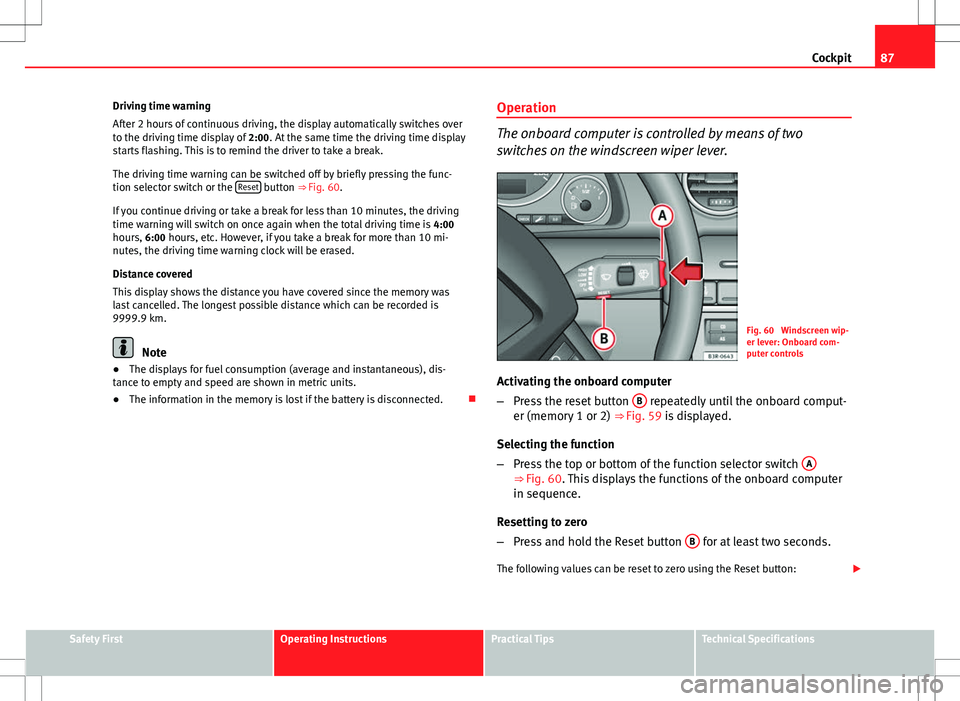
The onboard computer is controlled by means of two
switches on the windscreen wiper lever.
Fig. 60 Windscreen wip-
er lever: Onboard com-
puter controls
Activating the onboard computer
– Press the reset button B
repeatedly until the onboard comput-
er (memory 1 or 2) ⇒ Fig. 59 is displayed.
Selecting the function
– Press the top or bottom of the function selector switch A
⇒ Fig. 60. This displays the functions of the onboard computer
in sequence.
Resetting to zero
– Press and hold the Reset button B
for at least two seconds.
The following values can be reset to zero using the Reset button:
Safety FirstOperating InstructionsPractical TipsTechnical Specifications