service Seat Exeo 2012 User Guide
[x] Cancel search | Manufacturer: SEAT, Model Year: 2012, Model line: Exeo, Model: Seat Exeo 2012Pages: 317, PDF Size: 5.29 MB
Page 72 of 317

70Cockpit
Alternator
The warning lamp signals a fault in the alternator or in the
vehicle's electrical system.
The warning lamp lights up when the ignition is switched on. It should
switch off after the engine has started.
If the warning lamp lights up when you are driving, you can normally
continue as far as the nearest specialised workshop. However, given that
the battery will be running down, any electrical consumption not absolutely
vital should be switched off.
CAUTION
If the coolant warning lamp in the instrument panel lights up as well as
the alternator waning lamp while driving ⇒ page 79, stop the vehicle im-
mediately and switch off the engine. In this case the coolant pump is no
longer working, and there is a risk of engine damage.
Main beam headlights
The indicator lamp lights up when the main beams are on or when the
headlight flasher is operated.
For further information on the main beam headlights, see ⇒ page 122.Handbrake
This lamp lights up when the handbrake is applied.
If you drive faster than 5 km/h with the handbrake on, the following mes-
sage will appear on the instrument panel display 1)
: HANDBRAKE ON. You will
also hear an acoustic warning signal ⇒ page 77.
Engine management
This warning lamp monitors the engine management sys-
tem for petrol engines.
The warning lamp (Electronic Power Control) lights up while the function
is being checked.
Note
If the warning lamp lights up while the vehicle is moving, this indicates a
fault in the engine management system. The vehicle must be taken immedi-
ately to a specialised workshop to have the engine serviced.
Glow plug system
The control lamp lights up while the glow plugs are preheat-
ing the diesel engine. The indicator lamp lights up while the glow plugs are preheating. When
the indicator lamp goes out the engine should be started straight away.
1)
Depending on the version of the model.
Page 73 of 317

71
Cockpit
When the engine is warm, or at outside temperatures above +8 °C, the
warning lamp will only light up very briefly.
Note
● If the glow plug indicator lamp should start flashing while the vehicle is
moving, this indicates a fault in the engine management system. The en-
gine should be serviced without delay.
● If the indicator lamp fails to light up when the ignition is switched on,
this can mean that the glow plug system is defective. The engine should be
serviced.
Brake system
The warning lamp flashes when the handbrake is applied, or
if the brake fluid level is too low or if there is a fault in the
ABS system. If the warning lamp flashes (and the handbrake is not applied), stop the
vehicle and check the brake fluid level ⇒
⇒ page 236.
If a failure should occur in the ABS, the ABS warning lamp will light up
together with the brake warning lamp ⇒
.
Handbrake on
The warning lamp also lights up when the handbrake is applied. In addi-
tion to this, the handbrake warning ⇒ page 77 switches on after driving
for 3 seconds at a speed above 5 km/h.
WARNING
● Before opening the bonnet and checking the brake fluid level, ob-
serve the warning information in ⇒ page 227, Work in the engine com-
partment.
● If the brake warning lamp does not go out, or if it lights up when driv-
ing, the brake fluid level in the reservoir is too low and this may cause an
increased accident risk. Stop the vehicle and do not drive on. Obtain
technical assistance.
● If the brake warning lamp lights up together with the ABS warning
lamp, this can mean that there is a fault in the ABS control function. As a
result, the rear wheels can lock relatively easily when braking. Under cer-
tain circumstances, the rear of the vehicle could suddenly sway from side
to side, with the subsequent danger of skidding. Drive carefully to the
nearest specialised workshop and have the fault repaired.
Safety FirstOperating InstructionsPractical TipsTechnical Specifications
Page 74 of 317

72Cockpit
Driver information system
General notes
The driver information system in the instrument panel
shows the status of various on-board systems at a glance.
Fig. 47 Cockpit: Digital
instrument panel display
The display for the driver information system is in the centre of the instru-
ment panel.
The system runs a check on certain components and functions when the ig-
nition is switched on and while the vehicle is moving. The DIS system gives
an audible warning if a fault should occur or if servicing is required, and a
red or yellow warning symbol (in some cases with a corresponding driver
message) appears in the instrument panel display.
The driver is informed on the audio system.
The driver information system includes the following functions:
CD player, radio and telephone display*⇒ page 73Outside temperature display⇒ page 73Gear indicator*⇒ page 74Selector lever positions for the 7-speed automatic
gearbox*⇒ page 185
Selector lever positions with multitronic ®
*⇒ page 182Distance to empty⇒ page 74Door and rear lid warning⇒ page 75Service indicator⇒ page 75auto-check control⇒ page 76Driving tips⇒ page 77Handbrake warning⇒ page 77Bulb monitor*⇒ page 83Onboard computer*⇒ page 86Tyre pressure monitoring*⇒ page 90Navigation information*Separate Instruc-
tion Manual
Note
● If a fault should occur, the display will show a red or yellow warning
symbol. A red warning symbol indicates a serious malfunction ⇒ page 78.
A yellow warning symbol indicates a less serious malfunction ⇒ page 80.
Page 76 of 317

74Cockpit
Note
When the display shows route guidance instructions from the navigation
system, the outside temperature appears in the second line of the radio dis-
play.
Gear display*
This display helps to save fuel.
Fig. 50 Gear display
Use the gear display to save fuel. The indication ⇒ Fig. 50 on the instrument
panel display recommends that you select the gear indicated by the arrow.
It may also skip a gear, and recommend changing up from 4th gear to 6th
gear, for example.
Note
● The display may not recommend any gear-change while you are acceler-
ating.
● The gear change indication should not be taken into account the accel-
eration is required (for example when overtaking).
● If desired, you can have the gear-change display deactivated by a Tech-
nical Service.
Distance to empty
The distance to empty display can help you to plan your trip.
The estimated distance to empty is displayed in km. It shows how far the
vehicle can be driven with the amount of fuel left in the tank, assuming the
same style of driving. The distance to empty is displayed in increments of
10 km.
The distance to empty is calculated on the basis of the fuel consumption
over the last 30 kilometres. The distance to empty will increase if you drive
in a more economical manner.
Page 77 of 317

75
Cockpit
Door and rear lid warning
Fig. 51 Display: Door
and rear lid warning
The door and rear lid warning symbol lights up if one or more of the doors,
or the bonnet or rear lid are not properly closed when the ignition is on. The
symbol also indicates which of these is not properly closed. The display in
the illustration ⇒ Fig. 51 shows that the driver door is open.
The corresponding part of the pictogram will flash if either the bonnet or
rear lid are open. The warning symbol goes out when the bonnet, rear lid
and all the doors are closed.
In vehicles with a driver information system and an onboard computer* the
door catches/rear lid warning symbol can be switched off by briefly press-
ing one of the control switches for the onboard computer ⇒ page 87. How-
ever, the warning symbol will appear again if any of the doors or the bonnet
or rear lid is opened or closed. Service indicator
This display reminds the driver when the next routine serv-
ice is due.
Fig. 52 Detailed view of
the instrument panel:
Service indicator
Displaying distance to next service
When you press the service button 1
briefly with the ignition switched on,
the display will show how far the vehicle can be driven before the next serv-
ice is due. This check can be carried out with the engine stopped or running
up to 5 km/h. Before the first 500 km and after the ignition cycle, the kilo-
metres and days before the service inspection are not displayed.
If the service button 1
is pressed before the first 500 km the following indi-
cation appears on screen:
Service in ----- km --- days
This is only valid for vehicles with “LongLife Service Intervals”*.
Safety FirstOperating InstructionsPractical TipsTechnical Specifications
Page 78 of 317

76Cockpit
Service reminder
The instrument panel controls the distance travelled every day. It calculates
the average of these distances travelled and activates the service reminder
sufficiently in advance.
The display reverts back to the standard display after about 5 seconds. The
remaining distance to the next service is updated every time the ignition is
switched on, until the service becomes due.
Service due
When a service is due, SERVICE! will appear in the display immediately after
you switch on the ignition. The display reverts back to the standard display
after about 5 seconds.
Resetting the display
The display is reset by the specialised workshop after the service has been
carried out. The service interval will be set to a LongLife Service (flexible
service interval) or Inspection Service (fixed service interval), depending on
which engine oil is used. It is only possible to reset the display via the in-
strument panel when an oil change is performed; in this case the display
can only be reset to a fixed service interval of 15 000 km. Proceed as fol-
lows:
● Switch the ignition off.
● Press the service button ⇒ Fig. 52 1
and hold while switching on the
ignition. The display will show one of these messages: Service in ----- km or
Service!
● Now press and hold the reset button 2
until the display shows
Service
in ----- km --- days or Service!
The display switches out of the reset mode if you do not press the reset but-
ton within 5 seconds.
CAUTION
The system cannot calculate the figures for the service interval display if the
battery is disconnected from the vehicle, so no service reminder can be dis-
played during this time. Please remember that it is essential to service the
vehicle within the established time limits to prevent its deterioration and to
extend its useful life (particularly that of the engine). The period between
two services must never be longer than the time specified in the Mainte-
nance Programme, even if you only cover a low mileage during this time.
Note
● Do not reset the service indicator between services, otherwise the dis-
play will be incorrect.
● The information in the service indicator remains intact if the battery is
disconnected.
● The distance to the next service cannot be called up if the system has
detected a Priority 1 fault (red symbol).
Auto-check system Introduction
The auto-check system checks important components and vehicle systems.
These background checks are run constantly, as long as the ignition is
switched on.
A message is displayed on the instrument panel if a fault should occur or if
any maintenance or repairs are urgently required. This is accompanied by
an audible warning signal. Depending on the priority of the fault, a red or
yellow warning symbol lights up on the display.
Page 91 of 317
89
Cockpit
Menu display
Introduction
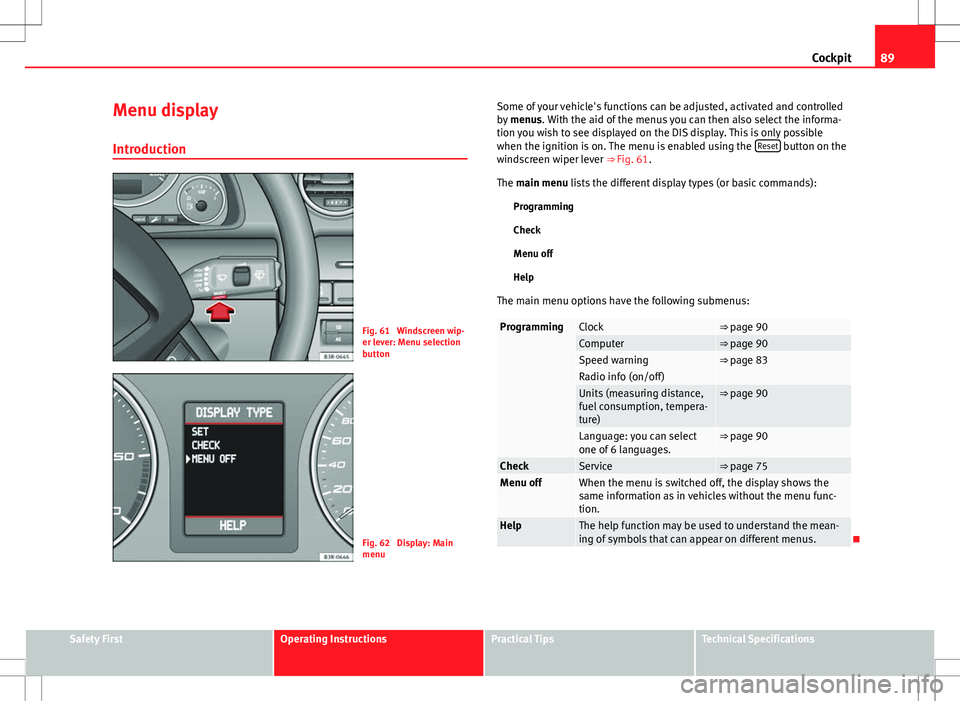
Fig. 61 Windscreen wip-
er lever: Menu selection
button
Fig. 62 Display: Main
menu Some of your vehicle's functions can be adjusted, activated and controlled
by
menus. With the aid of the menus you can then also select the informa-
tion you wish to see displayed on the DIS display. This is only possible
when the ignition is on. The menu is enabled using the Reset
button on the
windscreen wiper lever ⇒ Fig. 61.
The main menu lists the different display types (or basic commands):
Programming
Check
Menu off
Help
The main menu options have the following submenus:
ProgrammingClock⇒ page 90Computer⇒ page 90Speed warning⇒ page 83Radio info (on/off) Units (measuring distance,
fuel consumption, tempera-
ture)⇒ page 90
Language: you can select
one of 6 languages.⇒ page 90
CheckService⇒ page 75Menu offWhen the menu is switched off, the display shows the
same information as in vehicles without the menu func-
tion.
HelpThe help function may be used to understand the mean-
ing of symbols that can appear on different menus.
Safety FirstOperating InstructionsPractical TipsTechnical Specifications
Page 99 of 317
97
Unlocking and locking
Unlocking and locking
Remote control keys Set of keys
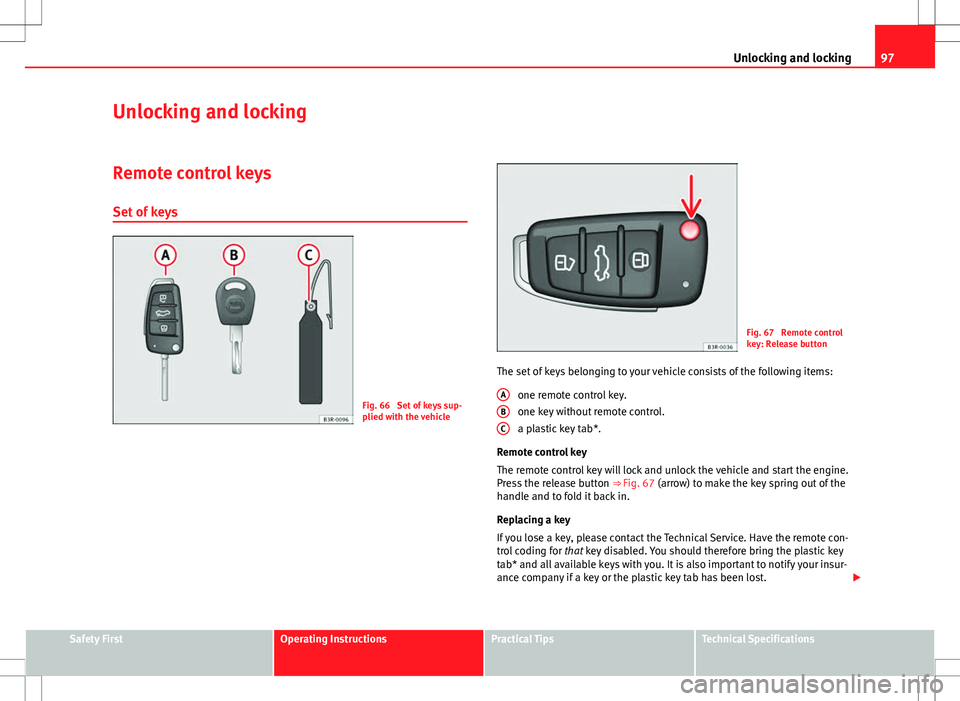
Fig. 66 Set of keys sup-
plied with the vehicle
Fig. 67 Remote control
key: Release button
The set of keys belonging to your vehicle consists of the following items: one remote control key.
one key without remote control.
a plastic key tab*.
Remote control key
The remote control key will lock and unlock the vehicle and start the engine.
Press the release button ⇒ Fig. 67 (arrow) to make the key spring out of the
handle and to fold it back in.
Replacing a key
If you lose a key, please contact the Technical Service. Have the remote con-
trol coding for that key disabled. You should therefore bring the plastic key
tab* and all available keys with you. It is also important to notify your insur-
ance company if a key or the plastic key tab has been lost.
A
BC
Safety FirstOperating InstructionsPractical TipsTechnical Specifications
Page 101 of 317
99
Unlocking and locking
– Insert the new battery. Make sure that the “+” symbol on the
battery is facing downwards. The correct polarity is indicated on
the cover.
– After inserting the battery, align the cover and key and press
the two parts together.
For the sake of the environment
Used batteries must be disposed of at an appropriate waste facility or
through an authorised service, given that their components can affect the
environment.
Note
● The system must be re-synchronised after each battery replacement to
be able to lock and unlock the vehicle using the remote control
⇒ page 107.
● The new battery must be of the same type as the original.
Electronic immobiliser
The electronic immobiliser is designed to prevent unauthor-
ised persons from starting up the vehicle.
There is an electronic chip inside the key which automatically deactivates
the immobiliser when the key is inserted into the ignition lock. The electron-
ic immobiliser is enabled automatically when the ignition key is removed
from the ignition lock after coming to a stop.
If an uncoded key is used, the message SAFE will appear in the trip recorder
display.
Note
● The engine can only be started using an original SEAT key with the cor-
rect code.
● It may not be possible to start the engine with the key if there is another
ignition key from a different make of vehicle on the same key tab.
Central locking Description
The central locking system enables you to lock and unlock
all the doors, the rear lid and the tank flap together.The central locking system on your vehicle locks and unlocks all the doors
and the tank flap simultaneously. The rear lid is unlocked when the vehicle
is opened. However, the handle must be used to open it. The vehicle can be
locked and unlocked using the remote control ⇒ page 105 or by turning the
key in the lock in the driver door.
The windows can also be centrally opened or closed using the central lock-
ing system ⇒ page 111. The sunroof* can be closed but not opened using
the central locking system.
The central locking system is combined with an anti-theft security system.
If the vehicle is locked with the key from the outside, the interior opening
levers stop working, which prevents unauthorised persons from entering
the vehicle.
Should the central locking system fail to work, you can activate all the locks
individually.
Safety FirstOperating InstructionsPractical TipsTechnical Specifications
Page 147 of 317
145
Seats and storage compartments
Note
Do not fold away the ski bag after use if it is still damp.
Roof rack
Description
Additional luggage can be carried on the roof rack. Note the following points if you intend to carry loads on the roof:
● There are aerodynamic drainage channels on the roof of the vehicle and,
therefore, normal roof racks cannot be used. We recommend using the ba-
sic support units from the range of genuine SEAT accessories.
● These basic supports are the base of a complete roof rack system. For
safety reasons, however, the corresponding additional fastenings must be
fitted to carry luggage, bicycles, surfboards, skis and boats. All the parts of
this system are available from SEAT Official Services.
CAUTION
Any damage to the vehicle caused by the use of other types of roof rack or
incorrect installation will not be covered by the factory warranty. The roof
rack system must therefore be installed exactly according to the instructions
provided. Attachment points
The roof rack must be attached at the marked points only.
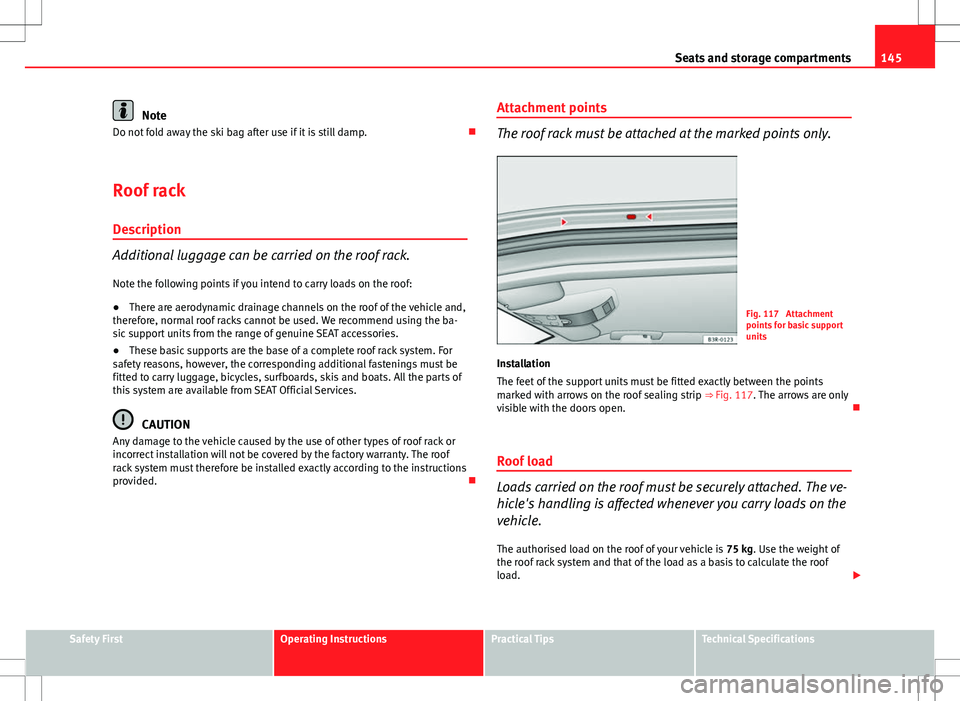
Fig. 117 Attachment
points for basic support
units
Installation
The feet of the support units must be fitted exactly between the points
marked with arrows on the roof sealing strip ⇒ Fig. 117. The arrows are only
visible with the doors open.
Roof load
Loads carried on the roof must be securely attached. The ve-
hicle's handling is affected whenever you carry loads on the
vehicle. The authorised load on the roof of your vehicle is 75 kg. Use the weight of
the roof rack system and that of the load as a basis to calculate the roof
load.
Safety FirstOperating InstructionsPractical TipsTechnical Specifications