steering wheel Seat Exeo 2012 User Guide
[x] Cancel search | Manufacturer: SEAT, Model Year: 2012, Model line: Exeo, Model: Seat Exeo 2012Pages: 317, PDF Size: 5.29 MB
Page 39 of 317
37
Airbag system
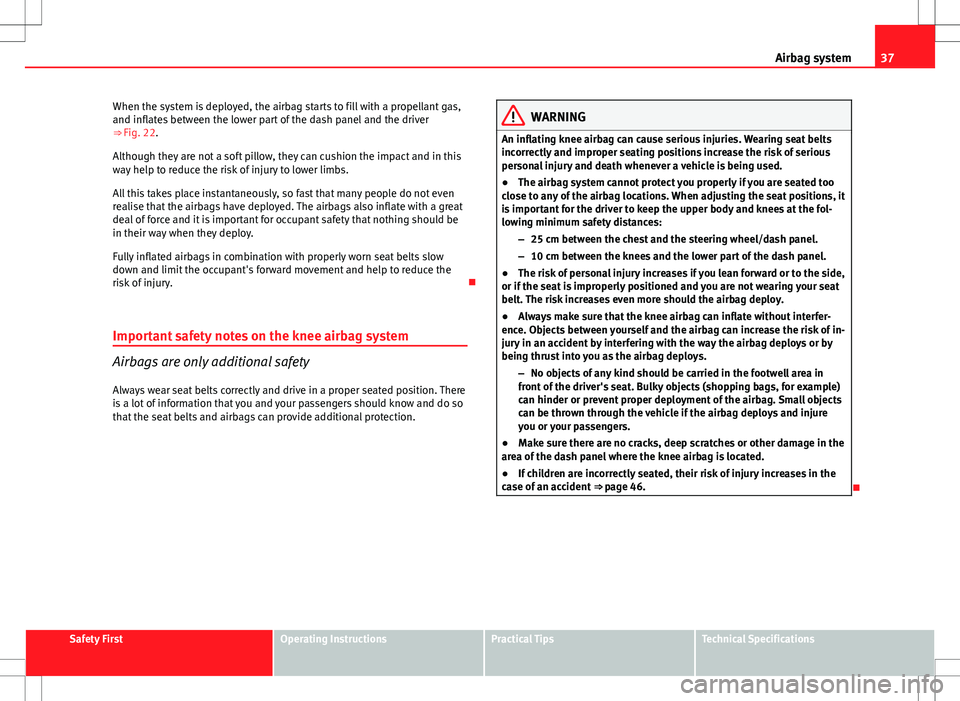
When the system is deployed, the airbag starts to fill with a propellant gas,
and inflates between the lower part of the dash panel and the driver
⇒ Fig. 22.
Although they are not a soft pillow, they can cushion the impact and in this
way help to reduce the risk of injury to lower limbs.
All this takes place instantaneously, so fast that many people do not even
realise that the airbags have deployed. The airbags also inflate with a great
deal of force and it is important for occupant safety that nothing should be
in their way when they deploy.
Fully inflated airbags in combination with properly worn seat belts slow
down and limit the occupant's forward movement and help to reduce the
risk of injury.
Important safety notes on the knee airbag system
Airbags are only additional safety
Always wear seat belts correctly and drive in a proper seated position. There
is a lot of information that you and your passengers should know and do so
that the seat belts and airbags can provide additional protection.
WARNING
An inflating knee airbag can cause serious injuries. Wearing seat belts
incorrectly and improper seating positions increase the risk of serious
personal injury and death whenever a vehicle is being used.
● The airbag system cannot protect you properly if you are seated too
close to any of the airbag locations. When adjusting the seat positions, it
is important for the driver to keep the upper body and knees at the fol-
lowing minimum safety distances:
–25 cm between the chest and the steering wheel/dash panel.
– 10 cm between the knees and the lower part of the dash panel.
● The risk of personal injury increases if you lean forward or to the side,
or if the seat is improperly positioned and you are not wearing your seat
belt. The risk increases even more should the airbag deploy.
● Always make sure that the knee airbag can inflate without interfer-
ence. Objects between yourself and the airbag can increase the risk of in-
jury in an accident by interfering with the way the airbag deploys or by
being thrust into you as the airbag deploys.
–No objects of any kind should be carried in the footwell area in
front of the driver's seat. Bulky objects (shopping bags, for example)
can hinder or prevent proper deployment of the airbag. Small objects
can be thrown through the vehicle if the airbag deploys and injure
you or your passengers.
● Make sure there are no cracks, deep scratches or other damage in the
area of the dash panel where the knee airbag is located.
● If children are incorrectly seated, their risk of injury increases in the
case of an accident ⇒ page 46.
Safety FirstOperating InstructionsPractical TipsTechnical Specifications
Page 60 of 317
58Cockpit
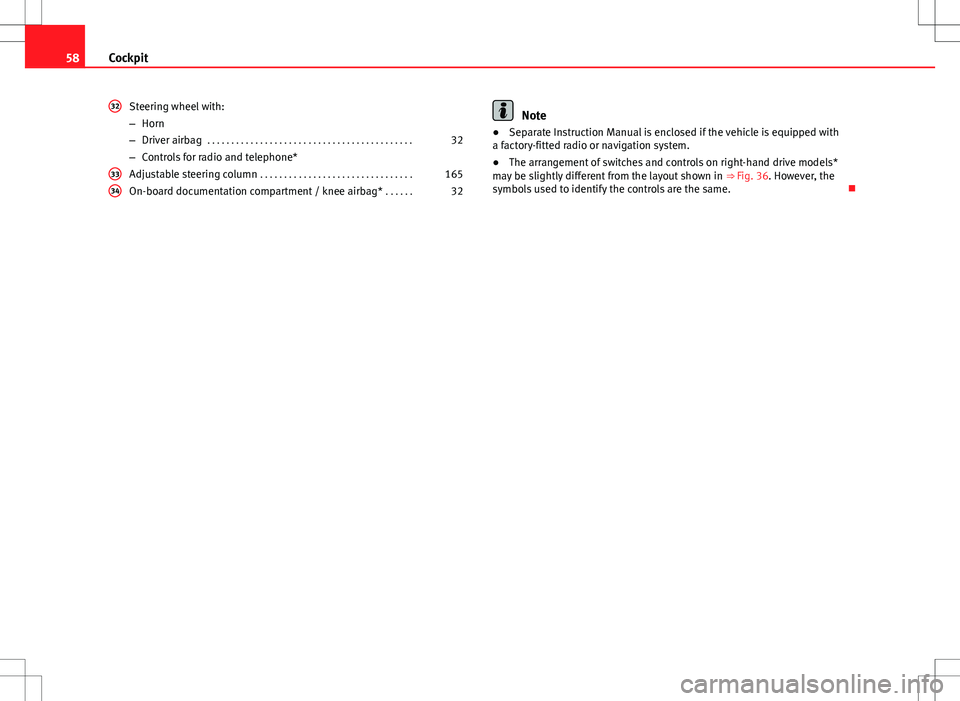
Steering wheel with:
–Horn
– Driver airbag . . . . . . . . . . . . . . . . . . . . . . . . . . . . . . . . . . . . . . . . . . . 32
– Controls for radio and telephone*
Adjustable steering column . . . . . . . . . . . . . . . . . . . . . . . . . . . . . . . . 165
On-board documentation compartment / knee airbag* . . . . . .32
32
3334
Note
● Separate Instruction Manual is enclosed if the vehicle is equipped with
a factory-fitted radio or navigation system.
● The arrangement of switches and controls on right-hand drive models*
may be slightly different from the layout shown in ⇒ Fig. 36. However, the
symbols used to identify the controls are the same.
Page 94 of 317
92Steering wheel controls
Steering wheel controls
Multifunction steering wheel* Introduction
You can use the multifunction steering wheel to quickly and
easily operate selected functions of the radio, CD, and tele-
phone*.
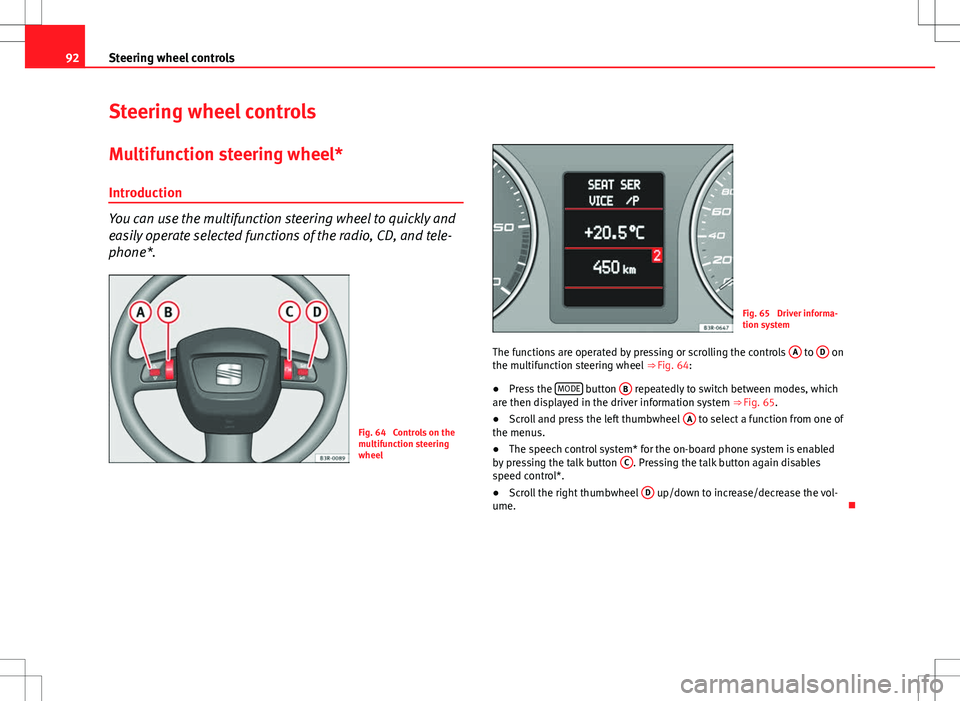
Fig. 64 Controls on the
multifunction steering
wheel
Fig. 65 Driver informa-
tion system
The functions are operated by pressing or scrolling the controls A
to D on
the multifunction steering wheel ⇒ Fig. 64:
● Press the MODE
button
B repeatedly to switch between modes, which
are then displayed in the driver information system ⇒ Fig. 65.
● Scroll and press the left thumbwheel A
to select a function from one of
the menus.
● The speech control system* for the on-board phone system is enabled
by pressing the talk button C
. Pressing the talk button again disables
speed control*.
● Scroll the right thumbwheel D
up/down to increase/decrease the vol-
ume.
Page 95 of 317
93
Steering wheel controls
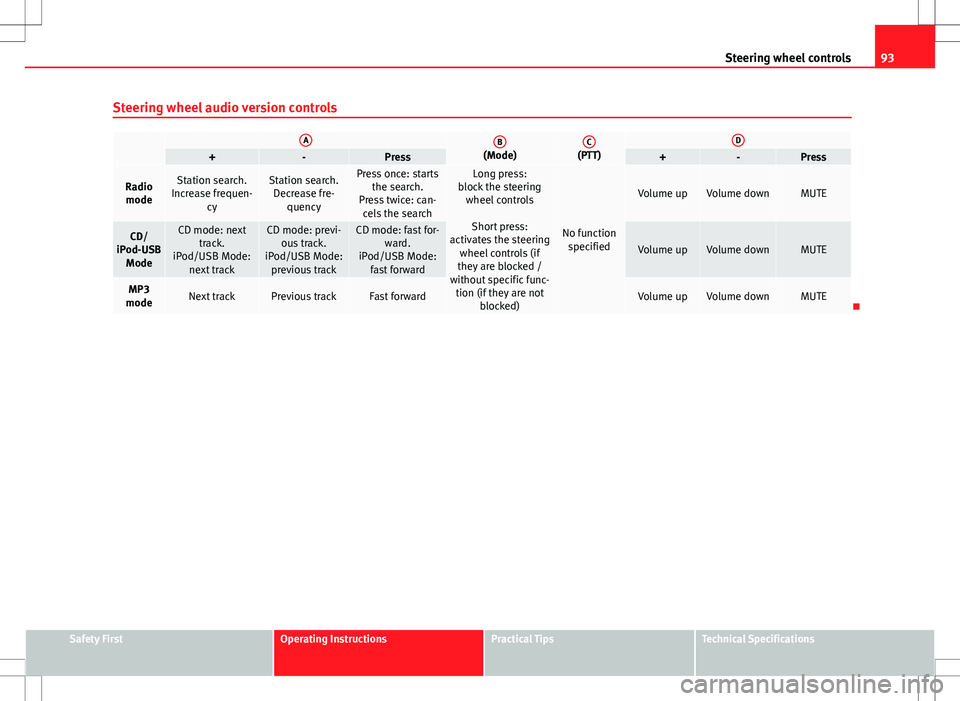
Steering wheel audio version controls
AB(Mode)C(PTT)D+-Press+-Press
Radio modeStation search.
Increase frequen- cyStation search.Decrease fre- quencyPress once: starts the search.
Press twice: can- cels the searchLong press:
block the steering wheel controls
Short press:
activates the steering wheel controls (if
they are blocked /
without specific func- tion (if they are not blocked)
No functionspecified
Volume upVolume downMUTE
CD/
iPod-USB ModeCD mode: next track.
iPod/USB Mode: next trackCD mode: previ-ous track.
iPod/USB Mode: previous trackCD mode: fast for- ward.
iPod/USB Mode: fast forward
Volume upVolume downMUTE
MP3
modeNext trackPrevious trackFast forwardVolume upVolume downMUTE
Safety FirstOperating InstructionsPractical TipsTechnical Specifications
Page 96 of 317
94Steering wheel controls
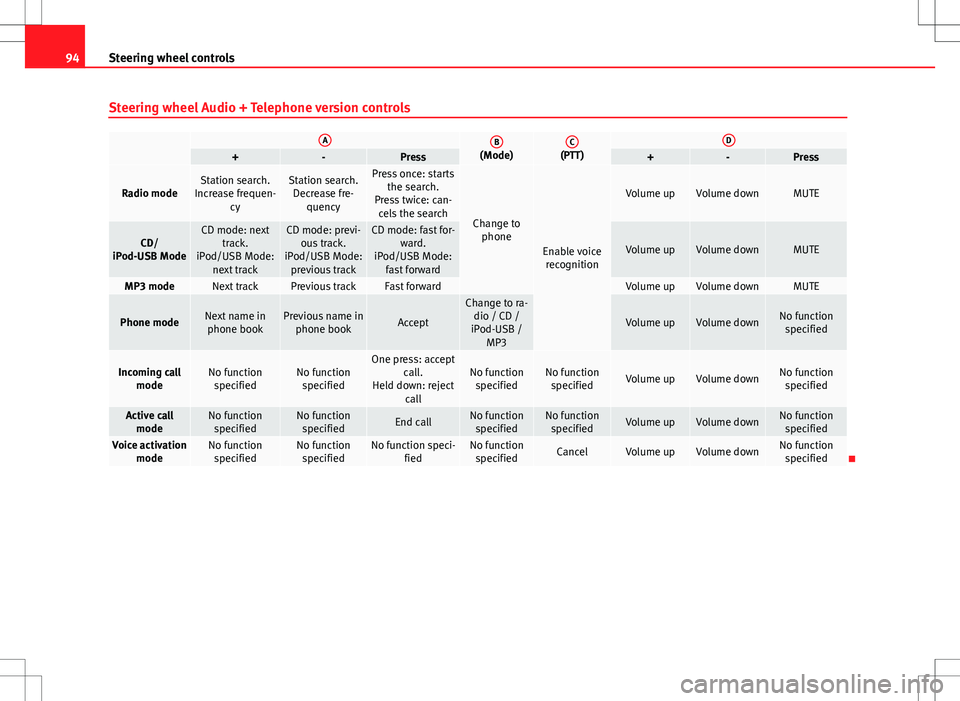
Steering wheel Audio + Telephone version controls
AB(Mode)C(PTT)D+-Press+-Press
Radio modeStation search.
Increase frequen- cyStation search.Decrease fre- quencyPress once: starts the search.
Press twice: can- cels the search
Change to phone
Enable voicerecognition
Volume upVolume downMUTE
CD/
iPod-USB ModeCD mode: next track.
iPod/USB Mode: next trackCD mode: previ-ous track.
iPod/USB Mode: previous trackCD mode: fast for- ward.
iPod/USB Mode: fast forward
Volume upVolume downMUTE
MP3 modeNext trackPrevious trackFast forwardVolume upVolume downMUTE
Phone modeNext name inphone bookPrevious name in phone bookAccept
Change to ra-dio / CD /
iPod-USB / MP3
Volume upVolume downNo functionspecified
Incoming call modeNo functionspecifiedNo functionspecifiedOne press: accept call.
Held down: reject callNo functionspecifiedNo function specifiedVolume upVolume downNo functionspecified
Active call modeNo functionspecifiedNo functionspecifiedEnd callNo functionspecifiedNo function specifiedVolume upVolume downNo functionspecified
Voice activation modeNo functionspecifiedNo functionspecifiedNo function speci- fiedNo functionspecifiedCancelVolume upVolume downNo function specified
Page 97 of 317
95
Steering wheel controls
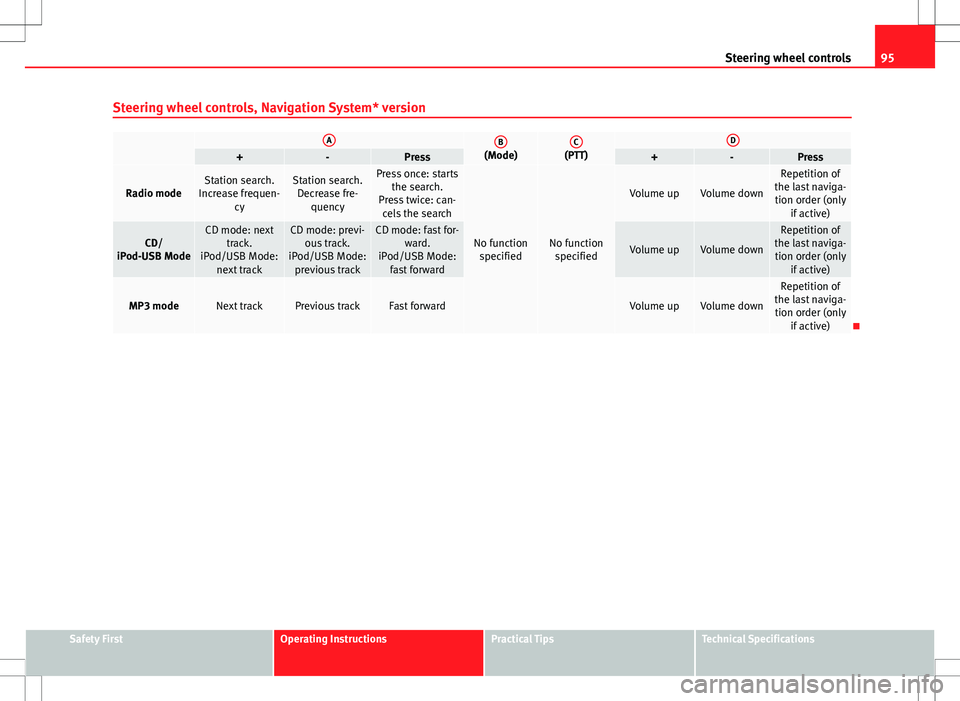
Steering wheel controls, Navigation System* version
AB(Mode)C(PTT)D+-Press+-Press
Radio modeStation search.
Increase frequen- cyStation search.Decrease fre- quencyPress once: starts the search.
Press twice: can- cels the search
No function specifiedNo function specified
Volume upVolume down
Repetition of
the last naviga- tion order (only if active)
CD/
iPod-USB ModeCD mode: next track.
iPod/USB Mode: next trackCD mode: previ-ous track.
iPod/USB Mode: previous trackCD mode: fast for- ward.
iPod/USB Mode: fast forward
Volume upVolume down
Repetition of
the last naviga- tion order (only if active)
MP3 modeNext trackPrevious trackFast forwardVolume upVolume down
Repetition of
the last naviga- tion order (only if active)
Safety FirstOperating InstructionsPractical TipsTechnical Specifications
Page 98 of 317
96Steering wheel controls
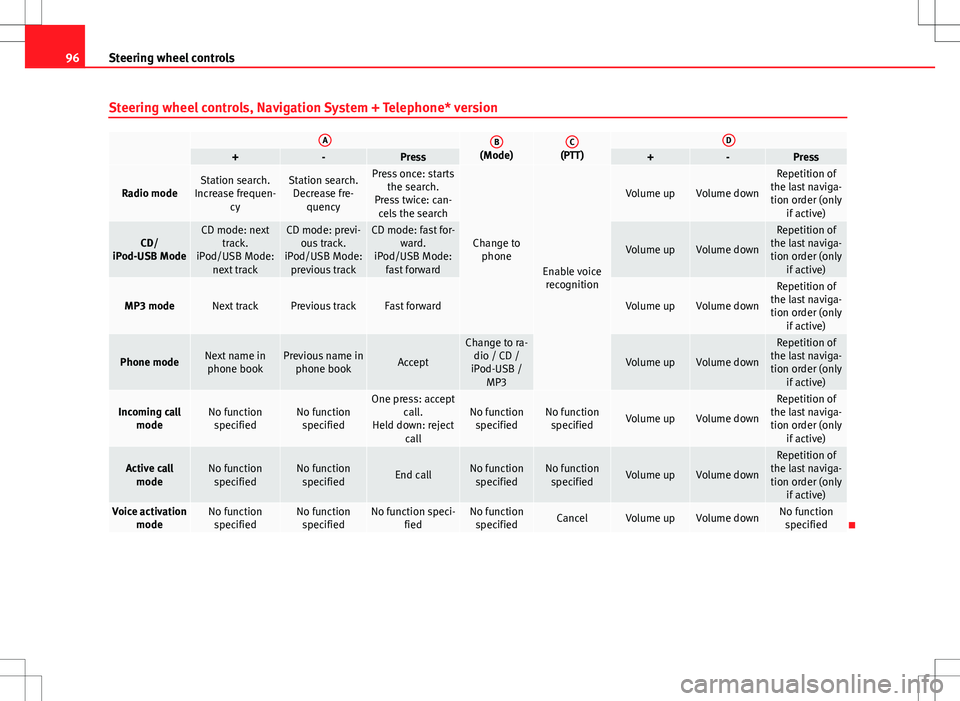
Steering wheel controls, Navigation System + Telephone* version
AB(Mode)C(PTT)D+-Press+-Press
Radio modeStation search.
Increase frequen- cyStation search.Decrease fre- quencyPress once: starts the search.
Press twice: can- cels the search
Change to phone
Enable voicerecognition
Volume upVolume down
Repetition of
the last naviga- tion order (only if active)
CD/
iPod-USB ModeCD mode: next track.
iPod/USB Mode: next trackCD mode: previ-ous track.
iPod/USB Mode: previous trackCD mode: fast for- ward.
iPod/USB Mode: fast forward
Volume upVolume down
Repetition of
the last naviga- tion order (only if active)
MP3 modeNext trackPrevious trackFast forwardVolume upVolume down
Repetition of
the last naviga- tion order (only if active)
Phone modeNext name inphone bookPrevious name in phone bookAccept
Change to ra-dio / CD /
iPod-USB / MP3
Volume upVolume down
Repetition of
the last naviga- tion order (only if active)
Incoming call modeNo functionspecifiedNo functionspecifiedOne press: accept call.
Held down: reject callNo functionspecifiedNo function specifiedVolume upVolume down
Repetition of
the last naviga- tion order (only if active)
Active callmodeNo functionspecifiedNo functionspecifiedEnd callNo functionspecifiedNo function specifiedVolume upVolume down
Repetition of
the last naviga- tion order (only if active)
Voice activation modeNo functionspecifiedNo functionspecifiedNo function speci- fiedNo functionspecifiedCancelVolume upVolume downNo function specified
Page 123 of 317
121
Lights and visibility
– Press the knob in again to prevent the setting from being
changed unintentionally.
This button activates or deactivates the daytime running lights function.
With the function activated, when the ignition is switched on the daytime
running lights are turned on automatically.
Note
Please observe any relevant legal requirements which may apply in your
country.
Adaptive headlights* (for driving around bends)
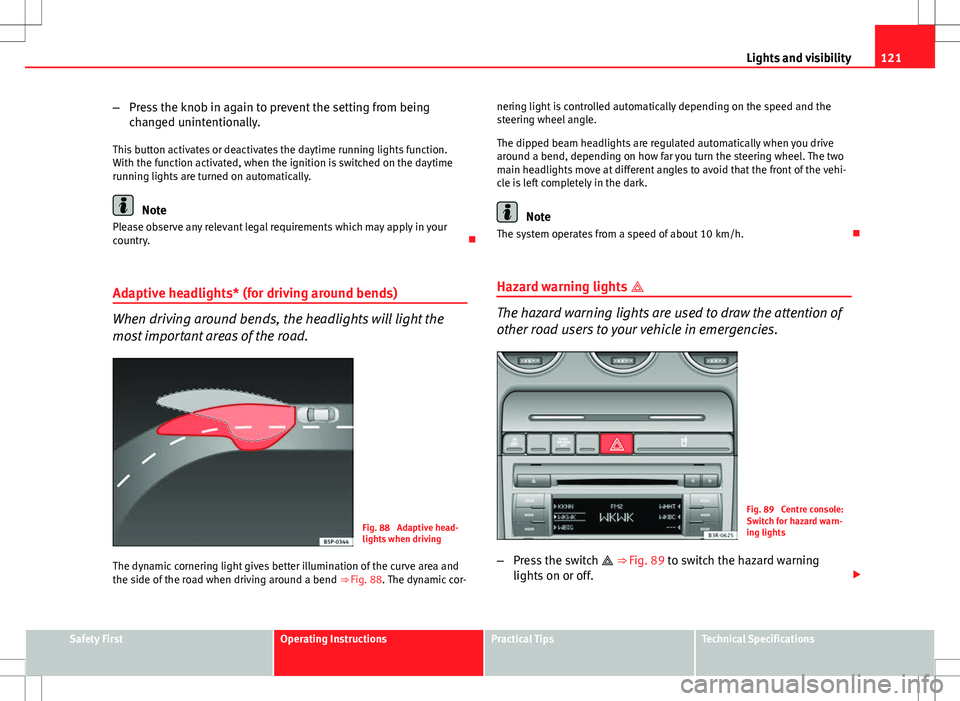
When driving around bends, the headlights will light the
most important areas of the road.
Fig. 88 Adaptive head-
lights when driving
The dynamic cornering light gives better illumination of the curve area and
the side of the road when driving around a bend ⇒ Fig. 88. The dynamic cor-nering light is controlled automatically depending on the speed and the
steering wheel angle.
The dipped beam headlights are regulated automatically when you drive
around a bend, depending on how far you turn the steering wheel. The two
main headlights move at different angles to avoid that the front of the vehi-
cle is left completely in the dark.
Note
The system operates from a speed of about 10 km/h.
Hazard warning lights
The hazard warning lights are used to draw the attention of
other road users to your vehicle in emergencies.
Fig. 89 Centre console:
Switch for hazard warn-
ing lights
– Press the switch
⇒
Fig. 89 to switch the hazard warning
lights on or off.
Safety FirstOperating InstructionsPractical TipsTechnical Specifications
Page 125 of 317

123
Lights and visibility
Main beam headlights
– Press the lever forward to switch on the main beams.
– Pull the lever back towards you to switch the main beam head-
lights off again.
Headlight flasher
– Pull the lever towards the steering wheel to operate the flasher.
Parking light
– Switch the ignition off.
– Move the lever up or down to turn on the right or left-hand park-
ing lights respectively.
Notes on these functions
● The turn signals only work when the ignition is switched on. The turn
signal lamp or flashes in the instrument panel when the turns signals
⇒ page 65 are working.
● The turn signals are cancelled automatically when the steering wheel is
returned to the straight-ahead position.
● The main beam headlights can only be switched on if the dipped beam
headlights are already on. The main beam headlight indicator lamp then
comes on in the instrument panel.
● The headlight flasher comes on for as long as you pull the lever, even if
no other lights are switched on. The main beam headlight indicator lamp
then comes on in the instrument panel.
● When the parking lights are switched on, the headlight and the tail light
on one side of the vehicle light up with reduced intensity. The parking lights
will only work with the ignition off.
CAUTION
Never use the main beam headlights or the headlight flasher if this would
dazzle oncoming traffic.
Interior lights
Front interior lights and glove compartment light
The front interior light also incorporates the reading lights
for the driver and passenger.
Fig. 91 Detail of headlin-
er: front interior lights
The rocker switch A
⇒
Fig. 91 for the front interior light has the
following functions:
Door light position
– Move switch A
to the centre position.
Safety FirstOperating InstructionsPractical TipsTechnical Specifications
Page 130 of 317

128Lights and visibility
Note
● An overload cut-out may be triggered if the sun blind for the rear window
is operated repeatedly. There will then be a short delay before the blind can
be operated again.
● As the material of the sun blind is less flexible at low temperatures the
electric actuator is switched off when the temperature in the car is below
-5 °C. The sun blind can only be operated when the temperature inside the
car rises above this level.
Windscreen wipers
Windscreen wipers
The windscreen wiper lever controls the windscreen wipers
and the automatic wash and wipe.
Fig. 99 Windscreen wip-
er lever
The windscreen wiper lever ⇒
Fig. 99 has the following settings: Short wipe
–
Move the lever down to position 1
to give the windscreen a
short wipe.
Intermittent wipe / Rain sensor* (activate)
– Move the lever up to position 2
.
– Move the switch A
up or down to set the wiper intervals.
– In vehicles equipped with a rain sensor*, you can move the
switch A
up and down to set the sensitivity of the rain sensor.
Slow wipe
– Move the lever up to position 3
.
Continuous wipe
– Move the lever up to position 4
.
Automatic wash and wipe
– Pull the lever towards the steering wheel, 5
, to activate the
windscreen washer.
– Release the lever. The washer will stop and the wipers will keep
running for approximately 4 seconds.
Deactivating the windscreen wiper
– Pull the lever to basic position 0
.
General notes
The washers and wipers will work only when the ignition is switched on.