lights Seat Exeo 2013 Workshop Manual
[x] Cancel search | Manufacturer: SEAT, Model Year: 2013, Model line: Exeo, Model: Seat Exeo 2013Pages: 319, PDF Size: 4.81 MB
Page 154 of 319
152Seats and storage
● In some countries this socket is 115 volts. Therefore the socket should
have a different inverter installed at the factory. You can obtain retrofit kits
from your Technical Service. Do not connect 115 Volt appliances to the
230 Volt socket.
● The use of electrical equipment in the vicinity of the aerial in the rear
window may cause interference to the reception of stations broadcasting in
AM.
Compartments Overview
There are several storage compartments at various points in
the vehicle.
Your vehicle has the following storage compartments:
First-aid kit* Emergency triangle* Glove compartment⇒ page 152Storage compartment in the centre console On-board documentation compartment* Compartments in the door trims⇒ page 153Coat hooks⇒ page 153Rear shelf⇒ page 143Side storage compartment in luggage com-
partment
Some of the compartments listed are only provided in certain models or are
optional extras. Glove compartment
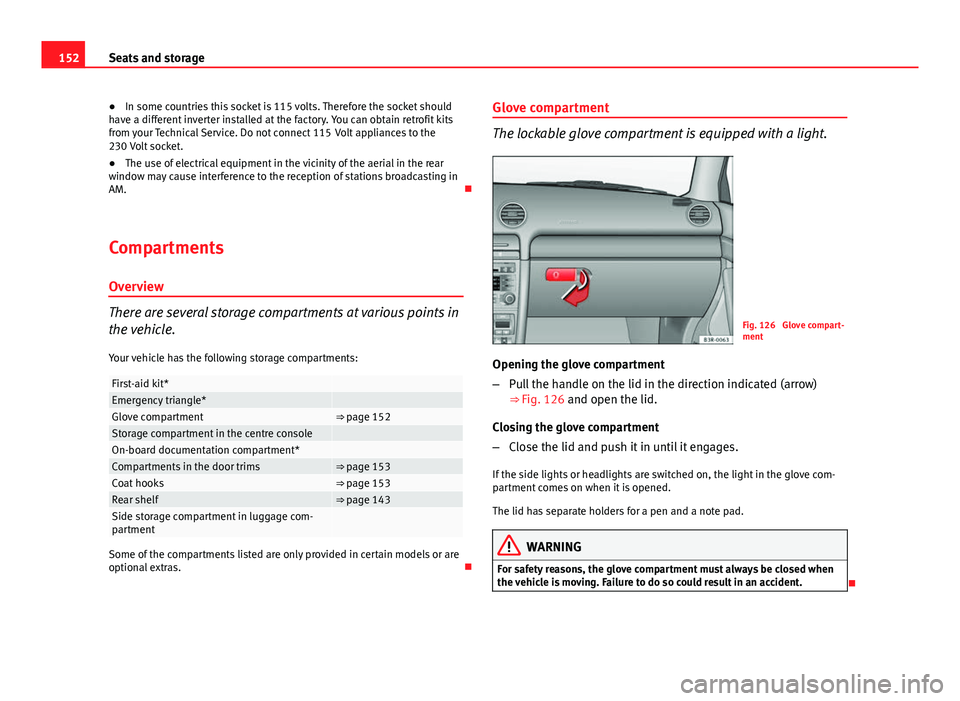
The lockable glove compartment is equipped with a light.
Fig. 126 Glove compart-
ment
Opening the glove compartment
– Pull the handle on the lid in the direction indicated (arrow)
⇒ Fig. 126 and open the lid.
Closing the glove compartment
– Close the lid and push it in until it engages.
If the side lights or headlights are switched on, the light in the glove com-
partment comes on when it is opened.
The lid has separate holders for a pen and a note pad.
WARNING
For safety reasons, the glove compartment must always be closed when
the vehicle is moving. Failure to do so could result in an accident.
Page 159 of 319
157
Air conditioning
Controls
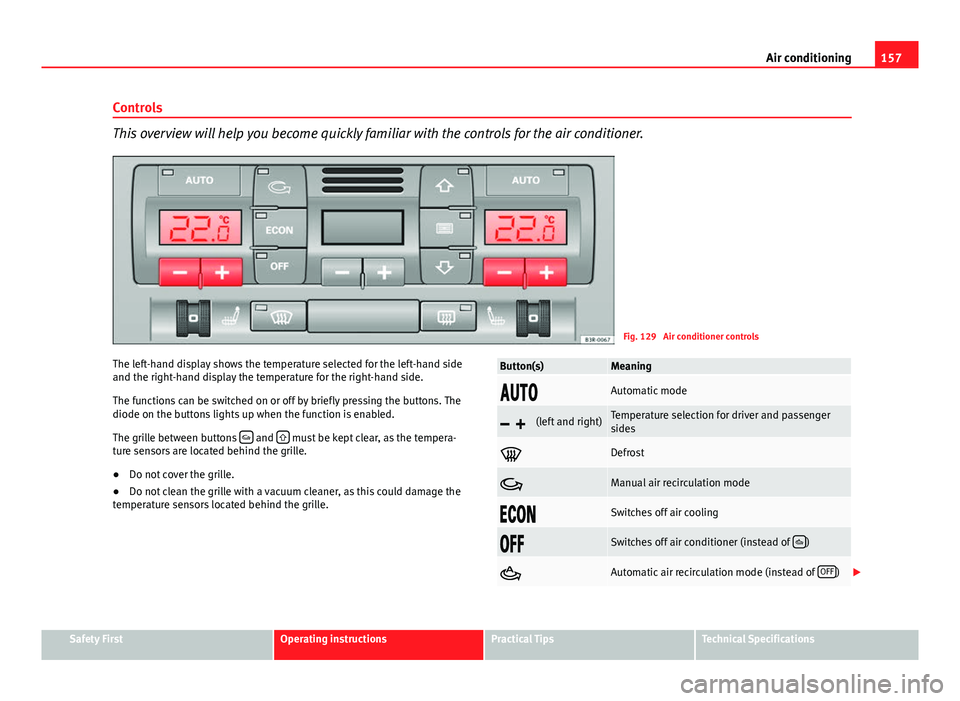
This overview will help you become quickly familiar with the controls for the air conditioner.
Fig. 129 Air conditioner controls
The left-hand display shows the temperature selected for the left-hand side
and the right-hand display the temperature for the right-hand side.
The functions can be switched on or off by briefly pressing the buttons. The
diode on the buttons lights up when the function is enabled.
The grille between buttons
and must be kept clear, as the tempera-
ture sensors are located behind the grille.
● Do not cover the grille.
● Do not clean the grille with a vacuum cleaner, as this could damage the
temperature sensors located behind the grille.
Button(s)Meaning
Automatic mode
(left and right)Temperature selection for driver and passenger
sides
Defrost
Manual air recirculation mode
Switches off air cooling
Switches off air conditioner (instead of )
Automatic air recirculation mode (instead of OFF)
Safety FirstOperating instructionsPractical TipsTechnical Specifications
Page 168 of 319
166Driving
The Electronic Stability Control (ESC) contains the electronic differential lock
(EDL) and the traction control system (ASR). The ESC works together with
the ABS. If a fault in the ABS occurs, both warning lamps light up, but if the
ESC fails, only the ESC warning lamp lights up.
The ESC system is started automatically when the engine is started.
The ESC system is always active and cannot be switched off. The ESC switch
only switches the ASR off.
The ASR can be deactivated when wheel spin is desirable.
For example:
● When driving with snow chains.
● When driving in deep snow or on loose surfaces.
● When the vehicle is stuck, to rock it backwards and forwards.
Press the button to switch the ASR back on when you no longer need wheel
spin.
Situations in which the warning lamp lights
●
On switching the ignition on, it lights up for about two seconds to carry
out a function control.
● The warning lamp will start flashing when the vehicle is moving if the
ESC or the ASR is activated.
● It will light up continuously if there is a fault in the ESC.
WARNING
● Do not forget that the Electronic stability control ESC cannot defy the
laws of physics. This should be kept in mind, particularly on slippery and
wet roads and when towing a trailer.
● Always adapt your driving style to suit the condition of the roads and
the traffic situation. The greater safety provided by the ESC should not
encourage you to run any risks.
● Please refer to the corresponding warning notes on ESC in
⇒ page 188, Intelligent technology.
Ignition lock Ignition key positions
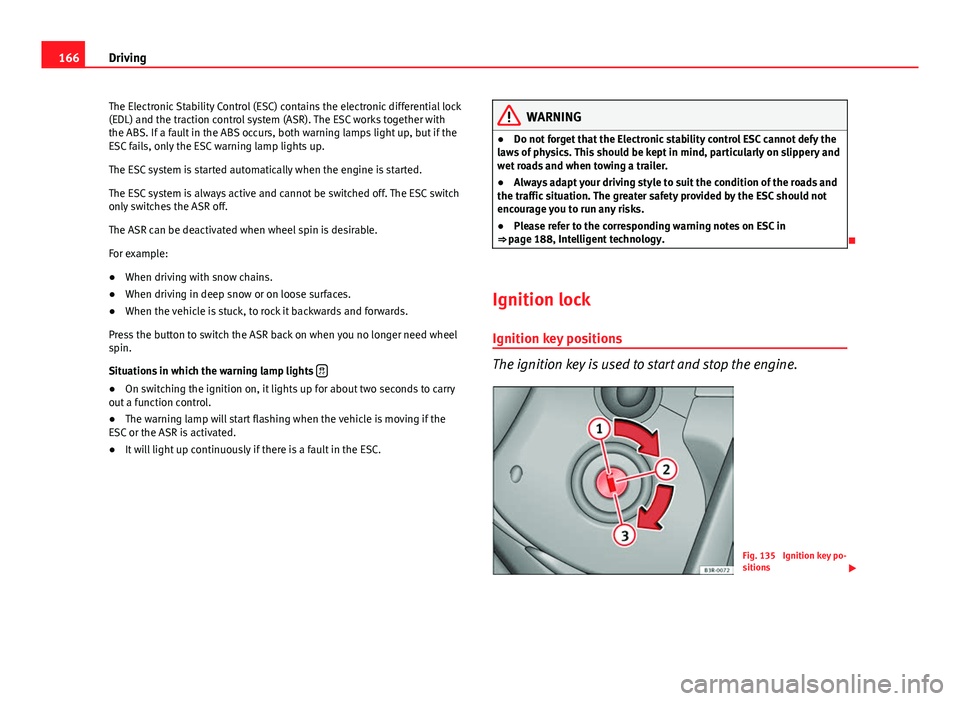
The ignition key is used to start and stop the engine.
Fig. 135 Ignition key po-
sitions
Page 172 of 319
170Driving
● The Start-Stop System is manually deactivated.
● The windscreen de-mist function is turned on.
● The temperature of the passenger compartment exceeds the comfort
limits (button ECON
should not be selected).
● If more than 50% of the airflow that the fan can supply is ordered.
● Temperature setting HI or LO is selected.
● The engine coolant temperature is insufficient.
● The alternator is faulty, for example the V-belt has ruptured.
● If any of the conditions described in the previous section are not fulfil-
led.
WARNING
Never allow the vehicle to move with the engine off for any reason. You
could lose control of your vehicle. This could cause an accident and seri-
ous injury.
● Power steering does not work when the engine is not running. That is
why it is much more difficult to turn the steering wheel.
● Turn off the Start-Stop system when driving through water (fording
streams, etc.).
Note
● For vehicles with the Start-Stop function and a manual gearbox, when
the engine is started, the clutch must be pressed.
● When the conditions for the Start-Stop function are not fulfilled, the in-
strument panel displays the Start-Stop indicator dimmed.
● If the steering wheel is turned more than 270°, Stop will not function;
however, the angle of steering wheel turn does not affect starting the vehi-
cle. Activating and deactivating the Start-Stop function
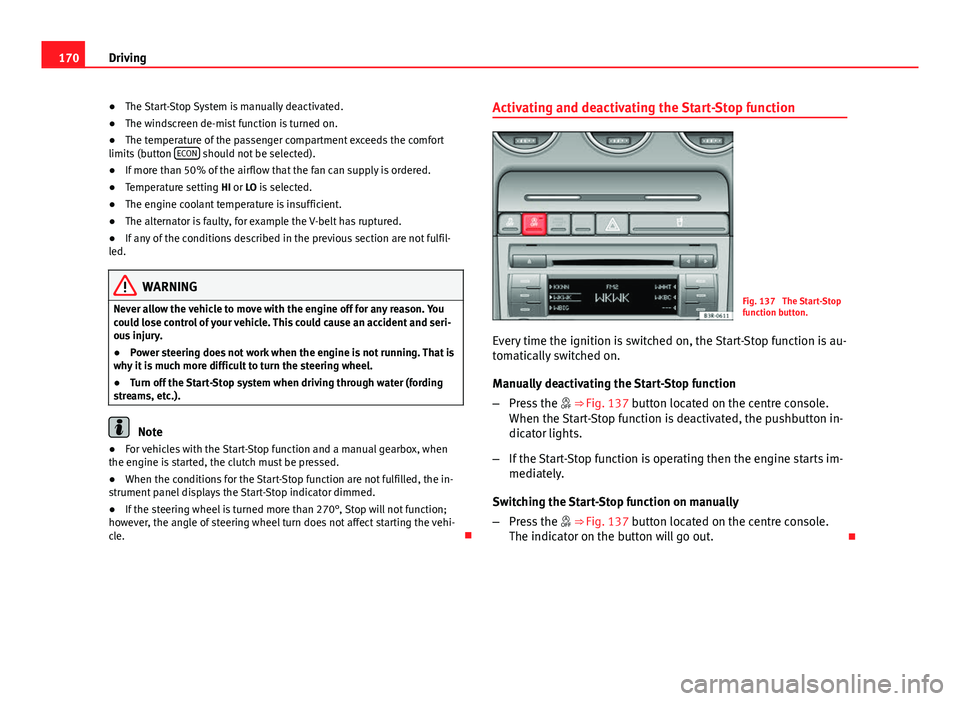
Fig. 137 The Start-Stop
function button.
Every time the ignition is switched on, the Start-Stop function is au-
tomatically switched on.
Manually deactivating the Start-Stop function
– Press the ⇒ Fig. 137 button located on the centre console.
When the Start-Stop function is deactivated, the pushbutton in-
dicator lights.
– If the Start-Stop function is operating then the engine starts im-
mediately.
Switching the Start-Stop function on manually
– Press the ⇒ Fig. 137 button located on the centre console.
The indicator on the button will go out.
Page 173 of 319
171
Driving
Driver messages
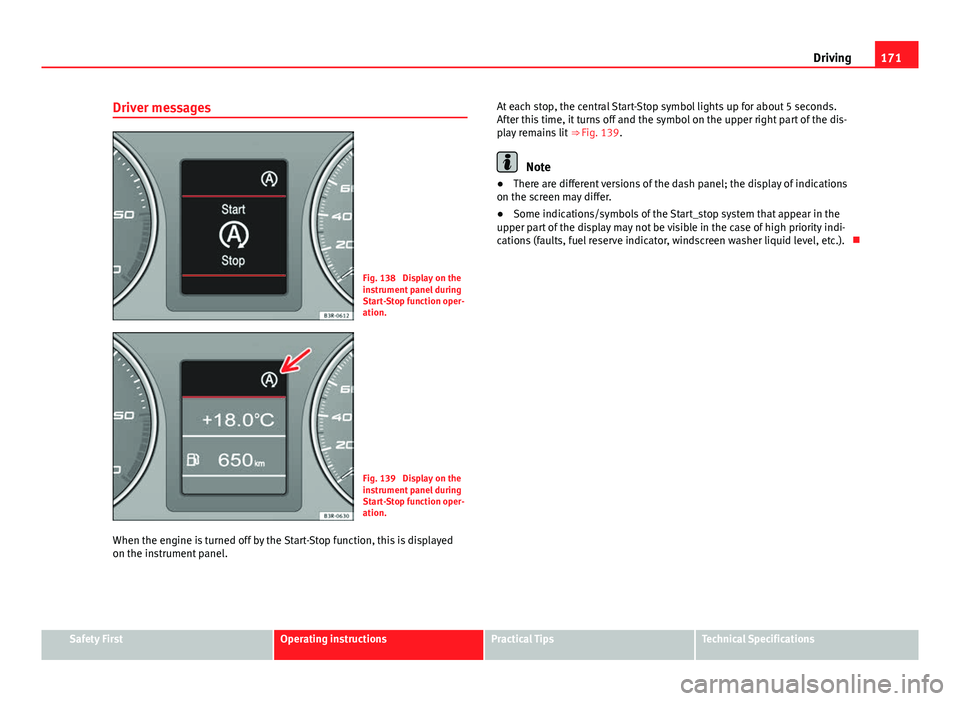
Fig. 138 Display on the
instrument panel during
Start-Stop function oper-
ation.
Fig. 139 Display on the
instrument panel during
Start-Stop function oper-
ation.
When the engine is turned off by the Start-Stop function, this is displayed
on the instrument panel. At each stop, the central Start-Stop symbol lights up for about 5 seconds.
After this time, it turns off and the symbol on the upper right part of the dis-
play remains lit
⇒ Fig. 139.
Note
● There are different versions of the dash panel; the display of indications
on the screen may differ.
● Some indications/symbols of the Start_stop system that appear in the
upper part of the display may not be visible in the case of high priority indi-
cations (faults, fuel reserve indicator, windscreen washer liquid level, etc.).
Safety FirstOperating instructionsPractical TipsTechnical Specifications
Page 175 of 319
173
Driving
Releasing the handbrake
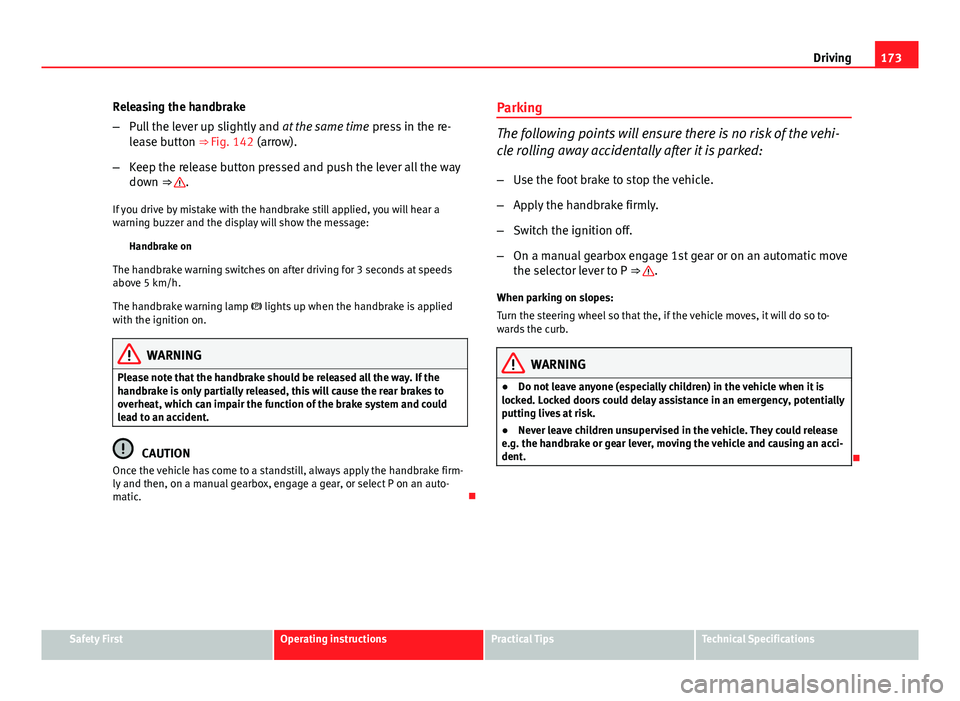
– Pull the lever up slightly and at the same time press in the re-
lease button ⇒ Fig. 142 (arrow).
– Keep the release button pressed and push the lever all the way
down ⇒
.
If you drive by mistake with the handbrake still applied, you will hear a
warning buzzer and the display will show the message: Handbrake on
The handbrake warning switches on after driving for 3 seconds at speeds
above 5 km/h.
The handbrake warning lamp lights up when the handbrake is applied
with the ignition on.
WARNING
Please note that the handbrake should be released all the way. If the
handbrake is only partially released, this will cause the rear brakes to
overheat, which can impair the function of the brake system and could
lead to an accident.
CAUTION
Once the vehicle has come to a standstill, always apply the handbrake firm-
ly and then, on a manual gearbox, engage a gear, or select P on an auto-
matic. Parking
The following points will ensure there is no risk of the vehi-
cle rolling away accidentally after it is parked:
– Use the foot brake to stop the vehicle.
– Apply the handbrake firmly.
– Switch the ignition off.
– On a manual gearbox engage 1st gear or on an automatic move
the selector lever to P ⇒
.
When parking on slopes:
Turn the steering wheel so that the, if the vehicle moves, it will do so to-
wards the curb.
WARNING
● Do not leave anyone (especially children) in the vehicle when it is
locked. Locked doors could delay assistance in an emergency, potentially
putting lives at risk.
● Never leave children unsupervised in the vehicle. They could release
e.g. the handbrake or gear lever, moving the vehicle and causing an acci-
dent.
Safety FirstOperating instructionsPractical TipsTechnical Specifications
Page 178 of 319
176Driving
WARNING
● The parking aid is not a replacement for driver awareness. The driver
is personally responsible for safe parking and other manoeuvres.
● The sensors have blind spots in which obstacles are not registered.
Always look out for small children and animals because the system will
not always detect them. Always pay attention when reversing to avoid ac-
cidents.
● Always keep a close eye on the area around the vehicle and make full
use of the rear vision mirrors.
CAUTION
Please note that low obstacles detected by the system may no longer be
registered by the sensors as the vehicle moves closer, so the system will not
give any further warning. Certain kinds of obstacles (such as wire fences,
chains, thin painted posts or trailer draw bars, etc) may not always be de-
tected by the system, so take care not to damage the vehicle in such cases.
Note
● Please refer to the notes on towing ⇒ page 176.
● There is a slight delay in the picture display.
Towing bracket*
In towing mode, the rear parking aid sensors are not enabled when you se-
lect reverse gear or press the switch . This function may not be guaran-
teed on towing brackets that are not factory fitted. This results in the follow-
ing restrictions:
SEAT Parking System*
There is no distance warning. SEAT Parking System Plus*
There is no rear distance warning. The system will still give a warning when
obstacles are detected while driving forward.
Fault messages*
If you hear a long beep for a few seconds and the LED on the button*
starts flashing when you switch on the parking aid, a system fault has oc-
curred. Please have the fault corrected by a Technical Service or specialised
workshop.
Note
If the fault is not corrected before you switch off the ignition, it will only be
indicated by the flashing LED on the switch * the next time you switch on
the parking aid.
Cruise speed* (Cruise control system)
Introduction
The cruise control system allows you to maintain a constant
speed. Using this system, any speed over 30 km/h can be kept constant, as long as
the engine power allows it. This is subject to power output and braking abil-
ity of the engine. This helps to reduce fatigue, especially on long journeys.
The control lamp on the instrument panel lights up when the cruise con-
trol system is operating.
Page 181 of 319
179
Driving
WARNING
Retrieve the programmed speed only if this is not excessive for the cur-
rent traffic conditions. Failure to do so could result in an accident.
Deactivating the cruise control
While driving
– Move lever A
⇒ Fig. 144 to position 2 (click stop engaged).
While the vehicle is stationary
– Switch the ignition off. Manual gearbox
Driving with a manual gearbox
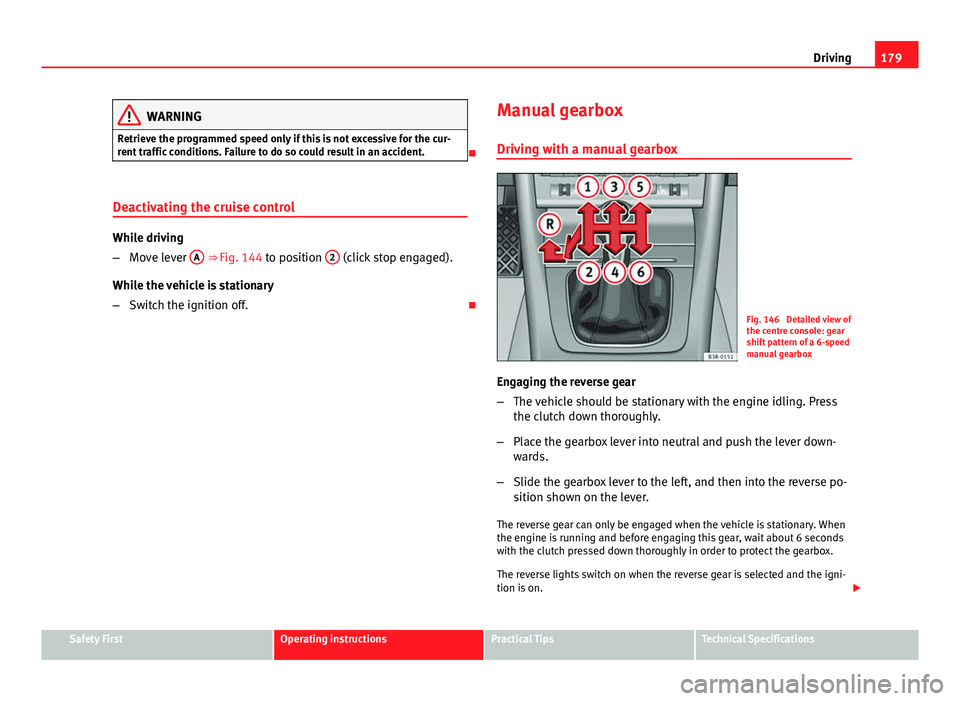
Fig. 146 Detailed view of
the centre console: gear
shift pattern of a 6-speed
manual gearbox
Engaging the reverse gear
– The vehicle should be stationary with the engine idling. Press
the clutch down thoroughly.
– Place the gearbox lever into neutral and push the lever down-
wards.
– Slide the gearbox lever to the left, and then into the reverse po-
sition shown on the lever.
The reverse gear can only be engaged when the vehicle is stationary. When
the engine is running and before engaging this gear, wait about 6 seconds
with the clutch pressed down thoroughly in order to protect the gearbox.
The reverse lights switch on when the reverse gear is selected and the igni-
tion is on.
Safety FirstOperating instructionsPractical TipsTechnical Specifications
Page 183 of 319
181
Driving
Driving instructions
The gears are changed automatically.
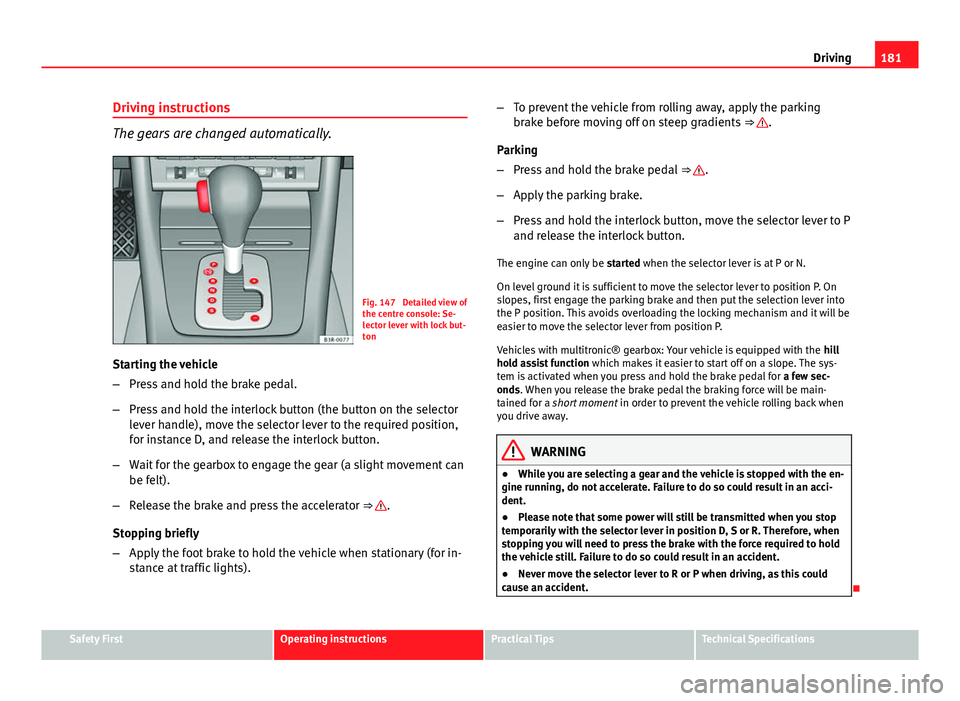
Fig. 147 Detailed view of
the centre console: Se-
lector lever with lock but-
ton
Starting the vehicle
– Press and hold the brake pedal.
– Press and hold the interlock button (the button on the selector
lever handle), move the selector lever to the required position,
for instance D, and release the interlock button.
– Wait for the gearbox to engage the gear (a slight movement can
be felt).
– Release the brake and press the accelerator ⇒
.
Stopping briefly
– Apply the foot brake to hold the vehicle when stationary (for in-
stance at traffic lights). –
To prevent the vehicle from rolling away, apply the parking
brake before moving off on steep gradients ⇒
.
Parking
– Press and hold the brake pedal ⇒
.
– Apply the parking brake.
– Press and hold the interlock button, move the selector lever to P
and release the interlock button.
The engine can only be started when the selector lever is at P or N.
On level ground it is sufficient to move the selector lever to position P. On
slopes, first engage the parking brake and then put the selection lever into
the P position. This avoids overloading the locking mechanism and it will be
easier to move the selector lever from position P.
Vehicles with multitronic® gearbox: Your vehicle is equipped with the hill
hold assist function which makes it easier to start off on a slope. The sys-
tem is activated when you press and hold the brake pedal for a few sec-
onds. When you release the brake pedal the braking force will be main-
tained for a short moment in order to prevent the vehicle rolling back when
you drive away.
WARNING
● While you are selecting a gear and the vehicle is stopped with the en-
gine running, do not accelerate. Failure to do so could result in an acci-
dent.
● Please note that some power will still be transmitted when you stop
temporarily with the selector lever in position D, S or R. Therefore, when
stopping you will need to press the brake with the force required to hold
the vehicle still. Failure to do so could result in an accident.
● Never move the selector lever to R or P when driving, as this could
cause an accident.
Safety FirstOperating instructionsPractical TipsTechnical Specifications
Page 184 of 319
182Driving
Selector lever positions
This section covers all the selector lever positions.
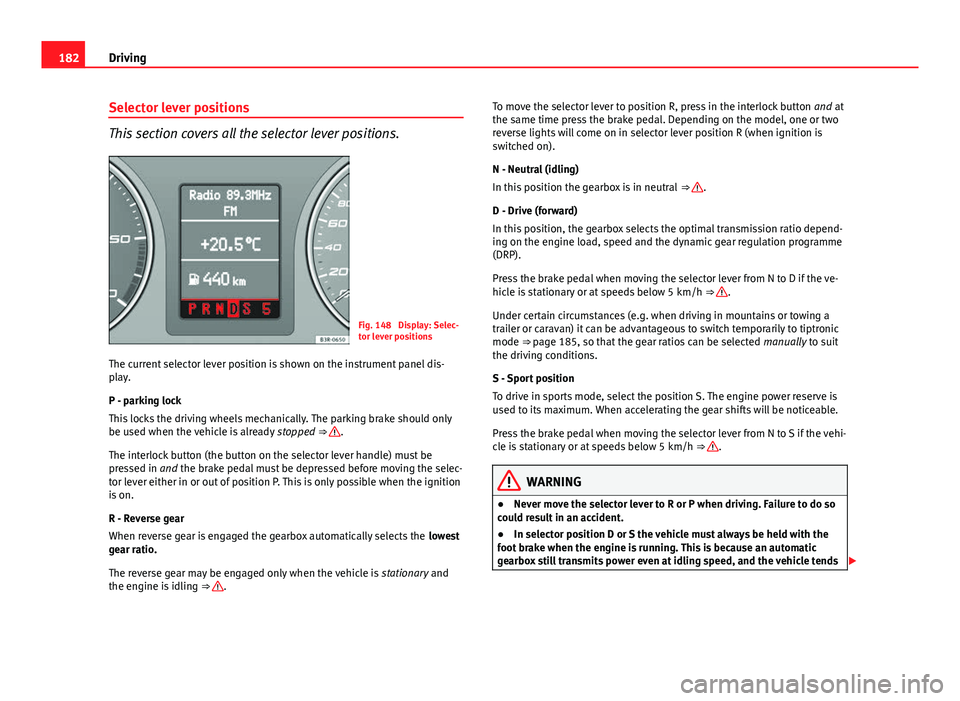
Fig. 148 Display: Selec-
tor lever positions
The current selector lever position is shown on the instrument panel dis-
play.
P - parking lock
This locks the driving wheels mechanically. The parking brake should only
be used when the vehicle is already stopped
⇒
.
The interlock button (the button on the selector lever handle) must be
pressed in and the brake pedal must be depressed before moving the selec-
tor lever either in or out of position P. This is only possible when the ignition
is on.
R - Reverse gear
When reverse gear is engaged the gearbox automatically selects the lowest
gear ratio.
The reverse gear may be engaged only when the vehicle is stationary and
the engine is idling ⇒
. To move the selector lever to position R, press in the interlock button
and at
the same time press the brake pedal. Depending on the model, one or two
reverse lights will come on in selector lever position R (when ignition is
switched on).
N - Neutral (idling)
In this position the gearbox is in neutral ⇒
.
D - Drive (forward)
In this position, the gearbox selects the optimal transmission ratio depend-
ing on the engine load, speed and the dynamic gear regulation programme
(DRP).
Press the brake pedal when moving the selector lever from N to D if the ve-
hicle is stationary or at speeds below 5 km/h ⇒
.
Under certain circumstances (e.g. when driving in mountains or towing a
trailer or caravan) it can be advantageous to switch temporarily to tiptronic
mode ⇒ page 185, so that the gear ratios can be selected manually to suit
the driving conditions.
S - Sport position
To drive in sports mode, select the position S. The engine power reserve is
used to its maximum. When accelerating the gear shifts will be noticeable.
Press the brake pedal when moving the selector lever from N to S if the vehi-
cle is stationary or at speeds below 5 km/h ⇒
.
WARNING
● Never move the selector lever to R or P when driving. Failure to do so
could result in an accident.
● In selector position D or S the vehicle must always be held with the
foot brake when the engine is running. This is because an automatic
gearbox still transmits power even at idling speed, and the vehicle tends