ABS Seat Exeo ST 2011 User Guide
[x] Cancel search | Manufacturer: SEAT, Model Year: 2011, Model line: Exeo ST, Model: Seat Exeo ST 2011Pages: 319, PDF Size: 5.12 MB
Page 91 of 319
89
Cockpit
Controlling the menu
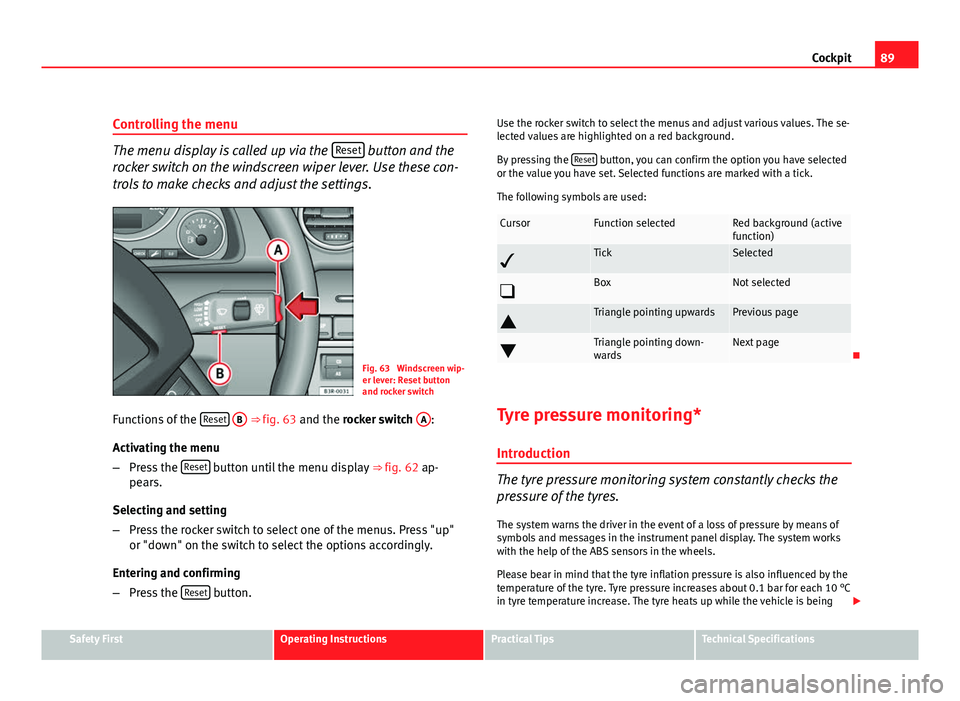
The menu display is called up via the Reset button and the
rocker switch on the windscreen wiper lever. Use these con-
trols to make checks and adjust the settings.
Fig. 63 Windscreen wip-
er lever: Reset button
and rocker switch
Functions of the Reset
B ⇒
fig. 63 and the rocker switch A:
Activating the menu
– Press the Reset
button until the menu display
⇒ fig. 62 ap-
pears.
Selecting and setting
– Press the rocker switch to select one of the menus. Press "up"
or "down" on the switch to select the options accordingly.
Entering and confirming
– Press the Reset
button. Use the rocker switch to select the menus and adjust various values. The se-
lected values are highlighted on a red background.
By pressing the
Reset
button, you can confirm the option you have selected
or the value you have set. Selected functions are marked with a tick.
The following symbols are used:
CursorFunction selectedRed background (active
function)
TickSelected
BoxNot selected
Triangle pointing upwardsPrevious page
Triangle pointing down-
wardsNext page
Tyre pressure monitoring* Introduction
The tyre pressure monitoring system constantly checks the
pressure of the tyres.
The system warns the driver in the event of a loss of pressure by means of
symbols and messages in the instrument panel display. The system works
with the help of the ABS sensors in the wheels.
Please bear in mind that the tyre inflation pressure is also influenced by the
temperature of the tyre. Tyre pressure increases about 0.1 bar for each 10 °C
in tyre temperature increase. The tyre heats up while the vehicle is being
Safety FirstOperating InstructionsPractical TipsTechnical Specifications
Page 159 of 319
157
Seats and storage compartments
WARNING
● Heavy appliances or connectors (for example, adapters) which hang
down directly from the Europlug socket may damage the socket with the
resultant risk of injury.
● Ensure that appliances connected to the socket are secure to prevent
them from being thrown around the vehicle in the event of sharp braking
or an accident. This could result in severe injury or loss of life ⇒ page 16,
Storing objects.
● Never spill liquid over the socket – there is a risk of death. If any
moisture enters the socket, ensure that it is thoroughly dry before using.
● Improper use of the sockets or electrical accessories can lead to seri-
ous injuries or cause a fire, with the resultant risk of injury.
● Children must never be left alone in the vehicle with the engine run-
ning. They could cause an accident.
● Appliances connected to the socket do not behave in the same way as
when they are connected to the mains power supply. They may overheat
during use and cause injury.
● When using adapters and extension leads, the childproof safety de-
vice on the 230 volt socket is disconnected and the socket is live. Risk of
injury!.
● Never insert objects which conduct electricity, such as a needle, in
the pins of the 230 volt socket. There is a risk of death.
● Always switch off electrical appliances connected to the socket if the
inverter goes off as a result of overheating. Failure to comply could result
in injuries.
CAUTION
● The instructions for handling appliances connected to the socket must
be observed.
● If the power consumption of the appliances connected exceeds 150
watts, the socket inverter will overheat. If the temperature exceeds a certain
value, the inverter will switch off. It may also switch off if the outside tem- perature is very high, even if the power consumption is normal. The inverter
will switch on again automatically after it has cooled down. Appliances con-
nected to the socket, and which have been left switched on, will automati-
cally come back on
⇒
.
● Do not connect neon lamps to the socket. For technical reasons, these
could break down.
● Do not connect 115 volt appliances to the 230 volt power socket, as
they could be damaged. If you have any queries, please check the manufac-
turer's label for details of the power supply accepted by the appliance.
● With some adapters, for example for laptops, their built-in overload dis-
connection system prevents the equipment from switching on in the event
of an excessive start-up current. In this case, disconnect the adapter from
the power supply and try to reconnect after ten seconds.
Note
● Non-insulated equipment may cause interference to the radio or vehicle
electronics.
● The Europlug socket has a built-in childproof device and only carries live
current when the Europlug is correctly plugged in.
● Some appliances may not operate correctly in the absence of adequate
power (watts).
● In some countries this socket is 115 volts. Therefore the socket should
have a different inverter installed at the factory. You can obtain retrofit kits
from your Authorised Technical Service. Do not connect 115 Volt appliances
to the 230 Volt socket.
● The use of electrical equipment in the vicinity of the aerial in the rear
window may cause interference to the reception of stations broadcasting in
AM.
Safety FirstOperating InstructionsPractical TipsTechnical Specifications
Page 174 of 319
172Driving
The Electronic Stability Programme (ESP) contains the electronic differential
lock (EDL) and the traction control system (TCS). The ESP function works to-
gether with the ABS. If a fault in the ABS occurs, both warning lamps light
up, but if the ESP fails, only the ESP warning lamp lights up.
The ESP is started automatically when the engine is started.
The ESP switch deactivates both TCS and ESP functions. The ESP, in spite of
being deactivated, will always self-connect when necessary if brakes are be-
ing used.
The TCS can be deactivated when in cases where wheel sliding is desirable.
For example:
● When driving with snow chains.
● When driving in deep snow or on loose surfaces.
● When the vehicle is stuck, to rock it backwards and forwards.
Next, the button should be pressed to reactivate the TCS.
When does the lamp light up or flash
●
On switching the ignition on, it lights up for about two seconds to carry
out a function control.
● The warning lamp will start flashing when the vehicle is moving if the
ESP or the TCS is activated.
● It will light up continuously if there is a malfunction in the ESP.
WARNING
● The Electronic Stability Programme (ESP) cannot defy the laws of
physics. This should be kept in mind, particularly on slippery and wet
roads and when towing a trailer.
● Always adapt your driving style to suit the condition of the roads and
the traffic situation. Do not let the extra safety afforded by ESP tempt you
into taking any risks when driving, as this can cause accidents.
● Please refer to the corresponding warning notes on ESP in
⇒ page 190, Intelligent technology.
Ignition lock Ignition key positions
The ignition key is used to start and stop the engine.
Fig. 147 Ignition key po-
sitions
Page 192 of 319
190Intelligent technology
Practical Tips
Intelligent technology
Electronic Stability Programme (ESP) General notes
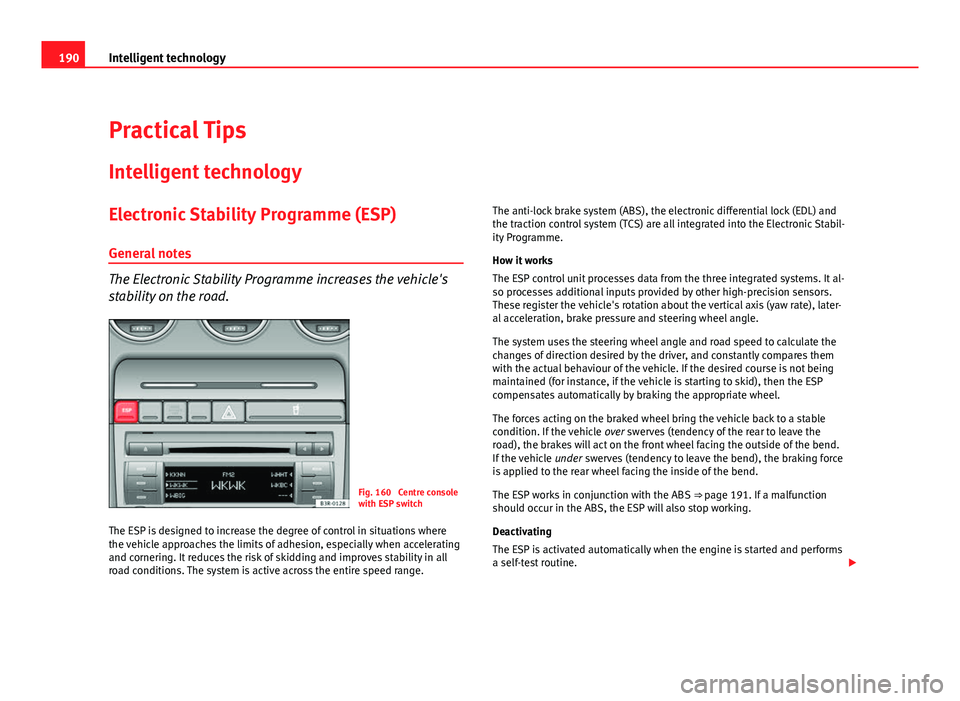
The Electronic Stability Programme increases the vehicle's
stability on the road.
Fig. 160 Centre console
with ESP switch
The ESP is designed to increase the degree of control in situations where
the vehicle approaches the limits of adhesion, especially when accelerating
and cornering. It reduces the risk of skidding and improves stability in all
road conditions. The system is active across the entire speed range. The anti-lock brake system (ABS), the electronic differential lock (EDL) and
the traction control system (TCS) are all integrated into the Electronic Stabil-
ity Programme.
How it works
The ESP control unit processes data from the three integrated systems. It al-
so processes additional inputs provided by other high-precision sensors.
These register the vehicle's rotation about the vertical axis (yaw rate), later-
al acceleration, brake pressure and steering wheel angle.
The system uses the steering wheel angle and road speed to calculate the
changes of direction desired by the driver, and constantly compares them
with the actual behaviour of the vehicle. If the desired course is not being
maintained (for instance, if the vehicle is starting to skid), then the ESP
compensates automatically by braking the appropriate wheel.
The forces acting on the braked wheel bring the vehicle back to a stable
condition. If the vehicle
over swerves (tendency of the rear to leave the
road), the brakes will act on the front wheel facing the outside of the bend.
If the vehicle under swerves (tendency to leave the bend), the braking force
is applied to the rear wheel facing the inside of the bend.
The ESP works in conjunction with the ABS ⇒ page 191. If a malfunction
should occur in the ABS, the ESP will also stop working.
Deactivating
The ESP is activated automatically when the engine is started and performs
a self-test routine.
Page 193 of 319
191
Intelligent technology
If required, the ESP can also be enabled and disabled manually by briefly
pressing the ESP
button ⇒
fig. 160. The ESP warning lamp lights up when
the system is switched off, see ⇒ page 68.
In general, the ESP should be left switched on at all times. In particular cir-
cumstances where a certain amount of wheel slip is desirable, it may be ad-
visable to switch off the ESP. Examples:
● when driving with snow chains
● when driving in deep snow or on loose surfaces
● when rocking the vehicle backwards and forwards to free it.
The ESP should be switched on again afterwards as soon as possible.
WARNING
The ESP is not able to overcome the physical limits of adhesion. Even
with ESP, you should always adjust your speed to suit the conditions.
Please bear this in mind, especially on wet or slippery road surfaces. Do
not let the extra safety features tempt you into taking any risks when
driving. Failure to do so could result in an accident.
Anti-lock brake system (ABS)
ABS prevents the wheels from locking up under braking.
The anti-lock brake system (ABS) is an important part of the vehicle's active
safety system. However, the ABS will not necessarily guarantee shorter
stopping distances in all conditions. For instance, on loose gravel or fresh
snow on top of an icy surface (conditions which anyway require extreme
care and reduced speed), the stopping distance with ABS may even be
slightly longer. How the ABS works
The system runs an automatic self-check when the vehicle reaches a road
speed of about 6 km/h. This may be accompanied by a noise from the ABS
pump.
When one of the wheels is turning very slowly in relation to the road speed
and is close to locking up, the system will reduce the brake pressure on that
wheel. The driver is made aware of this adjustment process by a
vibration of
the brake pedal and an audible noise. This is a deliberate warning to the
driver that one or more of the wheels is tending to lock up and the ABS con-
trol function has intervened. In this situation it is important to keep the
brake pedal fully depressed so the ABS can regulate the brake application,
but do not “pump” the brake pedal.
WARNING
The grip provided by ABS is still subject to the physical limits of adhe-
sion. Always bear this in mind, especially on wet or slippery roads. If you
notice that the ABS is working (to counteract locked wheels under brak-
ing), you should reduce speed immediately to suit the road and traffic
conditions. Do not let the extra safety features tempt you into taking any
risks when driving. Failure to do so could result in an accident.
Note
If a malfunction should occur in the ABS, this is indicated by a warning lamp
⇒ page 67.
Safety FirstOperating InstructionsPractical TipsTechnical Specifications
Page 194 of 319
192Intelligent technology
Brake assist system
The brake assist system helps the driver to achieve optimum
braking effect.
The brake assist system helps to increase braking power and thus to ach-
ieve a shorter stopping distance. If the driver presses the brake pedal very
quickly, the brake assist system automatically boosts the braking force to
the maximum level, up to the point where the anti-lock brake function (ABS)
intervenes to stop the wheels from locking. You should then keep the brake
pedal pressed until the vehicle has braked to the required speed. The brake
assist system switches itself off as soon as you release the brake pedal.
The brake assist system will not be operative if there is a malfunction in the
ABS or the ESP.
WARNING
Please remember that the accident risk always increases if you drive too
fast, especially in corners or on a slippery road, or if you follow too close
behind the vehicle in front of you. An increased accident risk cannot be
compensated even by the brake assist system. Risk of accident.
Electronic differential lock (EDL)
The electronic differential lock prevents the loss of traction
caused if one wheel starts spinning. General notes
The electronic differential lock (EDL) helps the vehicle to start moving, ac-
celerate and climb a gradient in slippery conditions where this may other-
wise be difficult or even impossible. How it works
The EDL works automatically, without the driver's involvement. With the aid
of the ABS sensors, the system monitors the rotational speed of the drive
wheels
⇒ page 191. If a considerable difference in revs is detected (approx.
100 rpm) in the speed of the drive wheels, e.g. when only one part of the
surface supporting the wheels is slippery, the system applies the brake to
slow down the skidding wheel so that more of the power is directed to the
other wheels. The systems works up to a speed of approx. 80 km/h. The
system will make noise while it is working.
Starting the vehicle
If one wheel has less grip and starts spinning (for instance, if one of the
drive wheels is on ice), keep pressing the accelerator gradually until the ve-
hicle starts moving.
Overheating of the brakes
To prevent the brake disk of the braked wheel from overheating, the EDL
cuts out automatically if subjected to excessive loads. In this case, the vehi-
cle will continue to run and will have the same running properties as those
of another without EDL.
The EDL will switch on again automatically when the brake has cooled
down.
WARNING
● When accelerating on a uniformly slippery surface (for instance all
four wheels on ice or snow), press the accelerator gradually and careful-
ly. Despite EDL, the drive wheels may otherwise start to spin. This could
impair the vehicle's stability. Risk of accident.
● Even with EDL, you should always adjust your speed to suit the road
and traffic conditions. Do not let the extra safety features tempt you into
taking any risks when driving. Failure to do so could result in an accident.
Page 195 of 319
193
Intelligent technology
Note
If the ABS warning lamp lights up, this can also mean there is a fault in the
EDL. Take the vehicle to a specialised workshop as soon as possible.
Traction control system (TCS)
The traction control system prevents the drive wheels from
spinning when the vehicle is accelerating. General notes
The traction control system (TCS) is one of the functions incorporated in the
Electronic Stability Programme (ESP).
The traction control system (TCS) helps the vehicle to start moving, acceler-
ate or climb a gradient in slippery conditions where this may otherwise be
difficult or even impossible.
How it works
The TCS acts automatically, without the driver's intervention. With the aid of
the ABS sensors ⇒ page 191, the TCS monitors the speed of the drive
wheels. If the wheels start to spin, the engine speed is reduced automati-
cally to match the amount of grip available. The system is active across the
entire speed range.
The TCS works in conjunction with the ABS. If a malfunction occurs in the
ABS, the TCS will also be inoperative.
Note
To ensure that the TCS works properly, all four wheels must be fitted with
identical tyres. The difference in size of the wheels may lead to an unde-
sired reduction in engine power. Also see ⇒ page 247.Brakes
General notes
New brake pads
New brake pads do not provide optimal performance during the first 200
km; first they must be “run in”. However, the reduced braking capacity may
be compensated by pressing on the brake pedal a little harder. Avoid over-
loading the brakes during run-in.
Wear
The rate of wear on the brake pads depends a great deal on how you drive
and the conditions in which the vehicle is operated. Negative factors are, for
instance, city traffic, frequent short trips or hard driving with abrupt starts
and stops.
Wet roads or road salt
In certain conditions, such as in heavy rain, or after washing the vehicle or
driving through water, the full braking effect can be delayed by moisture (or
in winter by ice) on the discs and brake pads. In this case the brakes should
be dried by pressing the brake pedal several times.
When the speed is over 80 km/h and the windscreen wipers are on, the
brake system moves the pads towards the brake discs for a few seconds.
This occurs - without the driver knowing - at regular intervals and allows a
faster response from the brakes when driving on wet roads.
The effectiveness of the brakes can also be temporarily reduced if the vehi-
cle is driven for some distance without using the brakes when there is a lot
of salt on the road in winter. In this case, the layer of salt on the brake discs
and pads has to wear off before braking.
Corrosion
There may be a tendency for corrosion to form on the discs and dirt to build
up on the brake pads if the vehicle is used infrequently or the brakes are
not used very often.
Safety FirstOperating InstructionsPractical TipsTechnical Specifications
Page 239 of 319
237
Checking and refilling levels
Topping up and changing the brake fluid
It is best to have the brake fluid changed by a professional. Brake fluid absorbs moisture. Therefore, in the course of time it will absorb
water from the air. If the water content in the brake fluid is too high, the
brake system could corrode. In addition, the boiling point of the brake fluid
will be considerably reduced. This could adversely affect the braking ability
in certain circumstances.
For this reason the brake fluid must be changed periodically.
Your vehicle's Service Plan will tell you when the brake fluid has to be re-
newed.
We recommend you have the brake fluid changed as part of a regular In-
spection Service at a workshop. They are familiar with the procedure and
have the necessary special tools and spare parts as well as the proper facili-
ties for disposing of the old fluid.
Use only approved brake fluid. Specialised workshops are informed about
the factory-approved brake fluid -DOT 4-. The brake fluid must be new.
WARNING
● Brake fluid must always be kept closed in its original container. Keep
out of the reach of children. Failure to comply could result in poisoning.
● If the brake fluid is left in the system for too long and the brakes are
subjected to heavy use, vapour bubbles may form in the brake system.
This would seriously affect the efficiency of the brakes and the safety of
the vehicle, leading to the risk of accident.
CAUTION
Please note that brake fluid will attack the paintwork on contact.
For the sake of the environment
The brake pads and fluid must be collected and disposed of according the
applicable regulations. The SEAT Technical Service network has the neces-
sary equipment and qualified personnel for collecting and disposing of this
waste material.
Vehicle battery General notes
All work on batteries requires specialist knowledge.
The battery is virtually maintenance-free and is checked in the Inspection
Services.
We recommend replacing the battery after 5 years.
Disconnecting the battery
If the battery is disconnected, some of the vehicle's functions will become
inoperative (e.g. electric windows). These functions will require resetting af-
ter the battery is reconnected. For this reason, the battery should only be
disconnected from the vehicle's electrical system when absolutely necessa-
ry.
Long periods of non-use
The battery will gradually lose its charge because certain electrical equip-
ment continues to draw current even when the ignition is off. If you park the
vehicle for long periods of time in winter you should take the battery out of
the vehicle and store it in a place protected from frost. This way it will not
freeze and become damaged. At warm outside temperatures it is sufficient
to disconnect the negative terminal of the battery. Even when the battery is
not connected you should charge it from time to time.
Safety FirstOperating InstructionsPractical TipsTechnical Specifications
Page 245 of 319
243
Wheels and tyres
Significant tyre pressure loss
The tyre symbol is displayed and indicates that the tyre pressure
of at least one tyre is insufficient.
– Stop the vehicle.
– Switch the engine off.
– Check the tyre(s).
– Change the wheel if necessary.
Tyre pressure monitoring (RKA+)*
The tyre pressure monitor display on the instrument panel
indicates if the pressure is too low.
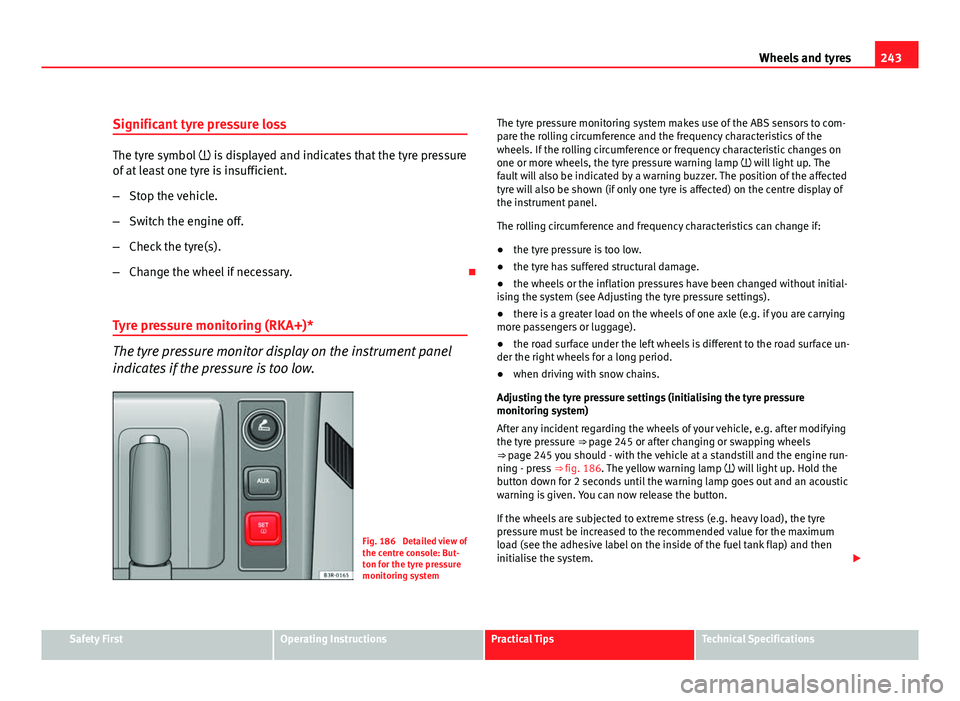
Fig. 186 Detailed view of
the centre console: But-
ton for the tyre pressure
monitoring system The tyre pressure monitoring system makes use of the ABS sensors to com-
pare the rolling circumference and the frequency characteristics of the
wheels. If the rolling circumference or frequency characteristic changes on
one or more wheels, the tyre pressure warning lamp will light up. The
fault will also be indicated by a warning buzzer. The position of the affected
tyre will also be shown (if only one tyre is affected) on the centre display of
the instrument panel.
The rolling circumference and frequency characteristics can change if:
●
the tyre pressure is too low.
● the tyre has suffered structural damage.
● the wheels or the inflation pressures have been changed without initial-
ising the system (see Adjusting the tyre pressure settings).
● there is a greater load on the wheels of one axle (e.g. if you are carrying
more passengers or luggage).
● the road surface under the left wheels is different to the road surface un-
der the right wheels for a long period.
● when driving with snow chains.
Adjusting the tyre pressure settings (initialising the tyre pressure
monitoring system)
After any incident regarding the wheels of your vehicle, e.g. after modifying
the tyre pressure ⇒ page 245 or after changing or swapping wheels
⇒ page 245 you should - with the vehicle at a standstill and the engine run- ning - press ⇒ fig. 186. The yellow warning lamp will light up. Hold the
button down for 2 seconds until the warning lamp goes out and an acoustic
warning is given. You can now release the button.
If the wheels are subjected to extreme stress (e.g. heavy load), the tyre
pressure must be increased to the recommended value for the maximum
load (see the adhesive label on the inside of the fuel tank flap) and then
initialise the system.
Safety FirstOperating InstructionsPractical TipsTechnical Specifications
Page 271 of 319
269
If and when
Changing the dipped beam headlight bulb
The procedure for changing the bulb is the same on both
sides.
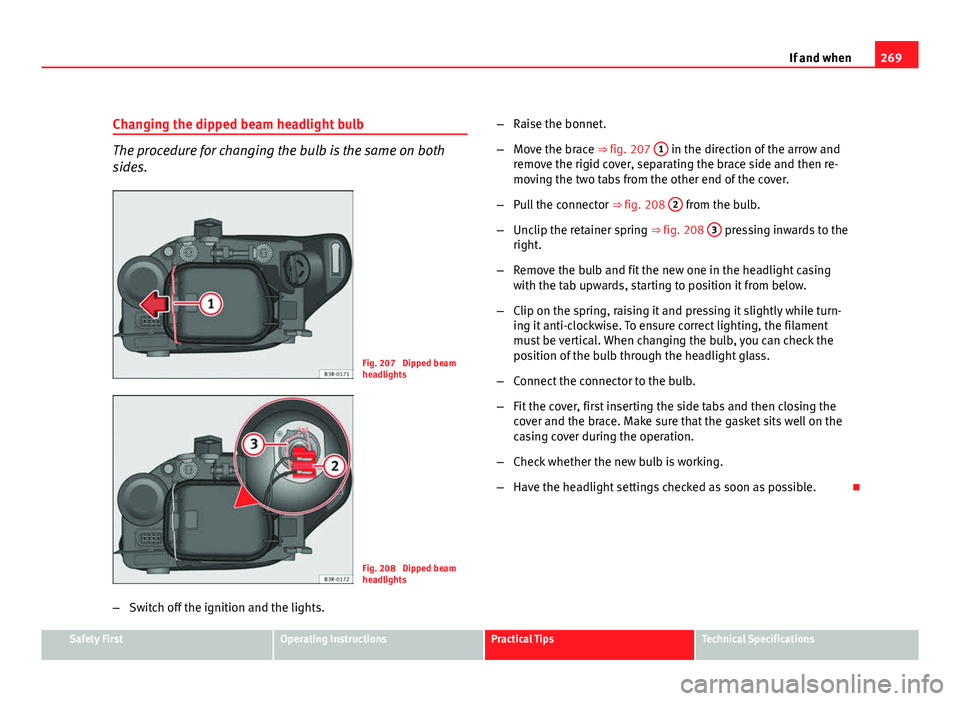
Fig. 207 Dipped beam
headlights
Fig. 208 Dipped beam
headlights
– Switch off the ignition and the lights. –
Raise the bonnet.
– Move the brace ⇒ fig. 207 1
in the direction of the arrow and
remove the rigid cover, separating the brace side and then re-
moving the two tabs from the other end of the cover.
– Pull the connector ⇒ fig. 208 2
from the bulb.
– Unclip the retainer spring ⇒ fig. 208 3
pressing inwards to the
right.
– Remove the bulb and fit the new one in the headlight casing
with the tab upwards, starting to position it from below.
– Clip on the spring, raising it and pressing it slightly while turn-
ing it anti-clockwise. To ensure correct lighting, the filament
must be vertical. When changing the bulb, you can check the
position of the bulb through the headlight glass.
– Connect the connector to the bulb.
– Fit the cover, first inserting the side tabs and then closing the
cover and the brace. Make sure that the gasket sits well on the
casing cover during the operation.
– Check whether the new bulb is working.
– Have the headlight settings checked as soon as possible.
Safety FirstOperating InstructionsPractical TipsTechnical Specifications