wheel Seat Exeo ST 2012 Owner's Guide
[x] Cancel search | Manufacturer: SEAT, Model Year: 2012, Model line: Exeo ST, Model: Seat Exeo ST 2012Pages: 325, PDF Size: 5.56 MB
Page 95 of 325
93
Cockpit
driven and the tyre pressure will rise accordingly. Therefore, you should only
adjust the tyre pressures when they are cold (i.e. approximately at ambient
temperature).
To ensure that the tyre pressure monitoring system works reliably, you
should check and, if necessary, adjust the tyre pressures at regular intervals
and store the correct pressures (reference values) in the system.
A tyre pressure information label is attached to the inside of the fuel tank
flap.
WARNING
● Never adjust tyre pressure when the tyres are hot. This may damage
or even burst the tyres. Risk of accident!
● An insufficiently inflated tyre flexes a lot more at high speeds and
causes significant heating of the tyre. Under these conditions, the tyre
bead may be released or the tyre may burst. Risk of accident!
For the sake of the environment
Under-inflated tyres lead to increased fuel consumption and tyre wear.
Note
● Responsibility for ensuring that the tyres are correctly inflated remains
with the driver; the system can only provide assistance.
● Pressure can only be adjusted when the tyres are at ambient tempera-
ture. Tyre pressure monitoring display
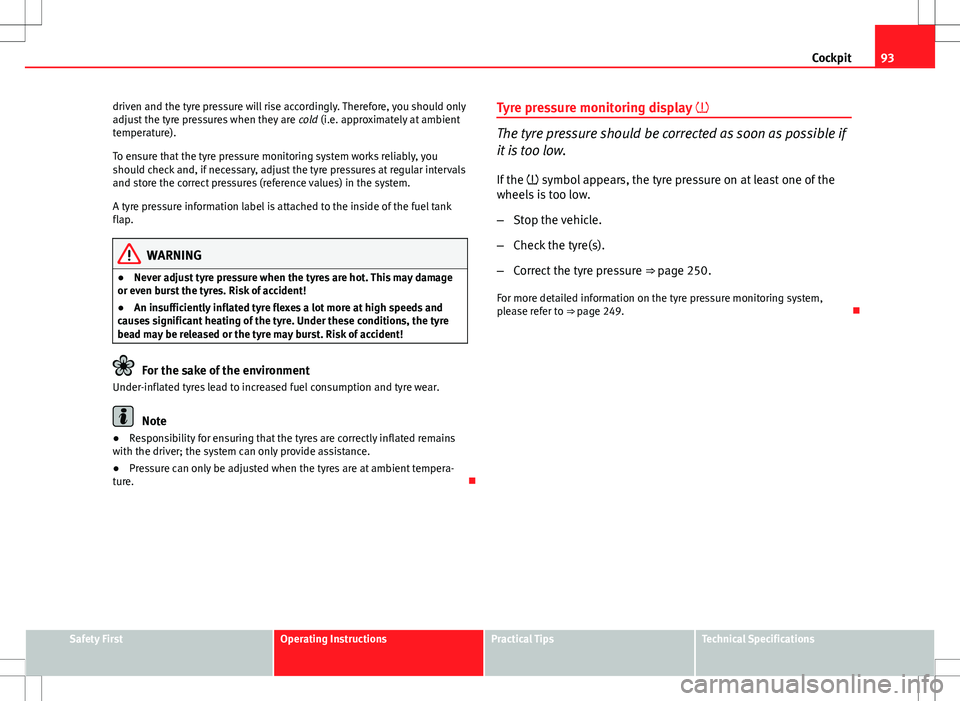
The tyre pressure should be corrected as soon as possible if
it is too low.
If the symbol appears, the tyre pressure on at least one of the
wheels is too low.
– Stop the vehicle.
– Check the tyre(s).
– Correct the tyre pressure ⇒ page 250.
For more detailed information on the tyre pressure monitoring system,
please refer to ⇒ page 249.
Safety FirstOperating InstructionsPractical TipsTechnical Specifications
Page 96 of 325
94Steering wheel controls
Steering wheel controls
Multifunction steering wheel* Introduction
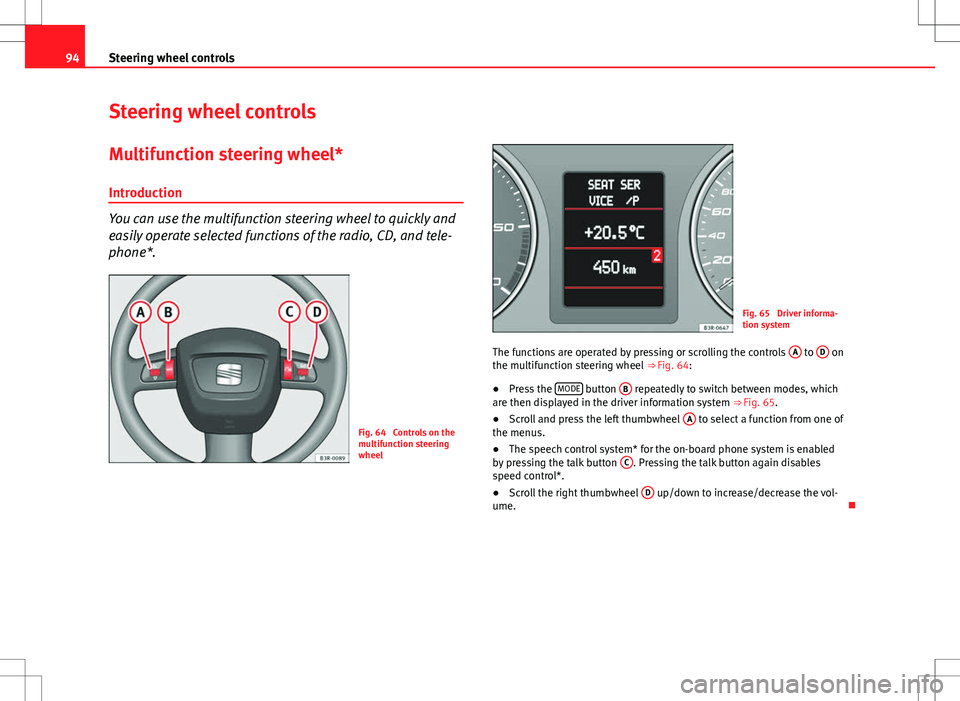
You can use the multifunction steering wheel to quickly and
easily operate selected functions of the radio, CD, and tele-
phone*.
Fig. 64 Controls on the
multifunction steering
wheel
Fig. 65 Driver informa-
tion system
The functions are operated by pressing or scrolling the controls A
to D on
the multifunction steering wheel ⇒ Fig. 64:
● Press the MODE
button
B repeatedly to switch between modes, which
are then displayed in the driver information system ⇒ Fig. 65.
● Scroll and press the left thumbwheel A
to select a function from one of
the menus.
● The speech control system* for the on-board phone system is enabled
by pressing the talk button C
. Pressing the talk button again disables
speed control*.
● Scroll the right thumbwheel D
up/down to increase/decrease the vol-
ume.
Page 97 of 325

95
Steering wheel controls
Steering wheel audio version controls
AB(Mode)C(PTT)D+-Press+-Press
Radio modeStation search.
Increase frequen- cyStation search.Decrease fre- quencyPress once: starts the search.
Press twice: can- cels the searchLong press:
block the steering wheel controls
Short press:
activates the steering wheel controls (if
they are blocked /
without specific func- tion (if they are not blocked)
No functionspecified
Volume upVolume downMUTE
CD/
iPod-USB ModeCD mode: next track.
iPod/USB Mode: next trackCD mode: previ-ous track.
iPod/USB Mode: previous trackCD mode: fast for- ward.
iPod/USB Mode: fast forward
Volume upVolume downMUTE
MP3
modeNext trackPrevious trackFast forwardVolume upVolume downMUTE
Safety FirstOperating InstructionsPractical TipsTechnical Specifications
Page 98 of 325
96Steering wheel controls
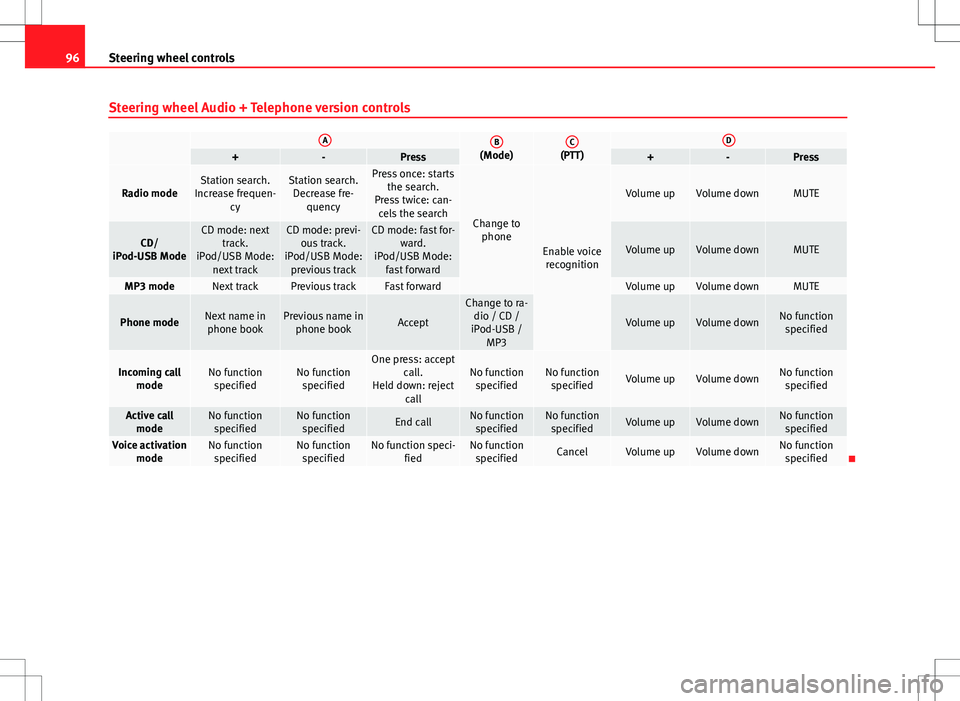
Steering wheel Audio + Telephone version controls
AB(Mode)C(PTT)D+-Press+-Press
Radio modeStation search.
Increase frequen- cyStation search.Decrease fre- quencyPress once: starts the search.
Press twice: can- cels the search
Change to phone
Enable voicerecognition
Volume upVolume downMUTE
CD/
iPod-USB ModeCD mode: next track.
iPod/USB Mode: next trackCD mode: previ-ous track.
iPod/USB Mode: previous trackCD mode: fast for- ward.
iPod/USB Mode: fast forward
Volume upVolume downMUTE
MP3 modeNext trackPrevious trackFast forwardVolume upVolume downMUTE
Phone modeNext name inphone bookPrevious name in phone bookAccept
Change to ra-dio / CD /
iPod-USB / MP3
Volume upVolume downNo functionspecified
Incoming call modeNo functionspecifiedNo functionspecifiedOne press: accept call.
Held down: reject callNo functionspecifiedNo function specifiedVolume upVolume downNo functionspecified
Active call modeNo functionspecifiedNo functionspecifiedEnd callNo functionspecifiedNo function specifiedVolume upVolume downNo functionspecified
Voice activation modeNo functionspecifiedNo functionspecifiedNo function speci- fiedNo functionspecifiedCancelVolume upVolume downNo function specified
Page 99 of 325

97
Steering wheel controls
Steering wheel controls, Navigation System* version
AB(Mode)C(PTT)D+-Press+-Press
Radio modeStation search.
Increase frequen- cyStation search.Decrease fre- quencyPress once: starts the search.
Press twice: can- cels the search
No function specifiedNo function specified
Volume upVolume down
Repetition of
the last naviga- tion order (only if active)
CD/
iPod-USB ModeCD mode: next track.
iPod/USB Mode: next trackCD mode: previ-ous track.
iPod/USB Mode: previous trackCD mode: fast for- ward.
iPod/USB Mode: fast forward
Volume upVolume down
Repetition of
the last naviga- tion order (only if active)
MP3 modeNext trackPrevious trackFast forwardVolume upVolume down
Repetition of
the last naviga- tion order (only if active)
Safety FirstOperating InstructionsPractical TipsTechnical Specifications
Page 100 of 325
98Steering wheel controls
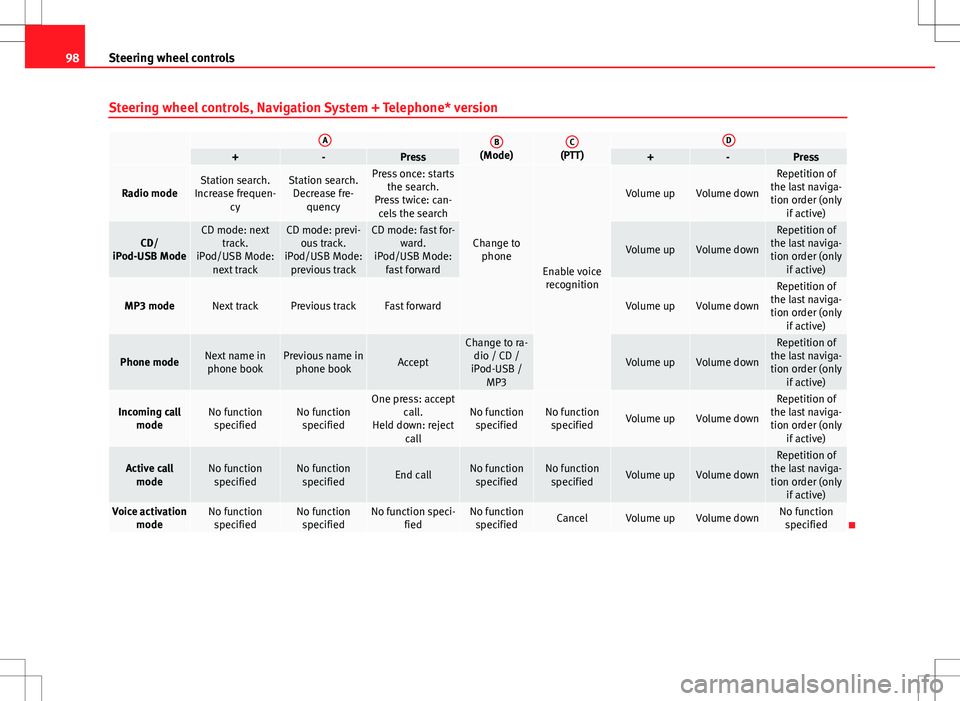
Steering wheel controls, Navigation System + Telephone* version
AB(Mode)C(PTT)D+-Press+-Press
Radio modeStation search.
Increase frequen- cyStation search.Decrease fre- quencyPress once: starts the search.
Press twice: can- cels the search
Change to phone
Enable voicerecognition
Volume upVolume down
Repetition of
the last naviga- tion order (only if active)
CD/
iPod-USB ModeCD mode: next track.
iPod/USB Mode: next trackCD mode: previ-ous track.
iPod/USB Mode: previous trackCD mode: fast for- ward.
iPod/USB Mode: fast forward
Volume upVolume down
Repetition of
the last naviga- tion order (only if active)
MP3 modeNext trackPrevious trackFast forwardVolume upVolume down
Repetition of
the last naviga- tion order (only if active)
Phone modeNext name inphone bookPrevious name in phone bookAccept
Change to ra-dio / CD /
iPod-USB / MP3
Volume upVolume down
Repetition of
the last naviga- tion order (only if active)
Incoming call modeNo functionspecifiedNo functionspecifiedOne press: accept call.
Held down: reject callNo functionspecifiedNo function specifiedVolume upVolume down
Repetition of
the last naviga- tion order (only if active)
Active callmodeNo functionspecifiedNo functionspecifiedEnd callNo functionspecifiedNo function specifiedVolume upVolume down
Repetition of
the last naviga- tion order (only if active)
Voice activation modeNo functionspecifiedNo functionspecifiedNo function speci- fiedNo functionspecifiedCancelVolume upVolume downNo function specified
Page 125 of 325
123
Lights and visibility
– Press the knob in again to prevent the setting from being
changed unintentionally.
This button activates or deactivates the daytime running lights function.
With the function activated, when the ignition is switched on the daytime
running lights are turned on automatically.
Note
Please observe any relevant legal requirements which may apply in your
country.
Adaptive headlights* (for driving around bends)
When driving around bends, the headlights will light the
most important areas of the road.
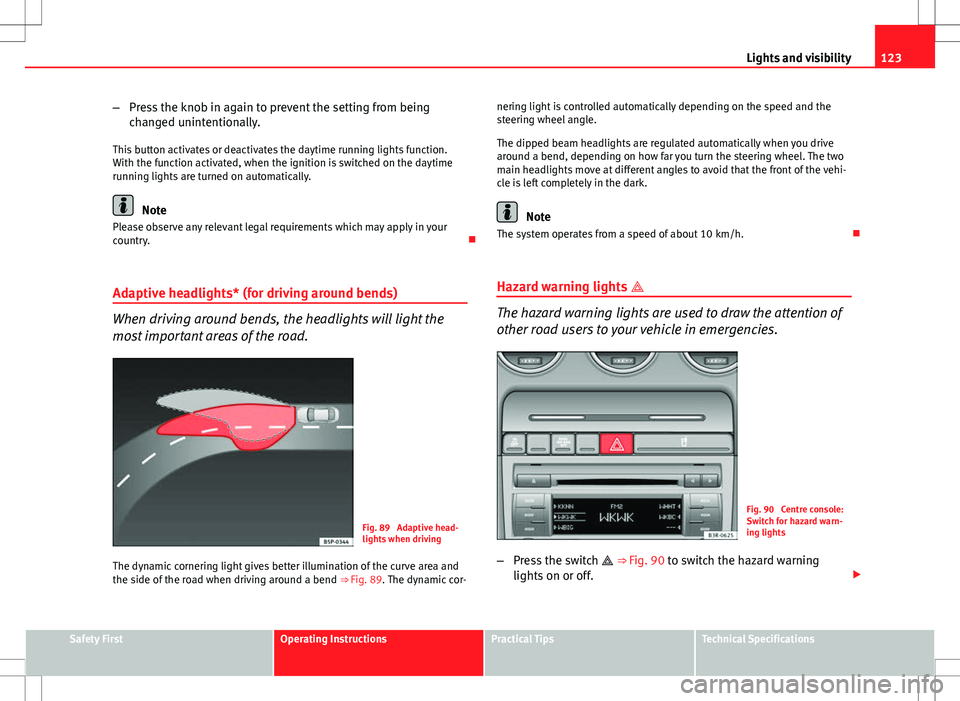
Fig. 89 Adaptive head-
lights when driving
The dynamic cornering light gives better illumination of the curve area and
the side of the road when driving around a bend ⇒ Fig. 89. The dynamic cor-nering light is controlled automatically depending on the speed and the
steering wheel angle.
The dipped beam headlights are regulated automatically when you drive
around a bend, depending on how far you turn the steering wheel. The two
main headlights move at different angles to avoid that the front of the vehi-
cle is left completely in the dark.
Note
The system operates from a speed of about 10 km/h.
Hazard warning lights
The hazard warning lights are used to draw the attention of
other road users to your vehicle in emergencies.
Fig. 90 Centre console:
Switch for hazard warn-
ing lights
– Press the switch
⇒
Fig. 90 to switch the hazard warning
lights on or off.
Safety FirstOperating InstructionsPractical TipsTechnical Specifications
Page 127 of 325

125
Lights and visibility
Main beam headlights
– Press the lever forward to switch on the main beams.
– Pull the lever back towards you to switch the main beam head-
lights off again.
Headlight flasher
– Pull the lever towards the steering wheel to operate the flasher.
Parking light
– Switch the ignition off.
– Move the lever up or down to turn on the right or left-hand park-
ing lights respectively.
Notes on these functions
● The turn signals only work when the ignition is switched on. The turn
signal lamp or flashes in the instrument panel when the turns signals
⇒ page 67 are working.
● The turn signals are cancelled automatically when the steering wheel is
returned to the straight-ahead position.
● The main beam headlights can only be switched on if the dipped beam
headlights are already on. The main beam headlight indicator lamp then
comes on in the instrument panel.
● The headlight flasher comes on for as long as you pull the lever, even if
no other lights are switched on. The main beam headlight indicator lamp
then comes on in the instrument panel.
● When the parking lights are switched on, the headlight and the tail light
on one side of the vehicle light up with reduced intensity. The parking lights
will only work with the ignition off.
CAUTION
Never use the main beam headlights or the headlight flasher if this would
dazzle oncoming traffic.
Interior lights
Front interior lights and glove compartment light
The front interior light also incorporates the reading lights
for the driver and passenger.
Fig. 92 Detail of headlin-
er: front interior lights
The rocker switch A
⇒
Fig. 92 for the front interior light has the
following functions:
Door light position
– Move switch A
to the centre position.
Safety FirstOperating InstructionsPractical TipsTechnical Specifications
Page 132 of 325
130Lights and visibility
–In vehicles equipped with a rain sensor*, you can move the
switch A
up and down to set the sensitivity of the rain sensor.
Slow wipe
– Move the lever up to position 3
.
Continuous wipe
– Move the lever up to position 4
.
Automatic wash and wipe
– Pull the lever towards the steering wheel, 5
, to activate the
windscreen washer.
– Release the lever. The washer will stop and the wipers will keep
running for approximately 4 seconds.
Deactivating the windscreen wiper
– Pull the lever to basic position 0
.
General notes
The washers and wipers will work only when the ignition is switched on.
If you stop briefly, e.g. at traffic lights, the wiper speed will automatically be
reduced. The rain sensor* will automatically be set to the intermittent wipe
function.
The windscreen washer jets are heated when the ignition is switched on.
The wiper intervals in the intermittent wipe setting are also varied automati-
cally according to the road speed (in addition to the manual delay setting).
When the lights are switched on you should only pull the lever briefly to
wash the windscreen, otherwise the headlight washers* will also be ena-
bled. This will use an unnecessary amount of fluid from the reservoir. Rain sensor
The rain sensor* will only function in the intermittent wipe position. The in-
termittent wipe function is enabled automatically when it starts to rain.
If the windscreen wiper lever was in the intermittent wipe position when the
ignition was off, the rain sensor will not activate until you reach a speed of
6 km/h.
Use switch
A
to set the sensitivity of the rain sensor*.
If you have selected a high sensitivity level for the rain sensor the wind-
screen wipers will react sooner to any moisture on the windscreen.
The wiper intervals in the intermittent wipe setting are also varied automati-
cally according to the road speed (in addition to the sensitivity setting).
WARNING
● For correct visibility and safe driving, the wiper must be in perfect
condition ⇒ page 220. Failure to do so could result in an accident.
● The rain sensor* is only intended to assist the driver. The driver is
still obliged to manually operate the windscreen wipers as required de-
pending on visibility.
● Do not use water-repellent coatings on the windscreen. In bad visibili-
ty conditions such as light rain, low sun or when driving at night, these
coatings can cause increased dazzle, which is a serious safety hazard.
Such coatings can also cause the wiper blades to make noise.
CAUTION
● In the event of frost, check that the wiper blade has not frozen before
activating the windscreen wipers. Should the windscreen wiper system be
enabled when the blade is frozen, this could damage it or even the wind-
screen wiper system motor.
● Make sure you switch off the windscreen wiper system (lever in position
0) before you use an automatic car wash. This will avoid inadvertent trigger-
ing of the wipers and possible damage to the wiper system.
Page 138 of 325
136Seats and storage compartments
WARNING
● The height of the driver seat must not be adjusted while driving. Fail-
ure to do so could result in an accident.
● Be careful when adjusting the seat height. Injuries can be caused if
the seat height is adjusted without due care and attention.
Adjusting the backrest angle
– Lean forwards to take your weight off the backrest.
– Turn the adjuster wheel 3
⇒ Fig. 104 to set the angle of the
backrest as required.
WARNING
The front backrests must not be reclined for driving. Otherwise, seat
belts and the airbag system might not protect as they should, with the
subsequent danger of injury.
Adjusting lumbar support*
– Do not exert any pressure on the backrest and turn adjuster
wheel 4 ⇒ Fig. 104 to adjust lumbar support.
As you make the adjustments, the curvature of the cushioned area of the
lumbar region becomes more or less acute. In this way, it adapts to the nat-
ural curvature of the spine.