display Seat Exeo ST 2012 Owner's Guide
[x] Cancel search | Manufacturer: SEAT, Model Year: 2012, Model line: Exeo ST, Model: Seat Exeo ST 2012Pages: 325, PDF Size: 5.56 MB
Page 103 of 325
101
Unlocking and locking
– Insert the new battery. Make sure that the “+” symbol on the
battery is facing downwards. The correct polarity is indicated on
the cover.
– After inserting the battery, align the cover and key and press
the two parts together.
For the sake of the environment
Used batteries must be disposed of at an appropriate waste facility or
through an authorised service, given that their components can affect the
environment.
Note
● The system must be re-synchronised after each battery replacement to
be able to lock and unlock the vehicle using the remote control
⇒ page 109.
● The new battery must be of the same type as the original.
Electronic immobiliser
The electronic immobiliser is designed to prevent unauthor-
ised persons from starting up the vehicle.
There is an electronic chip inside the key which automatically deactivates
the immobiliser when the key is inserted into the ignition lock. The electron-
ic immobiliser is enabled automatically when the ignition key is removed
from the ignition lock after coming to a stop.
If an uncoded key is used, the message SAFE will appear in the trip recorder
display.
Note
● The engine can only be started using an original SEAT key with the cor-
rect code.
● It may not be possible to start the engine with the key if there is another
ignition key from a different make of vehicle on the same key tab.
Central locking Description
The central locking system enables you to lock and unlock
all the doors, the rear lid and the tank flap together.The central locking system on your vehicle locks and unlocks all the doors
and the tank flap simultaneously. The rear lid is unlocked when the vehicle
is opened. However, the handle must be used to open it. The vehicle can be
locked and unlocked using the remote control ⇒ page 108 or by turning the
key in the lock in the driver door.
The windows can also be centrally opened or closed using the central lock-
ing system ⇒ page 114. The sunroof* can be closed but not opened using
the central locking system.
The central locking system is combined with an anti-theft security system.
If the vehicle is locked with the key from the outside, the interior opening
levers stop working, which prevents unauthorised persons from entering
the vehicle.
Should the central locking system fail to work, you can activate all the locks
individually.
Safety FirstOperating InstructionsPractical TipsTechnical Specifications
Page 123 of 325

121
Lights and visibility
Instrument lighting
The brightness of the instrument lighting, displays and cen-
tre console lighting can be varied as required.
Fig. 86 Instrument panel
lighting
– Press the +
button to increase the brightness.
– Press the -
button to reduce the brightness.
With the ignition switched on
The lighting of the digital displays will adjust automatically, depending on
the ambient light.
With the vehicle's lights switched on
When the vehicle's lights are switched on, the brightness of the instrument
lighting, displays and centre console lighting can be varied by pressing the +
and - buttons. Headlight range control
When the dipped beam headlights are switched on, the
range of the headlights can be adjusted to suit the load of
the vehicle.
Fig. 87 Headlight range
control
– Briefly press the knob ⇒ Fig. 87 to release it from its set posi-
tion.
– Turn the knob to the required setting.
– Press the knob in again to prevent the setting from being
changed unintentionally.
Settings
The settings roughly correspond to the following load conditions: Two front occupants, luggage compartment empty
All seats occupied, luggage compartment empty
O
1
Safety FirstOperating InstructionsPractical TipsTechnical Specifications
Page 166 of 325
164Air conditioning
Controls
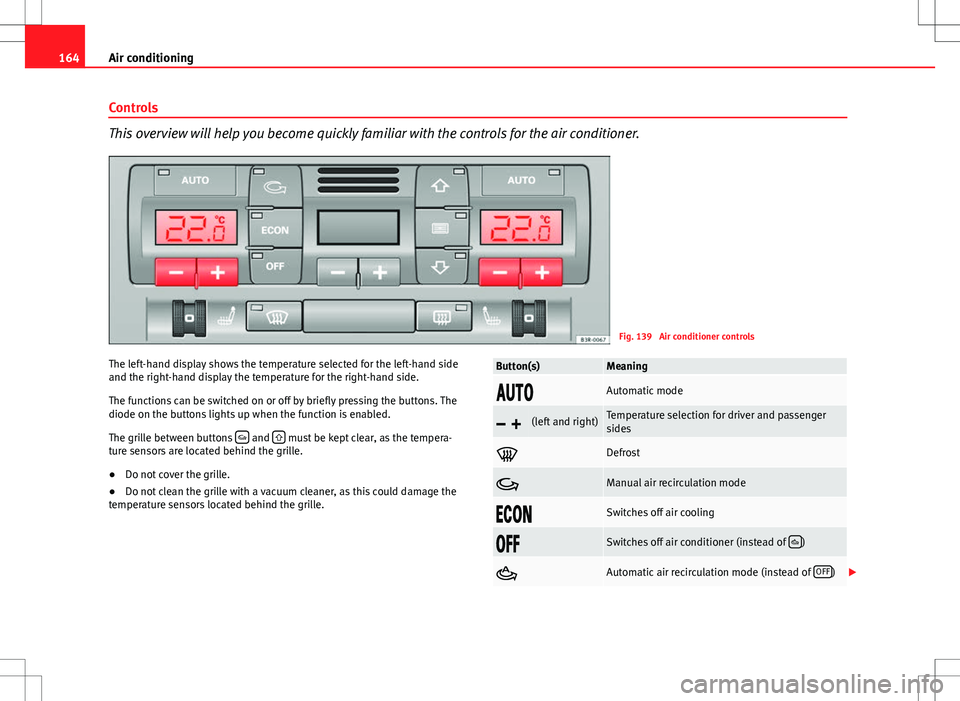
This overview will help you become quickly familiar with the controls for the air conditioner.
Fig. 139 Air conditioner controls
The left-hand display shows the temperature selected for the left-hand side
and the right-hand display the temperature for the right-hand side.
The functions can be switched on or off by briefly pressing the buttons. The
diode on the buttons lights up when the function is enabled.
The grille between buttons
and must be kept clear, as the tempera-
ture sensors are located behind the grille.
● Do not cover the grille.
● Do not clean the grille with a vacuum cleaner, as this could damage the
temperature sensors located behind the grille.
Button(s)Meaning
Automatic mode
(left and right)Temperature selection for driver and passenger
sides
Defrost
Manual air recirculation mode
Switches off air cooling
Switches off air conditioner (instead of )
Automatic air recirculation mode (instead of OFF)
Page 167 of 325

165
Air conditioning
Button(s)Meaning
(in the centre)Adjusts blower speed
Air to the windows
Air from the dashboard outlets
Air to the footwells
The , and buttons (which regulate air distribution) can either be
selected individually or in combination.
Automatic mode AUTO
Standard setting for all seasons.
Switching on automatic mode
– It is possible to select interior temperatures from +18°C (64°F)
to +29°C (86°F).
– Press the AUTO
⇒
Fig. 139 button.
The automatic mode maintains a constant temperature inside the vehicle
and dehumidifies the air. Air temperature, air delivery and air distribution
are regulated automatically to reach the desired interior temperature as
quickly as possible, and then to maintain this temperature. The system au-
tomatically compensates for any variations in the outside temperature and
for the effect of direct sunlight.
The automatic temperature regulation only operates at temperature settings
between +18°C and +29°C. If a temperature below +18°C is selected, LO ap-
pears on the display. If a temperature is selected which is higher than +29°C, the display will show
HI. In the maximum and minimum settings, the
climate control operates continuously with maximum cooling or heating
output and the temperature is not regulated automatically. The temperature
is not regulated.
Note
By keeping the AUTO button on the driver side pressed for several seconds,
the temperature of the passenger side can be set to the temperature of the
driver side or vice versa. The display indicates the new temperature value.
Selecting the temperature -
+
Separate temperatures can be selected for the driver and
front passenger sides.
– Press the -
or + buttons below the displays
⇒ Fig. 139 until
the desired temperature is selected for the driver side or front
passenger side.
The currently selected temperature setting is shown in the display above
the buttons.
By keeping the AUTO
button on the driver side pressed for several seconds,
the temperature of the passenger side can be set to the temperature of the
driver side or vice versa. The display indicates the new temperature value.
The previous temperature setting can be restored by resetting the display
on the driver or passenger side as required.
Safety FirstOperating InstructionsPractical TipsTechnical Specifications
Page 170 of 325

168Air conditioning
Switching the temperature display from °C to °F and vice
versa
The outside temperature indicator can be switched from °C
(degrees Celsius) to °F (degrees Fahrenheit) and vice versa.
– Press and hold the
button for air recirculation mode and
briefly press the plus button of the left-hand temperature selec-
tor ⇒ Fig. 139.
Switching the air conditioner on/off
Switching the air conditioner off: models with an OFF button
– Press the OFF
button. The air conditioner is switched off and
the supply of air from outside the vehicle is cut off.
Switching the air conditioner off: models with a
button
– Keep pressing the -
button for the blower until the display seg-
ment is empty. The air conditioner is switched off and the sup-
ply of air from outside the vehicle is cut off.
Switching the air conditioner on: models with an OFF
button
– Press the OFF
button again, or
– Press the AUTO
button or
– Press one of the air distribution buttons
, or .
Switching the air conditioner on: models with a
button
– Press the +
button for the blower, or –
Press the AUTO
button or
– Press one of the air distribution buttons
, or .
The air conditioner also starts to operate if one of the blower or temperature
selector buttons is pressed.
Blower speed -
+
The automatically selected blower speed can be reduced or
increased manually.
– Press the -
and + buttons in the centre of the control panel
⇒ Fig. 139 to set the blower to the desired speed (and regulate the volume of air delivery).
The air conditioner system automatically regulates the blower speed accord-
ing to the interior temperature. However, you can also adjust the air delivery
manually. The current blower setting is illustrated by a bar in the middle dis-
play (above the buttons).
Automatic change of passenger temperature
In order to automatically set the passenger temperature like the driver tem-
perature, press the AUTO button on the driver side for 2 seconds approxi-
mately. In order to automatically set the driver temperature like the passen-
ger temperature, press the AUTO
button on the passenger side for 2 sec-
onds approximately.
Page 178 of 325
176Driving
WARNING
● Never switch the engine off until the vehicle is stationary.
● The brake servo and the power steering system work only when the
engine is running. You need more strength to steer and brake the vehicle
when the engine is switched off. Given that you will be unable to steer
and brake as usual, this could lead to a risk of accidents and injuries.
CAUTION
If the engine has been running under high load for a long time, there is a
risk of heat building up in the engine compartment after the engine has
been switched off; this could cause engine damage. Therefore, you should
let the engine idle for approximately 2 minutes before you switch it off.
Note
After the engine is switched off the radiator fan may run on for up to 10 mi-
nutes, even if the ignition is switched off. It may also start running again af-
ter some time if the coolant temperature rises due to a build-up of heat un-
der the bonnet, or if the engine is already warm and the engine compart-
ment is heated up further by direct sunlight.
Start-Stop function* Description and operation
The Start-Stop function stops the engine when the vehicle is stop-
ped and starts it automatically when required.
– When the vehicle is stopped, put it in neutral and release the
clutch pedal. The engine will stop. –
When the clutch pedal is pressed, the engine starts again.
– The instrument panel screen displays information about the sta-
tus of the Start-Stop function ⇒ Fig. 148.
Start-Stop function conditions
● The driver seat belt must be buckled.
● The engine hood must be closed.
● The engine must be at operating temperature
● The steering wheel must not be turned more than 270°.
● The vehicle must not be on a steep gradient.
● The vehicle must not be in reverse.
● A trailer must not be connected.
● The temperature of the passenger compartment must be within the con-
venience limits ( ECON
button should not be selected).
● The windscreen de-mist function must be off.
● Otherwise it requires more than 50% of the airflow that the fan can sup-
ply.
● The temperature must not be set to HI or LO.
● The driver door must be closed.
● The diesel particulate filter must not be in regeneration mode, for diesel
engines.
● The battery charge must not be low for the next start.
● The battery temperature must be between –1°C and 60°C.
Start-Stop function interruption
In the following situations, the Start-Stop function will be interrupted and
the engine will automatically start:
● The vehicle starts moving.
● The brake pedal is pressed several times in a row.
● The battery has been discharged excessively.
Page 179 of 325
177
Driving
● The Start-Stop System is manually deactivated.
● The windscreen de-mist function is turned on.
● The temperature of the passenger compartment exceeds the comfort
limits (button ECON
should not be selected).
● If more than 50% of the airflow that the fan can supply is ordered.
● Temperature setting HI or LO is selected.
● The engine coolant temperature is insufficient.
● The alternator is faulty, for example the V-belt has ruptured.
● If any of the conditions described in the previous section are not fulfil-
led.
WARNING
Never allow the vehicle to move with the engine off for any reason. You
could lose control of your vehicle. This could cause an accident and seri-
ous injury.
● Power steering does not work when the engine is not running. That is
why it is much more difficult to turn the steering wheel.
● Disconnect the Start-Stop system when driving through water (ford-
ing streams, etc.).
Note
● For vehicles with the Start-Stop function and a manual gearbox, when
the engine is started, the clutch must be pressed.
● When the conditions for the Start-Stop function are not fulfilled, the in-
strument panel displays the Start-Stop indicator dimmed.
● If the steering wheel is turned more than 270°, Stop will not function;
however, the angle of steering wheel turn does not affect starting the vehi-
cle. Activating and deactivating the Start-Stop function
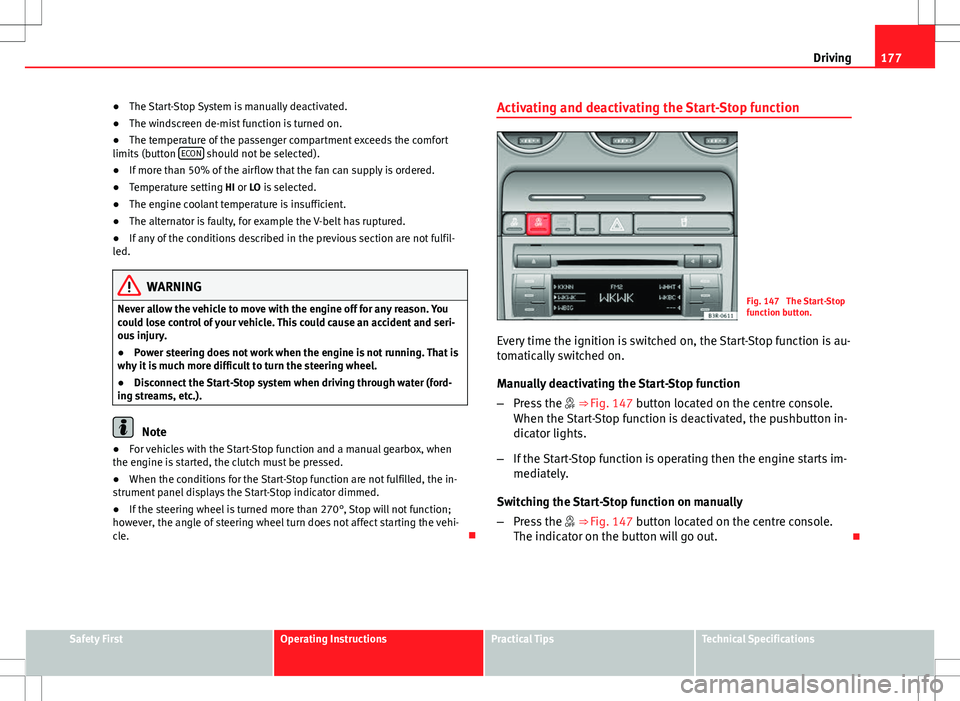
Fig. 147 The Start-Stop
function button.
Every time the ignition is switched on, the Start-Stop function is au-
tomatically switched on.
Manually deactivating the Start-Stop function
– Press the ⇒ Fig. 147 button located on the centre console.
When the Start-Stop function is deactivated, the pushbutton in-
dicator lights.
– If the Start-Stop function is operating then the engine starts im-
mediately.
Switching the Start-Stop function on manually
– Press the ⇒ Fig. 147 button located on the centre console.
The indicator on the button will go out.
Safety FirstOperating InstructionsPractical TipsTechnical Specifications
Page 180 of 325

178Driving
Driver messages
Fig. 148 Display on the
instrument panel during
Start-Stop function oper-
ation.
Fig. 149 Display on the
instrument panel during
Start-Stop function oper-
ation.
When the engine is turned off by the Start-Stop function, this is displayed
on the instrument panel. At each stop, the central Start-Stop symbol lights up for about 5 seconds.
After this time, it turns off and the symbol on the upper right part of the dis-
play remains lit
⇒ Fig. 149.
Note
● There are different versions of the dash panel; the display of indications
on the screen may differ.
● Some indications/symbols of the Start_stop system that appear in the
upper part of the display may not be visible in the case of high priority indi-
cations (faults, fuel reserve indicator, windscreen washer liquid level, etc.).
Page 181 of 325
179
Driving
Warnings
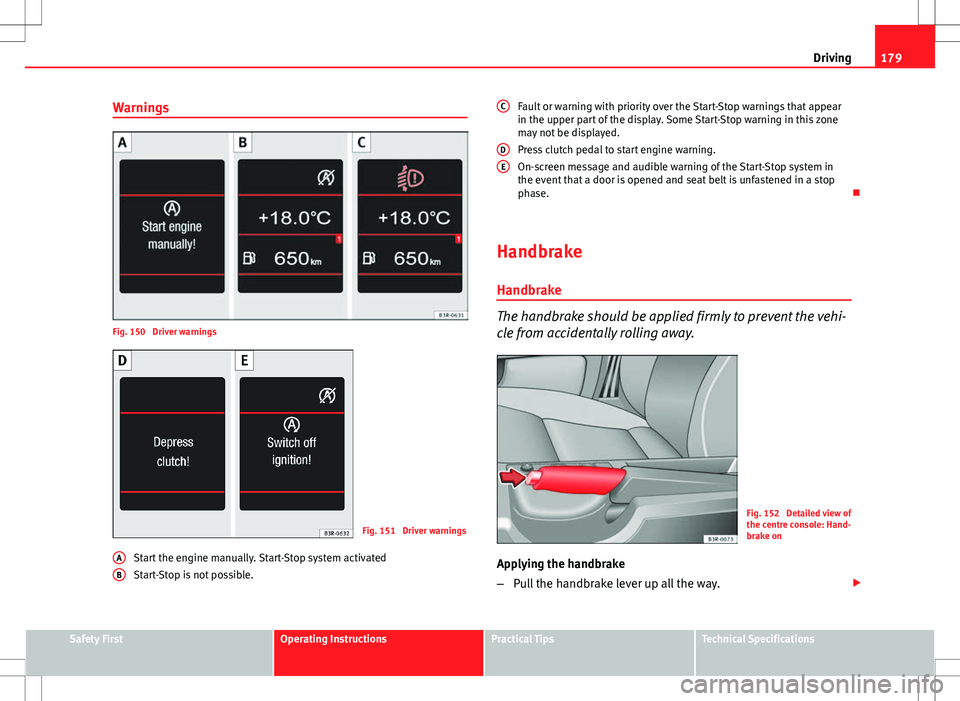
Fig. 150 Driver warnings
Fig. 151 Driver warnings
Start the engine manually. Start-Stop system activated
Start-Stop is not possible.
A
B
Fault or warning with priority over the Start-Stop warnings that appear
in the upper part of the display. Some Start-Stop warning in this zone
may not be displayed.
Press clutch pedal to start engine warning.
On-screen message and audible warning of the Start-Stop system in
the event that a door is opened and seat belt is unfastened in a stop
phase.
Handbrake Handbrake
The handbrake should be applied firmly to prevent the vehi-
cle from accidentally rolling away.
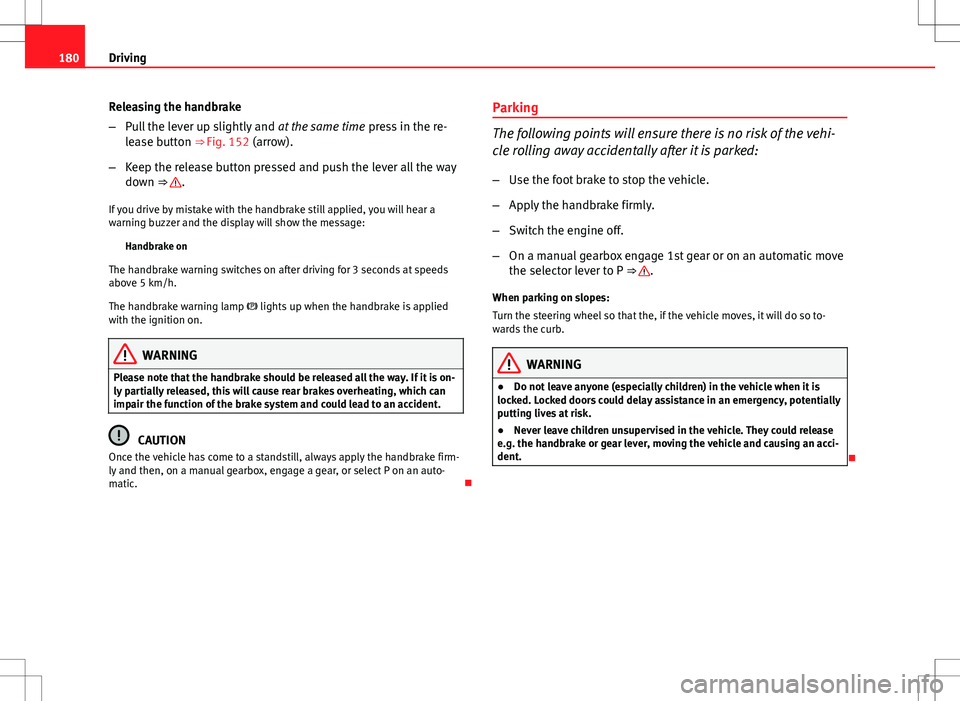
Fig. 152 Detailed view of
the centre console: Hand-
brake on
Applying the handbrake
– Pull the handbrake lever up all the way.
C
DE
Safety FirstOperating InstructionsPractical TipsTechnical Specifications
Page 182 of 325
180Driving
Releasing the handbrake
–Pull the lever up slightly and at the same time press in the re-
lease button ⇒ Fig. 152 (arrow).
– Keep the release button pressed and push the lever all the way
down ⇒
.
If you drive by mistake with the handbrake still applied, you will hear a
warning buzzer and the display will show the message: Handbrake on
The handbrake warning switches on after driving for 3 seconds at speeds
above 5 km/h.
The handbrake warning lamp lights up when the handbrake is applied
with the ignition on.
WARNING
Please note that the handbrake should be released all the way. If it is on-
ly partially released, this will cause rear brakes overheating, which can
impair the function of the brake system and could lead to an accident.
CAUTION
Once the vehicle has come to a standstill, always apply the handbrake firm-
ly and then, on a manual gearbox, engage a gear, or select P on an auto-
matic. Parking
The following points will ensure there is no risk of the vehi-
cle rolling away accidentally after it is parked:
– Use the foot brake to stop the vehicle.
– Apply the handbrake firmly.
– Switch the engine off.
– On a manual gearbox engage 1st gear or on an automatic move
the selector lever to P ⇒
.
When parking on slopes:
Turn the steering wheel so that the, if the vehicle moves, it will do so to-
wards the curb.
WARNING
● Do not leave anyone (especially children) in the vehicle when it is
locked. Locked doors could delay assistance in an emergency, potentially
putting lives at risk.
● Never leave children unsupervised in the vehicle. They could release
e.g. the handbrake or gear lever, moving the vehicle and causing an acci-
dent.