belt Seat Exeo ST 2012 Service Manual
[x] Cancel search | Manufacturer: SEAT, Model Year: 2012, Model line: Exeo ST, Model: Seat Exeo ST 2012Pages: 325, PDF Size: 5.56 MB
Page 69 of 325
67
Cockpit
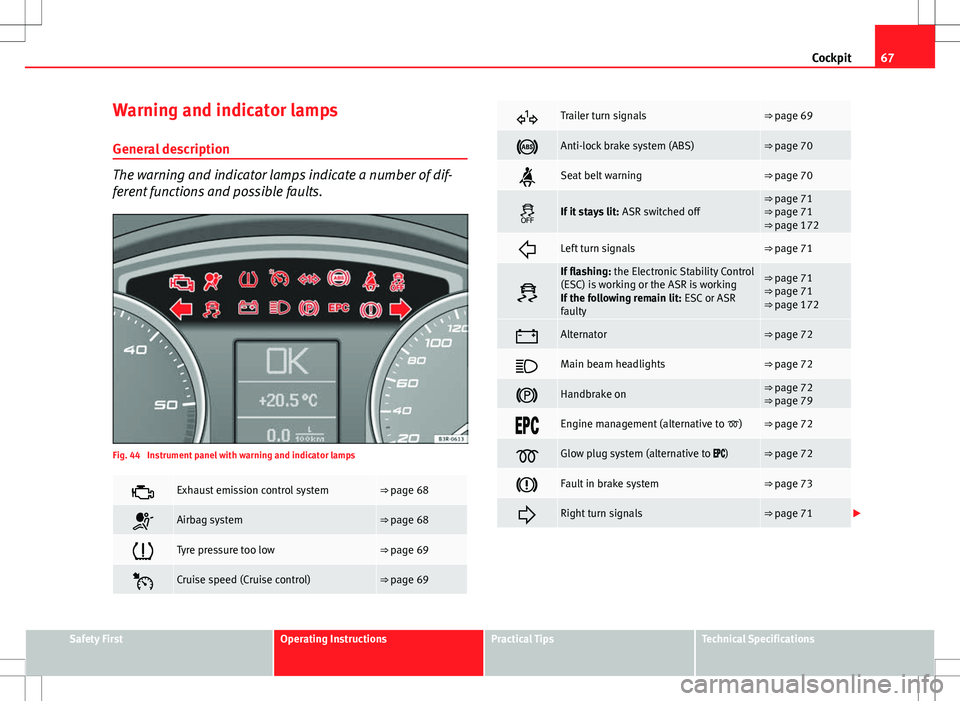
Warning and indicator lamps General description
The warning and indicator lamps indicate a number of dif-
ferent functions and possible faults.
Fig. 44 Instrument panel with warning and indicator lamps
Exhaust emission control system⇒ page 68
Airbag system⇒ page 68
Tyre pressure too low⇒ page 69
Cruise speed (Cruise control)⇒ page 69
Trailer turn signals⇒ page 69
Anti-lock brake system (ABS)⇒ page 70
Seat belt warning⇒ page 70
If it stays lit: ASR switched off⇒ page 71
⇒ page 71
⇒ page 172
Left turn signals⇒ page 71
If flashing: the Electronic Stability Control
(ESC) is working or the ASR is working
If the following remain lit: ESC or ASR
faulty⇒ page 71
⇒ page 71
⇒ page 172
Alternator⇒ page 72
Main beam headlights⇒ page 72
Handbrake on⇒ page 72
⇒ page 79
Engine management (alternative to )⇒ page 72
Glow plug system (alternative to )⇒ page 72
Fault in brake system⇒ page 73
Right turn signals⇒ page 71
Safety FirstOperating InstructionsPractical TipsTechnical Specifications
Page 70 of 325
68Cockpit
Note
A number of functions are monitored by the auto-check control
⇒ page 78. If a malfunction should occur, this will be shown by the dis-
play in the instrument panel either with a red symbol (priority 1 - danger) or
a yellow symbol (priority 2 - warning).
Exhaust emission control system
If the warning lamp lights up continuously you should take your vehicle to a
specialised workshop as soon as possible in order to have the fault re-
paired.
If the warning lamp flashes drive on at reduced speed and seek professio-
nal help in order to avoid damage to the catalytic converter.
For further information on the catalytic converter, see ⇒ page 202.
Airbag system
This warning lamp monitors the airbag and belt tension de-
vice system.
The warning lamp should light up for a few seconds when the ignition is
switched on.
If the warning lamp does not go out, or if it lights up, flashes or flickers
when the vehicle is moving, this indicates a malfunction in the system.
WARNING
If a malfunction should occur, have the system checked immediately by a
specialised workshop. Otherwise there is a risk that the airbag system
and/or belt tensioners may not be triggered in an accident.
Page 72 of 325
70Cockpit
Where a turn signal bulb does not work, either on the trailer or on the tow-
ing vehicle, the turn signal bulb will not flash.
Anti-lock brake system (ABS)
The warning lamp monitors the ABS and the integrated elec-
tronic differential lock (EDL).
The warning lamp lights up for a few seconds when the ignition is switch-
ed on and while the engine is being started. The lamp goes out again after
the system has run through an automatic test sequence.
There is a fault in the ABS if:
● The warning lamp does not light up when the ignition is switched on
● The warning lamp does not go out again after a few seconds
● The warning lamp lights up when the vehicle is moving
The vehicle can still brake in the normal way (except that the ABS control
function is out of action). Please take the vehicle to a specialised workshop
as soon as possible. For further information on the ABS, see ⇒ page 196.
If a malfunction should occur in the ABS, the ESC warning lamp will also
light up.
Entire brake system fault
If the ABS warning lamp lights up together with the brake warning lamp
⇒ page 73 (with the handbrake released), this indicates not only a
fault in the ABS function, but probably also a malfunction in the main brake
system ⇒
.
The symbol will light up on the instrument panel if there if a fault in the
brake system. Please refer to ⇒ page 80. Electronic differential lock (EDL) fault
The EDL works in conjunction with the ABS. The ABS indicator lamp will light
up to indicate an EDL fault. Please take the vehicle to a specialised work-
shop as soon as possible. For further information on the EDL, see
⇒ page 197.
WARNING
● Before opening the bonnet and checking the brake fluid level, ob-
serve the warning information in ⇒ page 234, Work in the engine com-
partment.
● If the brake warning lamp should light up together with the ABS
warning lamp , stop the vehicle immediately and check the brake fluid
level in the reservoir. If the fluid level has dropped below the "MIN" mark
you must not drive on, as there is a risk of accident. Obtain technical as-
sistance.
● If the brake fluid level is correct, the fault in the brake system may
have been caused by a fault in the ABS control function. As a result, the
rear wheels can lock relatively easily when braking. Under certain cir-
cumstances, the rear of the vehicle could suddenly sway from side to
side, with the subsequent danger of skidding. Drive carefully to the near-
est specialised workshop and have the fault repaired.
Seat belt warning lamp*
The warning lamp acts as a reminder to the driver to fasten
the seat belt. After switching on the ignition, the warning lamp will remain lit until the
driver and front passenger (if applicable) have fastened their seat belts.
When the vehicle has reached a certain speed, you will also hear a warning
signal and the warning light will flash.
For further information on the seat belts, see ⇒ page 24.
Page 83 of 325
81
Cockpit
WARNING
● Before opening the bonnet and checking the brake fluid level, ob-
serve the warning information in ⇒ page 234, Work in the engine com-
partment.
● If the brake fluid level in the reservoir is too low, this could result in
an accident. Do not drive on! Obtain technical assistance.
● If the brake warning lamp lights up together with the ABS warning
lamp, this can mean that there is a fault in the ABS control function. As a
result, the rear wheels can lock relatively easily when braking. Under cer-
tain circumstances, the rear of the vehicle could suddenly sway from side
to side, with the subsequent danger of skidding. Drive carefully to the
nearest specialised workshop and have the fault repaired.
Fault in the cooling system
Faults in the cooling system must be repaired immediately.
If the symbol flashes in the display, this means that either the
coolant temperature is too high or the coolant level is too low. The
following message will appear in the display together with the
symbol:
Switch off engine and check coolant level
– Stop the vehicle.
– Switch the engine off.
– Check the coolant level ⇒ page 239.
– Add more coolant if necessary ⇒ page 240.
– Wait for the symbol to go out before driving on. –
Obtain professional assistance if necessary.
If the coolant level is correct, the overheating may be caused by a malfunc-
tion of the radiator fan.
If the alternator warning lamp lights up as well ⇒ page 72, it is possible that
the drive belt has broken.
CAUTION
Do not drive on if the symbol has come on to indicate a fault in the cool-
ing system, otherwise there is a risk of engine damage.
Engine oil pressure too low
If the engine oil pressure is too low the fault must be re-
paired immediately.
If the symbol flashes in the display, the oil pressure is too low.
The following message will appear in the display together with the
symbol:
Switch off engine, check oil level
– Stop the vehicle.
– Switch the engine off.
– Check the engine oil level ⇒ page 237.
– Obtain professional assistance if necessary.
Engine oil level too low
If the engine oil level is too low, add more oil ⇒ page 238.
Safety FirstOperating InstructionsPractical TipsTechnical Specifications
Page 86 of 325
84Cockpit
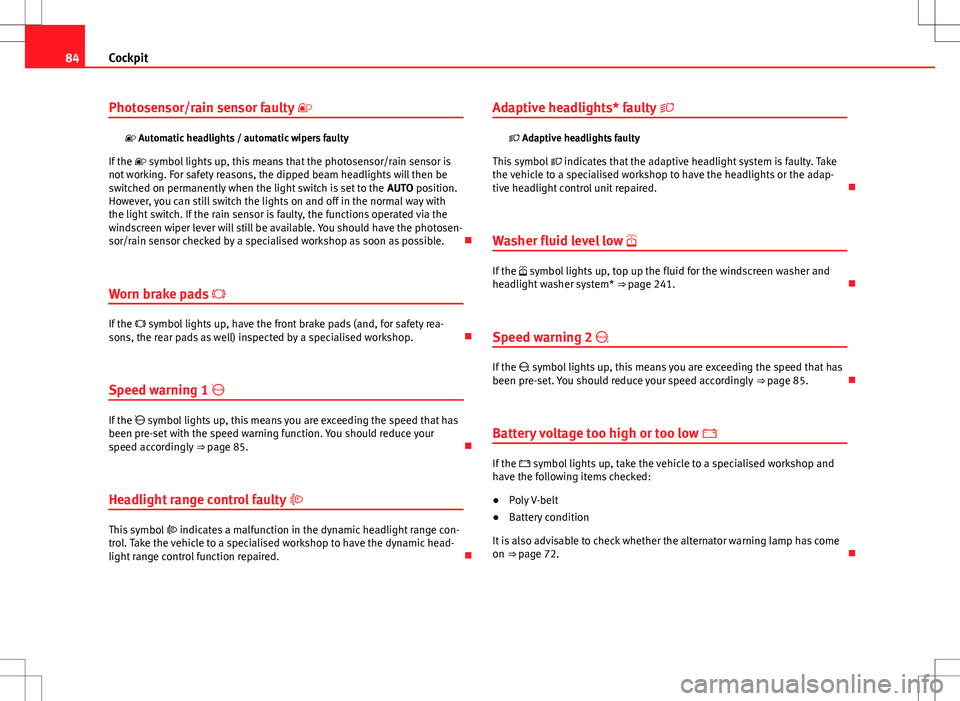
Photosensor/rain sensor faulty
Automatic headlights / automatic wipers faulty
If the symbol lights up, this means that the photosensor/rain sensor is
not working. For safety reasons, the dipped beam headlights will then be
switched on permanently when the light switch is set to the AUTO position.
However, you can still switch the lights on and off in the normal way with
the light switch. If the rain sensor is faulty, the functions operated via the
windscreen wiper lever will still be available. You should have the photosen-
sor/rain sensor checked by a specialised workshop as soon as possible.
Worn brake pads
If the symbol lights up, have the front brake pads (and, for safety rea-
sons, the rear pads as well) inspected by a specialised workshop.
Speed warning 1
If the symbol lights up, this means you are exceeding the speed that has
been pre-set with the speed warning function. You should reduce your
speed accordingly ⇒ page 85.
Headlight range control faulty
This symbol indicates a malfunction in the dynamic headlight range con-
trol. Take the vehicle to a specialised workshop to have the dynamic head-
light range control function repaired. Adaptive headlights* faulty
Adaptive headlights faulty
This symbol indicates that the adaptive headlight system is faulty. Take
the vehicle to a specialised workshop to have the headlights or the adap-
tive headlight control unit repaired.
Washer fluid level low
If the symbol lights up, top up the fluid for the windscreen washer and
headlight washer system* ⇒ page 241.
Speed warning 2
If the symbol lights up, this means you are exceeding the speed that has
been pre-set. You should reduce your speed accordingly ⇒ page 85.
Battery voltage too high or too low
If the symbol lights up, take the vehicle to a specialised workshop and
have the following items checked:
● Poly V-belt
● Battery condition
It is also advisable to check whether the alternator warning lamp has come
on ⇒ page 72.
Page 138 of 325
136Seats and storage compartments
WARNING
● The height of the driver seat must not be adjusted while driving. Fail-
ure to do so could result in an accident.
● Be careful when adjusting the seat height. Injuries can be caused if
the seat height is adjusted without due care and attention.
Adjusting the backrest angle
– Lean forwards to take your weight off the backrest.
– Turn the adjuster wheel 3
⇒ Fig. 104 to set the angle of the
backrest as required.
WARNING
The front backrests must not be reclined for driving. Otherwise, seat
belts and the airbag system might not protect as they should, with the
subsequent danger of injury.
Adjusting lumbar support*
– Do not exert any pressure on the backrest and turn adjuster
wheel 4 ⇒ Fig. 104 to adjust lumbar support.
As you make the adjustments, the curvature of the cushioned area of the
lumbar region becomes more or less acute. In this way, it adapts to the nat-
ural curvature of the spine.
Page 140 of 325
138Seats and storage compartments
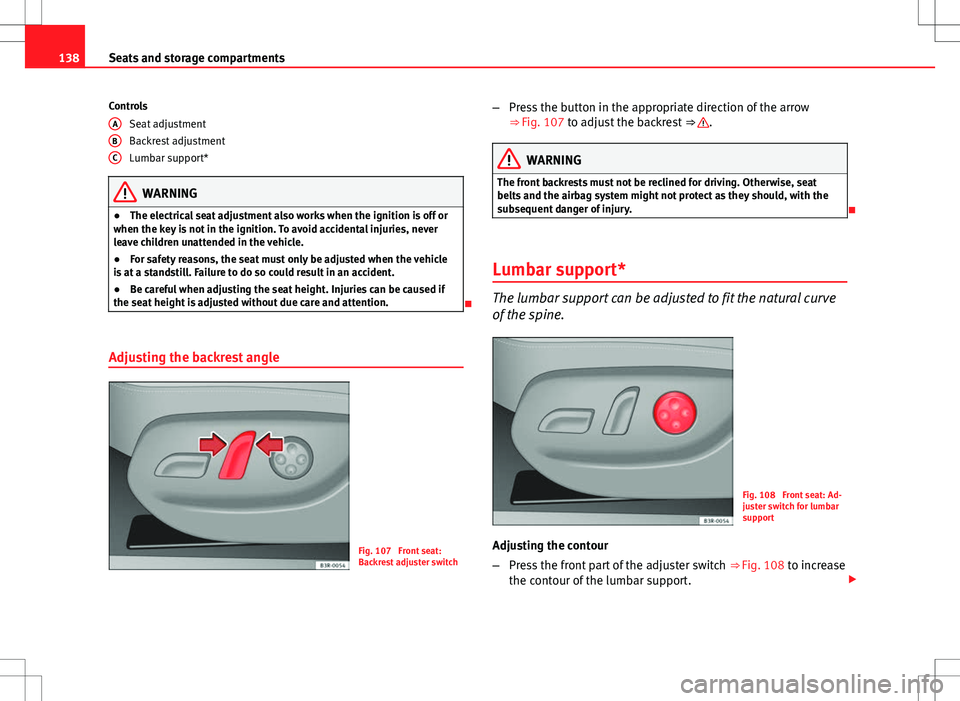
Controls
Seat adjustment
Backrest adjustment
Lumbar support*
WARNING
● The electrical seat adjustment also works when the ignition is off or
when the key is not in the ignition. To avoid accidental injuries, never
leave children unattended in the vehicle.
● For safety reasons, the seat must only be adjusted when the vehicle
is at a standstill. Failure to do so could result in an accident.
● Be careful when adjusting the seat height. Injuries can be caused if
the seat height is adjusted without due care and attention.
Adjusting the backrest angle
Fig. 107 Front seat:
Backrest adjuster switch
A
BC
–
Press the button in the appropriate direction of the arrow
⇒ Fig. 107 to adjust the backrest ⇒ .
WARNING
The front backrests must not be reclined for driving. Otherwise, seat
belts and the airbag system might not protect as they should, with the
subsequent danger of injury.
Lumbar support*
The lumbar support can be adjusted to fit the natural curve
of the spine.
Fig. 108 Front seat: Ad-
juster switch for lumbar
support
Adjusting the contour
– Press the front part of the adjuster switch ⇒
Fig. 108 to increase
the contour of the lumbar support.
Page 143 of 325
141
Seats and storage compartments
Assigning remote control keys
The key must be assigned to a memory button so that the
positions stored in the memory can also be recalled using
the remote control key. Assigning the remote control key to a memory button
– Using the memory button, recall the settings that are to be pro-
grammed onto the key.
– Keeping the memory button pressed down, press the unlock
button on the remote control key within 10 seconds.
– Wait for about 2 seconds before releasing the memory button.
Deleting assignment of the remote control key to the memory
button
– Press and hold the MEMO
button and press the unlock button
on the remote control key within 10 seconds.
– Wait for about 2 seconds before releasing the MEMO
button.
The previous settings are automatically cancelled when the keys are re-as-
signed to different memory buttons. Head restraints
Front head restraints
In combination with properly worn seat belts, the head re-
straints offer effective protection, provided they are properly
adjusted to suit the height of the occupant.
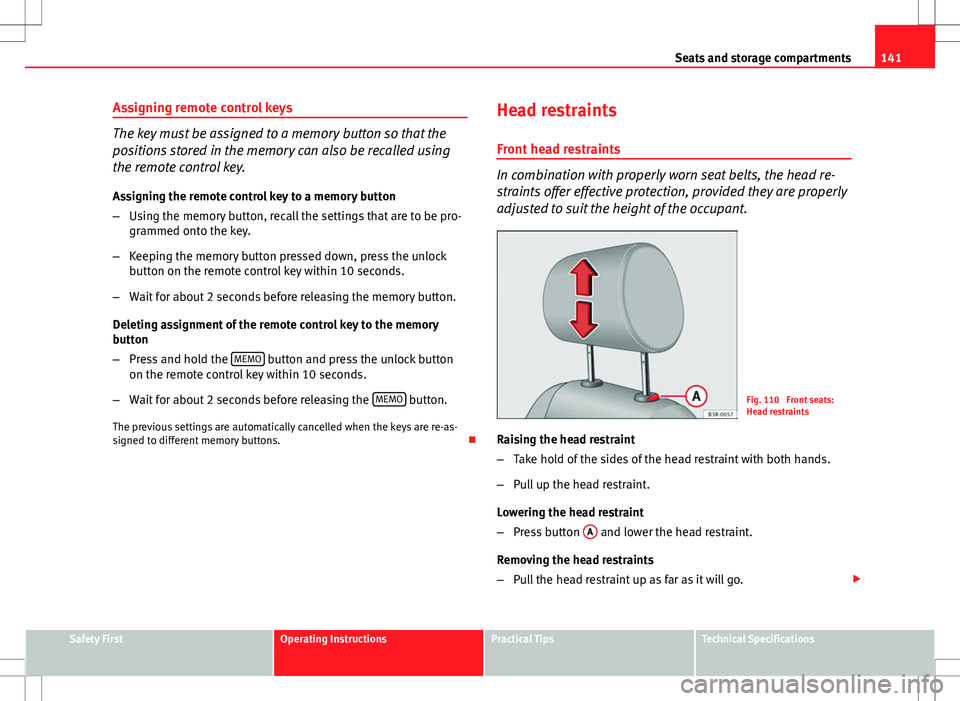
Fig. 110 Front seats:
Head restraints
Raising the head restraint
– Take hold of the sides of the head restraint with both hands.
– Pull up the head restraint.
Lowering the head restraint
– Press button A
and lower the head restraint.
Removing the head restraints
– Pull the head restraint up as far as it will go.
Safety FirstOperating InstructionsPractical TipsTechnical Specifications
Page 144 of 325

142Seats and storage compartments
–Press button A
and pull out the head restraint.
Fitting the head restraint
– Insert the head restraint in its guides until it clicks into place.
Press button A
and lower the head restraint.
The height of the head restraints is adjustable. They should be set to suit
the height of the occupant. In combination with the seat belts, the head re-
straints offer effective protection, provided they are properly adjusted.
For best protection, the top of the head restraint should be at least at eye
level or higher.
Head restraints on the side rear seats
Fig. 111 Outer rear
seats: Head restraints
Raising the head restraint
– Take hold of the sides of the head restraint with both hands.
– Pull the head restraint up as far as it will go. Lowering the head restraint
–
Press button A
⇒ Fig. 111 and lower the head restraint.
Removing the head restraint
– Pull the head restraint up as far as it will go.
– Press button A
⇒ Fig. 111 and pull out the head restraint.
Fitting the head restraint
– Insert the head restraint in its guides until it clicks into place.
Press button A
and lower the head restraint.
When the rear seats are not occupied, the head restraints should be moved
to the lowest position so that they do not obstruct the driver's field of vi-
sion.
Rear seat central head restraint
Fig. 112 Centre rear
seat: Head restraints
Page 153 of 325
151
Seats and storage compartments
WARNING
● Make sure that the rear backrest is securely locked in position so that
the seat belt can provide proper protection on the centre rear seat.
● The rear backrest must always be securely latched so that objects
stored in the luggage compartment will not fly forward during sudden
braking.
CAUTION
When returning the backrest to an upright position, make sure that the seat
belts for the outer rear seats are in their guides, so that they cannot be
caught up and damaged in the catches for the backrest.
Ski bag*
You can use the ski bag to transport skis or other extra-long
objects safely inside the vehicle without soiling or damag-
ing the upholstery.
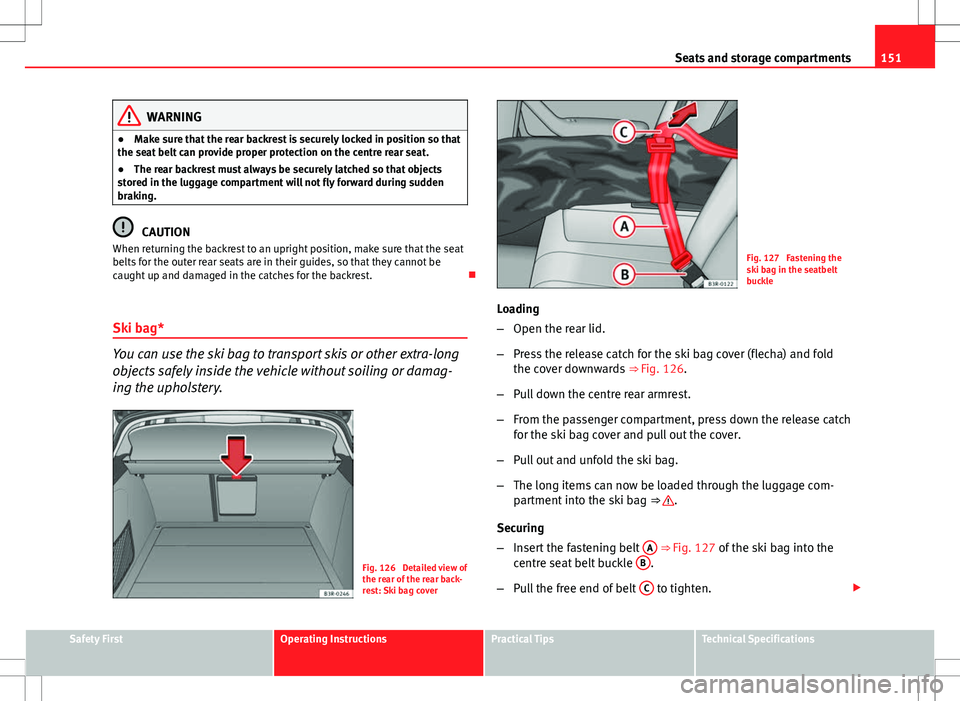
Fig. 126 Detailed view of
the rear of the rear back-
rest: Ski bag cover
Fig. 127 Fastening the
ski bag in the seatbelt
buckle
Loading
– Open the rear lid.
– Press the release catch for the ski bag cover (flecha) and fold
the cover downwards ⇒ Fig. 126.
– Pull down the centre rear armrest.
– From the passenger compartment, press down the release catch
for the ski bag cover and pull out the cover.
– Pull out and unfold the ski bag.
– The long items can now be loaded through the luggage com-
partment into the ski bag ⇒
.
Securing
– Insert the fastening belt A
⇒ Fig. 127 of the ski bag into the
centre seat belt buckle B.
– Pull the free end of belt C
to tighten.
Safety FirstOperating InstructionsPractical TipsTechnical Specifications