remote control Seat Exeo ST 2013 User Guide
[x] Cancel search | Manufacturer: SEAT, Model Year: 2013, Model line: Exeo ST, Model: Seat Exeo ST 2013Pages: 327, PDF Size: 5.07 MB
Page 122 of 327
120Lights and visibility
Activating the function
–Briefly press the knob ⇒ Fig. 86 to release it from its set posi-
tion.
– Turn the knob to position 1.
– Press the knob in again to prevent the setting from being
changed unintentionally.
Deactivating the function
– Briefly press the knob ⇒ Fig. 86 to release it from its set posi-
tion.
– Turn the knob to position 0.
– Press the knob in again to prevent the setting from being
changed unintentionally.
The coming home and leaving home functions are controlled by light sen-
sors in the interior mirror housing. The system will function when the follow-
ing requirements are met:
● The knob is set to position 1.
● The headlights and the ignition are switched off.
● Dark conditions; the sensors register little or no light.
Coming home
When the system is enabled and it is dark, the corresponding exterior lights
switch on as soon as the driver door is opened.
The exterior lights will stay on for up to a maximum of 2 minutes as long as
one of the doors or the rear lid is open.
The exterior lights stay on for about 30 seconds to light up the area around
the vehicle after all the doors and the rear lid have been closed. This time interval is factory-set, but you can have it changed by a special-
ised workshop to suit your own requirements (max. setting is 60 seconds).
Leaving home
The exterior lights are switched on when the vehicle is unlocked with the
button on the remote control key.
The exterior lights go out when the driver door is opened or after 60 sec-
onds when the vehicle locks itself again automatically
⇒ page 108.
WARNING
Before leaving the vehicle, remove the key from the ignition, as the lights
will not go out if the coming home function is activated. This will lead to
battery discharge and vehicle breakdown.
Note
● If you always wish to use the coming home and leaving home functions,
you can leave them permanently switched on. As the system is controlled
via a photosensor, it will only work in dark conditions.
● Permanent use of the coming home and leaving home functions, partic-
ularly on short journeys, will increase the load on the battery. To make sure
the battery is always sufficiently charged, occasionally drive longer distan-
ces.
● If the fog lights have been switched on by the coming home and leaving
home functions, they will always be switched off when you switch on the ig-
nition.
● Observe all relevant legal requirements when using the signalling and
lighting systems described here.
Page 143 of 327

141
Seats and storage
system when the vehicle is being driven temporarily by a different driver
whose settings do not need to be stored in the memory.
Note
You can also use the remote control to call up the stored settings
⇒ page 142.
Storing settings
The STOP button must be in its down position (pressed in) before
you can store the desired settings.
– Adjust the driver seat as required ⇒ page 138.
– Adjust both exterior mirrors ⇒ page 134.
– Press and hold the MEMO
button. At the same time, press one
of the memory buttons for at least a second.
– Release both buttons. The setting is now stored on the selected
memory button.
Any new setting selected automatically cancels the existing setting stored
on the memory button. It is best to begin with memory button No. 1 for the
first driver and then assign the other memory buttons to each subsequent
driver.
The seat and mirror positions are stored when the vehicle is locked with the
remote control and are assigned to the remote control key. The exterior mir-
rors adjust automatically to the previous position when you unlock the vehi-
cle; the driver seat adjusts automatically when you open the driver door.
However, this does not delete the settings stored in memory buttons 1 to 4.
These settings can be enabled at any time. Activating settings
Stored settings can be recalled using either the memory but-
tons or the remote control (remote control key).
Using the memory buttons
– If the driver door is open, press the desired memory button
briefly.
– If the driver door is closed, press and hold down the appropri-
ate memory button until the seat and exterior mirrors reach
their programmed positions.
Using the remote control
– Unlock the vehicle using the remote control and open the driver
door within the next ten minutes.
The seat adjustment will have to be called up using the memory buttons if
the driver door is not opened within 10 minutes after unlocking the vehicle
with the remote control.
WARNING
● For safety reasons, the seat must only be adjusted when the vehicle
is at a standstill. Failure to do so could result in an accident.
● In an emergency, the memory function can be stopped at any time by
pressing the STOP button or by briefly pressing any of the memory but-
tons.
Safety FirstOperating instructionsPractical TipsTechnical Specifications
Page 144 of 327
142Seats and storage
Assigning remote control keys
The key must be assigned to a memory button so that the
positions stored in the memory can also be recalled using
the remote control key.
Assigning the remote control key to a memory button
– Using the memory button, recall the settings that are to be pro-
grammed onto the key.
– Keeping the memory button pressed down, press the unlock
button on the remote control key within 10 seconds.
– Wait for about 2 seconds before releasing the memory button.
Deleting assignment of the remote control key to the memory
button
– Press and hold the MEMO
button and press the unlock button
on the remote control key within 10 seconds.
– Wait for about 2 seconds before releasing the MEMO
button.
The previous settings are automatically cancelled when the keys are re-as-
signed to different memory buttons. Head restraints
Front head restraints
In combination with properly worn seat belts, the head re-
straints offer effective protection, provided they are properly
adjusted to suit the height of the occupant.
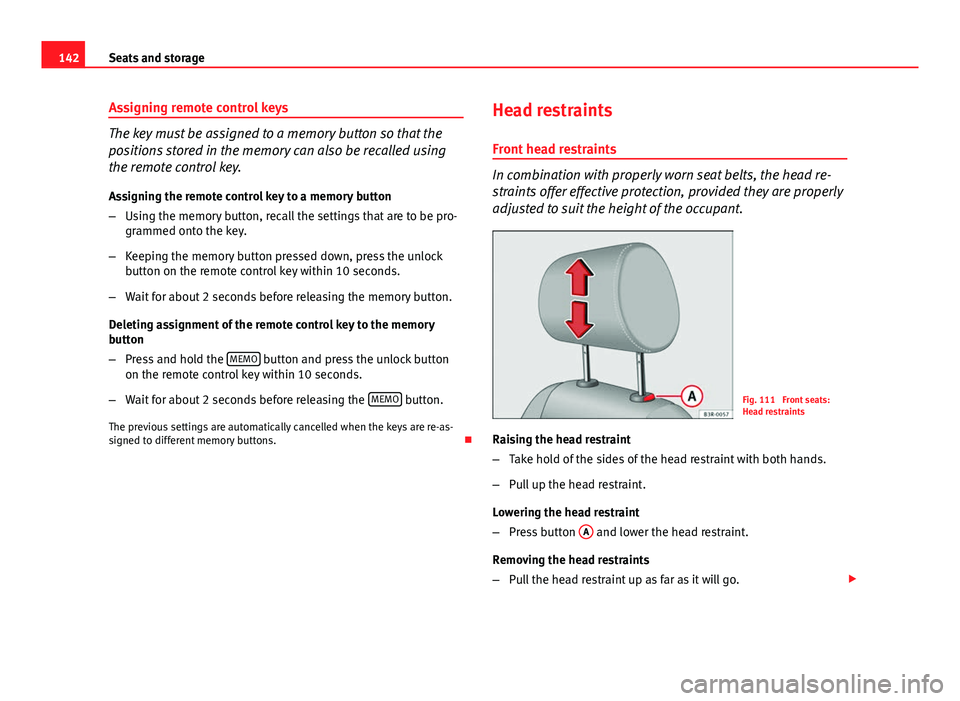
Fig. 111 Front seats:
Head restraints
Raising the head restraint
– Take hold of the sides of the head restraint with both hands.
– Pull up the head restraint.
Lowering the head restraint
– Press button A
and lower the head restraint.
Removing the head restraints
– Pull the head restraint up as far as it will go.
Page 321 of 327
Head restraintsFront seats . . . . . . . . . . . . . . . . . . . . . . . . . 142
Rear seats . . . . . . . . . . . . . . . . . . . . . . . . . . 143
Removing and fitting . . . . . . . . . . . . . . . . . 142
Heated Seats . . . . . . . . . . . . . . . . . . . . . . . . . . . . . . 172
Heated rear window . . . . . . . . . . . . . . . . . . . . . 128 Heating element wires . . . . . . . . . . . . . . . . 222
Heated seats . . . . . . . . . . . . . . . . . . . . . . . . . . . 172
High pressure cleaners . . . . . . . . . . . . . . . . . . 220
Horn . . . . . . . . . . . . . . . . . . . . . . . . . . . . . . . . . . 59
How to jump start description . . . . . . . . . . . . . 296
I
Identification number . . . . . . . . . . . . . . . . . . . 303
Identification plate . . . . . . . . . . . . . . . . . . . . . . 303
Ignition key Safety interlock . . . . . . . . . . . . . . . . . . . . . . 174
Ignition lock . . . . . . . . . . . . . . . . . . . . . . . . . . . 174
Indicator lamps Glow plug system . . . . . . . . . . . . . . . . . . . . . 72
Main beam headlights . . . . . . . . . . . . . . . . . 72
Indicator lamps - overview . . . . . . . . . . . . . . . . . 67
Instruments Lighting . . . . . . . . . . . . . . . . . . . . . . . . . 64, 121
Interior lights Ambient lighting . . . . . . . . . . . . . . . . . . . . 126
Front . . . . . . . . . . . . . . . . . . . . . . . . . . . . . . 125
Luggage compartment . . . . . . . . . . . . . . . . 127
Rear . . . . . . . . . . . . . . . . . . . . . . . . . . . . . . . 127 Interior mirror
With manual anti-dazzle setting . . . . . . . . 133
Interior monitoring . . . . . . . . . . . . . . . . . . . . . . 111
Intermittent wipe . . . . . . . . . . . . . . . . . . . . . . . 129
ISOFIX . . . . . . . . . . . . . . . . . . . . . . . . . . . . . . . . . 53
J
Jack . . . . . . . . . . . . . . . . . . . . . . . . . . . . . . 261, 266
Jump-starting . . . . . . . . . . . . . . . . . . . . . . . . . . 295
Jump leads . . . . . . . . . . . . . . . . . . . . . . . . . . . . 295
K
Keys . . . . . . . . . . . . . . . . . . . . . . . . . . . . . . . . . . . 99 Air conditioner settings . . . . . . . . . . . . . . . 171
Battery . . . . . . . . . . . . . . . . . . . . . . . . . . . . . 100
Remote control key . . . . . . . . . . . . . . . . . . . 108
Settings for the driver seat . . . . . . . . . . . . 142
Kick-down feature . . . . . . . . . . . . . . . . . . . . . . . 192
L
Lamps Cruise speed . . . . . . . . . . . . . . . . . . . . . . . . . 69
Lighting . . . . . . . . . . . . . . . . . . . . . . . . . . . . . . . 117 Instruments . . . . . . . . . . . . . . . . . . . . . 64, 121
Lights Adaptive headlights . . . . . . . . . . . . . . . . . . 123
Automatic headlight control . . . . . . . . . . . 117
Coming home function . . . . . . . . . . . . . . . 119
Cornering light . . . . . . . . . . . . . . . . . . . . . . 123 Dipped beam headlights faulty . . . . . . . . . . 85
Dynamic headlight range control . . . . . . . 122
Headlight flasher . . . . . . . . . . . . . . . . . . . . 125
Leaving home function . . . . . . . . . . . . . . . 119
Parking light . . . . . . . . . . . . . . . . . . . . . . . . 125
Reverse lights faulty . . . . . . . . . . . . . . . . . . . 85
Switching on and off . . . . . . . . . . . . . . . . . 117
Xenon lights . . . . . . . . . . . . . . . . . . . . . . . . 122
Load compartment in the luggage compart- ment
see Loading the luggage compartment . . . 16
Loading the luggage compartment . . . . . . . . . . 16
Locking the doors manually if the central lock- ing fails to work
Locking the doors manually if the centrallocking fails to work . . . . . . . . . . . . . . . . 105
Locks . . . . . . . . . . . . . . . . . . . . . . . . . . . . . . . . . 222
Long periods of non-use Battery . . . . . . . . . . . . . . . . . . . . . . . . . . . . . 247
Luggage compartment . . . . . . . . . . . . . . . . . . . 145 Cover . . . . . . . . . . . . . . . . . . . . . . . . . . . . . . 147
Extending . . . . . . . . . . . . . . . . . . . . . . . . . . 151
Fastening rings . . . . . . . . . . . . . . . . . . . . . . 146
Light . . . . . . . . . . . . . . . . . . . . . . . . . . . . . . 127
Loading . . . . . . . . . . . . . . . . . . . . . . . . . . . . 145
Luggage compartment liner . . . . . . . . . . . 150
Luggage net . . . . . . . . . . . . . . . . . . . . . . . . 146
Net partition . . . . . . . . . . . . . . . . . . . . . . . . 148
Retaining strap . . . . . . . . . . . . . . . . . . . . . . 147
Side storage compartment . . . . . . . . . . . . 151
Ski bag . . . . . . . . . . . . . . . . . . . . . . . . . . . . 152
see also Loading the luggage compartment . .16
319
Index
Page 323 of 327
Remote control keyIndicator light . . . . . . . . . . . . . . . . . . . . . . . 100
Locking and unlocking . . . . . . . . . . . . . . . . 108
Locking and unlocking the vehicle . . . . . . 108
Replacing the battery . . . . . . . . . . . . . . . . . 100
Remote control keys . . . . . . . . . . . . . . . . . . . . . . 99 Re-synchronising . . . . . . . . . . . . . . . . . . . . 109
Removing and fitting the wheel . . . . . . . . . . . 267
Repairs Airbags . . . . . . . . . . . . . . . . . . . . . . . . . . . . . 31
Replacement of parts . . . . . . . . . . . . . . . . . . . . 230
Rev counter . . . . . . . . . . . . . . . . . . . . . . . . . . . . . 63
Reverse gear Automatic gearbox . . . . . . . . . . . . . . . . . . . 190
Manual gearbox . . . . . . . . . . . . . . . . . . . . . 187
Roof rack . . . . . . . . . . . . . . . . . . . . . . . . . . . . . . 153 Attachment points . . . . . . . . . . . . . . . . . . . 153
Roof load . . . . . . . . . . . . . . . . . . . . . . . . . . . 154
Roof rails . . . . . . . . . . . . . . . . . . . . . . . . . . . . . . 153
Rubber seals . . . . . . . . . . . . . . . . . . . . . . . . . . . 222
Run-flat tyres . . . . . . . . . . . . . . . . . . . . . . . . . . 256
Running in Engine . . . . . . . . . . . . . . . . . . . . . . . . . . . . . 202
S SAFE . . . . . . . . . . . . . . . . . . . . . . . . . . . . . . . . . 101
Safe driving . . . . . . . . . . . . . . . . . . . . . . . . . . . . . 7 Aspects to take into account . . . . . . . . . . . . . 8
Before setting off . . . . . . . . . . . . . . . . . . . . . . 8
Driving safety . . . . . . . . . . . . . . . . . . . . . . . . . 8
Safety . . . . . . . . . . . . . . . . . . . . . . . . . . . . . . . . . . 9 Safety equipment . . . . . . . . . . . . . . . . . . . . . . . . . 7
Safety instructions
Engine compartment . . . . . . . . . . . . . . . . . 235
Safety notes Airbags . . . . . . . . . . . . . . . . . . . . . . . . . . . . . 31
Curtain airbags . . . . . . . . . . . . . . . . . . . . . . . 43
Deactivating front passenger airbag . . . . . . 46
Front airbags . . . . . . . . . . . . . . . . . . . . . . . . 36
Seat belt tensioners . . . . . . . . . . . . . . . . . . . 28
Side airbags . . . . . . . . . . . . . . . . . . . . . . . . . 41
Using child seats . . . . . . . . . . . . . . . . . . . . . 47
Using seat belts . . . . . . . . . . . . . . . . . . . . . . 22
Seals . . . . . . . . . . . . . . . . . . . . . . . . . . . . . . . . . 222
Seat adjustment Lumbar support . . . . . . . . . . . . . . . . . . . . . 139
Seat belt cleaning . . . . . . . . . . . . . . . . . . . . . . 228
Seat belt control lamp . . . . . . . . . . . . . . . . . . . . 19
Seat belt position Pregnant women . . . . . . . . . . . . . . . . . . . . . 26
Seat belts . . . . . . . . . . . . . . . . . . . . . . . . . . . 25
Seat belt protection . . . . . . . . . . . . . . . . . . . . . . 22
Seat belt release . . . . . . . . . . . . . . . . . . . . . . . . 26
Seat belts . . . . . . . . . . . . . . . . . . . . . . . . . . . . . . 19 Adjustment . . . . . . . . . . . . . . . . . . . . . . . . . . 24
control lamp . . . . . . . . . . . . . . . . . . . . . . . . . 19
Height adjustment . . . . . . . . . . . . . . . . . . . . 27
Incorrectly fastened . . . . . . . . . . . . . . . . . . . 27
Not worn . . . . . . . . . . . . . . . . . . . . . . . . . . . . 21
Safety notes . . . . . . . . . . . . . . . . . . . . . . . . . 22
Warning lamp . . . . . . . . . . . . . . . . . . . . . . . . 70
Seat belt tensioner control lamp . . . . . . . . . . . . . . . . . . . . . . . . . 31 Seat belt tensioners . . . . . . . . . . . . . . . . . . . . . . 28
Seat heating . . . . . . . . . . . . . . . . . . . . . . . . . . . 172
Seats
Electric adjustment . . . . . . . . . . . . . . . . . . 138
Electric backrest adjustment . . . . . . . . . . . 139
Manual adjustment . . . . . . . . . . . . . . . . . . 136
Manual adjustment of lumbar support . . . 137
Manual backrest angle adjustment . . . . . 137
Moving the seat forwards and backwards 136
Seat height adjustment . . . . . . . . . . . . . . . 136
Seat upholstery Alcantara . . . . . . . . . . . . . . . . . . . . . . . . . . . 226
Checklist . . . . . . . . . . . . . . . . . . . . . . . . . . . 225
cleaning Alcantara . . . . . . . . . . . . . . . . . . . 226
Cleaning and maintenance of natural leath-er . . . . . . . . . . . . . . . . . . . . . . . . . . . . . . . 227
cleaning the trim fabric . . . . . . . . . . . . . . . 226
synthetic leather . . . . . . . . . . . . . . . . . . . . 228
Selector lever positions . . . . . . . . . . . . . . . . . . 190
Service indicator . . . . . . . . . . . . . . . . . . . . . . . . 77
Servotronic . . . . . . . . . . . . . . . . . . . . . . . . . . . . 201
Side airbags . . . . . . . . . . . . . . . . . . . . . . . . . . . . 39 Description . . . . . . . . . . . . . . . . . . . . . . . . . . 39
Operation . . . . . . . . . . . . . . . . . . . . . . . . . . . 40
Safety notes . . . . . . . . . . . . . . . . . . . . . . . . . 41
Side lights . . . . . . . . . . . . . . . . . . . . . . . . . . . . . 117
Sitting position driver . . . . . . . . . . . . . . . . . . . . . . . . . . . . . . . 10
Sitting position, occupants . . . . . . . . . . . . . . . . 10
Ski bag . . . . . . . . . . . . . . . . . . . . . . . . . . . . . . . 152
Sliding/tilting sunroof . . . . . . . . . . . . . . . . . . . 114 Automatic close function . . . . . . . . . . . . . . 116
Closing . . . . . . . . . . . . . . . . . . . . . . . . . . . . 115
321
Index