tow Seat Exeo ST 2013 User Guide
[x] Cancel search | Manufacturer: SEAT, Model Year: 2013, Model line: Exeo ST, Model: Seat Exeo ST 2013Pages: 327, PDF Size: 5.07 MB
Page 126 of 327
124Lights and visibility
All four turn signals flash simultaneously when the hazard warning lights
are switched on. The turn signal indicators and the hazard control lamp
indicator flash at the same time. The hazard warning lights also work
when the ignition is switched off.
In an accident in which the airbags are triggered, the hazard warning lights
are switched on automatically.
Note
You should switch on the hazard warning lights to warn other road users,
e.g.
● When reaching the tail end of a traffic jam
● If your vehicle breaks down or there is an emergency
● If your vehicle is being towed away or if you are towing another vehicle Turn signal
and main beam headlight lever
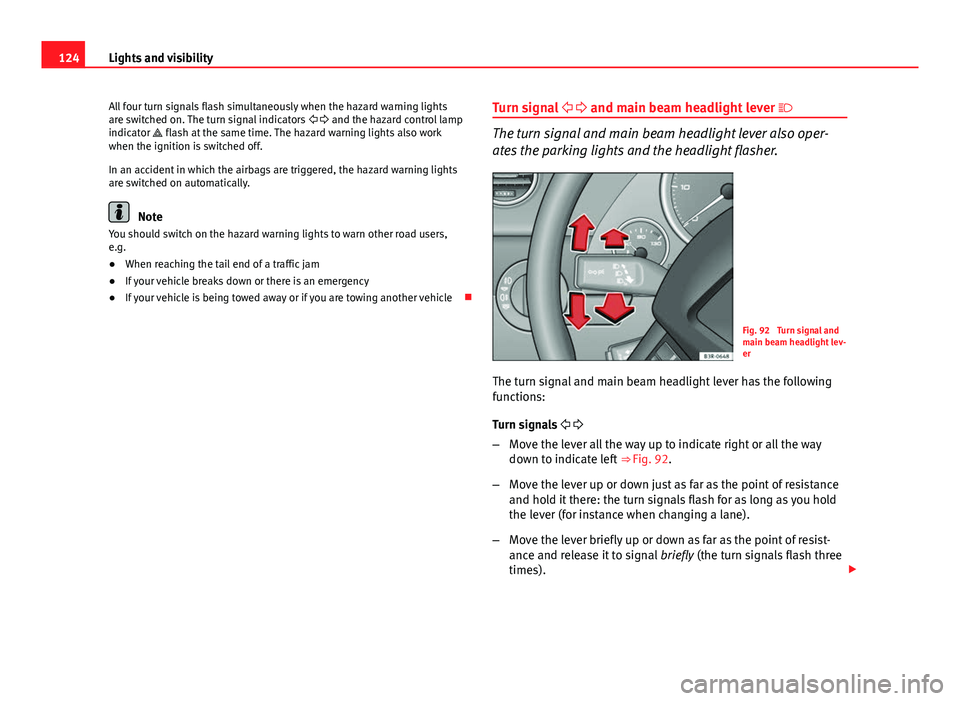
The turn signal and main beam headlight lever also oper-
ates the parking lights and the headlight flasher.
Fig. 92 Turn signal and
main beam headlight lev-
er
The turn signal and main beam headlight lever has the following
functions:
Turn signals
– Move the lever all the way up to indicate right or all the way
down to indicate left ⇒ Fig. 92.
– Move the lever up or down just as far as the point of resistance
and hold it there: the turn signals flash for as long as you hold
the lever (for instance when changing a lane).
– Move the lever briefly up or down as far as the point of resist-
ance and release it to signal briefly (the turn signals flash three
times).
Page 127 of 327

125
Lights and visibility
Main beam headlights
– Press the lever forward to switch on the main beams.
– Pull the lever back towards you to switch the main beam head-
lights off again.
Headlight flasher
– Pull the lever towards the steering wheel to operate the flasher.
Parking light
– Switch the ignition off.
– Move the lever up or down to turn on the right or left-hand park-
ing lights respectively.
Notes on these functions
● The turn signals only work when the ignition is switched on. The turn
signal lamp or flashes in the instrument panel when the turns signals
⇒ page 67 are working.
● The turn signals are cancelled automatically when the steering wheel is
returned to the straight-ahead position.
● The main beam headlights can only be switched on if the dipped beam
headlights are already on. The main beam headlight indicator lamp then
comes on in the instrument panel.
● The headlight flasher comes on for as long as you pull the lever, even if
no other lights are switched on. The main beam headlight indicator lamp
then comes on in the instrument panel.
● When the parking lights are switched on, the headlight and the tail light
on one side of the vehicle light up with reduced intensity. The parking lights
will only work with the ignition off.
CAUTION
Never use the main beam headlights or the headlight flasher if this would
dazzle oncoming traffic.
Interior lights
Front interior lights and glove compartment light
The front interior light also incorporates the reading lights
for the driver and passenger.
Fig. 93 Detail of headlin-
er: front interior lights
The rocker switch A
⇒
Fig. 93 for the front interior light has the
following functions:
Door light position
– Move switch A
to the centre position.
Safety FirstOperating instructionsPractical TipsTechnical Specifications
Page 130 of 327
128Lights and visibility
Visibility
Heated rear window
The rear window heating clears the rear window of conden-
sation.
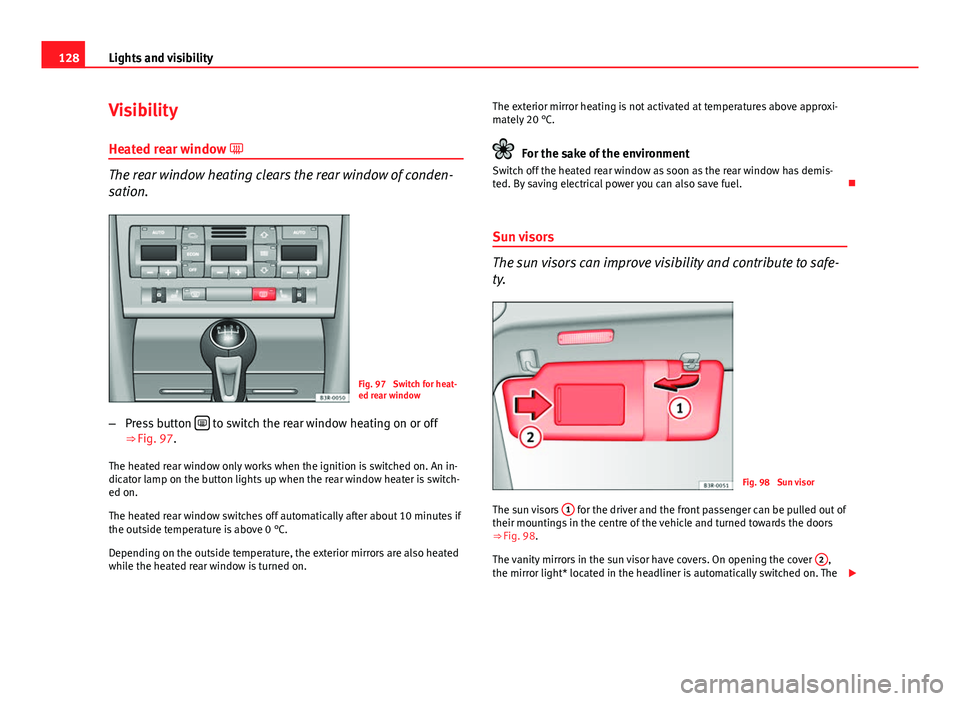
Fig. 97 Switch for heat-
ed rear window
– Press button
to switch the rear window heating on or off
⇒ Fig. 97.
The heated rear window only works when the ignition is switched on. An in-
dicator lamp on the button lights up when the rear window heater is switch-
ed on.
The heated rear window switches off automatically after about 10 minutes if
the outside temperature is above 0 °C.
Depending on the outside temperature, the exterior mirrors are also heated
while the heated rear window is turned on. The exterior mirror heating is not activated at temperatures above approxi-
mately 20 °C.
For the sake of the environment
Switch off the heated rear window as soon as the rear window has demis-
ted. By saving electrical power you can also save fuel.
Sun visors
The sun visors can improve visibility and contribute to safe-
ty.
Fig. 98 Sun visor
The sun visors 1
for the driver and the front passenger can be pulled out of
their mountings in the centre of the vehicle and turned towards the doors
⇒ Fig. 98.
The vanity mirrors in the sun visor have covers. On opening the cover 2
,
the mirror light* located in the headliner is automatically switched on. The
Page 132 of 327
130Lights and visibility
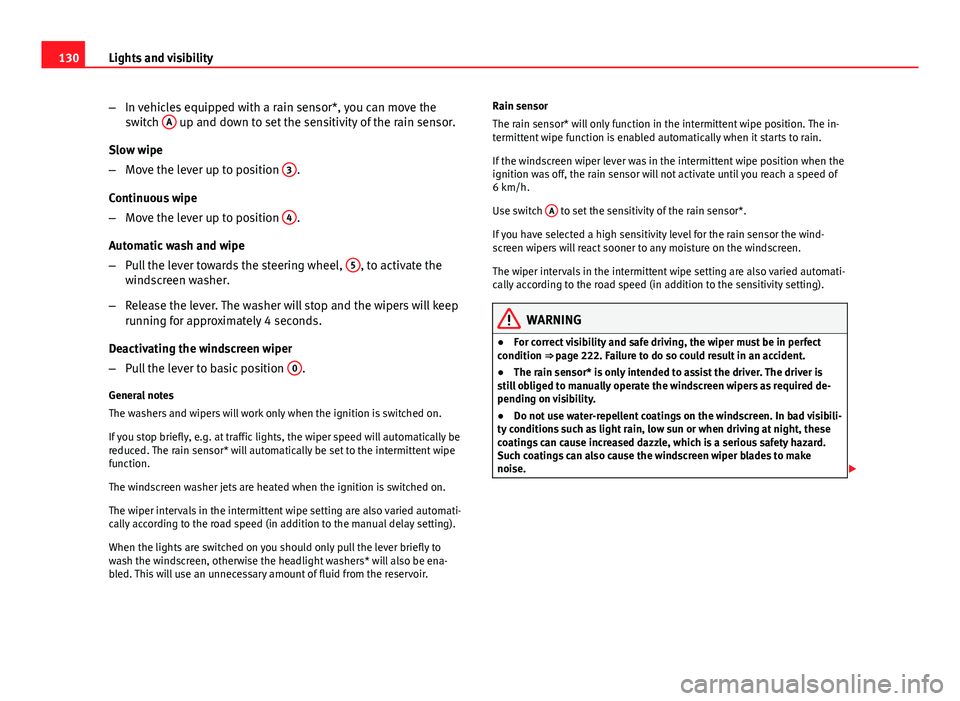
–In vehicles equipped with a rain sensor*, you can move the
switch A
up and down to set the sensitivity of the rain sensor.
Slow wipe
– Move the lever up to position 3
.
Continuous wipe
– Move the lever up to position 4
.
Automatic wash and wipe
– Pull the lever towards the steering wheel, 5
, to activate the
windscreen washer.
– Release the lever. The washer will stop and the wipers will keep
running for approximately 4 seconds.
Deactivating the windscreen wiper
– Pull the lever to basic position 0
.
General notes
The washers and wipers will work only when the ignition is switched on.
If you stop briefly, e.g. at traffic lights, the wiper speed will automatically be
reduced. The rain sensor* will automatically be set to the intermittent wipe
function.
The windscreen washer jets are heated when the ignition is switched on.
The wiper intervals in the intermittent wipe setting are also varied automati-
cally according to the road speed (in addition to the manual delay setting).
When the lights are switched on you should only pull the lever briefly to
wash the windscreen, otherwise the headlight washers* will also be ena-
bled. This will use an unnecessary amount of fluid from the reservoir. Rain sensor
The rain sensor* will only function in the intermittent wipe position. The in-
termittent wipe function is enabled automatically when it starts to rain.
If the windscreen wiper lever was in the intermittent wipe position when the
ignition was off, the rain sensor will not activate until you reach a speed of
6 km/h.
Use switch
A
to set the sensitivity of the rain sensor*.
If you have selected a high sensitivity level for the rain sensor the wind-
screen wipers will react sooner to any moisture on the windscreen.
The wiper intervals in the intermittent wipe setting are also varied automati-
cally according to the road speed (in addition to the sensitivity setting).
WARNING
● For correct visibility and safe driving, the wiper must be in perfect
condition ⇒ page 222. Failure to do so could result in an accident.
● The rain sensor* is only intended to assist the driver. The driver is
still obliged to manually operate the windscreen wipers as required de-
pending on visibility.
● Do not use water-repellent coatings on the windscreen. In bad visibili-
ty conditions such as light rain, low sun or when driving at night, these
coatings can cause increased dazzle, which is a serious safety hazard.
Such coatings can also cause the windscreen wiper blades to make
noise.
Page 134 of 327
132Lights and visibility
Deactivating the interval wipe function
–Pull the lever backwards until it returns to its original position.
The rear window wiper will start working automatically if reverse gear is en-
gaged while the windscreen wipers are switched on.
WARNING
For correct visibility and safe driving, the wiper must be in perfect condi-
tion ⇒ page 222. Failure to do so could result in an accident.
CAUTION
In icy conditions, always check that the wiper blades are not frozen to the
glass before using the windscreen wipers/rear window wiper. The wind-
screen wiper blades and even the windscreen wiper motor could be dam-
aged if you start the windscreen wipers/rear window wiper with the blades
frozen to the glass. Headlight washer system
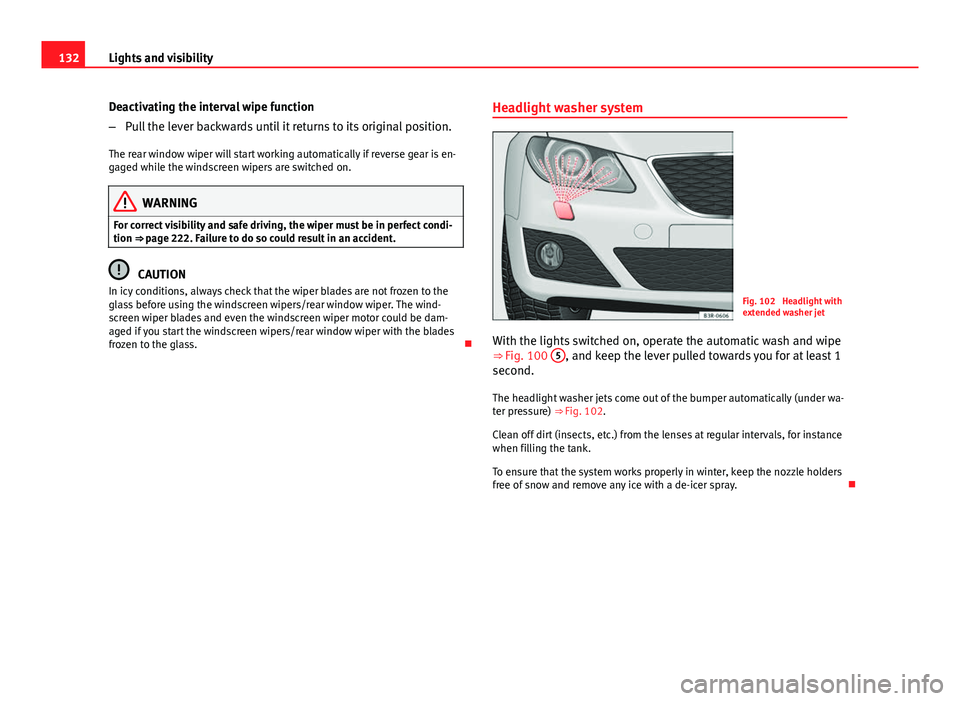
Fig. 102 Headlight with
extended washer jet
With the lights switched on, operate the automatic wash and wipe
⇒ Fig. 100 5
, and keep the lever pulled towards you for at least 1
second.
The headlight washer jets come out of the bumper automatically (under wa-
ter pressure) ⇒ Fig. 102.
Clean off dirt (insects, etc.) from the lenses at regular intervals, for instance
when filling the tank.
To ensure that the system works properly in winter, keep the nozzle holders
free of snow and remove any ice with a de-icer spray.
Page 135 of 327

133
Lights and visibility
Rear vision mirrors
Interior mirror with manual anti-dazzle setting
Normal setting
– Point the lever at the bottom of the mirror forwards.
Anti-dazzle setting for the interior mirror
– Position the small lever of the lower edge of the mirror to face
towards the rear.
Interior mirror with automatic anti-dazzle adjustment*
The automatic anti-dazzle function can be switched on and
off as desired.
Fig. 103 Interior mirror
with anti-dazzle setting:
Indicator lamp and on/off
switch Switching off the anti-dazzle function
–
Press button A
⇒ Fig. 103. Control lamp B goes off.
Switching on the anti-dazzle function
– Press button A
⇒ Fig. 103. Indicator lamp B turns on.
Anti-dazzle function
The anti-dazzle function is activated every time the ignition is switched on.
The green warning lamp lights up in the rear vision mirror housing.
When the anti-dazzle function is enabled, the interior rear vision mirror will
darken automatically according to the amount of light it receives. The anti-
dazzle function is disabled if:
● the interior lighting is switched on
● reverse gear is engaged
Sensors for automatic headlights*
When the light switch is set to the AUTO position, the dipped beam head-
lights are switched on and off automatically according to the ambient light
level with the aid of the sensors located in the interior mirror ⇒ page 118.
WARNING
Electrolyte fluid can leak from a broken mirror. This could cause irritation
to the skin, eyes and respiratory organs. If you come into contact with
this liquid, it must be rinsed with large quantities of water. Seek medical
assistance if needed!
CAUTION
Electrolyte fluid leaking from a broken mirror can cause damage to plastic
surfaces. Use a sponge or similar to remove the fluid as soon as possible.
Safety FirstOperating instructionsPractical TipsTechnical Specifications
Page 151 of 327
149
Seats and storage
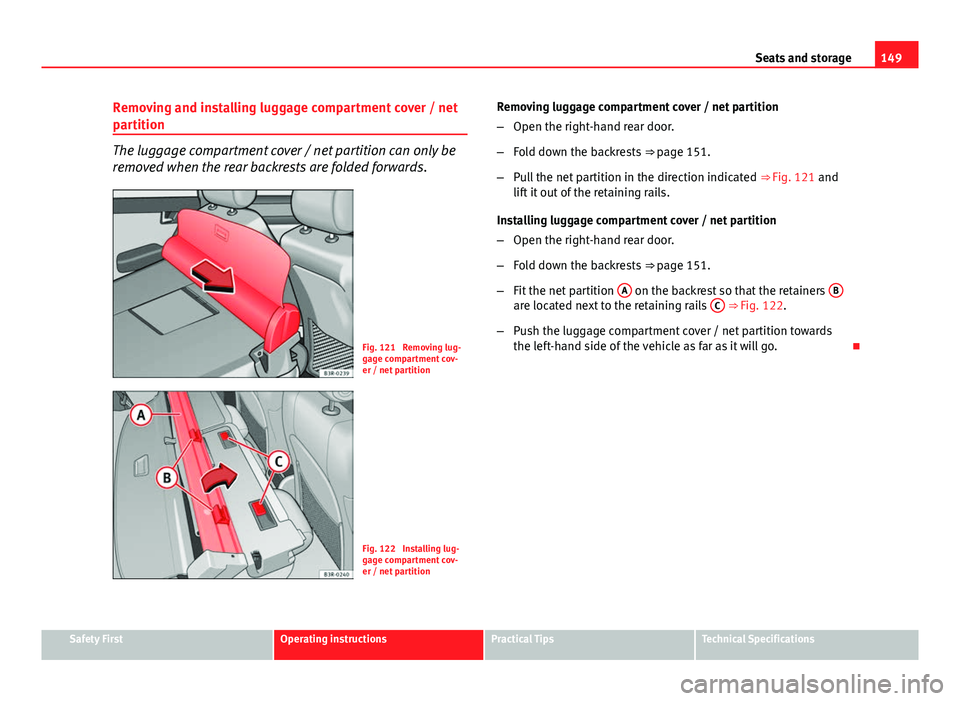
Removing and installing luggage compartment cover / net
partition
The luggage compartment cover / net partition can only be
removed when the rear backrests are folded forwards.
Fig. 121 Removing lug-
gage compartment cov-
er / net partition
Fig. 122 Installing lug-
gage compartment cov-
er / net partition Removing luggage compartment cover / net partition
–
Open the right-hand rear door.
– Fold down the backrests ⇒ page 151.
– Pull the net partition in the direction indicated ⇒ Fig. 121 and
lift it out of the retaining rails.
Installing luggage compartment cover / net partition
– Open the right-hand rear door.
– Fold down the backrests ⇒ page 151.
– Fit the net partition A
on the backrest so that the retainers Bare located next to the retaining rails C ⇒ Fig. 122.
– Push the luggage compartment cover / net partition towards
the left-hand side of the vehicle as far as it will go.
Safety FirstOperating instructionsPractical TipsTechnical Specifications
Page 152 of 327
150Seats and storage
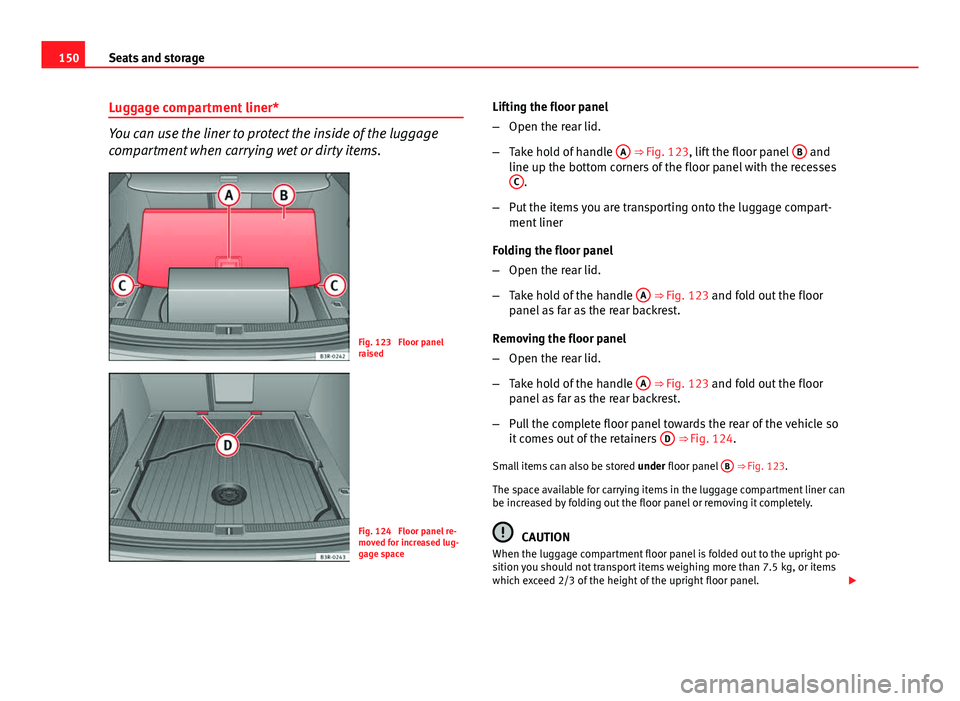
Luggage compartment liner*
You can use the liner to protect the inside of the luggage
compartment when carrying wet or dirty items.
Fig. 123 Floor panel
raised
Fig. 124 Floor panel re-
moved for increased lug-
gage space Lifting the floor panel
–
Open the rear lid.
– Take hold of handle A
⇒ Fig. 123, lift the floor panel B and
line up the bottom corners of the floor panel with the recesses C
.
– Put the items you are transporting onto the luggage compart-
ment liner
Folding the floor panel
– Open the rear lid.
– Take hold of the handle A
⇒ Fig. 123 and fold out the floor
panel as far as the rear backrest.
Removing the floor panel
– Open the rear lid.
– Take hold of the handle A
⇒ Fig. 123 and fold out the floor
panel as far as the rear backrest.
– Pull the complete floor panel towards the rear of the vehicle so
it comes out of the retainers D
⇒ Fig. 124.
Small items can also be stored under floor panel B
⇒ Fig. 123.
The space available for carrying items in the luggage compartment liner can
be increased by folding out the floor panel or removing it completely.
CAUTION
When the luggage compartment floor panel is folded out to the upright po-
sition you should not transport items weighing more than 7.5 kg, or items
which exceed 2/3 of the height of the upright floor panel.
Page 176 of 327

174Driving
The Electronic Stability Control (ESC) contains the electronic differential lock
(EDL) and the traction control system (ASR). The ESC works together with
the ABS. If a fault in the ABS occurs, both warning lamps light up, but if the
ESC fails, only the ESC warning lamp lights up.
The ESC system is started automatically when the engine is started.
The ESC system is always active and cannot be switched off. The ESC switch
only switches the ASR off.
The ASR can be deactivated when wheel spin is desirable.
For example:
● When driving with snow chains.
● When driving in deep snow or on loose surfaces.
● When the vehicle is stuck, to rock it backwards and forwards.
Press the button to switch the ASR back on when you no longer need wheel
spin.
Situations in which the warning lamp lights
●
On switching the ignition on, it lights up for about two seconds to carry
out a function control.
● The warning lamp will start flashing when the vehicle is moving if the
ESC or the ASR is activated.
● It will light up continuously if there is a fault in the ESC.
WARNING
● Do not forget that the Electronic stability control ESC cannot defy the
laws of physics. This should be kept in mind, particularly on slippery and
wet roads and when towing a trailer.
● Always adapt your driving style to suit the condition of the roads and
the traffic situation. The greater safety provided by the ESC should not
encourage you to run any risks.
● Please refer to the corresponding warning notes on ESC in
⇒ page 196, Intelligent technology.
Ignition lock Ignition key positions
The ignition key is used to start and stop the engine.
Fig. 146 Ignition key po-
sitions
Page 184 of 327
182Driving
Parking aid acoustic system
General notes
Various parking aid systems are available to help you when parking or ma-
noeuvring in tight spaces, depending on the equipment fitted on your vehi-
cle.
The SEAT Parking System gives an acoustic warning if there are any obsta-
cles behind your vehicle ⇒ page 182.
When you are parking, SEAT Parking System Plus warns you acoustically
and optically about obstacles in front of and behind the vehicle
⇒ page 183.
Note
To ensure the acoustic parking aid works properly, the sensors must be kept
clean and free of snow and ice.
SEAT Parking System*
SEAT Parking System is an acoustic parking aid.
Sensors are located in the rear bumper. When the sensors detect an obsta-
cle, you are alerted by audible warnings. The measuring range of the sen-
sors starts at approximately:
RearSide0.60 mCentre1.60 m
The audible warnings sound with increasing frequency as you approach the
obstacle. When the vehicle is less than 0.30 m away from the obstacle, the
warning tone will sound continuously. Do not drive on! The volume of the warning beeps will be gradually reduced after about 4
seconds if the vehicle remains at a constant distance from a detected obsta-
cle (it does not affect the permanent acoustic signal).
The parking aid is switched on automatically when reverse gear is engaged.
You will hear a brief confirmation tone.
WARNING
● The parking aid is not a replacement for driver awareness. The driver
is personally responsible for safe parking and other manoeuvres.
● The sensors have blind spots in which obstacles are not registered.
Always look out for small children and animals because the system will
not always detect them. Always pay attention when reversing to avoid ac-
cidents.
● Always keep a close eye on the area around the vehicle and make full
use of the rear vision mirrors.
CAUTION
Please note that low obstacles detected by the system may no longer be
registered by the sensors as the vehicle moves closer, so the system will not
give any further warning. Certain kinds of obstacles (such as wire fences,
chains, thin painted posts or trailer draw bars, etc) may not always be de-
tected by the system, so take care not to damage the vehicle in such cases.
Note
● Please refer to the notes on towing ⇒ page 184.