instrument panel Seat Exeo ST 2013 Owner's Guide
[x] Cancel search | Manufacturer: SEAT, Model Year: 2013, Model line: Exeo ST, Model: Seat Exeo ST 2013Pages: 327, PDF Size: 5.07 MB
Page 81 of 327

79
Cockpit
The red symbol indicates danger, whereas the yellow one represents a
warning. Additional messages for the driver may be shown with the red or
yellow symbols.
Driver messages
Additional messages for the driver are displayed together
with the warning symbols on the instrument panel.
Fig. 54 Instrument pan-
el: CHECK button
Driver messages and red symbols
If a red warning symbol appears on the display, you can press the CHECK
button ⇒ Fig. 54 to call up an additional driver message.
For example: in the event of an oil pressure malfunction, the oil pressure
symbol
will appear in the display. If you now press the CHECK
button,
the following message will appear in the display:
Switch off engine, check oil level The message will disappear from the display after about 5 seconds. If re-
quired, the message can be called up again by briefly pressing the
CHECK
button.
Driver messages and yellow symbols
If a yellow warning symbol appears in the display, it will automatically be
accompanied by the corresponding driver message.
For example, the symbol
is displayed to indicate that the windscreen
washer fluid level is low. In addition, the following message will appear:
Top up washer fluid
The message will disappear after a few seconds. If required, the message
can be called up again by briefly pressing the CHECK
button.
Note
● The messages handbrake on and when stationary apply footbrake to se-
lect gear cannot be called up a second time. They will remain in the display
until the handbrake is released or until a gear is selected.
Handbrake warning
– Release the handbrake.
If you drive by mistake with the handbrake still applied, you will hear a
warning buzzer and the display will show the message: Handbrake on
The handbrake warning switches on after driving for 3 seconds at speeds
above 5 km/h.
Safety FirstOperating instructionsPractical TipsTechnical Specifications
Page 85 of 327
83
Cockpit
Yellow symbols are used to indicate a Priority 2 fault (warning).
Yellow symbols are accompanied by one warning buzzer. The function indi-
cated should be checked as soon as possible. If several Priority 2 faults are
detected at the same time, the symbols are displayed one after the other for
about 2 seconds at a time.
Brake light failure
This warning light will appear on the upper part of the display if any of the
brake lights has failed. A text message in the central part of the display indi-
cates which brake light has failed (left or right).
Fuel level low
When this symbol comes on for the first time, there are about 8 to 10 li-
tres of fuel left in the tank. You should fill up as soon as possible
⇒ page 232.
Engine speed governing
Max. engine speed XXXX rpm
There is a fault in the engine management. In addition, the warning lamp
on the instrument panel will light up. The engine speed will be governed to
the speed displayed in the driver information system. Please ensure that
the engine speed does not exceed the speed shown (for example, when
changing down a gear).
Take the vehicle to a specialised workshop immediately to have the fault re-
paired. Checking the engine oil level
If the symbol lights up, please check the engine oil level as soon as pos-
sible ⇒ page 239. Top up the oil at the next opportunity ⇒ page 240.
Engine oil sensor defective*
If the symbol lights up, take the vehicle to a specialised workshop and
have the oil level sensor checked. Until then it is advisable to check the oil
level every time you fill up with fuel ⇒ page 239.
Diesel particulate filter obstructed
If the symbol lights up, you can contribute towards automatic filter
cleaning by driving in the right manner. To do this, drive about 15 minutes
in 4th or 5th gear (automatic gearbox: S gear range) at a speed of 60 km/h,
with the engine running at approximately 2,000 rpm. The increase in tem-
perature will burn off any soot in the filter. When cleaning is successful, the
symbol switches off.
If the symbol does not turn off, or the three lamps turn on (particulate
filter , emission control system fault and heaters ), take the vehicle
to a specialised workshop to repair the fault.
For further information on the diesel particulate filter, see ⇒ page 204.
WARNING
It is essential that you adjust your speed to suit the weather, road, ter-
rain and traffic conditions. The recommended driving speed must never
lead to the driver disregarding the traffic regulations.
Safety FirstOperating instructionsPractical TipsTechnical Specifications
Page 87 of 327
85
Cockpit
Bulb monitor
The bulb monitor checks whether the lights on the vehicle
are working.
If a defective bulb is detected, or if one of the lights has failed for any rea-
son, the bulb monitor symbol will appear in the display together with an
additional message (which goes out after 5 seconds). For instance, if the
rear left turn signal is not working, the display in the instrument panel will
show the following message:
Left rear turn signal
The message disappears after 5 seconds. Press the CHECK button briefly if
you wish to call up the message again.
If the display indicates that one of the lights is not working, this can have a
number of causes:
● Bulb failure ⇒ page 274.
● A blown fuse ⇒ page 273.
● Faulty electrical wiring.
It is not necessary to have lamps replaced in a specialised workshop, how-
ever the use of Xenon lamps is recommended.
LED lamps
If any of the LED (Light Emitting Diode) functions fail, the complete lamp
should be replaced.
The failure of the lamp is only shown when the LED function goes out com-
pletely. Sometimes, a LED will stop working, without displaying the warning
as the function continues to operate.WARNING
● Bulbs are highly sensitive to pressure. The glass can break when you
touch the bulb, causing injury.
● The high voltage element of gas discharge bulbs* (xenon light) must
be handled correctly. Otherwise, there is a risk of death.
Speed warning* Introduction
The speed warning function can help prevent you exceeding
a particular pre-set maximum speed.
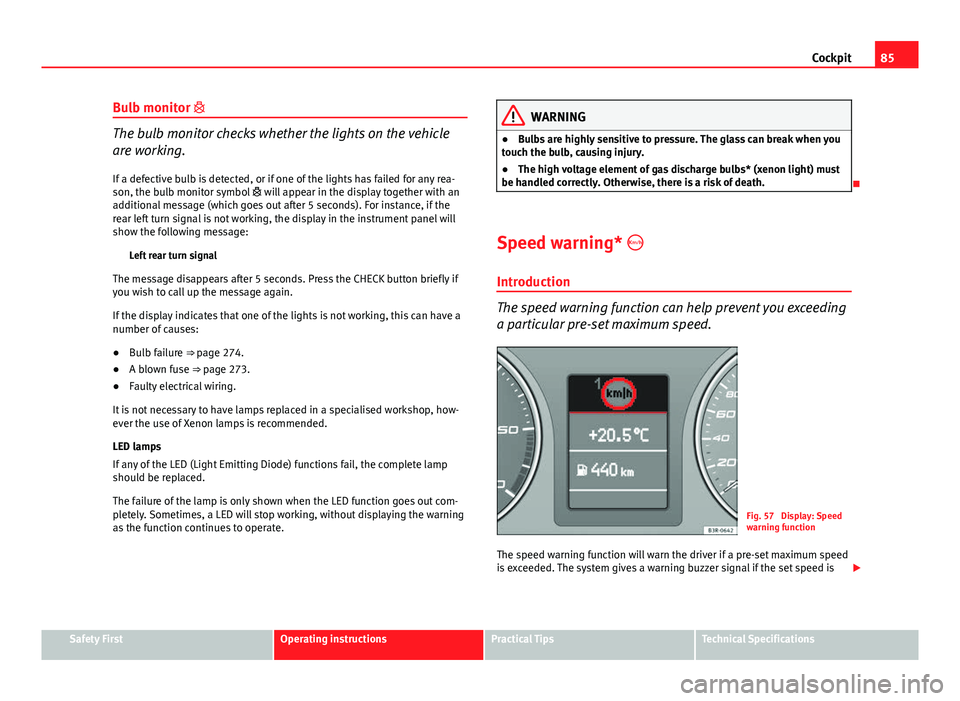
Fig. 57 Display: Speed
warning function
The speed warning function will warn the driver if a pre-set maximum speed
is exceeded. The system gives a warning buzzer signal if the set speed is
Safety FirstOperating instructionsPractical TipsTechnical Specifications
Page 88 of 327
86Cockpit
exceeded by about 10 km/h (6 mph). A warning symbol will also appear in
the display ⇒ Fig. 57.
The speed warning function has two different warning speeds, which oper-
ate independently and serve slightly different purposes:
Speed limit warning 1
With speed limit warning 1, the maximum speed can be changed while driv-
ing. The speed limit that has been set remains stored until the ignition is
switched off, or until it is changed or cleared.
The warning symbol for speed limit warning 1 ⇒ Fig. 57 will appear in the
display if you exceed the pre-set speed. It goes out again if the speed is re-
duced below the set speed limit.
The symbol also goes out if the speed is increased to more than about
40 km/h above the set speed for at least 10 seconds. However, this does
not cancel the speed limit that was originally set.
Setting speed limit warning 1 ⇒ page 86.
Speed limit warning 2
With speed limit warning 2, the speed limit can only be changed or cleared
when the ignition is switched off. You are recommended to store this speed
limit warning if you always wish to be reminded of a particular speed limit.
This could be when driving in countries with general speed limits, or if a
particular speed should not be exceeded when winter tyres are fitted etc.
The speed limit warning symbol for speed warning 2 will appear in the
display if you exceed the pre-set speed. Unlike speed limit warning 1, the
warning symbol only goes out once the road speed has dropped below the
set value again.
Setting speed limit warning 2 ⇒ page 87.
Note
Please bear in mind that, even with the speed warning function, it is still im-
portant to keep an eye on the vehicle speed with the speedometer and to
observe the legal speed limits.
Setting speed limit warning 1
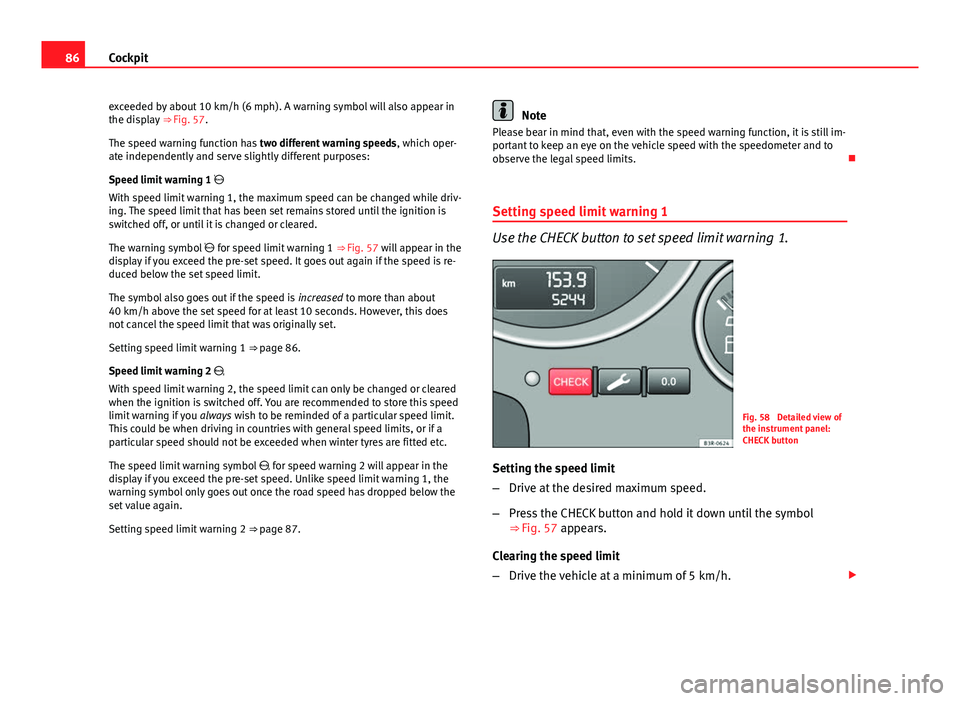
Use the CHECK button to set speed limit warning 1.
Fig. 58 Detailed view of
the instrument panel:
CHECK button
Setting the speed limit
– Drive at the desired maximum speed.
– Press the CHECK button and hold it down until the symbol
⇒ Fig. 57 appears.
Clearing the speed limit
– Drive the vehicle at a minimum of 5 km/h.
Page 89 of 327
87
Cockpit
– Press the CHECK button for at least two seconds.
The speed warning symbol lights up briefly in the display when the but-
ton is released to confirm that the selected speed has been stored. The
speed limit that has been selected remains stored until another speed is se-
lected with a brief push of the button, or until the memory is cleared with a
long push of the button.
Setting speed limit warning 2
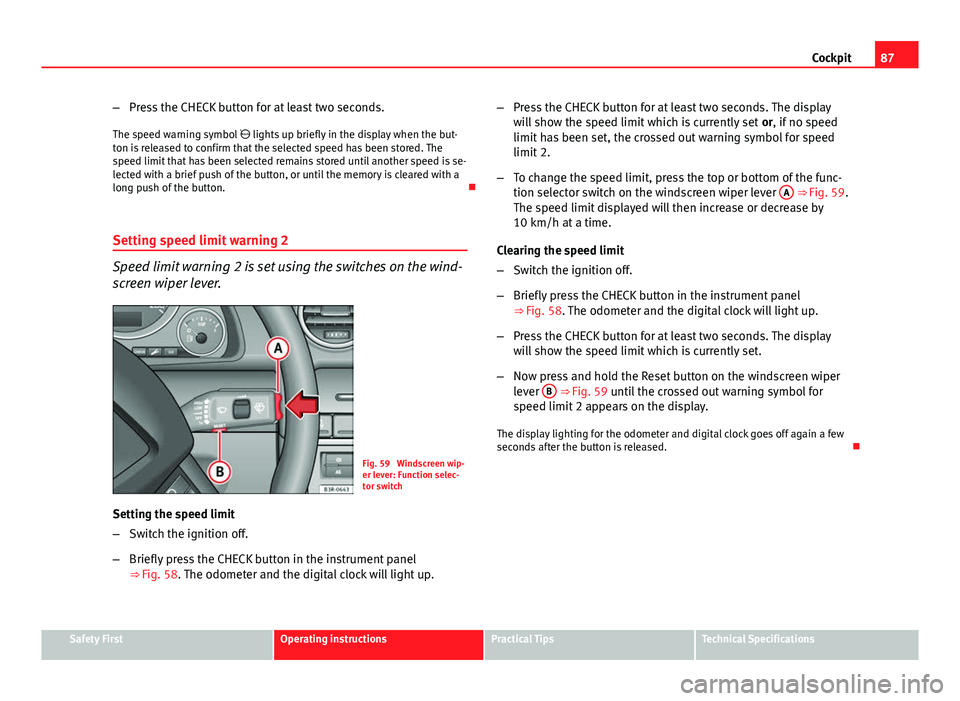
Speed limit warning 2 is set using the switches on the wind-
screen wiper lever.
Fig. 59 Windscreen wip-
er lever: Function selec-
tor switch
Setting the speed limit
– Switch the ignition off.
– Briefly press the CHECK button in the instrument panel
⇒ Fig. 58. The odometer and the digital clock will light up. –
Press the CHECK button for at least two seconds. The display
will show the speed limit which is currently set or, if no speed
limit has been set, the crossed out warning symbol for speed
limit 2.
– To change the speed limit, press the top or bottom of the func-
tion selector switch on the windscreen wiper lever A
⇒ Fig. 59.
The speed limit displayed will then increase or decrease by
10 km/h at a time.
Clearing the speed limit
– Switch the ignition off.
– Briefly press the CHECK button in the instrument panel
⇒ Fig. 58. The odometer and the digital clock will light up.
– Press the CHECK button for at least two seconds. The display
will show the speed limit which is currently set.
– Now press and hold the Reset button on the windscreen wiper
lever B
⇒ Fig. 59 until the crossed out warning symbol for
speed limit 2 appears on the display.
The display lighting for the odometer and digital clock goes off again a few
seconds after the button is released.
Safety FirstOperating instructionsPractical TipsTechnical Specifications
Page 94 of 327
92Cockpit
Controlling the menu
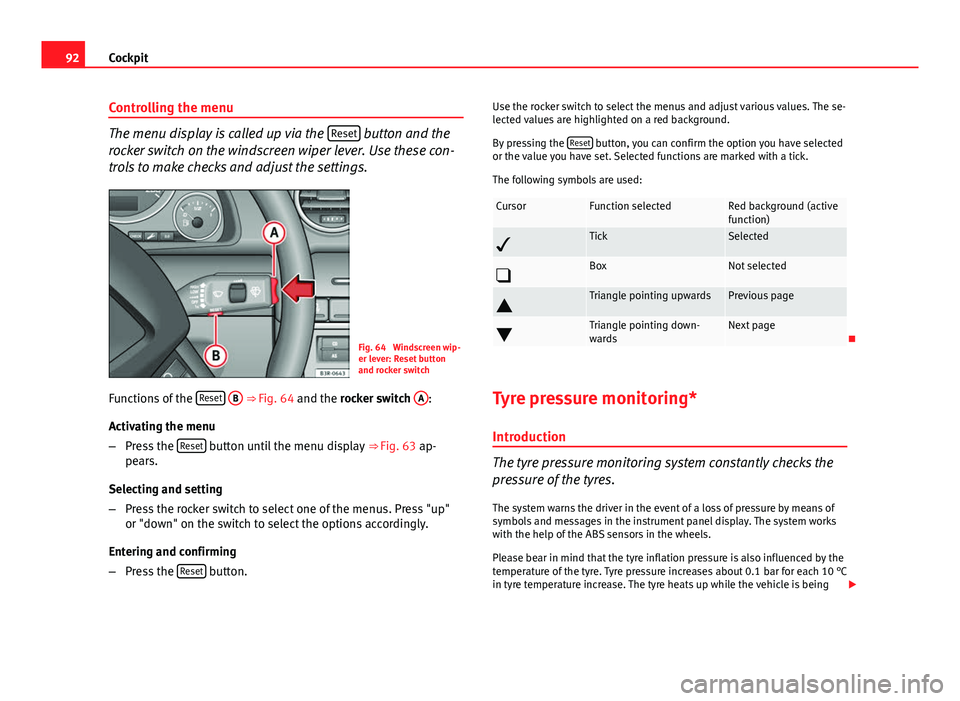
The menu display is called up via the Reset button and the
rocker switch on the windscreen wiper lever. Use these con-
trols to make checks and adjust the settings.
Fig. 64 Windscreen wip-
er lever: Reset button
and rocker switch
Functions of the Reset
B ⇒
Fig. 64 and the rocker switch A:
Activating the menu
– Press the Reset
button until the menu display
⇒ Fig. 63 ap-
pears.
Selecting and setting
– Press the rocker switch to select one of the menus. Press "up"
or "down" on the switch to select the options accordingly.
Entering and confirming
– Press the Reset
button. Use the rocker switch to select the menus and adjust various values. The se-
lected values are highlighted on a red background.
By pressing the
Reset
button, you can confirm the option you have selected
or the value you have set. Selected functions are marked with a tick.
The following symbols are used:
CursorFunction selectedRed background (active
function)
TickSelected
BoxNot selected
Triangle pointing upwardsPrevious page
Triangle pointing down-
wardsNext page
Tyre pressure monitoring* Introduction
The tyre pressure monitoring system constantly checks the
pressure of the tyres.
The system warns the driver in the event of a loss of pressure by means of
symbols and messages in the instrument panel display. The system works
with the help of the ABS sensors in the wheels.
Please bear in mind that the tyre inflation pressure is also influenced by the
temperature of the tyre. Tyre pressure increases about 0.1 bar for each 10 °C
in tyre temperature increase. The tyre heats up while the vehicle is being
Page 108 of 327
106Opening and closing
Rear lid
Rear lid: opening and closing
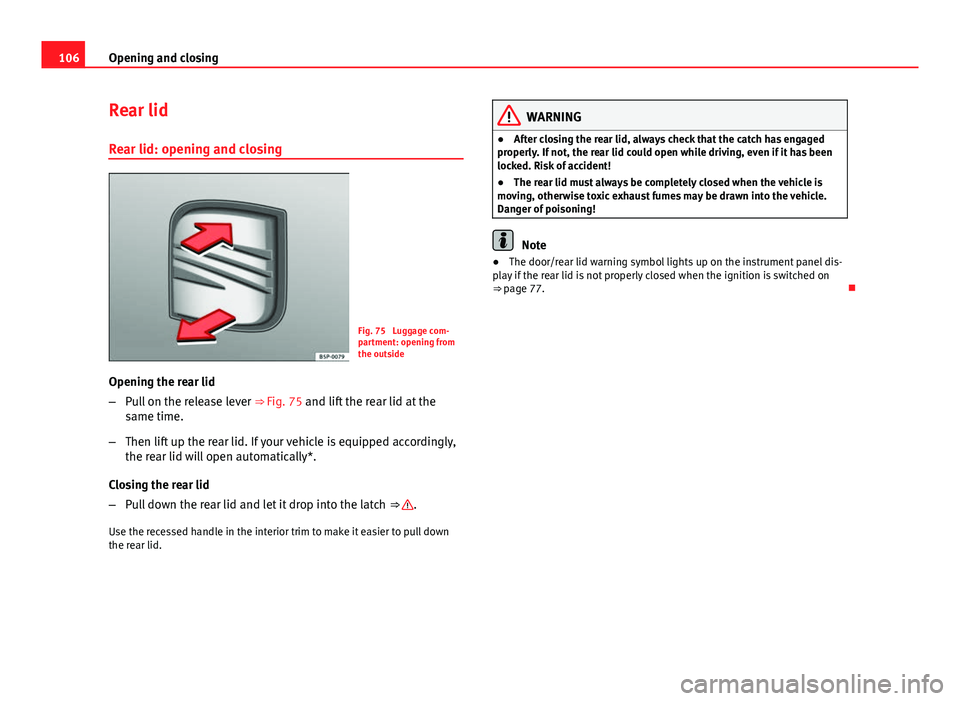
Fig. 75 Luggage com-
partment: opening from
the outside
Opening the rear lid
– Pull on the release lever ⇒ Fig. 75 and lift the rear lid at the
same time.
– Then lift up the rear lid. If your vehicle is equipped accordingly,
the rear lid will open automatically*.
Closing the rear lid
– Pull down the rear lid and let it drop into the latch ⇒
.
Use the recessed handle in the interior trim to make it easier to pull down
the rear lid.
WARNING
● After closing the rear lid, always check that the catch has engaged
properly. If not, the rear lid could open while driving, even if it has been
locked. Risk of accident!
● The rear lid must always be completely closed when the vehicle is
moving, otherwise toxic exhaust fumes may be drawn into the vehicle.
Danger of poisoning!
Note
● The door/rear lid warning symbol lights up on the instrument panel dis-
play if the rear lid is not properly closed when the ignition is switched on
⇒ page 77.
Page 121 of 327
119
Lights and visibility
● The warning symbol will appear on the instrument panel if a malfunc-
tion occurs ⇒ page 84.
● Observe all relevant legal requirements when using the signalling and
lighting systems described here.
Front fog lights
The light switch can also be used to turn on the front fog
lights.
Switching on the front fog lights
– Do ⇒ Fig. 84 not turn the light switch to the symbol .
– First turn the light switch to the position or .
– Then pull the light switch out to the first stop 1
.
The front fog light symbol next to the switch will light up when the front
fog lights are on.
Rear fog light
The light switch can also be used to turn on the rear fog
light.
– Do ⇒ Fig. 84 not turn the light switch to the symbol .
– First turn the light switch ⇒ Fig. 84 to the position or .
– Then pull out the light switch to the second stop 2
to switch
on the rear fog light. The symbols
and next to the switch will light up when the rear fog light
is switched on.
If you are towing a trailer or caravan equipped with a rear fog light on a vehi-
cle with a factory-fitted towing bracket*, only the rear fog light on the trailer
or caravan will light up.
CAUTION
To avoid dazzling the traffic behind you, the rear fog light should only be
used in accordance with legal regulations.
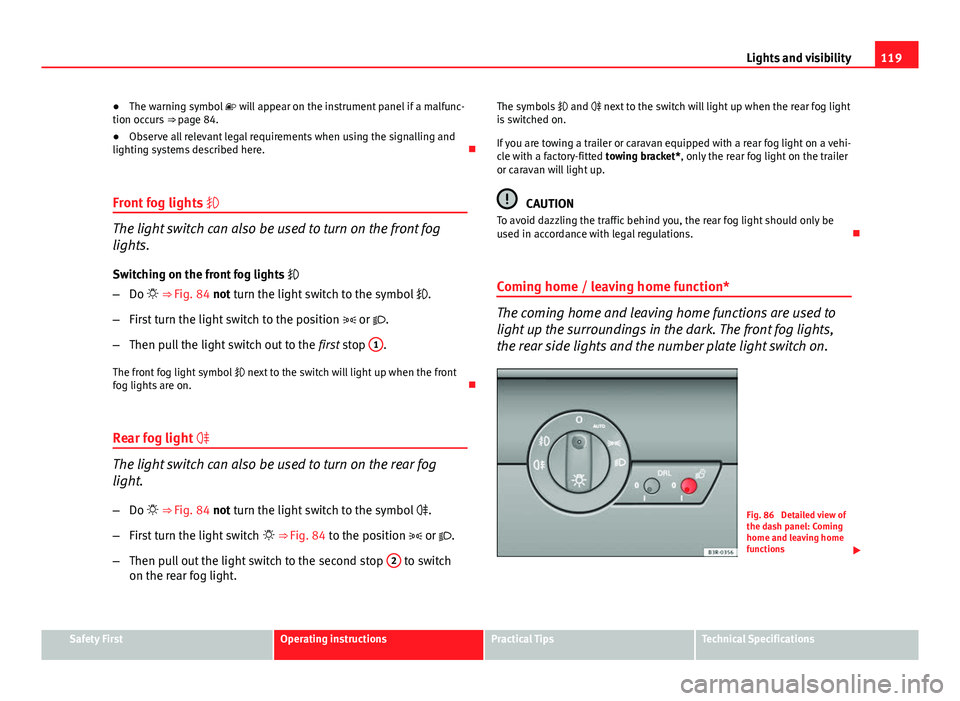
Coming home / leaving home function*
The coming home and leaving home functions are used to
light up the surroundings in the dark. The front fog lights,
the rear side lights and the number plate light switch on.
Fig. 86 Detailed view of
the dash panel: Coming
home and leaving home
functions
Safety FirstOperating instructionsPractical TipsTechnical Specifications
Page 123 of 327

121
Lights and visibility
Instrument lighting
The brightness of the instrument lighting, displays and cen-
tre console lighting can be varied as required.
Fig. 87 Instrument panel
lighting
– Press the +
button to increase the brightness.
– Press the -
button to reduce the brightness.
With the ignition switched on
The lighting of the digital displays will adjust automatically, depending on
the ambient light.
With the vehicle's lights switched on
When the vehicle's lights are switched on, the brightness of the instrument
lighting, displays and centre console lighting can be varied by pressing the +
and - buttons. Headlight range control
When the dipped beam headlights are switched on, the
range of the headlights can be adjusted to suit the load of
the vehicle.
Fig. 88 Headlight range
control
– Briefly press the knob ⇒ Fig. 88 to release it from its set posi-
tion.
– Turn the knob to the required setting.
– Press the knob in again to prevent the setting from being
changed unintentionally.
Settings
The settings roughly correspond to the following load conditions: Two front occupants, luggage compartment empty
All seats occupied, luggage compartment empty
O
1
Safety FirstOperating instructionsPractical TipsTechnical Specifications
Page 127 of 327

125
Lights and visibility
Main beam headlights
– Press the lever forward to switch on the main beams.
– Pull the lever back towards you to switch the main beam head-
lights off again.
Headlight flasher
– Pull the lever towards the steering wheel to operate the flasher.
Parking light
– Switch the ignition off.
– Move the lever up or down to turn on the right or left-hand park-
ing lights respectively.
Notes on these functions
● The turn signals only work when the ignition is switched on. The turn
signal lamp or flashes in the instrument panel when the turns signals
⇒ page 67 are working.
● The turn signals are cancelled automatically when the steering wheel is
returned to the straight-ahead position.
● The main beam headlights can only be switched on if the dipped beam
headlights are already on. The main beam headlight indicator lamp then
comes on in the instrument panel.
● The headlight flasher comes on for as long as you pull the lever, even if
no other lights are switched on. The main beam headlight indicator lamp
then comes on in the instrument panel.
● When the parking lights are switched on, the headlight and the tail light
on one side of the vehicle light up with reduced intensity. The parking lights
will only work with the ignition off.
CAUTION
Never use the main beam headlights or the headlight flasher if this would
dazzle oncoming traffic.
Interior lights
Front interior lights and glove compartment light
The front interior light also incorporates the reading lights
for the driver and passenger.
Fig. 93 Detail of headlin-
er: front interior lights
The rocker switch A
⇒
Fig. 93 for the front interior light has the
following functions:
Door light position
– Move switch A
to the centre position.
Safety FirstOperating instructionsPractical TipsTechnical Specifications