warning Seat Exeo ST 2013 Service Manual
[x] Cancel search | Manufacturer: SEAT, Model Year: 2013, Model line: Exeo ST, Model: Seat Exeo ST 2013Pages: 327, PDF Size: 5.07 MB
Page 56 of 327
54Child safety
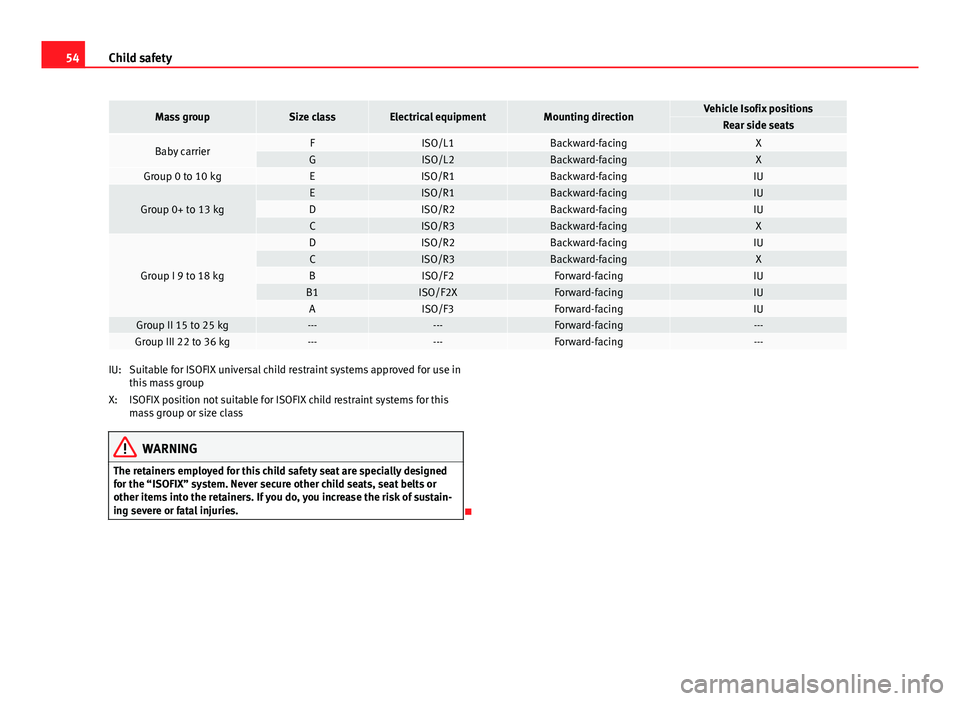
Mass groupSize classElectrical equipmentMounting directionVehicle Isofix positionsRear side seats
Baby carrierFISO/L1Backward-facingXGISO/L2Backward-facingXGroup 0 to 10 kgEISO/R1Backward-facingIU
Group 0+ to 13 kgEISO/R1Backward-facingIUDISO/R2Backward-facingIUCISO/R3Backward-facingX
Group I 9 to 18 kg
DISO/R2Backward-facingIUCISO/R3Backward-facingXBISO/F2Forward-facingIUB1ISO/F2XForward-facingIUAISO/F3Forward-facingIUGroup II 15 to 25 kg------Forward-facing---Group III 22 to 36 kg------Forward-facing---
Suitable for ISOFIX universal child restraint systems approved for use in
this mass group
ISOFIX position not suitable for ISOFIX child restraint systems for this
mass group or size class
WARNING
The retainers employed for this child safety seat are specially designed
for the “ISOFIX” system. Never secure other child seats, seat belts or
other items into the retainers. If you do, you increase the risk of sustain-
ing severe or fatal injuries.
IU:
X:
Page 57 of 327

55
Child safety
Top Tether retainer straps
Some child restraint seats have a third Top Tether anchoring
point, apart from both “ISOFIX” anchoring points, which al-
low better child retention.
Fig. 35 Position of the
Top Tether rings on the
rear tray
The Top Tether system has an upper strap for attachment to the vehicle's
upper anchoring point, which is found on the rear luggage compartment
cover.
The retainer strap is used to reduce forwards movements of the safety seat
in a crash, helping reduce the risk of injuries to the head from hitting the
inside of the vehicle.
It is foreseen that an EU Directive will introduce requirements related to the
retention of child restraint systems by means of ISOFIX and Top Tether an-
chorages (probably compulsory for new types from 2010), which will entail
improved retention of the child restraint seat and less head movement in
case of frontal collisions. Use of retainer straps on rear-facing seats
At present there are very few rear-facing child safety seats fitted with a re-
tainer strap. Please carefully read and follow the safety seat manufacturer's
instructions for information on how to install the retainer strap properly.
WARNING
An undue installation of the safety seat will increase the risk of injury in
the event of a crash.
● Never tie the retainer strap to a hook in the luggage compartment.
● Never secure or tie luggage or other items to the lower anchorages
(ISOFIX) or the upper ones (Top Tether).
Fitting the Top Tether child restraint to the anchoring point
Fig. 36 Retainer strap:
correct adjustment and
fitting
Safety FirstOperating instructionsPractical TipsTechnical Specifications
Page 58 of 327
56Child safety
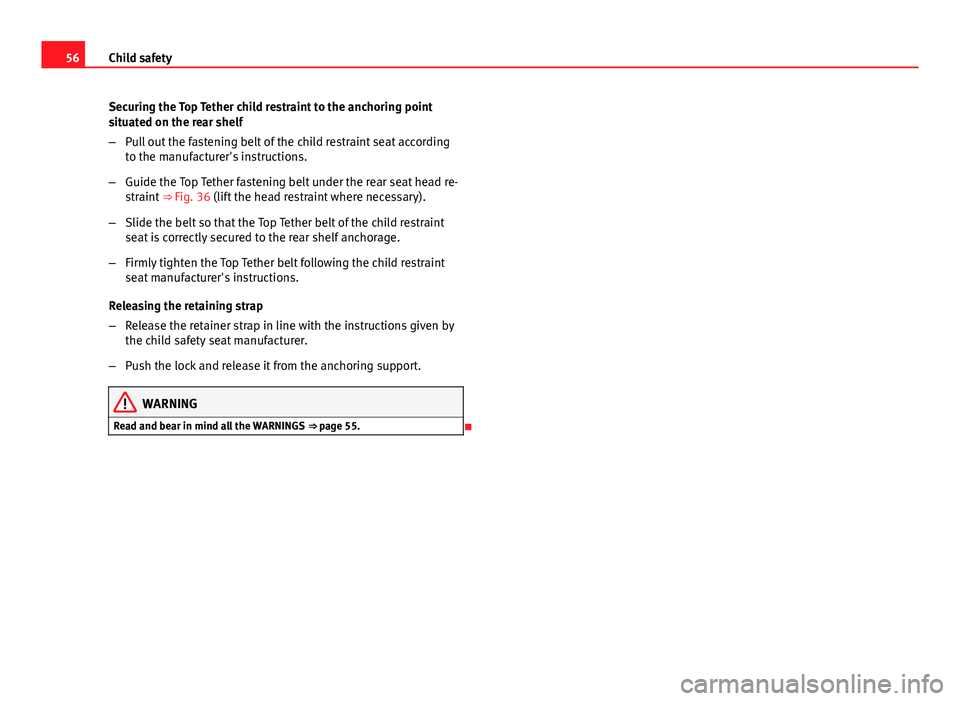
Securing the Top Tether child restraint to the anchoring point
situated on the rear shelf
–Pull out the fastening belt of the child restraint seat according
to the manufacturer's instructions.
– Guide the Top Tether fastening belt under the rear seat head re-
straint ⇒ Fig. 36 (lift the head restraint where necessary).
– Slide the belt so that the Top Tether belt of the child restraint
seat is correctly secured to the rear shelf anchorage.
– Firmly tighten the Top Tether belt following the child restraint
seat manufacturer's instructions.
Releasing the retaining strap
– Release the retainer strap in line with the instructions given by
the child safety seat manufacturer.
– Push the lock and release it from the anchoring support.
WARNING
Read and bear in mind all the WARNINGS ⇒ page 55.
Page 61 of 327

59
Cockpit
Operating instructions Cockpit
Overview Dash panel overview
Electric windows . . . . . . . . . . . . . . . . . . . . . . . . . . . . . . . . . . . . . . . . . . 112
Door handle
Central locking switch . . . . . . . . . . . . . . . . . . . . . . . . . . . . . . . . . . . . . 103
Electric control for exterior mirrors . . . . . . . . . . . . . . . . . . . . . . . . .134
Air outlets with thumbwheel . . . . . . . . . . . . . . . . . . . . . . . . . . . . . . . 170
Light switch . . . . . . . . . . . . . . . . . . . . . . . . . . . . . . . . . . . . . . . . . . . . . . . 117
Lever for turn signals and main beam headlights . . . . . . . . . . .124
Instrument panel . . . . . . . . . . . . . . . . . . . . . . . . . . . . . . . . . . . . . . . . . . 61
Levers and switches for:
– Windscreen wipers and washer . . . . . . . . . . . . . . . . . . . . . . . . . . 129
– On-board computer . . . . . . . . . . . . . . . . . . . . . . . . . . . . . . . . . . . . . 88
– Menu display . . . . . . . . . . . . . . . . . . . . . . . . . . . . . . . . . . . . . . . . . . . 91
Ignition lock . . . . . . . . . . . . . . . . . . . . . . . . . . . . . . . . . . . . . . . . . . . . . . 174
Depending on equipment fitted:
– Electronic Stability Control (ESC) . . . . . . . . . . . . . . . . . . . . . . . .71
– Start-Stop switch . . . . . . . . . . . . . . . . . . . . . . . . . . . . . . . . . . . . . . . 177
– Warning lamp indicating that front passenger airbag has
been disabled . . . . . . . . . . . . . . . . . . . . . . . . . . . . . . . . . . . . . . . . . . 45
– Switch for acoustic parking aid . . . . . . . . . . . . . . . . . . . . . . . . . . 182
Hazard warning lights . . . . . . . . . . . . . . . . . . . . . . . . . . . . . . . . . . . . . 123
123456789
1011
12
Drink holder
. . . . . . . . . . . . . . . . . . . . . . . . . . . . . . . . . . . . . . . . . . . . . . 154
Storage compartment
Depending on equipment fitted: Sound system or navigation
system
Lockable glove compartment . . . . . . . . . . . . . . . . . . . . . . . . . . . . . . 160
Front passenger airbag . . . . . . . . . . . . . . . . . . . . . . . . . . . . . . . . . . . . 33
Air conditioner . . . . . . . . . . . . . . . . . . . . . . . . . . . . . . . . . . . . . . . . . . . . 165
Switch for heated rear window . . . . . . . . . . . . . . . . . . . . . . . . . . . . . 128
Thumbwheel for seat heating . . . . . . . . . . . . . . . . . . . . . . . . . . . . . . 172
Ashtray . . . . . . . . . . . . . . . . . . . . . . . . . . . . . . . . . . . . . . . . . . . . . . . . . . . 155
Manual gear lever
Cigarette lighter/Power socket . . . . . . . . . . . . . . . . . . . . . . . . . . . . . 155
Auxiliary socket
Tyre pressure monitoring . . . . . . . . . . . . . . . . . . . . . . . . . . . . . . . . . . 69
Storage compartment
Handbrake . . . . . . . . . . . . . . . . . . . . . . . . . . . . . . . . . . . . . . . . . . . . . . . . 180
Seat memory* . . . . . . . . . . . . . . . . . . . . . . . . . . . . . . . . . . . . . . . . . . . . 140
Bonnet lock release . . . . . . . . . . . . . . . . . . . . . . . . . . . . . . . . . . . . . . . 235
Headlight range control . . . . . . . . . . . . . . . . . . . . . . . . . . . . . . . . . . . 121
– coming home and leaving home: delayed lights off and
anticipated lights on function . . . . . . . . . . . . . . . . . . . . . . . . . . . 119
Lever for cruise control . . . . . . . . . . . . . . . . . . . . . . . . . . . . . . . . . . . . 184
131415
161718192021222324252627282930
31
Safety FirstOperating instructionsPractical TipsTechnical Specifications
Page 63 of 327

61
Cockpit
Instruments Instrument panel overview
The instrument panel is the driver's information centre.
Fig. 38 Overview of instrument panel Coolant temperature gauge . . . . . . . . . . . . . . . . . . . . . . . . . . . . . . . . 62
Rev counter incorporating digital clock and date . . . . . . . . . . . .63, 63
Warning and indicator lamps . . . . . . . . . . . . . . . . . . . . . . . . . . . . . . 67
Speedometer (incorporating odometer display) . . . . . . . . . . . . .65
Fuel gauge . . . . . . . . . . . . . . . . . . . . . . . . . . . . . . . . . . . . . . . . . . . . . . . . 65
1
2345
Adjuster buttons for
–
Digital clock and date . . . . . . . . . . . . . . . . . . . . . . . . . . . . . . . . . . . 63
– Instrument lighting . . . . . . . . . . . . . . . . . . . . . . . . . . . . . . . . . . . . . 64
Digital display with
– Service interval display . . . . . . . . . . . . . . . . . . . . . . . . . . . . . . . . . 77
– Driver information system . . . . . . . . . . . . . . . . . . . . . . . . . . . . . . . 74
6
7
Safety FirstOperating instructionsPractical TipsTechnical Specifications
Page 64 of 327
62Cockpit
CHECK button . . . . . . . . . . . . . . . . . . . . . . . . . . . . . . . . . . . . . . . . . . . . . 66
Call-up button for service indicator . . . . . . . . . . . . . . . . . . . . . . . . .77
Reset button for trip recorder . . . . . . . . . . . . . . . . . . . . . . . . . . . . . . 65
Coolant temperature gauge
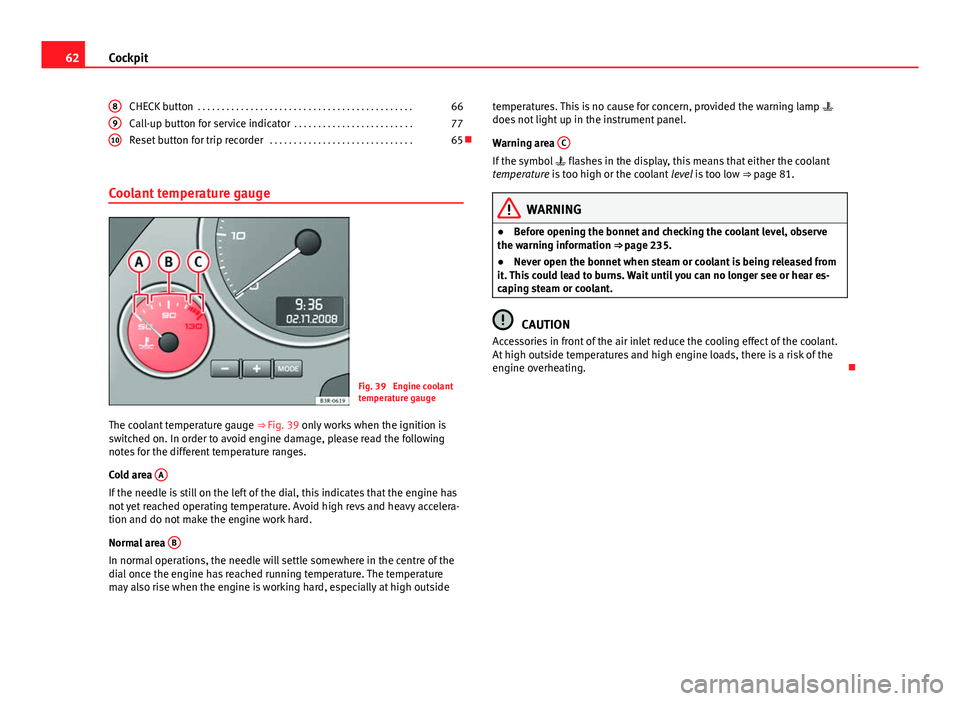
Fig. 39 Engine coolant
temperature gauge
The coolant temperature gauge ⇒ Fig. 39 only works when the ignition is
switched on. In order to avoid engine damage, please read the following
notes for the different temperature ranges.
Cold area A
If the needle is still on the left of the dial, this indicates that the engine has
not yet reached operating temperature. Avoid high revs and heavy accelera-
tion and do not make the engine work hard.
Normal area B
In normal operations, the needle will settle somewhere in the centre of the
dial once the engine has reached running temperature. The temperature
may also rise when the engine is working hard, especially at high outside8
910
temperatures. This is no cause for concern, provided the warning lamp
does not light up in the instrument panel.
Warning area C
If the symbol
flashes in the display, this means that either the coolant
temperature is too high or the coolant level is too low ⇒ page 81.
WARNING
● Before opening the bonnet and checking the coolant level, observe
the warning information ⇒ page 235.
● Never open the bonnet when steam or coolant is being released from
it. This could lead to burns. Wait until you can no longer see or hear es-
caping steam or coolant.
CAUTION
Accessories in front of the air inlet reduce the cooling effect of the coolant.
At high outside temperatures and high engine loads, there is a risk of the
engine overheating.
Page 68 of 327
66Cockpit
CHECK button
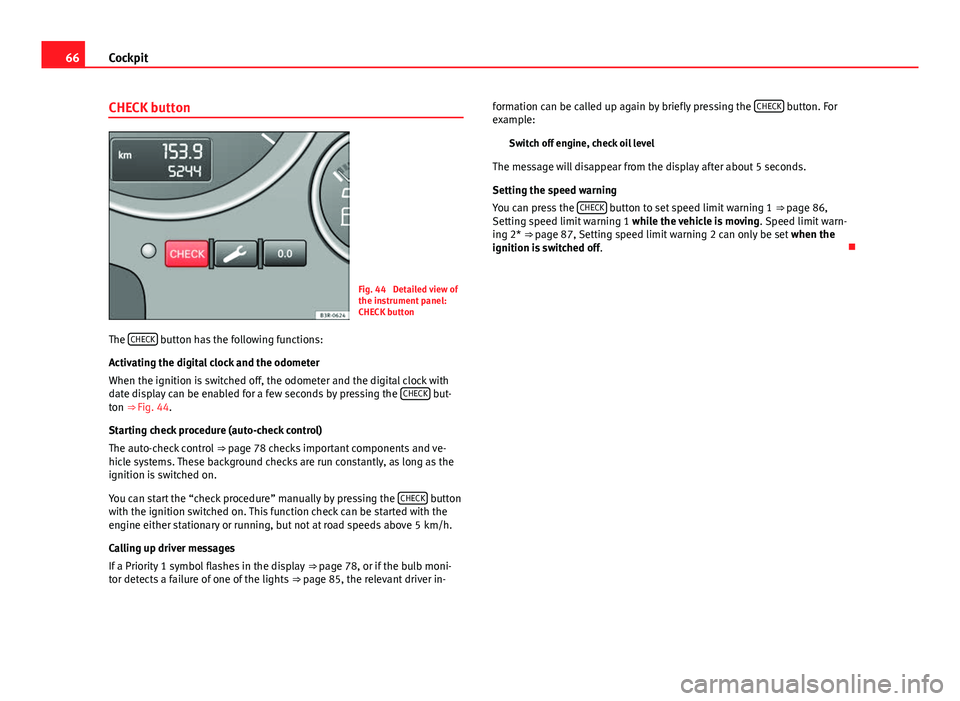
Fig. 44 Detailed view of
the instrument panel:
CHECK button
The CHECK
button has the following functions:
Activating the digital clock and the odometer
When the ignition is switched off, the odometer and the digital clock with
date display can be enabled for a few seconds by pressing the CHECK
but-
ton ⇒ Fig. 44.
Starting check procedure (auto-check control)
The auto-check control ⇒ page 78 checks important components and ve-
hicle systems. These background checks are run constantly, as long as the
ignition is switched on.
You can start the “check procedure” manually by pressing the CHECK
button
with the ignition switched on. This function check can be started with the
engine either stationary or running, but not at road speeds above 5 km/h.
Calling up driver messages
If a Priority 1 symbol flashes in the display ⇒ page 78, or if the bulb moni-
tor detects a failure of one of the lights ⇒ page 85, the relevant driver in- formation can be called up again by briefly pressing the
CHECK
button. For
example:
Switch off engine, check oil level
The message will disappear from the display after about 5 seconds.
Setting the speed warning
You can press the CHECK
button to set speed limit warning 1
⇒ page 86,
Setting speed limit warning 1 while the vehicle is moving . Speed limit warn-
ing 2* ⇒ page 87, Setting speed limit warning 2 can only be set when the
ignition is switched off .
Page 69 of 327

67
Cockpit
Warning and indicator lamps General description
The warning and indicator lamps indicate a number of dif-
ferent functions and possible faults.
Fig. 45 Instrument panel with warning and indicator lamps
Exhaust emission control system⇒ page 68
Airbag system⇒ page 68
Tyre pressure too low⇒ page 69
Cruise speed (Cruise control)⇒ page 69
Trailer turn signals⇒ page 69
Anti-lock brake system (ABS)⇒ page 70
Seat belt warning⇒ page 70
If it stays lit: ASR switched off⇒ page 71
⇒ page 71
⇒ page 173
Left turn signals⇒ page 71
If flashing: the Electronic Stability Control
(ESC) is working or the ASR is working
If the following remain lit: ESC or ASR
faulty⇒ page 71
⇒ page 71
⇒ page 173
Alternator⇒ page 72
Main beam headlights⇒ page 72
Handbrake on⇒ page 72
⇒ page 79
Engine management (alternative to )⇒ page 72
Glow plug system (alternative to )⇒ page 72
Fault in brake system⇒ page 73
Right turn signals⇒ page 71
Safety FirstOperating instructionsPractical TipsTechnical Specifications
Page 70 of 327
68Cockpit
Note
A number of functions are monitored by the auto-check control
⇒ page 78. If a malfunction should occur, this will be shown by the dis-
play in the instrument panel either with a red symbol (priority 1 - danger) or
a yellow symbol (priority 2 - warning).
Exhaust emission control system
If the warning lamp lights up continuously you should take your vehicle to a
specialised workshop as soon as possible in order to have the fault re-
paired.
If the warning lamp flashes drive on at reduced speed and seek professio-
nal help in order to avoid damage to the catalytic converter.
For further information on the catalytic converter, see ⇒ page 203.
Airbag system
This warning lamp monitors the airbag and belt tension de-
vice system.
The control lamp should light up for a few seconds when the ignition is
switched on.
If the warning lamp does not go out, or if it lights up, flashes or flickers
when the vehicle is moving, this indicates a malfunction in the system.
WARNING
If a malfunction should occur, have the system checked immediately by a
specialised workshop. Otherwise there is a risk that the airbag system
and/or belt tensioners may not be triggered in an accident.
Page 71 of 327
69
Cockpit
Tyre pressure warning lamp*
The tyre pressure should be corrected as soon as possible if
it is too low.
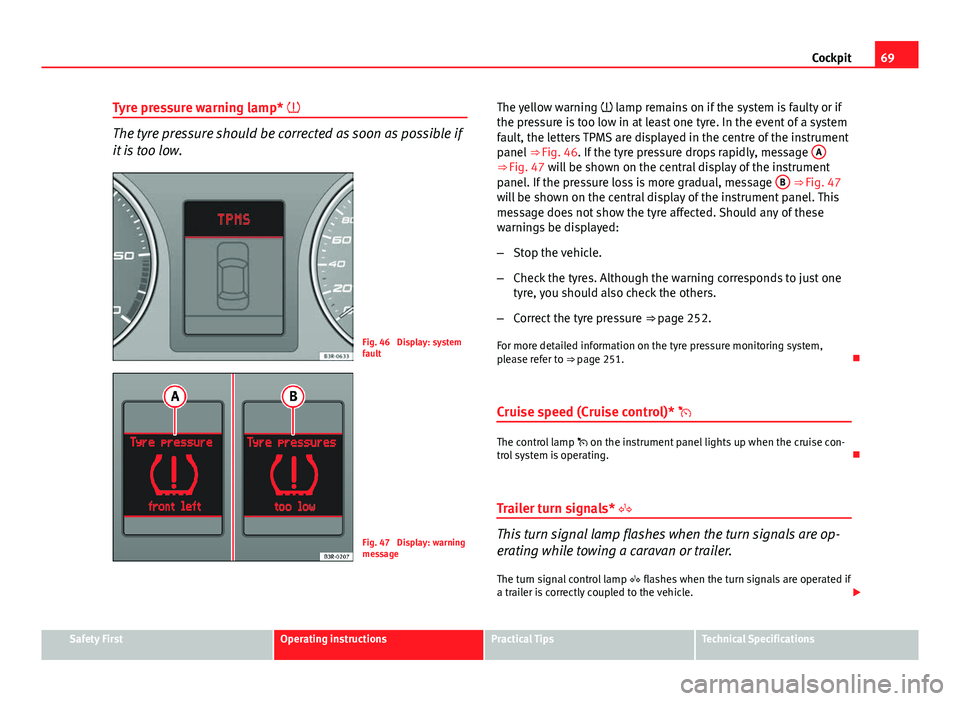
Fig. 46 Display: system
fault
Fig. 47 Display: warning
message The yellow warning
lamp remains on if the system is faulty or if
the pressure is too low in at least one tyre. In the event of a system
fault, the letters TPMS are displayed in the centre of the instrument
panel ⇒ Fig. 46. If the tyre pressure drops rapidly, message A
⇒ Fig. 47 will be shown on the central display of the instrument
panel. If the pressure loss is more gradual, message B ⇒ Fig. 47
will be shown on the central display of the instrument panel. This
message does not show the tyre affected. Should any of these
warnings be displayed:
– Stop the vehicle.
– Check the tyres. Although the warning corresponds to just one
tyre, you should also check the others.
– Correct the tyre pressure ⇒ page 252.
For more detailed information on the tyre pressure monitoring system,
please refer to ⇒ page 251.
Cruise speed (Cruise control)*
The control lamp on the instrument panel lights up when the cruise con-
trol system is operating.
Trailer turn signals*
This turn signal lamp flashes when the turn signals are op-
erating while towing a caravan or trailer. The turn signal control lamp flashes when the turn signals are operated if
a trailer is correctly coupled to the vehicle.
Safety FirstOperating instructionsPractical TipsTechnical Specifications