display Seat Ibiza 2017 Edition 11.17 User Guide
[x] Cancel search | Manufacturer: SEAT, Model Year: 2017, Model line: Ibiza, Model: Seat Ibiza 2017Pages: 312, PDF Size: 6.51 MB
Page 46 of 312
The essentials
Service due
When the ser v
ic
e date is due, an audible
warning is given when the ignition is switch-
ed on and the spanner displayed on the
screen flashes for a few seconds .
Vehicles with text messages : Service now
will be shown on the instrument panel dis-
play.
Reading a service notification
With the ignition switched on, the engine off
and the vehicle at a standstill, the current
service notification can be read:
Press and hold the button 0.0/SET for more
th an 5 sec
ond
s to consult the service mes-
sage 2 .
When the ser v
ic
e date has passed , a minus
sign is displayed in front of the number of kil-
ometres or days. Vehicles with text messages
: the fol
lowing
message is displayed: Service --- km
(miles) or --- days ago .
Resetting service interval display
If the service was not carried out by a SEAT
dealership, the display can be reset as fol-
lows: ● Switch off the ignition, press and hold the
button 0.0/S
ET
2 .
● Switch ignition back on.
● Release the button 0.0/S
ET and press it
ag ain f
or the ne
xt 20 seconds. Note
● The serv ic
e message disappears after a few
seconds, when the engine is started or when OK/RESET is pressed on the windscreen wiper
lev er
, or OK on the multifunction steering
wheel.
● In v
ehicles with the LongLife system in
which the batt
ery has been disconnected for
a long period of time, it is not possible to cal-
culate the date of the next service. Therefore the service interval display may not be cor-
rect
. In thi
s case, bear in mind the maximum
service intervals permitted in the ››› Booklet
Maintenance Programme.
● If you reset the display manually, the next
servic
e interval will be indicated as in vehi-
cles with fixed service intervals. For this rea-
son we recommend that the service interval
display be reset by a SEAT authorised Dealer. 44
Page 49 of 312
The essentials
Warning lamps On the in s
trument
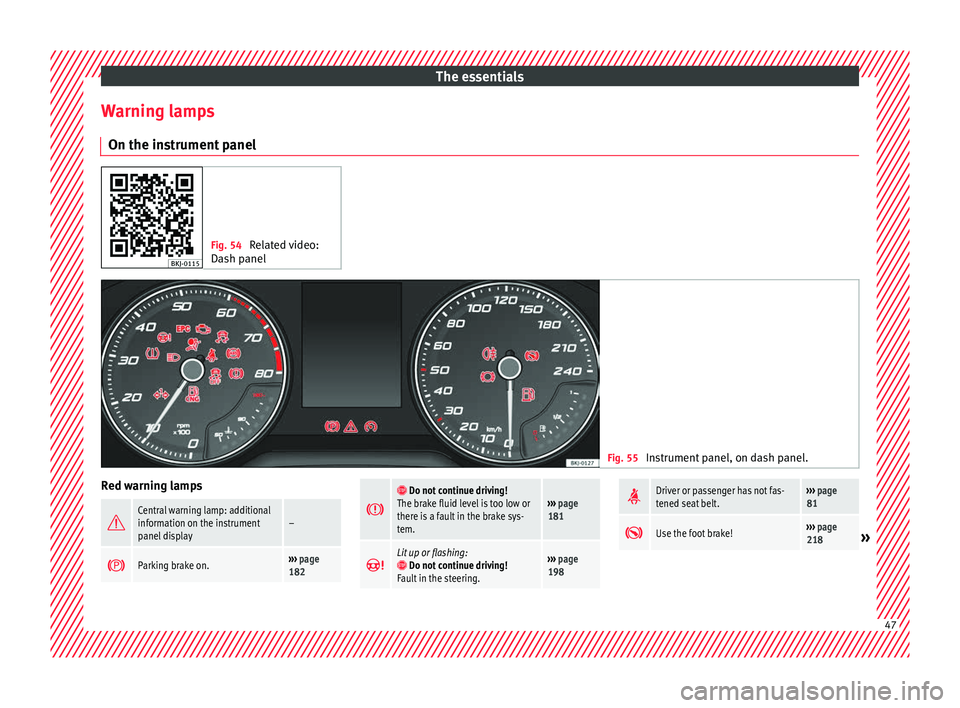
panel Fig. 54
Related video:
Dash panel Fig. 55
Instrument panel, on dash panel. Red warning lamps
Central warning lamp: additional
information on the instrument
panel display–
Parking brake on.›››
page
182
Do not continue driving!
The brake fluid level is too low or
there is a fault in the brake sys-
tem.››› page
181
Lit up or flashing: Do not continue driving!
Fault in the steering.››› page
198
Driver or passenger has not fas-
tened seat belt.›››
page
81
Use the foot brake!›››
page
218» 47
Page 50 of 312
The essentials
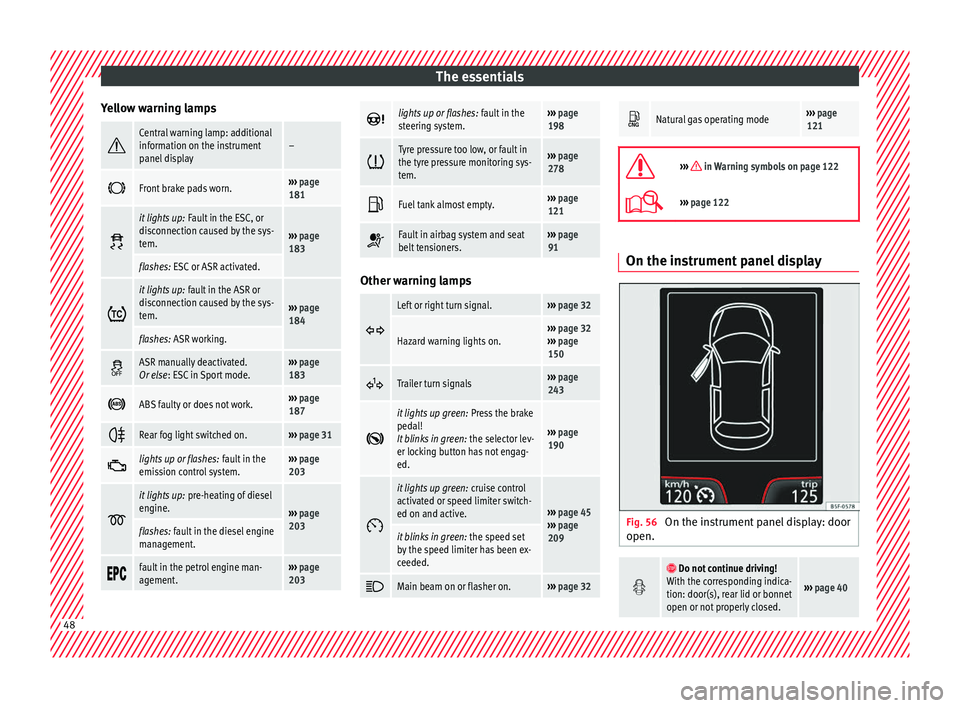
Yellow warning lamps Central warning lamp: additional
information on the instrument
panel display–
Front brake pads worn.›››
page
181
it lights up:
Fault in the ESC, or
disconnection caused by the sys-
tem.
››› page
183
flashes: ESC or ASR activated.
it lights up:
fault in the ASR or
disconnection caused by the sys-
tem.
››› page
184
flashes: ASR working.
ASR manually deactivated.
Or else
: ESC in Sport mode.››› page
183
ABS faulty or does not work.›››
page
187
Rear fog light switched on.›››
page 31
lights up or flashes:
fault in the
emission control system.››› page
203
it lights up:
pre-heating of diesel
engine.
››› page
203
flashes: fault in the diesel engine
management.
fault in the petrol engine man-
agement.›››
page
203
lights up or flashes:
fault in the
steering system.››› page
198
Tyre pressure too low, or fault in
the tyre pressure monitoring sys-
tem.›››
page
278
Fuel tank almost empty.›››
page
121
Fault in airbag system and seat
belt tensioners.›››
page
91 Other warning lamps
Left or right turn signal.›››
page 32
Hazard warning lights on.››› page 32
››› page
150
Trailer turn signals›››
page
243
it lights up green:
Press the brake
pedal!
It blinks in green: the selector lev-
er locking button has not engag-
ed.
››› page
190
it lights up green:
cruise control
activated or speed limiter switch-
ed on and active.
››› page 45
››› page
209
it blinks in green: the speed set
by the speed limiter has been ex-
ceeded.
Main beam on or flasher on.›››
page 32
Natural gas operating mode›››
page
121
››› in Warning symbols on page 122
›››
page 122 On the instrument panel display
Fig. 56
On the instrument panel display: door
open.
Do not continue driving!
With the corresponding indica-
tion: door(s), rear lid or bonnet
open or not properly closed.
››› page 40 48
Page 51 of 312
The essentials
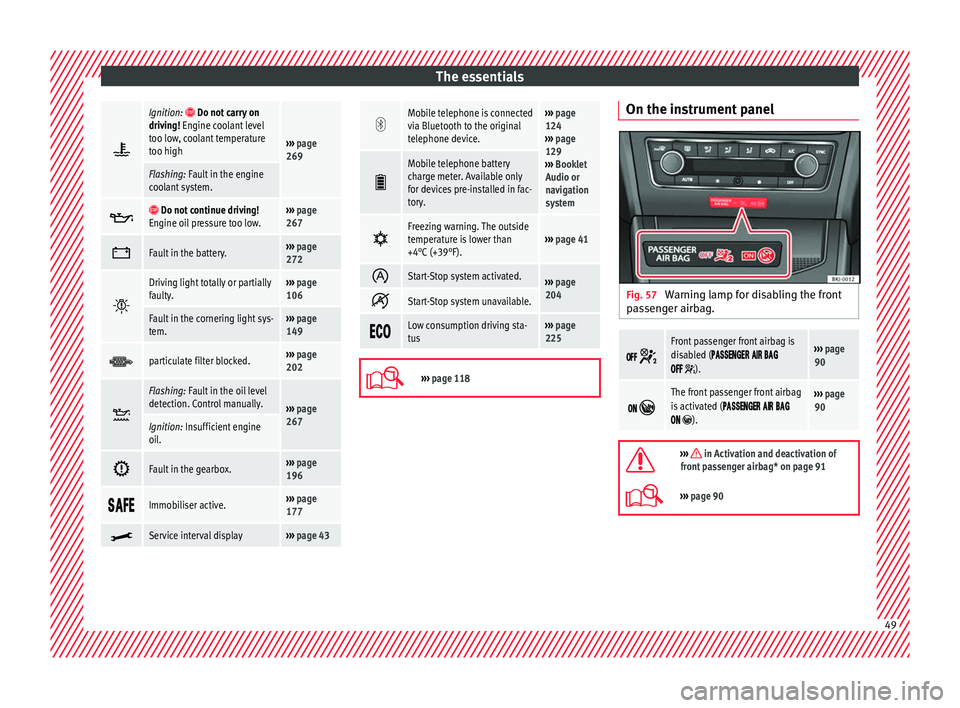
Ignition: Do not carry on
driving! Engine coolant level
too low, coolant temperature
too high
››› page
269
Flashing: Fault in the engine
coolant system.
Do not continue driving!
Engine oil pressure too low.››› page
267
Fault in the battery.›››
page
272
Driving light totally or partially
faulty.›››
page
106
Fault in the cornering light sys-
tem.››› page
149
particulate filter blocked.›››
page
202
Flashing: Fault in the oil level
detection. Control manually.
›››
page
267
Ignition: Insufficient engine
oil.
Fault in the gearbox.›››
page
196
Immobiliser active.›››
page
177
Service interval display›››
page 43
Mobile telephone is connected
via Bluetooth to the original
telephone device.›››
page
124
››› page
129
››› Booklet
Audio or
navigation
system
Mobile telephone battery
charge meter. Available only
for devices pre-installed in fac-
tory.
Freezing warning. The outside
temperature is lower than
+4°C (+39°F).›››
page 41
Start-Stop system activated.›››
page
204
Start-Stop system unavailable.
Low consumption driving sta-
tus›››
page
225
›››
page 118 On the instrument panel
Fig. 57
Warning lamp for disabling the front
p a
s
senger airbag.
Front passenger front airbag is
disabled (
).
››› page
90
The front passenger front airbag
is activated (
).
››› page
90
››› in Activation and deactivation of
front passenger airbag* on page 91
››› page 90 49
Page 54 of 312
The essentials
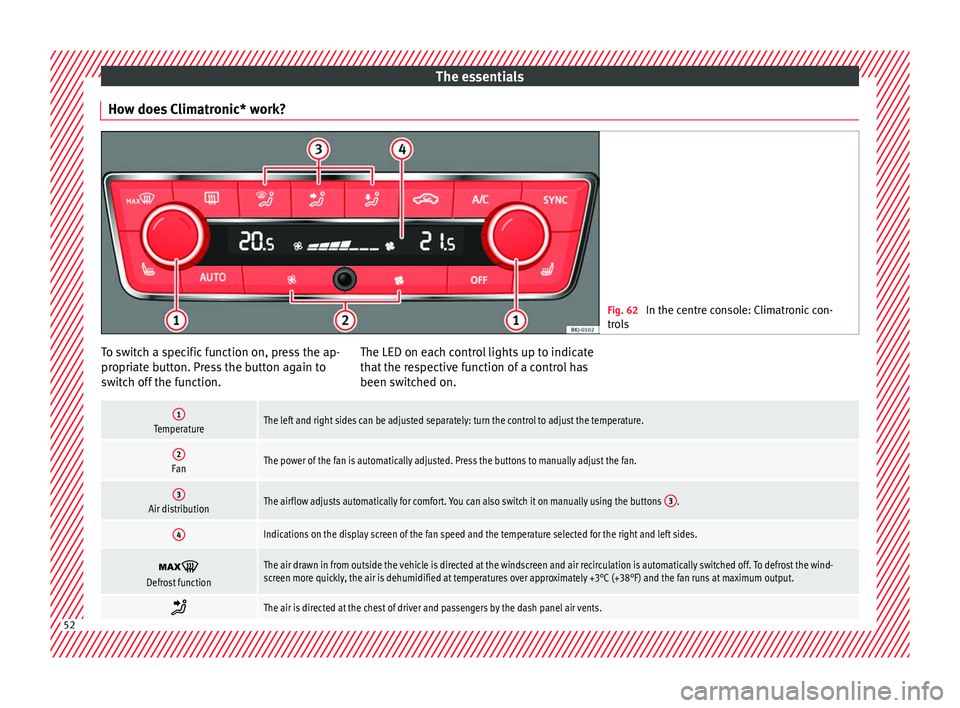
How does Climatronic* work? Fig. 62
In the centre console: Climatronic con-
tro l
s To switch a specific function on, press the ap-
pr
opri
at
e button. Press the button again to
switch off the function. The LED on each control lights up to indicate
that the r
espective function of a control has
been switched on.
1TemperatureThe left and right sides can be adjusted separately: turn the control to adjust the temperature.
2FanThe power of the fan is automatically adjusted. Press the buttons to manually adjust the fan.
3Air distributionThe airflow adjusts automatically for comfort. You can also switch it on manually using the buttons 3.
4Indications on the display screen of the fan speed and the temperature selected for the right and left sides.
Defrost functionThe air drawn in from outside the vehicle is directed at the windscreen and air recirculation is automatically switched off. To defrost the wind-
screen more quickly, the air is dehumidified at temperatures over approximately +3°C (+38°F) and the fan runs at maximum output.
The air is directed at the chest of driver and passengers by the dash panel air vents.
52
Page 83 of 312
Seat belts
Seat belts
Wh y
w
ear a seat belt
Number of seats Your vehicle has
five se
ats, two in the front
and three in the rear. Each seat is equipped
with a three-point seat belt. WARNING
● Never tr an
sport more than the permitted
amount of people in your vehicle.
● Every vehicle occupant must properly fas-
ten and we
ar the seat belt belonging to his or
her seat. Children must be protected with an
appropriate child restraint system. Seat belt control lamp*
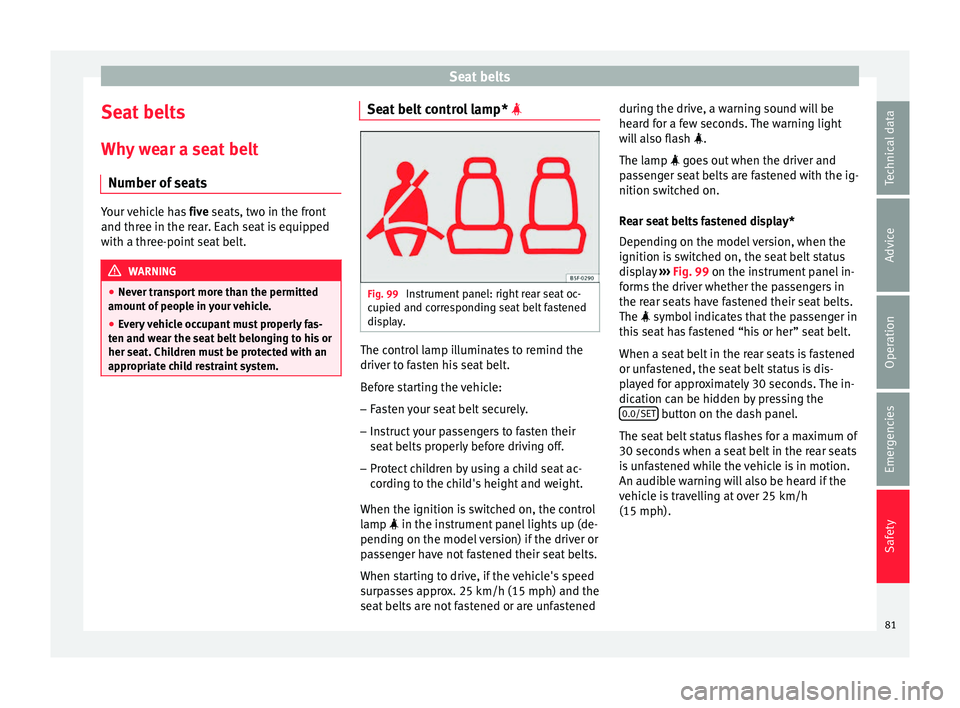
Fig. 99
Instrument panel: right rear seat oc-
c upied and c
orr
esponding seat belt fastened
display. The control lamp illuminates to remind the
driv
er t
o f
asten his seat belt.
Before starting the vehicle: – Fasten your seat belt securely.
– Instruct your passengers to fasten their
seat belts
properly before driving off.
– Protect children by using a child seat ac-
cordin
g to the child's height and weight.
When the ignition is switched on, the control
lamp in the instrument panel lights up (de-
pending on the model version) if the driver or
passenger have not fastened their seat belts.
When starting to drive, if the vehicle's speed
surpasses approx. 25 km/h (15 mph) and the
seat belts are not fastened or are unfastened during the drive, a warning sound will be
heard f
or a few seconds. The warning light
will also flash .
The lamp goes out when the driver and
passenger seat belts are fastened with the ig-
nition switched on.
Rear seat belts fastened display*
Depending on the model version, when the
ignition is switched on, the seat belt status
display ››› Fig. 99 on the instrument panel in-
forms the driver whether the passengers in
the rear seats have fastened their seat belts.
The symbol indicates that the passenger in
this seat has fastened “his or her” seat belt.
When a seat belt in the rear seats is fastened
or unfastened, the seat belt status is dis-
played for approximately 30 seconds. The in-
dication can be hidden by pressing the 0.0/SET button on the dash panel.
The se at
belt
status flashes for a maximum of
30 seconds when a seat belt in the rear seats
is unfastened while the vehicle is in motion.
An audible warning will also be heard if the
vehicle is travelling at over 25 km/h
(15 mph).
81
Technical data
Advice
Operation
Emergencies
Safety
Page 107 of 312
Fuses and bulbsNo.Consumer/Amps
13Lights switch, steering column LSS
and SMLS, diagnostic port, rain/light
sensor7.5
14steering column LSS: wiper controls10
15Instrument panel7.5
16Right Lights Power Supply40
17Right Door Window Control30
18Windscreen wipers30
19Radio, Multimedia System25
20Heated Rear Window30
21SCR Control Unit30
23Rear View Camera7.5
24Connectivity Box, external audio
source wiring (Double USB-Aux IN),
telephone amplifier, MIB display5
25Steering Column Electronics (MFL)7.5
26Gateway7.5
27Active Suspension Control Unit7.5
28DWA Sensor7.5
29DWA Horn7.5
319AA/9AB climate control unit7.5
9AK Climatronic control unit15
32Steering Column LSS, without Kessy7.5
No.Consumer/Amps
33Left Door Window Control30
35Left Lights Power Supply40
36Signal Horn20
37Heated seats control unit30
38BCM Power C6330
39BSD, PDC, MRR10
40
Lights switch, diagnostic port, head-
light range control, steering column
LSS: lights, halogen headlights, re-
verse light switch, electrochromic mir-
ror, RKA without radio
7.5
41Regulation of unfolded exterior mir-
rors7.5
42Clutch pedal, ignition relays, CNG re-
lay coil, AC sensor pressure7.5
43DWP relay coil, rear window wiper mo-
tor, heated nozzles15
44Airbag7.5
45Leimo Plus left headlight7.5
46Leimo Plus right headlight7.5
48Steering Column Lock, Kessy Control
Unit7.5
49SCR Relay Coil7.5
53Automatic gearbox lever, ZSS7.5
No.Consumer/Amps
58Double Water Pump7.5
59Heated rear view mirrors10
60Tow Hook30
61Tow Hook30
Fuse arrangement in engine compart-
ment
Read the additional information carefully
› ›
›
page 62
Only replace fuses with a fuse of the same
amperage (same colour and markings) and
size.
No.Consumer/Amps
1
MPI Engine Injection Module10
TSI Engine Injection Module15
Diesel Engine Injection Module30
2
Fuel metering valve (TJ4/T6P/TJ7), Low
temperature coolant pump
(TJ4/T6P/TJ7); Oil Pressure Regulating
Valve (TJ1), Coolant Valve AGR (TJ1),
High and Low Water Bumps (TJ1), SCR
relay coil
7.5
3Lambda probes15» 105
Technical data
Advice
Operation
Emergencies
Safety
Page 117 of 312
Controls and displays
Operation
C ontr
o
ls and displays
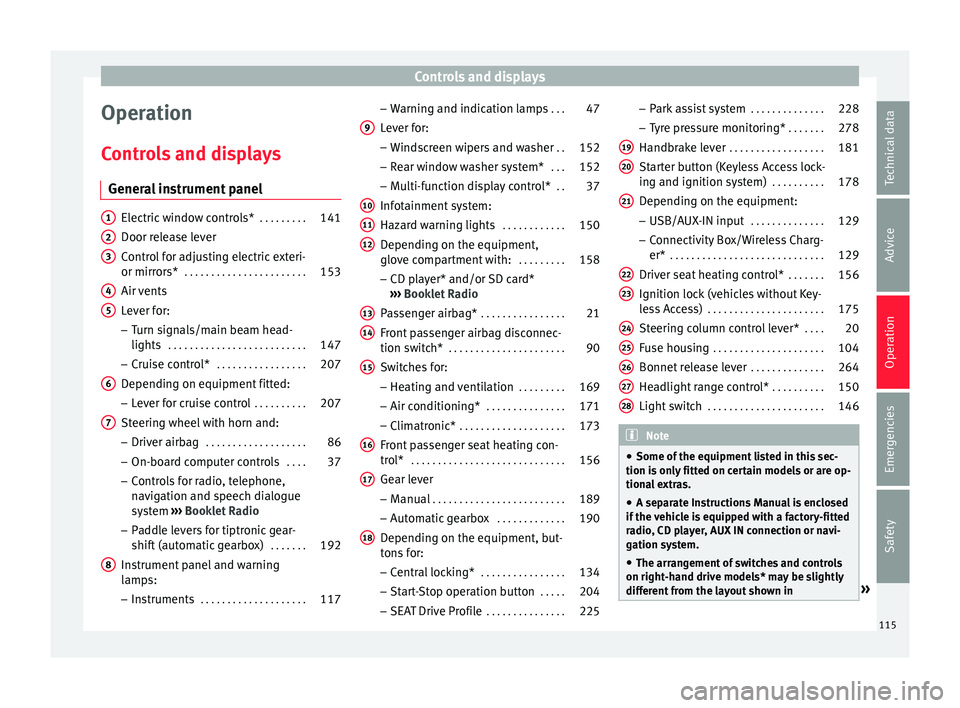
General instrument panel Electric window controls*
. . . . . . . . .141
Door release lever
Contr o
l for adjusting electric exteri-
or mirrors* . . . . . . . . . . . . . . . . . . . . . . . 153
Air vents
Lev er f
or:
– Turn signals/main beam head-
lights . . . . . . . . . . . . . . . . . . . . . . . . . . 147
– Crui se c
ontrol* . . . . . . . . . . . . . . . . . 207
Depending on equipment fitted:
– Lev er f
or cruise control . . . . . . . . . .207
Steering wheel with horn and:
– Driver airbag . . . . . . . . . . . . . . . . . . . 86
– On-boar d c
omputer controls . . . .37
– Contro
ls for radio, telephone,
navigation and speech dialogue
system ›››
Booklet Radio
– Paddle levers for tiptronic gear-
shift (automatic gearbox) . . . . . . .192
Instrument panel and warning
lamp s:
– In
struments . . . . . . . . . . . . . . . . . . . . 117
1 2
3
4
5
6
7
8 –
Warnin
g and indic
ation lamps . . .47
Lever for:
– Winds
creen wipers and washer . .152
– Rear w
indow washer system* . . .152
– Multi-f
unction display control* . .37
Infotainment system:
Hazard w
arning lights . . . . . . . . . . . . 150
Depending on the equipment,
glove c
ompartment with: . . . . . . . . .158
– CD pla
yer* and/or SD card*
››› Booklet Radio
Passenger airbag* . . . . . . . . . . . . . . . . 21
Front passenger airbag disconnec-
tion switc
h* . . . . . . . . . . . . . . . . . . . . . . 90
Switches for: – Heating and
ventilation . . . . . . . . . 169
– Air conditionin g* . . . . . . . . . . . . . . . 171
– C
limatr
onic* . . . . . . . . . . . . . . . . . . . . 173
Front passenger seat heating con-
tro l* . . . . . . . . . . . . . . . . . . . . . . . . . . . . . 156
Ge
ar lever
– Manual . . . . . . . . . . . . . . . . . . . . . . . . . 189
– Autom atic
gearbox . . . . . . . . . . . . . 190
Depending on the equipment, but-
ton s
for:
– Central locking* . . . . . . . . . . . . . . . . 134
– Star t
-Stop operation button . . . . .204
– SEAT Driv
e Profile . . . . . . . . . . . . . . . 225
9
10
11
12
13
14
15
16
17
18 –
Park
a
ssist system . . . . . . . . . . . . . . 228
– Tyr
e pressure monitoring* . . . . . . .278
Handbrake lever . . . . . . . . . . . . . . . . . . 181
Starter button (Keyless Access lock-
ing and ignition sys
tem) . . . . . . . . . . 178
Depending on the equipment:
– USB/AUX-IN inp
ut . . . . . . . . . . . . . . 129
– Connectivity
Box/Wireless Charg-
er* . . . . . . . . . . . . . . . . . . . . . . . . . . . . . 129
Driver seat heating control* . . . . . . .156
Ignition lock (vehicles without Key-
les
s Access) . . . . . . . . . . . . . . . . . . . . . . 175
Steering column control lever* . . . .20
Fuse housing . . . . . . . . . . . . . . . . . . . . . 104
Bonnet release lever . . . . . . . . . . . . . .264
Headlight range control* . . . . . . . . . .150
Light switch . . . . . . . . . . . . . . . . . . . . . . 146 Note
● Some of the equipment li
sted in this sec-
tion is only fitted on certain models or are op-
tional extras.
● A separate Instructions Manual is enclosed
if the v
ehicle is equipped with a factory-fitted
radio, CD player, AUX IN connection or navi-
gation system.
● The arrangement of switches and controls
on right-hand driv
e models* may be slightly
different from the layout shown in » 19
20
21
22
23
24
25
26
27
28
115
Technical data
Advice
Operation
Emergencies
Safety
Page 119 of 312
Instruments and warning/control lamps
Instruments and warning/control lamps
In s
trument
s
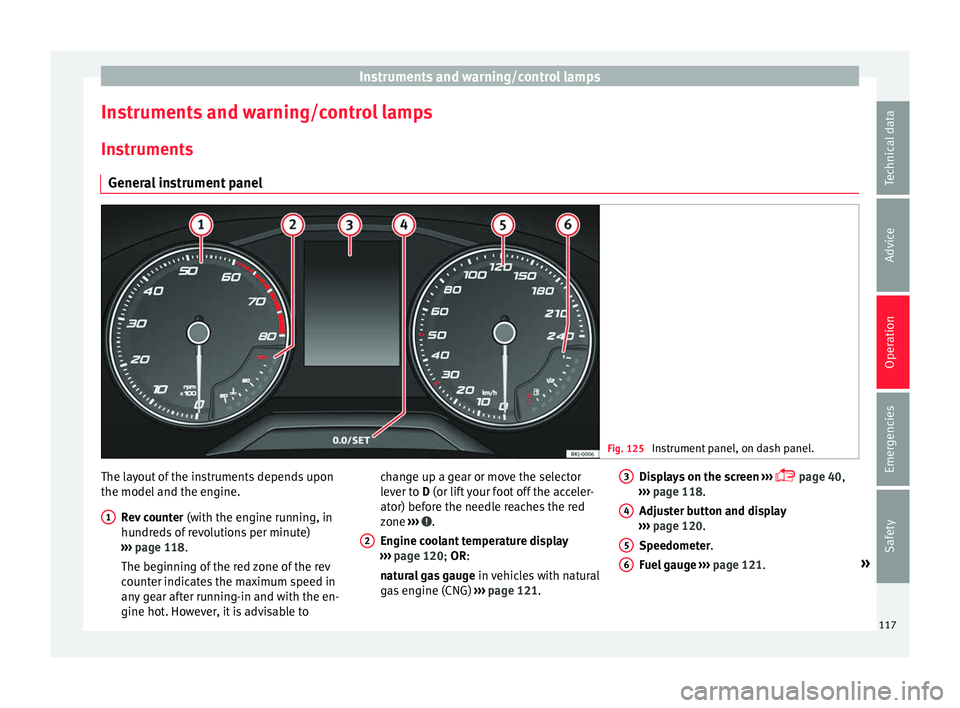
General instrument panel Fig. 125
Instrument panel, on dash panel. The layout of the instruments depends upon
the model
and the en
gine.
R
ev counter (with the engine running, in
hundreds of revolutions per minute)
››› page 118.
The beginning of the red zone of the rev
counter indicates the maximum speed in
any gear after running-in and with the en-
gine hot. However, it is advisable to
1 change up a gear or move the selector
l
ev
er t
o D (or lift your foot off the acceler-
ator) before the needle reaches the red
zone ››› .
En gine c
oo
lant temperature display
››› page 120; OR:
natural gas gauge in vehicles with natural
gas engine (CNG) ››› page 121.
2 Displays on the screen
› ›
›
page 40,
››› page 118.
Adjuster button and display
››› page 120.
Speedometer.
Fuel gauge ››› page 121. »
3 4
5
6
117
Technical data
Advice
Operation
Emergencies
Safety
Page 120 of 312
Operation
WARNING
Any distraction may lead to an accident, with
the risk of
injury.
● Do not operate the instrument panel con-
trol
s when driving. CAUTION
● When the engine i s
cold, avoid high revs
and heavy acceleration and do not make the
engine work hard. Revolution counter
The rev counter indicates the number of en-
gine r
ev
o
lutions per minute ›››
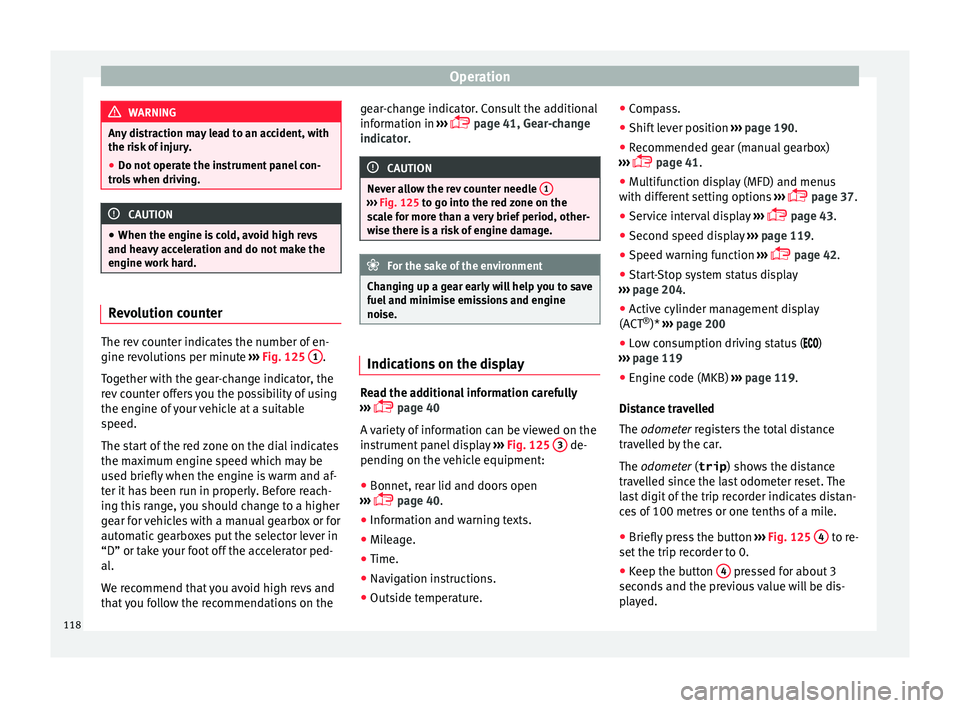
Fig. 125 1 .
T og
ether w
ith the gear-change indicator, the
rev counter offers you the possibility of using
the engine of your vehicle at a suitable
speed.
The start of the red zone on the dial indicates
the maximum engine speed which may be
used briefly when the engine is warm and af-
ter it has been run in properly. Before reach-
ing this range, you should change to a higher
gear for vehicles with a manual gearbox or for
automatic gearboxes put the selector lever in
“D” or take your foot off the accelerator ped-
al.
We recommend that you avoid high revs and
that you follow the recommendations on the gear-change indicator. Consult the additional
information in
›
›› page 41, Gear-change
indicator. CAUTION
Never allow the rev counter needle 1 ›››
Fig. 125 to g o int
o the red zone on the
scale for more than a very brief period, other-
wise there is a risk of engine damage. For the sake of the environment
Changing up a gear early will help you to save
fuel and minimi
se emissions and engine
noise. Indications on the display
Read the additional information carefully
› ›
›
page 40
A variety of information can be viewed on the
instrument panel display ›››
Fig. 125 3 de-
pendin g on the
v
ehicle equipment:
● Bonnet, rear lid and doors open
›››
page 40.
● Information and warning texts.
● Mileage.
● Time.
● Navigation instructions.
● Outside temperature. ●
Compa
ss.
● Shift lever position ›››
page 190.
● Recommended gear (manual gearbox)
›››
page 41.
● Multifunction display (MFD) and menus
with differ
ent setting options ›››
page 37.
● Service interval display ›››
page 43.
● Second speed display ›››
page 119.
● Speed warning function ›››
page 42.
● Start-Stop system status display
›››
page 204.
● Active cylinder management display
(ACT ®
)* ››
› page 200
● Low consumption driving status ( )
››
› page 119
● Engine code (MKB) ›››
page 119.
Distance travelled
The odometer registers the total distance
travelled by the car.
The odometer (trip ) shows the distance
travelled since the last odometer reset. The
last digit of the trip recorder indicates distan-
ces of 100 metres or one tenths of a mile.
● Briefly press the button ›››
Fig. 125 4 to re-
set the trip r
ec
order to 0.
● Keep the button 4 pressed for about 3
sec ond
s
and the previous value will be dis-
played.
118