lock Seat Ibiza 2017 Edition 11.17 User Guide
[x] Cancel search | Manufacturer: SEAT, Model Year: 2017, Model line: Ibiza, Model: Seat Ibiza 2017Pages: 312, PDF Size: 6.51 MB
Page 45 of 312
The essentials
● Vehicle
s
with Easy Connect : Press the button and the function button SETTINGS >
Driver assistance > ACC > Dis-
tance .
The w arnin
g limit
can be set from 30 to
210 km/h (18 to 150 mph) ›››
page 209.
The adjustment is made at 10 km/h (6 mph)
intervals. Note
● Ple a
se bear in mind that, even with the
speed warning function, it is still important
to keep an eye on the vehicle speed with the
speedometer and to observe the legal speed
limits.
● The speed limit warning function in the ver-
sion for some c
ountries warns you at a speed
of 120 km/h (75 mph). This is a factory-set
speed limit. Service intervals
Fig. 51
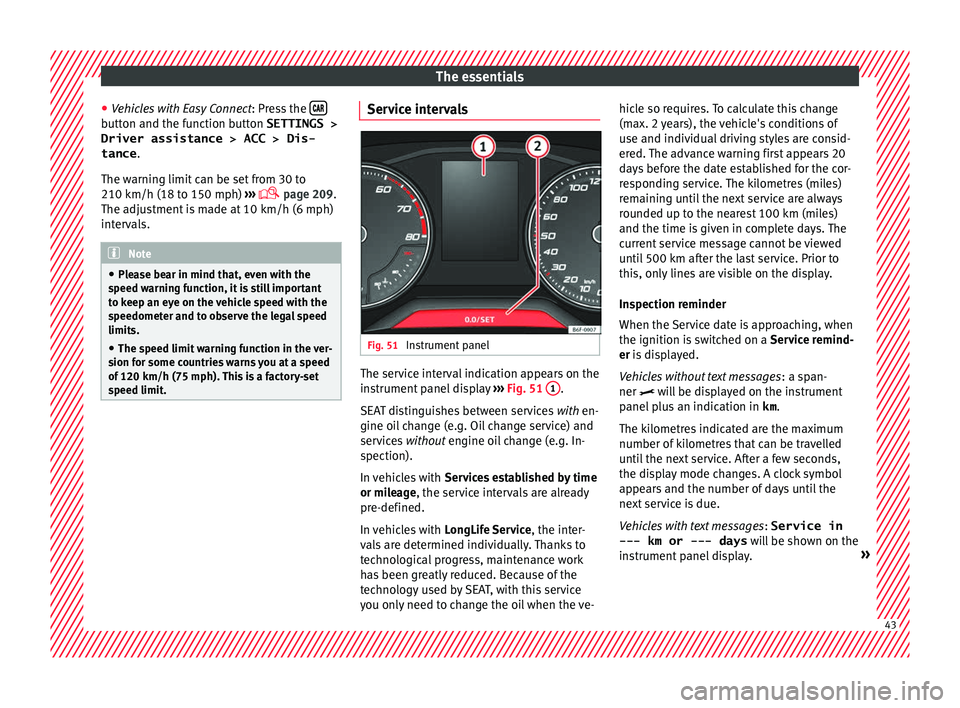
Instrument panel The service interval indication appears on the
in
s
trument
panel display ››› Fig. 51 1 .
S EA
T di
stinguishes between services with en-
gine oil change (e.g. Oil change service) and
services without engine oil change (e.g. In-
spection).
In vehicles with Services established by time
or mileage, the service intervals are already
pre-defined.
In vehicles with LongLife Service , the inter-
vals are determined individually. Thanks to
technological progress, maintenance work
has been greatly reduced. Because of the
technology used by SEAT, with this service
you only need to change the oil when the ve- hicle so requires. To calculate this change
(max. 2 y
ears), the vehicle's conditions of
use and individual driving styles are consid-
ered. The advance warning first appears 20
days before the date established for the cor-
responding service. The kilometres (miles)
remaining until the next service are always
rounded up to the nearest 100 km (miles)
and the time is given in complete days. The
current service message cannot be viewed
until 500 km after the last service. Prior to
this, only lines are visible on the display.
Inspection reminder
When the Service date is approaching, when
the ignition is switched on a Service remind-
er is displayed.
Vehicles without text messages : a span-
ner will be displayed on the instrument
panel plus an indication in km.
The kilometres indicated are the maximum
number of kilometres that can be travelled
until the next service. After a few seconds,
the display mode changes. A clock symbol
appears and the number of days until the
next service is due.
Vehicles with text messages : Service in
--- km or --- days will be shown on the
instrument panel display. » 43
Page 50 of 312
The essentials
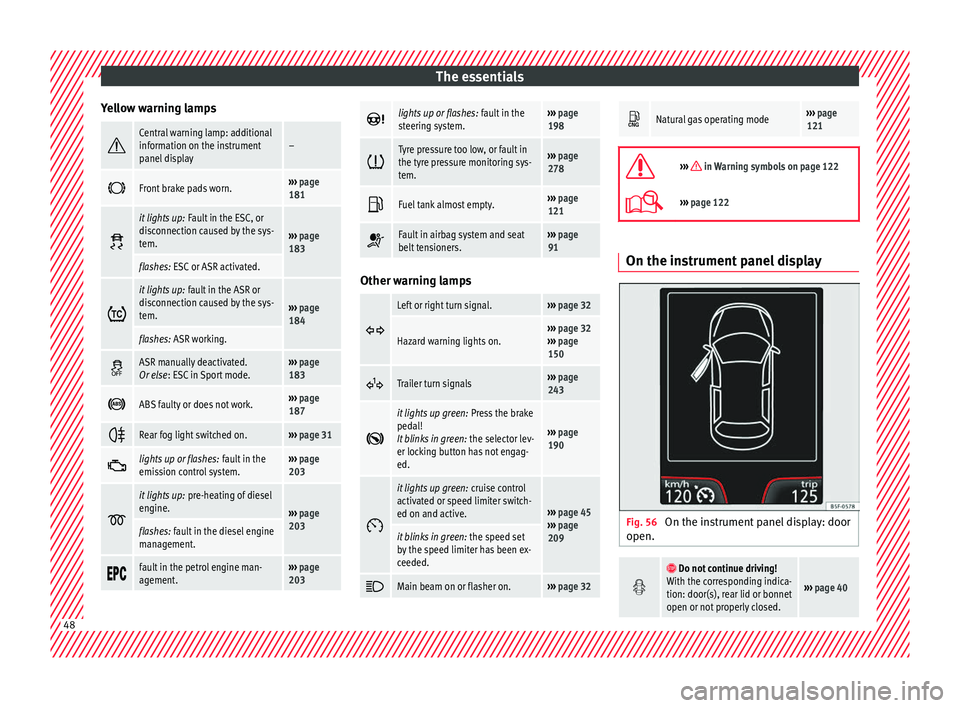
Yellow warning lamps Central warning lamp: additional
information on the instrument
panel display–
Front brake pads worn.›››
page
181
it lights up:
Fault in the ESC, or
disconnection caused by the sys-
tem.
››› page
183
flashes: ESC or ASR activated.
it lights up:
fault in the ASR or
disconnection caused by the sys-
tem.
››› page
184
flashes: ASR working.
ASR manually deactivated.
Or else
: ESC in Sport mode.››› page
183
ABS faulty or does not work.›››
page
187
Rear fog light switched on.›››
page 31
lights up or flashes:
fault in the
emission control system.››› page
203
it lights up:
pre-heating of diesel
engine.
››› page
203
flashes: fault in the diesel engine
management.
fault in the petrol engine man-
agement.›››
page
203
lights up or flashes:
fault in the
steering system.››› page
198
Tyre pressure too low, or fault in
the tyre pressure monitoring sys-
tem.›››
page
278
Fuel tank almost empty.›››
page
121
Fault in airbag system and seat
belt tensioners.›››
page
91 Other warning lamps
Left or right turn signal.›››
page 32
Hazard warning lights on.››› page 32
››› page
150
Trailer turn signals›››
page
243
it lights up green:
Press the brake
pedal!
It blinks in green: the selector lev-
er locking button has not engag-
ed.
››› page
190
it lights up green:
cruise control
activated or speed limiter switch-
ed on and active.
››› page 45
››› page
209
it blinks in green: the speed set
by the speed limiter has been ex-
ceeded.
Main beam on or flasher on.›››
page 32
Natural gas operating mode›››
page
121
››› in Warning symbols on page 122
›››
page 122 On the instrument panel display
Fig. 56
On the instrument panel display: door
open.
Do not continue driving!
With the corresponding indica-
tion: door(s), rear lid or bonnet
open or not properly closed.
››› page 40 48
Page 51 of 312
The essentials
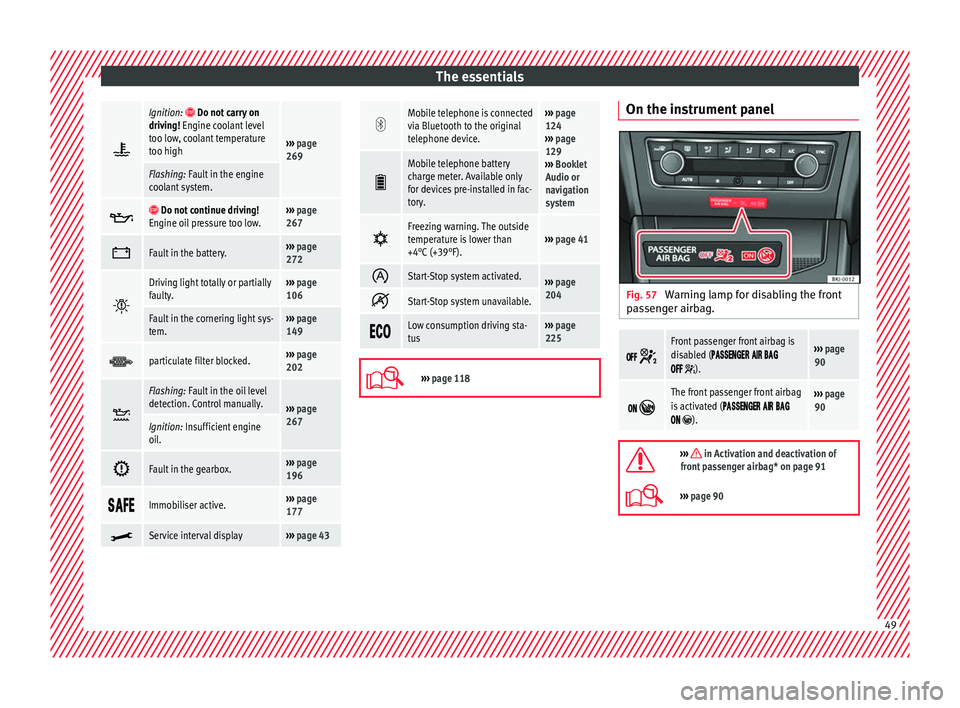
Ignition: Do not carry on
driving! Engine coolant level
too low, coolant temperature
too high
››› page
269
Flashing: Fault in the engine
coolant system.
Do not continue driving!
Engine oil pressure too low.››› page
267
Fault in the battery.›››
page
272
Driving light totally or partially
faulty.›››
page
106
Fault in the cornering light sys-
tem.››› page
149
particulate filter blocked.›››
page
202
Flashing: Fault in the oil level
detection. Control manually.
›››
page
267
Ignition: Insufficient engine
oil.
Fault in the gearbox.›››
page
196
Immobiliser active.›››
page
177
Service interval display›››
page 43
Mobile telephone is connected
via Bluetooth to the original
telephone device.›››
page
124
››› page
129
››› Booklet
Audio or
navigation
system
Mobile telephone battery
charge meter. Available only
for devices pre-installed in fac-
tory.
Freezing warning. The outside
temperature is lower than
+4°C (+39°F).›››
page 41
Start-Stop system activated.›››
page
204
Start-Stop system unavailable.
Low consumption driving sta-
tus›››
page
225
›››
page 118 On the instrument panel
Fig. 57
Warning lamp for disabling the front
p a
s
senger airbag.
Front passenger front airbag is
disabled (
).
››› page
90
The front passenger front airbag
is activated (
).
››› page
90
››› in Activation and deactivation of
front passenger airbag* on page 91
››› page 90 49
Page 52 of 312
The essentials
Gearbox lever M anua
l
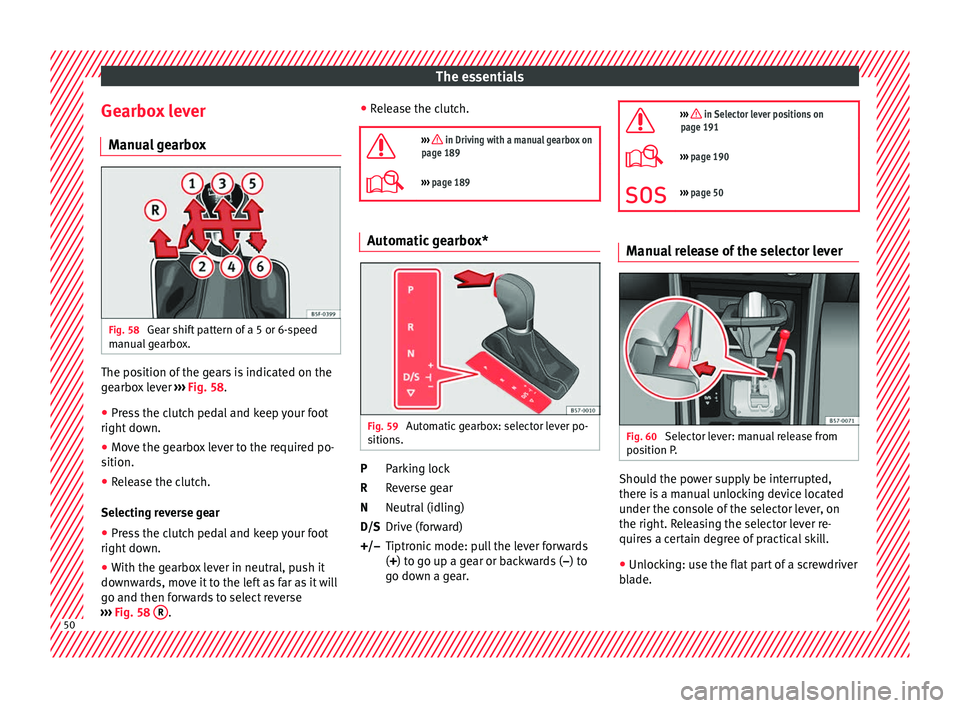
gearbox Fig. 58
Gear shift pattern of a 5 or 6-speed
m anual
g
earbox. The position of the gears is indicated on the
g
e
arbo
x lever ››› Fig. 58.
● Press the clutch pedal and keep your foot
right down.
● Mo
ve the gearbox lever to the required po-
sition.
● Rel
ease the clutch.
Selecting r
everse gear
● Press the clutch pedal and keep your foot
right down.
● W
ith the gearbox lever in neutral, push it
downw
ards, move it to the left as far as it will
go and then forwards to select reverse
››› Fig. 58 R . ●
Rel
e
ase the clutch.
››› in Driving with a manual gearbox on
page 189
››› page 189 Automatic gearbox*
Fig. 59
Automatic gearbox: selector lever po-
s ition
s. Parking lock
R
ev
er
se gear
Neutral (idling)
Drive (forward)
Tiptronic mode: pull the lever forwards
(+) to go up a gear or backwards ( –) to
go down a gear.
P
R
N
D/S
+/–
››› in Selector lever positions on
page 191
››› page 190
››› page 50 Manual release of the selector lever
Fig. 60
Selector lever: manual release from
po s
ition P
. Should the power supply be interrupted,
ther
e i
s
a manual unlocking device located
under the console of the selector lever, on
the right. Releasing the selector lever re-
quires a certain degree of practical skill.
● Unlocking: use the flat part of a screwdriver
bla
de. 50
Page 53 of 312
The essentials
Removing the cover from the selector lever
● Apply the handbrake › ›
› to ensure that
the c ar doe
s
not move.
● Carefully pull the corners of the selector
lever boot
and twist it upwards above the lev-
er handle.
Releasing the selector lever
● Using a screwdriver, press and hold the yel-
low un
locking tab sideways ››› Fig. 60.
● Press the interlock button on the selector
lever and mo
ve the selector lever to posi-
tion N.
● After carrying out the manual release, at-
tach the sel
ector lever boot on the gearbox
console again. If the power supply should ever fail (e.g. dis-
char
ged battery) and the vehicle has to be
pushed or towed, the selector lever must first
be moved to position N, after operating the
manual release mechanism. WARNING
The selector lever may be moved out of posi-
tion P only when the h
andbrake is firmly ap-
plied. If this does not work, secure the vehi-
cle with the brake pedal. On a slope the vehi-
cle could otherwise start to move inadver-
tently after shifting the selector lever out of
position P - accident risk! Air conditioning
R el
at
ed video Fig. 61
Air conditioning 51
Page 59 of 312
The essentials
Fluid Level control Fi l
lin
g capacities
Capacities
Fuel tank40 litres. 7 litre re-
serve.
Windscreen washer fluid con-
tainer3 litres Fuel
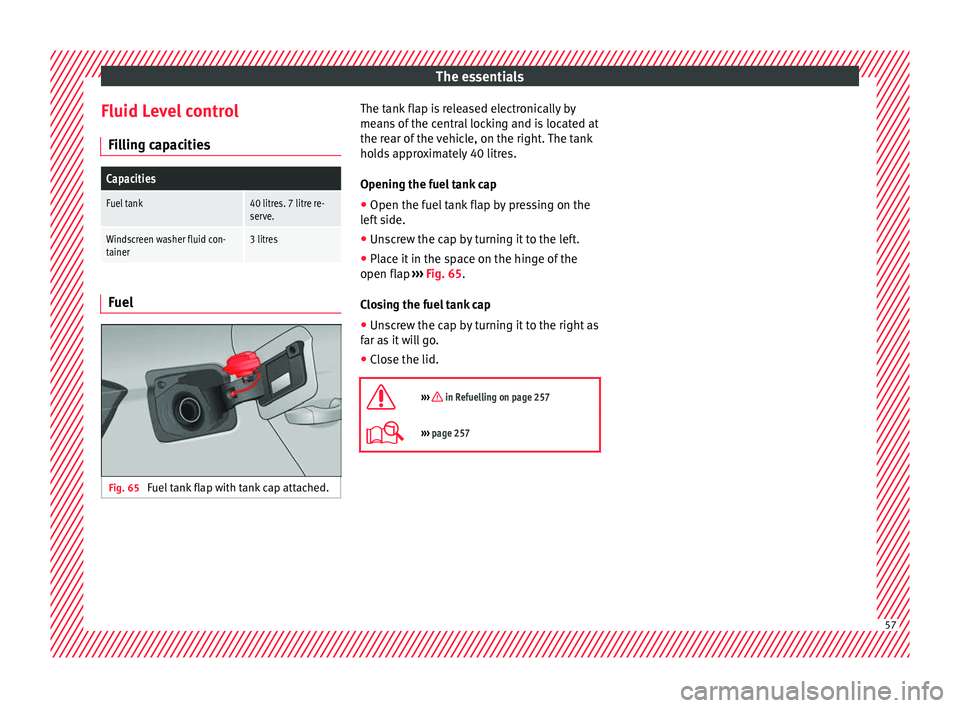
Fig. 65
Fuel tank flap with tank cap attached. The tank flap is released electronically by
me
an
s
of the central locking and is located at
the rear of the vehicle, on the right. The tank
holds approximately 40 litres.
Opening the fuel tank cap
● Open the fuel tank flap by pressing on the
left
side.
● Unscrew the cap by turning it to the left.
● Place it in the space on the hinge of the
open flap ››
› Fig. 65.
Closing the fuel tank cap
● Unscrew the cap by turning it to the right as
far as
it will go.
● Close the lid.
››› in Refuelling on page 257
››› page 257 57
Page 64 of 312
The essentials
Emergencies F u
se
s
Fuse location Fig. 71
On the driver-side dash panel: fuse
bo x
c
over. Fig. 72
In the engine compartment: fuse box
c o
v
er. Opening and closing the fuse box situated
belo
w the d a
sh panel
● Opening: remove the fuse box cover in the
direction indicat
ed ››› Fig. 71.
● Closing: click the cover back into place.
To open the engine c
ompartment fuse box
● Raise the bonnet.
● Press the locking tabs to release the fuse
box c
over ››› Fig. 72
● Then lift the cover out.
● To fit the cover, place it on the fuse box.
Pu
sh the locking tabs down until they click
audibly into place.
Identifying fuses situated below the dash
panel by colours
ColourAmp rating
Black1
Purple3
Light brown5
Brown7.5
Red10
Blue15
Yellow20
White or transparent25
ColourAmp rating
Green30
Orange40
››› in Introduction on page 104
›››
page 104 Replacing a blown fuse
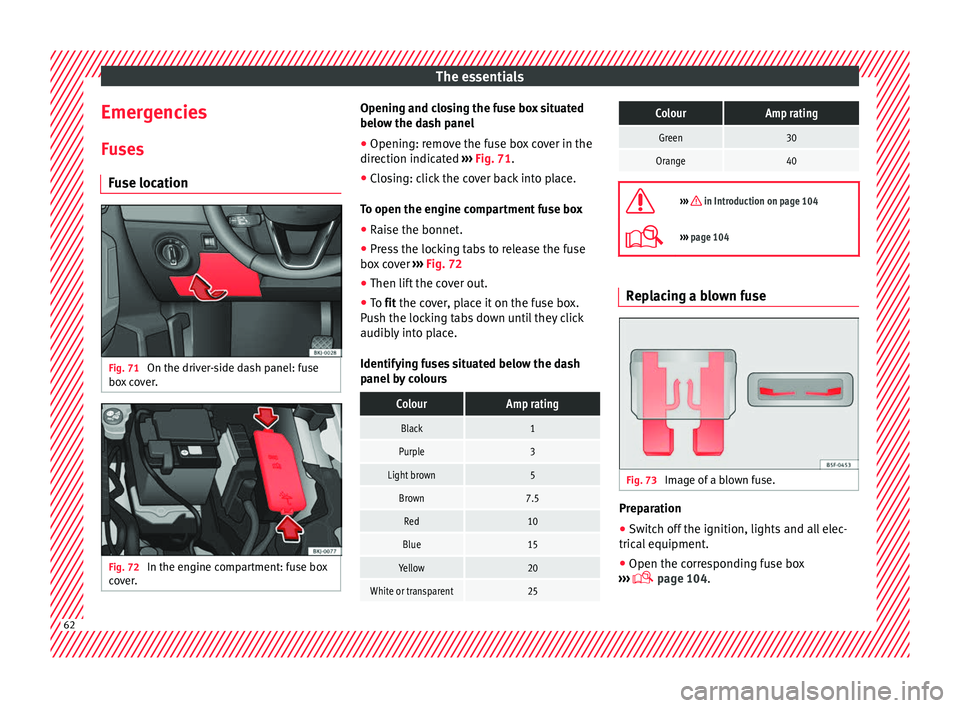
Fig. 73
Image of a blown fuse. Preparation
●
Switch off the ignition, lights and all elec-
tric al
equipment
.
● Open the corresponding fuse box
›››
page 104.62
Page 66 of 312
The essentials
● Al
l
occupants should leave the vehicle and
wait in a safe place (for instance behind the
roadside crash barrier). WARNING
● Alw a
ys observe the above steps and pro-
tect yourself and other road users.
● If you change the wheel on a slope, block
the wheel on the oppo
site side of the car with
a stone or similar to prevent the vehicle from
moving. Repairing a tyre with the anti-punc-
t
ur
e k
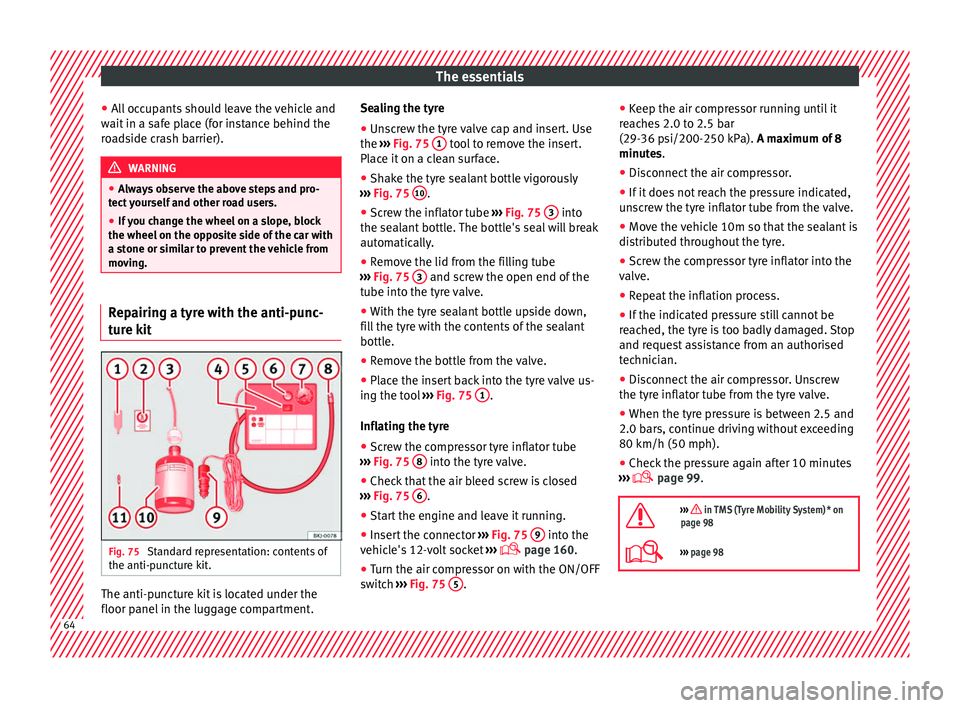
it Fig. 75
Standard representation: contents of
the anti-p u
nct
ure kit. The anti-puncture kit is located under the
floor p
anel
in the lug
gage compartment. Sealing the tyre
● Unscrew the tyre valve cap and insert. Use
the ›››
Fig. 75 1 tool to remove the insert.
Pl ac
e it
on a clean surface.
● Shake the tyre sealant bottle vigorously
›››
Fig. 75 10 .
● Screw the inflator tube ››
›
Fig. 75 3 into
the se al
ant
bottle. The bottle's seal will break
automatically.
● Remove the lid from the filling tube
›››
Fig. 75 3 and screw the open end of the
t ube int
o the ty
re valve.
● With the tyre sealant bottle upside down,
fill
the tyre with the contents of the sealant
bottle.
● Remove the bottle from the valve.
● Place the insert back into the tyre valve us-
ing the too
l ››› Fig. 75 1 .
Infl atin
g the ty
re
● Screw the compressor tyre inflator tube
›››
Fig. 75 8 into the tyre valve.
● Check that the air bleed screw is closed
› ›
›
Fig. 75 6 .
● Start the engine and leave it running.
● Insert the connector ››
›
Fig. 75 9 into the
v ehic
l
e's 12-volt socket ›››
page 160.
● Turn the air compressor on with the ON/OFF
swit c
h ››› Fig. 75 5 .●
Keep the air c
ompr
essor running until it
reaches 2.0 to 2.5 bar
(29-36 psi/200-250 kPa). A maximum of 8
minutes.
● Disconnect the air compressor.
● If it does not reach the pressure indicated,
uns
crew the tyre inflator tube from the valve.
● Move the vehicle 10m so that the sealant is
distrib
uted throughout the tyre.
● Screw the compressor tyre inflator into the
valve.
● R
epeat the inflation process.
● If the indicated pressure still cannot be
reac
hed, the tyre is too badly damaged. Stop
and request assistance from an authorised
technician.
● Disconnect the air compressor. Unscrew
the tyre infl
ator tube from the tyre valve.
● When the tyre pressure is between 2.5 and
2.0 bars, c
ontinue driving without exceeding
80 km/h (50 mph).
● Check the pressure again after 10 minutes
›››
page 99.
››› in TMS (Tyre Mobility System)* on
page 98
››› page 98 64
Page 67 of 312
The essentials
Changing a wheel R el
at
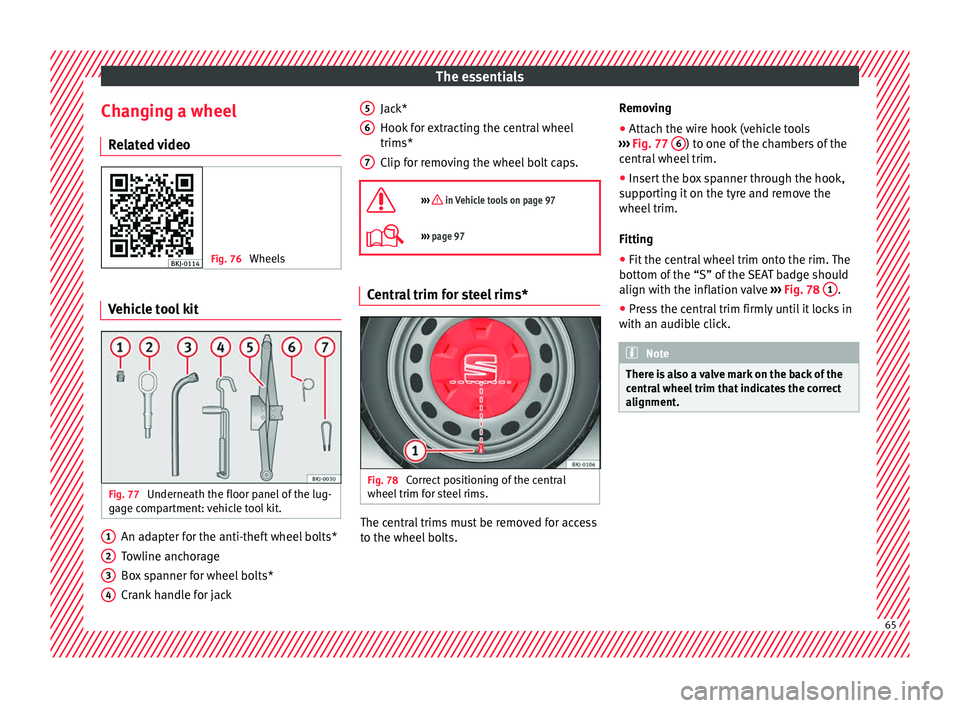
ed video Fig. 76
Wheels Vehicle tool kit
Fig. 77
Underneath the floor panel of the lug-
g ag
e c
ompartment: vehicle tool kit. An adapter for the anti-theft wheel bolts*
T
o
wline anc
horage
Box spanner for wheel bolts*
Crank handle for jack
1 2
3
4 Jack*
Hook
f
or e
xtracting the central wheel
trims*
Clip for removing the wheel bolt caps.
››› in Vehicle tools on page 97
››› page 97 Central trim for steel rims*
Fig. 78
Correct positioning of the central
wheel trim f
or s
teel rims. The central trims must be removed for access
t
o the wheel
bo
lts.
5 6
7 Removing
●
Attach the wire hook (vehicle tools
› ›
›
Fig. 77 6 ) to one of the chambers of the
c entr
al
wheel trim.
● Insert the box spanner through the hook,
suppor
ting it on the tyre and remove the
wheel trim.
Fitting
● Fit the central wheel trim onto the rim. The
bottom of the
“S” of the SEAT badge should
align with the inflation valve ››› Fig. 78 1 .
● Press the central trim firmly until it locks in
w ith an audib
l
e click. Note
There is also a valve mark on the back of the
centr a
l wheel trim that indicates the correct
alignment. 65
Page 68 of 312
The essentials
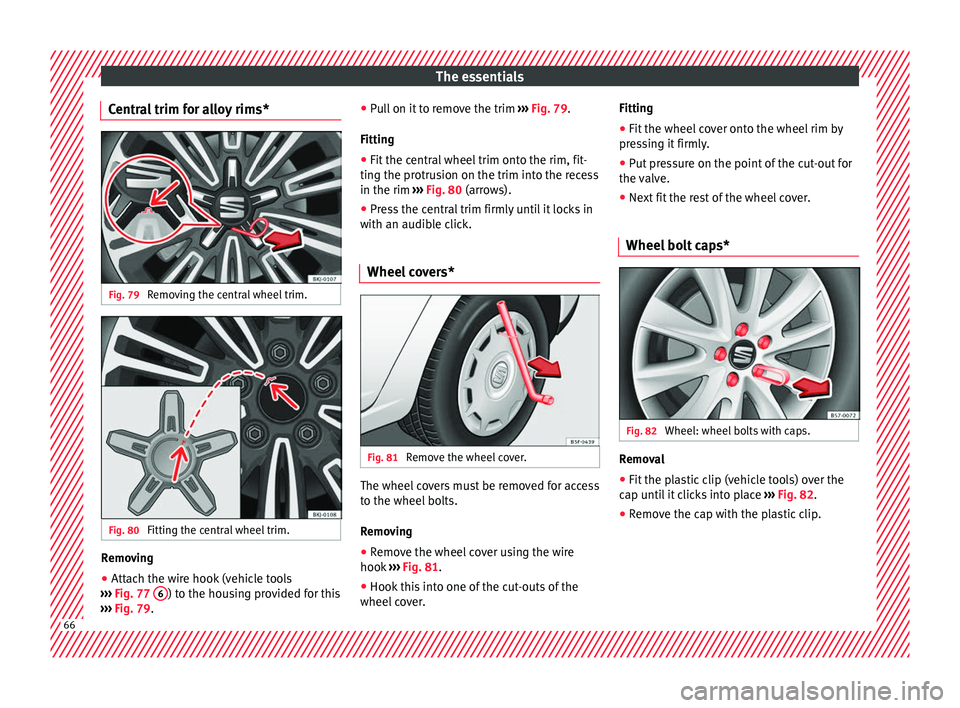
Central trim for alloy rims* Fig. 79
Removing the central wheel trim. Fig. 80
Fitting the central wheel trim. Removing
● Attach the wire hook (vehicle tools
› ››
Fig. 77 6 ) to the housing provided for this
› ›
›
Fig. 79. ●
Pul
l on it to remove the trim ››› Fig. 79.
Fitting
● Fit the central wheel trim onto the rim, fit-
ting the protru
sion on the trim into the recess
in the rim ››› Fig. 80 (arrows).
● Press the central trim firmly until it locks in
with an audibl
e click.
Wheel covers* Fig. 81
Remove the wheel cover. The wheel covers must be removed for access
t
o the wheel
bo
lts.
Removing ● Remove the wheel cover using the wire
hook ››
› Fig. 81.
● Hook this into one of the cut-outs of the
wheel co
ver. Fitting
●
Fit the wheel cover onto the wheel rim by
pres
sing it firmly.
● Put pressure on the point of the cut-out for
the valv
e.
● Next fit the rest of the wheel cover.
Wheel bolt caps* Fig. 82
Wheel: wheel bolts with caps. Removal
● Fit the plastic clip (vehicle tools) over the
c ap u
nti
l it clicks into place ››› Fig. 82.
● Remove the cap with the plastic clip. 66