mirror Seat Ibiza 2017 Edition 11.17 User Guide
[x] Cancel search | Manufacturer: SEAT, Model Year: 2017, Model line: Ibiza, Model: Seat Ibiza 2017Pages: 312, PDF Size: 6.51 MB
Page 154 of 312
Operation
● The s u
n
visor can be pulled out of its
mounting and turned towards the door
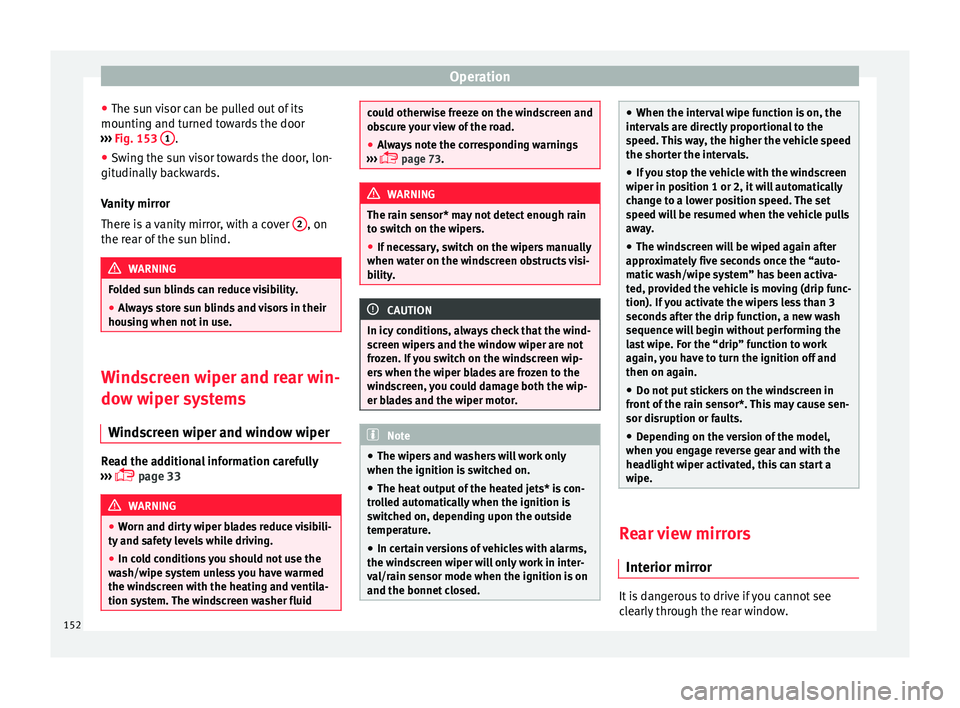
››› Fig. 153 1 .
● Swing the sun visor towards the door, lon-
git udin
al
ly backwards.
Vanity mirror
There is a vanity mirror, with a cover 2 , on
the r e
ar of
the sun blind. WARNING
Folded sun blinds can reduce visibility.
● Always store sun blinds and visors in their
hous in
g when not in use. Windscreen wiper and rear win-
do
w w
iper sy
stems
Windscreen wiper and window wiper Read the additional information carefully
› ›
›
page 33 WARNING
● Worn and dir ty
wiper blades reduce visibili-
ty and safety levels while driving.
● In cold conditions you should not use the
wash/w
ipe system unless you have warmed
the windscreen with the heating and ventila-
tion system. The windscreen washer fluid could otherwise freeze on the windscreen and
ob
s
cure your view of the road.
● Always note the corresponding warnings
›››
page 73. WARNING
The rain sensor* may not detect enough rain
t o sw it
ch on the wipers.
● If necessary, switch on the wipers manually
when water on the w
indscreen obstructs visi-
bility. CAUTION
In icy conditions, always check that the wind-
sc r
een wipers and the window wiper are not
frozen. If you switch on the windscreen wip-
ers when the wiper blades are frozen to the
windscreen, you could damage both the wip-
er blades and the wiper motor. Note
● The wiper s
and washers will work only
when the ignition is switched on.
● The heat output of the heated jets* is con-
trol
led automatically when the ignition is
switched on, depending upon the outside
temperature.
● In certain versions of vehicles with alarms,
the winds
creen wiper will only work in inter-
val/rain sensor mode when the ignition is on
and the bonnet closed. ●
When the inter v
al wipe function is on, the
intervals are directly proportional to the
speed. This way, the higher the vehicle speed
the shorter the intervals.
● If you stop the vehicle with the windscreen
wiper in pos
ition 1 or 2, it will automatically
change to a lower position speed. The set
speed will be resumed when the vehicle pulls
away.
● The windscreen will be wiped again after
appro
ximately five seconds once the “auto-
matic wash/wipe system” has been activa-
ted, provided the vehicle is moving (drip func-
tion). If you activate the wipers less than 3
seconds after the drip function, a new wash
sequence will begin without performing the
last wipe. For the “drip” function to work
again, you have to turn the ignition off and
then on again.
● Do not put stickers on the windscreen in
front of
the rain sensor*. This may cause sen-
sor disruption or faults.
● Depending on the version of the model,
when you en
gage reverse gear and with the
headlight wiper activated, this can start a
wipe. Rear view mirrors
Int erior mirr or It is dangerous to drive if you cannot see
c
le
arly through the rear window.
152
Page 155 of 312
Lights and visibility
Interior mirror with automatic anti-dazzle
f u
nction*
The anti-d
azzle function is activated every
time the ignition is switched on.
When the anti-dazzle function is enabled, the
interior rear vision mirror will darken auto-
matically according to the amount of light it
receives. The anti-dazzle function is cancel-
led if reverse gear is engaged. Note
● The autom atic
anti-dazzle function will only
work properly if the sun blind* for the rear
window is retracted and there are no other
objects preventing light from reaching the in-
terior rear vision mirror.
● If you have to stick any type of sticker on
the winds
creen, do not do so in front of the
sensors. Doing so could prevent the anti-daz-
zle function from working well or even from
working at all. Folding in the exterior mirrors man-
ua
l
ly The exterior mirrors of the vehicle may be fol-
ded in. F
or thi
s, pr
ess the mirror housing to-
wards the vehicle. Note
Before washing the vehicle with an automatic
car w a
sh, fold in the exterior mirrors to avoid
damage. Electric exterior mirrors*
Fig. 154
Exterior mirror controls. Read the additional information carefully
› ›
›
page 20
The exterior mirrors can be adjusted using
the rotary knob in the driver door.
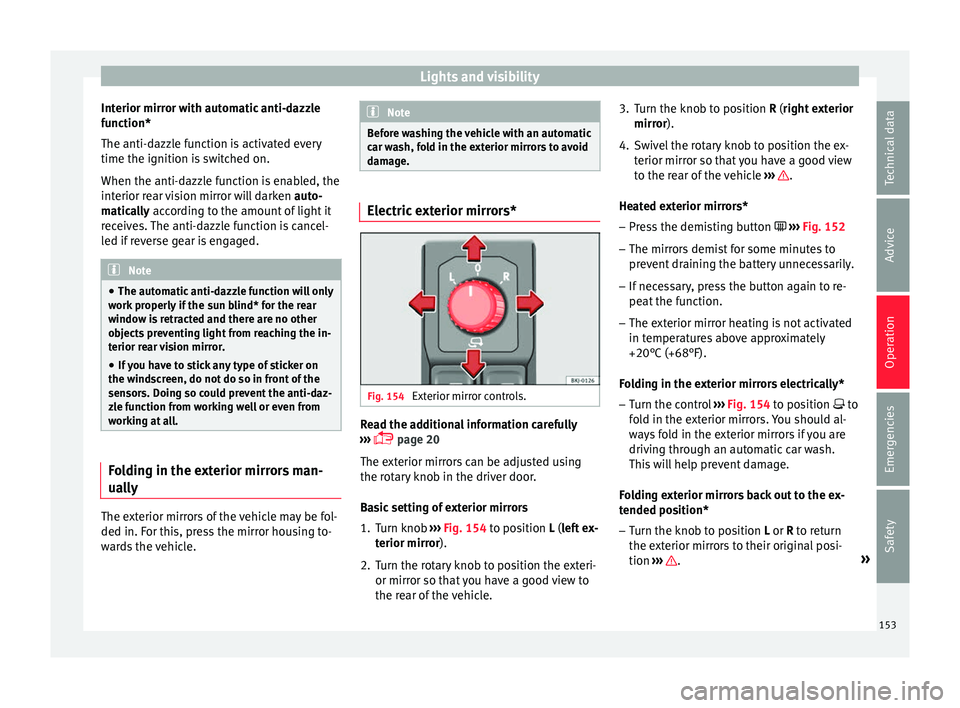
Basic setting of exterior mirrors
1. Turn knob ›››
Fig. 154 to position L (left ex-
terior mirror).
2. Turn the rotary knob to position the exteri- or mirror so that
you have a good view to
the rear of the vehicle. 3. Turn the knob to position R (right ext
erior
mirror).
4. Swivel the rotary knob to position the ex- terior mirror so th
at you have a good view
to the rear of the vehicle ››› .
He at
ed e
xterior mirrors*
– Press the demisting button ›››
Fig. 152
– The mirrors demist for some minutes to
prevent
draining the battery unnecessarily.
– If necessary, press the button again to re-
peat the f
unction.
– The exterior mirror heating is not activated
in temperat
ures above approximately
+20°C (+68°F).
Folding in the exterior mirrors electrically* – Turn the control ›››
Fig. 154 to position to
fold in the exterior mirrors. You should al-
ways fold in the exterior mirrors if you are
driving through an automatic car wash.
This will help prevent damage.
Folding exterior mirrors back out to the ex-
tended position* – Turn the knob to position L or R to ret
urn
the exterior mirrors to their original posi-
tion ››› .
»
153
Technical data
Advice
Operation
Emergencies
Safety
Page 156 of 312
Operation
Fold in the exterior mirrors after parking
(c on
v
enience function)*
The Easy Connect system, the button and
the f u
nction b
uttons SETTINGS and
Mirr or
s
and windscreen wipers can be used to
h av
e the e
xterior mirrors fold in when the ve-
hicle is parked ››› page 123.
When the vehicle is locked with the remote
control, by pressing for more than approxi-
mately 1 second the exterior mirrors are fol-
ded in automatically. When the vehicle is
opened with the remote control, the exterior
mirrors are deployed automatically. WARNING
● Con v
ex or aspheric mirrors increase the
field of vision however the objects appear
smaller and further away in the mirrors. If you
use these mirrors to estimate the distance to
vehicles behind you when changing lane, you
could make a mistake. Risk of accident.
● If possible, use the rear vision mirror to es-
timate di
stances to vehicles behind you.
● Make sure that you do not get your finger
trapped betw
een the mirror and the mirror
base when folding back the mirrors. Risk of
injury! For the sake of the environment
The exterior mirror heating should be switch-
ed off when it i
s no longer needed. Other-
wise, it is an unnecessary fuel waste. Note
● If the el ectric
al adjustment ever fails to op-
erate, the mirrors can be adjusted by hand by
lightly pressing the edge of the mirror glass.
● In vehicles with electric exterior mirrors,
the fol
lowing points should be observed: if,
due to an external force (e.g. being knocked
while manoeuvring), the adjustment of the
mirror housing is altered, the mirror will have
to be fully folded electrically. Do not readjust
the rear vision mirror housing by hand, as
this will interfere with the mirror adjuster
function.
● The fold-in function on the exterior mirrors
wil
l not activate at speeds over 40 km/h
(25 mph). Seats and head restraints
Adju
s
tin
g the seat and head re-
straints
Adjusting the front seats Read the additional information carefully
›› ›
page 19 WARNING
The safe driving chapter contains important
inform ation, tip
s, suggestions and warnings
that you should read and observe for your
own safety and the safety of your passengers
››› page 75. WARNING
● Never a dju
st the driver or front passenger
seat while the vehicle is in motion. While ad-
justing your seat, you will assume an incor-
rect sitting position. Risk of accidents. Adjust
the driver or front passenger seat only when
the vehicle is stationary.
● To reduce the risk of injury to the driver and
front p
assenger in case of a sudden braking
or an accident, never drive with the backrest
tilted towards the rear. The maximum protec-
tion of the seat belt can be achieved only
when the backrests are in an upright position
and the driver and front passenger have prop-
erly adjusted their seat belts. The further the 154
Page 231 of 312
Driver assistance systems
●
Alw a
ys keep visual control of the vehicle
surroundings: use the mirrors for additional
help. CAUTION
Parking Aid functions may be negatively af-
f ect ed b
y different factors that may lead to
damage to the vehicle or its immediate sur-
rounds:
● Under certain circumstances, the system
does not
detect or display certain objects:
– Objects such as chains, trailer draw bars,
fences, posts and thin trees.
– Objects that are located above the sen-
sors, such as protrusions in a wall.
– Objects with certain surfaces or struc-
tures, such as wire mesh fences or pow-
der snow.
● Certain surfaces of objects and garments
do not refl
ect the ultrasound sensors' sig-
nals. The system cannot detect, at least cor-
rectly, these objects or people wearing such
clothes.
● Ultrasound sensor signals may be affected
by e
xternal sound sources. In certain circum-
stances this may prevent them from detect-
ing people or objects.
● Please note that low obstacles detected by
the syst
em may no longer be registered by
the sensors as the car moves closer, so the
system will not give any further warning. In
certain circumstances, objects such as high kerbs that could damage the bottom of the
vehic
l
e are not detected either.
● If the first warning from the ParkPilot is ig-
nored, the v
ehicle could suffer considerable
damage.
● The knocks or damage on the radiator
grill
e, bumper, wheel arch and vehicle under-
body can adjust the orientation of the sen-
sors. This can affect the parking aid function.
Have the function checked by a specialised
workshop. Note
● In cer t
ain situations, the system can give a
warning even though there is no obstacle in
the detected area, e.g:
–with rough or cobbled floors or ground
with long grass;
– with external ultrasound sources, such as
cleaning vehicles or other vehicles;
– In downpours, intense snow or dense ex-
haust gases;
– or in locations such as the brow of a hill.
● A registration plate or plate holder on the
front w
ith larger than the space for the regis-
tration plate, or a registration plate that is
curved or warped can cause:
– false detections,
– loss of sensor visibility,
● In order to guarantee good system opera-
tion, keep the ultr
asound sensors clean, free of snow or ice, and do not cover them with
adhe
s
ives or other objects.
● If you use high-pressure or vapour equip-
ment to c
lean the ultrasound sensors, apply
it directly only very briefly and always from a
distance of more than 10 cm.
● Retrofitting of accessories to the vehicle,
such a
s a bicycle rack, may interfere with the
operation of the Parking Aid.
● In order to familiarise yourself with the sys-
tem, it i
s advised that you practice parking in
an area or car park that is free from traffic.
There must be good weather and light condi-
tions.
● The volume and tone of the warnings can
be modified, in addition t
o the indications
››› page 232.
● In vehicles without a driv
er information
system, these parameters can be modified in
a SEAT Official Service or in a specialised
workshop.
● Please observe information on towing a
trail
er ››› page 233.
● The display on the Easy Connect screen
shows
a slight time delay. Rear parking aid*
The rear Parking Aid assists the driver in
p
ark
in
g by means of audible warning
sounds. »
229
Technical data
Advice
Operation
Emergencies
Safety
Page 238 of 312
Operation
Parking and manoeuvring with the
r e
ar a
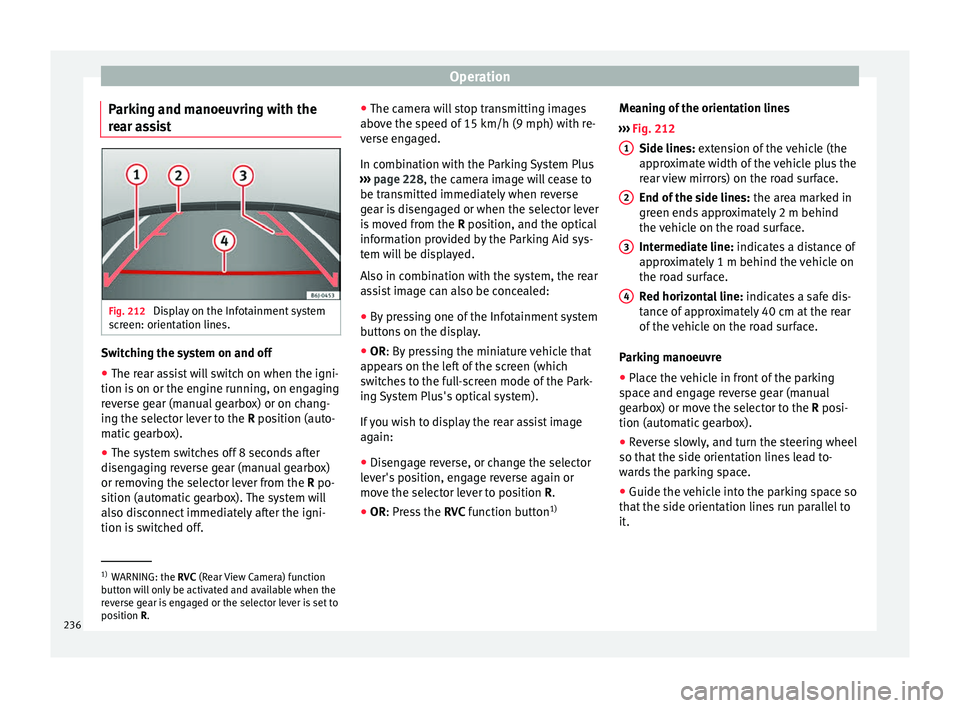
ssist Fig. 212
Display on the Infotainment system
s c
r
een: orientation lines. Switching the system on and off
●
The rear assist will switch on when the igni-
tion i s
on or the en
gine running, on engaging
reverse gear (manual gearbox) or on chang-
ing the selector lever to the R position (auto-
matic gearbox).
● The system switches off 8 seconds after
diseng
aging reverse gear (manual gearbox)
or removing the selector lever from the R po-
sition (automatic gearbox). The system will
also disconnect immediately after the igni-
tion is switched off. ●
The camera w
ill stop transmitting images
above the speed of 15 km/h (9 mph) with re-
verse engaged.
In combination with the Parking System Plus
››› page 228, the camera image will cease to
be transmitted immediately when reverse
gear is disengaged or when the selector lever
is moved from the R position, and the optical
information provided by the Parking Aid sys-
tem will be displayed.
Also in combination with the system, the rear
assist image can also be concealed:
● By pressing one of the Infotainment system
button
s on the display.
● OR: By pressing the miniature vehicle that
appe
ars on the left of the screen (which
switches to the full-screen mode of the Park-
ing System Plus's optical system).
If you wish to display the rear assist image
again:
● Disengage reverse, or change the selector
lever's
position, engage reverse again or
move the selector lever to position R.
● OR: Press the RVC fu
nction button1)Meaning of the orientation lines
›››
Fig. 212
Side lines: extension of the vehicle (the
approximate width of the vehicle plus the
rear view mirrors) on the road surface.
End of the side lines: the area marked in
green ends approximately 2 m behind
the vehicle on the road surface.
Intermediate line: indicates a distance of
approximately 1 m behind the vehicle on
the road surface.
Red horizontal line: indicates a safe dis-
tance of approximately 40 cm at the rear
of the vehicle on the road surface.
Parking manoeuvre
● Place the vehicle in front of the parking
spac
e and engage reverse gear (manual
gearbox) or move the selector to the R posi-
tion (automatic gearbox).
● Reverse slowly, and turn the steering wheel
so that the s
ide orientation lines lead to-
wards the parking space.
● Guide the vehicle into the parking space so
that the s
ide orientation lines run parallel to
it. 1
2
3
4
1)
WARNING: the RVC (Rear
View Camera) function
button will only be activated and available when the
reverse gear is engaged or the selector lever is set to
position R.
236
Page 244 of 312
Operation
Trailer towing Wh at
do
you need to bear in mind
when towing a trailer? Your vehicle may be used to tow a trailer
when fitted w
ith the c
orrect equipment.
If you wish to retrofit a towing bracket, con-
sult ››› page 245.
Connectors
Your vehicle is fitted with a 13-pin connector
for the electrical connection between the
trailer and the vehicle.
If the trailer has a 7-pin plug you will need to
use an adapter cable. It is available at any
Technical Service.
Trailer weight/drawbar load
Never exceed the authorised trailer weight. If
you do not load the trailer up to the maxi-
mum permitted trailer weight, you can then
climb correspondingly steeper slopes.
The maximum trailer weights listed are only
applicable for altitudes up to 1000 m above
sea level. With increasing altitude the engine
power and therefore the vehicle climbing
ability are impaired because of the reduced
air density. The maximum trailer weight has
to be reduced accordingly. The weight of the
vehicle and trailer combination must be re- duced by 10% for every further 1000 m (or
par
t
thereof). The gross combination weight
is the actual weight of the laden vehicle plus
the actual weight of the laden trailer. When
possible, operate the trailer with the maxi-
mum permitted drawbar load on the ball joint
of the towing bracket, but do not exceed the
specified limit.
The figures for trailer weights and drawbar
loads that are given on the data plate of the
towing bracket are for certification purposes
only. The correct towing bracket figures for
your specific model, which may be lower than
these figures, are given in the vehicle docu-
mentation or on ››› page 281, Technical
specifications.
Distributing the load
Distribute loads in the trailer so that heavy
objects are as near to the axle as possible.
Loads carried in the trailer must be secured
to prevent them moving.
Tyre pressure
The maximum permissible tyre pressure val-
ues are shown on the sticker on the rear part
of the left front door frame. Set the tyre pres-
sure of the trailer tyres in accordance with the
trailer manufacturer's recommendations. Exterior mirrors
Check whether
you can see enough of the
road behind the trailer with the standard rear
vision mirrors. If this is not the case, you
should have additional exterior mirrors fitted.
Both exterior mirrors should be mounted on
hinged extension brackets. Adjust the mirrors
to give sufficient vision to the rear.
Tow rope
Always use a cable between the vehicle and
the trailer ››› page 243.
Trailer rear lights
The trailer's rear lights should comply with
the statutory safety regulations ››› page 243. WARNING
Never transport people in a trailer. This could
re s
ult in fatal accidents. Note
● To w
ing a trailer places additional demands
on the vehicle. We recommend additional
services between the normal inspection inter-
vals if the vehicle is used frequently for tow-
ing a trailer.
● Find out whether special regulations apply
to to
wing a trailer in your country. 242
Page 251 of 312
Care and maintenance
WARNING
● Car -c
are products can be toxic. Because of
this, they must always be kept closed in their
original container. Keep them out of the reach
of children. Failure to comply could result in
poisoning.
● Always read and observe the instructions
and warning
s on the package before using
car-care products. Improper use could cause
health problems or damage the vehicle. The
use of certain products may produce noxious
vapours; they should be used in well ventila-
ted areas.
● Never use fuel, turpentine, engine oil, nail
varnish r
emover or other volatile fluids.
These are toxic and highly flammable. Risk of
fire and explosion.
● Before washing your vehicle, or carrying
out any
maintenance, switch the engine off,
apply the handbrake firmly and remove the
key from the ignition. CAUTION
Never attempt to remove dirt, mud or dust if
the sur f
ace of the vehicle is dry. Never use a
dry cloth or sponge for cleaning purposes.
This could damage the paintwork or the win-
dows of your vehicle. Soak dirt, mud or dust
with plenty of water. For the sake of the environment
● When pur c
hasing car care products, try to
select ones that are not harmful to the envi-
ronment.
● The waste from car-care products should
not be dis
posed of with ordinary household
waste. Observe the disposal information on
the package. Care of the vehicle exterior
Autom atic
car wash tunnel The vehicle paintwork is so durable that the
v
ehic
l
e can normally be washed without
problems in an automatic car wash tunnel.
However, the paintwork wear depends to a
large extent on the kind of the car wash tun-
nel, the brushes used, its water filtering and
the type of cleaning and preservative prod-
ucts.
Before going through a car wash, be sure to
take the usual precautions (close the win-
dows, the roof and rear-view mirrors). There
is nothing to note apart from that.
If the vehicle has special accessories such as
spoilers or a roof rack or two-way radio aerial,
etc., it is advisable to consult the car wash
tunnel operator first. After washing, the brake
s could take some
time to respond as the brake discs and pads
could be wet, or even frozen in winter. “Dry”
the brakes by braking several times. WARNING
Water, ice and salt on the brake system can
reduc e br
aking effectiveness. Risk of acci-
dent. Hand-washing
Vehicle washing
– First soften the dirt and rinse it off with wa-
ter
.
– C
lean your vehicle from top to bottom with
a soft s
ponge, a glove or a brush. Use very
light pressure.
– Rinse the sponge or glove often with clean
water
.
– Special car shampoo should only be used
for v
ery stubborn dirt.
– Leave the wheels, sill panels etc. until last,
usin
g a different sponge or glove.
– Rinse the vehicle thoroughly with water.
– Dry the vehicle surface gently with a cha-
mois l
eather.
– In cold temperature, dry the rubber seals
and their sur
faces to prevent them from »
249
Technical data
Advice
Operation
Emergencies
Safety
Page 253 of 312
Care and maintenance
● Do not u
se s
crapers to remove ice or snow
from the sheets.
● Do not polish the adhesive sheets.
● Do not use dirty cloths or sponges.
● It is preferable to wash them with a soft
spong
e and gentle neutral soap.
Camera sensors and lenses ●
Use a small brush to remove snow and a
de-icer s pr
ay to remove ice.
● Clean the sensors with a solvent-free prod-
uct and a sof t, dr
y cloth.
● Moisten the camera lens using a standard
alcohol-b
ased glass cleaning agent and
clean the lens with a dry cloth. CAUTION
● When y ou c
lean the vehicle with a pressure
washer:
–Stay a suitable distance from the sensors
on the front and rear bumpers.
– Do not clean the camera lenses or sur-
rounding area with the pressure washer.
● Never use warm or hot water to remove
snow and ic
e from the reverse camera lens,
as it could crack the lens.
● Never use abrasive cleaning agents on the
lens. Vehicle paint maintenance
Regular waxing protects the paintwork.
You need t
o ap
ply wax to your vehicle if water
does not form small drops and run off the
paintwork when it is clean.
Good quality hard wax products are available
at your Technical Service.
Regular wax applications help to protect the
paintwork from environmental contaminants
››› page 248. It is also effective in protecting
against minor scratches.
Even if a wax solution is used regularly in the
vehicle washing tunnel, it is advisable to pro-
tect the paint with a hard wax coating at least
twice a year.
Polishing the paintwork Polishing is only necessary if the paint has
lo
s
t
its shine, and the gloss cannot be
brought back by applying wax. Polishing
products can be purchased in your Technical
Service.
The vehicle must be waxed after polishing if
the polish used does not contain wax com-
pounds to seal the paint ›››
page 251, Vehicle
paint maintenance . CAUTION
To prevent damage to the paintwork:
● Do not use polishes and hard wax on pain-
ted p ar
ts with a matt finish or on plastic
parts.
● Do not polish your vehicle in a sandy or
dusty
environment. Caring for plastic parts
If normal washing fails to clean plastic parts,
c
l
e
an them with approved solvent-free plas-
tic cleaning and care products. CAUTION
● The use of li
quid air freshener directly over
the air vents of the vehicle may damage the
plastic parts if the liquid is accidentally spil-
led.
● Cleaning products which contain solvents
wil
l damage the material. Cleaning of windows and mirrors
Cleaning windows
– Moisten the windows with commercially
av ai
l
able, alcohol based glass cleaner.
– Dry the windows with a clean chamois
leather or a lint
-free cloth. »
251
Technical data
Advice
Operation
Emergencies
Safety
Page 254 of 312
Advice
Removing snow – Use a small brush to remove snow from the
windo
w
s and mirrors.
Removing ice – Use a de-icer spray.
Use a cl
ean cloth or chamois leather to dry
the windows. The chamois leathers used on
painted surfaces are not suitable to clean
windows because they are soiled with wax
deposits which could smear the windows.
If possible, use a de-icing spray to remove
ice. If you use an ice scraper, push it in one
direction only without swinging it.
Use window cleaner or a silicone remover to
clean rubber, oil, grease and silicone depos-
its off.
Wax deposits can only be removed with a
special cleaner available at your Technical
Service. Wax deposits on the windscreen
could cause the wiper blades to judder. Add-
ing a window cleaner that dissolves wax to
the windscreen washer fluid reservoir pre-
vents wiper blades from juddering, but the
wax deposits are not removed. CAUTION
● Never u se w
arm or hot water to remove
snow and ice from windows and mirrors. This
could cause the glass to crack! ●
The heatin g el
ement for the rear window is
located on the inner side of the window. To
prevent damage, do not put stickers over the
heating elements on the inside of the win-
dow. Cleaning windscreen wiper blades
Clean wiper blades improve visibility.
1. Use a soft cloth to remove dust and dirt
from the w ind
screen wiper blades.
2. Use window cleaner to clean the wind- scr
een wiper blades. Use a sponge or a
cloth to remove stubborn dirt.
Care of rubber seals If rubber seals are well looked after, they will
not
fr
eez
e so quickly.
1. Use a soft cloth to remove dust and dirt from the rubber seal
s.
2. Apply a specialist care product to the rub- ber seals.
The rubber s
trips on the doors, windows, etc.
will remain pliable and last longer if they are
treated with a suitable rubber care product
from time to time (for example silicone
spray). Caring for rubber seals will also prevent pre-
matur
e ageing and leaks. The doors will be
easier to open. If rubber seals are well looked
after, they will not freeze so quickly in winter.
Door lock cylinder The door lock cylinders can freeze up in win-
ter
.
T
o de-ice the lock cylinders you should only
use spray with lubricating and anti-corrosive
properties.
Cleaning chrome parts 1. Clean chrome parts with a damp cloth.
2. Polish chrome parts with a soft, dry cloth.
If
thi
s
does not provide satisfying results, use
a specialist chrome cleaning product.
Chrome cleaning products will remove stains
from the surface. CAUTION
To prevent scratching chrome surfaces:
● Never use an abrasive cleaning product on
chr ome.
● Do not
clean or polish chrome parts in a
sandy or du
sty environment.252
Page 301 of 312
Index
leather . . . . . . . . . . . . . . . . . . . . . . . . . . . . . . . . 255
p l
a
stic parts . . . . . . . . . . . . . . . . . . . . . . 251, 254
radio screen . . . . . . . . . . . . . . . . . . . . . . . . . . . 254
rubber seals . . . . . . . . . . . . . . . . . . . . . . . . . . . 252
seat belts . . . . . . . . . . . . . . . . . . . . . . . . . . . . . 256
steel wheel rims . . . . . . . . . . . . . . . . . . . . . . . . 253
washing the vehicle . . . . . . . . . . . . . . . . . . . . . 249
windows and exterior mirrors . . . . . . . . . . . . . 251
windscreen wiper blades . . . . . . . . . . . . . . . . . 252
wooden trim . . . . . . . . . . . . . . . . . . . . . . . . . . . 254
Climatronic . . . . . . . . . . . . . . . . . . . . . . . . . . . . . . . 52 adjusting the temperature . . . . . . . . . . . . . . . . 174
automatic mode . . . . . . . . . . . . . . . . . . . . . . . . 174
controls . . . . . . . . . . . . . . . . . . . . . . . . . . . . . . . 173
fan regulation . . . . . . . . . . . . . . . . . . . . . . . . . . 174
general notes . . . . . . . . . . . . . . . . . . . . . . . . . . 166
windscreen defrost . . . . . . . . . . . . . . . . . . . . . . 174
Close sunroof . . . . . . . . . . . . . . . . . . . . . . . . . . . . . . . 144
Closing . . . . . . . . . . . . . . . . . . . . . . . . . . . . . . . . . 130 bonnet . . . . . . . . . . . . . . . . . . . . . . . . . . . . . . . . 265
sunroof . . . . . . . . . . . . . . . . . . . . . . . . . . . . . . . 144
windows . . . . . . . . . . . . . . . . . . . . . . . . . . . . . . 141
Clutch (warning lamp) . . . . . . . . . . . . . . . . . . . . . 196
Coming Home . . . . . . . . . . . . . . . . . . . . . . . . . . . . 148
Coming Home Function . . . . . . . . . . . . . . . . . . . . 148
Connectivity Box . . . . . . . . . . . . . . . . . . . . . . . . . . 129
Contact key . . . . . . . . . . . . . . . . . . . . . . . . . . . . . . 175
Control and warning lamps airbag system . . . . . . . . . . . . . . . . . . . . . . . . . . . 91
alternator . . . . . . . . . . . . . . . . . . . . . . . . . . . . . 273
Anti-lock brake system (ABS) . . . . . . . . . . . . . . 187
ASR . . . . . . . . . . . . . . . . . . . . . . . . . . . . . . . . . . 184
braking system . . . . . . . . . . . . . . . . . . . . . . . . . 181
coolant . . . . . . . . . . . . . . . . . . . . . . . . . . . . . . . 269
cruise control system (CCS) . . . . . . . . . . . . . . . 208
depress the brake . . . . . . . . . . . . . . . . . . . . . . . 212 diesel particulate filter . . . . . . . . . . . . . . . . . . . 202
EDL . . . . . . . . . . . . . . . . . . . . . . . . . . . . . . . . . . 186
emis
sion control . . . . . . . . . . . . . . . . . . . . . . . . 203
engine oil . . . . . . . . . . . . . . . . . . . . . . . . . . . . . 267
ESC . . . . . . . . . . . . . . . . . . . . . . . . . . . . . . . . . . 183
instrument panel . . . . . . . . . . . . . . . . . . . . . 47, 49
lights . . . . . . . . . . . . . . . . . . . . . . . . . . . . . . . . . 146
speed limiter . . . . . . . . . . . . . . . . . . . . . . . . . . . 209
steering column lock . . . . . . . . . . . . . . . . . . . . 198
tyres . . . . . . . . . . . . . . . . . . . . . . . . . . . . . . . . . . 278
Controls and displays general instrument panel . . . . . . . . . . . . . . . . . 115
Controls for the windows . . . . . . . . . . . . . . . 18, 141
Controls on the steering wheel without voice control . . . . . . . . . . . . . . . . . . . . 127
with voice control . . . . . . . . . . . . . . . . . . . . . . . 125
Coolant checking level . . . . . . . . . . . . . . . . . . . . . . . . . . 270
Coolant level control lamp . . . . . . . . . . . . . . . . . . . . . . . . . . . 269
Coolant temperature control lamp . . . . . . . . . . . . . . . . . . . . . . . . . . . 269
safety instructions . . . . . . . . . . . . . . . . . . . . . . 270
Cooling coolant temperature gauge . . . . . . . . . . . . . . . 120
Cooling system checking coolant . . . . . . . . . . . . . . . . . . 269, 270
topping up coolant . . . . . . . . . . . . . . . . . 269, 270
Correct sitting position . . . . . . . . . . . . . . . . . . . . . 76 driver . . . . . . . . . . . . . . . . . . . . . . . . . . . . . . . . . . 76
front passenger . . . . . . . . . . . . . . . . . . . . . . . . . 77
rear seat passengers . . . . . . . . . . . . . . . . . . . . . 78
Cruise control . . . . . . . . . . . . . . . . . . . . . . . . . . . . . 45 control and warning lamps . . . . . . . . . . . . . . . 208
operation . . . . . . . . . . . . . . . . . . . . . . . . . . . . . . 208
Cruise control system . . . . . . . . . . . . . . . . . . . . . . 207
Current . . . . . . . . . . . . . . . . . . . . . . . . . . . . . . . . . 160 D
Danger
s in not using the seat belt . . . . . . . . . . . . 83
Dash panel . . . . . . . . . . . . . . . . . . . . . . . . . . . . . . . 47
Data label . . . . . . . . . . . . . . . . . . . . . . . . . . . . . . . 281
Deactivating the front passenger front airbag . . . 22
Deactivation of front airbag . . . . . . . . . . . . . . . . . . 90
Detachable ball assembling . . . . . . . . . . . . . . . . . . . . . . . . . . . . 239
checking attachment . . . . . . . . . . . . . . . . . . . . 240
placing in standby position . . . . . . . . . . . . . . . 238
removing . . . . . . . . . . . . . . . . . . . . . . . . . 240, 241
standby position . . . . . . . . . . . . . . . . . . . . . . . . 238
Diesel diesel particulate filter . . . . . . . . . . . . . . . . . . . 202
refuelling . . . . . . . . . . . . . . . . . . . . . . . . . . . . . . 260
Diesel particulate filter . . . . . . . . . . . . . . . . . . . . 202 malfunction . . . . . . . . . . . . . . . . . . . . . . . . . . . . 202
Digital clock . . . . . . . . . . . . . . . . . . . . . . . . . . . . . 118
Dimensions . . . . . . . . . . . . . . . . . . . . . . . . . . . . . . 295
Direction of rotation tyres . . . . . . . . . . . . . . . . . . . . . . . . . . . . . . . . . . . 69
Display . . . . . . . . . . . . . . . . . . . . . . . . . . . . 117, 118
Display messages speed limiter . . . . . . . . . . . . . . . . . . . . . . . . . . . 209
Disposal belt tensioners . . . . . . . . . . . . . . . . . . . . . . . . . . 85
Distance control see Adaptive cruise control . . . . . . . . . . . . . . . 216
Door cylinder . . . . . . . . . . . . . . . . . . . . . . . . . . . . . 15
Door handle . . . . . . . . . . . . . . . . . . . . . . . . . . . . . . 15 de-icing . . . . . . . . . . . . . . . . . . . . . . . . . . . . . . . 252
Door lock . . . . . . . . . . . . . . . . . . . . . . . . . . . . . . . . . 15 de-icing . . . . . . . . . . . . . . . . . . . . . . . . . . . . . . . 252
Door lock cylinder de-icing . . . . . . . . . . . . . . . . . . . . . . . . . . . . . . . 252
Door release lever . . . . . . . . . . . . . . . . . . . . . . . . 115
299