clock Seat Ibiza 2017 Owner's manual Edition 11.17
[x] Cancel search | Manufacturer: SEAT, Model Year: 2017, Model line: Ibiza, Model: Seat Ibiza 2017Pages: 312, PDF Size: 6.51 MB
Page 45 of 312
The essentials
● Vehicle
s
with Easy Connect : Press the button and the function button SETTINGS >
Driver assistance > ACC > Dis-
tance .
The w arnin
g limit
can be set from 30 to
210 km/h (18 to 150 mph) ›››
page 209.
The adjustment is made at 10 km/h (6 mph)
intervals. Note
● Ple a
se bear in mind that, even with the
speed warning function, it is still important
to keep an eye on the vehicle speed with the
speedometer and to observe the legal speed
limits.
● The speed limit warning function in the ver-
sion for some c
ountries warns you at a speed
of 120 km/h (75 mph). This is a factory-set
speed limit. Service intervals
Fig. 51
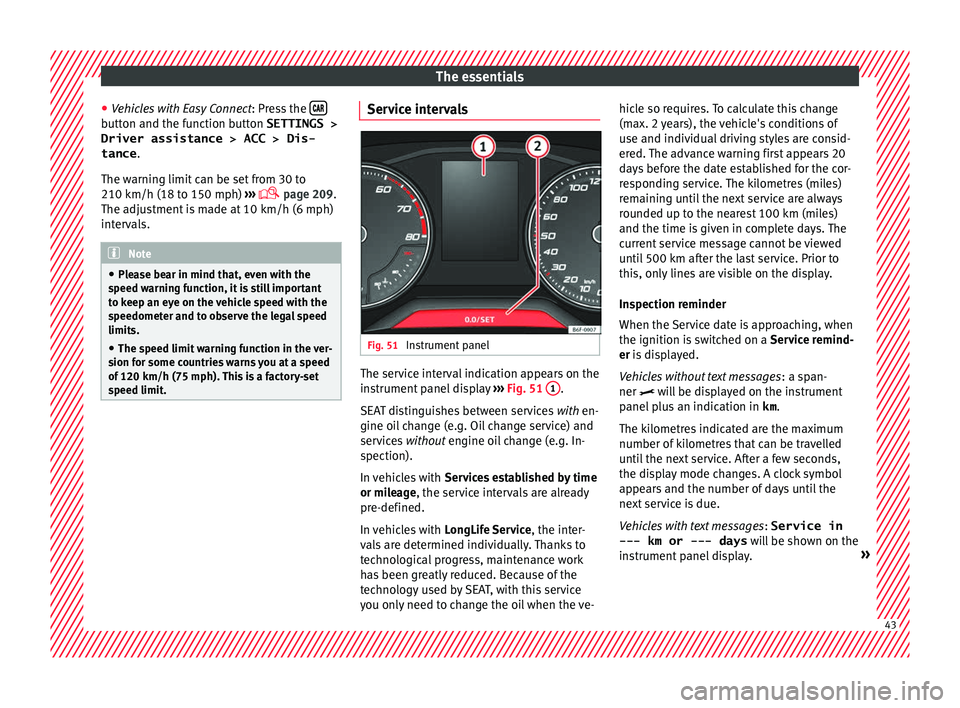
Instrument panel The service interval indication appears on the
in
s
trument
panel display ››› Fig. 51 1 .
S EA
T di
stinguishes between services with en-
gine oil change (e.g. Oil change service) and
services without engine oil change (e.g. In-
spection).
In vehicles with Services established by time
or mileage, the service intervals are already
pre-defined.
In vehicles with LongLife Service , the inter-
vals are determined individually. Thanks to
technological progress, maintenance work
has been greatly reduced. Because of the
technology used by SEAT, with this service
you only need to change the oil when the ve- hicle so requires. To calculate this change
(max. 2 y
ears), the vehicle's conditions of
use and individual driving styles are consid-
ered. The advance warning first appears 20
days before the date established for the cor-
responding service. The kilometres (miles)
remaining until the next service are always
rounded up to the nearest 100 km (miles)
and the time is given in complete days. The
current service message cannot be viewed
until 500 km after the last service. Prior to
this, only lines are visible on the display.
Inspection reminder
When the Service date is approaching, when
the ignition is switched on a Service remind-
er is displayed.
Vehicles without text messages : a span-
ner will be displayed on the instrument
panel plus an indication in km.
The kilometres indicated are the maximum
number of kilometres that can be travelled
until the next service. After a few seconds,
the display mode changes. A clock symbol
appears and the number of days until the
next service is due.
Vehicles with text messages : Service in
--- km or --- days will be shown on the
instrument panel display. » 43
Page 69 of 312
The essentials
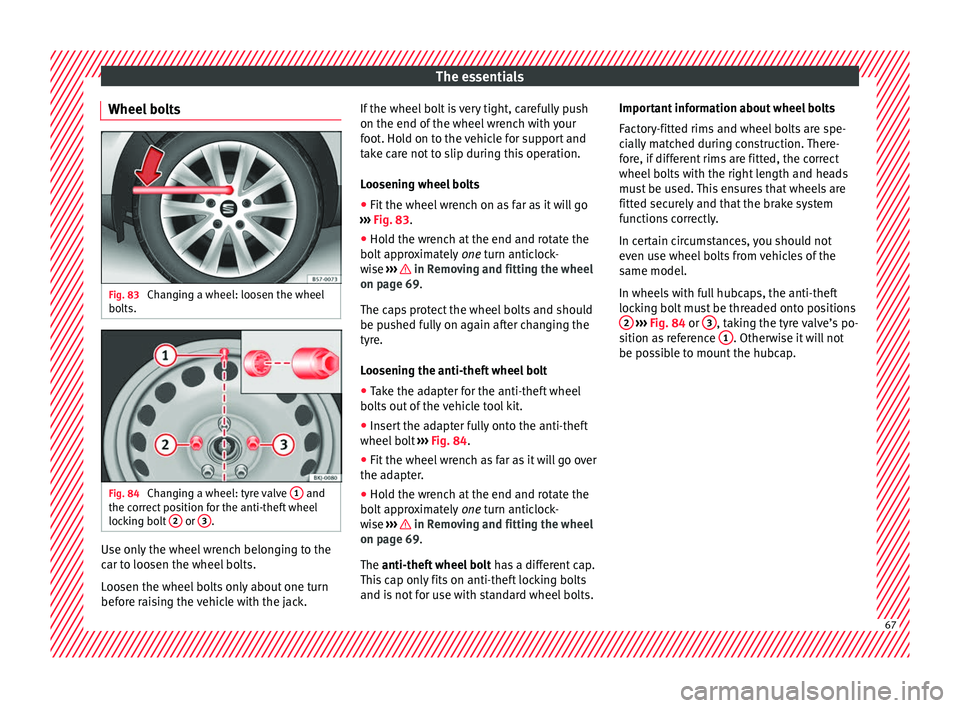
Wheel bolts Fig. 83
Changing a wheel: loosen the wheel
bo lts. Fig. 84
Changing a wheel: tyre valve 1 and
the c orrect
position for the anti-theft wheel
locking bolt 2 or
3 .
Use only the wheel wrench belonging to the
c
ar t
o loo
sen the wheel bolts.
Loosen the wheel bolts only about one turn
before raising the vehicle with the jack. If the wheel bolt is very tight, carefully push
on the end of the wheel wr
ench with your
foot. Hold on to the vehicle for support and
take care not to slip during this operation.
Loosening wheel bolts
● Fit the wheel wrench on as far as it will go
›››
Fig. 83.
● Hold the wrench at the end and rotate the
bolt ap
proximately one turn anticlock-
wise ››› in Removing and fitting the wheel
on p ag
e 69
.
The caps protect the wheel bolts and should
be pushed fully on again after changing the
tyre.
Loosening the anti-theft wheel bolt
● Take the adapter for the anti-theft wheel
bolts out
of the vehicle tool kit.
● Insert the adapter fully onto the anti-theft
wheel bolt
››› Fig. 84.
● Fit the wheel wrench as far as it will go over
the adapt
er.
● Hold the wrench at the end and rotate the
bolt ap
proximately one turn anticlock-
wise ››› in Removing and fitting the wheel
on p ag
e 69
.
The anti-theft wheel bolt has a different cap.
This cap only fits on anti-theft locking bolts
and is not for use with standard wheel bolts. Important information about wheel bolts
Factor
y-fitted rims and wheel bolts are spe-
cially matched during construction. There-
fore, if different rims are fitted, the correct
wheel bolts with the right length and heads
must be used. This ensures that wheels are
fitted securely and that the brake system
functions correctly.
In certain circumstances, you should not
even use wheel bolts from vehicles of the
same model.
In wheels with full hubcaps, the anti-theft
locking bolt must be threaded onto positions 2
› ›
› Fig. 84
or 3 , taking the tyre valve’s po-
s ition a
s
reference 1 . Otherwise it will not
be po s
s
ible to mount the hubcap. 67
Page 79 of 312
Safe driving
WARNING
● An incorr ect
sitting position of the driver
can lead to severe injuries.
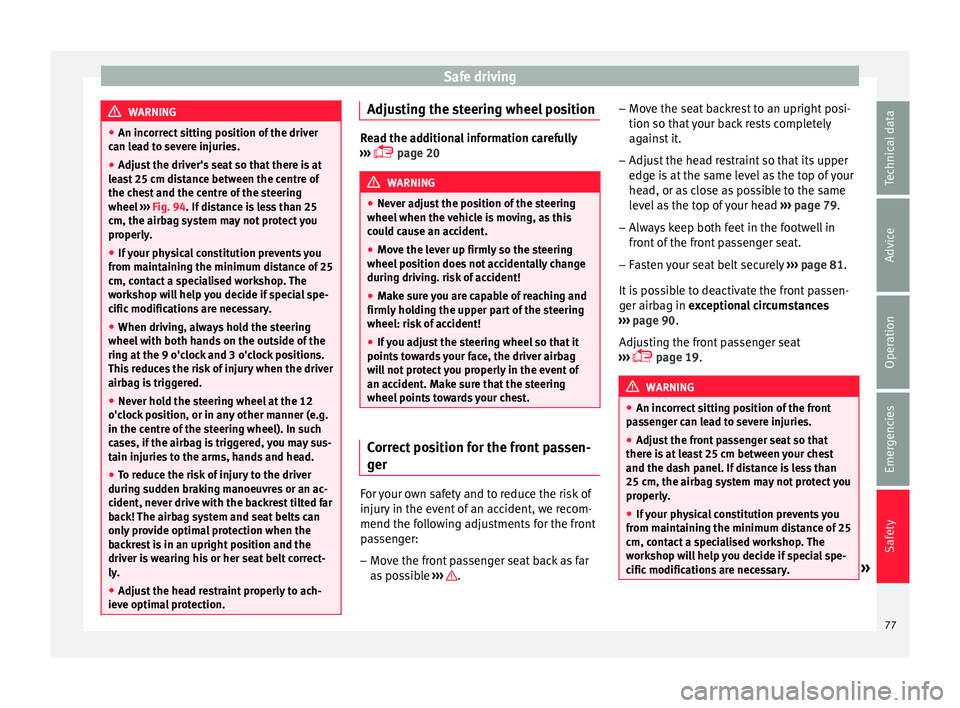
● Adjust the driver's seat so that there is at
lea
st 25 cm distance between the centre of
the chest and the centre of the steering
wheel ››› Fig. 94. If distance is less than 25
cm, the airbag system may not protect you
properly.
● If your physical constitution prevents you
from maint
aining the minimum distance of 25
cm, contact a specialised workshop. The
workshop will help you decide if special spe-
cific modifications are necessary.
● When driving, always hold the steering
wheel with both h
ands on the outside of the
ring at the 9 o'clock and 3 o'clock positions.
This reduces the risk of injury when the driver
airbag is triggered.
● Never hold the steering wheel at the 12
o'clock
position, or in any other manner (e.g.
in the centre of the steering wheel). In such
cases, if the airbag is triggered, you may sus-
tain injuries to the arms, hands and head.
● To reduce the risk of injury to the driver
during sud
den braking manoeuvres or an ac-
cident, never drive with the backrest tilted far
back! The airbag system and seat belts can
only provide optimal protection when the
backrest is in an upright position and the
driver is wearing his or her seat belt correct-
ly.
● Adjust the head restraint properly to ach-
ieve optima
l protection. Adjusting the steering wheel position
Read the additional information carefully
›› ›
page 20 WARNING
● Never a dju
st the position of the steering
wheel when the vehicle is moving, as this
could cause an accident.
● Move the lever up firmly so the steering
wheel pos
ition does not accidentally change
during driving. risk of accident!
● Make sure you are capable of reaching and
firmly ho
lding the upper part of the steering
wheel: risk of accident!
● If you adjust the steering wheel so that it
points t
owards your face, the driver airbag
will not protect you properly in the event of
an accident. Make sure that the steering
wheel points towards your chest. Correct position for the front passen-
g
er For your own safety and to reduce the risk of
injur
y
in the ev
ent of an accident, we recom-
mend the following adjustments for the front
passenger:
– Move the front passenger seat back as far
as po
ssible ››› .–
Mo v
e the se
at backrest to an upright posi-
tion so that your back rests completely
against it.
– Adjust the head restraint so that its upper
edge is
at the same level as the top of your
head, or as close as possible to the same
level as the top of your head ››› page 79.
– Always keep both feet in the footwell in
front of
the front passenger seat.
– Fasten your seat belt securely ›››
page 81.
It is possible to deactivate the front passen-
ger airbag in exceptional circumstances
››› page 90.
Adjusting the front passenger seat
››› page 19. WARNING
● An incorr ect
sitting position of the front
passenger can lead to severe injuries.
● Adjust the front passenger seat so that
there is
at least 25 cm between your chest
and the dash panel. If distance is less than
25 cm, the airbag system may not protect you
properly.
● If your physical constitution prevents you
from maint
aining the minimum distance of 25
cm, contact a specialised workshop. The
workshop will help you decide if special spe-
cific modifications are necessary. » 77
Technical data
Advice
Operation
Emergencies
Safety
Page 109 of 312
Fuses and bulbs
CAUTION
● Remo v
e the ignition key before working on
the electric system. Otherwise, a short circuit
could occur.
● Switch off the lights or parking lights be-
fore
you change a bulb. For the sake of the environment
Please ask your specialist retailer how to dis-
pose of u
sed bulbs in the proper manner. Note
● Dependin g on w
eather conditions (cold or
wet), the front lights, the fog lights, the tail
lights and the turn signals may be temporari-
ly misted. This has no influence on the useful
life of the lighting system. By switching on
the lights, the area through which the beam
of light is projected will quickly be demisted.
However, the edges may continue to be mis-
ted.
● Please check at regular intervals that all
lighting (es
pecially the exterior lighting) on
your vehicle is functioning properly. This is
not only in the interest of your own safety,
but also that of all other road users.
● Before changing a bulb, make sure you
have the c
orrect new bulb.
● Do not touch the glass part of the bulb with
your bar
e hands, use a cloth or paper towel
instead. The residue left by the fingerprints
would vaporise as a result of the heat gener- ated by the bulb, they will be deposited on
the refl
ect
or and will impair its surface.
● Depending on the level of equipment fitted
in the vehic
le, LEDs may be used for part or
all of the interior and/or exterior lighting.
LEDs have an estimated life that exceeds than
that of the car. If an LED light fails, go to an
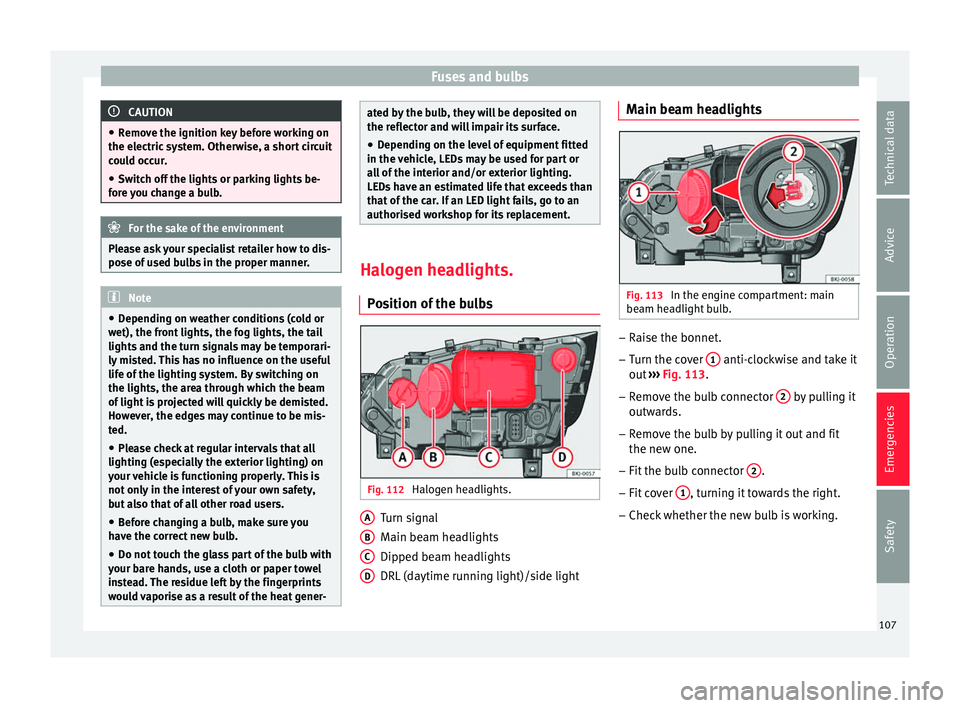
authorised workshop for its replacement. Halogen headlights.
Po s
ition of the bulbs Fig. 112
Halogen headlights. Turn signal
M
ain be
am he
adlights
Dipped beam headlights
DRL (daytime running light)/side light
A B
C
D Main beam headlights
Fig. 113
In the engine compartment: main
be am he
a
dlight bulb. –
Raise the bonnet.
– Turn the cover 1 anti-clockwise and take it
out
›
›
› Fig. 113.
– Remove the bulb connector 2 by pulling it
outw ar
d
s.
– Remove the bulb by pulling it out and fit
the new one.
– Fit the bulb connector 2 .
– Fit cover 1 , turning it towards the right.
– Check whether the new bulb is working.
107
Technical data
Advice
Operation
Emergencies
Safety
Page 110 of 312
Emergencies
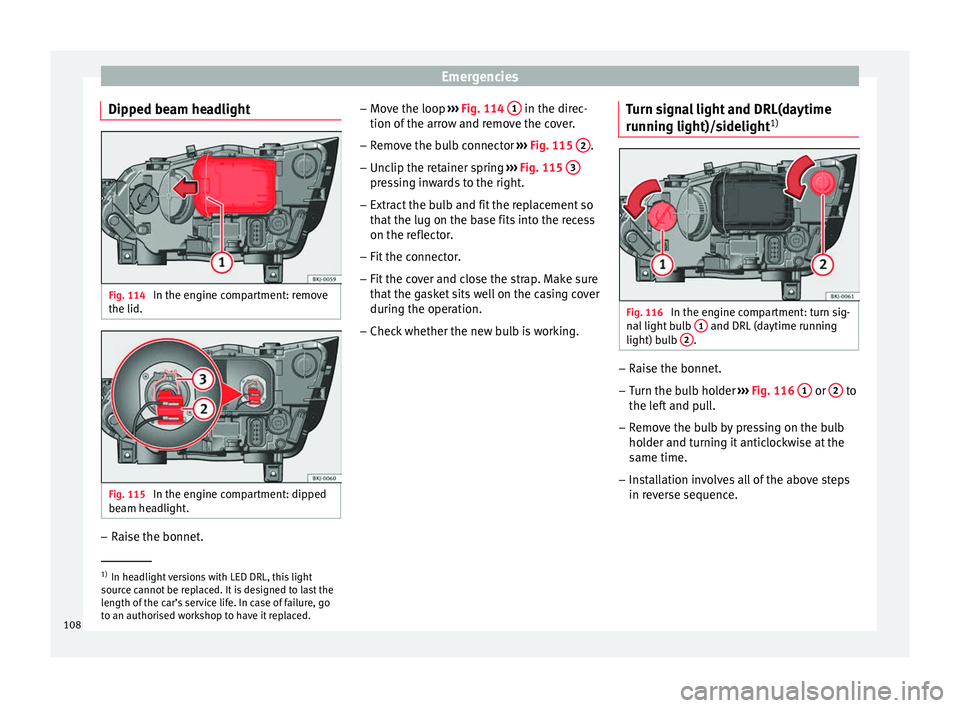
Dipped beam headlight Fig. 114
In the engine compartment: remove
the lid. Fig. 115
In the engine compartment: dipped
be am he
a
dlight. –
Raise the bonnet. –
Mo v
e the loop ›
›› Fig. 114 1 in the direc-
tion of the arr
o
w and remove the cover.
– Remove the bulb connector ›››
Fig. 115 2 .
– Unclip the retainer spring ››
›
Fig. 115 3 pressing inwards to the right.
– Extract the bulb and fit the replacement so
th at
the lug on the b
ase fits into the recess
on the reflector.
– Fit the connector.
– Fit the cover and close the strap. Make sure
that the g
asket sits well on the casing cover
during the operation.
– Check whether the new bulb is working. Turn signal light and DRL(daytime
running light)/s
idelight1) Fig. 116
In the engine compartment: turn sig-
n al
light
bulb 1 and DRL (daytime running
light) b u
l
b 2 .
–
Raise the bonnet.
– Turn the bulb holder ››
›
Fig. 116 1 or
2 to
the l ef
t
and pull.
– Remove the bulb by pressing on the bulb
holder and t
urning it anticlockwise at the
same time.
– Installation involves all of the above steps
in rever
se sequence. 1)
In headlight versions with LED DRL, this light
sourc e c
annot be replaced. It is designed to last the
length of the car’s service life. In case of failure, go
to an authorised workshop to have it replaced.
108
Page 111 of 312
Fuses and bulbs
Changing the fog light bulbs Fr ont
f
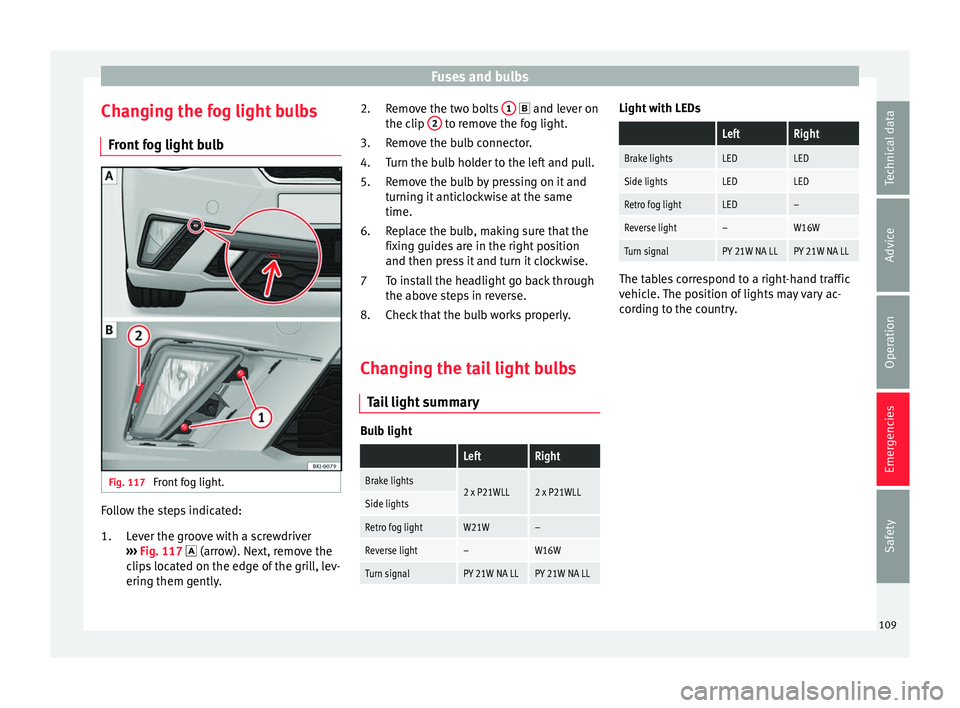
og light bulb Fig. 117
Front fog light. Follow the steps indicated:
Lev
er the gr
oove with a screwdriver
››› Fig. 117 (arrow). Next, remove the
clips located on the edge of the grill, lev-
ering them gently.
1. Remove the two bolts
1 and l
ever on
the c lip 2 to remove the fog light.
R emo
v
e the bulb connector.
Turn the bulb holder to the left and pull.
Remove the bulb by pressing on it and
turning it anticlockwise at the same
time.
Replace the bulb, making sure that the
fixing guides are in the right position
and then press it and turn it clockwise.
To install the headlight go back through
the above steps in reverse.
Check that the bulb works properly.
Changing the tail light bulbs Tail
light summary Bulb light
LeftRight
Brake lights2 x P21WLL2 x P21WLLSide lights
Retro fog lightW21W–
Reverse light–W16W
Turn signalPY 21W NA LLPY 21W NA LL2.
3.
4.
5.
6.
7
8.
Light with LEDs
LeftRight
Brake lightsLEDLED
Side lightsLEDLED
Retro fog lightLED–
Reverse light–W16W
Turn signalPY 21W NA LLPY 21W NA LL The tables correspond to a right-hand traffic
vehic
l
e. The position of lights may vary ac-
cording to the country.
109
Technical data
Advice
Operation
Emergencies
Safety
Page 140 of 312
Operation
●
If ther e i
s no valid key inside the vehicle or
the system fails to detect one, a warning will
display on the dash panel screen. This could
happen if any other radio frequency signal in-
terferes with the key signal (e.g. from a mo-
bile device accessory) or if the key is covered
by another object (e.g. an aluminium case).
● If the sensors are very dirty, e.g. have a lay-
er of sa
lt, the correct functioning of the sen-
sors on the door handles may be affected. In
this case, clean the vehicle.
● If the vehicle is equipped with an automatic
gearbo
x, it may only be locked in the gear
stick is in position P. Childproof lock
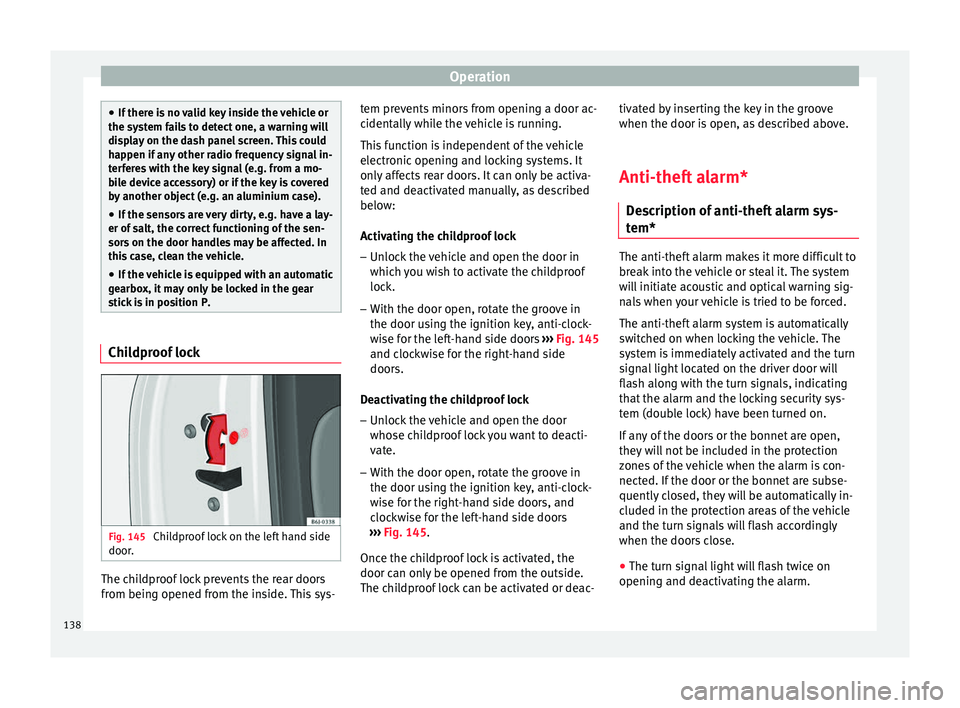
Fig. 145
Childproof lock on the left hand side
door . The childproof lock prevents the rear doors
fr
om bein
g opened fr
om the inside. This sys- tem prevents minors from opening a door ac-
cidental
ly while the vehicle is running.
This function is independent of the vehicle
electronic opening and locking systems. It
only affects rear doors. It can only be activa-
ted and deactivated manually, as described
below:
Activating the childproof lock – Unlock the vehicle and open the door in
which y
ou wish to activate the childproof
lock.
– With the door open, rotate the groove in
the door usin
g the ignition key, anti-clock-
wise for the left-hand side doors ››› Fig. 145
and clockwise for the right-hand side
doors.
Deactivating the childproof lock – Unlock the vehicle and open the door
whose chi
ldproof lock you want to deacti-
vate.
– With the door open, rotate the groove in
the door usin
g the ignition key, anti-clock-
wise for the right-hand side doors, and
clockwise for the left-hand side doors
››› Fig. 145.
Once the childproof lock is activated, the
door can only be opened from the outside.
The childproof lock can be activated or deac- tivated by inserting the key in the groove
when the door is open, a
s described above.
Anti-theft alarm* Des
cription of anti-theft alarm sys-
tem* The anti-theft alarm makes it more difficult to
bre
ak
into the vehicle or steal it. The system
will initiate acoustic and optical warning sig-
nals when your vehicle is tried to be forced.
The anti-theft alarm system is automatically
switched on when locking the vehicle. The
system is immediately activated and the turn
signal light located on the driver door will
flash along with the turn signals, indicating
that the alarm and the locking security sys-
tem (double lock) have been turned on.
If any of the doors or the bonnet are open,
they will not be included in the protection
zones of the vehicle when the alarm is con-
nected. If the door or the bonnet are subse-
quently closed, they will be automatically in-
cluded in the protection areas of the vehicle
and the turn signals will flash accordingly
when the doors close.
● The turn signal light will flash twice on
opening and de activ
ating the alarm.
138
Page 172 of 312
Operation
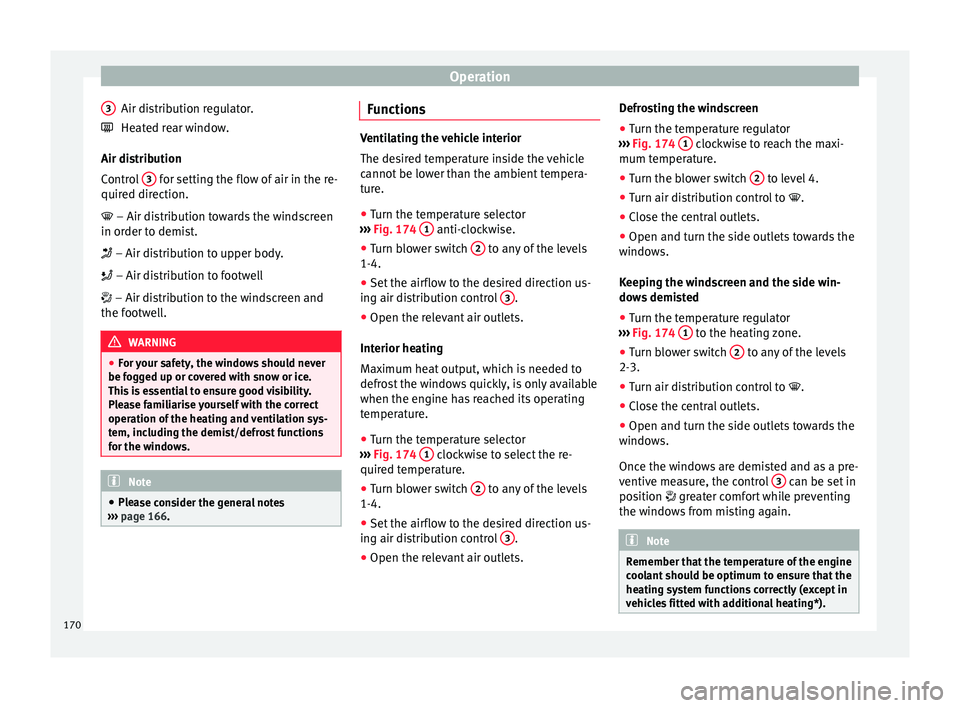
Air distribution regulator.
He at
ed r
ear window.
Air distribution
Control 3 for setting the flow of air in the re-
quir ed dir
ection.
– Air distribution towards the windscreen
in order to demist.
– Air distribution to upper body.
– Air distribution to footwell
– Air distribution to the windscreen and
the footwell. WARNING
● For y
our safety, the windows should never
be fogged up or covered with snow or ice.
This is essential to ensure good visibility.
Please familiarise yourself with the correct
operation of the heating and ventilation sys-
tem, including the demist/defrost functions
for the windows. Note
● Ple a
se consider the general notes
››› page 166. 3
Functions Ventilating the vehicle interior
The des
ir
ed temperature inside the vehicle
cannot be lower than the ambient tempera-
ture.
● Turn the temperature selector
›››
Fig. 174 1 anti-clockwise.
● Turn blower switch 2 to any of the levels
1-4.
● Set the airflow to the desired direction us-
ing air di s
tribution control 3 .
● Open the relevant air outlets.
Int erior he
atin
g
Maximum heat output, which is needed to
defrost the windows quickly, is only available
when the engine has reached its operating
temperature.
● Turn the temperature selector
›››
Fig. 174 1 clockwise to select the re-
quir ed t
emper
ature.
● Turn blower switch 2 to any of the levels
1-4.
● Set the airflow to the desired direction us-
in g air di
s
tribution control 3 .
● Open the relevant air outlets. Defrosting the windscreen
●
Turn the temperature regulator
› ›
›
Fig. 174 1 clockwise to reach the maxi-
mum t emper
at
ure.
● Turn the blower switch 2 to level 4.
● Turn air distribution control to .
● Close the central outlets.
● Open and turn the side outlets towards the
w indo
w
s.
Keeping the windscreen and the side win-
dows demisted
● Turn the temperature regulator
›››
Fig. 174 1 to the heating zone.
● Turn blower switch 2 to any of the levels
2-3.
● Turn air distribution control to .
● Close the central outlets.
● Open and turn the side outlets towards the
w indo
w
s.
Once the windows are demisted and as a pre-
ventive measure, the control 3 can be set in
po s
ition
greater comfort while preventing
the windows from misting again. Note
Remember that the temperature of the engine
coo l
ant should be optimum to ensure that the
heating system functions correctly (except in
vehicles fitted with additional heating*). 170
Page 264 of 312
Advice
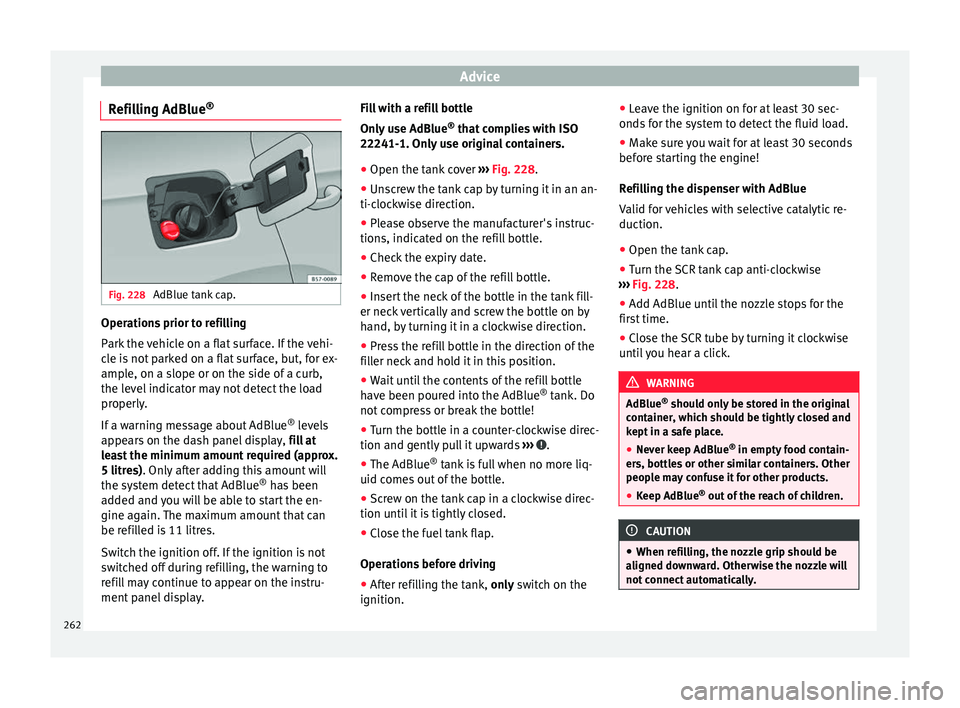
Refilling AdBlue ®Fig. 228
AdBlue tank cap. Operations prior to refilling
P
ark
the
vehicle on a flat surface. If the vehi-
cle is not parked on a flat surface, but, for ex-
ample, on a slope or on the side of a curb,
the level indicator may not detect the load
properly.
If a warning message about AdBlue ®
levels
appears on the dash panel display, fill at
least the minimum amount required (approx.
5 litres). Only after adding this amount will
the system detect that AdBlue ®
has been
added and you will be able to start the en-
gine again. The maximum amount that can
be refilled is 11 litres.
Switch the ignition off. If the ignition is not
switched off during refilling, the warning to
refill may continue to appear on the instru-
ment panel display. Fill with a refill bottle
Only u
se AdBlue ®
that complies with ISO
22241-1. Only use original containers.
● Open the tank cover ›››
Fig. 228.
● Unscrew the tank cap by turning it in an an-
ti-clock
wise direction.
● Please observe the manufacturer's instruc-
tions, indicat
ed on the refill bottle.
● Check the expiry date.
● Remove the cap of the refill bottle.
● Insert the neck of the bottle in the tank fill-
er neck
vertically and screw the bottle on by
hand, by turning it in a clockwise direction.
● Press the refill bottle in the direction of the
fill
er neck and hold it in this position.
● Wait until the contents of the refill bottle
have been pour
ed into the AdBlue ®
tank. Do
not compress or break the bottle!
● Turn the bottle in a counter-clockwise direc-
tion and gently p
ull it upwards ››› .
● The AdBlue ®
tank
i
s full when no more liq-
uid comes out of the bottle.
● Screw on the tank cap in a clockwise direc-
tion until
it is tightly closed.
● Close the fuel tank flap.
Operations
before driving
● After refilling the tank, only sw
itch on the
ignition. ●
Leav
e the ignition on for at least 30 sec-
onds for the system to detect the fluid load.
● Make sure you wait for at least 30 seconds
before s
tarting the engine!
Refilling the dispenser with AdBlue
Valid for vehicles with selective catalytic re-
duction.
● Open the tank cap.
● Turn the SCR tank cap anti-clockwise
›››
Fig. 228.
● Add AdBlue until the nozzle stops for the
first
time.
● Close the SCR tube by turning it clockwise
until
you hear a click. WARNING
AdBlue ®
shoul d on
ly be stored in the original
container, which should be tightly closed and
kept in a safe place.
● Never keep AdBlue ®
in empty food c
ontain-
ers, bottles or other similar containers. Other
people may confuse it for other products.
● Keep AdBlue ®
out of the r
each of children. CAUTION
● When refi l
ling, the nozzle grip should be
aligned downward. Otherwise the nozzle will
not connect automatically. 262
Page 281 of 312
Wheels
●
Under cer t
ain circumstances (e.g. when
driving in a sporty manner, in winter condi-
tions or on a dirt track) the tyre control lamp
may light up belatedly or may function incor-
rectly. Note
If the battery is disconnected, the yellow
w arnin g l
amp lights up after turning the
ignition on. This should turn off after a brief
journey. Spare wheel (temporary spare
wheel)*
Loc
ation and u
se of the temporary
spare wheel Fig. 235
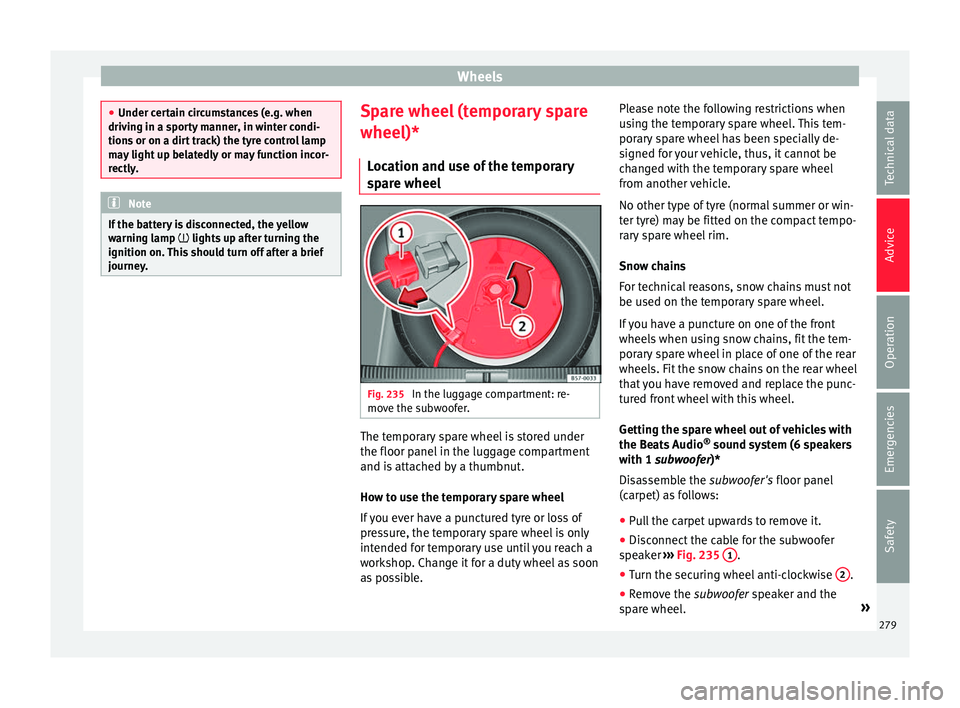
In the luggage compartment: re-
mo v
e the s
ubwoofer. The temporary spare wheel is stored under
the floor p
anel
in the lug
gage compartment
and is attached by a thumbnut.
How to use the temporary spare wheel
If you ever have a punctured tyre or loss of
pressure, the temporary spare wheel is only
intended for temporary use until you reach a
workshop. Change it for a duty wheel as soon
as possible. Please note the following restrictions when
usin
g the temporary spare wheel. This tem-
porary spare wheel has been specially de-
signed for your vehicle, thus, it cannot be
changed with the temporary spare wheel
from another vehicle.
No other type of tyre (normal summer or win-
ter tyre) may be fitted on the compact tempo-
rary spare wheel rim.
Snow chains
For technical reasons, snow chains must not
be used on the temporary spare wheel.
If you have a puncture on one of the front
wheels when using snow chains, fit the tem-
porary spare wheel in place of one of the rear
wheels. Fit the snow chains on the rear wheel
that you have removed and replace the punc-
tured front wheel with this wheel.
Getting the spare wheel out of vehicles with
the Beats Audio ®
sound system (6 speakers
with 1 subwoofer)*
Disassemble the subwoofer's floor panel
(carpet) as follows:
● Pull the carpet upwards to remove it.
● Disconnect the cable for the subwoofer
speak
er ›››
Fig. 235 1 .
● Turn the securing wheel anti-clockwise 2 .
● Remove the s ub
woofer
speaker and the
spare wheel. »
279
Technical data
Advice
Operation
Emergencies
Safety