fog light Seat Ibiza 2017 Owner's manual Edition 11.17
[x] Cancel search | Manufacturer: SEAT, Model Year: 2017, Model line: Ibiza, Model: Seat Ibiza 2017Pages: 312, PDF Size: 6.51 MB
Page 7 of 312
Table of Contents
Table of Contents
The e s
senti
als . . . . . . . . . . . . . . . . . . . . . . . . 7
Exterior view . . . . . . . . . . . . . . . . . . . . . . . . . . . . 7
Exterior view . . . . . . . . . . . . . . . . . . . . . . . . . . . . 8
Driver-side general instrument panel (left-
hand drive) . . . . . . . . . . . . . . . . . . . . . . . . . . . . .
9
Driver-side general instrument panel (right-
hand drive) . . . . . . . . . . . . . . . . . . . . . . . . . . . . .
10
Centre console . . . . . . . . . . . . . . . . . . . . . . . . . . 11
Passenger-side general instrument panel (left-
hand drive) . . . . . . . . . . . . . . . . . . . . . . . . . . . . .
12
Passenger-side general instrument panel
(right-hand driv
e) . . . . . . . . . . . . . . . . . . . . . . . . 13
Interior view . . . . . . . . . . . . . . . . . . . . . . . . . . . . 14
How it works . . . . . . . . . . . . . . . . . . . . . . . . . . . . 15
Opening and closing . . . . . . . . . . . . . . . . . . . . . 15
Before driving . . . . . . . . . . . . . . . . . . . . . . . . . . . 19
Airbags . . . . . . . . . . . . . . . . . . . . . . . . . . . . . . . . 21
Child seats . . . . . . . . . . . . . . . . . . . . . . . . . . . . . 23
Starting the vehicle . . . . . . . . . . . . . . . . . . . . . . 31
Lights and visibility . . . . . . . . . . . . . . . . . . . . . . 31
Easy Connect . . . . . . . . . . . . . . . . . . . . . . . . . . . 34
Driver information System . . . . . . . . . . . . . . . . . 37
Status display . . . . . . . . . . . . . . . . . . . . . . . . . . . 40
Cruise control . . . . . . . . . . . . . . . . . . . . . . . . . . . 45
Warning lamps . . . . . . . . . . . . . . . . . . . . . . . . . . 47
Gearbox lever . . . . . . . . . . . . . . . . . . . . . . . . . . . 50
Air conditioning . . . . . . . . . . . . . . . . . . . . . . . . . 51
Fluid Level control . . . . . . . . . . . . . . . . . . . . . . . 57
Emergencies . . . . . . . . . . . . . . . . . . . . . . . . . . . . 62
Fuses . . . . . . . . . . . . . . . . . . . . . . . . . . . . . . . . . . 62
Bulbs . . . . . . . . . . . . . . . . . . . . . . . . . . . . . . . . . . 63
Action in the event of a puncture . . . . . . . . . . . 63
Changing a wheel . . . . . . . . . . . . . . . . . . . . . . . 65
Snow chains . . . . . . . . . . . . . . . . . . . . . . . . . . . . 70
Emergency towing of the vehicle . . . . . . . . . . . 70 How to jump start . . . . . . . . . . . . . . . . . . . . . . . . 71
Changing the windscreen wiper blades . . . . . . 73
Safety . . . . . . . . . . . . . . . . . . . . . . . . . . . . . . . . 75
Safe driving . . . . . . . . . . . . . . . . . . . . . . . . . . . . 75
Safety first! . . . . . . . . . . . . . . . . . . . . . . . . . . . . . 75
Advice about driving . . . . . . . . . . . . . . . . . . . . . 75
Correct position of the vehicle occupants . . . . 76
Pedal area . . . . . . . . . . . . . . . . . . . . . . . . . . . . . . 80
Seat belts . . . . . . . . . . . . . . . . . . . . . . . . . . . . . . 81
Why wear a seat belt . . . . . . . . . . . . . . . . . . . . . 81
How to properly adjust your seatbelt . . . . . . . . 84
Seat belt tensioners* . . . . . . . . . . . . . . . . . . . . . 85
Airbag system . . . . . . . . . . . . . . . . . . . . . . . . . . 86
Brief introduction . . . . . . . . . . . . . . . . . . . . . . . . 86
Airbag safety instructions . . . . . . . . . . . . . . . . . 88
Deactivating airbags . . . . . . . . . . . . . . . . . . . . . 90
Transporting children safely . . . . . . . . . . . . . . . 92
Child safety . . . . . . . . . . . . . . . . . . . . . . . . . . . . . 92
Child seats . . . . . . . . . . . . . . . . . . . . . . . . . . . . . 93
Event Data Recorder . . . . . . . . . . . . . . . . . . . . . . 96
Description and operation . . . . . . . . . . . . . . . . . 96
Emergencies . . . . . . . . . . . . . . . . . . . . . . . . . . 97
Self-help . . . . . . . . . . . . . . . . . . . . . . . . . . . . . . . 97
Emergency equipment . . . . . . . . . . . . . . . . . . . . 97
Tyre repair . . . . . . . . . . . . . . . . . . . . . . . . . . . . . . 98
Changing the windscreen wiper blades . . . . . . 100
Towing or tow-starting . . . . . . . . . . . . . . . . . . . . 100
Fuses and bulbs . . . . . . . . . . . . . . . . . . . . . . . . . 104
Fuses . . . . . . . . . . . . . . . . . . . . . . . . . . . . . . . . . . 104
Changing bulbs . . . . . . . . . . . . . . . . . . . . . . . . . 106
Halogen headlights. . . . . . . . . . . . . . . . . . . . . . 107
Changing the fog light bulbs . . . . . . . . . . . . . . . 109
Changing the tail light bulbs . . . . . . . . . . . . . . . 109
Changing the interior bulbs . . . . . . . . . . . . . . . . 111 Operation
. . . . . . . . . . . . . . . . . . . . . . . . . . . . . 115
Controls and displays . . . . . . . . . . . . . . . . . . . . 115
General instrument panel . . . . . . . . . . . . . . . . . 114
Instruments and warning/control lamps . . . . . 117
Instruments . . . . . . . . . . . . . . . . . . . . . . . . . . . . 117
Warning and control lamps . . . . . . . . . . . . . . . . 122
Introduction to the Easy Connect system* . . . . 123
System settings (CAR)* . . . . . . . . . . . . . . . . . . . 123
Communications and multimedia . . . . . . . . . . . 124
Steering wheel controls* . . . . . . . . . . . . . . . . . . 124
Multimedia . . . . . . . . . . . . . . . . . . . . . . . . . . . . . 129
Opening and closing . . . . . . . . . . . . . . . . . . . . . 130
Keys . . . . . . . . . . . . . . . . . . . . . . . . . . . . . . . . . . . 130
Central locking system . . . . . . . . . . . . . . . . . . . . 132
Anti-theft alarm* . . . . . . . . . . . . . . . . . . . . . . . . 138
Rear lid . . . . . . . . . . . . . . . . . . . . . . . . . . . . . . . . 141
Controls for the windows . . . . . . . . . . . . . . . . . . 141
Sunroof* . . . . . . . . . . . . . . . . . . . . . . . . . . . . . . . 144
Lights and visibility . . . . . . . . . . . . . . . . . . . . . . 146
Lights . . . . . . . . . . . . . . . . . . . . . . . . . . . . . . . . . 146
Interior lights . . . . . . . . . . . . . . . . . . . . . . . . . . . 150
Visibility . . . . . . . . . . . . . . . . . . . . . . . . . . . . . . . 151
Windscreen wiper and rear window wiper sys-
tems . . . . . . . . . . . . . . . . . . . . . . . . . . . . . . . . . . 152 R
ear view mirrors . . . . . . . . . . . . . . . . . . . . . . . . 152
Seats and head restraints . . . . . . . . . . . . . . . . . 154
Adjusting the seat and head restraints . . . . . . 154
Seat functions . . . . . . . . . . . . . . . . . . . . . . . . . . 156
Transport and practical equipment . . . . . . . . . 158
Practical equipment . . . . . . . . . . . . . . . . . . . . . . 158
Luggage compartment . . . . . . . . . . . . . . . . . . . . 160
Roof carrier* . . . . . . . . . . . . . . . . . . . . . . . . . . . . 164
Air conditioning . . . . . . . . . . . . . . . . . . . . . . . . . 166
Heating, ventilation and cooling . . . . . . . . . . . . 166
Heating and fresh air . . . . . . . . . . . . . . . . . . . . . 169
Manual air conditioning* . . . . . . . . . . . . . . . . . . 171
Climatronic* . . . . . . . . . . . . . . . . . . . . . . . . . . . . 173
5
Page 34 of 312
The essentialsSym-
bolIgnition switch-
ed offIgnition is switch-
ed on
Fog lights, dipped
beam and side
lights off.Light off or daytime
driving light on.
The “Coming home”
and “Leaving
home” guide lights
may be switched
on.Automatic control of
dipped beam and day-
time running light.
Side light on.Daylight running
lights switched on.
Dipped beam head-
light offDipped beam switch-
ed on.
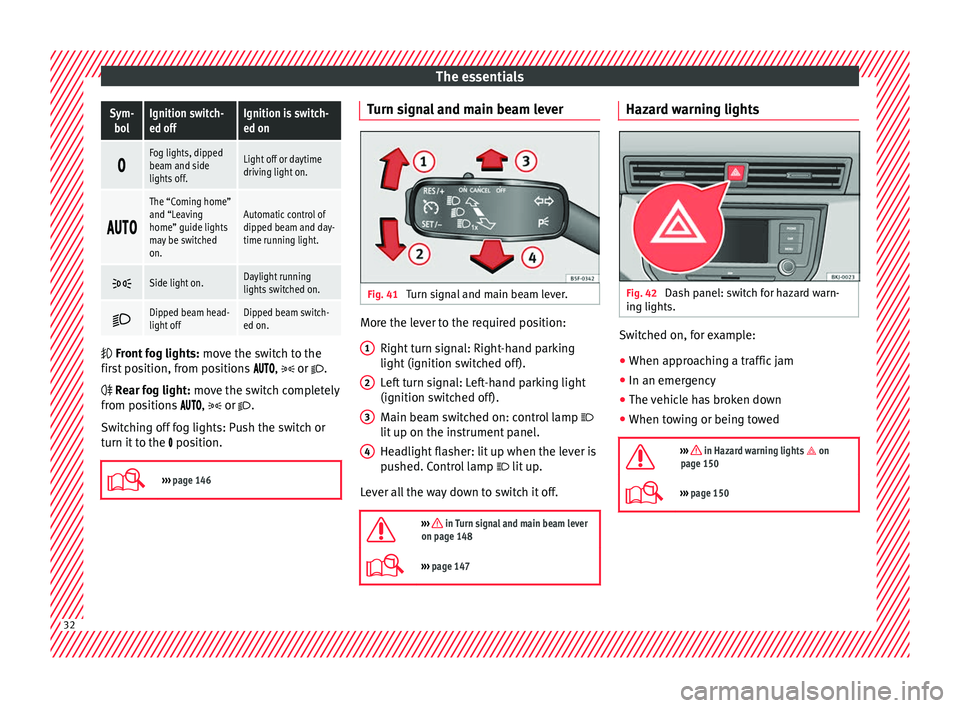
Front
fog lights: mo
ve the switch to the
first position, from positions , or .
Rear fog light: move the switch completely
from positions ,
or
.
Switching off fog lights: Push the switch or
turn it to the position.
››› page 146 Turn signal and main beam lever
Fig. 41
Turn signal and main beam lever. More the lever to the required position:
Right t
urn s
ignal: Right-hand parking
light (ignition switched off).
Left turn signal: Left-hand parking light
(ignition switched off).
Main beam switched on: control lamp
lit up on the instrument panel.
Headlight flasher: lit up when the lever is
pushed. Control lamp lit up.
Lever all the way down to switch it off.
››› in Turn signal and main beam lever
on page 148
››› page 147 1
2
3
4 Hazard warning lights
Fig. 42
Dash panel: switch for hazard warn-
in g lights. Switched on, for example:
●
When approaching a traffic jam
● In an emergency
● The vehicle has broken down
● When towing or being towed
››› in Hazard warning lights on
page 150
››› page 150 32
Page 50 of 312
The essentials
Yellow warning lamps Central warning lamp: additional
information on the instrument
panel display–
Front brake pads worn.›››
page
181
it lights up:
Fault in the ESC, or
disconnection caused by the sys-
tem.
››› page
183
flashes: ESC or ASR activated.
it lights up:
fault in the ASR or
disconnection caused by the sys-
tem.
››› page
184
flashes: ASR working.
ASR manually deactivated.
Or else
: ESC in Sport mode.››› page
183
ABS faulty or does not work.›››
page
187
Rear fog light switched on.›››
page 31
lights up or flashes:
fault in the
emission control system.››› page
203
it lights up:
pre-heating of diesel
engine.
››› page
203
flashes: fault in the diesel engine
management.
fault in the petrol engine man-
agement.›››
page
203
lights up or flashes:
fault in the
steering system.››› page
198
Tyre pressure too low, or fault in
the tyre pressure monitoring sys-
tem.›››
page
278
Fuel tank almost empty.›››
page
121
Fault in airbag system and seat
belt tensioners.›››
page
91 Other warning lamps
Left or right turn signal.›››
page 32
Hazard warning lights on.››› page 32
››› page
150
Trailer turn signals›››
page
243
it lights up green:
Press the brake
pedal!
It blinks in green: the selector lev-
er locking button has not engag-
ed.
››› page
190
it lights up green:
cruise control
activated or speed limiter switch-
ed on and active.
››› page 45
››› page
209
it blinks in green: the speed set
by the speed limiter has been ex-
ceeded.
Main beam on or flasher on.›››
page 32
Natural gas operating mode›››
page
121
››› in Warning symbols on page 122
›››
page 122 On the instrument panel display
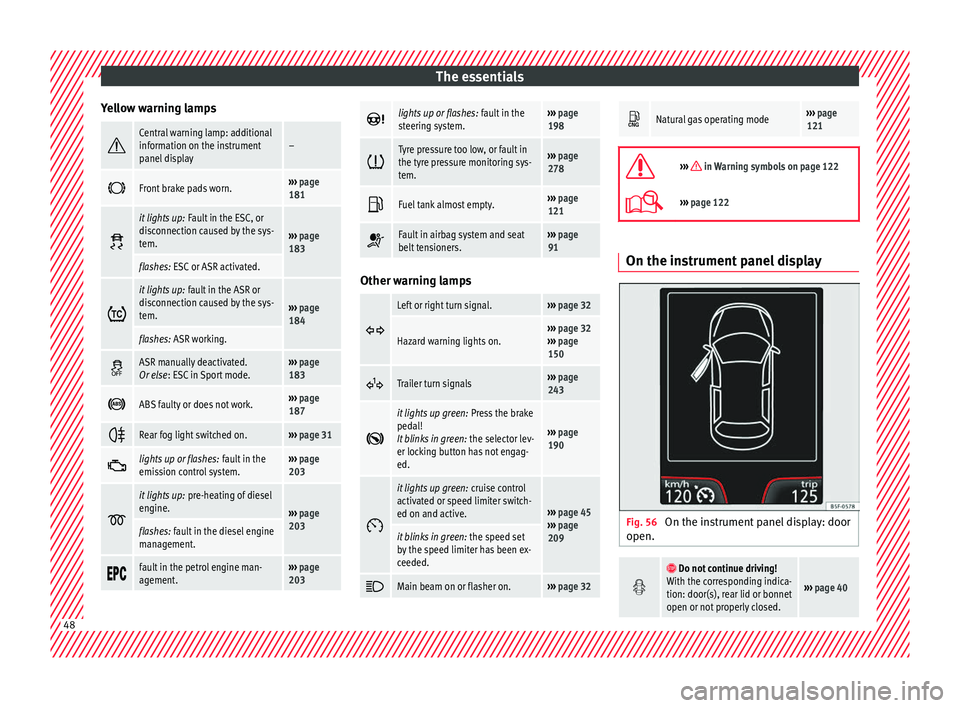
Fig. 56
On the instrument panel display: door
open.
Do not continue driving!
With the corresponding indica-
tion: door(s), rear lid or bonnet
open or not properly closed.
››› page 40 48
Page 109 of 312
Fuses and bulbs
CAUTION
● Remo v
e the ignition key before working on
the electric system. Otherwise, a short circuit
could occur.
● Switch off the lights or parking lights be-
fore
you change a bulb. For the sake of the environment
Please ask your specialist retailer how to dis-
pose of u
sed bulbs in the proper manner. Note
● Dependin g on w
eather conditions (cold or
wet), the front lights, the fog lights, the tail
lights and the turn signals may be temporari-
ly misted. This has no influence on the useful
life of the lighting system. By switching on
the lights, the area through which the beam
of light is projected will quickly be demisted.
However, the edges may continue to be mis-
ted.
● Please check at regular intervals that all
lighting (es
pecially the exterior lighting) on
your vehicle is functioning properly. This is
not only in the interest of your own safety,
but also that of all other road users.
● Before changing a bulb, make sure you
have the c
orrect new bulb.
● Do not touch the glass part of the bulb with
your bar
e hands, use a cloth or paper towel
instead. The residue left by the fingerprints
would vaporise as a result of the heat gener- ated by the bulb, they will be deposited on
the refl
ect
or and will impair its surface.
● Depending on the level of equipment fitted
in the vehic
le, LEDs may be used for part or
all of the interior and/or exterior lighting.
LEDs have an estimated life that exceeds than
that of the car. If an LED light fails, go to an
authorised workshop for its replacement. Halogen headlights.
Po s
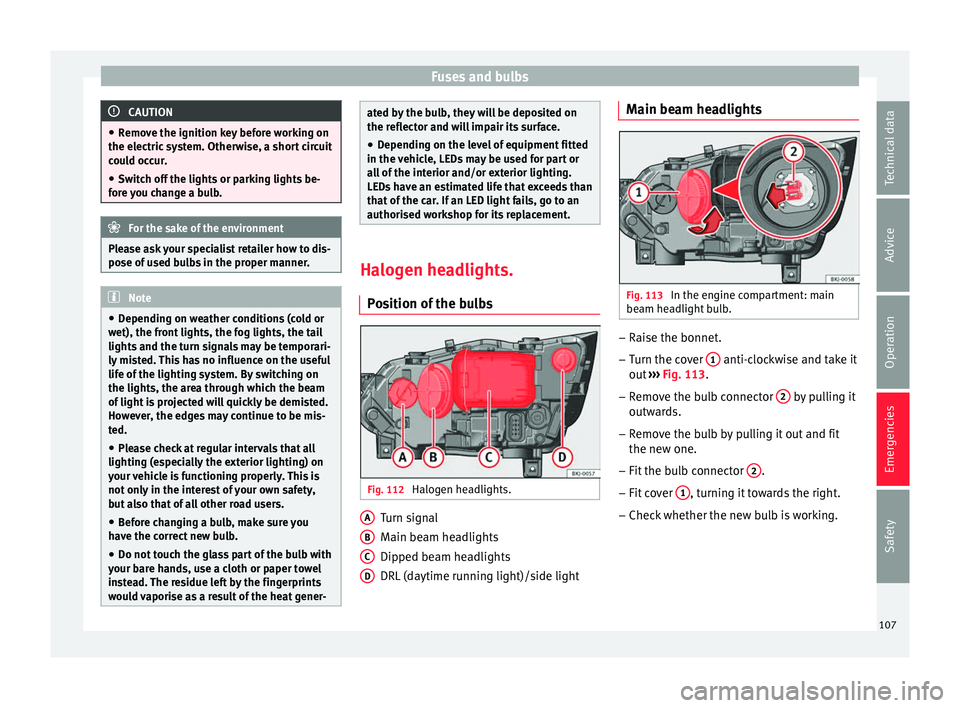
ition of the bulbs Fig. 112
Halogen headlights. Turn signal
M
ain be
am he
adlights
Dipped beam headlights
DRL (daytime running light)/side light
A B
C
D Main beam headlights
Fig. 113
In the engine compartment: main
be am he
a
dlight bulb. –
Raise the bonnet.
– Turn the cover 1 anti-clockwise and take it
out
›
›
› Fig. 113.
– Remove the bulb connector 2 by pulling it
outw ar
d
s.
– Remove the bulb by pulling it out and fit
the new one.
– Fit the bulb connector 2 .
– Fit cover 1 , turning it towards the right.
– Check whether the new bulb is working.
107
Technical data
Advice
Operation
Emergencies
Safety
Page 111 of 312
Fuses and bulbs
Changing the fog light bulbs Fr ont
f
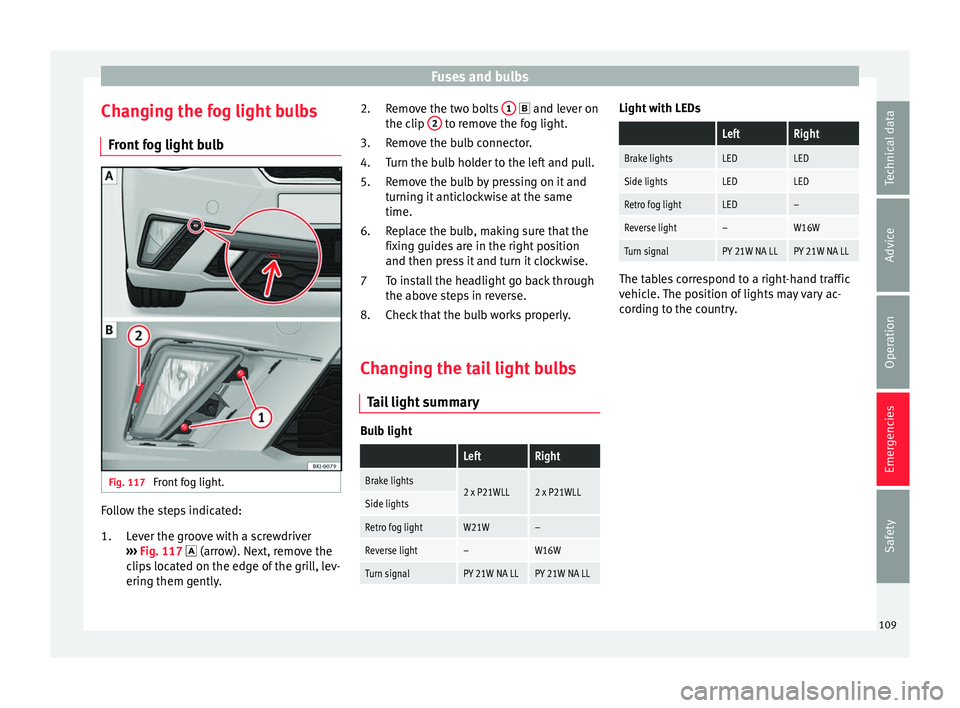
og light bulb Fig. 117
Front fog light. Follow the steps indicated:
Lev
er the gr
oove with a screwdriver
››› Fig. 117 (arrow). Next, remove the
clips located on the edge of the grill, lev-
ering them gently.
1. Remove the two bolts
1 and l
ever on
the c lip 2 to remove the fog light.
R emo
v
e the bulb connector.
Turn the bulb holder to the left and pull.
Remove the bulb by pressing on it and
turning it anticlockwise at the same
time.
Replace the bulb, making sure that the
fixing guides are in the right position
and then press it and turn it clockwise.
To install the headlight go back through
the above steps in reverse.
Check that the bulb works properly.
Changing the tail light bulbs Tail
light summary Bulb light
LeftRight
Brake lights2 x P21WLL2 x P21WLLSide lights
Retro fog lightW21W–
Reverse light–W16W
Turn signalPY 21W NA LLPY 21W NA LL2.
3.
4.
5.
6.
7
8.
Light with LEDs
LeftRight
Brake lightsLEDLED
Side lightsLEDLED
Retro fog lightLED–
Reverse light–W16W
Turn signalPY 21W NA LLPY 21W NA LL The tables correspond to a right-hand traffic
vehic
l
e. The position of lights may vary ac-
cording to the country.
109
Technical data
Advice
Operation
Emergencies
Safety
Page 143 of 312
Opening and closing
If the anti-theft security system (Safelock)*
› ›
›
page 133 is switched off, the vehicle interi-
or monitoring and the tow-away protection
are automatically switched off. WARNING
Observe the safety warnings ›››
in Descrip-
tion on pag e 132
. Rear lid
Opening and c lo
singRead the additional information carefully
› ›
›
page 16 WARNING
● Alw a
ys close the rear lid properly. Risk of
accident or injury.
● The rear lid must not be opened when the
rever
se or rear fog lights are lit. This may
damage the tail lights.
● Do not close the rear lid by pushing it down
with y
our hand on the rear window. The glass
could smash. Risk of injury!
● Ensure the rear lid is locked after closing it.
If not, it m
ay open unexpectedly while driv-
ing.
● Never allow children to play in or around
the vehic
le. A locked vehicle can be subjected
to extremely high and low temperatures, de- pending on the time of year, thus causing se-
rious
injurie
s/illness. It could even have fatal
consequences. Close and lock both the rear
lid and all the other doors when you are not
using the vehicle.
● Closing the rear lid without observing and
ensurin
g it is clear could cause serious injury
to you and to third parties. Make sure that no
one is in the path of the rear lid.
● Never drive with the rear lid open or half-
closed, e
xhaust gases may enter into the in-
terior of the vehicle. Danger of poisoning!
● If you only open the rear lid, do not leave
the key in
side. The vehicle cannot be opened
if the key is left inside. Controls for the windows
Openin g and c
lo
sing of the electric
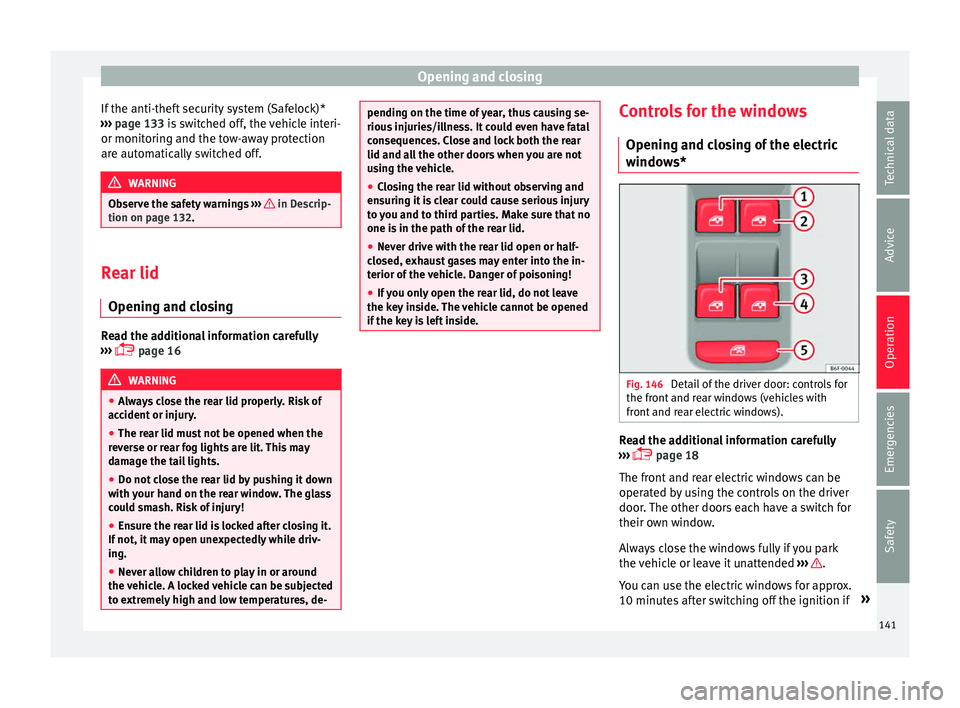
windows* Fig. 146
Detail of the driver door: controls for
the fr ont
and r
ear windows (vehicles with
front and rear electric windows). Read the additional information carefully
› ›
›
page 18
The front and rear electric windows can be
operated by using the controls on the driver
door. The other doors each have a switch for
their own window.
Always close the windows fully if you park
the vehicle or leave it unattended ››› .
Y ou c
an u
se the electric windows for approx.
10 minutes after switching off the ignition if »
141
Technical data
Advice
Operation
Emergencies
Safety
Page 148 of 312
Operation
Lights and visibility Light s
C ontr
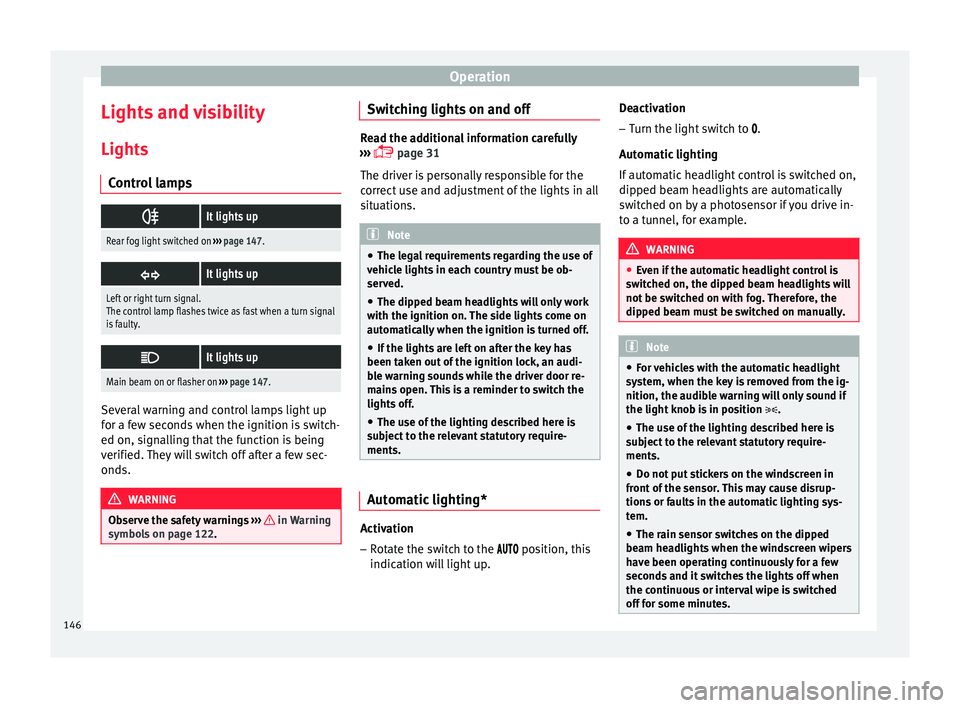
ol lamps
It lights up
Rear fog light switched on
››› page 147.
It lights up
Left or right turn signal.
The control lamp flashes twice as fast when a turn signal
is faulty.
It lights up
Main beam on or flasher on
››› page 147. Several warning and control lamps light up
f
or a f
ew sec
onds when the ignition is switch-
ed on, signalling that the function is being
verified. They will switch off after a few sec-
onds. WARNING
Observe the safety warnings ›››
in Warning
symbol s on p
age 122. Switching lights on and off
Read the additional information carefully
›› ›
page 31
The driver is personally responsible for the
correct use and adjustment of the lights in all
situations. Note
● The le g
al requirements regarding the use of
vehicle lights in each country must be ob-
served.
● The dipped beam headlights will only work
with the ignition on. The s
ide lights come on
automatically when the ignition is turned off.
● If the lights are left on after the key has
been taken out
of the ignition lock, an audi-
ble warning sounds while the driver door re-
mains open. This is a reminder to switch the
lights off.
● The use of the lighting described here is
subj
ect to the relevant statutory require-
ments. Automatic lighting*
Activation
– Rotate the switch to the po
s
ition, this
indication will light up. Deactivation
– Turn the light switch to .
Automatic
lighting
If automatic headlight control is switched on,
dipped beam headlights are automatically
switched on by a photosensor if you drive in-
to a tunnel, for example. WARNING
● Ev en if
the automatic headlight control is
switched on, the dipped beam headlights will
not be switched on with fog. Therefore, the
dipped beam must be switched on manually. Note
● For v
ehicles with the automatic headlight
system, when the key is removed from the ig-
nition, the audible warning will only sound if
the light knob is in position .
● The use of the lighting described here is
subj
ect to the relevant statutory require-
ments.
● Do not put stickers on the windscreen in
front of
the sensor. This may cause disrup-
tions or faults in the automatic lighting sys-
tem.
● The rain sensor switches on the dipped
beam hea
dlights when the windscreen wipers
have been operating continuously for a few
seconds and it switches the lights off when
the continuous or interval wipe is switched
off for some minutes. 146
Page 149 of 312
Lights and visibility
Daytime running lights The daytime running lights consist of individ-
ual lights, int
e
grated in the front headlights.
By connecting the daytime running lights,
these lights are switched on 1)
››› .
The da ytime ru
nning lights switch on every
time the ignition is switched on, if the switch
is in positions or , according to the level
of exterior lighting.
When the light switch is in position , a
light sensor automatically switches dipped
beam on and off (including the control and
instrument lighting) or the daytime running
lights depending on the level of exterior
lighting. WARNING
● Never driv e w
ith daytime lights if the road
is not well lit due to weather or lighting con-
ditions. Daytime lights do not provide
enough light to illuminate the road properly
or be seen by other road users.
● On vehicles with rear lights with bulbs,
when activating the d
aytime running light
the rear lights are not switched on. A vehicle
which does not have the rear lights on may
not be visible to other drivers in the dark-
ness, in the case of heavy rain or in condi-
tions of poor visibility. Fog lights
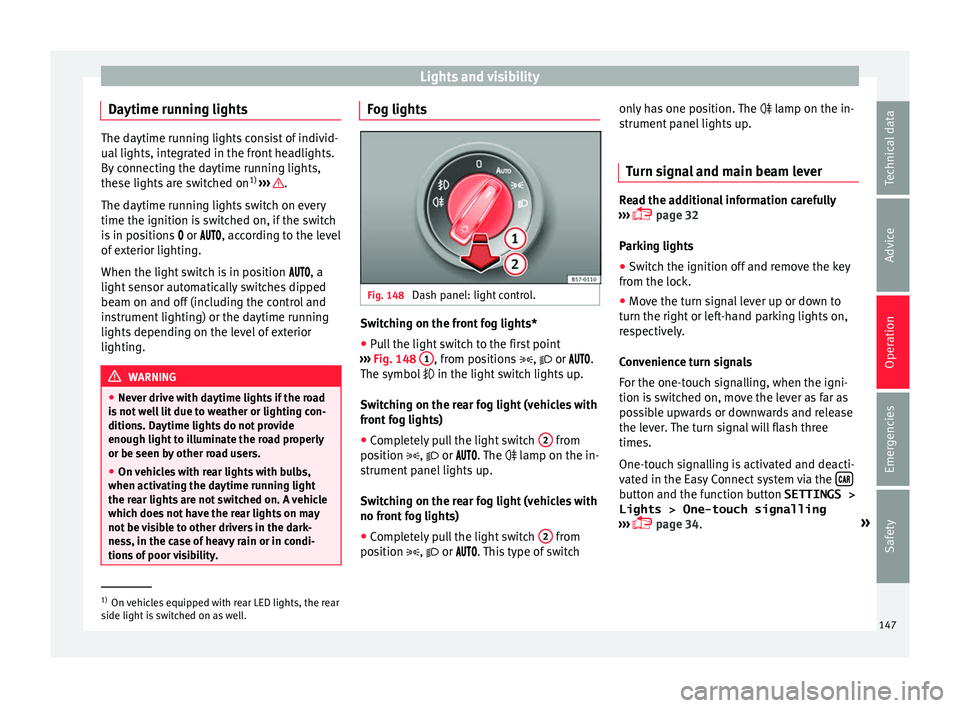
Fig. 148
Dash panel: light control. Switching on the front fog lights*
● Pull the light switch to the first point
› ›
›
Fig. 148 1 , from positions
, or .
The symbo l
in the light switch lights up.
Switching on the rear fog light (vehicles with
front fog lights)
● Completely pull the light switch 2 from
po s
ition
, or . The lamp on the in-
strument panel lights up.
Switching on the rear fog light (vehicles with
no front fog lights)
● Completely pull the light switch 2 from
po s
ition
, or . This type of switch only has one position. The
lamp on the in-
strument
panel lights up.
Turn signal and main beam lever Read the additional information carefully
›› ›
page 32
Parking lights
● Switch the ignition off and remove the key
from the lock.
● Mo
ve the turn signal lever up or down to
turn the right or l
eft-hand parking lights on,
respectively.
Convenience turn signals
For the one-touch signalling, when the igni-
tion is switched on, move the lever as far as
possible upwards or downwards and release
the lever. The turn signal will flash three
times.
One-touch signalling is activated and deacti-
vated in the Easy Connect system via the button and the function button SETTINGS >
Lights > One-touch signalling
› ›
›
page 34. »1)
On vehicles equipped with rear LED lights, the rear
side light i
s switched on as well. 147
Technical data
Advice
Operation
Emergencies
Safety
Page 151 of 312
Lights and visibility
Note
● To activ at
e the Coming/Leaving home func-
tion, the rotary light switch must be in posi-
tion and the light sensor must detect
darkness. Fog lights with cornering function*
This is an additional light source to dipped
beam he
a
dlights to light up the road as a
bend is taken.
The cornering light operates with the lights
switched on and when driving at less than
40 Km/h (25 mph). Ignition occurs by turning
the steering or connecting the turn signal.
Forward gear
● If the steering wheel is turned to the right,
or the right-h and t
urn signal operated, the
right-hand fog light turns on.
● If the steering wheel is turned to the left, or
the left
-hand turn signal operated, the left-
hand fog light turns on.
In reverse, both fog lights turn on. Note
When the fog lamps are on, the cornering
fu nction i
s activated and both headlights are
continuously on. Motorway light*
The motorway light is available on vehicles
equipped w
ith f
ull-LED lights.
The function is connected/disconnected via
the corresponding Easy Connect system
menu.
● Activation: when going abo
ve 110 km/h
(68 mph) for more than 10 seconds, the dip-
ped beam raises slightly to increase the driv-
er's visibility distance.
● Deactivation: when reduc in
g the speed of
the car below 100 km/h (62 mph), the dip-
ped beam returns to its normal position.
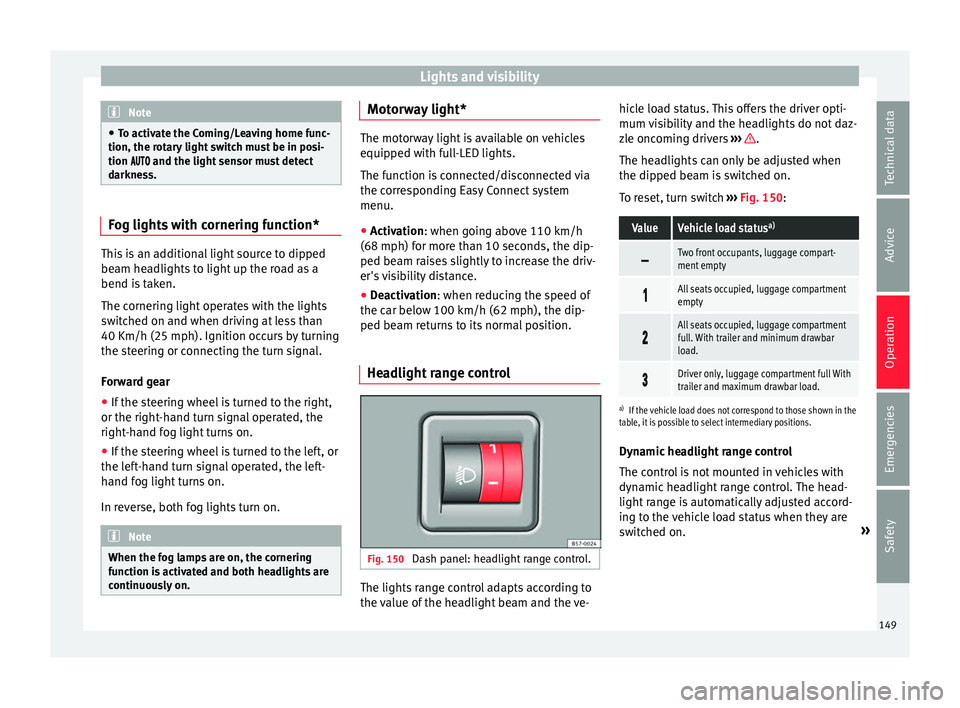
Headlight range control Fig. 150
Dash panel: headlight range control. The lights range control adapts according to
the
v
alue of
the headlight beam and the ve- hicle load status. This offers the driver opti-
mum vi
sibility and the headlights do not daz-
zle oncoming drivers ››› .
The he a
dlights
can only be adjusted when
the dipped beam is switched on.
To reset, turn switch ››› Fig. 150:
ValueVehicle load status a)
Two front occupants, luggage compart-
ment empty
All seats occupied, luggage compartment
empty
All seats occupied, luggage compartment
full. With trailer and minimum drawbar
load.
Driver only, luggage compartment full With
trailer and maximum drawbar load.
a)
If the vehicle load does not correspond to those shown in the
table, it is possible to select intermediary positions.
Dynamic headlight range control
The control is not mounted in vehicles with
dynamic headlight range control. The head-
light range is automatically adjusted accord-
ing to the vehicle load status when they are
switched on. »
149
Technical data
Advice
Operation
Emergencies
Safety
Page 173 of 312
Air conditioning
Manual air conditioning* C ontr
o
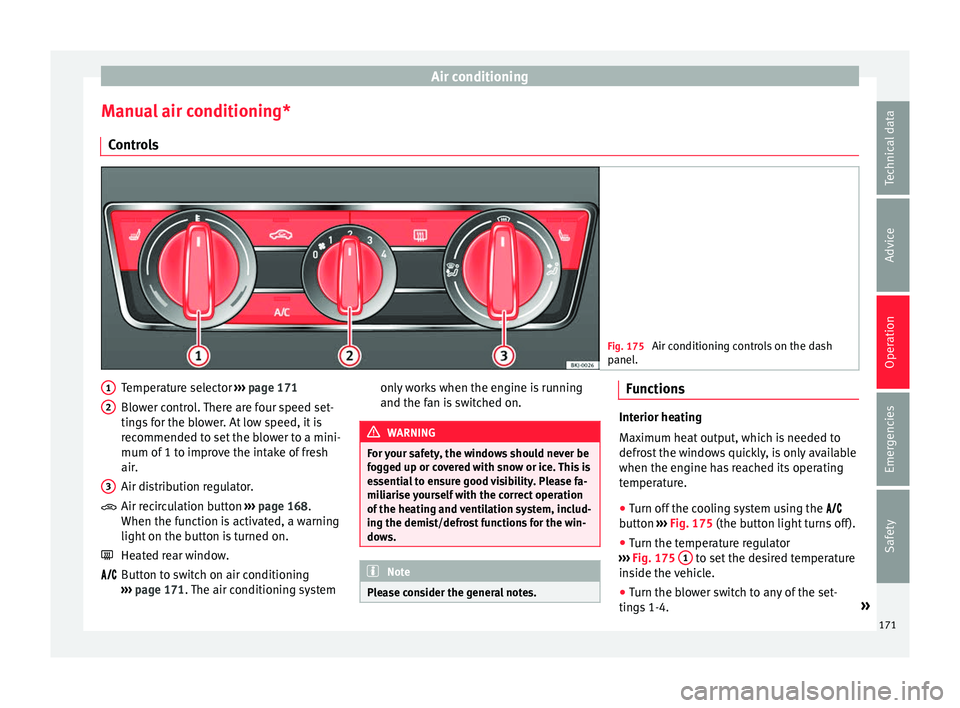
ls Fig. 175
Air conditioning controls on the dash
panel . Temperature selector
››
›
page 171
Blower control. There are four speed set-
tings for the blower. At low speed, it is
recommended to set the blower to a mini-
mum of 1 to improve the intake of fresh
air.
Air distribution regulator.
Air recirculation button ››› page 168.
When the function is activated, a warning
light on the button is turned on.
Heated rear window.
Button to switch on air conditioning
››› page 171. The air conditioning system
1 2
3
only works when the engine is running
and the f
an is
switched on. WARNING
For your safety, the windows should never be
fog g
ed up or covered with snow or ice. This is
essential to ensure good visibility. Please fa-
miliarise yourself with the correct operation
of the heating and ventilation system, includ-
ing the demist/defrost functions for the win-
dows. Note
Please consider the general notes. Functions
Interior heating
Max
imum he
at output, which is needed to
defrost the windows quickly, is only available
when the engine has reached its operating
temperature.
● Turn off the cooling system using the
butt
on ››› Fig. 175 (the button light turns off).
● Turn the temperature regulator
›››
Fig. 175 1 to set the desired temperature
ins ide the
vehicle.
● Turn the blower switch to any of the set-
ting s
1-4. »
171
Technical data
Advice
Operation
Emergencies
Safety