ECU Seat Ibiza 5D 2006 User Guide
[x] Cancel search | Manufacturer: SEAT, Model Year: 2006, Model line: Ibiza 5D, Model: Seat Ibiza 5D 2006Pages: 268, PDF Size: 8.14 MB
Page 48 of 268
Child safety
46Securing the child seat using the “ISOFIX” and “Toptether” system or the antirotation mechanism/system
Child seats with the “ISOFIX” and “Toptether” system can be
secured quickly, easily and safely on the rear outer seats.When removing or fitting the child seat, please be sure to follow the
manufacturer's instructions.
– Move the seat as far to rear as it will go.
– Press the child seat onto the “ISOFIX” retaining rings until the
child seat can be heard to engage securely. If the child seat is
fitted with “Toptether” anchoring, connect it to the corre-
sponding ring. If the child seat is fitted with any other antirota-
tion system, follow the manufacturer instructions carefully.
– Pull on both sides of the child se at to ensure that it is secure.
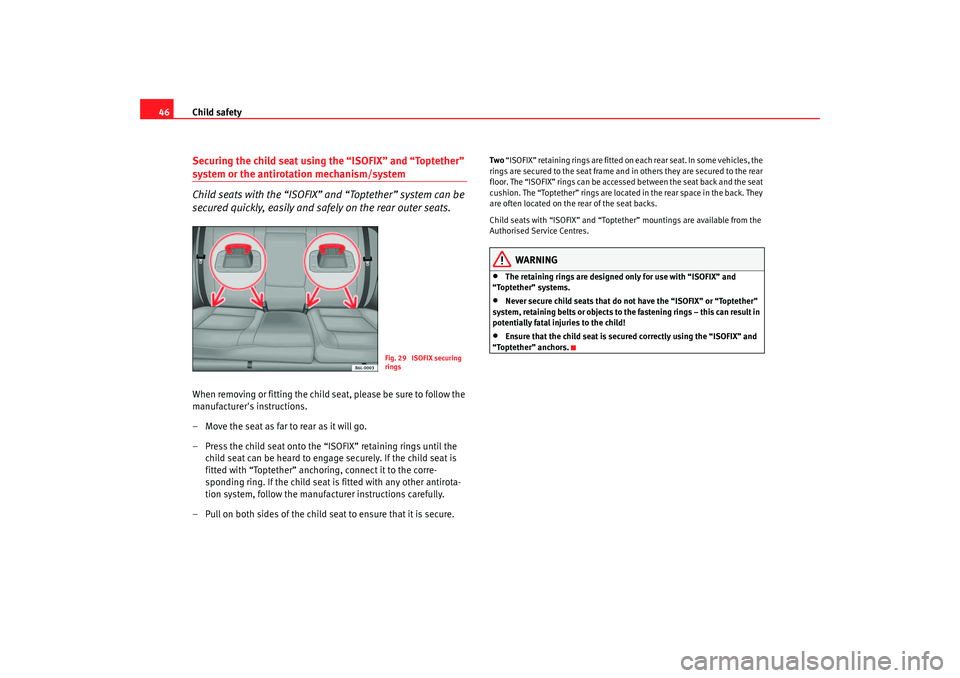
Two “ISOFIX” retaining rings are fitted on each rear seat. In some vehicles, the
rings are secured to the seat frame and in others they are secured to the rear
floor. The “ISOFIX” rings can be accessed between the seat back and the seat
cushion. The “Toptether” rings are located in the rear space in the back. They
are often located on the rear of the seat backs.
Child seats with “ISOFIX” and “Topteth er” mountings are available from the
Authorised Service Centres.
WARNING
•
The retaining rings are designed only for use with “ISOFIX” and
“Toptether” systems.
•
Never secure child seats that do not have the “ISOFIX” or “Toptether”
system, retaining belts or objects to the fastening rings – this can result in
potentially fatal injuries to the child!
•
Ensure that the child seat is secu red correctly using the “ISOFIX” and
“Toptether” anchors.
Fig. 29 ISOFIX securing
rings
ibiza_angles_0706_DEF Seite 46 Freitag, 1. September 2006 1:18 13
Page 70 of 268
Unlocking and locking
68Unlocking and lockingDoorsLocking and unlocking the vehicle
From the outside of the vehicle, the driver's door may be
locked or unlocked using the key.When opened , the latch will rise up (for vehicles without central locking)
For vehicles equipped with electric windows and central locking, if the key is
maintained in the opening position all of the electric side windows will open.
When locking the latch will descend (for vehicles without central locking)
In some vehicle models equipped with electric windows and central locking,
if the key is maintained in the locking position on the driver side, any side
windows left open, as well as the electric sunroof, will close.
For vehicles without central locking, the passenger door and the rear doors
may be locked from the outside without using a key. Just press the button
down and close the door.
The latch on the driver’s door may not be pushed down while the door is open
(only in vehicles without central locking) . This avoids accidentally leaving the
keys in the ignition.
From inside, all the doors may be locked by pushing the security buttons
down (in vehicles without central locking).
WARNING
•
Exercise extreme caution when closing the windows and the sunroof
from the outside of the vehicle.
•
Closing from the outside without ta king care or observing all the
vehicle may cause bruising for other people especially children.
•
When locking a vehicle, never leave children unaccompanied inside, as
it will be difficult to provide assistance if required.
•
When the doors are locked, any intrusion is impeded, for example while
stopped at a red light.
Ce ntral l ocking *Description
The central locking system enables you to lock and unlock all
the doors and the tailgate from one point.Central locking can be activated us ing any of the following options:•
the key, by inserting it into the driver's door cylinder and rotating manu-
ally,
•
the central locking button , (electronic control) in the passenger compart-
ment ⇒page 71,
•
the radio frequency remote control , using the buttons on the key
⇒ page 76.
Various functions are available to improve the vehicle security:
- Locking system “Safe”
- Selective unlocking system*WARNING (continued)
ibiza_angles_0706_DEF Seite 68 Freitag, 1. September 2006 1:18 13
Page 71 of 268
Unlocking and locking69
Safety First
Operating instructions
Tips and Maintenance
Te c h n i c a l D a t a
- Auto-locking to prevent involuntary unlocking
- Automatic speed dependent locking and unlocking system*
- Emergency unlocking system
Note
For anti-theft security, only the driver's door is fitted with a lock cylinder.Safety system “Safe”
This is an anti-theft device consisting of a double lock for the
door locks and a deactivation func
tion for the boot in order to
make forced entry more difficult.Activation
The “safe” system is activated when the vehicle is locked using the key or the
remote control.
To activate this system with the key, rotate the key once in the door lock
cylinder in the locking direction.
To activate the system using the remote control, press the lock button on the
remote once.
When this system is activated, it is not possible to open the doors normally,
from the outside or the inside. The boot/tailgate may not be opened. The
central locking button does not work.
Voluntary deactivation
The “Safe” system can be deactivated voluntarily by the user.
This is done by locking two times in quick succession (in under 2 seconds).
This double locking can be executed using the key or the remote control.
Using the key, rotate the lock cyli nder twice in the locking direction. To activate the system using the remote control, press the lock button on the
remote twice.
When the “Safe” system is deactivated, the alarm volumetric sensor is also
deactivated.
When the “Safe” system is deactivated, the doors are locked using the simple
locking system, meaning that they may
be opened from the interior but not
from the exterior.
Involuntary deactivation
The methods described for deactivati on of the “Safe” system may be
executed involuntarily (for example, if we press the button because we
want to lock the vehicle, and it locks as a result, however, we are not sure that
it is locked and we press the button once more within 2 seconds, we will have
deactivated the “Safe” system).
Deactivation when opening
To deactivate the system on opening, see “Selective unlocking system*”.
“Safe” status
On the driver's door, there is a light in dicator visible from the outside of the
vehicle that indicates the “Safe” system status.
We can see that the “Safe” system is activated, by the flashing of the light
indicator . The indicator will flash on all vehicles, whether they are fitted with
an alarm or not, and until the vehicle is unlocked.
Remember:
Safe activated with or without alarm: Continuous flashing of the indicator.
Safe deactivated without alarm: The indicator remains unlit.
Safe deactivated with alarm: The indicator remains unlit.
ibiza_angles_0706_DEF Seite 69 Freitag, 1. September 2006 1:18 13
Page 73 of 268
Unlocking and locking71
Safety First
Operating instructions
Tips and Maintenance
Te c h n i c a l D a t a
Each door may be unlocked and opened
from the interior (for example when
a passenger gets out). For this, simply operate the lever on the inside of the
door twice.
WARNING
When the vehicle is in motion, the internal door release levers should not
be operated, this could cause a door to open.Emergency unlocking systemThe entire vehicle is unlocked if the airbags are triggered during an accident,
except for the boot. It is possible to lock the vehicle from inside using the
central locking, after turning the ignition off and back on again.
Central locking button
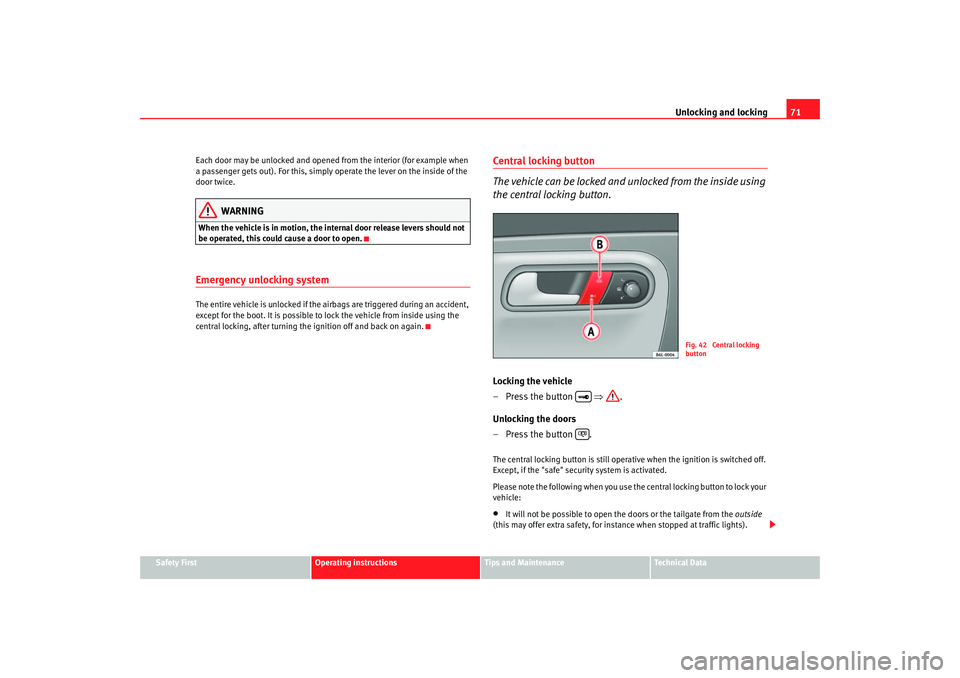
The vehicle can be locked and unlocked from the inside using
the central locking button.Locking the vehicle
– Press the button ⇒.
Unlocking the doors
– Press the button .The central locking button is still operative when the ignition is switched off.
Except, if the "safe" security system is activated.
Please note the following when you use the central locking button to lock your
vehicle:•
It will not be possible to open th e doors or the tailgate from the outside
(this may offer extra safety, for instance when stopped at traffic lights).
Fig. 42 Central locking
button
ibiza_angles_0706_DEF Seite 71 Freitag, 1. September 2006 1:18 13
Page 78 of 268
Unlocking and locking
76Radio frequency remote controlLocking and unlocking the vehicle
The remote control key can be used to lock and unlock the
vehicle from a distance.
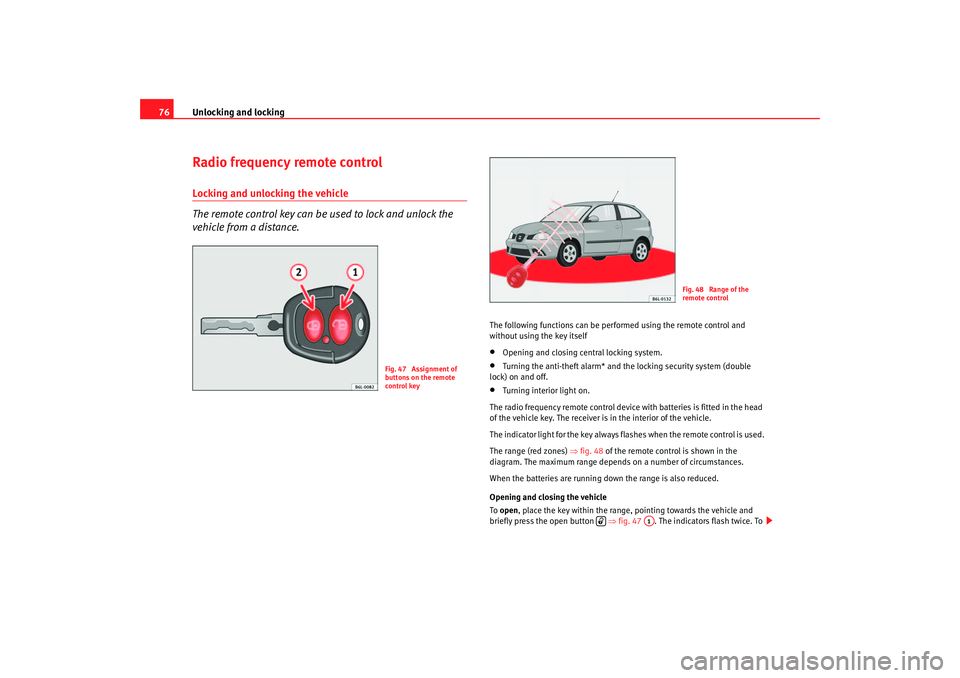
The following functions can be perf ormed using the remote control and
without using the key itself•
Opening and closing central locking system.
•
Turning the anti-theft alarm* and the locking security system (double
lock) on and off.
•
Turning interior light on.
The radio frequency remote control device with batteries is fitted in the head
of the vehicle key. The receiver is in the interior of the vehicle.
The indicator light for the key always flashes when the remote control is used.
The range (red zones) ⇒fig. 48 of the remote cont rol is shown in the
diagram. The maximum range depends on a number of circumstances.
When the batteries are running down the range is also reduced.
Opening and closing the vehicle
To open , place the key within the range, pointing towards the vehicle and
briefly press the open button ⇒fig. 47 . The indicators flash twice. To
Fig. 47 Assignment of
buttons on the remote
control key
Fig. 48 Range of the
remote control
A1
ibiza_angles_0706_DEF Seite 76 Freitag, 1. September 2006 1:18 13
Page 79 of 268
Unlocking and locking77
Safety First
Operating instructions
Tips and Maintenance
Te c h n i c a l D a t a
lock
the vehicle, press the lock button briefly ⇒fig. 47 . The indicators
flash once.
By pressing the lock button twice ⇒page 76, fig. 47 both the locking
security mechanism (double lock) and th e volumetric alarm* are deactivated
but the perimetric alarm* remains active and this is indicated by the indicator
light on the driver’s door.
Selective unlocking*
When the button ⇒page 76, fig. 47 is used the driver's door is
unlocked, all others remain locked.
Press the button ⇒page 76, fig. 47 twice to unlock all doors.
WARNING
•
Incorrect use of the key can result in critical injuries.
•
Never leave children or disabled persons in the vehicle; in case of emer-
gency they may not be able to leave the vehicle or look after themselves.
•
Never leave any of the vehicle keys in the vehicle. This could result in
serious injuries, accidents or the theft of your vehicle. Always take the key
with you when you leave the vehicle.
•
Unsupervised use of a key could me an that the engine is started or that
electrical equipment is used (e.g. elec tric windows). Risk of accident. The
vehicle can be locked using the remote control key. This could result in
people being trapped in the vehicle in an emergency.Note
•
The radio-frequency remote control ca n also be programmed so that only
the driver's door is unlocked the first time that the unlocking button on the
radio frequency remote control key is pressed. When the button is pressed
once more, all doors and the tailgate will be unlocked.
•
The remote control functions only when you are in range ⇒page 76,
fig. 48 (red area).
•
If the vehicle is unlocked using the button, the vehicle will be
locked again automatically if any of the doors or the tailgate are not opened
within 30 seconds of unlocking the vehicle. This function prevents the vehicle
from remaining unlocked if the unlocking button is pressed by mistake.
•
If the vehicle cannot be opened and closed using the remote control, the
remote control key will have to be re-synchronised ⇒page 77.
Changing the batteryIf the battery indicator does not flash when the buttons are pushed, the
battery must be replaced.
Caution
Use of inappropriate batteries may damage the radio frequency remote
control. For this reason, always replac e the dead battery with another of the
same size and power.
For the sake of the environment
The flat batteries must be disposed of in accordance with regulations
governing the protection of the environment.Synchronising the remote control keySynchronising the remote control key
– Use both keys that have been delivered with the vehicle; the key with the remote and the normal key ⇒page 76, fig. 47
⇒ page 76, fig. 48 .
A2
A2
A1
A1
A1
ibiza_angles_0706_DEF Seite 77 Freitag, 1. September 2006 1:18 13
Page 80 of 268
Unlocking and locking
78
–Maximum time allowed for synchronising is 30 seconds.
– The normal key is used to activate the ignition, and the key with the remote control is the key to be programmed.
– Check that the car is open before commencing programming.
– Place the key without remote control in the contact inside the steering and ignition lock.
– Use the key with remote control and mechanically lock the vehicle from the driver's door.
– Open and close the driver's door lock mechanically, using the remote control key.
– At the same time press the button on the remote control key.
– Complete the procedure by removing the key from the contactIt is possible that the vehicle could no longer be opened and closed with the
remote control if the button is repeatedly pressed outside of the effective
range of the radio frequency remote cont rol. The remote control key will have
to be resynchronised.
Spare remote control keys are available from Authorised Service Centres, they
must be matched to the locking system.
Anti-theft alarm system*Description of anti-theft alarm system*
The anti-theft alarm triggers an alarm if unauthorised move-
ments are detected around the vehicle.The anti-theft alarm makes it more difficult to break into the vehicle or steal
it. Audible and visible alarms are triggered if the car is opened using the
mechanical key, or if unauthorised access is gained to the vehicle.
The anti-theft alarm system is automatically switched on when the vehicle is
locked. For this, either turn the key once in the lock towards the locking posi-
tion or press button on the radio-frequency remote control*. The
system is activated immediately and the indicator light located on the
driver’s door will flash along with the indicators indicating that the alarm and
the locking security system (double lock) have been turned on.
When the vehicle is locked the indicator lamps light up only if the alarm has
been correctly activated (all the protection zones should be correctly closed).
If any of the doors or the bonnet are open, when the alarm is connected these
will not be included in the protection zones of the vehicle. If the door or
bonnet is subsequently closed, they wi ll automatically be included in the
vehicle protection zones and the indicators will flash accordingly.
When does the system trigger an alarm?
The alarm system is triggered, in the locked vehicle, when:•
a door
•
the bonnet or
•
the tailgate
are unduly opened
•
or the ignition is switched on
A1
A2
ibiza_angles_0706_DEF Seite 78 Freitag, 1. September 2006 1:18 13
Page 106 of 268
Seats and stowage
104Removing or adjust ing head restraints
The head restraints can be adjusted by moving them up and
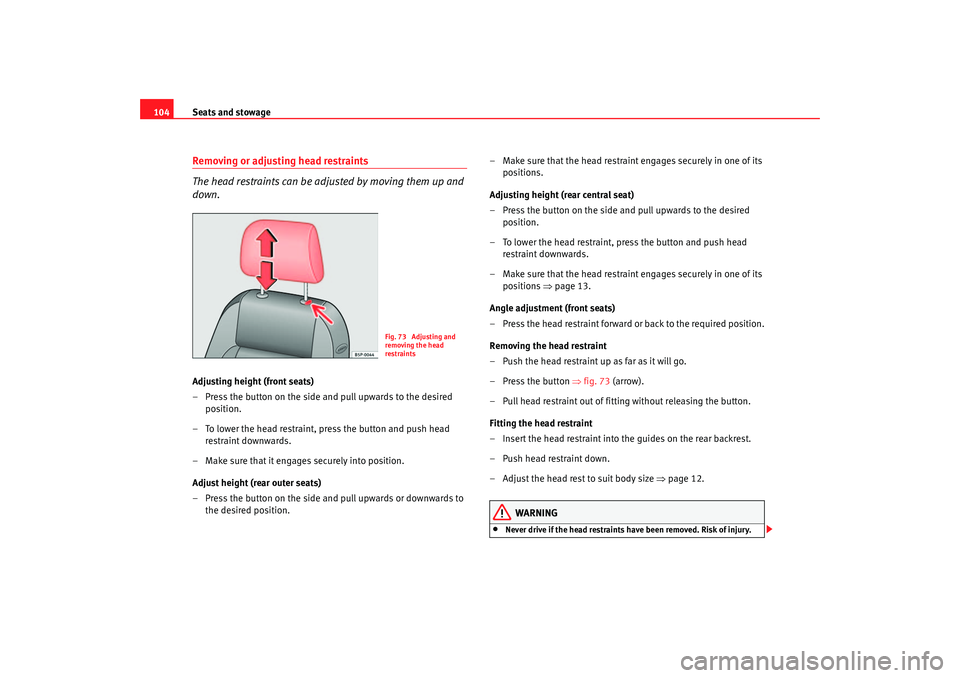
down.Adjusting height (front seats)
– Press the button on the side and pull upwards to the desired position.
– To lower the head restraint, press the button and push head restraint downwards.
– Make sure that it engages securely into position.
Adjust height (rear outer seats)
– Press the button on the side and pull upwards or downwards to the desired position. – Make sure that the head restrain
t engages securely in one of its
positions.
Adjusting height (rear central seat)
– Press the button on the side and pull upwards to the desired position.
– To lower the head restraint, press the button and push head restraint downwards.
– Make sure that the head restrain t engages securely in one of its
positions ⇒page 13.
Angle adjustment (front seats)
– Press the head restraint forward or back to the required position.
Removing the head restraint
– Push the head restraint up as far as it will go.
– Press the button ⇒fig. 73 (arrow).
– Pull head restraint out of fitting without releasing the button.
Fitting the head restraint
– Insert the head restraint into the guides on the rear backrest.
– Push head restraint down.
– Adjust the head rest to suit body size ⇒page 12.
WARNING
•
Never drive if the head restraints have been removed. Risk of injury.
Fig. 73 Adjusting and
removing the head
restraints
ibiza_angles_0706_DEF Seite 104 Freitag, 1. September 2006 1:18 13
Page 116 of 268
Seats and stowage
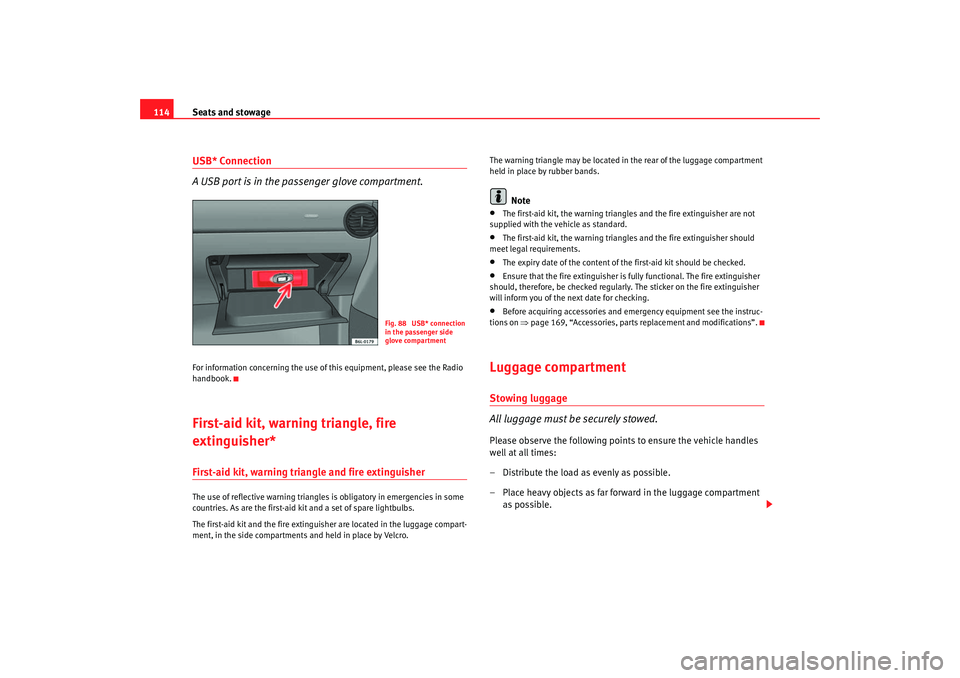
114USB* Connection
A USB port is in the passenger glove compartment.For information concerning the use of this equipment, please see the Radio
handbook.First-aid kit, warning triangle, fire
extinguisher*First-aid kit, warning triangle and fire extinguisherThe use of reflective warning triangles is obligatory in emergencies in some
countries. As are the first-aid kit and a set of spare lightbulbs.
The first-aid kit and the fire extinguisher are located in the luggage compart-
ment, in the side compartments and held in place by Velcro. The warning triangle may be located in
the rear of the luggage compartment
held in place by rubber bands.
Note
•
The first-aid kit, the warning triangles and the fire extinguisher are not
supplied with the vehicle as standard.
•
The first-aid kit, the warning triangles and the fire extinguisher should
meet legal requirements.
•
The expiry date of the content of the first-aid kit should be checked.
•
Ensure that the fire extinguisher is fully functional. The fire extinguisher
should, therefore, be checked regularly. The sticker on the fire extinguisher
will inform you of the next date for checking.
•
Before acquiring accessories and em ergency equipment see the instruc-
tions on ⇒page 169, “Accessories, parts replacement and modifications”.
Luggage compartmentStowing luggage
All luggage must be securely stowed.Please observe the following points to ensure the vehicle handles
well at all times:
– Distribute the load as evenly as possible.
– Place heavy objects as far forward in the luggage compartment
as possible.
Fig. 88 USB* connection
in the passenger side
glove compartment
ibiza_angles_0706_DEF Seite 114 Freitag, 1. September 2006 1:18 13
Page 142 of 268
Driving
140
– Switch off the engine and remove the key from the ignition lock. Turn the steering wheel slightly to engage the steering lock.
– Always take you car keys with you when you leave the vehicle ⇒ .Additional notes on parking the vehicle on gradients:
Turn the steering wheel so that the vehicle would roll against the kerb if it did
start to roll.•
If the vehicle is facing downhill, turn the front wheels so that they point
towards the kerb.
•
If the vehicle is facing uphill, turn the front wheels so that they point away
from the kerb .
•
Secure the vehicle as normal by applying the handbrake firmly and
selecting first gear.
WARNING
•
Take measures to reduce the risk of injury when you leave your vehicle
unattended.
•
Never park where the hot exhaust system could ignite inflammable
materials, such as dry grass, low bushes, spilt fuel etc.
•
Never allow vehicle occupants to remain in the vehicle when it is
locked. They would be unable to open the vehicle from the inside, and
could become trapped in the vehicle in an emergency. In the event of an
emergency, locked doors will delay assistance to occupants.
•
Never leave children unsupervised in the vehicle. They could set the
vehicle in motion, for example, by releasing the handbrake or the gear
lever / selector lever.
•
Depending on weather conditions, it may become extremely hot or cold
inside the vehicle. This can be fatal.
Cruise control system (CCS)*Description
The cruise control system is able to maintain the set speed in
the range from approx. 30 km/h to 180 km/h.Once the speed setting has been saved, you may take your foot off the accel-
erator.
WARNING
It could be dangerous to use the cruise control system if it is not possible
to drive at constant speed.•
For safety reasons the cruise control system should not be used in
dense traffic, in sections with bends or where roads conditions are poor
(e.g. aquaplaning, loose chippings, slippery surfaces, snow). Risk of acci-
dent.
•
Always switch off the CCS when you have finished using it. This will
prevent you using it by mistake.
•
It is dangerous to use a set speed which is too high for the current road,
traffic or weather conditions. Risk of accident.Note
The cruise control cannot maintain a co nstant speed when descending gradi-
ents. The vehicle will accelerate under its own weight. Use the foot brake to
slow the vehicle.
ibiza_angles_0706_DEF Seite 140 Freitag, 1. September 2006 1:18 13