lock Seat Ibiza 5D 2007 User Guide
[x] Cancel search | Manufacturer: SEAT, Model Year: 2007, Model line: Ibiza 5D, Model: Seat Ibiza 5D 2007Pages: 272, PDF Size: 8.32 MB
Page 56 of 272
Cockpit
54
WARNING
When working in the engine compartment, always bear in mind the safety
warnings ⇒ page 180.
Caution
Accessories in front of the air inlet reduce the cooling effect of the coolant. At
high outside temperatures and high engine loads, there is a risk of the
engine overheating.Fuel gauge
and reserve indicator
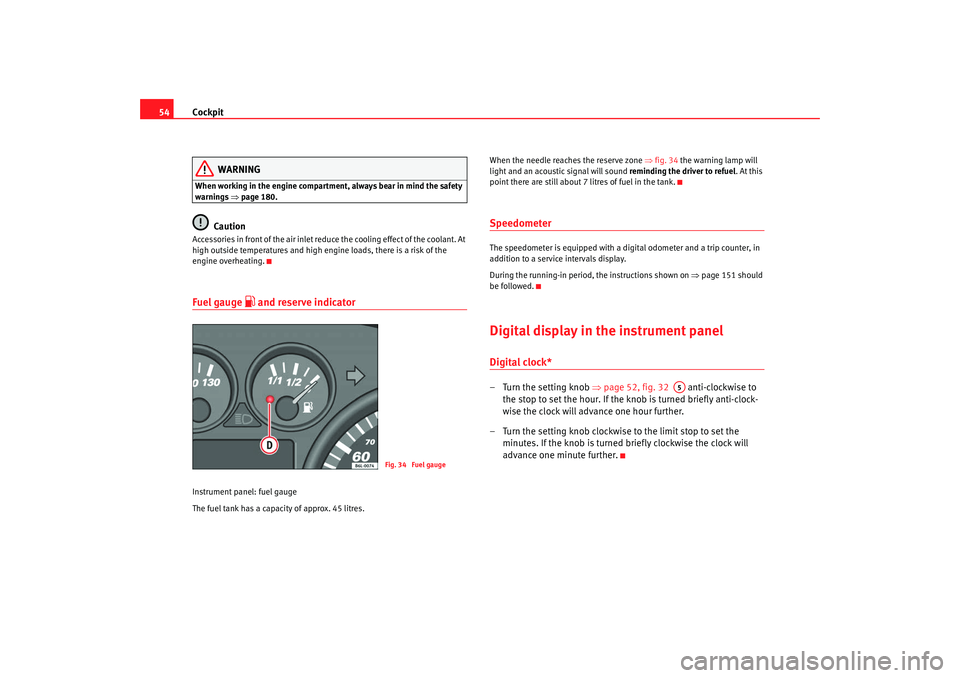
Instrument panel: fuel gauge
The fuel tank has a capacity of approx. 45 litres. When the needle reaches the reserve zone
⇒fig. 34 the warning lamp will
light and an acoustic signal will sound reminding the driver to refuel. At this
point there are still about 7 litres of fuel in the tank.
SpeedometerThe speedometer is equipped with a digital odometer and a trip counter, in
addition to a service intervals display.
During the running-in period, the instructions shown on ⇒page 151 should
be followed.Digital display in the instrument panelDigital clock* – Turn the setting knob ⇒page 52, fig. 32 anti-clockwise to
the stop to set the hour. If the kn ob is turned briefly anti-clock-
wise the clock will advance one hour further.
– Turn the setting knob clockwise to the limit stop to set the minutes. If the knob is turned briefly clockwise the clock will
advance one minute further.
Fig. 34 Fuel gauge
A5
IBI_ANG_0707 Seite 54 Montag, 6. August 2007 3:59 15
Page 59 of 272
Cockpit57
Safety First
Operating instructions
Tips and Maintenance
Te c h n i c a l D a t a
Memory displays
•
Time
•
Journey duration
•
Average speed
•
Distance
•
Distance to empty (the distance you can travel with the remaining fuel)
•
Average fuel consumption
•
Current fuel consumption
•
Ambient temperature display
Time
The time is also displayed when the ignition is switched off. The clock can be
set with the right-hand rotating button below the rev counter “digital clock”.
min - Journey duration
The display shows the amount of time which has elapsed since the ignition
was switched on.
The maximum display value in both me mories is 99 hours and 59 minutes.
The memory will automatically be deleted once this value has been reached.
Ø km/h - Average speed
The average speed will be shown after a distance of approximately 100
metres has been travelled. Dashes will appear in the display until that time.
The display will be updated every 5 seconds whilst the vehicle is in motion.
Miles - Distance travelled
The display shows the distance travelled since the ignition was switched on.
The maximum display value in both memories is 9999 miles. The memory will
automatically be deleted once this value has been reached.
Miles - Fuel range
The fuel range is calculated using the fi gures for tank content and current fuel
consumption. It shows how far the vehicle can travel using the same condi-
tions as a reference.
Ø litre/100km - Average fuel consumption
The average fuel consumption will be shown ⇒page 56, fig. 38 after a
distance of approximately 100 metres has been travelled. Dashes will appear
in the display until that time. The display will be updated every 5 seconds
whilst the vehicle is in motion. The amount of fuel used will not be shown.
ltr/100km or ltr/hr - Current fuel consumption
The display will show the current fuel consumption in litre/km whilst the
vehicle is in motion or in litre/hour when the vehicle is in a stationary position
with the engine running.
Using this display you can see how your driving style affects fuel consump-
tion ⇒page 160.
Ambient temperature display
The measurement margin extends from -45°C to +58°C. At temperatures
lower than +4°C, an “ice crystal symbol” is displayed and a “warning” sounds
if the vehicle is moving at more than 10 km/h (ice warning). This symbol will
flash for about 10 seconds and remains lit until the exterior temperature rises
above +4°C or 6°C if it was already lit.
WARNING
There could be black ice on the road surface even if the “snowflake symbol”
is not shown. You should, for this reason, not rely exclusively on this
display - Risk of accident!
IBI_ANG_0707 Seite 57 Montag, 6. August 2007 3:59 15
Page 60 of 272
Cockpit
58
NoteWhen the vehicle is stationary or travelling at very low speeds, the tempera-
ture displayed may be slightly higher than the actual ambient temperature as
a result of the heat radiated from the engine.Display field for selector lever position*The position of the automatic gearbox selector lever is shown on the display
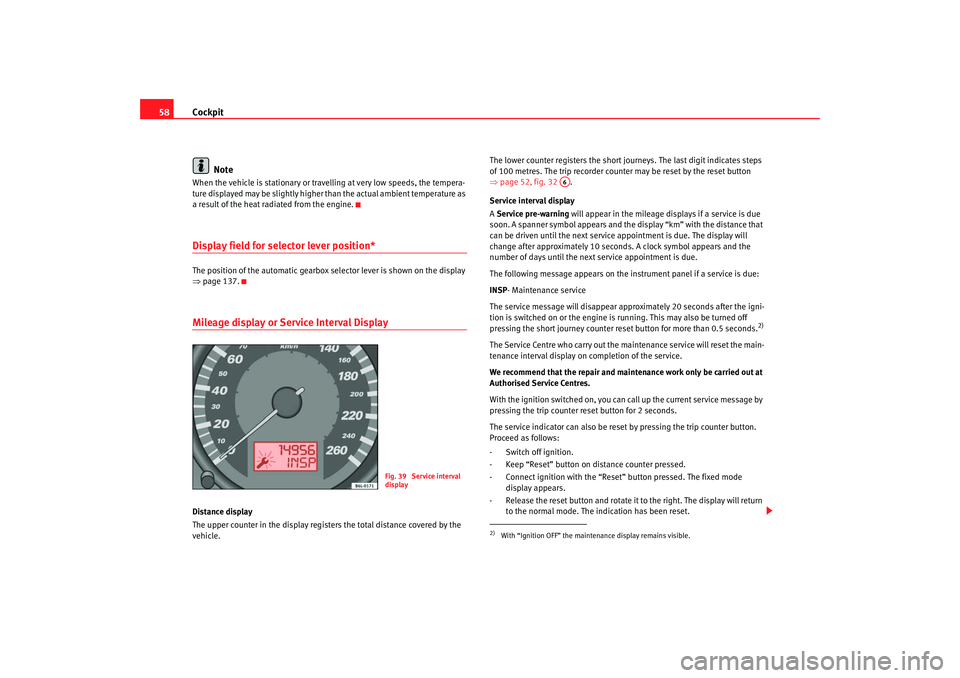
⇒page 137.Mileage display or Service Interval DisplayDistance display
The upper counter in the display registers the total distance covered by the
vehicle. The lower counter registers the short journeys. The last digit indicates steps
of 100 metres. The trip recorder counter may be reset by the reset button
⇒
page 52, fig. 32 .
Service interval display
A Service pre-warning will appear in the mileage displays if a service is due
soon. A spanner symbol appears and the display “km” with the distance that
can be driven until the next service appointment is due. The display will
change after approximately 10 seconds. A clock symbol appears and the
number of days until the next service appointment is due.
The following message appears on the instrument panel if a service is due:
INSP- Maintenance service
The service message will disappear approximately 20 seconds after the igni-
tion is switched on or the engine is running. This may also be turned off
pressing the short journey counter reset button for more than 0.5 seconds.
2)
The Service Centre who carry out the maintenance service will reset the main-
tenance interval display on completion of the service.
We recommend that the repair and main tenance work only be carried out at
Authorised Service Centres.
With the ignition switched on, you can call up the current service message by
pressing the trip counter reset button for 2 seconds.
The service indicator can also be reset by pressing the trip counter button.
Proceed as follows:
- Switch off ignition.
- Keep “Reset” button on distance counter pressed.
- Connect ignition with the “Reset ” button pressed. The fixed mode
display appears.
- Release the reset button and rotate it to the right. The display will return to the normal mode. The indication has been reset.
Fig. 39 Service interval
display
2)With “Ignition OFF” the mainte nance display remains visible.
A6
IBI_ANG_0707 Seite 58 Montag, 6. August 2007 3:59 15
Page 63 of 272
Cockpit61
Safety First
Operating instructions
Tips and Maintenance
Te c h n i c a l D a t a
Item
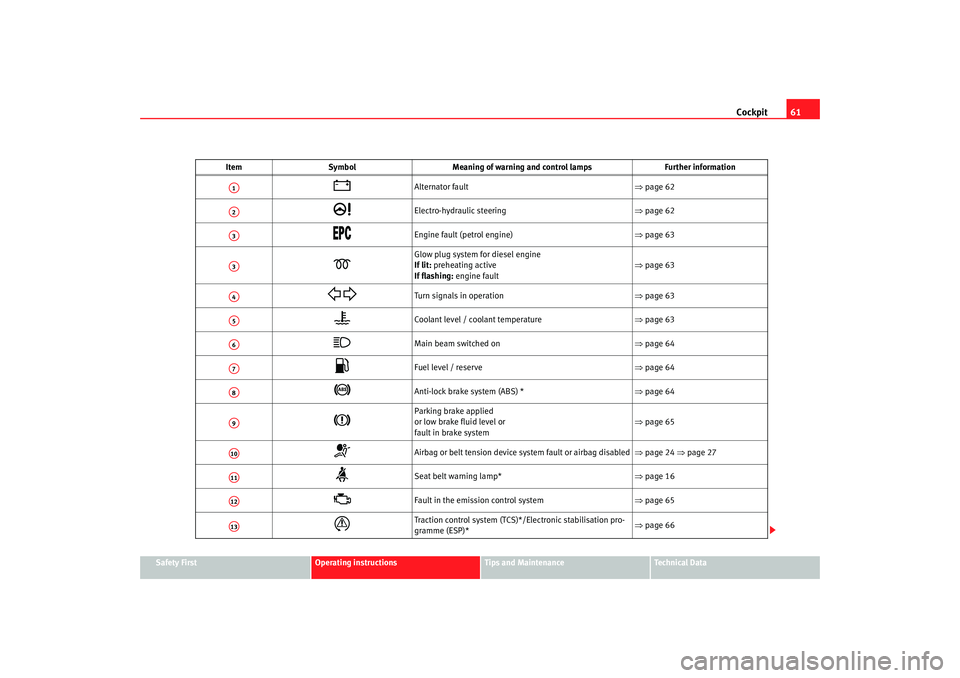
Symbol Meaning of warning and control lamps Further information
Alternator fault ⇒page 62
Electro-hydraulic steering ⇒page 62
Engine fault (petrol engine) ⇒page 63
Glow plug system for diesel engine
If lit: preheating active
If flashing: engine fault ⇒
page 63
Turn signals in operation ⇒page 63
Coolant level / coolant temperature ⇒page 63
Main beam switched on ⇒page 64
Fuel level / reserve ⇒page 64
Anti-lock brake system (ABS) * ⇒page 64
Parking brake applied
or low brake fluid level or
fault in brake system ⇒
page 65
Airbag or belt tension device system fault or airbag disabled ⇒page 24 ⇒page 27
Seat belt warning lamp* ⇒page 16
Fault in the emission control system ⇒page 65
Traction control system (TCS)*/Electronic stabilisation pro-
gramme (ESP)* ⇒
page 66
A1A2A3A3A4A5A6A7A8A9A10A11A12A13
IBI_ANG_0707 Seite 61 Montag, 6. August 2007 3:59 15
Page 66 of 272
Cockpit
64Coolant temperature too high
First look at the coolant temperature gauge. The coolant temperature is too
high if the needle is over the warning area on the dial. Stop the vehicle,
switch off the engine and wait for it to cool down. Check the coolant level.
If the coolant level is correct, the overheating may be caused by a malfunction
of the radiator fan. Check the radiator fan fuse and have it replaced if neces-
sary ⇒page 213.
If the warning lamp lights up again after driving on for a short distance, stop
the vehicle and switch off the engine. Contact an Authorised Service Centre
or a qualified workshop.
Coolant level too low
First look at the coolant temperature gauge. If the needle is in the normal
range, top up with coolant at the earliest opportunity ⇒.
WARNING
•
If your vehicle is immobilised for any technical reasons, move it to a
safe distance from traffic. Turn off the engine, turn on the hazard lights and
place the warning triangle.
•
Never open the bonnet if you can see or hear steam or coolant escaping
from the engine compartment. Risk of scalding. Wait until you can no
longer see or hear escaping steam or coolant.
•
The engine compartment of any motor vehicle is a dangerous area!
Before carrying out any work in the engine compartment, switch off the
engine and allow it to cool down. Alwa ys note the corresponding warnings
⇒ page 180.
Main beam headlights
This warning lamp lights up when the main beams are on.The warning lamp
lights up when the main beams are on or when the
headlight flasher is operated.
Further information ⇒page 93.
Fuel level / reserve
This symbol lights up to indicate that the fuel tank is down to
the reserve level.This lights when only 7 litres of fuel remain in the tank. Also, an audible
warning is given. This serves as a reminder to fill up with fuel at the earliest
opportunity ⇒page 177.Anti-lock brake system (ABS)
A warning lamp system monitors the ABS.
The warning lamp
should light up for a few seconds when the ignition is
switched on. It goes out again after the system has run through an automatic
test sequence.
There is a fault in the ABS if:
•
The warning lamp
does not light up when the ignition is switched on.
•
The warning lamp does not go out again after a few seconds.
•
The warning lamp lights up when the vehicle is moving.
IBI_ANG_0707 Seite 64 Montag, 6. August 2007 3:59 15
Page 67 of 272
Cockpit65
Safety First
Operating instructions
Tips and Maintenance
Te c h n i c a l D a t a
The vehicle can still be braked in the normal way (except that the ABS control
function will not function). Please take
the vehicle to a qualified workshop as
soon as possible. For further information on the ABS see the ⇒page 148.
If a fault occurs in the ABS, the ESP* warning lamp will also light up.
Brake system fault
If the ABS warning lamp
lights up together with the brake warning lamp
, this indicates not only a fault in the ABS function, but also a possible fault
in the brake system ⇒.
WARNING
•
Before opening the bonnet, read and observe the warnings on
⇒ page 180, “Working in the engine compartment”.
•
If the brake warning lamp
should light up together with the ABS
warning lamp
, stop the vehicle immediately and check the brake fluid
level in the reservoir ⇒page 192, “Brake fluid”. If the fluid level has
dropped below the “MIN” mark you must not drive on. Risk of accident.
Obtain technical assistance.
•
If the brake fluid level is correct, the fault in the brake system may have
been caused by a failure of the ABS system. This could cause the rear
wheels to lock quickly when you brake. This could cause the rear to break
away. Risk of skidding. Stop the vehicle and seek technical assistance.
Brake system* / handbrake
The warning lamp lights up if the handbrake is applied, if the
brake fluid level falls too low or if there is a fault in the brake
system.
This warning lamp
lights up if
•
If the handbrake is on
•
If the brake fluid level is too low ⇒page 192
•
If there is a fault in the brake system
This warning lamp can light up together with the anti-lock brake system
warning lamp.
WARNING
•
If the brake warning lamp does not go out, or if it lights up when
driving, the brake fluid level ⇒page 192, “Brake fluid” in the reservoir is
too low. Risk of accident. Stop the vehicle and do not drive on. Obtain tech-
nical assistance.
•
If the brake warning lamp
lights up together with the ABS warning
lamp
, the control function of the ABS could be out of action. This could
cause the rear wheels to lock quickly when you brake. This could cause the
rear to break away. Risk of skidding. Stop the vehicle and seek technical
assistance.
Emission control system*
This warning lamp monitors the exhaust system.
Warning lamp
flashes:
When there is misfiring that can damage the catalytic converter. Reduce
speed and drive carefully to the nearest qualified workshop to have the
engine checked.
Warning lamp is lit:
If a fault has developed during driving which has reduced the quality of the
exhaust gas (e.g. lambda probe fault). Reduce speed and drive carefully to
the nearest qualified workshop to have the engine checked.
IBI_ANG_0707 Seite 65 Montag, 6. August 2007 3:59 15
Page 69 of 272
Cockpit67
Safety First
Operating instructions
Tips and Maintenance
Te c h n i c a l D a t a
Electronic immobiliser
Inside the key there is a chip that deac tivates the electronic immobiliser auto-
matically when the key is inserted into the ignition. The immobiliser will be
activated again automatically as soon as you pull the key out of the ignition
lock.
The engine can, however, be started if the appropriate coded SEAT genuine
key is used.
Note
The vehicle cannot be operated properly if you do not have a genuine SEAT
key.Engine oil pressure
This warning lamp indicates that the engine oil pressure is
too low.If this warning symbol starts to flash, and is accompanied by three audible
warnings , switch off the engine and check the oil level. If the oil level is too
low, add more engine oil ⇒page 183.
If the symbol flashes although the oil level is correct, do not drive on. The
engine must not even run at idle speed. Obtain technical assistance.
Trailer turn signals
This warning lamp also flashe s when the turn signals are
operated while towing a caravan or trailer.The warning lamp
flashes when the turn signals are operated, provided a
trailer is correctly attached and connected to the vehicle.
The warning lamp will not flash if one of the turn signals on the trailer fails.
Differential lock fault (EDL)*
EDL operates along with the ABS in vehicles equipped with an
Electronic Stabilisation Program (ESP)*A malfunction in the EDL is indicated by the ABS warning lamp
. Please
take the vehicle to a qualified workshop as soon as possible. For further infor-
mation on the EDL ⇒page 150, “Electronic diff erential lock (EDL)*”
IBI_ANG_0707 Seite 67 Montag, 6. August 2007 3:59 15
Page 72 of 272
Unlocking and locking
70Unlocking and lockingDoorsLocking and unlocking the vehicle
From the outside of the vehicle, the driver's door may be
locked or unlocked using the key.When opened , the latch will rise up (for vehicles without central locking)
For vehicles equipped with electric windows and central locking, if the key is
maintained in the opening position all of the electric side windows will open.
When locking the latch will descend (for vehicles without central locking)
In some vehicle models equipped with electric windows and central locking,
if the key is maintained in the locking position on the driver side, any side
windows left open, as well as the electric sunroof, will close.
For vehicles without central locking, the passenger door and the rear doors
may be locked from the outside without using a key. Just press the button
down and close the door.
The latch on the driver’s door may not be pushed down while the door is open
(only in vehicles without central locking) . This avoids accidentally leaving the
keys in the ignition.
From inside all the doors may be locked by pushing the security buttons down
(in vehicles withou t central locking).
WARNING
•
Exercise extreme caution when closing the windows and the sunroof
from the outside of the vehicle.
•
Closing from the outside without ta king care or observing all the
vehicle may cause bruising for other people especially children.
•
When locking a vehicle, never leave children unaccompanied inside, as
it will be difficult to provide assistance if required.
•
When the doors are locked, any intrusion is impeded, for example while
stopped at a red light.
Ce ntral l ocking *Description
The central locking system enables you to lock and unlock all
the doors and the tailgate from one point.Central locking can be activated us ing any of the following options:•
the key, by inserting it into the driver's door cylinder and rotating manu-
ally,
•
the central locking button , (electronic control) in the passenger compart-
ment ⇒page 73,
•
the radio frequency remote control , using the buttons on the key
⇒ page 78.
Various functions are available to improve the vehicle security:
- Locking system “Safe”
- Selective unlocking system*WARNING (continued)
IBI_ANG_0707 Seite 70 Montag, 6. August 2007 3:59 15
Page 73 of 272
Unlocking and locking71
Safety First
Operating instructions
Tips and Maintenance
Te c h n i c a l D a t a
- Auto-locking to prevent involuntary unlocking
- Automatic speed dependent locking and unlocking system*
- Emergency unlocking system
Note
For anti-theft security, only the driver's door is fitted with a lock cylinder.Safety system “Safe”
This is an anti-theft device consisting of a double lock for the
door locks and a deactivation func
tion for the boot in order to
make forced entry more difficult.Activation
The “safe” system is activated when the vehicle is locked using the key or the
remote control.
To activate this system with the key, rotate the key once in the door lock
cylinder in the locking direction.
To activate the system using the remote control, press the lock button on the
remote once.
When this system is activated, it is not possible to open the doors normally,
from the outside or the inside. The boot/tailgate may not be opened. The
central locking button does not work.
Voluntary deactivation
The “Safe” system can be deactivated voluntarily by the user.
This is done by locking two times in quick succession (in under 2 seconds).
This double locking can be executed using the key or the remote control.
Using the key, rotate the lock cyli nder twice in the locking direction. To activate the system using the remote control, press the lock button on the
remote twice.
When the “Safe” system is deactivated, the alarm volumetric sensor is also
deactivated.
When the “Safe” system is deactivated, the doors are locked using the simple
locking system, meaning that they may
be opened from the interior but not
from the exterior.
Involuntary deactivation
The methods described for deactivati on of the “Safe” system may be
executed involuntarily (for example, if we press the button because we
want to lock the vehicle, and it locks as a result, however, we are not sure that
it is locked and we press the button once more within 2 seconds, we will have
deactivated the “Safe” system).
Deactivation when opening
To deactivate the system on opening, see “Selective unlocking system*”.
“Safe” status
On the driver's door, there is a light in dicator visible from the outside of the
vehicle that indicates the “Safe” system status.
We can see that the “Safe” system is activated, by the flashing of the light
indicator. The indicator will flash on all vehicles, whether they are fitted with
an alarm or not, and until the vehicle is unlocked.
Remember:
Safe activated with or without alarm: Indicator flashes continuously.
Safe deactivated without alarm: The indicator remains off.
Safe deactivated with alarm: The indicator remains off.
IBI_ANG_0707 Seite 71 Montag, 6. August 2007 3:59 15
Page 74 of 272
Unlocking and locking
72
WARNING
No one should remain in the vehicle if the “Safe” deadlock mechanism has
been activated. It is not possible to open the doors from the inside or the
outside and this would make any outsid e intervention difficult in case of
emergency. Danger of death. People could become trapped inside in an
emergency.Selective unlocking system*
This system allows for unlocking only the driver's door, or all
the vehicle.Driver's door unlock button
This is done by a simple unlocking (on ce). This can be done with the key or
the remote control.
With the key, rotate the key once in the lock cylinder in the unlock direction.
The driver's door will be released from the “Safe” system and unlocked and
may be opened, the indicator light will also be switched off. For vehicles fitted
with an alarm, this system is deactivated.
Using the remote control, press the unlock button on the remote once. The
“Safe” system is deactivated for all the vehicle, only the driver's door is
unlocked for opening, the alarm is turned off as is the light indicator.
Unlocking all doors and the boot
So that all the doors and the boot can be opened, the unlock button on
the remote must be pressed twice.
The button must be pressed twice in under 2 seconds and this will deactivate
the “Safe” system for all the vehicle, all doors will be unlocked and the boot
will be activated. The indicator will be turned off as will be the alarm for those
vehicles fitted with one. Unlocking the boot
See
⇒page 78 and ⇒page 83.
Locking system for involuntary unlocking
This is an anti-theft system and will avoid situations where
the vehicle is opened unintentionallyThe vehicle will be re-locked automatically, if it is unlocked and neither the
boot or any of the doors are opened within 30 seconds. This function
prevents the vehicle from remaining unlocked if the unlocking button is
pressed by mistake.Automatic speed dependent locking and unlocking system*
This is a safety system to prevent access to the vehicle from
the exterior when the vehicle is in transit (for example, when
stopped at a traffic light).Locking
The doors and the boot are automatically locked when vehicle speed exceeds
15 km/h.
If the vehicle is stopped and one of the doors is opened, when the vehicle
moves off again and exceeds a speed of 15 km/h the unlocked door(s) will be
locked once more.
Unlocking
The driver's door automatically unlocks when the key is removed from the
ignition.
IBI_ANG_0707 Seite 72 Montag, 6. August 2007 3:59 15