tow Seat Ibiza 5D 2007 Owner's Guide
[x] Cancel search | Manufacturer: SEAT, Model Year: 2007, Model line: Ibiza 5D, Model: Seat Ibiza 5D 2007Pages: 272, PDF Size: 8.32 MB
Page 119 of 272
Seats and stowage117
Safety First
Operating instructions
Tips and Maintenance
Te c h n i c a l D a t a
WARNING
•
Loose luggage and other loose items in the vehicle can cause serious
injuries.
•
Loose objects in the luggage compartment can suddenly move and
change the way the vehicle handles.
•
During sudden manoeuvres or accidents, loose objects in the
passenger compartment can be flung forward, injuring vehicle occupants.
•
Always put objects in the luggage compartment.
•
When you transport heavy objects, always keep in mind that a change
in the centre of gravity can also cause changes in vehicle handling.
•
Please observe information on safe driving ⇒page 7, “Safe driving”.Caution
Hard objects on the shelf could chafe against the wires of the heating
element in the rear window and cause damage.
Note
The ventilation slots in front of the rear side windows must not be covered as
this would prevent st ale air being extracted from the vehicle.
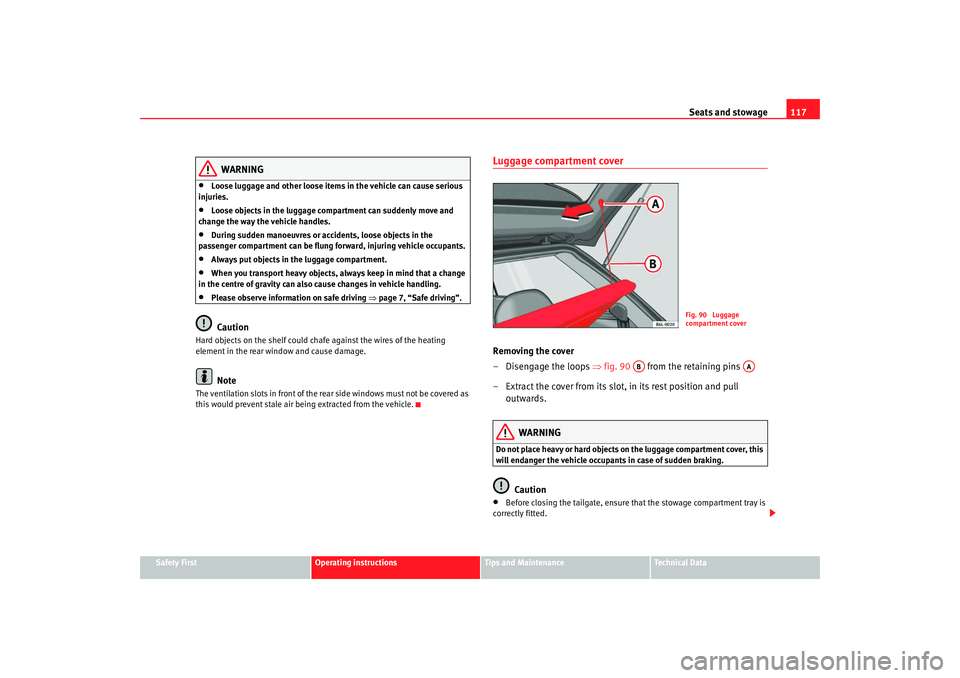
Luggage compartment coverRemoving the cover
–Disengage the loops ⇒fig. 90 from the retaining pins
– Extract the cover from its slot, in its rest position and pull outwards.
WARNING
Do not place heavy or hard objects on the luggage compartment cover, this
will endanger the vehicle occupants in case of sudden braking.
Caution
•
Before closing the tailgate, ensure th at the stowage compartment tray is
correctly fitted.
Fig. 90 Luggage
compartment cover
AB
AA
IBI_ANG_0707 Seite 117 Montag, 6. August 2007 3:59 15
Page 120 of 272
Seats and stowage
118•
An overloaded boot could mean that the rear stowage tray is not correctly
seated and it may be bent or damaged.
•
If the boot is overloaded, remove the tray.Note
•
Ensure that, when placing items of clothing on the luggage compartment
cover, rear visibility is not reduced.
Roof carrier*Please observe the following points if you intend to carry loads on the roof:•
For safety reasons, only luggage racks and accessories approved by SEAT
should be used.
•
It is imperative to precisely follow the fitting instructions included for the
rack, taking special care when fitting the front bar in the holes designed for
this and the rear bar between the marks on the upper part of the rear door
frame while respecting the correct direction of travel indicated in the installa-
tion manual. Not following these instructions may lead to paintwork damage
or marks on the bodywork.
•
Pay special attention to the tightening torque of the attachment bolts and
check them following a short journey. If necessary, retighten the bolts and
check them at regular intervals.
•
Distribute the load evenly. A maximum load of 40 kg only is permitted for
each roof carrier system support bar, the load must be distributed evenly over
the entire length. However, the maximu m load permitted for the entire roof
(including the support system) of 75 kg must not be exceeded nor should the
total weight of the vehicle be exceeded. See the chapter on “Technical Data”.
•
When transporting heavy or large objects on the roof, any change in the
normal vehicle behaviour due to a change in the centre of gravity or an increased wind resistance must be taken into account. For this reason, a suit-
able speed and driving style must be used.
•
For those vehicles fitted with a sunroof*, ensure that it does not interfere
with the load on the roof carrier system when opened.
IBI_ANG_0707 Seite 118 Montag, 6. August 2007 3:59 15
Page 121 of 272
Heating, Ventilation and Air conditioning 119
Safety First
Operating instructions
Tips and Maintenance
Te c h n i c a l D a t a
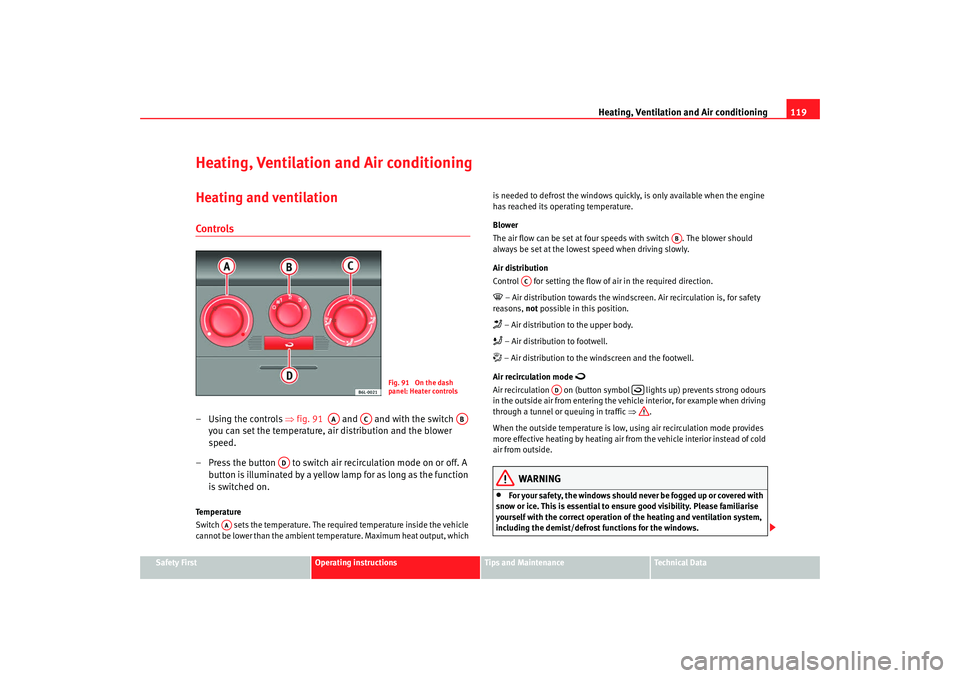
Heating, Ventilation and Air conditioningHeating and ventilationControls– Using the controls ⇒fig. 91 and and with the switch
you can set the temperature, air distribution and the blower
speed.
– Press the button to switch air recirculation mode on or off. A button is illuminated by a yellow lamp for as long as the function
is switched on.Temperature
Switch sets the temperature. The required temperature inside the vehicle
cannot be lower than the ambient tem perature. Maximum heat output, which is needed to defrost the windows quickly, is only available when the engine
has reached its operating temperature.
Blower
The air flow can be set at four s
peeds with switch . The blower should
always be set at the lowest speed when driving slowly.
Air distribution
Control for setting the flow of air in the required direction.
– Air distribution towards the windsc reen. Air recirculation is, for safety
reasons, not possible in this position. – Air distribution to the upper body. – Air distribution to footwell. – Air distribution to the windscreen and the footwell.
Air recirculation mode
Air recirculation on (button symbol lights up) prevents strong odours
in the outside air from entering the vehicle interior, for example when driving
through a tunnel or queuing in traffic ⇒.
When the outside temperature is low, using air recirculation mode provides
more effective heating by heating air from the vehicle interior instead of cold
air from outside.
WARNING
•
For your safety, the windows should never be fogged up or covered with
snow or ice. This is essential to ensure good visibility. Please familiarise
yourself with the correct operation of the heating and ventilation system,
including the demist/defrost functions for the windows.
Fig. 91 On the dash
panel: Heater controls
AA
AC
AB
AD
AA
AB
AC
AD
IBI_ANG_0707 Seite 119 Montag, 6. August 2007 3:59 15
Page 122 of 272
Heating, Ventilation and Air conditioning
120•
In air recirculation mode, no ambient air enters the vehicle interior. The
windows can quickly fog over if the heating is switched off. Therefore, you
should never leave the air recirculation mode switched on for longer
periods, as this increases the risk of an accident.Note
•
Please observe the general notes ⇒page 128.
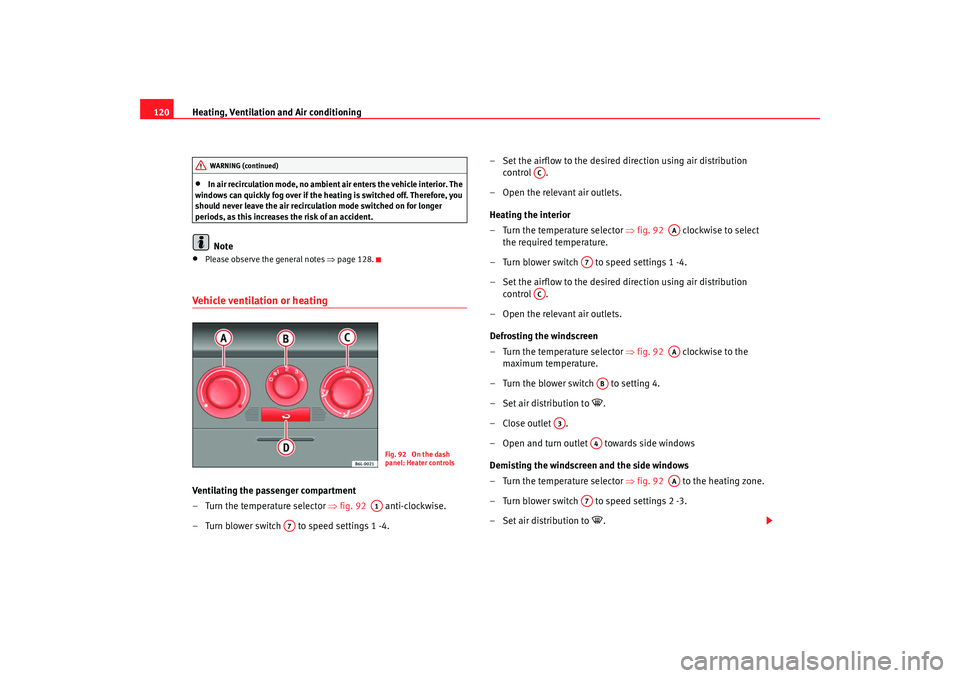
Vehicle ventilation or heatingVentilating the passenger compartment
– Turn the temperature selector ⇒fig. 92 anti-clockwise.
– Turn blower switch to speed settings 1 -4. – Set the airflow to the desired direction using air distribution
control .
– Open the relevant air outlets.
Heating the interior
– Turn the temperature selector ⇒fig. 92 clockwise to select
the required temperature.
– Turn blower switch to speed settings 1 -4.
– Set the airflow to the desired direction using air distribution control .
– Open the relevant air outlets.
Defrosting the windscreen
– Turn the temperature selector ⇒fig. 92 clockwise to the
maximum temperature.
– Turn the blower switch to setting 4.
– Set air distribution to
.
–Close outlet .
– Open and turn outlet towards side windows
Demisting the windscreen and the side windows
– Turn the temperature selector ⇒fig. 92 to the heating zone.
– Turn blower switch to speed settings 2 -3.
– Set air distribution to
.
WARNING (continued)
Fig. 92 On the dash
panel: Heater controls
A1
A7
AC
AA
A7
AC
AA
AB
A3
A4
AA
A7
IBI_ANG_0707 Seite 120 Montag, 6. August 2007 3:59 15
Page 123 of 272
Heating, Ventilation and Air conditioning 121
Safety First
Operating instructions
Tips and Maintenance
Te c h n i c a l D a t a
– Close outlets .
– Open and turn outlets towards side windowsWhen the windows are demisted and as a preventive measure, the switch
can be set in position
, thus obtaining greater comfort while preventing the
windows from misting again. Heating
Maximum heat output, which is needed to defrost the windows quickly, is
only available when the engine has reached its operating temperature.
Note
Remember that the temperature of the engine coolant should be optimum to
ensure that the heating system functions correctly ( except in vehicles fitted
with additional heating*)
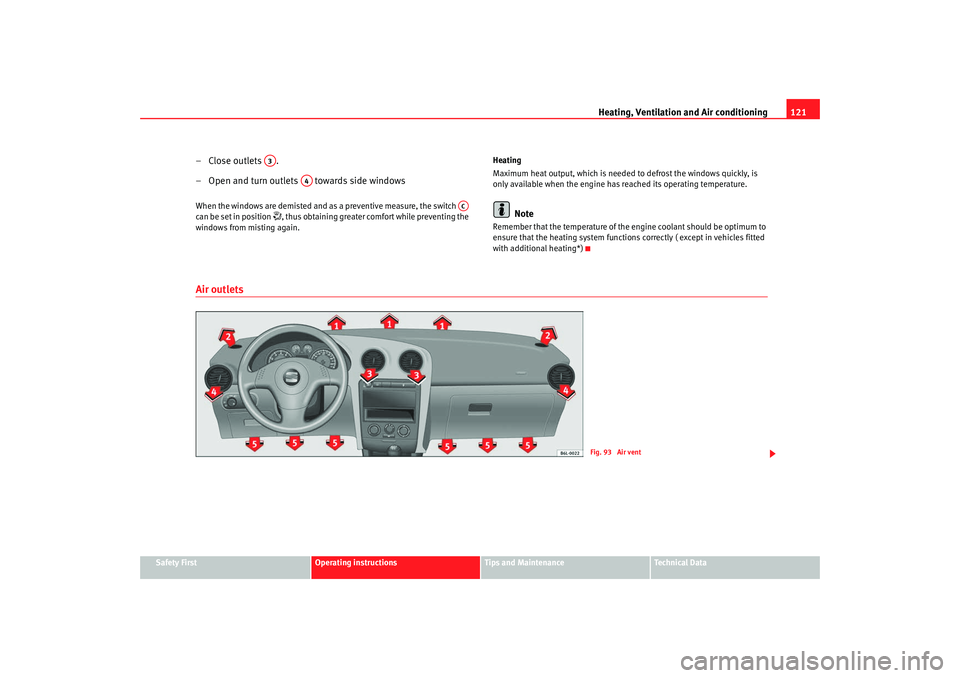
Air outlets
A3
A4
AC
Fig. 93 Air vent
IBI_ANG_0707 Seite 121 Montag, 6. August 2007 3:59 15
Page 125 of 272
Heating, Ventilation and Air conditioning 123
Safety First
Operating instructions
Tips and Maintenance
Te c h n i c a l D a t a
– Turn the fan control to one of the two levels depending on the
speed required.
– Rotate the temperature control to the desired level.
– Close outlets .
– Open and turn outlets towards side windows.
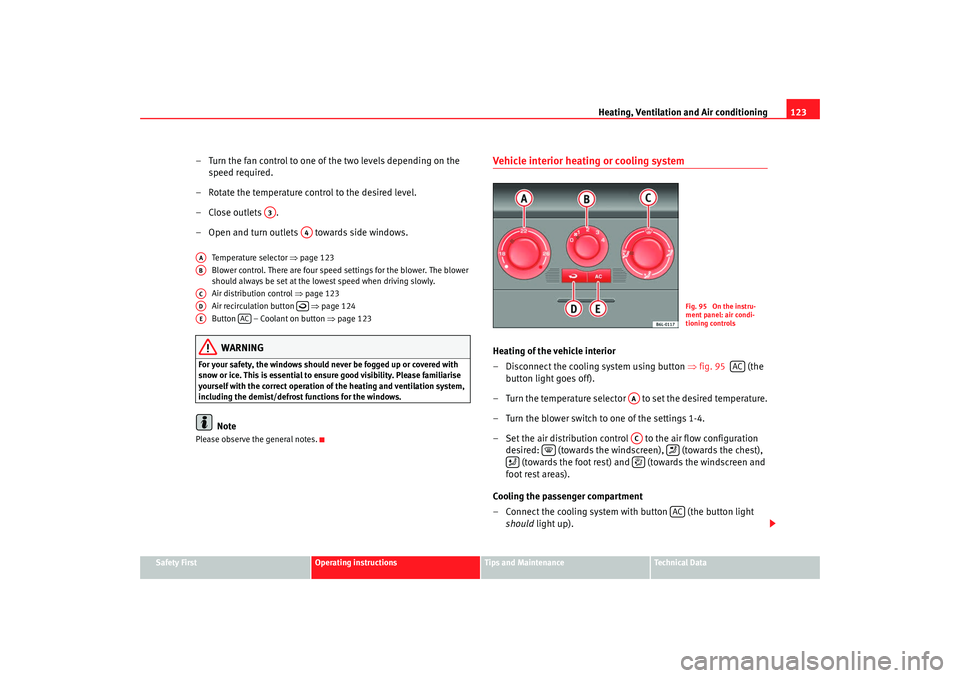
Temperature selector ⇒page 123
Blower control. There are four speed settings for the blower. The blower
should always be set at the lowest speed when driving slowly.
Air distribution control ⇒page 123
Air recirculation button ⇒page 124
Button – Coolant on button ⇒page 123WARNING
For your safety, the windows should never be fogged up or covered with
snow or ice. This is essential to ensu re good visibility. Please familiarise
yourself with the correct operation of the heating and ventilation system,
including the demist/defrost functions for the windows.
Note
Please observe the general notes.
Vehicle interior heating or cooling system Heating of the vehicle interior
– Disconnect the cooling system using button ⇒fig. 95 (the
button light goes off).
– Turn the temperature selector to set the desired temperature.
– Turn the blower switch to one of the settings 1-4.
– Set the air distribution control to the air flow configuration desired: (towards the windsc reen), (towards the chest),
(towards the foot rest) and (towards the windscreen and
foot rest areas).
Cooling the passenger compartment
– Connect the cooling system with button (the button light should light up).
A3
A4
AAABACAD
AE
AC
Fig. 95 On the instru-
ment panel: air condi-
tioning controls
AC
AAAC
AC
IBI_ANG_0707 Seite 123 Montag, 6. August 2007 3:59 15
Page 126 of 272
Heating, Ventilation and Air conditioning
124
– Turn the temperature control switch until the desired interior temperature is obtained.
– Turn the blower switch to one of the settings 1-4.
– Set the air distribution control to the air flow configuration desired: (towards the windsc reen), (towards the chest),
(towards the foot rest) and (towards the windscreen and
foot rest areas).Heating
Maximum heat output, which is needed to defrost the windows quickly, is
only available when the engine has reached its operating temperature.
Coolant system
When the cooling system is switched on, not only the temperature, but also
the air humidity in the vehicle interior is reduced. This improves comfort for
the vehicle occupants and prevents misting of the windows when the outside
air humidity is high.
If the cooling system cannot be switched on this may be due to the following
reasons:•
the engine is not running.
•
The blower is switched off.
•
The outside temperature is lower than +5°C.
•
the cooling system compressor has been temporarily switched off
because the engine coolant temperature is too high.
•
The air conditioning fuse is faulty.
•
Another fault in the vehicle. Have the air conditioning checked by a qual-
ified workshop.
Air recirculation
Air recirculation mode prevents fumes or unpleasant smells
from entering the vehicle.When air recirculation mode is switched on (button ⇒page 123, fig. 95
with warning lamp) strong odours in the outside air do not enter the vehicle
interior, for example when passing through a tunnel or in queuing traffic.
When the outside temperature is low, us ing air recirculation mode provides
more effective heating by heating air from the vehicle interior instead of cold
air from outside.
When the outside temperature is high, using air recirculation mode provides
more effective cooling by cooling air fr om the vehicle interior instead of warm
air from outside.
For reasons of safety, air recirculation is not possible when the control for air
distribution is set to the windscreen setting
.
WARNING
In air recirculation mode, no ambient air enters the vehicle interior. If the
air conditioning system is switched off, the windows can quickly mist over.
Therefore, you should never leave the air recirculation mode switched on
for longer periods, as this increases the risk of an accident.
Note
•
When reverse gear is engaged the air recirculation connects automatically
to prevent the entrance of exhaust fumes in the vehicle on travelling back-
wards. The control light on th e button does not light up.
•
If the temperature control is turned to the coldest setting (blue point) and
the switch is activated, the “Air recirculation” function is automatically
activated in order to cool the passenger compartment rapidly using a
minimum of energy and the function indicator will light.
AC
IBI_ANG_0707 Seite 124 Montag, 6. August 2007 3:59 15
Page 133 of 272
Driving131
Safety First
Operating instructions
Tips and Maintenance
Te c h n i c a l D a t a
•
Adjust the driver seat or steering wheel so that there is a distance of at
least 25 cm between the steering wheel and your breast bone ⇒page 130,
fig. 98 . If you fail to observe the minimum distance, the airbag will not
protect you. Risk of fatal injury.
•
If your physical constitution prevents you from maintaining the
minimum distance of 25 cm, contact an Authorised Service Centre. The
Authorised Service Centre will help you decide if special specific modifica-
tions are necessary.
•
If you adjust the steering wheel so th at it points towards your face, the
driver airbag will not protect you prop erly in the event of an accident. Make
sure that the steering wheel points towards your chest.
•
When driving, always hold the steering wheel with both hands on the
outside of the ring at the 9 o'clock and 3 o'clock positions. Never hold the
steering wheel at the 12 o'clock position, or in any other manner (e.g. in
the centre of the steering wheel, or on the inside of the rim). In such cases,
you could receive severe injuries to the arms, hands and head.
SafetyElectronic stabilisation programme (ESP)*
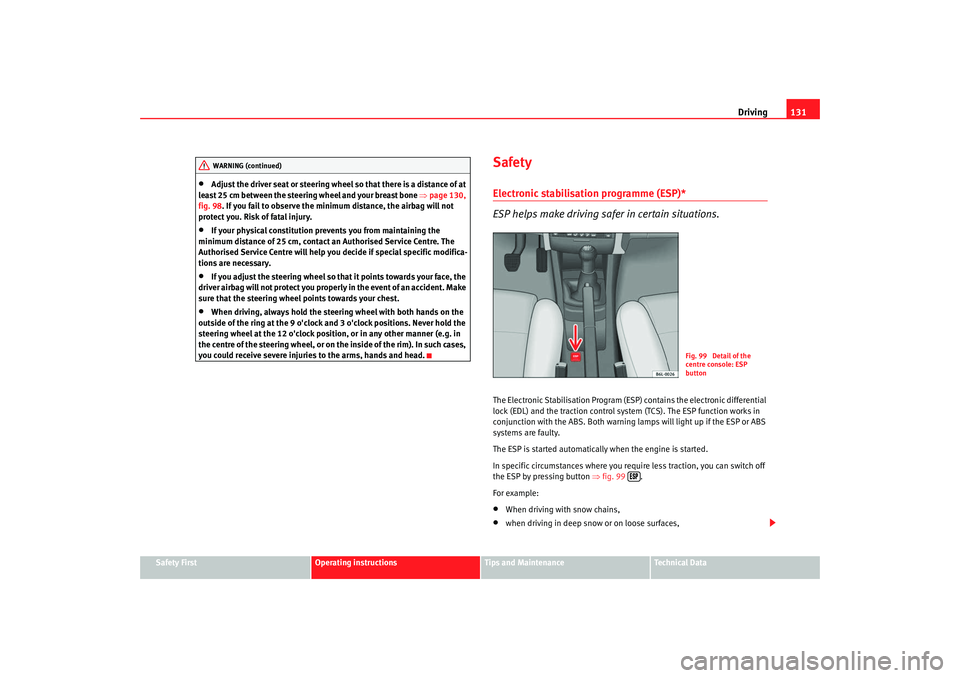
ESP helps make driving safer in certain situations.The Electronic Stabilisation Program (ESP ) contains the electronic differential
lock (EDL) and the traction control system (TCS). The ESP function works in
conjunction with the ABS. Both warning la mps will light up if the ESP or ABS
systems are faulty.
The ESP is started automatically when the engine is started.
In specific circumstances where you requ ire less traction, you can switch off
the ESP by pressing button ⇒fig. 99 .
For example:•
When driving with snow chains,
•
when driving in deep snow or on loose surfaces,
WARNING (continued)
Fig. 99 Detail of the
centre console: ESP
button
IBI_ANG_0707 Seite 131 Montag, 6. August 2007 3:59 15
Page 134 of 272
Driving
132•
when rocking the vehicle backwards and forwards to free it from mud, for
example.
You should press the button to switch the ESP back on when you no longer
need wheel spin.
The TCS and EDL are also switched off if the ESP is switched off. That is to say,
these systems are not available while ESP is not activated.
When does the button light up or flash?
•
It lights up when the ignition is switched on and should go out again after
about 2 seconds.
•
It will start flashing to indicate that ESP is counteracting an unstable
driving condition.
•
It will light up continuously if there is a malfunction in the ESP.
•
It will light up continuously if the ESP is switched off.
WARNING
•
The electronic stabilisation programme (ESP) cannot defy the laws of
physics. This should be kept in mind, particularly on slippery and wet
roads and when towing a trailer.
•
Always adapt your driving style to suit the condition of the roads and
the traffic situation. Do not let the extra safety afforded by ESP tempt you
into taking any risks when driv ing, this can cause accidents.
•
Please refer to the corresponding warning notes on ESP in ⇒page 147,
“Intelligent technology”.
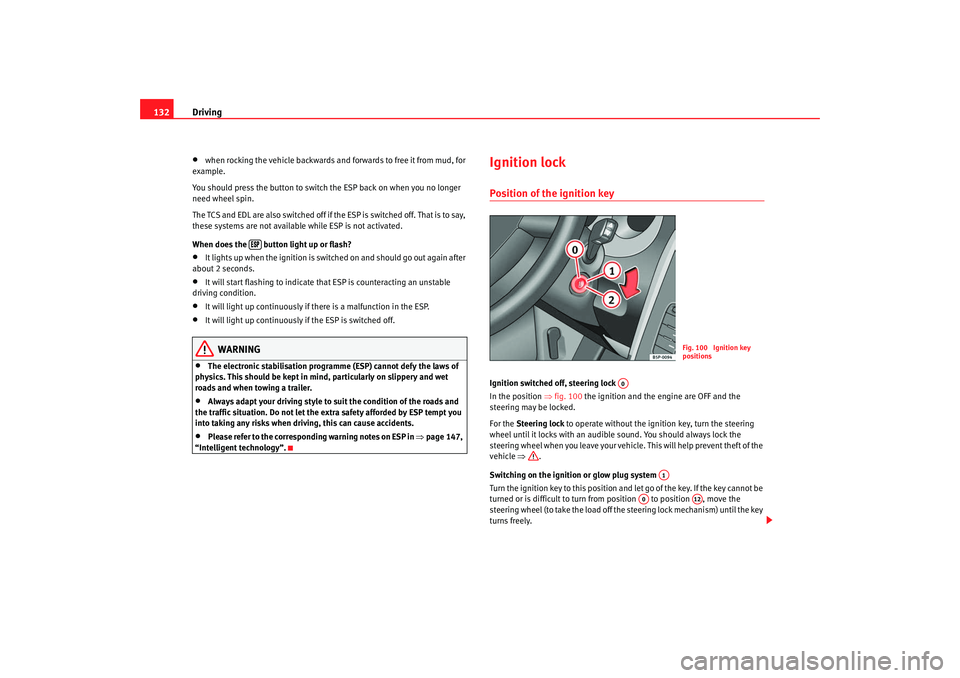
Ignition lockPosition of the ignition keyIgnition switched off, steering lock
In the position ⇒fig. 100 the ignition and the engine are OFF and the
steering may be locked.
For the Steering lock to operate without the ignition key, turn the steering
wheel until it locks with an audible sound. You should always lock the
steering wheel when you leave your vehicle. This will help prevent theft of the
vehicle ⇒.
Switching on the ignition or glow plug system
Turn the ignition key to this position an d let go of the key. If the key cannot be
turned or is difficult to turn from position to position , move the
steering wheel (to take the load off the steering lock mechanism) until the key
turns freely.
Fig. 100 Ignition key
positions
A0
A1
A0
A12
IBI_ANG_0707 Seite 132 Montag, 6. August 2007 3:59 15
Page 136 of 272
Driving
134
– Let go of the ignition key as soon as the engine starts; the starter motor must not be allowed to run on with the engine.After starting a very hot engine, you may need to press the accelerator briefly.
When starting from cold, the engine ma y be a little noisy for the first few
seconds until oil pressure has built up in the hydraulic valve compensators.
This is quite normal, and no cause for concern.
If the engine does not start immediately, switch off the starter after about
10 seconds and try again after about half a minute. If the engine still does not
start, the fuel pump fuse should be checked ⇒page 213, “Fuses”.
WARNING
•
Never start or run the engine in un ventilated or closed rooms. The
exhaust fumes contain carbon mono xide, an odourless and colourless
poisonous gas. Risk of fatal accidents. Carbon monoxide can cause loss of
consciousness. It can also cause death.
•
Never leave the vehicle unattended if the engine is running.
•
Never use “cold start sprays”, they could explode or cause the engine
to run at high revs. Risk of injury.Caution
•
When the engine is cold, you should av oid high engine speeds, driving at
full throttle and over-loading the engine. Risk of engine damage.
•
The vehicle should not be pushed or towed for more than approximately
50 metres to start the engine. Fuel could enter the catalytic converter and
damage it.
•
Before attempting to push-start or tow a vehicle to start it, you should first
try to start it using the battery of another vehicle. Note and follow the instruc-
tions ⇒page 230, “Jump-starting”.
For the sake of the environment
Do not warm-up the engine by running th e engine with the vehicle stationary.
You should drive off as soon as you start the engine. This helps the engine
reach operating temperature faster and reduces emissions.Starting diesel engines
The engine can only be started using a genuine SEAT key with
the correct code.– Move the gear lever to the ne utral position and depress the
clutch pedal fully and hold it in this position, the starter will then
only have to turn the engine.
– Turn the ignition key to the starting position.
– Turn the ignition key to position ⇒page 132, fig. 100 . The
indication lamp
will light for engine pre-heating.
– When the warning lamp goes out, turn the key to position to start the engine. Do not press the accelerator.
– Let go of the ignition key as soon as the engine starts, the starter motor must not be allowed to run on with the engine.
When starting from cold, the engine may be a little noisy for the first few
seconds until oil pressure has built up in the hydraulic valve compensators.
This is quite normal, and no cause for concern.
If there are problems starting the engine, see ⇒page 230.
A1A2
IBI_ANG_0707 Seite 134 Montag, 6. August 2007 3:59 15