ESP Seat Ibiza 5D 2013 Owner's Guide
[x] Cancel search | Manufacturer: SEAT, Model Year: 2013, Model line: Ibiza 5D, Model: Seat Ibiza 5D 2013Pages: 294, PDF Size: 4.05 MB
Page 115 of 294
113
Lights and visibility
Rear window wiper
The window wiper lever operates the windscreen wiper and
the wash and wipe system for the rear window.
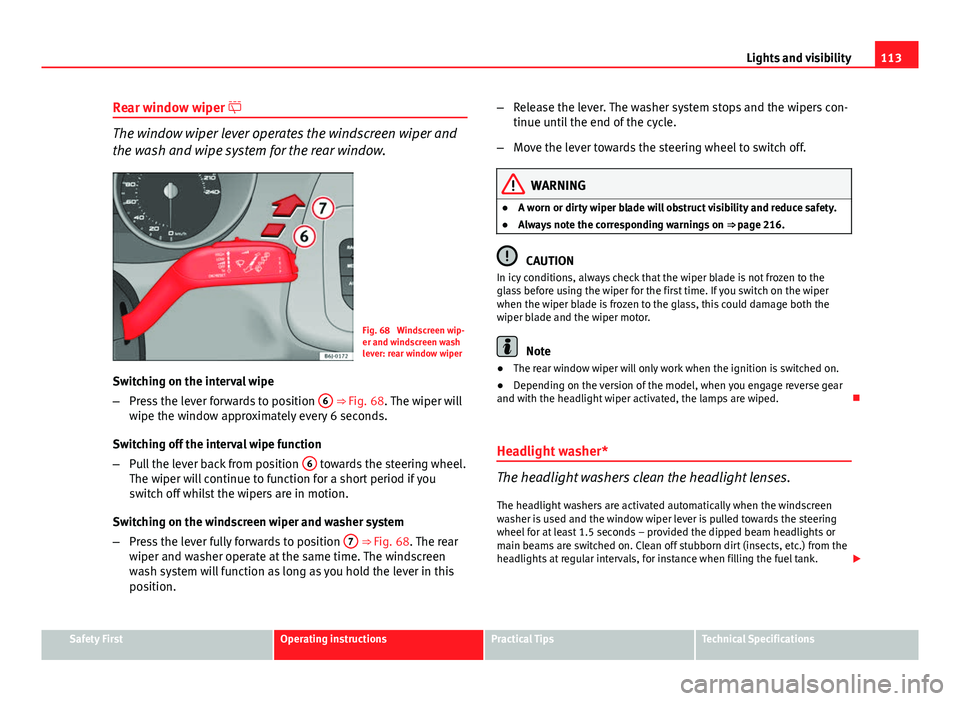
Fig. 68 Windscreen wip-
er and windscreen wash
lever: rear window wiper
Switching on the interval wipe
– Press the lever forwards to position 6
⇒ Fig. 68. The wiper will
wipe the window approximately every 6 seconds.
Switching off the interval wipe function
– Pull the lever back from position 6
towards the steering wheel.
The wiper will continue to function for a short period if you
switch off whilst the wipers are in motion.
Switching on the windscreen wiper and washer system
– Press the lever fully forwards to position 7
⇒ Fig. 68. The rear
wiper and washer operate at the same time. The windscreen
wash system will function as long as you hold the lever in this
position. –
Release the lever. The washer system stops and the wipers con-
tinue until the end of the cycle.
– Move the lever towards the steering wheel to switch off.
WARNING
● A worn or dirty wiper blade will obstruct visibility and reduce safety.
● Always note the corresponding warnings on ⇒ page 216.
CAUTION
In icy conditions, always check that the wiper blade is not frozen to the
glass before using the wiper for the first time. If you switch on the wiper
when the wiper blade is frozen to the glass, this could damage both the
wiper blade and the wiper motor.
Note
● The rear window wiper will only work when the ignition is switched on.
● Depending on the version of the model, when you engage reverse gear
and with the headlight wiper activated, the lamps are wiped.
Headlight washer*
The headlight washers clean the headlight lenses. The headlight washers are activated automatically when the windscreen
washer is used and the window wiper lever is pulled towards the steering
wheel for at least 1.5 seconds – provided the dipped beam headlights or
main beams are switched on. Clean off stubborn dirt (insects, etc.) from the
headlights at regular intervals, for instance when filling the fuel tank.
Safety FirstOperating instructionsPractical TipsTechnical Specifications
Page 119 of 294
117
Seats and storage
Seats and storage The importance of correct seat adjustment
Proper seat adjustment optimises the level of protection of-
fered by seat belts and airbags.
Your vehicle has five seats, two in the front and three in the rear. Each seat
is equipped with a three-point seat belt.
The driver seat and the front passenger seat can be adjusted in many ways
to suit the physical requirements of the vehicle occupants. The correct seat
position is very important for:
● a fast and easy operation of all controls on the instrument panel,
● a relaxed posture which does not cause drowsiness,
● a safe driving ⇒ page 7,
● ensuring that the seat belts and airbag system provide maximum pro-
tection ⇒ page 19.
WARNING
● If the driver and passengers assume improper sitting positions, they
may sustain critical injuries.
● Never transport more than the permitted amount of people in your ve-
hicle.
● Every vehicle occupant must properly fasten and wear the seat belt
belonging to his or her seat. Children must be protected with an appro-
priate child restraint system ⇒ page 43, Child safety.
● The front seats and all head restraints must always be adjusted to
body size and the seat belt must always be properly adjusted to provide
you and your passengers with optimum protection.
WARNING (Continued)
● Always keep your feet on the footwell when the vehicle is moving;
never rest them on the dash panel, out of the window or on the seat. This
is also applied to passengers. An incorrect sitting position exposes you
to an increased risk of injury in case of a sudden braking or an accident.
If the airbag is triggered, you could sustain severe injuries due to an in-
correct sitting position.
● It is important for the driver and front passenger to keep a distance of
at least 25 cm from the steering wheel and dash panel. Failure to respect
the minimum distance means that the airbag will not protect you. Risk of
fatal injury. The distance between the driver and the steering wheel or
between the front passenger and the dash panel should always be as
great as possible.
● Adjust the driver or front passenger seat only when the vehicle is sta-
tionary. Otherwise, your seat could move unexpectedly while the vehicle
is moving. This could increase the risk of an accident and therefore, in-
jury. In addition, while adjusting your seat, you will assume an incorrect
sitting position. Risk of fatal accidents.
● Special guidelines apply to installing a child seat on the front passen-
ger seat. When installing a child seat, please observe the warnings de-
scribed in ⇒ page 43, Child safety.
Safety FirstOperating instructionsPractical TipsTechnical Specifications
Page 123 of 294
121
Seats and storage
Vehicles without Easy-Entry function
– To fold the backrest, pull the lever 1
upwards and push the
backrest forwards.
– To unfold the backrest, push it back.
Vehicles with Easy-Entry function
– To fold the backrest, pull the lever 1
upwards and push the
backrest forwards. You can push the seat forwards at the same
time to make entry to the rear seats easier.
– To unfold the backrest, first move the seat completely back.
The Easy-Entry function facilitates the access to the vehicle rear seats. Be-
fore lifting the backrest, return the seat to the original position. The seat in-
serts when the backrest is lifted. Heated seats*
The front seat cushions and backrests can be heated electri-
cally.
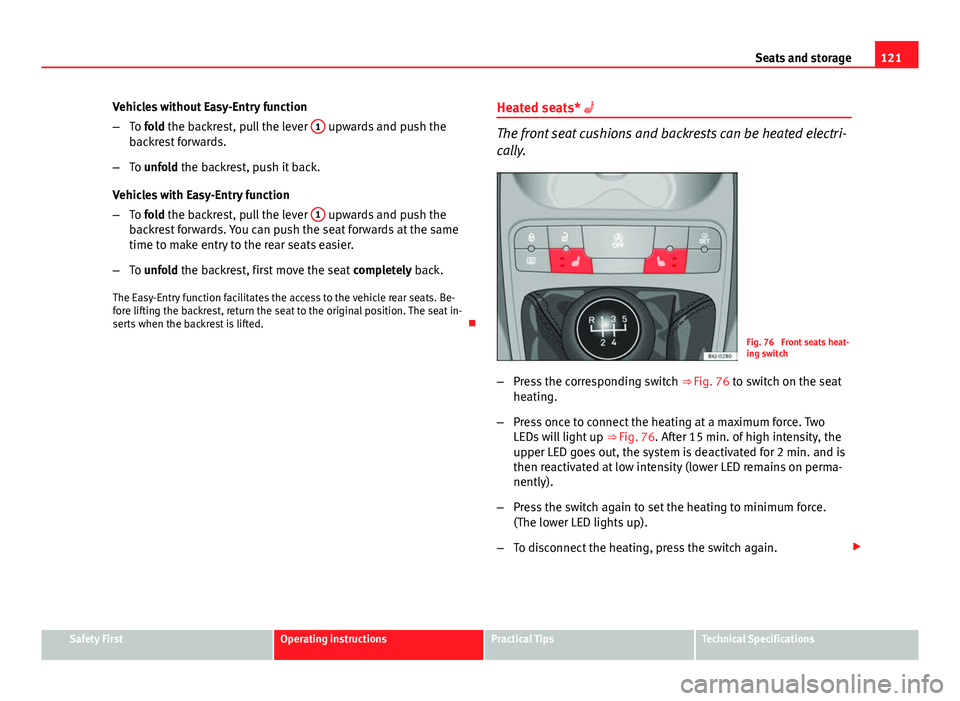
Fig. 76 Front seats heat-
ing switch
– Press the corresponding switch ⇒ Fig. 76 to switch on the seat
heating.
– Press once to connect the heating at a maximum force. Two
LEDs will light up ⇒ Fig. 76. After 15 min. of high intensity, the
upper LED goes out, the system is deactivated for 2 min. and is
then reactivated at low intensity (lower LED remains on perma-
nently).
– Press the switch again to set the heating to minimum force.
(The lower LED lights up).
– To disconnect the heating, press the switch again.
Safety FirstOperating instructionsPractical TipsTechnical Specifications
Page 138 of 294
136Seats and storage
Note
● Ensure that, when placing items of clothing on the luggage compart-
ment cover, rear visibility is not reduced.
● If your vehicle has a storage compartment*, only place light objects in-
side.
Roof rack*
Please observe the following points if you intend to carry loads on the roof:
● For safety reasons, only luggage racks and accessories supplied by SEAT
Official Services are recommended.
● It is essential that you follow the assembly instructions included with
the bars exactly, being especially careful to position front and rear luggage
compartment cover bars on the special housings on the longitudinal bars.
You must also respect their position according to the direction of travel indi-
cated in the assembly manual. Not following these instructions may dam-
age the bodywork.
● Pay special attention to the tightening torque of the attachment bolts
and check them following a short journey. If necessary, retighten the bolts
and check them at regular intervals.
● Distribute the load evenly. A maximum load of 40 kg only is permitted
for each roof rack system support bar, the load must be distributed evenly
along the entire length. However, the maximum load permitted for the en-
tire roof (including the support system) of 75 kg must not be exceeded nor
should the total weight of the vehicle be exceeded. See the Technical Data
section.
● When transporting heavy or large objects on the roof, any change in the
normal vehicle behaviour due to a change in the centre of gravity or an in-
creased wind resistance must be taken into account. For this reason, a suit-
able speed and driving style must be used.
● For those vehicles fitted with a sliding/tilting sunroof*, ensure that it
does not interfere with the load on the roof rack system when opened.
Page 146 of 294
144Air conditioning
Automatic mode
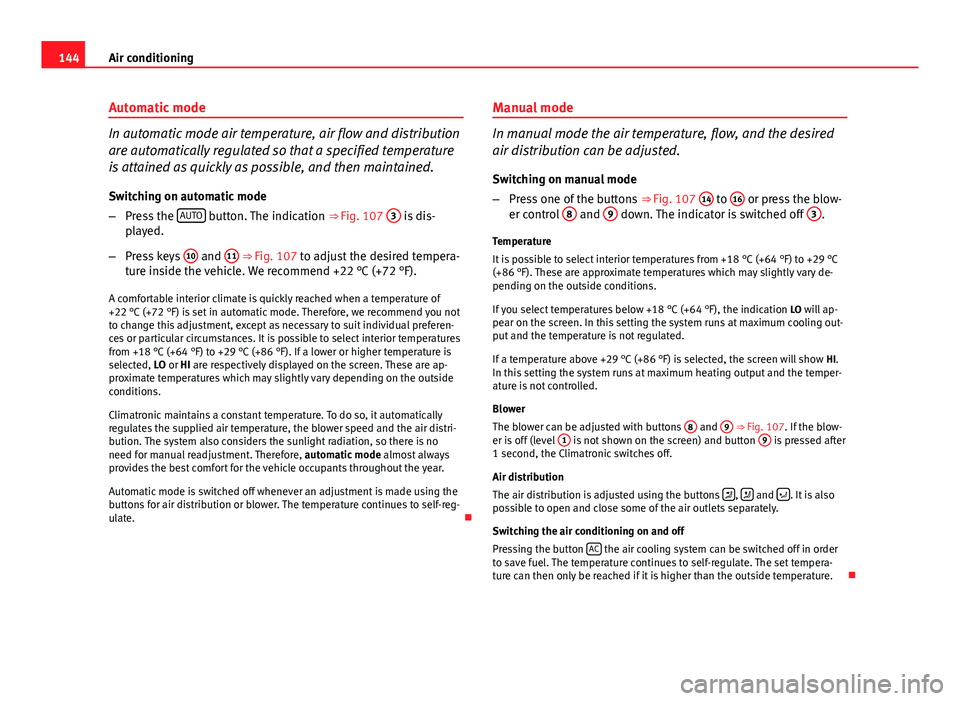
In automatic mode air temperature, air flow and distribution
are automatically regulated so that a specified temperature
is attained as quickly as possible, and then maintained.
Switching on automatic mode
– Press the AUTO
button. The indication
⇒ Fig. 107 3 is dis-
played.
– Press keys 10
and 11 ⇒ Fig. 107 to adjust the desired tempera-
ture inside the vehicle. We recommend +22 °C (+72 °F).
A comfortable interior climate is quickly reached when a temperature of
+22 °C (+72 °F) is set in automatic mode. Therefore, we recommend you not
to change this adjustment, except as necessary to suit individual preferen-
ces or particular circumstances. It is possible to select interior temperatures
from +18 °C (+64 °F) to +29 °C (+86 °F). If a lower or higher temperature is
selected, LO or HI are respectively displayed on the screen. These are ap-
proximate temperatures which may slightly vary depending on the outside
conditions.
Climatronic maintains a constant temperature. To do so, it automatically
regulates the supplied air temperature, the blower speed and the air distri-
bution. The system also considers the sunlight radiation, so there is no
need for manual readjustment. Therefore, automatic mode almost always
provides the best comfort for the vehicle occupants throughout the year.
Automatic mode is switched off whenever an adjustment is made using the
buttons for air distribution or blower. The temperature continues to self-reg-
ulate. Manual mode
In manual mode the air temperature, flow, and the desired
air distribution can be adjusted.
Switching on manual mode
– Press one of the buttons ⇒ Fig. 107 14
to 16 or press the blow-
er control 8 and 9 down. The indicator is switched off 3.
Temperature
It is possible to select interior temperatures from +18 °C (+64 °F) to +29 °C
(+86 °F). These are approximate temperatures which may slightly vary de-
pending on the outside conditions.
If you select temperatures below +18 °C (+64 °F), the indication LO will ap-
pear on the screen. In this setting the system runs at maximum cooling out-
put and the temperature is not regulated.
If a temperature above +29 °C (+86 °F) is selected, the screen will show HI.
In this setting the system runs at maximum heating output and the temper-
ature is not controlled.
Blower
The blower can be adjusted with buttons 8
and 9 ⇒ Fig. 107. If the blow-
er is off (level 1 is not shown on the screen) and button 9 is pressed after
1 second, the Climatronic switches off.
Air distribution
The air distribution is adjusted using the buttons
, and . It is also
possible to open and close some of the air outlets separately.
Switching the air conditioning on and off
Pressing the button AC
the air cooling system can be switched off in order
to save fuel. The temperature continues to self-regulate. The set tempera-
ture can then only be reached if it is higher than the outside temperature.
Page 150 of 294
148Driving
Safety
Electronic stability control (ESC)*
The ESC helps make driving safer in extreme driving condi-
tions.
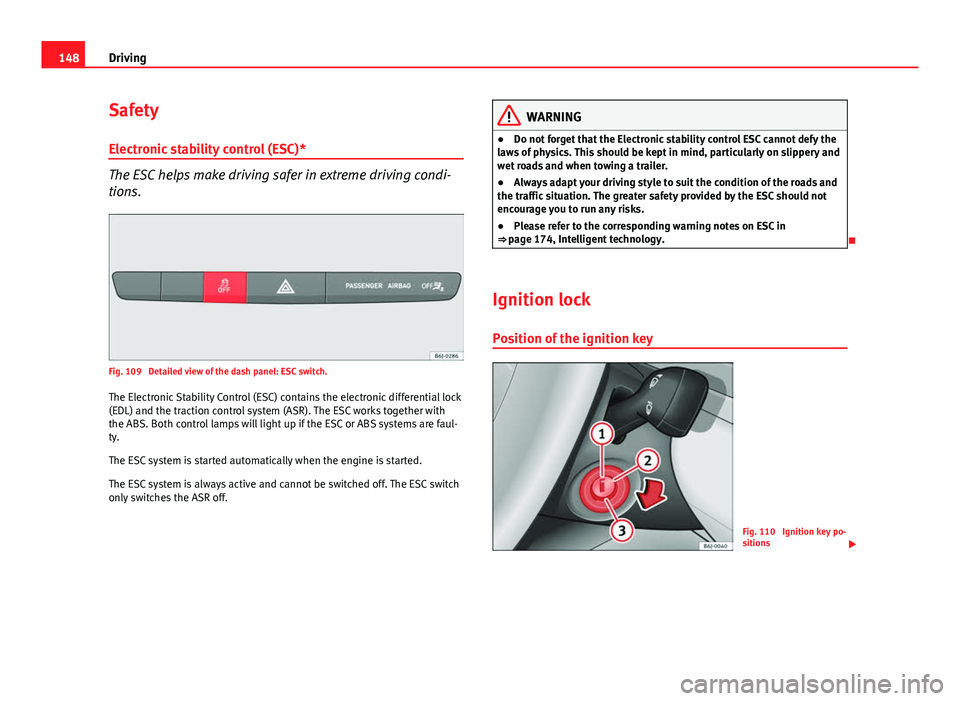
Fig. 109 Detailed view of the dash panel: ESC switch.The Electronic Stability Control (ESC) contains the electronic differential lock
(EDL) and the traction control system (ASR). The ESC works together with
the ABS. Both control lamps will light up if the ESC or ABS systems are faul-
ty.
The ESC system is started automatically when the engine is started.
The ESC system is always active and cannot be switched off. The ESC switch
only switches the ASR off.
WARNING
● Do not forget that the Electronic stability control ESC cannot defy the
laws of physics. This should be kept in mind, particularly on slippery and
wet roads and when towing a trailer.
● Always adapt your driving style to suit the condition of the roads and
the traffic situation. The greater safety provided by the ESC should not
encourage you to run any risks.
● Please refer to the corresponding warning notes on ESC in
⇒ page 174, Intelligent technology.
Ignition lock Position of the ignition key
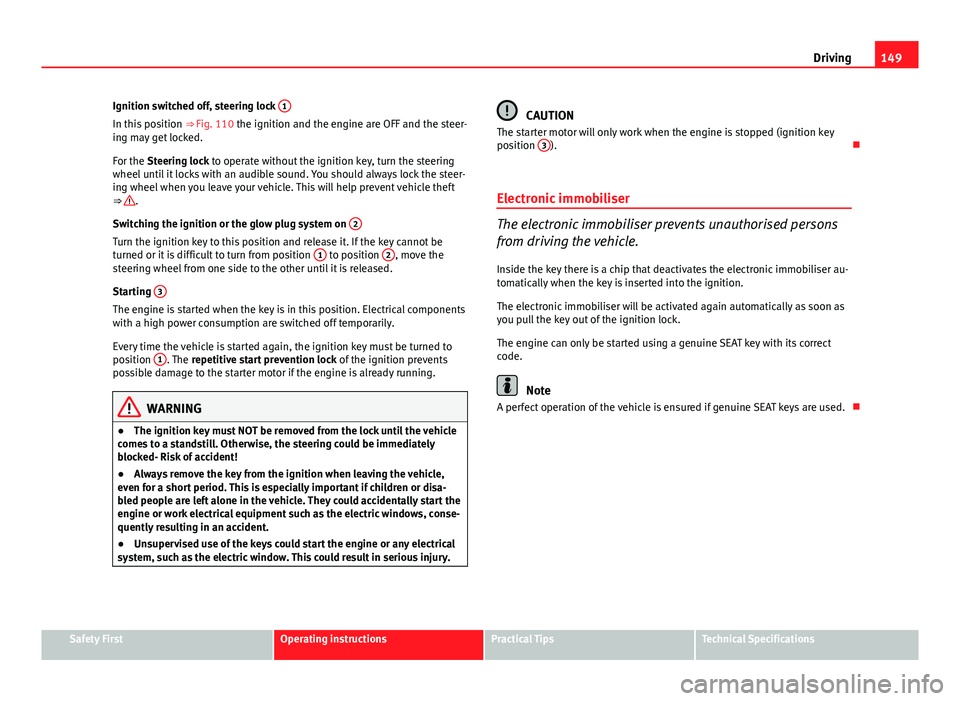
Fig. 110 Ignition key po-
sitions
Page 151 of 294
149
Driving
Ignition switched off, steering lock 1
In this position
⇒ Fig. 110 the ignition and the engine are OFF and the steer-
ing may get locked.
For the Steering lock to operate without the ignition key, turn the steering
wheel until it locks with an audible sound. You should always lock the steer-
ing wheel when you leave your vehicle. This will help prevent vehicle theft
⇒
.
Switching the ignition or the glow plug system on 2
Turn the ignition key to this position and release it. If the key cannot be
turned or it is difficult to turn from position 1 to position 2, move the
steering wheel from one side to the other until it is released.
Starting 3
The engine is started when the key is in this position. Electrical components
with a high power consumption are switched off temporarily.
Every time the vehicle is started again, the ignition key must be turned to
position 1
. The
repetitive start prevention lock of the ignition prevents
possible damage to the starter motor if the engine is already running.
WARNING
● The ignition key must NOT be removed from the lock until the vehicle
comes to a standstill. Otherwise, the steering could be immediately
blocked- Risk of accident!
● Always remove the key from the ignition when leaving the vehicle,
even for a short period. This is especially important if children or disa-
bled people are left alone in the vehicle. They could accidentally start the
engine or work electrical equipment such as the electric windows, conse-
quently resulting in an accident.
● Unsupervised use of the keys could start the engine or any electrical
system, such as the electric window. This could result in serious injury.
CAUTION
The starter motor will only work when the engine is stopped (ignition key
position 3
).
Electronic immobiliser
The electronic immobiliser prevents unauthorised persons
from driving the vehicle.
Inside the key there is a chip that deactivates the electronic immobiliser au-
tomatically when the key is inserted into the ignition.
The electronic immobiliser will be activated again automatically as soon as
you pull the key out of the ignition lock.
The engine can only be started using a genuine SEAT key with its correct
code.
Note
A perfect operation of the vehicle is ensured if genuine SEAT keys are used.
Safety FirstOperating instructionsPractical TipsTechnical Specifications
Page 155 of 294
153
Driving
● There is enough LPG in the tank.
● The temperature of the vehicle coolant is above +30 °C (+86 °F).
● Engine speed while driving is above 1200 rpm.
Automatic switch from LPG to petrol
When the vehicle is operating in LPG mode and one of these conditions is
met, the system automatically switches to petrol mode, the notification changed to petrol mode is displayed and the green warning lamp on the in-
strument panel goes out:
● When the engine is started.
● If the LPG tank is empty.
● If there is a fault in the LPG system.
● At very low temperatures below -10 °C (+14 °F).
Manual switch from petrol to LPG
Press the button on the centre console ⇒ Fig. 111 to change mode.
The notification changed to GAS mode is displayed. When the following con-
ditions are met, the system switches to LPG mode, the green warning lamp
on the instrument panel lights up and the notification displayed changes to changed to GAS mode .
● There is enough LPG in the tank.
● The temperature of the vehicle coolant is above +30 °C (+86 °F).
● Engine speed while driving is above 1200 rpm.
Manual switch from LPG to petrol
Press the button on the centre console ⇒ Fig. 111 to change mode.
The green lamp on the instrument panel goes out and the notification changed to petrol mode is displayed.
Running on petrol
Run the engine with petrol for short journeys at regular intervals to avoid
problems in the petrol system.
WARNING
LPG is a highly explosive and inflammable substance. It may cause se-
vere burns and other injury.
● Due care must be taken to avoid any risk of fire or explosion.
● When parking the vehicle in a closed area (for example in a garage),
make sure that there is adequate ventilation, either natural or mechani-
cal, to neutralise the LPG in the event of a leak.
Note
● If frequent short journeys are made, especially when the outside tem-
perature is low, the vehicle will tend to run on petrol more often than on
LPG. Therefore, the petrol tank may empty before the LPG tank.
● The notification LPG mode not possible may be displayed.
Start-Stop function* Description and operation
The Start-Stop function stops the engine when the vehicle is stop-
ped and starts it automatically when required.
– When the vehicle is stopped, put it in neutral and release the
clutch pedal. The engine will stop.
– When the clutch pedal is pressed, the engine starts again.
– The instrument panel display shows information about the sta-
tus of the Start-Stop function ⇒
Fig. 113.
Safety FirstOperating instructionsPractical TipsTechnical Specifications
Page 166 of 294
164Driving
Information regarding the “cleanliness” of the particulate filter
The exhaust system manager detects that the diesel particulate filter is
nearly saturated and contributes to self-cleaning by recommending the opti-
mal gear. For this purpose, it might be necessary to drive momentarily with
a high rpm ⇒ page 70.
WARNING
The gear change indicator is only an auxiliary function and in no case
should be a substitute for careful driving.
● The responsibility of choosing the correct gear depending on the sit-
uation (e.g. overtaking, driving up or down a slope or towing a trailer)
lies with the driver.
For the sake of the environment
Selecting the correct gear can help to save fuel.
Note
The recommended gear display is switched off when the clutch pedal is
pressed.
Kick-down feature
This feature allows maximum acceleration. If you press the accelerator down thoroughly, the gearbox automatically
changes down, depending on speed and engine speed, into a lower gear to
take full advantage of give the vehicle maximum acceleration.
The gearbox does not change gear until the engine reaches the maximum
determined engine speed for the gear.
WARNING
You could lose control of the vehicle if you accelerate on slippery road
surfaces. Risk of serious injury.
● Be particularly careful when using the kick-down features on slippery
road surfaces. With a fast acceleration, the vehicle could lose traction
and skid.
● You should use the kick-down feature only when traffic and weather
conditions allow it to be used safely.
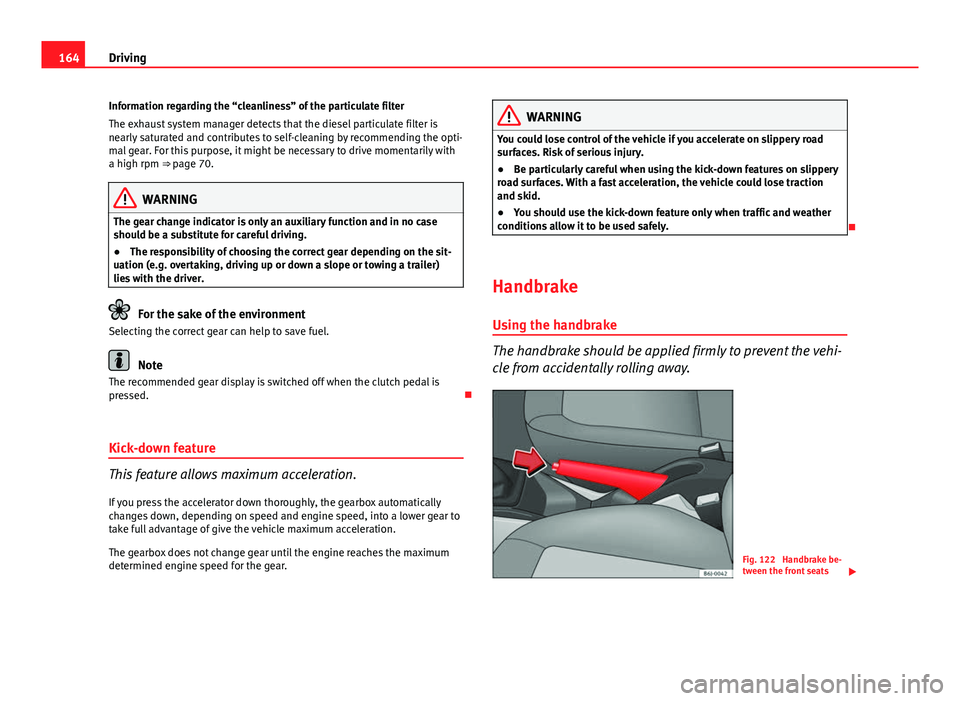
Handbrake Using the handbrake
The handbrake should be applied firmly to prevent the vehi-
cle from accidentally rolling away.
Fig. 122 Handbrake be-
tween the front seats
Page 169 of 294
167
Driving
The front parking aid is an audible aid that warns against obstacles both
behind and in front of the vehicle ⇒ page 169.
Apart from the acoustic signals, when the vehicle is equipped with a porta-
ble navigator (PND), this visually displays information regarding front and/
or rear areas.
Rear parking aid
The parking aid system will use an audible warning to indi-
cate of the approach of any object towards the rear of the ve-
hicle. Description
The acoustic parking aid system will measure the distance between the rear
of the vehicle and any possible obstacle using four ultrasonic sensors loca-
ted on the rear bumper. The measuring range of the sensors starts approxi-
mately and depending on the nature of the obstacle at a distance of:
● side of the rear bumper: 0.6 m
● middle of the rear bumper: 1.6 m
Activation
The system is activated by engagement of the reverse gear. A brief audible
warning confirms the activation and correct function of the system.
Reverse gear
The distance warning will begin as soon as an obstacle is detected by the
system. The frequency of the bleeps emitted by the system will increase rap-
idly as the vehicle approaches the obstacle. After a distance lower than ap-
proximately 30 cm, a continuous signal sounds (stop signal). The driver
should not reverse any further. Models with a factory-fitted towing bracket: When the vehicle is less than
0.35 m away from the obstacle the warning tone will sound continuously.
The driver should then not reverse any further.
The warning tone volume decreases by 30% 3 seconds after it is triggered
if
the detected obstacle stays at a constant distance from the vehicle .
Provided that it is not in continuous mode, the tone on the parking aid sys-
tem stops when it detects a wall parallel to the vehicle.
Trailer towing
For vehicles factory-fitted with a towing bar, the parking aid system will not
be activated by the engagement of the reverse gear when pulling a trailer,
as the trailer's electric connector will be plugged into the vehicle.
Possible faults
If a continuous beep sounds for some seconds when the reverse gear is en-
gaged, this indicates that there is a fault in the parking aid system. If the
fault continues until the ignition is turned off, the audible warning of the
fault will not be emitted every time the system is reactivated (by engaging
the reverse gear). Thus, the system ready indication will not sound either.
Have the fault repaired by a Technical Service as soon as possible.
If there is no ready signal or no acoustic warning signal, then the parking
aid loudspeaker is faulty and may not warn of obstacles. To ensure that the
system works properly, the sensors must be kept clean and free of ice and
snow.
WARNING
● The sensors have blind spots in which obstacles may not be detected.
● Always look out for small children and animals because the system
will not always detect them. Always pay attention when reversing to
avoid accidents.
● The parking aid is not a replacement for driver awareness. The driver
must take full responsibility for parking and other manoeuvres.
Safety FirstOperating instructionsPractical TipsTechnical Specifications