instrument panel Seat Ibiza 5D 2014 User Guide
[x] Cancel search | Manufacturer: SEAT, Model Year: 2014, Model line: Ibiza 5D, Model: Seat Ibiza 5D 2014Pages: 240, PDF Size: 4.89 MB
Page 92 of 240
Operation
Using the remote control
– Push the lock button on the remote control
for approximately 3 seconds. The tilting
sunroof closes.
– Press the unlock button to interrupt the
function.
Roll-back function of the
panoramic/tilting sunroof* The panoramic/tilting sunroof has a
roll-back
function which prevents larger objects get-
tin g tr
apped when the roof is closed. The roll-
back function does not prevent fingers get-
ting pinched against the roof opening. The
tilting sunroof stops and opens again imme-
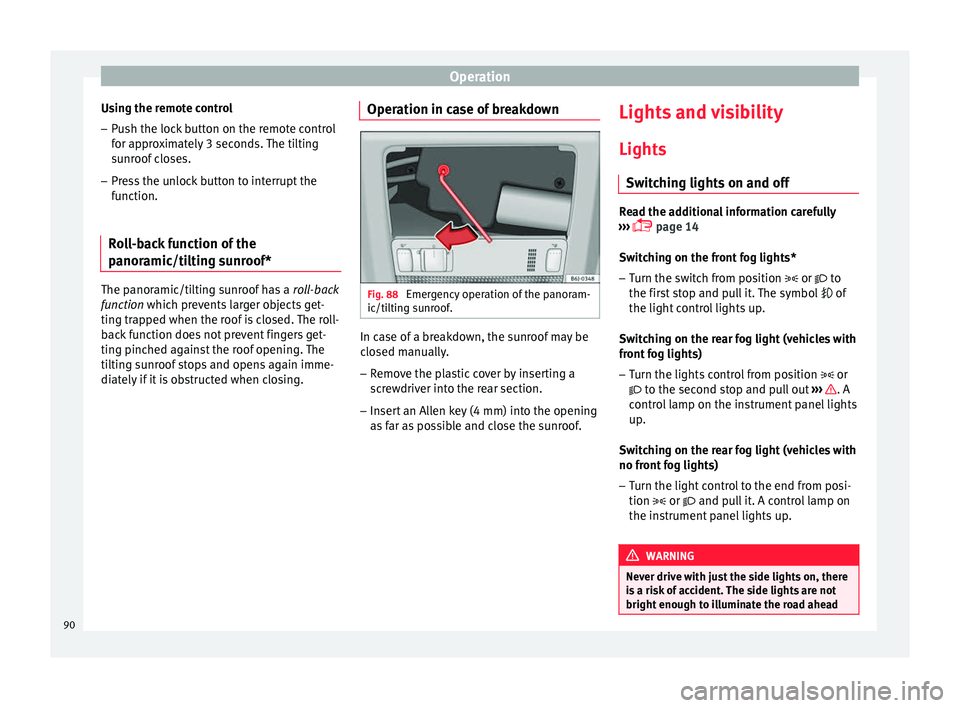
diately if it is obstructed when closing. Operation in case of breakdown Fig. 88
Emergency operation of the panoram-
ic/tilting sunroof. In case of a breakdown, the sunroof may be
closed manually.
– Remove the plastic cover by inserting a
screwdriver into the rear section.
– Insert an Allen key (4 mm) into the opening
as far as possible and close the sunroof. Lights and visibility
Lights Switching lights on and off Read the additional information carefully
››› page 14
Switching on the front fog lights*
– Turn the switch from position or
to
the first stop and pull it. The symbol of
the light control lights up.
Switching on the rear fog light (vehicles with
front fog lights)
– Turn the lights control from position or
to the second stop and pull out ››› . A
control lamp on the instrument panel lights
up.
Switching on the rear fog light (vehicles with
no front fog lights)
– Turn the light control to the end from posi-
tion or and pull it. A control lamp on
the instrument panel lights up. WARNING
Never drive with just the side lights on, there
is a risk of accident. The side lights are not
bright enough to illuminate the road ahead 90
Page 94 of 240
Operation
in position 0
or . It is automatically
switched off when the side lights are turned
on. WARNING
The side lights or daytime driving lights are
not bright enough to illuminate the road
ahead and to ensure that other road users are
able to see you.
● Always use your dipped beam head lights if
it is raining or if visibility is poor.
● The rear lights do not come on with the
daytime driving light. A vehicle which does
not have the rear lights on may not be visible
to other drivers in the darkness, if it is rain-
ing or in conditions of poor visibility. Note
See legal requirements for each country. Nordic country solution
3 Only available in certain countries or as an
optional extra
The so-called “Nordic country solution” is an
alternative solution to daytime running lights
in vehicles without this function. It consists
of simultaneously connecting the dimmed
dipped beams, the sidelights and the licence
plate lights.
The aforementioned lights are switched on
each time the ignition is turned on if the light switch is in position
0 or . Depending
upon the model, the control lamp
on the
light c
ontrol switch or the instrument panel
lighting will indicate that the lights are on.
Activation of the Nordic country solution
● Remove the key from the ignition, move the
turn signal lever upward (right turn signal),
press it back to flash position and hold it
there.
● Insert the key and switch the ignition on,
holding it in this position for 3 seconds.
Then, switch off the ignition. The Nordic
country solution is now activated and the cor-
responding lights can come on.
Deactivation of the Nordic country solution
● Remove the key from the ignition, press the
turn signal lever down (left turn signal), press
it back to flash position and hold it here.
● Insert the key and switch the ignition on,
holding it in this position for 3 seconds.
Then, switch off the ignition. The Nordic
country solution is now deactivated and the
corresponding lights will not come on. Instrument and switch lighting,
headlight range control
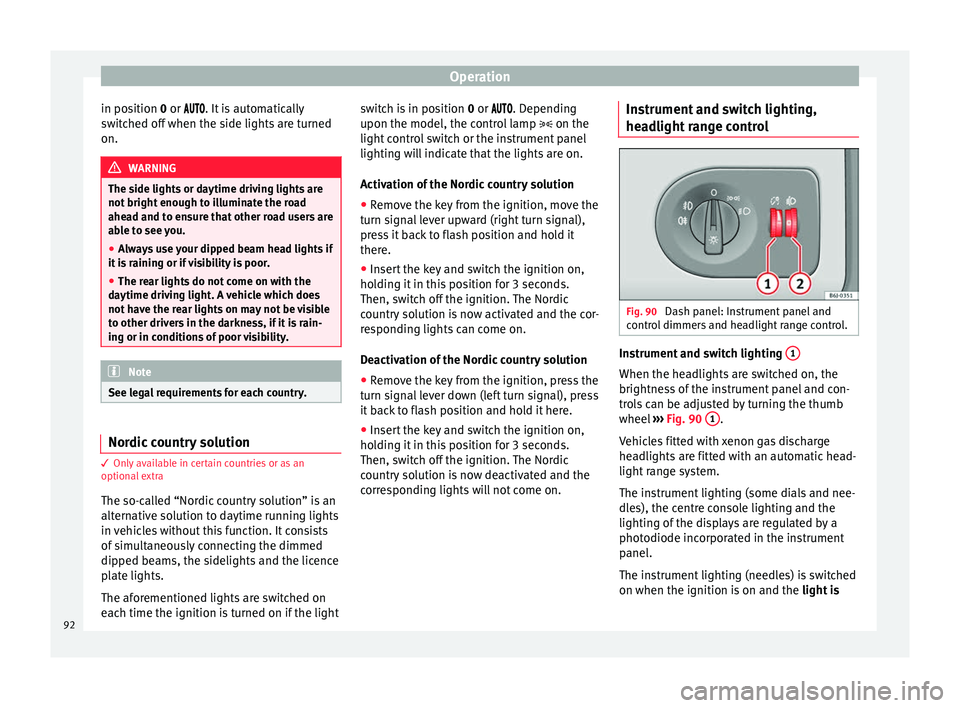
Fig. 90
Dash panel: Instrument panel and
control dimmers and headlight range control. Instrument and switch lighting
1 When the headlights are switched on, the
brightness of the instrument panel and con-
trols can be adjusted by turning the thumb
wheel
››› Fig. 90 1 .
Vehicles fitted with xenon gas discharge
headlights are fitted with an automatic head-
light range system.
The instrument lighting (some dials and nee-
dles), the centre console lighting and the
lighting of the displays are regulated by a
photodiode incorporated in the instrument
panel.
The instrument lighting (needles) is switched
on when the ignition is on and the light is
92
Page 95 of 240
Lights and visibility
off . The instrument lighting is dimmed auto-
m atic
ally as the daylight starts to fade. It
goes out completely when ambient light is
very low. This function is intended to remind
the driver to switch on the dipped beam
headlights in good time when light condi-
tions become poor.
Headlight range control 2By using the electrical headlight range con-
trol,
2 you can adjust the headlight range to
the load level that is being carried in the ve-
hicle. This way, it is possible to avoid daz-
zling oncoming traffic more than necessary.
At the same time, by using the correct head-
light settings, the driver has the best possi-
ble lighting for the road ahead.
The headlights can only be adjusted when
the dipped beam is switched on. To lower the
beam, turn the thumb wheel down 2 from
the basic setting 0.
D y
namic headlight range control
Vehicles with gas discharge bulbs (xenon
bulbs)
are equipped with dynamic headlight
range control. When you switch on the lights,
their range regulates itself according to the
vehicle load.
Vehicles with gas discharge bulbs do not
have headlight range control. Turn signal and main beam headlight
lever
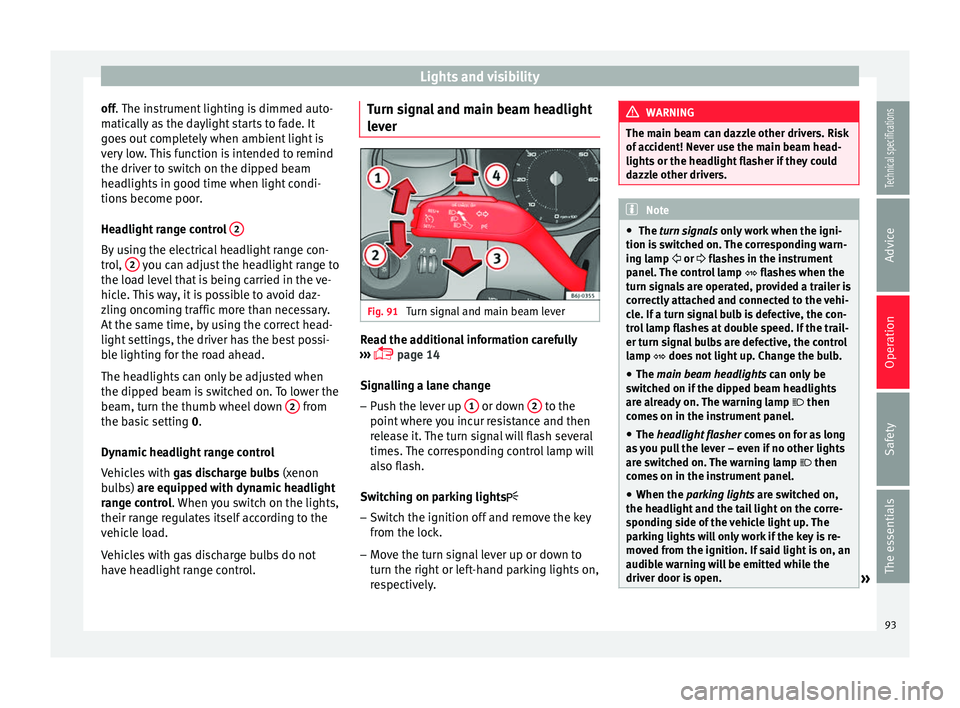
Fig. 91
Turn signal and main beam lever Read the additional information carefully
››› page 14
Signalling a lane change
– Push the lever up 1 or down
2 to the
point where you incur resistance and then
release it. The turn signal will flash several
times. The corresponding control lamp will
also flash.
Switching on parking lights – Switch the ignition off and remove the key
from the lock.
– Move the turn signal lever up or down to
turn the right or left-hand parking lights on,
respectively. WARNING
The main beam can dazzle other drivers. Risk
of accident! Never use the main beam head-
lights or the headlight flasher if they could
dazzle other drivers. Note
● The turn signals only
work when the igni-
tion is switched on. The corresponding warn-
ing lamp or flashes in the instrument
panel
. The control lamp flashes when the
turn signals are operated, provided a trailer is
correctly attached and connected to the vehi-
cle. If a turn signal bulb is defective, the con-
trol lamp flashes at double speed. If the trail-
er turn signal bulbs are defective, the control
lamp does not light up. Change the bulb.
● The main beam headlights
can only be
switched on if the dipped beam headlights
are already on. The warning lamp then
comes on in the instrument panel.
● The headlight flasher come
s on for as long
as you pull the lever – even if no other lights
are switched on. The warning lamp then
comes on in the instrument panel.
● When the parking lights are switched on,
the he
adlight and the tail light on the corre-
sponding side of the vehicle light up. The
parking lights will only work if the key is re-
moved from the ignition. If said light is on, an
audible warning will be emitted while the
driver door is open. » 93
Technical specifications
Advice
Operation
Safety
The essentials
Page 131 of 240
Driving
Automatic gearbox* Gearbox programmes Read the additional information carefully
››› page 20
The automatic gearbox has got two gearbox
programmes.
Selecting the normal programme
– Put the selector lever into position D.
Selecting the sport programme – Put the selector lever into position S.
If you select the normal programme, D
, you
w i
ll drive in the economy mode, i.e. the pro-
gramme is designed to reduce fuel consump-
tion. The gearbox changes up into a higher
gear as soon as possible and down into a
lower gear as late as possible.
If you select the sport programme, S, you will
drive in a s
porty mode, i.e. a programme in
which shifts into high gears are postponed in
order to use the full power of the engine. Selector lever lock
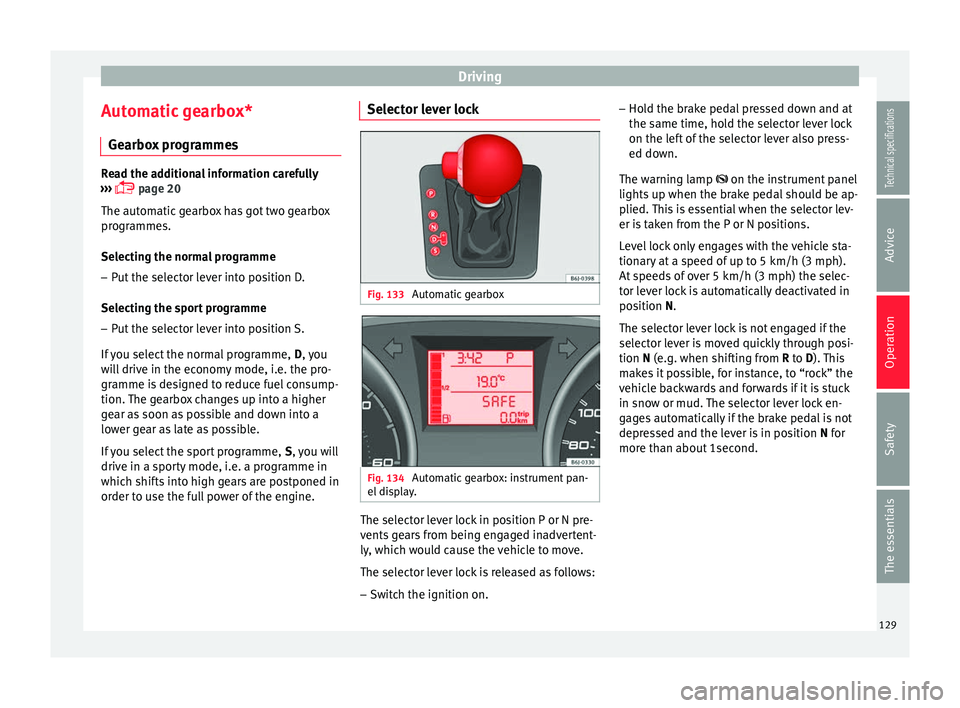
Fig. 133
Automatic gearbox Fig. 134
Automatic gearbox: instrument pan-
el display. The selector lever lock in position P or N pre-
vents gears from being engaged inadvertent-
ly, which would cause the vehicle to move.
The selector lever lock is released as follows:
– Switch the ignition on. –
Hold the brake pedal pressed down and at
the same time, hold the selector lever lock
on the left of the selector lever also press-
ed down.
The warning lamp
on the instrument panel
lights
up when the brake pedal should be ap-
plied. This is essential when the selector lev-
er is taken from the P or N positions.
Level lock only engages with the vehicle sta-
tionary at a speed of up to 5 km/h (3 mph).
At speeds of over 5 km/h (3 mph) the selec-
tor lever lock is automatically deactivated in
position
N.
The selector lever lock is not engaged if the
selector lever is moved quickly through posi-
tion
N (e.g. when shifting from R to D). This
makes it possible, for instance, to “rock” the
vehicle backwards and forwards if it is stuck
in snow or mud. The selector lever lock en-
gages automatically if the brake pedal is not
depressed and the lever is in position N for
more th
an about 1second.
129
Technical specifications
Advice
Operation
Safety
The essentials
Page 135 of 240
Driving
● The air conditioner automatically changes
the air recirculation mode.
● The wiper starts if the windscreen washer is
on.
● The parking distance warning system*
switches on.
N - Neutral (idling)
If this position is selected, the gearbox is in
neutral. Power is not transmitted to the
wheels and the engine does not have a brak-
ing function.
Never use the N
position to drive down a long
hi
ll. There is no engine braking and the
brakes are subjected to excessive stain.
You could damage the automatic gearbox if
you drive down hills with the gearbox lever in
position
N and the engine switched off.
D - Drive (forward)
In this position the gearbox automatically
changes to a lower or higher gear, according
to the engine's requirements, the driving
style and speed. The braking effect of the en-
gine when driving downhill is very limited
when the selector is in this position. The in-
strument panel display shows the selected
gear as well as the selector lever in position
D.
When trav
elling at speeds lower than 5 km/h
(3 mph) or when the vehicle is stationary, press the brake pedal to change the selector
lever from position N to position D.
S
- Standard driving position (Sport
programme)
When the selector lever is in position S
, it will
automatically change up into a higher gear
later, and change down into a low gear, if
compared with position D. This way, it is pos-
sible to take full advantage of the engine re-
serve power, depending on the engine de-
mand, driving style and speed. The braking
effect of the engine when driving downhill is
very limited. On the instrument panel display
the selected gear is shown as well as the se-
lector lever to position
S.
To select gear range S
, press the lock button
on the selector lever. WARNING
Observe the safety warnings ››› in Driving a
car with an automatic gearbox on page 131.
● If the
vehicle moves with no control, an ac-
cident and serious injury may occur. WARNING
Never switch the engine off until the vehicle
is stationary. You could lose control of your
vehicle. This could cause an accident and se-
rious injury.
● The airbags and belt tensioners do not
work when the ignition is switched off. ●
The brake servo does not work with the en-
gine off. You need more force to stop the vehi-
cle.
● Power steering does not work when the en-
gine is not running. That is why it is much
more difficult to turn the steering wheel.
● Never remove the key from the ignition if
the vehicle is in motion. The steering lock
could suddenly engage, and you would not be
able to steer the vehicle. CAUTION
If you allow the vehicle to move when the en-
gine is switched off or with the selector lever
in position “N”, take your foot off the acceler-
ator and wait until the engine starts idling
before returning to position “D”. Kick-down feature
This feature allows maximum acceleration.
If you press the accelerator down thoroughly,
the gearbox automatically changes down, de-
pending on speed and engine speed, into a
lower gear to take full advantage of give the
vehicle maximum acceleration.
The gearbox does not change gear until the
engine reaches the maximum determined en-
gine speed for the gear.
»
133
Technical specifications
Advice
Operation
Safety
The essentials
Page 139 of 240
Driving
Some tips on how to help you reduce pollu-
tion while saving money are listed below.
Active cylinder management (ACT ®
)
Depending on the equipment, the vehicle
may have active cylinder management
(ACT ®
).
The active cylinder management (ACT ®
) may
automatically deactivate some of the engine
cylinders if the driving situation does not re-
quire too much power. When it is switched
off, no fuel is injected into these cylinders,
hence total fuel consumption may be re-
duced.
Drive anticipating the traffic situation
A vehicle uses most fuel when accelerating.
When you anticipate situations, you have to
brake less often and, thus, accelerate less. If
it is possible, let the vehicle roll with a gear
engaged , for example, if you see a red light
ahe a
d. The braking effect achieved in this
way helps to reduce the wear of brakes and
tyres; emissions and fuel consumption are
reduced to zero (disconnection due to iner-
tia).
Change gear early to save energy
An effective way of saving fuel is to change
up
quickly through the gears. Running the
engine at high rpm in the lower gears uses
an unnecessary amount of fuel. Manual gearbox:
shift up from first to second
gear as soon as possible. We recommend
that, whenever possible, you change to a
higher gear upon reaching 2000 rpm. Follow
the “recommended gear” indication that ap-
pears on the instrument panel ››› page 64.
Avoid driving at high speed
We advise you not to drive at the top speed
permitted by the vehicle. Fuel consumption,
exhaust emissions and noise levels all in-
crease very rapidly at higher speeds. Driving
at moderate speeds will help to save fuel.
Avoid idling
It is worthwhile switching off the engine
when waiting in a traffic jam, at level cross-
ings or at traffic lights with a long red phase.
The fuel saved after only 30 - 40 seconds is
greater than the amount of fuel needed to re-
start the engine.
The engine takes a long time to warm up
when it is idling. Mechanical wear and pollu-
tant emissions are also especially high dur-
ing this initial warm-up phase. It is therefore
best to drive off immediately after starting
the engine. Avoid running the engine at high
speed.
Periodic maintenance
Periodic maintenance work guarantees that,
before beginning a journey, you will not con- sume more than the required amount of fuel.
A well-serviced engine gives you the benefit
of
improved fuel efficiency as well as maxi-
mum reliability and an enhanced resale val-
ue.
A badly serviced engine can consume up to
10% more fuel than necessary.
Avoid short journeys
To reduce the consumption and emission of
polluting exhaust gases, the engine and the
exhaust gas filtration systems should reach
the optimum operating temperature.
With the en
gine cold, fuel consumption is
proportionally higher. The engine does not
warm up and fuel consumption does not nor-
malise until having driven approximately four
kilometres (2.5 miles). This is why we recom-
mend avoiding short trips whenever possi-
ble.
Maintain the correct tyre pressures
Bear in mind that keeping the tyres at an ad-
equate pressure saves fuel. If the tyre pres-
sure is just one bar (14.5 psi/100 kPa) too
low, fuel consumption can increase by as
much as 5%. Due to the greater rolling resist-
ance, under-inflation also increases tyre wear
wear and impairs handling.
The tyre pressures should always be checked
when the tyres are cold.
»
137
Technical specifications
Advice
Operation
Safety
The essentials
Page 144 of 240
Operation
XDS* When taking a curve, the driveshaft differen-
tial mechanism allows the outer wheel to turn
at a higher speed than the inner wheel. In
this way, the wheel that is turning faster (out-
er wheel) receives less drive torque than the
inner wheel. This may mean that in certain
situations the torque delivered to the inner
wheel is too high, causing the wheels to
spin. On the other hand, the outer wheel is
receiving a lower drive torque than it could
transmit. This causes an overall loss of lateral
grip on the front axle, resulting in understeer
or “lengthening” of the trajectory.
The XDS system can detect and correct this
effect via the sensors and signals of the ESC.
Via the ESC, the XDS will brake the inside
wheel and counter the excess driving torque
of that wheel. This means that the driver's
desired trajectory is much more precise,
The XDS system works in combination with
the ESC and is always active, even when ASR
traction control is disconnected.
Brake servo The brake servo increases the pressure you
apply to the brake pedal. It works
only when
the engine is running . If the brake servo is not functioning, e.g. due
to a malfunction, or if the vehicle is being
towed, you will have to press the brake pedal
considerably harder to make up for the lack
of servo assistance.
WARNING
The braking distance can also be affected by
external factors.
● Never let the vehicle coast with the engine
switched off. Failure to follow this instruction
could result in an accident. The braking dis-
tance is increased considerably when the
brake servo is not active.
● If the brake servo is not working, for exam-
ple when the vehicle is being towed, you will
have to press the brake pedal considerably
harder than normal. Start-Stop System*
Description and operation The Start-Stop function stops the engine
when the vehicle is stopped and starts it au-
tomatically when required.
– When the vehicle is stopped, put it in neu-
tral and release the clutch pedal. The en-
gine will stop.
– When the clutch pedal is pressed, the en-
gine starts again. –
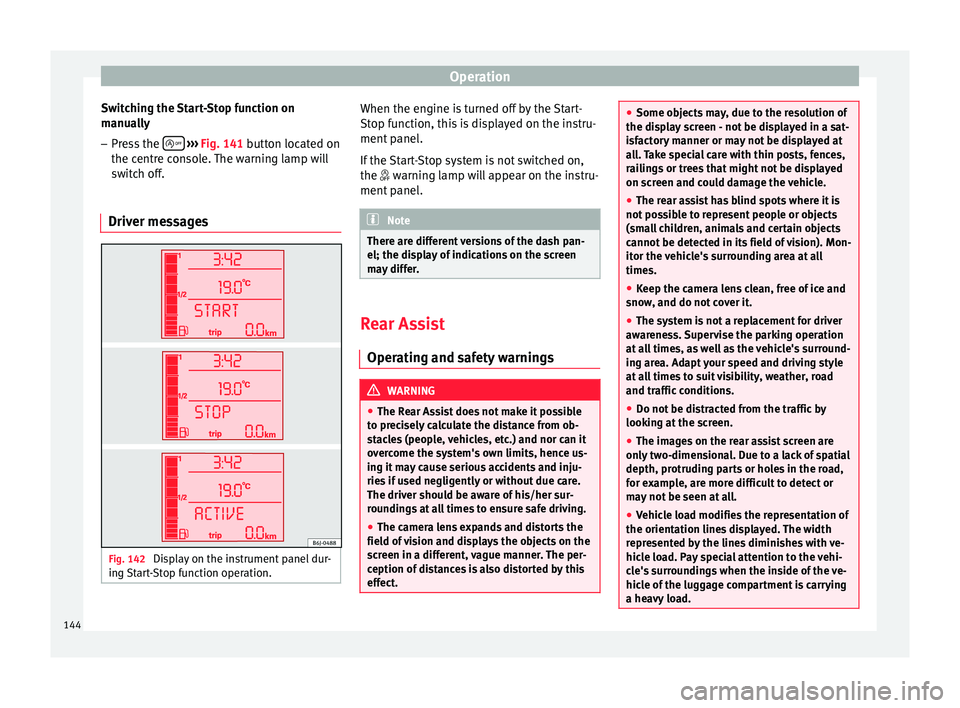
The instrument panel display shows infor-
mation about the status of the Start-Stop
function ››› Fig. 142 .
St ar
t-Stop function conditions
● The driver seat belt must be buckled.
● The bonnet must be closed.
● The engine must be at operating tempera-
ture.
● The steering wheel must be straight.
● The vehicle must be on flat ground.
● The vehicle must not be in reverse.
● A trailer must not be connected.
● The temperature of the interior must be
within the comfort limits ( A/C button should
be selected).
● The windscreen de-mist function must be
off.
● If in an increase in airflow is not requested.
● The t emper
ature must not be set to HI or
LO.
● The driver door must be closed.
● The diesel particulate filter must not be in
regeneration mode, for diesel engines.
● The battery charge must not be low for the
next start.
● Battery temperature must be between -1 °C
(+30 °F) and +55 °C (+131 °F).
142
Page 146 of 240
Operation
Switching the Start-Stop function on
manually – Press the
››› Fig. 141 button located on
the c entr
e console. The warning lamp will
switch off.
Driver messages Fig. 142
Display on the instrument panel dur-
ing Start-Stop function operation. When the engine is turned off by the Start-
Stop function, this is displayed on the instru-
ment panel.
If the Start-Stop system is not switched on,
the
warning lamp will appear on the instru-
ment
panel. Note
There are different versions of the dash pan-
el; the display of indications on the screen
may differ. Rear Assist
Operating and safety warnings WARNING
● The Rear Assist does not make it possible
to precisely calculate the distance from ob-
stacles (people, vehicles, etc.) and nor can it
overcome the system's own limits, hence us-
ing it may cause serious accidents and inju-
ries if used negligently or without due care.
The driver should be aware of his/her sur-
roundings at all times to ensure safe driving.
● The camera lens expands and distorts the
field of vision and displays the objects on the
screen in a different, vague manner. The per-
ception of distances is also distorted by this
effect. ●
Some objects may, due to the resolution of
the display screen - not be displayed in a sat-
isfactory manner or may not be displayed at
all. Take special care with thin posts, fences,
railings or trees that might not be displayed
on screen and could damage the vehicle.
● The rear assist has blind spots where it is
not possible to represent people or objects
(small children, animals and certain objects
cannot be detected in its field of vision). Mon-
itor the vehicle's surrounding area at all
times.
● Keep the camera lens clean, free of ice and
snow, and do not cover it.
● The system is not a replacement for driver
awareness. Supervise the parking operation
at all times, as well as the vehicle's surround-
ing area. Adapt your speed and driving style
at all times to suit visibility, weather, road
and traffic conditions.
● Do not be distracted from the traffic by
looking at the screen.
● The images on the rear assist screen are
only two-dimensional. Due to a lack of spatial
depth, protruding parts or holes in the road,
for example, are more difficult to detect or
may not be seen at all.
● Vehicle load modifies the representation of
the orientation lines displayed. The width
represented by the lines diminishes with ve-
hicle load. Pay special attention to the vehi-
cle's surroundings when the inside of the ve-
hicle of the luggage compartment is carrying
a heavy load. 144
Page 164 of 240
Advice
carried out only by a specialised workshop or
a petrol station.
Caring for the vehicle interior
Cleaning plastic parts and the
instrument panel –
Use a clean, damp cloth to clean plastic
parts and the dash panel.
– If this does not provide satisfactory results,
use a special solvent-free plastic cleaning
product. WARNING
Never clean the dash panel and the airbag
module surface with cleaners containing sol-
vents. Solvents cause the surface to become
porous. If the airbag triggered, plastic parts
could become detached and cause injuries. CAUTION
Cleaning products which contain solvents will
damage the material. Wooden trim cleaning*
–
Clean the wooden trim with a water-mois-
tened clean cloth. –
If this does not provide satisfactory results,
use a gentle
soap solution. CAUTION
Cleaning products which contain solvents will
damage the material. Cloth seat covers and fabric trim
cleaning
Cloth seat covers and fabric trim on the
doors, headlining etc. can be cleaned with a
special interior cleaner or with dry foam and
a soft brush.
Cleaning the radio and climate
controls To clean the radio and/or climate controls,
use a soft damp cloth. For more resistant dirt,
a neutral soap solution may be used.
Leather cleaning* Normal cleaning
–
Moisten a cotton or woollen cloth with wa-
ter and wipe over the leather surfaces. Cleaning stubborn stains
– More stubborn dirt can be removed using a
mild soap solution (pure liquid soap; two
tablespoons diluted in one litre of water)
and a cloth.
– Do not let the water soak through the leath-
er or soak into the seams.
– Then wipe off with a soft, dry cloth.
Leather maintenance – The leather should be treated twice a year
with a special leather-care product, availa-
ble at Technical Services.
– Apply these products very sparingly.
– Then wipe off with a soft, dry cloth.
SEAT does everything possible to preserve
the genuine qualities of this natural product.
Due to the natural properties of the specially
selected hides employed, the finished leath-
er has a certain sensitivity to grease and dirt,
etc. so a degree of care is required in every-
day use and when looking after the leather.
Dust and grit in the pores and seams can
scratch and damage the surface. If the vehi-
cle is under solar radiation for long periods,
the leather should be protected to prevent it
from fading. However, slight colour variations
in high-quality natural leather are normal.
162
Page 175 of 240
Checking and refilling levels
●
When working in the engine compartment,
always observe the safety warnings
››› page 166.
● When the en gine i
s warm or hot, the cool-
ing system is pressurised! Do not unscrew
the cap on the coolant expansion tank when
the engine is hot. This is a burn injury risk. CAUTION
● If you notice a change in the colour of the
liquid because it has been in use for a long
time, it is recommended to change it, as it
will have lost some of its properties and
could cause damage to the engine.
● If a lot of coolant fluid has been lost, wait
for the engine to cool. This avoids damaging
the engine. Large coolant losses are an indi-
cation of leaks in the cooling system. See a
specialised workshop immediately and have
the cooling system checked. Otherwise, there
is a risk of engine damage. Brake fluid
Checking the brake fluid level Read the additional information carefully
››› page 25
The position of the brake fluid reservoir is
shown in the corresponding engine compart- ment illustration
››› page 168 . The brake fluid
r e
servoir has a black and yellow cap.
The brake fluid level drops slightly when the
vehicle is being used as the brake pads are
automatically adjusted as they wear.
However, if the level goes down noticeably in
a short time, or drops below the “MIN” mark,
there may be a leak in the brake system. A
display on the instrument panel will warn you
if the brake fluid level is too low ››› page 57. WARNING
Before opening the bonnet to check the brake
fluid level, read and observe the warnings
››› page 166. Changing the brake fluid
The Maintenance Programme indicates brake
fluid change intervals.
We recommend that you have the brake fluid
changed by a Technical Service.
Before opening the bonnet, please read and
follow the warnings
››› in Safety instruc-
tions on working in the engine compartment
on page 166 in section “Safety notes for
w ork
ing in the engine compartment”.
In the course of time, brake fluid becomes
hygroscopic and absorbs water from the am-
bient air. If the water content in the brake flu- id is too high, the brake system could cor-
rode. This also considerably reduces the boil-
ing point of the brake fluid. Heavy use of the
brakes may then cause a vapour lock which
could impair the braking effect.
Be sure to always use the correct brake fluid.
Only use brake fluid that expressly meets the
VW 501 14 standard.
You can buy VW 501 14 standard brake fluid
in a SEAT dealership or a SEAT Official Serv-
ice. If none is available, use only high-quality
brake fluid that meets DIN ISO 4925 CLASS 4
standards, or USA Standards FMVSS 116 DOT
4.
Using any other kind of brake fluid or one
that is not of a high quality may affect opera-
tion of the brake system and reduce its effec-
tiveness. Never use a brake fluid if the con-
tainer does not state that it complies with VW
501 14, DIN ISO 4925 CLASS 4 standards, or
USA standards FMVSS 116 DOT 4.
WARNING
Brake fluid is poisonous. Old brake fluid im-
pairs the braking effect.
● Before opening the bonnet to check the
brake fluid level, read and observe the warn-
ings ››› page 166.
● Br ak
e fluid should be stored in the closed
original container in a safe place out of reach
of children. There is a toxic risk. » 173
Technical specifications
Advice
Operation
Safety
The essentials