gearbox Seat Ibiza 5D 2014 Owner's Guide
[x] Cancel search | Manufacturer: SEAT, Model Year: 2014, Model line: Ibiza 5D, Model: Seat Ibiza 5D 2014Pages: 240, PDF Size: 4.89 MB
Page 136 of 240
Operation
WARNING
You could lose control of the vehicle if you ac-
celerate on slippery road surfaces. Risk of se-
rious injury.
● Be particularly careful when using the kick-
down features on slippery road surfaces. With
a fast acceleration, the vehicle could lose
traction and skid.
● You should use the kick-down feature only
when traffic and weather conditions allow it
to be used safely. Gear-change indicator
3 Valid for vehicles: with a manual gearbox
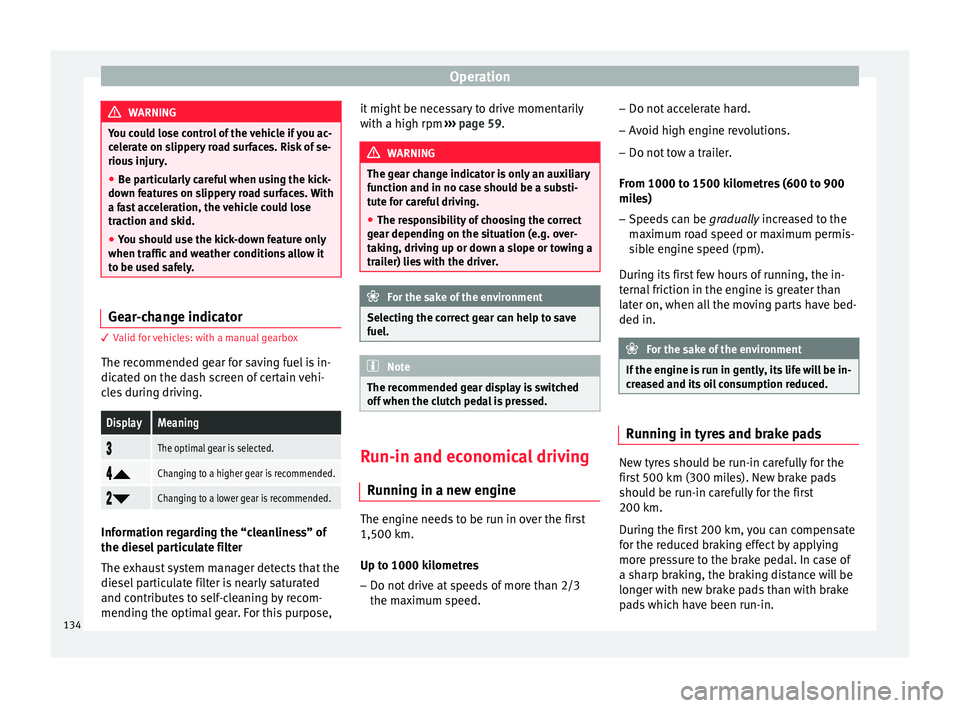
The recommended gear for saving fuel is in-
dicated on the dash screen of certain vehi-
cles during driving.DisplayMeaning
The optimal gear is selected.
Changing to a higher gear is recommended.
Changing to a lower gear is recommended.
Information regarding the “cleanliness” of
the diesel particulate filter
The exhaust system manager detects that the
diesel particulate filter is nearly saturated
and contributes to self-cleaning by recom-
mending the optimal gear. For this purpose, it might be necessary to drive momentarily
with a high rpm
››› page 59. WARNING
The gear change indicator is only an auxiliary
function and in no case should be a substi-
tute for careful driving.
● The responsibility of choosing the correct
gear depending on the situation (e.g. over-
taking, driving up or down a slope or towing a
trailer) lies with the driver. For the sake of the environment
Selecting the correct gear can help to save
fuel. Note
The recommended gear display is switched
off when the clutch pedal is pressed. Run-in and economical driving
Running in a new engine The engine needs to be run in over the first
1,500 km.
Up to 1000 kilometres
– Do not drive at speeds of more than 2/3
the maximum speed. –
Do not accelerate hard.
– Avoid high engine revolutions.
– Do not tow a trailer.
From 1000 to 1500 kilometres (600 to 900
miles) – Speeds can be gradually increased to the
m ax
imum road speed or maximum permis-
sible engine speed (rpm).
During its first few hours of running, the in-
ternal friction in the engine is greater than
later on, when all the moving parts have bed-
ded in. For the sake of the environment
If the engine is run in gently, its life will be in-
creased and its oil consumption reduced. Running in tyres and brake pads
New tyres should be run-in carefully for the
first 500 km (300 miles). New brake pads
should be run-in carefully for the first
200 km.
During the first 200 km, you can compensate
for the reduced braking effect by applying
more pressure to the brake pedal. In case of
a sharp braking, the braking distance will be
longer with new brake pads than with brake
pads which have been run-in.
134
Page 139 of 240
Driving
Some tips on how to help you reduce pollu-
tion while saving money are listed below.
Active cylinder management (ACT ®
)
Depending on the equipment, the vehicle
may have active cylinder management
(ACT ®
).
The active cylinder management (ACT ®
) may
automatically deactivate some of the engine
cylinders if the driving situation does not re-
quire too much power. When it is switched
off, no fuel is injected into these cylinders,
hence total fuel consumption may be re-
duced.
Drive anticipating the traffic situation
A vehicle uses most fuel when accelerating.
When you anticipate situations, you have to
brake less often and, thus, accelerate less. If
it is possible, let the vehicle roll with a gear
engaged , for example, if you see a red light
ahe a
d. The braking effect achieved in this
way helps to reduce the wear of brakes and
tyres; emissions and fuel consumption are
reduced to zero (disconnection due to iner-
tia).
Change gear early to save energy
An effective way of saving fuel is to change
up
quickly through the gears. Running the
engine at high rpm in the lower gears uses
an unnecessary amount of fuel. Manual gearbox:
shift up from first to second
gear as soon as possible. We recommend
that, whenever possible, you change to a
higher gear upon reaching 2000 rpm. Follow
the “recommended gear” indication that ap-
pears on the instrument panel ››› page 64.
Avoid driving at high speed
We advise you not to drive at the top speed
permitted by the vehicle. Fuel consumption,
exhaust emissions and noise levels all in-
crease very rapidly at higher speeds. Driving
at moderate speeds will help to save fuel.
Avoid idling
It is worthwhile switching off the engine
when waiting in a traffic jam, at level cross-
ings or at traffic lights with a long red phase.
The fuel saved after only 30 - 40 seconds is
greater than the amount of fuel needed to re-
start the engine.
The engine takes a long time to warm up
when it is idling. Mechanical wear and pollu-
tant emissions are also especially high dur-
ing this initial warm-up phase. It is therefore
best to drive off immediately after starting
the engine. Avoid running the engine at high
speed.
Periodic maintenance
Periodic maintenance work guarantees that,
before beginning a journey, you will not con- sume more than the required amount of fuel.
A well-serviced engine gives you the benefit
of
improved fuel efficiency as well as maxi-
mum reliability and an enhanced resale val-
ue.
A badly serviced engine can consume up to
10% more fuel than necessary.
Avoid short journeys
To reduce the consumption and emission of
polluting exhaust gases, the engine and the
exhaust gas filtration systems should reach
the optimum operating temperature.
With the en
gine cold, fuel consumption is
proportionally higher. The engine does not
warm up and fuel consumption does not nor-
malise until having driven approximately four
kilometres (2.5 miles). This is why we recom-
mend avoiding short trips whenever possi-
ble.
Maintain the correct tyre pressures
Bear in mind that keeping the tyres at an ad-
equate pressure saves fuel. If the tyre pres-
sure is just one bar (14.5 psi/100 kPa) too
low, fuel consumption can increase by as
much as 5%. Due to the greater rolling resist-
ance, under-inflation also increases tyre wear
wear and impairs handling.
The tyre pressures should always be checked
when the tyres are cold.
»
137
Technical specifications
Advice
Operation
Safety
The essentials
Page 145 of 240
Driver assistance systems
Start-Stop function interruption
In the following situations, the Start-Stop
function will be interrupted and the engine
will automatically start:
● The vehicle starts moving.
● The brake pedal is pressed several times in
a row.
● The battery has been discharged excessive-
ly.
● The Start-Stop System is manually deacti-
vated.
● The windscreen de-mist function is turned
on.
● The temperature of the interior exceeds the
comfort limits ( A/C button).
● If the airflow is increased by more than 3
presses.
● Temperature setting HI or LO is selected.
● The engine coolant temperature is insuffi-
cient.
● The alternator is faulty, for example the V-
belt has ruptured.
● If any of the conditions described in the
previous section are not fulfilled. WARNING
Never allow the vehicle to move with the en-
gine off for any reason. You could lose control
of your vehicle. This could cause an accident
and serious injury. ●
The brake servo does not work with the en-
gine off. You need more force to stop the vehi-
cle.
● Power steering does not work when the en-
gine is not running. That is why it is much
more difficult to turn the steering wheel.
● Turn off the Start-Stop system when driving
through water (fording streams, etc.). Note
● For vehicles with the Start-Stop function
and a manual gearbox, when the engine is
started, the clutch must be pressed.
● When the conditions for the Start-Stop
function are not fulfilled, the instrument pan-
el displays the Start-Stop indicator dimmed.
● If the steering wheel is turned more than
270°, it will not be possible to start the vehi-
cle again. To start the vehicle, straighten the
steering wheel so that it is turned less than
270°. Activating and deactivating the Start-
Stop function
Fig. 141
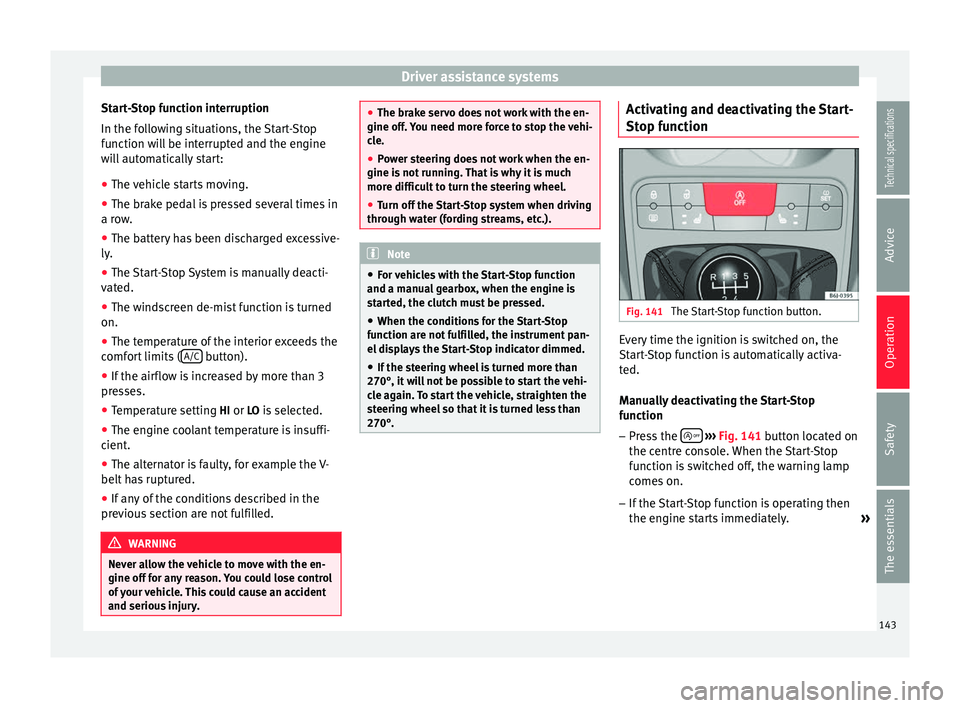
The Start-Stop function button. Every time the ignition is switched on, the
Start-Stop function is automatically activa-
ted.
Manually deactivating the Start-Stop
function
– Press the
››› Fig. 141 button located on
the c entr
e console. When the Start-Stop
function is switched off, the warning lamp
comes on.
– If the Start-Stop function is operating then
the engine starts immediately.
»
143
Technical specifications
Advice
Operation
Safety
The essentials
Page 148 of 240
Operation
Parking and manoeuvring with the
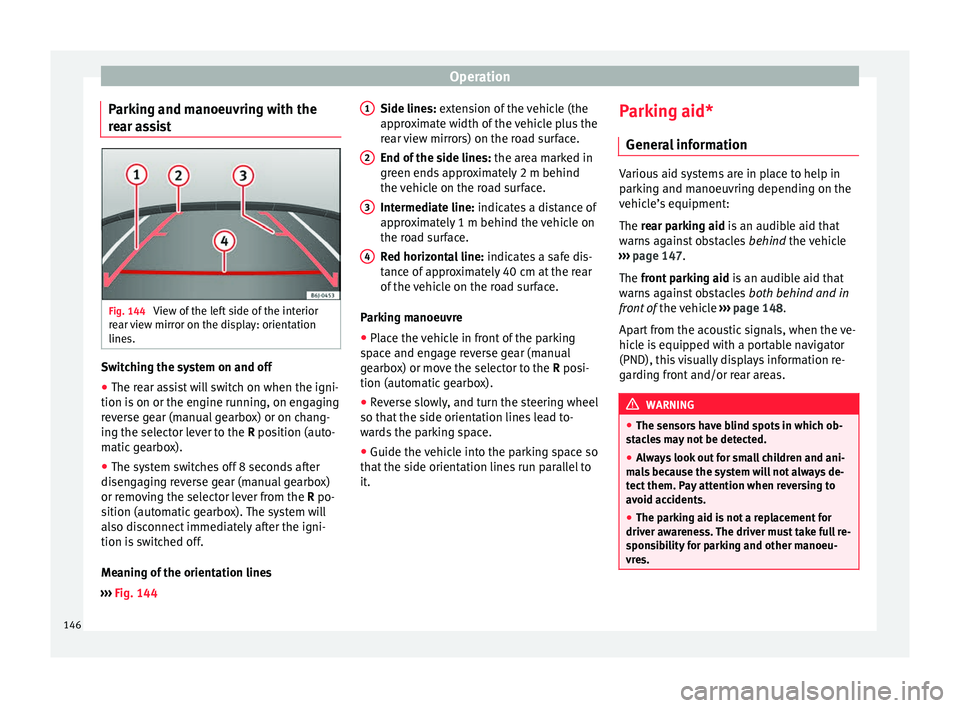
rear assist Fig. 144
View of the left side of the interior
rear view mirror on the display: orientation
lines. Switching the system on and off
● The rear assist will switch on when the igni-
tion is on or the engine running, on engaging
reverse gear (manual gearbox) or on chang-
ing the selector lever to the R position (auto-
m atic
gearbox).
● The system switches off 8 seconds after
disengaging reverse gear (manual gearbox)
or removing the selector lever from the R po-
sition (automatic gearbox). The system will
also disconnect immediately after the igni-
tion is switched off.
Meaning of the orientation lines
››› Fig. 144 Side lines: extension of the vehicle (the
approximate width of the vehicle plus the
rear view mirrors) on the road surface.
End of the side lines:
the area marked in
green ends approximately 2 m behind
the vehicle on the road surface.
Intermediate line: indicates a distance of
approximately 1 m behind the vehicle on
the road surface.
Red horizontal line: indicates a safe dis-
tance of approximately 40 cm at the rear
of the vehicle on the road surface.
Parking manoeuvre
● Place the vehicle in front of the parking
space and engage reverse gear (manual
gearbox) or move the selector to the R posi-
tion (automatic gearbox).
● Reverse slowly, and turn the steering wheel
so that the side orientation lines lead to-
wards the parking space.
● Guide the vehicle into the parking space so
that the side orientation lines run parallel to
it. 1 2
3
4 Parking aid*
General information Various aid systems are in place to help in
parking and manoeuvring depending on the
vehicle’s equipment:
The rear parking aid
is an audible aid that
w
arns against obstacles behind the vehicle
››› page 147.
The front parking aid i
s an audible aid that
warns against obstacles both behind and in
front of the vehicle ›››
page 148.
Apart from the acoustic signals, when the ve-
hicle is equipped with a portable navigator
(PND), this visually displays information re-
garding front and/or rear areas. WARNING
● The sensors have blind spots in which ob-
stacles may not be detected.
● Always look out for small children and ani-
mals because the system will not always de-
tect them. Pay attention when reversing to
avoid accidents.
● The parking aid is not a replacement for
driver awareness. The driver must take full re-
sponsibility for parking and other manoeu-
vres. 146
Page 153 of 240
Driver assistance systems
– Press the lower part SET of the rocker
switch ››› Fig. 148 B once briefly when you
have reached the speed you wish to set.
When you release the rocker switch, the cur-
rent speed is set and held constant.
Adjusting set speed* The speed can be altered without touching
the accelerator or the brake.
Setting a higher speed
– Press the upper part RES of the rocker
switch ››› Fig. 148
B to increase the speed.
The vehicle will continue to accelerate as
long as you keep the rocker switch pressed.
When you release the switch, the new
speed is stored.
Setting a lower speed – Press the lower part of the rocker switch
SET– ›››
Fig. 148 B to reduce the speed.
The vehicle will automatically reduce its
speed for as long as you keep the switch
pressed. When you release the switch, the
new speed is stored.
When you increase speed with the accelera-
tor and then release the pedal, the system
will automatically restore the set speed. This
will not be the case, however, if the vehicle
speed exceeds the stored speed by more than 10 km/h (6 mph) for longer than 5 mi-
nutes. The speed will have to be stored
again.
Cruise control is switched off if you reduce
speed by depressing the brake pedal. Reacti-
vate the control by pressing once on the up-
per part of the rocker switch
RES+ ››› Fig. 148
B .
Switching off cruise control
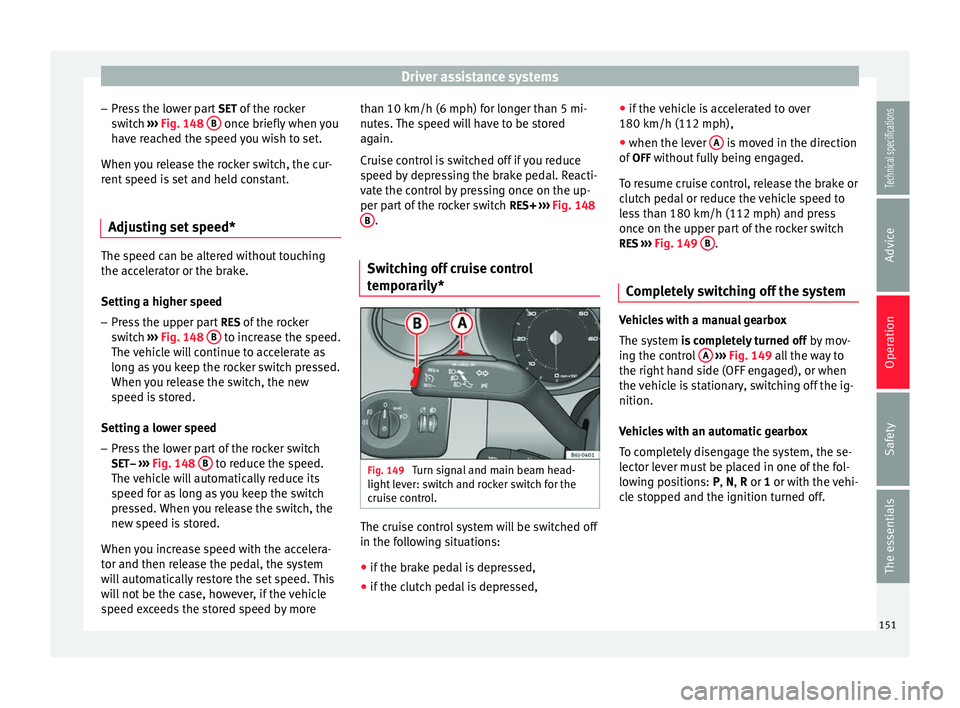
temporarily* Fig. 149
Turn signal and main beam head-
light lever: switch and rocker switch for the
cruise control. The cruise control system will be switched off
in the following situations:
● if the brake pedal is depressed,
● if the clutch pedal is depressed, ●
if the vehicle is accelerated to over
180 km/h (112 mph),
● when the lever A is moved in the direction
of OFF without fully being engaged.
To resume cruise control, release the brake or
clutch pedal or reduce the vehicle speed to
less than 180 km/h (112 mph) and press
once on the upper part of the rocker switch RES ››› Fig. 149 B .
Completely switching off the system Vehicles with a manual gearbox
The system
is completely turned off
b
y mov-
ing the control A
››› Fig. 149 all the way to
the right h
and side (OFF engaged), or when
the vehicle is stationary, switching off the ig-
nition.
Vehicles with an automatic gearbox
To completely disengage the system, the se-
lector lever must be placed in one of the fol-
lowing positions:
P, N, R or 1 or with the vehi-
cle stopped and the ignition turned off. 151
Technical specifications
Advice
Operation
Safety
The essentials
Page 185 of 240
Emergencies
Wheel change Preparation work –
If you have a flat tyre or puncture, park the
vehicle as far away from the flow of traffic
as possible. Choose a location that is as
level as possible.
– All vehicle occupants should leave the ve-
hicle. They should wait in a safe area (for
instance behind the roadside crash barri-
er).
– Switch the engine off. Switch the hazard
warning lights on and place the warning tri-
angles in position.
– Apply the handbrake
firmly.
– En g
age the first gear , or put
the selector
lever to position P for those vehicles with
an automatic gearbox.
– If you are towing a trailer, unhitch it from
your vehicle.
– Take the vehicle tools and the spare wheel
out of
the luggage compartment. WARNING
● Switch on the hazard warning lights and
place the warning triangles in position. This
is for your own safety and also warns other
road users. ●
If you change the wheel on a slope, block
the wheel on the opposite side of the car with
a stone or similar to prevent the vehicle from
moving. Changing a wheel
Change the wheel as described below:
– Remove the hub caps or the integral trim .
– Sl ac
ken the wheel bolts .
– Rai
se the vehicle with the jack at the corre-
s pondin
g area.
– Remove the wheel and put on the spare
one.
– Lower the vehicle.
– Tighten the wheel
bolts firmly with the box
sp
anner.
– Replace the hub cap.
Aft
er changing a wheel –
Put the tools back in their storage location.
– Place the wheel with the defective tyre in
the luggage compartment and secure it.
– Check the tyre pressure of the newly fitted
tyre as soon as possible. –
Have the tightening torque of the wheel
bolts checked as soon as possible with a
torque wrench. The prescribed torque must
be 120 Nm. Note
● If you notice that the wheel bolts are corro-
ded and difficult to turn when changing a
wheel, they must be replaced before having
the wheel bolt tightening torque checked.
● For safety reasons, drive at moderate
speeds until the wheel bolt tightening torque
has been checked. Wheel covers*
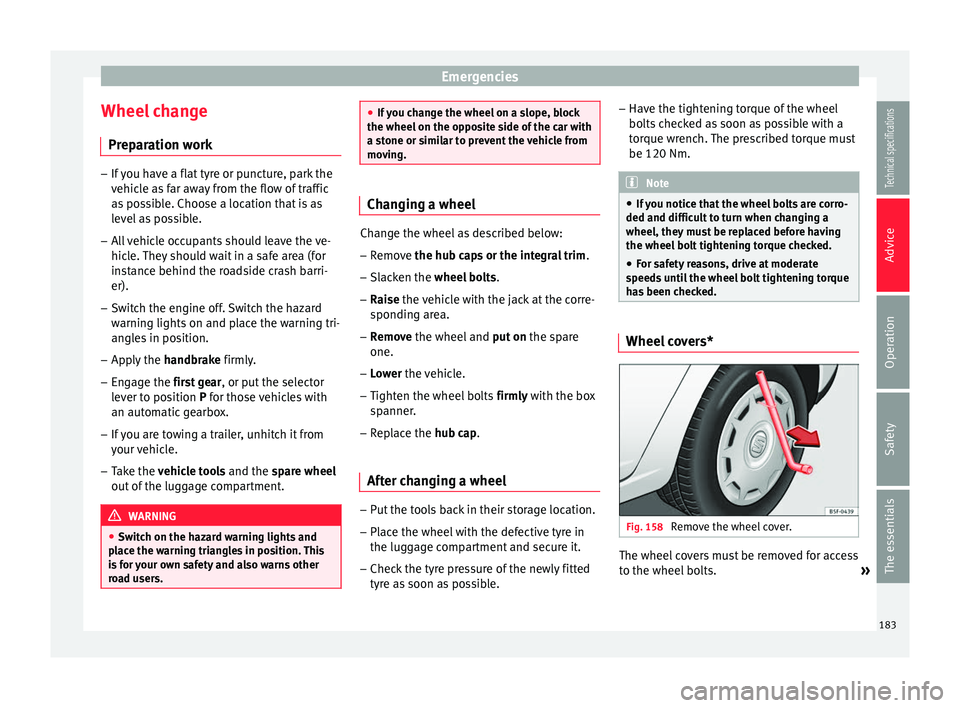
Fig. 158
Remove the wheel cover. The wheel covers must be removed for access
to the wheel bolts.
»
183
Technical specifications
Advice
Operation
Safety
The essentials
Page 188 of 240
Advice
Tyres with directional tread pattern A directional tread pattern can be identified
by arrows on the sidewall that point in the di-
rection of rotation. Always note the direction
of rotation indicated when fitting the wheel.
This is important so that these tyres can give
maximum grip and avoid excessive noise,
tread wear and aquaplaning.
If, in an emergency, you have to mount the
spare wheel so it rotates in the wrong direc-
tion, you must drive extremely carefully. The
tyre will not give optimum performance. This
is particularly important when driving on wet
roads.
To benefit from the advantages of tyres with
this type of tread pattern, the defective tyre
should be replaced as soon as possible so
that all tyres again rotate in the correct direc-
tion.
Tyre repair TMS (Tyre Mobility System)* Read the additional information carefully
››› page 26
The Anti-puncture kit* (Tyre Mobility System)
will reliably seal punctures caused by the
penetration of a foreign body of up to about 4 mm in diameter. Do not remove foreign ob-
jects, e.g. screws or nails, from the tyre.
After inserting the sealant residue in the tyre,
you must again check the tyre pressure about
10 minutes after starting the engine.
You should only use the tire mobility set if
the vehicle is parked in a safe place, you are
familiar with the procedure and you have the
necessary tire mobility set! Otherwise, you
should seek professional assistance.
The tyre sealant must not be used in the
following cases:
● If the wheel rim has been damaged.
● In outside temperatures below -20 °C
(-4 °F).
● In the event of cuts or perforations in the
tyre greater than 4 mm.
● If you have been driving with very low pres-
sure or a completely flat tyre.
● If the sealant bottle has passed its use by
date. WARNING
Using the tyre mobility system can be dan-
gerous, especially when filling the tyre at the
roadside. Please observe the following rules
to minimise the risk of injury:
● Stop the vehicle safely as soon as possible.
Park it at a safe distance from surrounding
traffic to fill the tyre. ●
Ensure the ground on which you park is flat
and solid.
● All passengers and particularly children
must keep a safe distance from the work area.
● Turn on the hazard warning lights to warn
other road users.
● Use the tyre mobility system only if you are
familiar with the necessary procedures. Oth-
erwise, you should seek professional assis-
tance.
● The tyre mobility set is intended for tempo-
rary emergency use only until you can reach
the nearest specialised workshop.
● Replace the repaired tyre with the tire mo-
bility set as soon as possible.
● The sealant is a health hazard and must be
cleaned immediately if it comes into contact
with the skin.
● Always keep the tire mobility set out of the
reach of small children.
● Never use an equivalent jack, even if it has
been approved for your vehicle.
● Always stop the engine, apply the hand-
brake lever firmly and engage gear if using a
manual gearbox, in order to reduce the risk of
vehicle involuntary movement. WARNING
A tyre filled with sealant does not have the
same performance properties as a conven-
tional tyre.
● Never drive faster than 80 km/h (50 mph). 186
Page 193 of 240
Emergencies
Towing vehicles with an automatic gearbox
● Put the selector lever into position “N”.
● Do not drive faster than 50 km/h (31 mph).
● Do not tow further than 50 km.
● If a breakdown vehicle is used, the vehicle
must be towed with the front wheels raised. Note
● Observe legal requirements when towing or
tow-starting.
● Switch on the hazard warning lights of both
vehicles. However, observe any regulations
to the contrary.
● For technical reasons, vehicles with an au-
tomatic gearbox must not be tow-started.
● If there is no lubricant in the gearbox as the
result of a fault, you must raise the driven
wheels while the vehicle is being towed.
● If the vehicle has to be towed more than
50 km (30 miles), the front wheels should be
raised during towing, and towing should be
carried out by a qualified person.
● The steering wheel is locked when the vehi-
cle has no electrical power. The vehicle must
then be towed with the front wheels raised.
Towing should be carried out by a qualified
person.
● The towline anchorage should always be
kept in the vehicle. Front towline anchorage
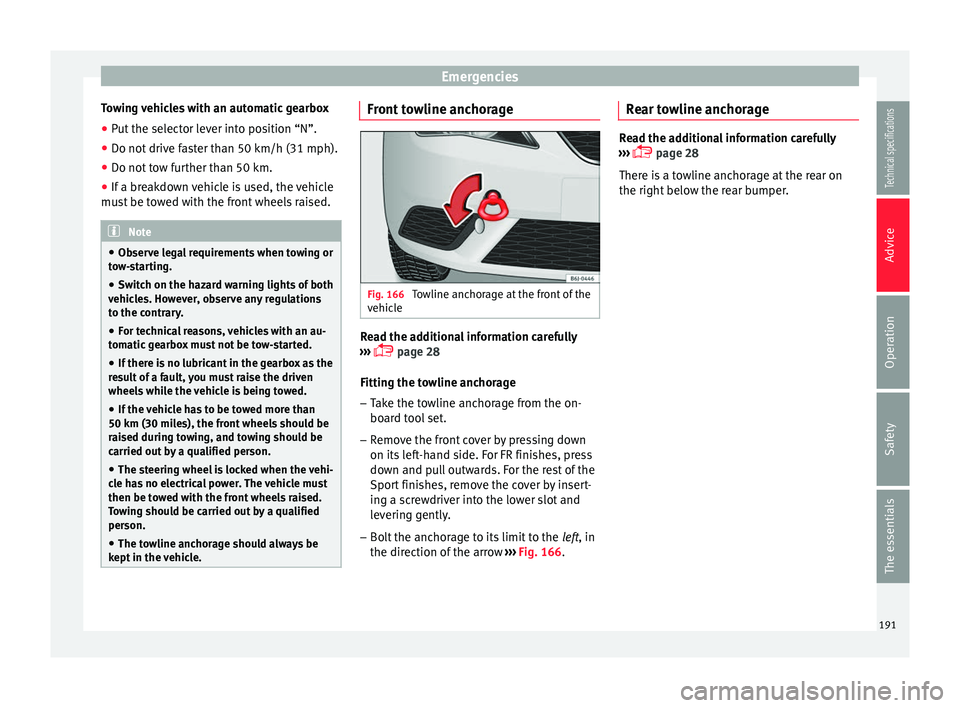
Fig. 166
Towline anchorage at the front of the
vehicle Read the additional information carefully
››› page 28
Fitting the towline anchorage
– Take the towline anchorage from the on-
board tool set.
– Remove the front cover by pressing down
on its left-hand side. For FR finishes, press
down and pull outwards. For the rest of the
Sport finishes, remove the cover by insert-
ing a screwdriver into the lower slot and
levering gently.
– Bolt the anchorage to its limit to the left, in
the dir ection of
the arrow ››› Fig. 166. Rear towline anchorage Read the additional information carefully
››› page 28
There is a towline anchorage at the rear on
the right below the rear bumper.
191
Technical specifications
Advice
Operation
Safety
The essentials
Page 211 of 240
Technical features
Vehicles for certain export countries do not
have an identification plate.
Identification plate
The identification plate is located on the right
rib inside the engine compartment.
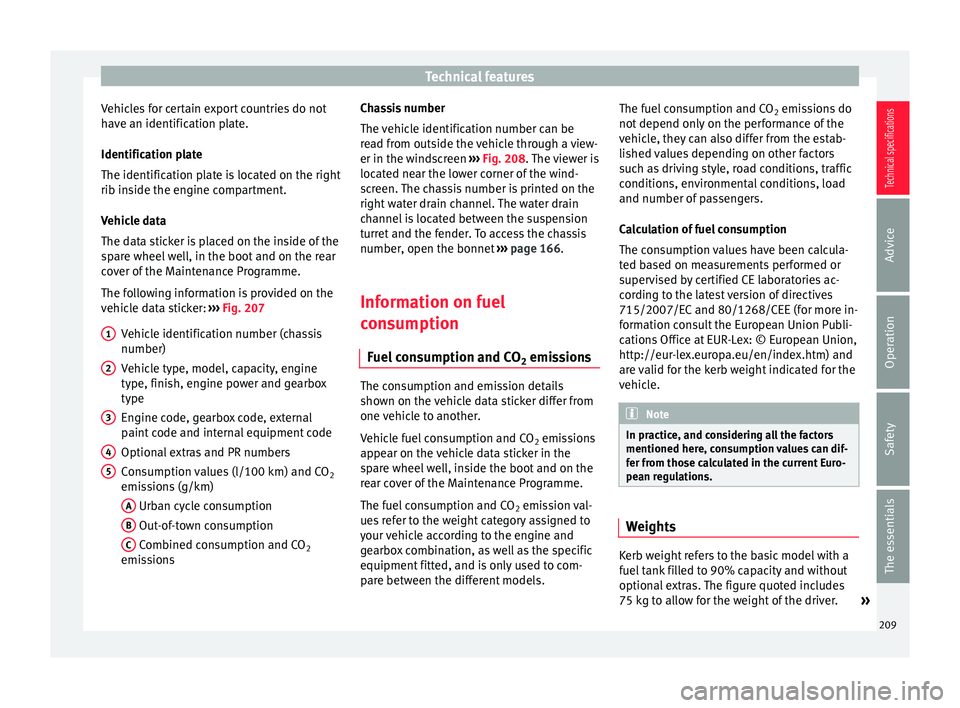
Vehicle data
The data sticker is placed on the inside of the
spare wheel well, in the boot and on the rear
cover of the Maintenance Programme.
The following information is provided on the
vehicle data sticker: ››› Fig. 207
Vehicle identification number (chassis
number)
Vehicle type, model, capacity, engine
type, finish, engine power and gearbox
type
Engine code, gearbox code, external
paint code and internal equipment code
Optional extras and PR numbers
Consumption values (l/100 km) and CO 2
emissions (g/km)
A Urban cycle consumption
B Out-of-town consumption
C Combined consumption and CO
2
emissions
1 2
3
4
5 Chassis number
The vehicle identification number can be
read from outside the vehicle through a view-
er in the windscreen
››› Fig. 208 . The viewer is
loc at
ed near the lower corner of the wind-
screen. The chassis number is printed on the
right water drain channel. The water drain
channel is located between the suspension
turret and the fender. To access the chassis
number, open the bonnet ››› page 166.
Information on fuel
consumption Fuel consumption and CO 2 emissions The consumption and emission details
shown on the vehicle data sticker differ from
one vehicle to another.
Vehicle fuel consumption and CO
2 emissions
appear on the vehicle data sticker in the
spare wheel well, inside the boot and on the
rear cover of the Maintenance Programme.
The fuel consumption and CO 2 emission val-
ues refer to the weight category assigned to
your vehicle according to the engine and
gearbox combination, as well as the specific
equipment fitted, and is only used to com-
pare between the different models. The fuel consumption and CO
2 emissions do
not depend only on the performance of the
vehicle, they can also differ from the estab-
lished values depending on other factors
such as driving style, road conditions, traffic
conditions, environmental conditions, load
and number of passengers.
Calculation of fuel consumption
The consumption values have been calcula-
ted based on measurements performed or
supervised by certified CE laboratories ac-
cording to the latest version of directives
715/2007/EC and 80/1268/CEE (for more in-
formation consult the European Union Publi-
cations Office at EUR-Lex: © European Union,
http://eur-lex.europa.eu/en/index.htm) and
are valid for the kerb weight indicated for the
vehicle. Note
In practice, and considering all the factors
mentioned here, consumption values can dif-
fer from those calculated in the current Euro-
pean regulations. Weights
Kerb weight refers to the basic model with a
fuel tank filled to 90% capacity and without
optional extras. The figure quoted includes
75 kg to allow for the weight of the driver.
»
209
Technical specifications
Advice
Operation
Safety
The essentials
Page 225 of 240
Technical features
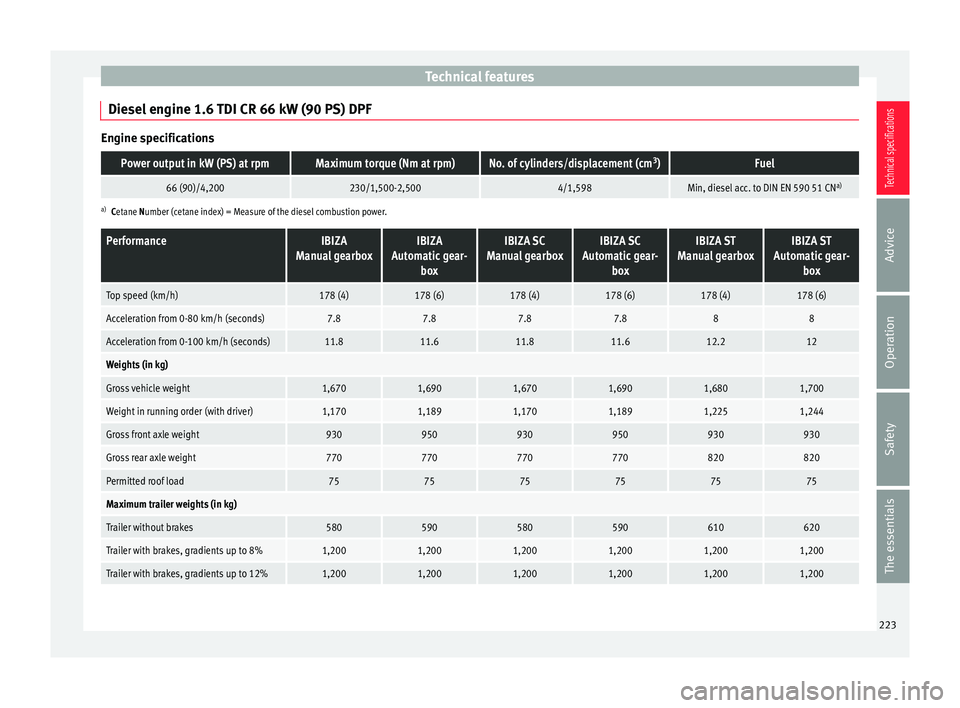
Diesel engine 1.6 TDI CR 66 kW (90 PS) DPF Engine specificationsPower output in kW (PS) at rpmMaximum torque (Nm at rpm)No. of cylinders/displacement (cm
3
)Fuel
66 (90)/4,200230/1,500-2,5004/1,598Min, diesel acc. to DIN EN 590 51 CN a)
a)
Cetane Number (cetane index) = Measure of the diesel combustion power.
PerformanceIBIZA
Manual gearboxIBIZA
Automatic gear- boxIBIZA SC
Manual gearboxIBIZA SC
Automatic gear- boxIBIZA ST
Manual gearboxIBIZA ST
Automatic gear- box
Top speed (km/h)178 (4)178 (6)178 (4)178 (6)178 (4)178 (6)
Acceleration from 0-80 km/h (seconds)7.87.87.87.888
Acceleration from 0-100 km/h (seconds)11.811.611.811.612.212
Weights (in kg)
Gross vehicle weight1,6701,6901,6701,6901,6801,700
Weight in running order (with driver)1,1701,1891,1701,1891,2251,244
Gross front axle weight930950930950930930
Gross rear axle weight770770770770820820
Permitted roof load757575757575
Maximum trailer weights (in kg)
Trailer without brakes580590580590610620
Trailer with brakes, gradients up to 8%1,2001,2001,2001,2001,2001,200
Trailer with brakes, gradients up to 12%1,2001,2001,2001,2001,2001,200 223
Technical specifications
Advice
Operation
Safety
The essentials