brake Seat Ibiza 5D 2015 User Guide
[x] Cancel search | Manufacturer: SEAT, Model Year: 2015, Model line: Ibiza 5D, Model: Seat Ibiza 5D 2015Pages: 248, PDF Size: 4.77 MB
Page 59 of 248
Safe driving
risk of injury. The following list includes most
of the s
af
ety equipment in your SEAT:
● Three-point seat belts
● Belt tension limiter for the front and rear
side seats
● B
elt tensioners for the front seats
● Front airbags
● Side airbags in the front seat backrests,
with che
st and head protection
● “ISOFIX” anchor points for “ISOFIX” rear
chil
d seat system
● Height-adjustable front head restraints
● Rear-centre head restraints with in-use po-
sition and non-use po
sition
● Adjustable steering column
The safety
equipment mentioned above
works together to provide you and your pas-
sengers with the best possible protection in
the event of an accident. However, these
safety systems can only be effective if you
and your passengers are sitting in a correct
position and use this equipment properly.
Safety is everyone's business! Correct position for passengers
Correct
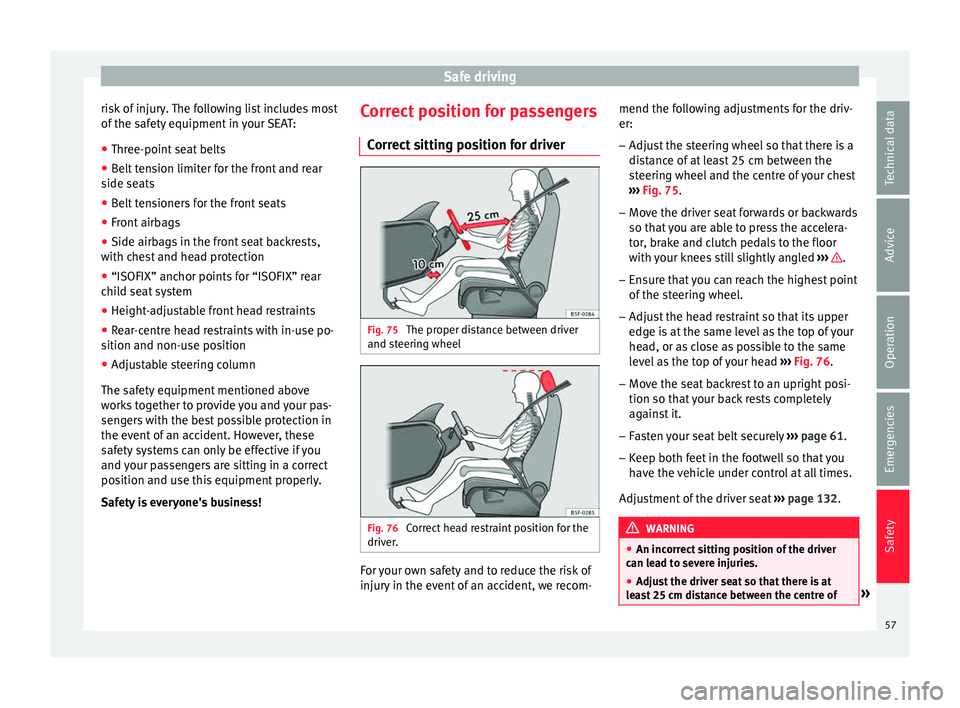
sitting position for driver Fig. 75
The proper distance between driver
and s t
eerin
g wheel Fig. 76
Correct head restraint position for the
driv er
. For your own safety and to reduce the risk of
injur
y
in the ev
ent of an accident, we recom- mend the following adjustments for the driv-
er:
– Adjust the steering wheel so that there is a
dist
ance of at least 25 cm between the
steering wheel and the centre of your chest
››› Fig. 75.
– Move the driver seat forwards or backwards
so that
you are able to press the accelera-
tor, brake and clutch pedals to the floor
with your knees still slightly angled ››› .
– Ensure that you can reach the highest point
of the s
t
eering wheel.
– Adjust the head restraint so that its upper
edge is
at the same level as the top of your
head, or as close as possible to the same
level as the top of your head ››› Fig. 76.
– Move the seat backrest to an upright posi-
tion so that
your back rests completely
against it.
– Fasten your seat belt securely ›››
page 61.
– Keep both feet in the footwell so that you
have the
vehicle under control at all times.
Adjustment of the driver seat ››› page 132. WARNING
● An incorr ect
sitting position of the driver
can lead to severe injuries.
● Adjust the driver seat so that there is at
lea
st 25 cm distance between the centre of » 57
Technical data
Advice
Operation
Emergencies
Safety
Page 63 of 248
Seat belts
●
Do not sw ap the c
entre rear head restraint
with either of the outer seat rear head re-
straints. Risk of injury in case of an accident! Note
Note the instructions on the head restraints
a dju s
tment. Pedal area
P ed
a
ls –
Ensure that you can always press the accel-
er at
or
, brake and clutch pedals unimpaired
to the floor.
– Ensure that the pedals can return unim-
paired t
o their initial positions.
– Ensure that the floor mats are securely fas-
tened during the trip and do not
obstruct
the pedals ››› .
On ly
u
se floor mats which leave the pedals
clear and which are secured to prevent them
from slipping. You can obtain suitable floor
mats from a specialised dealership.
If a brake circuit fails, the brake pedal must
be pressed down thoroughly in order to stop
the vehicle. Wear suitable footwear
Alwa
ys wear shoes which support your feet
properly and give you a good feeling for the
pedals. WARNING
● If the ped a
ls are obstructed, an accident
may occur. Risk of serious injuries.
● Never lay or fit floor mats or other floor cov-
erings
over the original floor mats. This
would reduce the pedal area and could ob-
struct the pedals. Risk of accident.
● Never place objects in the driver footwell.
An obj
ect could move into the pedal area and
impair pedal operation. In the event of a sud-
den driving or braking manoeuvre, you will
not be able to operate the brake, clutch or ac-
celerator pedal. Risk of accident! Seat belts
Wh y
w
ear a seat belt?
Number of seats Your vehicle has
five se
ats, two in the front
and three in the rear. Each seat is equipped
with a three-point seat belt.
In some versions, your vehicle is approved
only for four seats. Two front seats and two
rear seats. WARNING
● Never tr an
sport more than the permitted
amount of people in your vehicle.
● Every vehicle occupant must properly fas-
ten and we
ar the seat belt belonging to his or
her seat. Children must be protected with an
appropriate child restraint system. 61
Technical data
Advice
Operation
Emergencies
Safety
Page 79 of 248
Self-help
After inserting the sealant residue in the tyre,
y ou mu
s
t again check the tyre pressure about
10 minutes after starting the engine.
You should only use the tire mobility set if
the vehicle is parked in a safe place, you are
familiar with the procedure and you have the
necessary tire mobility set! Otherwise, you
should seek professional assistance.
Do not use the tyre sealant in the following
cases:
● If the wheel rim has been damaged.
● In outside temperatures below -20°C (-4°F).
● In the event of cuts or perforations in the
tyre gr
eater than 4 mm.
● If you have been driving with very low pres-
sure or a c
ompletely flat tyre.
● If the sealant bottle has passed its use by
date. WARNING
Using the tyre mobility system can be dan-
ger ou
s, especially when filling the tyre at the
roadside. Please observe the following rules
to minimise the risk of injury:
● Stop the vehicle safely as soon as possible.
Park it
at a safe distance from surrounding
traffic to fill the tyre.
● Ensure the ground on which you park is flat
and solid. ●
All
passengers and particularly children
must keep a safe distance from the work area.
● Turn on the hazard warning lights to warn
other roa
d users.
● Use the tyre mobility system only if you are
famili
ar with the necessary procedures. Oth-
erwise, you should seek professional assis-
tance.
● The tyre mobility set is intended for tempo-
rary
emergency use only until you can reach
the nearest specialised workshop.
● Replace the repaired tyre with the tyre mo-
bility
set as soon as possible.
● The sealant is a health hazard and must be
cle
aned immediately if it comes into contact
with the skin.
● Always keep the tyre mobility set out of the
reac
h of small children.
● Never use a jack, even if it has been ap-
prov
ed for your vehicle.
● Always stop the engine, apply the hand-
brake l
ever firmly and engage gear if using a
manual gearbox, in order to reduce the risk of
vehicle involuntary movement. WARNING
A tyre filled with sealant does not have the
same per f
ormance properties as a conven-
tional tyre.
● Never drive faster than 80 km/h (50 mph).
● Avoid heavy acceleration, hard braking and
fas
t cornering. ●
Drive f or on
ly 10 minutes at a maximum
speed of 80 km/h (50 mph) and then check
the tyre. For the sake of the environment
Dispose of used or expired sealant observing
an y l
egal requirements. Note
● A new bottle of se
alant can be purchased at
SEAT dealerships.
● Take into account the separate instruction
manual
of the tyre mobility set* manufactur-
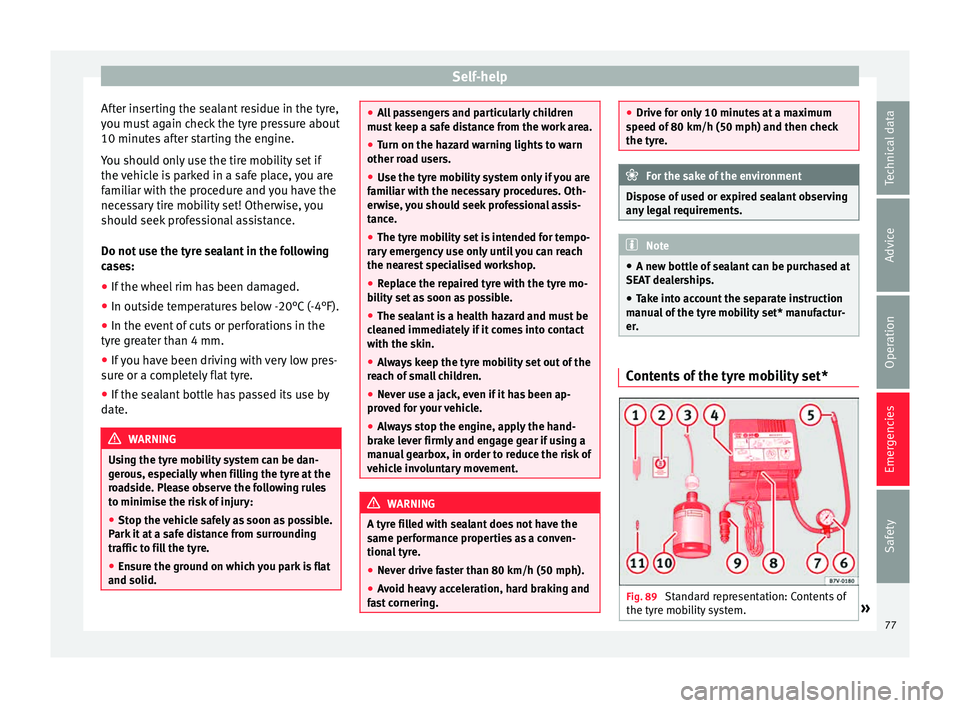
er. Contents of the tyre mobility set*
Fig. 89
Standard representation: Contents of
the ty r
e mo
bility system. » 77
Technical data
Advice
Operation
Emergencies
Safety
Page 81 of 248
Self-help
Check the condition of the wiper blades regu-
l arly
.
If the wipers scrape across the glass ,
they should be changed if they are damaged,
or cleaned if they are dirty ››› .
If thi
s
does not produce the desired results,
the setting angle of the windscreen wiper
arms might be incorrect. They should be
checked by a specialised workshop and cor-
rected if necessary. WARNING
Do not drive unless you have good visibility
through a l
l windows!
● Clean the windscreen wiper blades and all
window
s regularly.
● The wiper blades should be changed once
or twice a
year. CAUTION
● Damag ed or dir
ty windscreen wipers could
scratch the glass.
● Never use fuel, nail varnish remover, paint
thinner or simil
ar products to clean the win-
dows. This could damage the windscreen
wiper blades.
● Never move any windscreen wiper by hand.
This c
ould cause damage.
● To prevent damage to the bonnet and the
winds
creen wiper arms, the latter should only
be lifted off the windscreen when in service
position. Note
● The wind s
creen wiper arms can be moved
to the service position only when the bonnet
is properly closed.
● You can also use the service position, for
examp
le, if you want to fix a cover over the
windscreen in the winter to keep it clear of
ice. Towing or tow-starting
Note s Read the additional information carefully
› ›
›
page 51
Please observe the following points if you
use a tow rope:
Notes for the driver of the towing vehicle
– Move the vehicle slowly until the cable is
taut.
Then accelerate gradually.
– Begin and change gears cautiously. If you
are drivin
g an automatic vehicle, accelerate
gently.
– Remember that the brake servo and power
steerin
g are not working in the vehicle you
are towing. Brake sooner than normal and
pressing the pedal gently. Notes for the driver of the towed vehicle
– Ensure that the tow rope remains taut at all
times when t
owing.
Towing vehicles with an automatic gearbox
● Put the selector lever into position “N”.
● Do not drive faster than 50 km/h (31 mph).
● Do not tow further than 50 km.
● If a breakdown vehicle is used, the vehicle
must
be towed with the front wheels raised. WARNING
If the vehicle has no electrical power, the
brak e light
s, turn signals and all other lights
will no longer function. Do not have the vehi-
cle towed away. Failure to follow this instruc-
tion could result in an accident. WARNING
Vehicle handling and braking capacity
ch an
ge considerably during towing. Please
observe the following instructions to mini-
mise the risk of serious accidents and injury:
● As the driver of the vehicle being towed:
– You shoul
d depress the brake much hard-
er as the brake servo does not operate.
Pay the utmost attention to avoid crash-
ing into the towing vehicle.
– More strength is required at the steering
wheel as the power steering does not op-
erate when the engine is switched off. » 79
Technical data
Advice
Operation
Emergencies
Safety
Page 82 of 248
Emergencies
●
As the driv er of
the towing vehicle:
– Accelerate with particular care and cau-
tion.
– Avoid sudden braking and manoeuvres.
– Brake earlier than usual and more
smoothly. CAUTION
When tow-starting, fuel could enter the cata-
lytic con
verter and damage it. Note
● Ob ser
ve legal requirements when towing or
tow-starting.
● Switch on the hazard warning lights of both
vehicl
es. However, observe any regulations
to the contrary.
● For technical reasons, vehicles with an au-
tomatic
gearbox must not be tow-started.
● If there is no lubricant in the gearbox as the
res
ult of a fault, you must raise the driven
wheels while the vehicle is being towed.
● If the vehicle has to be towed more than
50 km (30 mile
s), the front wheels should be
raised during towing, and towing should be
carried out by a qualified person.
● The steering wheel is locked when the vehi-
cle h
as no electrical power. The vehicle must
then be towed with the front wheels raised.
Towing should be carried out by a qualified
person. ●
The to wline anc
horage should always be
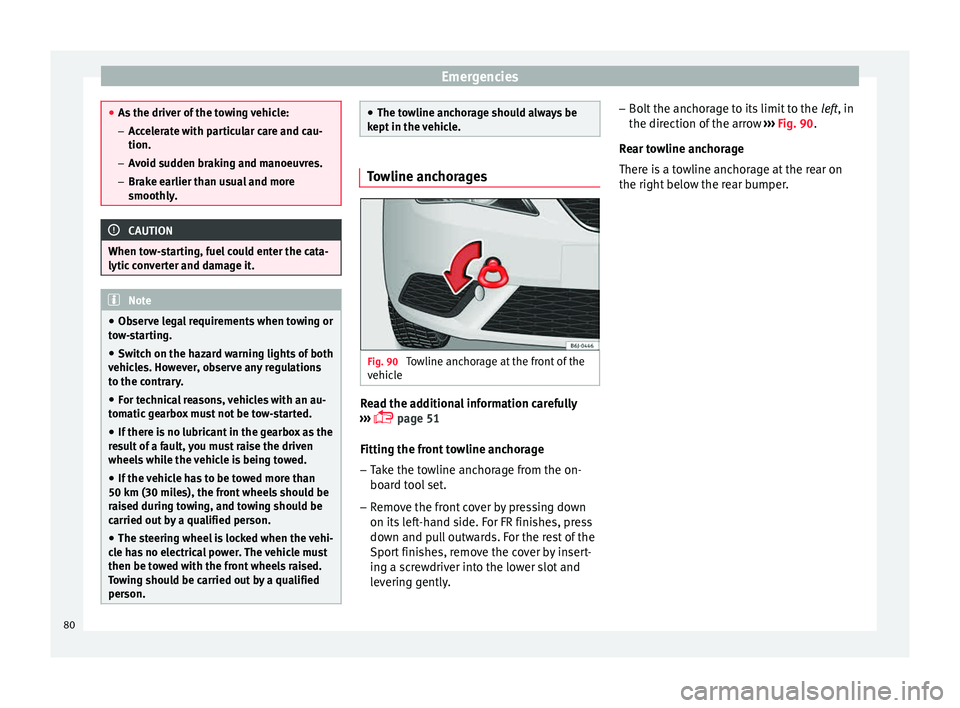
kept in the vehicle. Towline anchorages
Fig. 90
Towline anchorage at the front of the
v ehic
l
e Read the additional information carefully
› ›
›
page 51
Fitting the front towline anchorage
– Take the towline anchorage from the on-
board t
ool set.
– Remove the front cover by pressing down
on its lef
t-hand side. For FR finishes, press
down and pull outwards. For the rest of the
Sport finishes, remove the cover by insert-
ing a screwdriver into the lower slot and
levering gently. –
Bolt the anc
horage to its limit to the left, in
the direction of the arrow ››› Fig. 90.
Rear towline anchorage
There is a towline anchorage at the rear on
the right below the rear bumper. 80
Page 91 of 248
Fuses and bulbs
Changing the tail light bulbs S umm
ar
y of LED tail lights3 Applies to the model: IBIZA/IBIZA SC
LED
● Br ak
e lights
● Side lights
Bul
bs
● Retro fog light
● Reverse lights
● Turn signal
Tail light summary 3 App
lies to the model: IBIZA ST
T
ail lights on side panel Bulb lamps
● Brake lights
● Side lights
● Turn signal
Lights on the r
ear lid Bulb lamps
● Reverse lights
● Side lights
● Fog lights Tail lights on side panel LED lamps
●
Brake light (LED)
● Side light (LED)
● Turn signal
Lights on the r
ear lid LED lamps
● Reverse lights
● Side light (LED)
● Fog lights
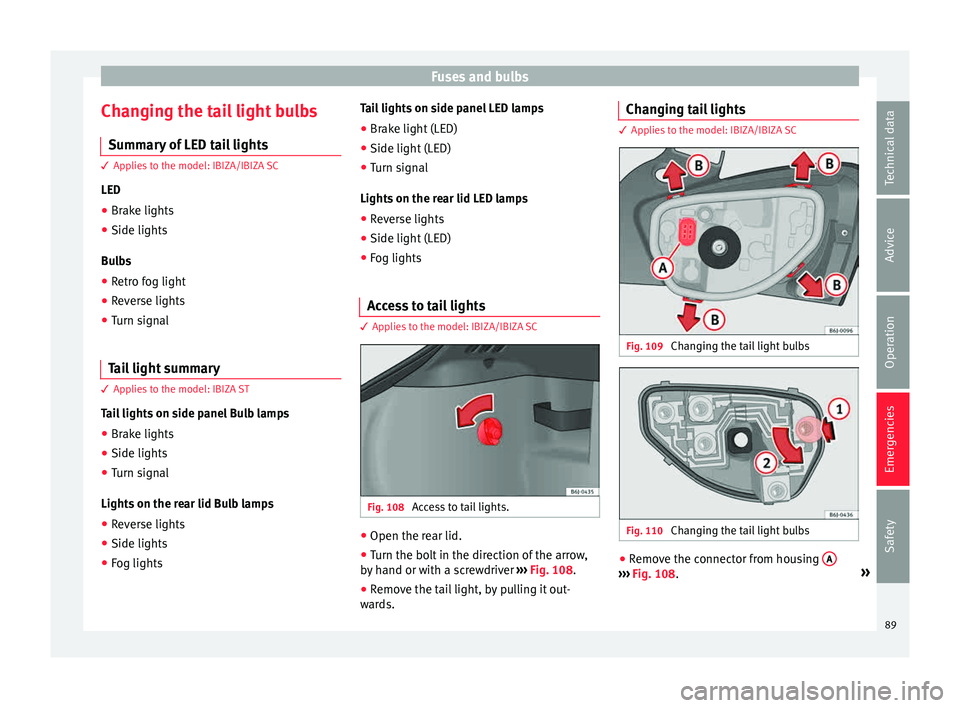
Access to tail lights 3 App
lies to the model: IBIZA/IBIZA SC Fig. 108
Access to tail lights. ●
Open the rear lid.
● Turn the bolt in the direction of the arrow,
b y
h
and or with a screwdriver ››› Fig. 108.
● Remove the tail light, by pulling it out-
ward
s. Changing tail lights 3 Applies to the model: IBIZA/IBIZA SC
Fig. 109
Changing the tail light bulbs Fig. 110
Changing the tail light bulbs ●
Remove the connector from housing A ›››
Fig. 108. »
89
Technical data
Advice
Operation
Emergencies
Safety
Page 92 of 248
Emergencies
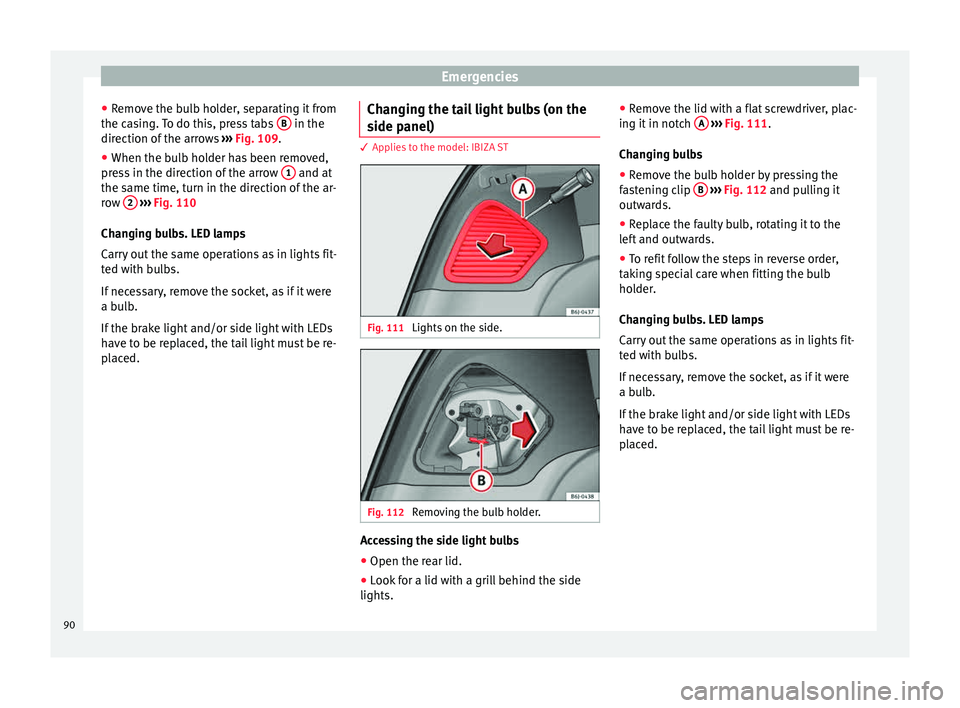
● Remo
v
e the bulb holder, separating it from
the casing. To do this, press tabs B in the
dir ection of
the arr
ows ››› Fig. 109.
● When the bulb holder has been removed,
pres
s in the direction of the arrow 1 and at
the s ame time, t
urn in the dir
ection of the ar-
row 2
› ››
Fig. 110
Ch an
ging bulbs. LED lamps
Carry out the same operations as in lights fit-
ted with bulbs.
If necessary, remove the socket, as if it were
a bulb.
If the brake light and/or side light with LEDs
have to be replaced, the tail light must be re-
placed. Changing the tail light bulbs (on the
side panel) 3 Applies to the model: IBIZA ST
Fig. 111
Lights on the side. Fig. 112
Removing the bulb holder. Accessing the side light bulbs
● Open the rear lid.
● Look for a lid with a grill behind the side
lights. ●
Remo
v
e the lid with a flat screwdriver, plac-
ing it in notch A
› ››
Fig. 111
.
Ch
anging bulbs
● Remove the bulb holder by pressing the
fas
tening clip B
› ››
Fig. 112
and p ulling it
outwards.
● Replace the faulty bulb, rotating it to the
left
and outwards.
● To refit follow the steps in reverse order,
takin
g special care when fitting the bulb
holder.
Changing bulbs. LED lamps
Carry out the same operations as in lights fit-
ted with bulbs.
If necessary, remove the socket, as if it were
a bulb.
If the brake light and/or side light with LEDs
have to be replaced, the tail light must be re-
placed.
90
Page 93 of 248
Fuses and bulbs
Changing the tail light bulbs (on the
r e
ar lid) 3 Applies to the model: IBIZA ST
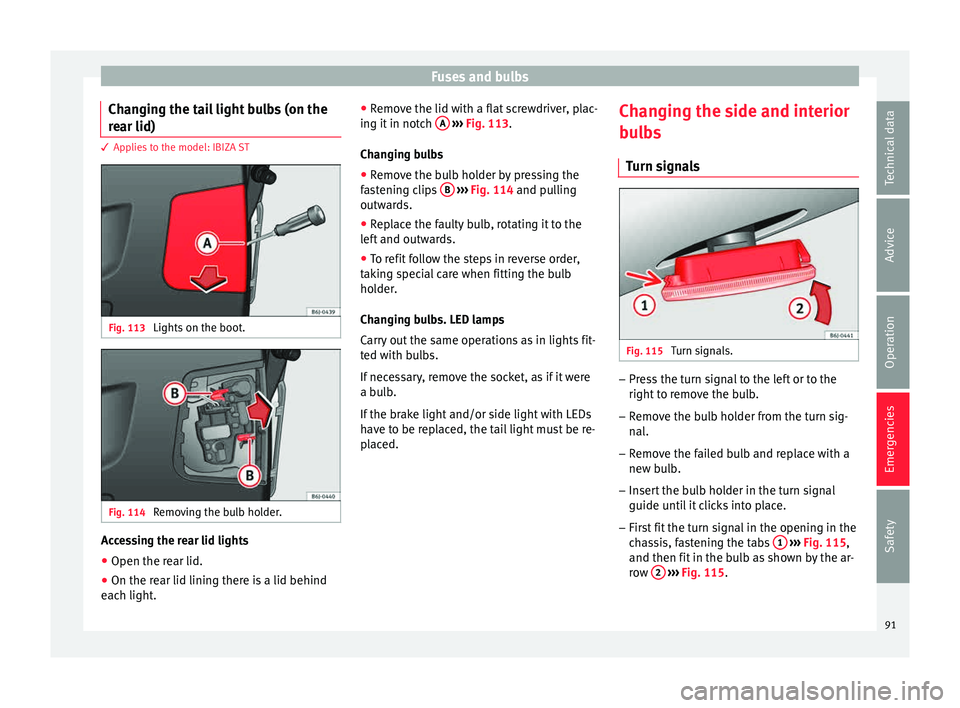
Fig. 113
Lights on the boot. Fig. 114
Removing the bulb holder. Accessing the rear lid lights
● Open the rear lid.
● On the rear lid lining there is a lid behind
e ac
h light
. ●
Remov
e the lid with a flat screwdriver, plac-
ing it in notch A
› ››
Fig. 113
.
Ch
anging bulbs
● Remove the bulb holder by pressing the
fas
tening clips B
› ››
Fig. 114
and p ulling
outwards.
● Replace the faulty bulb, rotating it to the
left
and outwards.
● To refit follow the steps in reverse order,
takin
g special care when fitting the bulb
holder.
Changing bulbs. LED lamps
Carry out the same operations as in lights fit-
ted with bulbs.
If necessary, remove the socket, as if it were
a bulb.
If the brake light and/or side light with LEDs
have to be replaced, the tail light must be re-
placed. Changing the side and interior
bul
bs
Turn signals Fig. 115
Turn signals. –
Press the turn signal to the left or to the
right t
o r
emove the bulb.
– Remove the bulb holder from the turn sig-
nal.
– R
emove the failed bulb and replace with a
new bul
b.
– Insert the bulb holder in the turn signal
guide until
it clicks into place.
– First fit the turn signal in the opening in the
cha
ssis, fastening the tabs 1
› ›
› Fig. 115 ,
and then fit in the bulb as shown by the ar-
row 2
› ›
› Fig. 115
.
91
Technical data
Advice
Operation
Emergencies
Safety
Page 94 of 248
Emergencies
Number plate light 3 Applies to the model: IBIZA/IBIZA SC
– Inser
t the flat part of a screwdriver into the
speci
al slot and remove the bulb.
– Remove the bulb holder, by turning it until
it is
free.
– Change the bulb.
– Replace the bulb holder, by turning it until
it fits f
ully.
– Fit the light into the space and press until
you he ar a “c
lick”.
Number plate light 3 App
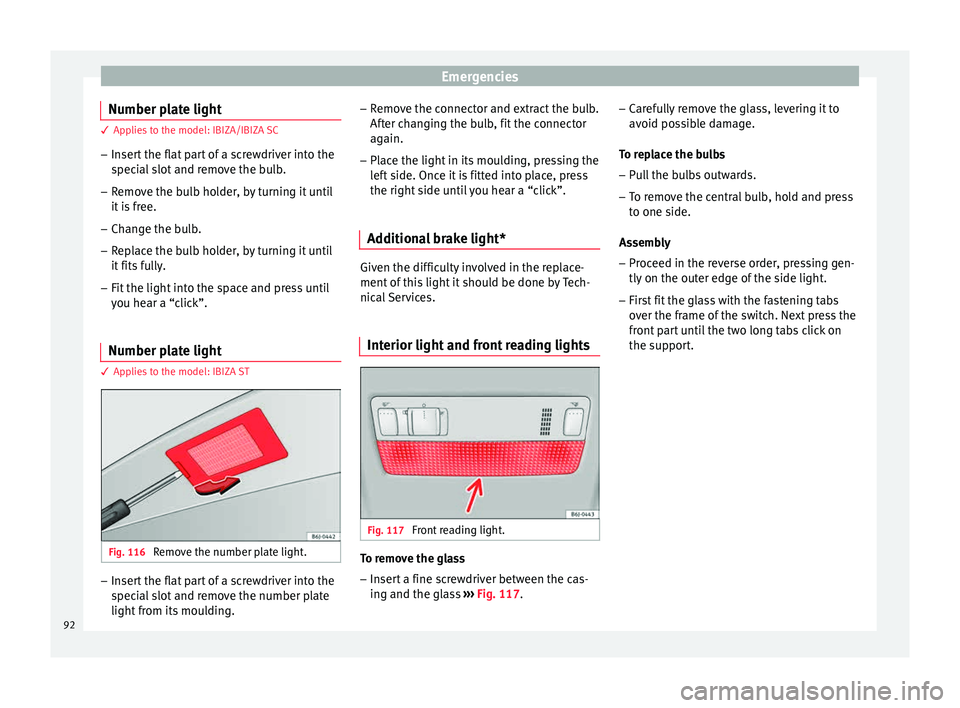
lies to the model: IBIZA ST Fig. 116
Remove the number plate light. –
Insert the flat part of a screwdriver into the
spec
i
al slot and remove the number plate
light from its moulding. –
Remov
e the connector and extract the bulb.
After changing the bulb, fit the connector
again.
– Place the light in its moulding, pressing the
left
side. Once it is fitted into place, press
the right side until you hear a “click”.
Additional brake light* Given the difficulty involved in the replace-
ment of
thi
s light it should be done by Tech-
nical Services.
Interior light and front reading lights Fig. 117
Front reading light. To remove the glass
– Insert a fine screwdriver between the cas-
ing and the gl
a
ss ››› Fig. 117. –
Caref
ully remove the glass, levering it to
avoid possible damage.
To replace the bulbs
– Pull the bulbs outwards.
– To remove the central bulb, hold and press
to one side.
As
sembly
– Proceed in the reverse order, pressing gen-
tly on the outer edg
e of the side light.
– First fit the glass with the fastening tabs
over the fr
ame of the switch. Next press the
front part until the two long tabs click on
the support.
92
Page 97 of 248
Controls and displays
Operation
C ontr
o
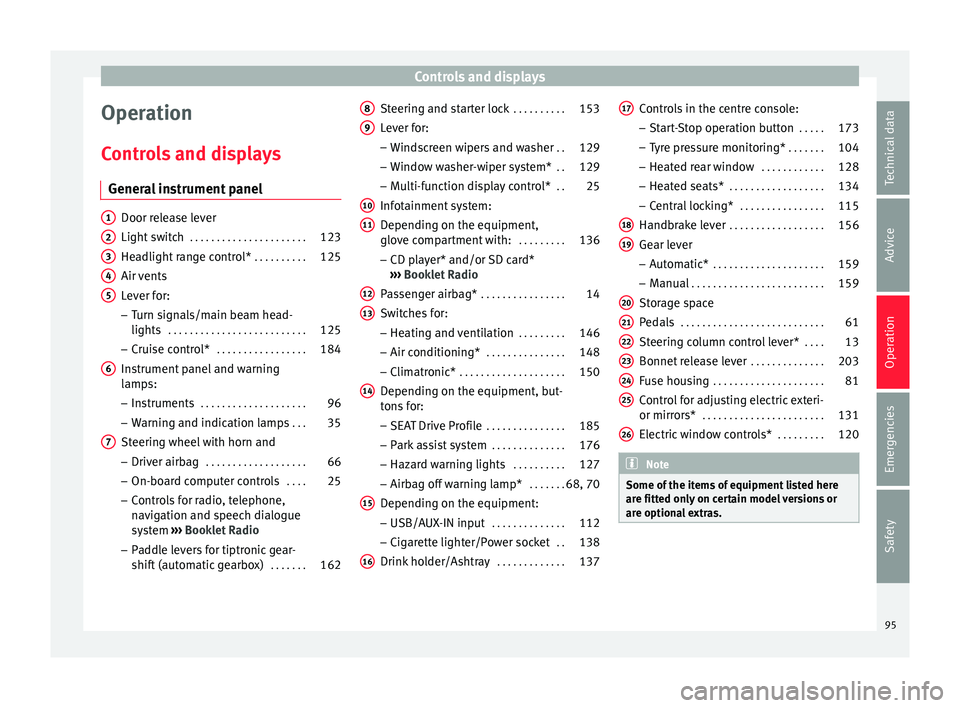
ls and displays
General instrument panel Door release lever
Light sw
it
ch . . . . . . . . . . . . . . . . . . . . . . 123
Headlight range control* . . . . . . . . . .125
Air vents
Lever f
or:
– Turn signals/main beam head-
lights . . . . . . . . . . . . . . . . . . . . . . . . . . 125
– Crui se c
ontrol* . . . . . . . . . . . . . . . . . 184
Instrument panel and warning
lamp s:
– In
struments . . . . . . . . . . . . . . . . . . . . 96
– Warnin g and indic
ation lamps . . .35
Steering wheel with horn and – Driver airb ag . . . . . . . . . . . . . . . . . . . 66
– On-boar d c
omputer controls . . . .25
– Contro
ls for radio, telephone,
navigation and speech dialogue
system ›››
Booklet Radio
– Paddle levers for tiptronic gear-
shift (automatic gearbox) . . . . . . .162
1 2
3
4
5
6
7 Steering and starter lock
. . . . . . . . . .153
Lever for: – Wind
s
creen wipers and washer . .129
– Window w
asher-wiper system* . .129
– Multi-f
unction display control* . .25
Infotainment system:
Depending on the equipment,
glo
ve compartment with: . . . . . . . . .136
– CD pla
yer* and/or SD card*
››› Booklet Radio
Passenger airbag* . . . . . . . . . . . . . . . . 14
Switches for:
– Heating and
ventilation . . . . . . . . . 146
– Air conditionin g* . . . . . . . . . . . . . . . 148
– C
limatr
onic* . . . . . . . . . . . . . . . . . . . . 150
Depending on the equipment, but-
ton s
for:
– SEAT Drive Profile . . . . . . . . . . . . . . . 185
– Park a
ssist system . . . . . . . . . . . . . . 176
– Hazard w
arning lights . . . . . . . . . .127
– Airbag off w
arning lamp* . . . . . . .68, 70
Depending on the equipment:
– USB/AUX -IN inp
ut . . . . . . . . . . . . . . 112
– Cig ar
ette lighter/Power socket . .138
Drink holder/Ashtray . . . . . . . . . . . . .137
8 9
10
11
12
13
14
15
16 Controls in the centre console:
– St ar
t
-Stop operation button . . . . .173
– Tyr
e pressure monitoring* . . . . . . .104
– Heated r
ear window . . . . . . . . . . . . 128
– Heated se
ats* . . . . . . . . . . . . . . . . . . 134
– Central
locking* . . . . . . . . . . . . . . . . 115
Handbrake lever . . . . . . . . . . . . . . . . . . 156
Gear lever – Automatic* . . . . . . . . . . . . . . . . . . . . . 159
– M
anual . . . . . . . . . . . . . . . . . . . . . . . . . 159
Stor
age space
Pedal
s . . . . . . . . . . . . . . . . . . . . . . . . . . . 61
Steering column control lever* . . . .13
Bonnet release lever . . . . . . . . . . . . . .203
Fuse housing . . . . . . . . . . . . . . . . . . . . . 81
Control for adjusting electric exteri-
or mirrors* . . . . . . . . . . . . . . . . . . . . . . . 131
El
ectric window controls* . . . . . . . . .120 Note
Some of the items of equipment listed here
are fitt ed on
ly on certain model versions or
are optional extras. 17
18
19
20
21
22
23
24
25
26
95
Technical data
Advice
Operation
Emergencies
Safety