change time Seat Ibiza 5D 2015 Owner's Guide
[x] Cancel search | Manufacturer: SEAT, Model Year: 2015, Model line: Ibiza 5D, Model: Seat Ibiza 5D 2015Pages: 248, PDF Size: 4.77 MB
Page 153 of 248
Air conditioning
Climatronic description
C oo
lin
g only works if the following conditions
are met:
● The engine is running
● the outside temperature is above +2°C
(+36°F);
● A/C
18
› ››
Fig. 167
sw
itched on.
Starting the Climatronic
The corresponding function will be switched
on when a button is pressed, turning on the
air conditioniNG if it was switched off, with
the exception of button 17
› ›
› Fig. 167
(recir-
culation)
Switching off the Climatronic
● Turn control 10 to the left until the seg-
ments of
c
olumn 9
› ›
› Fig. 167 switch off.
● After 1 second has elapsed, turn the control
again t
o switch off the display.
In order to ensure engines subject to heavy
loads are cooled, the air conditioning com-
pressor is switched off in the event of high
coolant temperatures.
Recommended setting for all seasons of the
year
● Set the required temperature. We recom-
mend +22 °C (72°F).
● Pre
ss the AUTO button
13
› ›
› Fig. 167
.●
Adjust
vents 3 and 4 ››› page 146 so that
the air flow is directed slightly upwards.
Change between degrees Centigrade and de-
grees Fahrenheit
Keep the AUTO and
A/C
› ››
Fig. 167
b
uttons
held down for 2 seconds at the same time.
The data is displayed on the screen in the
units required. Note
● A v i
sit to the specialised service once a
year is recommended to clean the Climatronic
system.
● The interior temperature sensor 11 ›››
Fig. 167 is at
the bottom. Do not cover it
with stickers or the like, as this could have a
negative effect on Climatronic operations. Automatic mode
Automatic mode is used to maintain a con-
s
t
ant
temperature and demist the windows
inside the vehicle.
Switching on automatic mode
● Set the interior temperature between +16°C
(+64°F) and +29°C (+84°F).
● Adjus
t vents 3 and 4 ›››
page 146 so that
the air flow is directed slightly upwards. ●
Pres
s the AUTO button
13
› ››
Fig. 167
and
AUTO di
splayed on the screen.
Automatic mode is switched off by pressing
the air distribution buttons or increasing or
decreasing the blower speed. However, the
temperature remains regulated.
Adjusting the temperature ●
When you switch on the ignition, control 1 ›››
Fig. 167 can be u sed t
o set the required in-
terior temperature.
It is possible to select interior temperatures
from +16°C (+64°F) to +29°C (+84°F). In this
range the temperature is regulated automati-
cally. If a temperature below +16°C (+64°F) is
selected, “LO” is displayed on the screen. If a
temperature above +29°C (+84°F) is selected,
“HI” is displayed on the screen. At both ex-
tremes, Climatronic works at maximum cool-
ing or heating power, respectively. The tem-
perature is not regulated.
In the event of prolonged, irregular distribu-
tion of the air flow from the outlets (particu-
larly the footwells) and significant differen-
ces in temperature, e.g. on leaving the vehi-
cle, sensitive people may catch cold.
151
Technical data
Advice
Operation
Emergencies
Safety
Page 158 of 248
Operation
start it using the battery of another vehicle.
Ple
a
se observe and follow the notes on the
››› page 52, How to jump start. For the sake of the environment
Do not warm-up the engine by running the
en gine w ith the
vehicle stationary. You
should drive off as soon as you start the en-
gine. This helps the engine reach operating
temperature faster and reduces emissions. Switching off the engine
–
Stop the vehicle.
– Turn the ignition key to position ››
›
Fig. 168
1 .
Af t
er sw
itching the engine off, the radiator
fan may run on for up to 10 minutes. It is also
possible that the fan turns itself on once
more if the coolant temperature increases
due to the heat accumulated in the engine
compartment or due to its prolonged expo-
sure to solar radiation. WARNING
● Never sw it
ch the engine off until the vehi-
cle is completely stationary.
● The brake servo works only when the en-
gine is ru
nning. With the engine switched off,
more strength is needed to brake. As normal brake operation cannot be performed, risk of
acc
ident
s and serious injury may exist.
● The steering lock can be immediately
block
ed once the key is removed from the ig-
nition. The vehicle cannot be steered. Risk of
accident.
● Power-assisted steering does not work
when the engine is
off, and more strength is
needed to turn the wheel.
● If the key is removed from the ignition lock
the steerin
g lock could be engaged and vehi-
cle steering would not work. CAUTION
When the engine has been running under a
heavy lo
ad for a long period, heat can accu-
mulate in the engine compartment and cause
engine damage. For this reason, idle the en-
gine for approximately 2 minutes before
switching it off. Braking and parking
Br ak
in
g capacity and braking distance The efficiency of the brakes depends directly
on the br
ak
e p
ad wear. This wear depends to
a great extent on the conditions under which
the vehicle is operated and the way the vehi-
cle is driven. If you often drive in town, drive
short distances or have a sporty driving style,
we recommend that you have the thickness of your brake pads checked by technical serv-
ices
more frequently than recommended in
the Maintenance Programme.
If you drive with wet brakes, for example, af-
ter crossing areas of water, on days of heavy
rainfall or even after washing the car, the ef-
fect of the brakes is reduced as the brake
discs are wet or even frozen (in winter): in
this case, the brakes should be “dried” by
pressing the brake pedal several times. WARNING
Longer braking distances and faults in the
brak e sy
stem increase the risk of accidents.
● New brake pads must be run in and do not
have the c
orrect friction during the first
200 km. This reduced braking capacity may
be compensated for by pressing on the brake
pedal a little harder, which also applies when
the brake pads have to be changed further
on.
● If brakes are wet or frozen, or if you are
driving on r
oads which have been salted,
braking power may be lower than normal.
● On steep slopes, if brakes are excessively
used, they w
ill overheat. Before driving down
a long steep slope, it is advisable to reduce
speed and change down into a lower gear or
range (depending on the type of transmis-
sion). Thus, make use of engine braking and
relieve the brakes.
● Never let the brakes “drag” by applying
light pre
ssure. Continuous braking will cause156
Page 160 of 248

Operation
– Ap p
ly
the handbrake.
– Put it in 1st gear.
– Switch the engine off and remove the key
from the ignition. T
urn the steering wheel
slightly to engage the steering lock.
– Always take you keys with you when you
leav
e the vehicle ››› .
Ad dition
a
l notes on parking the vehicle on
gradients:
Turn the steering wheel so that the vehicle
rolls against the kerb if it started to roll.
● If the vehicle is parked facing downhil
l,
turn the front wheels so that they point to-
wards the kerb .
● If the vehicle is parked facing uphill
, turn
the front wheels so that they point away from
the kerb.
● Secure the vehicle as usual by applying the
handbrak
e firmly and putting it in 1st gear. WARNING
● Tak e me
asures to reduce the risk of injury
when you leave your vehicle unattended.
● Never park where the hot exhaust system
coul
d ignite inflammable materials, such as
dry grass, low bushes, spilt fuel etc.
● Never allow vehicle occupants to remain in
the vehic
le when it is locked. They would be
unable to open the vehicle from the inside,
and could become trapped in the vehicle in an emergency. In the event of an emergency,
lock
ed door
s will delay assistance to vehicle
occupants.
● Never leave children alone in the vehicle.
They cou
ld set the vehicle in motion, for ex-
ample, by releasing the handbrake or the
gearbox lever.
● Depending on weather conditions, it may
become extr
emely hot or cold inside the vehi-
cle. This can be fatal. Hill driving assistant*
This function is only included in vehicles with
E
SC.
The hi l
l driving assistant helps the driver to
move off and upward on a hill when the vehi-
cle is stationary.
The system maintains brake pressure for ap-
proximately two seconds after the driver
takes his foot off the brake pedal to prevent
the vehicle from lurching backward when it is
started. During these 2 seconds, the driver
has enough time to release the clutch pedal
and accelerate without the vehicle moving
and without having to use the handbrake,
making start-up easier, more comfortable
and safer.
These are the basic operation conditions:
● being on a ramp or hill/slope, ●
doors c
losed,
● vehicle completely stationary,
● engine running and foot on the brake,
● besides having a gear engaged or being in
neutral f
or manual gear change and with the
selector lever at position S, D or R for an au-
tomatic gearbox.
This system is also active when reversing up-
hill. WARNING
● If y
ou do not start the vehicle immediately
after taking your foot off the brake pedal, the
vehicle may start to roll back under certain
conditions. Depress the brake pedal or use
the hand brake immediately.
● If the engine stalls, depress the brake ped-
al or u
se the hand brake immediately.
● When following a line of traffic uphill, if you
want t
o prevent the vehicle from rolling back
accidentally when starting off, hold the brake
pedal down for a few seconds before starting
off. Note
The Official Service or a specialist workshop
can t el
l you if your vehicle is equipped with
this system. 158
Page 162 of 248
Operation
Selecting the normal programme
– Put the selector lever into position D.
Sel ectin
g the s
port programme
– Put the selector lever into position S.
If y
ou select the normal programme, D, you
will drive in the economy mode, i.e. the pro-
gramme is designed to reduce fuel consump-
tion. The gearbox changes up into a higher
gear as soon as possible and down into a
lower gear as late as possible.
If you select the sport programme, S, you will
drive in a sporty mode, i.e. a programme in
which shifts into high gears are postponed in
order to use the full power of the engine.
Selector lever positions Read the additional information carefully
› ›
›
page 38
Selector lever positions
The selected gear is displayed on the side of
the selector lever and on the instrument pan-
el display. The currently selected gear for the
automatic gearbox will also be shown on the
display. Tiptronic gear indicator
If the autom
atic gearbox is shifted manually,
the selected gears are shown on the screen.
P - parking lock
When the selector lever is in this position,
the driven wheels are locked mechanically.
Position P on the lever must only be selected
if the vehicle is stationary.
To move selector lever from position P, the
locking button on the selector lever handle
must be pressed and the brake pedal de-
pressed at the same time while the ignition is
switched on.
To put the selector lever in position P, simply
press the lock button down and, if necessary,
depress the brake pedal down.
R - Reverse gear
The reverse gear is engaged in this position.
Reverse gear must be engaged only when the
vehicle is stationary and the engine is idling.
To move the selector lever to position R,
press the lock button down and, at the same
time, press the brake pedal down, with the
ignition switched on.
With the selector lever in position R and the
ignition switched on the following occurs:
● Reverse lights light up. ●
The air conditioner autom atically changes
the air recirculation mode.
● The wiper starts if the windscreen washer is
on.
● The parking distance warning system*
switc
hes on.
N - Neutral (idling)
If this position is selected, the gearbox is in
neutral. Power is not transmitted to the
wheels and the engine does not have a brak-
ing function.
Never use the N position to drive down a long
hill. There is no engine braking and the
brakes are subjected to excessive stain.
You could damage the automatic gearbox if
you drive down hills with the gearbox lever in
position N and the engine switched off.
D - Drive (forward)
In this position the gearbox automatically
changes to a lower or higher gear, according
to the engine's requirements, the driving
style and speed. The braking effect of the en-
gine when driving downhill is very limited
when the selector is in this position. The in-
strument panel display shows the selected
gear as well as the selector lever in position
D.
When travelling at speeds lower than 5 km/h
(3 mph) or when the vehicle is stationary,
160
Page 164 of 248
Operation
The selector lever lock is released as follows: – Switch the ignition on.
– Press and hold the brake pedal and press
the sel ect
or l
ever lock on the left of the se-
lector lever at the same time ››› Fig. 170.
The warning lamp on the instrument panel
lights up when the brake pedal should be ap-
plied. This is essential when the selector lev-
er is taken from the P or N positions.
Level lock only engages with the vehicle sta-
tionary at a speed of up to 5 km/h (3 mph).
At speeds of over 5 km/h (3 mph) the selec-
tor lever lock is automatically deactivated in
position N.
The selector lever lock is not engaged if the
selector lever is moved quickly through posi-
tion N (e.g. when shifting from R to D). This
makes it possible, for instance, to “rock” the
vehicle backwards and forwards if it is stuck
in snow or mud. The selector lever lock en-
gages automatically if the brake pedal is not
depressed and the lever is in position N for
more than about 1second. Selecting gears manually with Tip-
tronic mode
* Fig. 171
Changing gear with Tiptronic. Fig. 172
Steering wheel with paddle levers
f or aut
om
atic gearbox. The Tiptronic system allows the driver to se-
l
ect
g
ears manually. Changing gear with the selector lever
– Press the selector lever from position D to
the right int
o the tiptronic selector gate.
– Lightly press the selector lever forward
›››
Fig. 171 + to change up to a higher
g e
ar
.
– Lightly press the selector lever backward
›››
Fig. 171 - to change down to a lower
g e
ar
.
Changing gear with the steering wheel pad-
dle levers*
– Press the right paddle lever + towards the
s t
eerin
g wheel to change up ››› Fig. 172.
– Press the left paddle lever - towards the
s t
eerin
g wheel to change down ››› Fig. 172.
Using the paddle levers on the steering
wheel, you can access manual driving mode
regardless of the pre-selected driving mode.
General information about driving in tiptron-
ic mode
When accelerating, the automatic gearbox /
DSG automatic gearbox goes into a higher
gear a little before the engine reaches its
maximum permitted revolutions.
If a lower gear is selected, the automatic
gearbox / DSG automatic gearbox will only
change down when the engine cannot go
over its maximum permitted revolutions.
162
Page 165 of 248
Driving
If “tiptronic” is selected whilst the vehicle is
in motion and the aut om
atic
gearbox / DSG
automatic gearbox is in third gear and selec-
tor lever position D, “tiptronic” mode will
then also be in third gear.
Changing gears in the normal or sport pro-
gramme using the steering wheel paddle lev-
ers
If the paddle levers ››› Fig. 172 are used in
the normal or sport programme, the system
switches temporarily to “tiptronic” mode. To
exit “Tiptronic” mode again, press the right
paddle lever + towards the steering wheel
f or ap
pr
oximately one second. You will also
leave “tiptronic” mode if the paddle levers
are not moved for a certain time. Note
● The ge ar p
addle levers on the steering
wheel can be operated with the selector lever
in any position and with the vehicle in mo-
tion. Driving tips
The gearbox changes gear ratios automatical-
ly
a
s
the vehicle moves.
Starting
– Start the engine with the selector lever in
position
P or N. Driving
– Press and hold the brake pedal.
– Holding down the lock button (button on
the selector l
ever), select R or D.
– Release the lever and wait a little for the
gearbo
x to engage the gear (a slight move-
ment can be felt).
– Release the brake and press the accelerator
›››
in Selector lever positions on
p ag
e 161
.
Stopping briefly – If stopping for a short time, keep the vehi-
cle s
tationary by pressing the foot brake
hard to prevent the vehicle moving back-
wards on a slope or “creeping” forwards,
e.g. at traffic lights. The selector lever does
not need to be put into the positions P or N
for this.
– Do not press the accelerator.
Parkin
g
– Press and hold the brake pedal until the ve-
hicle c
omes to a standstill ››› in Selector
l ev
er po
sitions on page 161.
– Apply the handbrake.
– By pressing the lock button down, move
the selector l
ever to P and release the lock
button. Driving up and down hills
–
Press the selector lever from position “D”
to the right int
o the tiptronic selector gate.
– Lightly press the selector lever back to
chan
ge down.
Holding the car on a hill
– The brake must be always pressed down to
prevent
the vehicle from “rolling back-
wards” ››› in Selector lever positions on
p ag
e 161
. Do not try to prevent the vehicle
from “rolling backwards” by increasing the
engine speed while a range of gears is se-
lected.
Starting the vehicle up hills
– Apply the handbrake.
– With a selected gear, accelerate slowly and
at the same time, r
elease the handbrake.
The steeper the slope, the lower the needed
gear. This increases the braking effect of the
engine. For example, when driving down a
very steep slope in third gear. If the engine
brake effect is not enough, the vehicle will
speed up. The automatic gearbox automati-
cally changes up to prevent the engine over-
revving. Use the foot brake to reduce speed
and change into 3rd gear using Tiptronic*
››› in Selector lever positions on page 161.
Y our
v
ehicle has an automatic interlock
which prevents the selector lever from being »
163
Technical data
Advice
Operation
Emergencies
Safety
Page 169 of 248
Driving
must perform a cleaning cycle, as indicated
in ››
›
page 101. WARNING
● The diesel en
gine particulate filter may
reach extremely high temperatures; the vehi-
cle should be parked so that the exhaust pipe
does not come into contact with flammable
materials underneath the vehicle. Otherwise
there is a risk of fire. CAUTION
● Your v
ehicle is not designed to use biodie-
sel fuel. Never, under any circumstances re-
fuel with biodiesel. The use of biodiesel fuel
could damage the engine and the fuel sys-
tem. The addition of biodiesel to diesel by
the diesel producer in accordance with stand-
ard EN 590 is authorised and will not cause
damage to the engine or the fuel system.
● Using diesel fuel with a high sulphur con-
tent m
ay significantly reduce the useful life of
the diesel particulate filter. Your Technical
Service will be able to tell you which coun-
tries have diesel with a high sulphur content. Ecological and environmentally-
friendly
driv
in
gFuel consumption, environmental pollution
and w
e
ar t
o the engine, brakes and tyres de-
pends in large part on your driving style. By
adopting an economical driving style and an- ticipating the traffic situation ahead, you can
eas
ily reduce fuel consumption by 10-15%.
Some tips on how to help you reduce pollu-
tion while saving money are listed below.
Active cylinder management (ACT ®
)
Depending on the equipment, the vehicle
may have active cylinder management
(ACT ®
).
The active cylinder management (ACT ®
) may
automatically deactivate some of the engine
cylinders if the driving situation does not re-
quire too much power. When it is switched
off, no fuel is injected into these cylinders,
hence total fuel consumption may be re-
duced. The number of active cylinders can be
seen on the instrument panel display
››› page 30.
Drive anticipating the traffic situation
A vehicle uses most fuel when accelerating.
When you anticipate situations, you have to
brake less often and, thus, accelerate less. If
it is possible, let the vehicle roll with a gear
engaged, for example, if you see a red light
ahead. The braking effect achieved in this
way helps to reduce the wear of brakes and
tyres; emissions and fuel consumption are
reduced to zero (disconnection due to iner-
tia). Change gear early to save energy
An effective w
ay of saving fuel is to change
up quickly through the gears. Running the
engine at high rpm in the lower gears uses
an unnecessary amount of fuel.
Manual gearbox: shift up from first to second
gear as soon as possible. We recommend
that, whenever possible, you change to a
higher gear upon reaching 2000 rpm. Follow
the “recommended gear” indication that ap-
pears on the instrument panel ››› page 159.
Avoid driving at high speed
We advise you not to drive at the top speed
permitted by the vehicle. Fuel consumption,
exhaust emissions and noise levels all in-
crease very rapidly at higher speeds. Driving
at moderate speeds will help to save fuel.
Avoid idling
It is worthwhile switching off the engine
when waiting in a traffic jam, at level cross-
ings or at traffic lights with a long red phase.
The fuel saved after only 30 - 40 seconds is
greater than the amount of fuel needed to re-
start the engine.
The engine takes a long time to warm up
when it is idling. Mechanical wear and pollu-
tant emissions are also especially high dur-
ing this initial warm-up phase. It is therefore
best to drive off immediately after starting »
167
Technical data
Advice
Operation
Emergencies
Safety
Page 181 of 248
Driver assistance systems
10 km/h (6 mph) ››
› page 179, Automatic ac-
tivation. The obstacle is detected as of a dis-
tance of approx. 95 cm if the automatic con-
nection is activated in the infotainment sys-
tem. A reduced display is shown.
Automatic disconnection of Parking Aid
● Move the selector lever to position P.
● OR: accelerate to more than approx.
10 km/h (6 mph) for
ward.
Temporary suppression of sound in Parking
Aid
● Press the function button found on the
s
teering wheel.
Change from reduced view to full view
● Engage reverse gear or turn the selector
lever t
o position R.
● OR: press the car icon in reduced view.
If nec
essary, switch to the rear-assist image
(Rear View Camera “RVC”)
● Engage reverse gear or turn the selector
lever t
o position R.
● OR: Press the RVC fu
nction button.
A short confirmation signal will be heard and
the button symbol will light up yellow when
the system is switched on. Automatic activation
Fig. 178
Miniature indication of automatic ac-
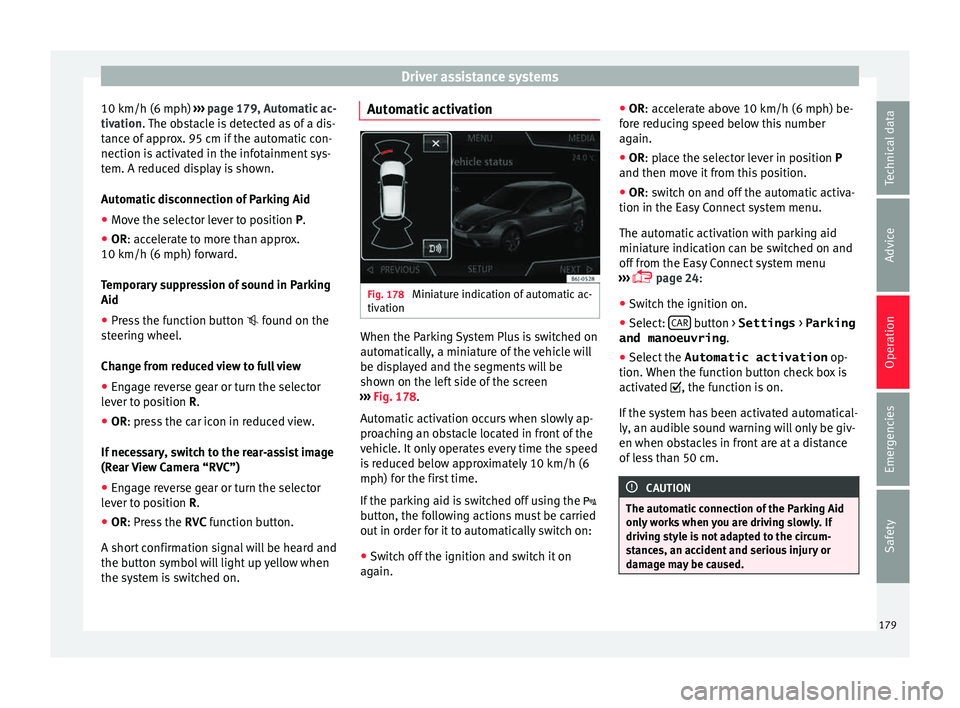
tiv ation When the Parking System Plus is switched on
aut
om
atic
ally, a miniature of the vehicle will
be displayed and the segments will be
shown on the left side of the screen
››› Fig. 178.
Automatic activation occurs when slowly ap-
proaching an obstacle located in front of the
vehicle. It only operates every time the speed
is reduced below approximately 10 km/h (6
mph) for the first time.
If the parking aid is switched off using the
button, the following actions must be carried
out in order for it to automatically switch on:
● Switch off the ignition and switch it on
again. ●
OR: ac
cel
erate above 10 km/h (6 mph) be-
fore reducing speed below this number
again.
● OR: place the selector lever in position P
and then mov
e it from this position.
● OR: switch on and off the automatic activa-
tion in the Ea
sy Connect system menu.
The automatic activation with parking aid
miniature indication can be switched on and
off from the Easy Connect system menu
››› page 24:
● Switch the ignition on.
● Select: CAR button > Settings
> Parking
and manoeuvring .
● Select the Automatic activation op-
tion. When the f
u
nction button check box is
activated , the function is on.
If the system has been activated automatical-
ly, an audible sound warning will only be giv-
en when obstacles in front are at a distance
of less than 50 cm. CAUTION
The automatic connection of the Parking Aid
only w
orks when you are driving slowly. If
driving style is not adapted to the circum-
stances, an accident and serious injury or
damage may be caused. 179
Technical data
Advice
Operation
Emergencies
Safety
Page 207 of 248
Checking and refilling levels
The specifications (VW standards) set out in
the f o
l
lowing page should appear on the con-
tainer of the service oil; when the container
displays the specific standards for petrol and
diesel engines together, it means that the oil
can be used for both types of engines.
We recommend that the oil change indicated
in the Maintenance Programme, be per-
formed by a technical service or specialised
workshop.
The correct oil specifications for your engine
are listed in the ›››
page 41.
Service intervals
Service intervals can be flexible (LongLife
service) or fixed (dependent on time/dis-
tance travelled).
If the PR code that appears on the back of the
Maintenance Programme booklet is PR QI6,
this means that your vehicle has the LongLife
service program. If it lists the codes QI1, QI2,
QI3, QI4 or QI7, the interval service is de-
pendent on the time/distance travelled.
Flexible service intervals (LongLife service
intervals*)
Special oils and processes have been devel-
oped which, depending on the characteris-
tics and individual driving profiles, enable
the extension of the oil change service (Long-
Life service intervals). Because this oil is essential for extending the
servic
e intervals, it must only be used ob-
serving the following indications:
● Avoid mixing it with oil for fixed service in-
terv
als.
● Only in exceptional circumstances, if the
engine oil
level is too low ››› page 206 and
LongLife oil is not available, it is permitted to
top up (once) with oil for fixed service inter-
vals ›››
page 41 (up to a maximum of 0.5
litres).
Fixed service intervals*
If your vehicle does not have the “LongLife
service interval” or it has been disabled (by
request), you may use oils for fixed service
intervals, which also appear in
››› page 41. In this case, your vehicle
must be serviced after a fixed interval of 1
year/15,000 km (10,000 miles)(whatever
comes first) ››› Booklet Maintenance Pro-
gramme.
● In exceptional circumstances, if the engine
oil l
evel is too low ››› page 206 and you can-
not obtain the oil specified for your vehicle,
you can add a small quantity of oil conform-
ing to the specification ACEA A2 or ACEA A3
(petrol engines) or ACEA B3 or ACEA B4 (die-
sel engines) (up to 0.5 l). Vehicles with diesel particulate filter*
The Mainten
ance Programme states whether
your vehicle is fitted with a diesel particulate
filter.
Only VW 507 00 engine oil, with reduced ash
formation, may be used in diesel engines
equipped with particulate filter. Using other
types of oil will cause a higher soot concen-
tration and reduce the life of the DPF. There-
fore:
● Avoid mixing this oil with other engine oils.
● Only in exceptional circumstances, if the
engine oil
level is too low ››› page 206 and
you cannot obtain the oil specified for your
vehicle, you can use a small quantity of oil
(once) conforming to the VW 506 00,
VW 506 01, VW 505 00, VW 505 01 or
ACEA B3/ACEA B4 specification. (up to 0.5 l). Note
Before a long trip, we recommend finding an
engine oi l
that conforms to the correspond-
ing VW specifications and recommend keep-
ing it in the vehicle. This way, the correct en-
gine oil will always be available for a top-up if
needed. 205
Technical data
Advice
Operation
Emergencies
Safety
Page 210 of 248
Advice
●
If w ork
ing inside the engine compartment,
remember that, even when the ignition is
switched off, the radiator fan may start up au-
tomatically, and therefore there is a risk of in-
jury. WARNING
If there is not enough anti-freeze in the cool-
ant sys
tem, the engine may fail leading to se-
rious damage.
● Please make sure that the percentage of
additiv
e is correct with respect to the lowest
expected ambient temperature in the zone in
which the vehicle is to be used.
● When the outside temperature is very low,
the cool
ant could freeze and the vehicle
would be immobilised. In this case, the heat-
ing would not work either and inadequately
dressed passengers could die of cold. CAUTION
Do not top up the expansion tank with cool-
ant fluid if it
is empty! Air could enter the
cooling system. In this case, stop driving.
Seek specialist assistance. Otherwise, there
is a risk of engine damage. CAUTION
The original additives should never be mixed
with c oo
lants which are not approved by
SEAT. Otherwise, you run the risk of causing severe damage to the engine and the engine
coo
lin
g system.
● If the fluid in the expansion tank is not pur-
ple b
ut is, for example, brown, this indicates
that the G13 additive has been mixed with an
inadequate coolant. The coolant must be
changed as soon as possible if this is the
case! This could result in serious faults and
engine damage. For the sake of the environment
Coolants and additives can contaminate the
en vir
onment. If any fluids are spilled, they
should be collected and correctly disposed
of, with respect to the environment. Brake fluid
Chec k
in
g the brake fluid level Read the additional information carefully
› ›
›
page 43
The position of the brake fluid reservoir is
shown in the corresponding engine compart-
ment illustration ››› page 204. The brake fluid
reservoir has a black and yellow cap.
The brake fluid level drops slightly when the
vehicle is being used as the brake pads are
automatically adjusted as they wear. However, if the level goes down noticeably in
a short time, or dr
ops below the “MIN” mark,
there may be a leak in the brake system. A
display on the instrument panel will warn you
if the brake fluid level is too low ››› page 100. WARNING
Before opening the bonnet to check the brake
fluid lev el, r
ead and observe the warnings
››› page 201. Changing the brake fluid
The Maintenance Programme indicates brake
fluid c
h
an
ge intervals.
We recommend that you have the brake fluid
changed by a Technical Service.
Before opening the bonnet, please read and
follow the warnings ››› in safety notes for
w ork
in the en
gine compartment on
page 201 in section “Safety notes for work-
ing in the engine compartment”.
In the course of time, brake fluid becomes
hygroscopic and absorbs water from the am-
bient air. If the water content in the brake flu-
id is too high, the brake system could cor-
rode. This also considerably reduces the boil-
ing point of the brake fluid. Heavy use of the
brakes may then cause a vapour lock which
could impair the braking effect.
208