gearbox Seat Ibiza 5D 2015 Owner's Guide
[x] Cancel search | Manufacturer: SEAT, Model Year: 2015, Model line: Ibiza 5D, Model: Seat Ibiza 5D 2015Pages: 248, PDF Size: 4.77 MB
Page 159 of 248
Driving
the brakes to overheat and the braking
dis
t
ance will increase. Apply and then release
the brakes alternately.
● Never let the vehicle run with the engine
switc
hed off. The braking distance is in-
creased considerably when the brake servo is
not active.
● If the brake fluid loses its viscosity and is
subj
ected to heavy use, vapour bubbles can
form in the brake system. This reduces the ef-
ficiency of the brakes.
● Non-standard or damaged front spoilers
coul
d restrict the airflow to the brakes and
cause them to overheat. Before purchasing
accessories please observe the relevant in-
structions ››› page 190, Modifications.
● If a brake system circuit fails, the braking
dist
ance will be increased considerably. Con-
tact a specialised workshop immediately and
avoid unnecessary journeys. Handbrake
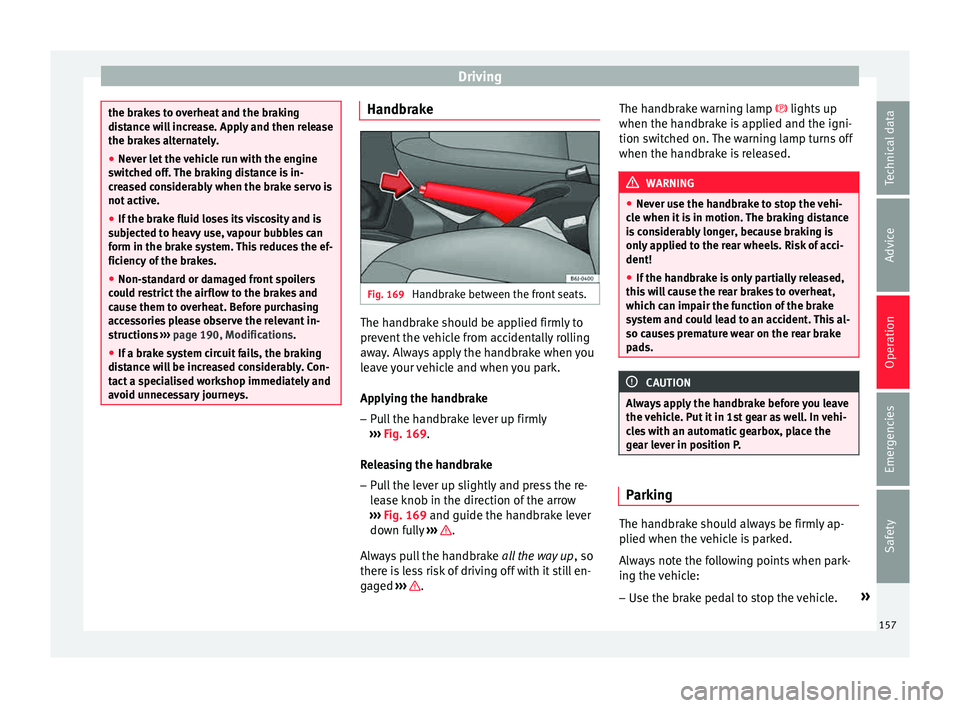
Fig. 169
Handbrake between the front seats. The handbrake should be applied firmly to
pr
ev
ent
the vehicle from accidentally rolling
away. Always apply the handbrake when you
leave your vehicle and when you park.
Applying the handbrake
– Pull the handbrake lever up firmly
›››
Fig. 169.
Releasing the handbrake
– Pull the lever up slightly and press the re-
lea
se knob in the direction of the arrow
››› Fig. 169 and guide the handbrake lever
down fully ››› .
A lw
a
ys pull the handbrake all the way up, so
there is less risk of driving off with it still en-
gaged ››› .The handbrake warning lamp lights
up
when the h andbr
ake is applied and the igni-
tion switched on. The warning lamp turns off
when the handbrake is released. WARNING
● Never u se the h
andbrake to stop the vehi-
cle when it is in motion. The braking distance
is considerably longer, because braking is
only applied to the rear wheels. Risk of acci-
dent!
● If the handbrake is only partially released,
this w
ill cause the rear brakes to overheat,
which can impair the function of the brake
system and could lead to an accident. This al-
so causes premature wear on the rear brake
pads. CAUTION
Always apply the handbrake before you leave
the v ehic
le. Put it in 1st gear as well. In vehi-
cles with an automatic gearbox, place the
gear lever in position P. Parking
The handbrake should always be firmly ap-
p
lied when the
v
ehicle is parked.
Always note the following points when park-
ing the vehicle: – Use the brake pedal to stop the vehicle. »
157
Technical data
Advice
Operation
Emergencies
Safety
Page 160 of 248

Operation
– Ap p
ly
the handbrake.
– Put it in 1st gear.
– Switch the engine off and remove the key
from the ignition. T
urn the steering wheel
slightly to engage the steering lock.
– Always take you keys with you when you
leav
e the vehicle ››› .
Ad dition
a
l notes on parking the vehicle on
gradients:
Turn the steering wheel so that the vehicle
rolls against the kerb if it started to roll.
● If the vehicle is parked facing downhil
l,
turn the front wheels so that they point to-
wards the kerb .
● If the vehicle is parked facing uphill
, turn
the front wheels so that they point away from
the kerb.
● Secure the vehicle as usual by applying the
handbrak
e firmly and putting it in 1st gear. WARNING
● Tak e me
asures to reduce the risk of injury
when you leave your vehicle unattended.
● Never park where the hot exhaust system
coul
d ignite inflammable materials, such as
dry grass, low bushes, spilt fuel etc.
● Never allow vehicle occupants to remain in
the vehic
le when it is locked. They would be
unable to open the vehicle from the inside,
and could become trapped in the vehicle in an emergency. In the event of an emergency,
lock
ed door
s will delay assistance to vehicle
occupants.
● Never leave children alone in the vehicle.
They cou
ld set the vehicle in motion, for ex-
ample, by releasing the handbrake or the
gearbox lever.
● Depending on weather conditions, it may
become extr
emely hot or cold inside the vehi-
cle. This can be fatal. Hill driving assistant*
This function is only included in vehicles with
E
SC.
The hi l
l driving assistant helps the driver to
move off and upward on a hill when the vehi-
cle is stationary.
The system maintains brake pressure for ap-
proximately two seconds after the driver
takes his foot off the brake pedal to prevent
the vehicle from lurching backward when it is
started. During these 2 seconds, the driver
has enough time to release the clutch pedal
and accelerate without the vehicle moving
and without having to use the handbrake,
making start-up easier, more comfortable
and safer.
These are the basic operation conditions:
● being on a ramp or hill/slope, ●
doors c
losed,
● vehicle completely stationary,
● engine running and foot on the brake,
● besides having a gear engaged or being in
neutral f
or manual gear change and with the
selector lever at position S, D or R for an au-
tomatic gearbox.
This system is also active when reversing up-
hill. WARNING
● If y
ou do not start the vehicle immediately
after taking your foot off the brake pedal, the
vehicle may start to roll back under certain
conditions. Depress the brake pedal or use
the hand brake immediately.
● If the engine stalls, depress the brake ped-
al or u
se the hand brake immediately.
● When following a line of traffic uphill, if you
want t
o prevent the vehicle from rolling back
accidentally when starting off, hold the brake
pedal down for a few seconds before starting
off. Note
The Official Service or a specialist workshop
can t el
l you if your vehicle is equipped with
this system. 158
Page 161 of 248
Driving
Manual gearbox Driv in
g w
ith manual gearboxRead the additional information carefully
›› ›
page 37
Certain versions of the model may include a
6-speed manual gearbox, and its diagram is
shown on the gearbox lever.
The reverse gear can only be engaged when
the car is stationary. When the engine is run-
ning and before engaging this gear, wait
about 6 seconds with the clutch pressed
down thoroughly in order to protect the gear-
box.
The reverse lights switch on when the reverse
gear is selected and the ignition is on. WARNING
● When the engine i s
running, the vehicle
will start to move as soon as a gear is engag-
ed and the clutch released.
● Never select the reverse gear when the ve-
hicle i
s in motion. Risk of accident. Note
● Do not r e
st your hand on the gear lever
while driving. The pressure of your hand
could cause premature wear on the selector
forks in the gearbox. ●
When ch an
ging gear, you should always
depress the clutch fully to avoid unnecessary
wear and damage.
● Do not “slip” the clutch to hold the vehicle
on a hill
. This causes premature wear and
damage to the clutch.
● Do not leave your foot on the clutch pedal;
although the pre
ssure may seem insignifi-
cant, it can cause the premature wear of the
clutch plate. Use the foot rest when you do
not need to change gear. Gear-change indicator
3 V
alid for vehicles: with a manual gearbox
The r
ecommended gear for saving fuel is in-
dicated on the dash screen of certain vehi-
cles during driving.
DisplayMeaning
The optimal gear is selected.
Changing to a higher gear is recommended.
Changing to a lower gear is recommended.
Information regarding the “cleanliness” of
the die
sel
p
articulate filter
The exhaust system manager detects that the
diesel particulate filter is nearly saturated
and contributes to self-cleaning by recom-
mending the optimal gear. For this purpose, it might be necessary to drive momentarily
with a high rpm
››
› page 101. WARNING
The gear change indicator is only an auxiliary
fu nction and in no c
ase should be a substi-
tute for careful driving.
● The responsibility of choosing the correct
gear dependin
g on the situation (e.g. over-
taking, driving up or down a slope or towing a
trailer) lies with the driver. For the sake of the environment
Selecting the correct gear can help to save
fuel . Note
The recommended gear display is switched
off when the c lut
ch pedal is pressed. Automatic gearbox*
Driv ing pr
ogrammes Read the additional information carefully
› ›
›
page 38
The automatic gearbox has got two gearbox
programmes. »
159
Technical data
Advice
Operation
Emergencies
Safety
Page 162 of 248
Operation
Selecting the normal programme
– Put the selector lever into position D.
Sel ectin
g the s
port programme
– Put the selector lever into position S.
If y
ou select the normal programme, D, you
will drive in the economy mode, i.e. the pro-
gramme is designed to reduce fuel consump-
tion. The gearbox changes up into a higher
gear as soon as possible and down into a
lower gear as late as possible.
If you select the sport programme, S, you will
drive in a sporty mode, i.e. a programme in
which shifts into high gears are postponed in
order to use the full power of the engine.
Selector lever positions Read the additional information carefully
› ›
›
page 38
Selector lever positions
The selected gear is displayed on the side of
the selector lever and on the instrument pan-
el display. The currently selected gear for the
automatic gearbox will also be shown on the
display. Tiptronic gear indicator
If the autom
atic gearbox is shifted manually,
the selected gears are shown on the screen.
P - parking lock
When the selector lever is in this position,
the driven wheels are locked mechanically.
Position P on the lever must only be selected
if the vehicle is stationary.
To move selector lever from position P, the
locking button on the selector lever handle
must be pressed and the brake pedal de-
pressed at the same time while the ignition is
switched on.
To put the selector lever in position P, simply
press the lock button down and, if necessary,
depress the brake pedal down.
R - Reverse gear
The reverse gear is engaged in this position.
Reverse gear must be engaged only when the
vehicle is stationary and the engine is idling.
To move the selector lever to position R,
press the lock button down and, at the same
time, press the brake pedal down, with the
ignition switched on.
With the selector lever in position R and the
ignition switched on the following occurs:
● Reverse lights light up. ●
The air conditioner autom atically changes
the air recirculation mode.
● The wiper starts if the windscreen washer is
on.
● The parking distance warning system*
switc
hes on.
N - Neutral (idling)
If this position is selected, the gearbox is in
neutral. Power is not transmitted to the
wheels and the engine does not have a brak-
ing function.
Never use the N position to drive down a long
hill. There is no engine braking and the
brakes are subjected to excessive stain.
You could damage the automatic gearbox if
you drive down hills with the gearbox lever in
position N and the engine switched off.
D - Drive (forward)
In this position the gearbox automatically
changes to a lower or higher gear, according
to the engine's requirements, the driving
style and speed. The braking effect of the en-
gine when driving downhill is very limited
when the selector is in this position. The in-
strument panel display shows the selected
gear as well as the selector lever in position
D.
When travelling at speeds lower than 5 km/h
(3 mph) or when the vehicle is stationary,
160
Page 163 of 248
Driving
press the brake pedal to change the selector
l ev
er fr
om position N to position D.
S - Standard driving position (Sport pro-
gramme)
When the selector lever is in position S, it will
automatically change up into a higher gear
later, and change down into a low gear, if
compared with position D. This way, it is pos-
sible to take full advantage of the engine re-
serve power, depending on the engine de-
mand, driving style and speed. The braking
effect of the engine when driving downhill is
very limited. On the instrument panel display
the selected gear is shown as well as the se-
lector lever to position S.
To select gear range S, press the lock button
on the selector lever. WARNING
● As a driv er
, you should never leave your ve-
hicle if the engine is running and a gear range
is engaged. If you have to leave your vehicle
while the engine is running, you must apply
the parking brake and put the selector lever
in position P.
● If the engine is running and if D or R is en-
gaged,
you will need to hold the car on the
foot brake. The car will creep forward as the
power transmission is not fully interrupted
even when the engine is idling.
● Never accelerate when moving the selector
lever or
you may cause an accident. ●
Never mo v
e the selector lever to R or P
when driving. Risk of accident!
● Before driving down a long, steep slope, it
is a
dvisable to reduce speed and change into
a lower gear.
● If you stop the vehicle up hill, always hold
the foot br
ake strongly depressed down to
stop it from rolling back.
● Never allow the brake to rub and do not use
the brake ped
al too often or for long periods.
Constant braking will cause the brakes to
overheat and will considerably reduce the
brake effect. This increases the braking dis-
tance and could cause the brake system to
fail.
● Never allow the car to roll down a gradient
with the ge
ar in neutral N, or in selector lever
position D, even if the engine is not running.
● If the vehicle moves with no control, an ac-
cident and seriou
s injury may occur. WARNING
Never switch the engine off until the vehicle
is s
tationary. You could lose control of your
vehicle. This could cause an accident and se-
rious injury.
● The airbags and belt tensioners do not
work when the ignition i
s switched off.
● The brake servo does not work with the en-
gine off. Y
ou need more force to stop the vehi-
cle. ●
Po w
er steering does not work when the en-
gine is not running. That is why it is much
more difficult to turn the steering wheel.
● Never remove the key from the ignition if
the vehic
le is in motion. The steering lock
could suddenly engage, and you would not be
able to steer the vehicle. CAUTION
If you allow the vehicle to move when the en-
gine i s sw
itched off or with the selector lever
in position “N”, take your foot off the acceler-
ator and wait until the engine starts idling
before returning to position “D”. Selector lever lock
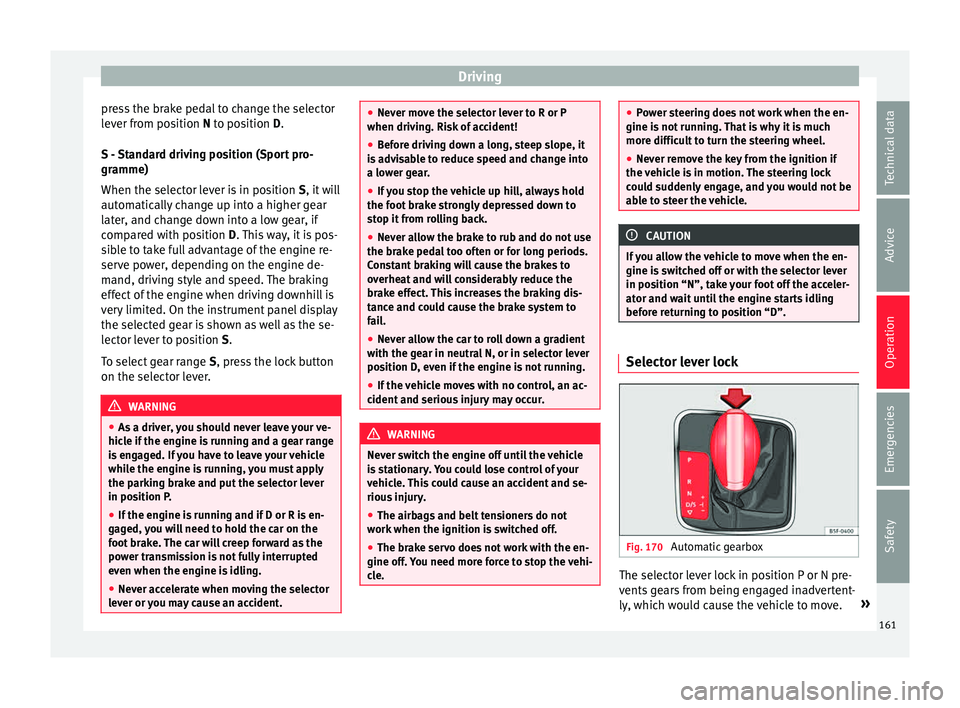
Fig. 170
Automatic gearbox The selector lever lock in position P or N pre-
v
ents
g
ears from being engaged inadvertent-
ly, which would cause the vehicle to move. »
161
Technical data
Advice
Operation
Emergencies
Safety
Page 164 of 248
Operation
The selector lever lock is released as follows: – Switch the ignition on.
– Press and hold the brake pedal and press
the sel ect
or l
ever lock on the left of the se-
lector lever at the same time ››› Fig. 170.
The warning lamp on the instrument panel
lights up when the brake pedal should be ap-
plied. This is essential when the selector lev-
er is taken from the P or N positions.
Level lock only engages with the vehicle sta-
tionary at a speed of up to 5 km/h (3 mph).
At speeds of over 5 km/h (3 mph) the selec-
tor lever lock is automatically deactivated in
position N.
The selector lever lock is not engaged if the
selector lever is moved quickly through posi-
tion N (e.g. when shifting from R to D). This
makes it possible, for instance, to “rock” the
vehicle backwards and forwards if it is stuck
in snow or mud. The selector lever lock en-
gages automatically if the brake pedal is not
depressed and the lever is in position N for
more than about 1second. Selecting gears manually with Tip-
tronic mode
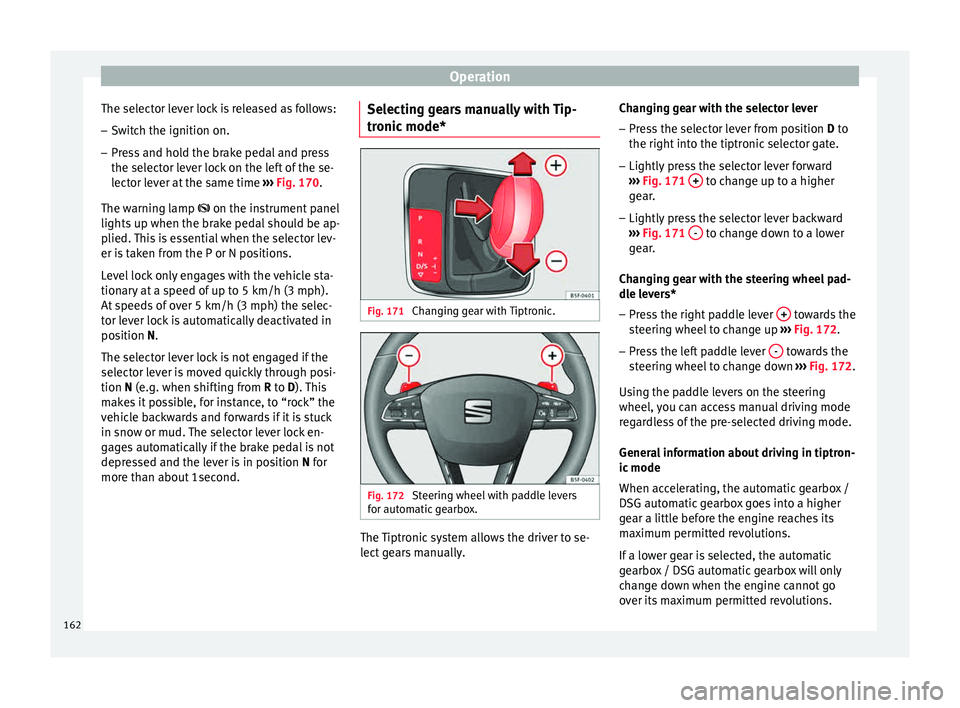
* Fig. 171
Changing gear with Tiptronic. Fig. 172
Steering wheel with paddle levers
f or aut
om
atic gearbox. The Tiptronic system allows the driver to se-
l
ect
g
ears manually. Changing gear with the selector lever
– Press the selector lever from position D to
the right int
o the tiptronic selector gate.
– Lightly press the selector lever forward
›››
Fig. 171 + to change up to a higher
g e
ar
.
– Lightly press the selector lever backward
›››
Fig. 171 - to change down to a lower
g e
ar
.
Changing gear with the steering wheel pad-
dle levers*
– Press the right paddle lever + towards the
s t
eerin
g wheel to change up ››› Fig. 172.
– Press the left paddle lever - towards the
s t
eerin
g wheel to change down ››› Fig. 172.
Using the paddle levers on the steering
wheel, you can access manual driving mode
regardless of the pre-selected driving mode.
General information about driving in tiptron-
ic mode
When accelerating, the automatic gearbox /
DSG automatic gearbox goes into a higher
gear a little before the engine reaches its
maximum permitted revolutions.
If a lower gear is selected, the automatic
gearbox / DSG automatic gearbox will only
change down when the engine cannot go
over its maximum permitted revolutions.
162
Page 165 of 248
Driving
If “tiptronic” is selected whilst the vehicle is
in motion and the aut om
atic
gearbox / DSG
automatic gearbox is in third gear and selec-
tor lever position D, “tiptronic” mode will
then also be in third gear.
Changing gears in the normal or sport pro-
gramme using the steering wheel paddle lev-
ers
If the paddle levers ››› Fig. 172 are used in
the normal or sport programme, the system
switches temporarily to “tiptronic” mode. To
exit “Tiptronic” mode again, press the right
paddle lever + towards the steering wheel
f or ap
pr
oximately one second. You will also
leave “tiptronic” mode if the paddle levers
are not moved for a certain time. Note
● The ge ar p
addle levers on the steering
wheel can be operated with the selector lever
in any position and with the vehicle in mo-
tion. Driving tips
The gearbox changes gear ratios automatical-
ly
a
s
the vehicle moves.
Starting
– Start the engine with the selector lever in
position
P or N. Driving
– Press and hold the brake pedal.
– Holding down the lock button (button on
the selector l
ever), select R or D.
– Release the lever and wait a little for the
gearbo
x to engage the gear (a slight move-
ment can be felt).
– Release the brake and press the accelerator
›››
in Selector lever positions on
p ag
e 161
.
Stopping briefly – If stopping for a short time, keep the vehi-
cle s
tationary by pressing the foot brake
hard to prevent the vehicle moving back-
wards on a slope or “creeping” forwards,
e.g. at traffic lights. The selector lever does
not need to be put into the positions P or N
for this.
– Do not press the accelerator.
Parkin
g
– Press and hold the brake pedal until the ve-
hicle c
omes to a standstill ››› in Selector
l ev
er po
sitions on page 161.
– Apply the handbrake.
– By pressing the lock button down, move
the selector l
ever to P and release the lock
button. Driving up and down hills
–
Press the selector lever from position “D”
to the right int
o the tiptronic selector gate.
– Lightly press the selector lever back to
chan
ge down.
Holding the car on a hill
– The brake must be always pressed down to
prevent
the vehicle from “rolling back-
wards” ››› in Selector lever positions on
p ag
e 161
. Do not try to prevent the vehicle
from “rolling backwards” by increasing the
engine speed while a range of gears is se-
lected.
Starting the vehicle up hills
– Apply the handbrake.
– With a selected gear, accelerate slowly and
at the same time, r
elease the handbrake.
The steeper the slope, the lower the needed
gear. This increases the braking effect of the
engine. For example, when driving down a
very steep slope in third gear. If the engine
brake effect is not enough, the vehicle will
speed up. The automatic gearbox automati-
cally changes up to prevent the engine over-
revving. Use the foot brake to reduce speed
and change into 3rd gear using Tiptronic*
››› in Selector lever positions on page 161.
Y our
v
ehicle has an automatic interlock
which prevents the selector lever from being »
163
Technical data
Advice
Operation
Emergencies
Safety
Page 166 of 248
Operation
put into a position for driving forwards or in
r ev
er
se from positions P or N if the brake
pedal is not depressed.
The ignition key cannot be removed unless
the selector lever is in position P.
Control lamp “Pressing brake pedal”
When the warning lamp next to the selector
lever lights up, press the brake pedal. This is
necessary when the automatic gearbox selec-
tor lever is moved out of positions P or N. A
text message or instructions to perform nec-
essary operations may appear on the instru-
ment panel. CAUTION
● If y
ou stop the vehicle up hills, do not at-
tempt to stop it from rolling back by depress-
ing the accelerator when a gear has been se-
lected. Otherwise, the automatic gearbox
may overheat causing damage. Pull the hand-
brake up or fully depress the brake pedal to
prevent the vehicle from rolling away.
● If you allow the vehicle to roll when the en-
gine is not
running, or with the selector lever
in position N, a lack of lubrication in the auto-
matic gearbox will damage it. Kick-down feature
This feature allows maximum acceleration. If you press the accelerator down thoroughly,
the g
e
arbo
x automatically changes down, de-
pending on speed and engine speed, into a
lower gear to take full advantage of give the
vehicle maximum acceleration.
The gearbox does not change gear until the
engine reaches the maximum determined en-
gine speed for the gear. WARNING
You could lose control of the vehicle if you ac-
cel er
ate on slippery road surfaces. Risk of se-
rious injury.
● Be particularly careful when using the kick-
down fe
atures on slippery road surfaces. With
a fast acceleration, the vehicle could lose
traction and skid.
● You should use the kick-down feature only
when traffic and w
eather conditions allow it
to be used safely. Gearbox malfunctions
Gearbox: Fault! Stop the ve-
hicle and place the lever in the
position P.
There i s
a fault in the gearbox. Stop the vehi-
cle in a safe place and do not continue driv-
ing. Seek specialist assistance.
Gearbox: System fault! You
may continue driving. Have the fault corrected by a specialised
work
shop w
ithout delay.
Gearbox: System fault! You
can continue driving with re-
strictions. Reverse gear disa‐
bled
Take the vehicle to a specialised workshop
and have the fault repaired without delay. Gearbox: System fault! You
can continue driving in D until
switching off the engine
Stop the vehicle in a safe place well away
from moving traffic. Seek specialist assis-
tance. Gearbox: too hot. Adapt your
driving accordingly
Continue driving at moderate speeds. When
the warning lamp switches off, you can con-
tinue driving in a normal manner. Gearbox: press the brake and
engage a gear again.
If the fault was caused by a gearbox with a
high temperature, this driver message will be
displayed when the gearbox has cooled
again.
164
Page 169 of 248
Driving
must perform a cleaning cycle, as indicated
in ››
›
page 101. WARNING
● The diesel en
gine particulate filter may
reach extremely high temperatures; the vehi-
cle should be parked so that the exhaust pipe
does not come into contact with flammable
materials underneath the vehicle. Otherwise
there is a risk of fire. CAUTION
● Your v
ehicle is not designed to use biodie-
sel fuel. Never, under any circumstances re-
fuel with biodiesel. The use of biodiesel fuel
could damage the engine and the fuel sys-
tem. The addition of biodiesel to diesel by
the diesel producer in accordance with stand-
ard EN 590 is authorised and will not cause
damage to the engine or the fuel system.
● Using diesel fuel with a high sulphur con-
tent m
ay significantly reduce the useful life of
the diesel particulate filter. Your Technical
Service will be able to tell you which coun-
tries have diesel with a high sulphur content. Ecological and environmentally-
friendly
driv
in
gFuel consumption, environmental pollution
and w
e
ar t
o the engine, brakes and tyres de-
pends in large part on your driving style. By
adopting an economical driving style and an- ticipating the traffic situation ahead, you can
eas
ily reduce fuel consumption by 10-15%.
Some tips on how to help you reduce pollu-
tion while saving money are listed below.
Active cylinder management (ACT ®
)
Depending on the equipment, the vehicle
may have active cylinder management
(ACT ®
).
The active cylinder management (ACT ®
) may
automatically deactivate some of the engine
cylinders if the driving situation does not re-
quire too much power. When it is switched
off, no fuel is injected into these cylinders,
hence total fuel consumption may be re-
duced. The number of active cylinders can be
seen on the instrument panel display
››› page 30.
Drive anticipating the traffic situation
A vehicle uses most fuel when accelerating.
When you anticipate situations, you have to
brake less often and, thus, accelerate less. If
it is possible, let the vehicle roll with a gear
engaged, for example, if you see a red light
ahead. The braking effect achieved in this
way helps to reduce the wear of brakes and
tyres; emissions and fuel consumption are
reduced to zero (disconnection due to iner-
tia). Change gear early to save energy
An effective w
ay of saving fuel is to change
up quickly through the gears. Running the
engine at high rpm in the lower gears uses
an unnecessary amount of fuel.
Manual gearbox: shift up from first to second
gear as soon as possible. We recommend
that, whenever possible, you change to a
higher gear upon reaching 2000 rpm. Follow
the “recommended gear” indication that ap-
pears on the instrument panel ››› page 159.
Avoid driving at high speed
We advise you not to drive at the top speed
permitted by the vehicle. Fuel consumption,
exhaust emissions and noise levels all in-
crease very rapidly at higher speeds. Driving
at moderate speeds will help to save fuel.
Avoid idling
It is worthwhile switching off the engine
when waiting in a traffic jam, at level cross-
ings or at traffic lights with a long red phase.
The fuel saved after only 30 - 40 seconds is
greater than the amount of fuel needed to re-
start the engine.
The engine takes a long time to warm up
when it is idling. Mechanical wear and pollu-
tant emissions are also especially high dur-
ing this initial warm-up phase. It is therefore
best to drive off immediately after starting »
167
Technical data
Advice
Operation
Emergencies
Safety
Page 175 of 248
Driver assistance systems
Electronic differential lock (XDS)* When taking a curve, the driveshaft differen-
tial
mec
hanism allows the outer wheel to turn
at a higher speed than the inner wheel. In
this way, the wheel that is turning faster (out-
er wheel) receives less drive torque than the
inner wheel. This may mean that in certain
situations the torque delivered to the inner
wheel is too high, causing the wheels to
spin. On the other hand, the outer wheel is
receiving a lower drive torque than it could
transmit. This causes an overall loss of lateral
grip on the front axle, resulting in understeer
or “lengthening” of the trajectory.
The XDS system can detect and correct this
effect via the sensors and signals of the ESC.
Via the ESC, the XDS will brake the inside
wheel and counter the excess driving torque
of that wheel. This means that the driver's
desired trajectory is much more precise.
The XDS system works in combination with
the ESC and is always active, even when ASR
traction control is disconnected or the ESC is
in Sport mode.
Brake servo The brake servo increases the pressure you
ap
p
ly
to the brake pedal. It works only when
the engine is running . If the brake servo is not functioning, e.g. due
to a malf
unction, or if the vehicle is being
towed, you will have to press the brake pedal
considerably harder to make up for the lack
of servo assistance. WARNING
The braking distance can also be affected by
ext ern
al factors.
● Never let the vehicle coast with the engine
switc
hed off. Failure to follow this instruction
could result in an accident. The braking dis-
tance is increased considerably when the
brake servo is not active.
● If the brake servo is not working, for exam-
ple when the
vehicle is being towed, you will
have to press the brake pedal considerably
harder than normal. Start-Stop System*
D e
s
cription and operation The Start-Stop function stops the engine
when the
v
ehic
le is stopped and starts it au-
tomatically when required.
Vehicles with a manual gearbox
– When the vehicle is stopped, put it into
neutral and r
elease the clutch pedal. The
engine will switch off. The warning lamp will appear on the instrument panel dis-
pla
y.
– When the clutch pedal is pressed the en-
gine wil
l start up again. The warning lamp
will switch off.
Vehicles with an automatic gearbox – Use the foot brake to bring the vehicle to a
stop and k
eep the brake pedal pressed
down with your foot. The engine will switch
off. The warning lamp will appear in the
display.
– When you take your foot off the brake pedal
the engine wi
ll start up again. The warning
lamp will switch off.
Start-Stop function conditions
● The driver seat belt must be buckled.
● The bonnet must be closed.
● The engine must be at operating tempera-
ture.
● The s
teering wheel must be straight.
● The vehicle must be on flat ground.
● The vehicle must not be in reverse.
● A trailer must not be connected.
● The temperature of the interior must be
within the comf
ort limits (A/C button should
be sel ect
ed).
● The w
indscreen de-mist function must be
off. »
173
Technical data
Advice
Operation
Emergencies
Safety