lights Seat Ibiza 5D 2015 Owner's Guide
[x] Cancel search | Manufacturer: SEAT, Model Year: 2015, Model line: Ibiza 5D, Model: Seat Ibiza 5D 2015Pages: 248, PDF Size: 4.77 MB
Page 88 of 248
Emergencies
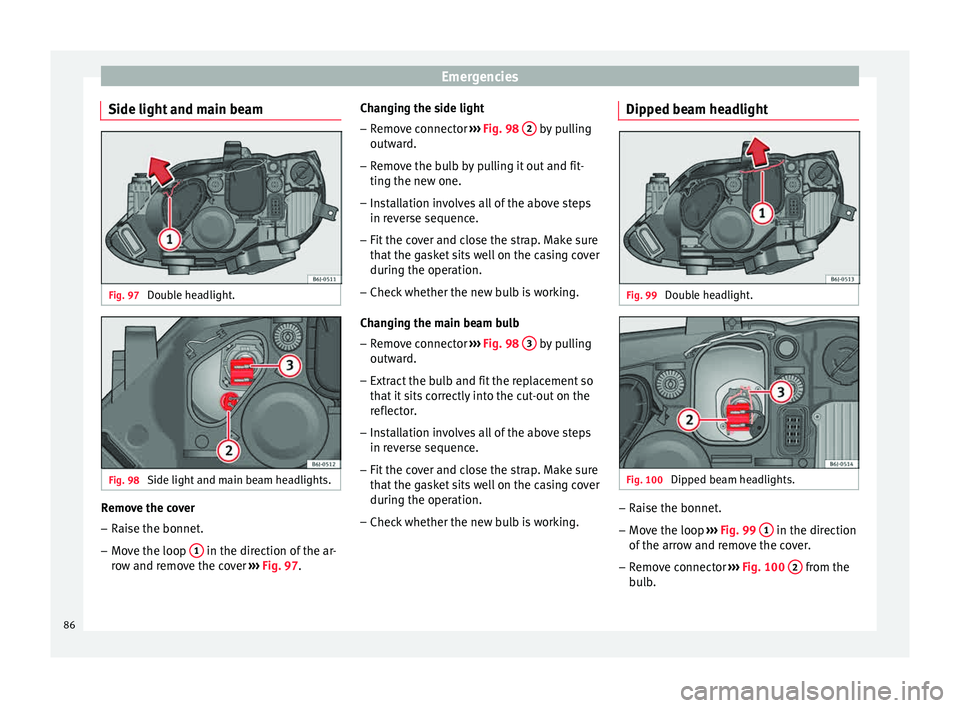
Side light and main beam Fig. 97
Double headlight. Fig. 98
Side light and main beam headlights. Remove the cover
– Raise the bonnet.
– Move the loop 1 in the direction of the ar-
r o
w and r
emove the cover ››› Fig. 97. Changing the side light
– Remove connector ›››
Fig. 98 2 by pulling
outw ar
d.
– R
emove the bulb by pulling it out and fit-
ting the new one.
– Ins
tallation involves all of the above steps
in rever
se sequence.
– Fit the cover and close the strap. Make sure
that the g
asket sits well on the casing cover
during the operation.
– Check whether the new bulb is working.
Changin
g the main beam bulb
– Remove connector ›››
Fig. 98 3 by pulling
outw ar
d.
– Extr
act the bulb and fit the replacement so
that it
sits correctly into the cut-out on the
reflector.
– Installation involves all of the above steps
in rever
se sequence.
– Fit the cover and close the strap. Make sure
that the g
asket sits well on the casing cover
during the operation.
– Check whether the new bulb is working. Dipped beam headlight
Fig. 99
Double headlight. Fig. 100
Dipped beam headlights. –
Raise the bonnet.
– Move the loop ››
›
Fig. 99 1 in the direction
of the arr
o
w and remove the cover.
– Remove connector ›››
Fig. 100 2 from the
b u
l
b.
86
Page 91 of 248
Fuses and bulbs
Changing the tail light bulbs S umm
ar
y of LED tail lights3 Applies to the model: IBIZA/IBIZA SC
LED
● Br ak
e lights
● Side lights
Bul
bs
● Retro fog light
● Reverse lights
● Turn signal
Tail light summary 3 App
lies to the model: IBIZA ST
T
ail lights on side panel Bulb lamps
● Brake lights
● Side lights
● Turn signal
Lights on the r
ear lid Bulb lamps
● Reverse lights
● Side lights
● Fog lights Tail lights on side panel LED lamps
●
Brake light (LED)
● Side light (LED)
● Turn signal
Lights on the r
ear lid LED lamps
● Reverse lights
● Side light (LED)
● Fog lights
Access to tail lights 3 App
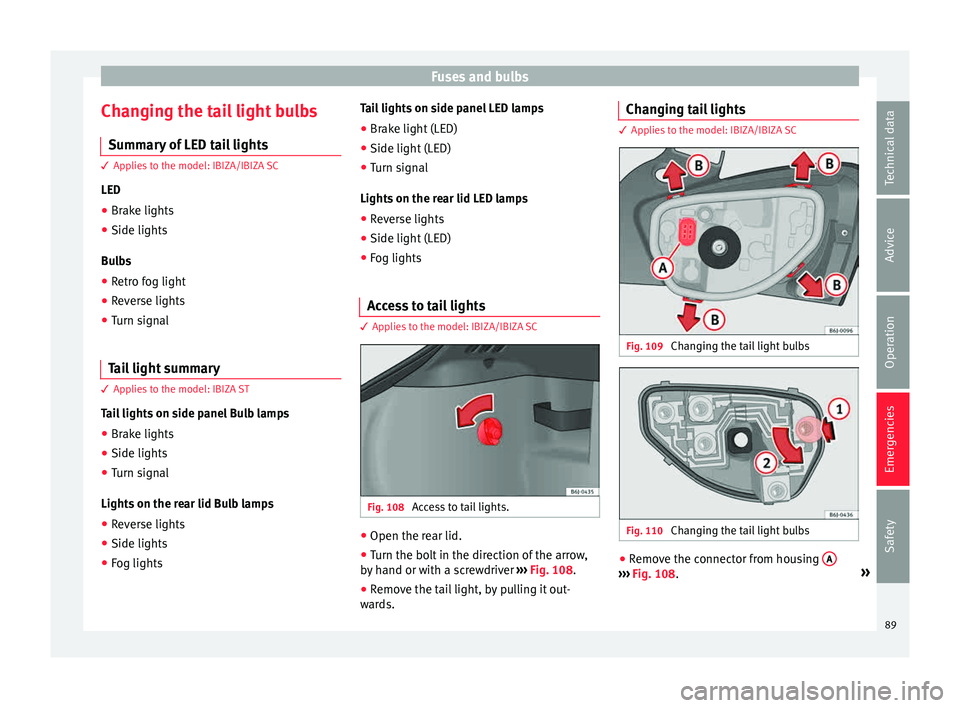
lies to the model: IBIZA/IBIZA SC Fig. 108
Access to tail lights. ●
Open the rear lid.
● Turn the bolt in the direction of the arrow,
b y
h
and or with a screwdriver ››› Fig. 108.
● Remove the tail light, by pulling it out-
ward
s. Changing tail lights 3 Applies to the model: IBIZA/IBIZA SC
Fig. 109
Changing the tail light bulbs Fig. 110
Changing the tail light bulbs ●
Remove the connector from housing A ›››
Fig. 108. »
89
Technical data
Advice
Operation
Emergencies
Safety
Page 92 of 248
Emergencies
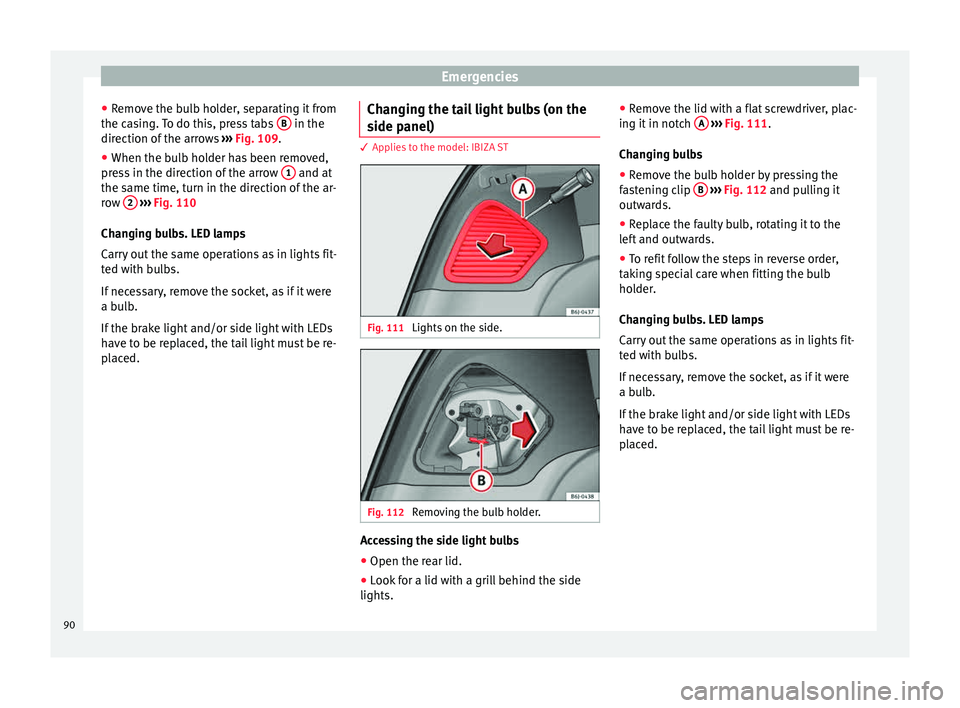
● Remo
v
e the bulb holder, separating it from
the casing. To do this, press tabs B in the
dir ection of
the arr
ows ››› Fig. 109.
● When the bulb holder has been removed,
pres
s in the direction of the arrow 1 and at
the s ame time, t
urn in the dir
ection of the ar-
row 2
› ››
Fig. 110
Ch an
ging bulbs. LED lamps
Carry out the same operations as in lights fit-
ted with bulbs.
If necessary, remove the socket, as if it were
a bulb.
If the brake light and/or side light with LEDs
have to be replaced, the tail light must be re-
placed. Changing the tail light bulbs (on the
side panel) 3 Applies to the model: IBIZA ST
Fig. 111
Lights on the side. Fig. 112
Removing the bulb holder. Accessing the side light bulbs
● Open the rear lid.
● Look for a lid with a grill behind the side
lights. ●
Remo
v
e the lid with a flat screwdriver, plac-
ing it in notch A
› ››
Fig. 111
.
Ch
anging bulbs
● Remove the bulb holder by pressing the
fas
tening clip B
› ››
Fig. 112
and p ulling it
outwards.
● Replace the faulty bulb, rotating it to the
left
and outwards.
● To refit follow the steps in reverse order,
takin
g special care when fitting the bulb
holder.
Changing bulbs. LED lamps
Carry out the same operations as in lights fit-
ted with bulbs.
If necessary, remove the socket, as if it were
a bulb.
If the brake light and/or side light with LEDs
have to be replaced, the tail light must be re-
placed.
90
Page 93 of 248
Fuses and bulbs
Changing the tail light bulbs (on the
r e
ar lid) 3 Applies to the model: IBIZA ST
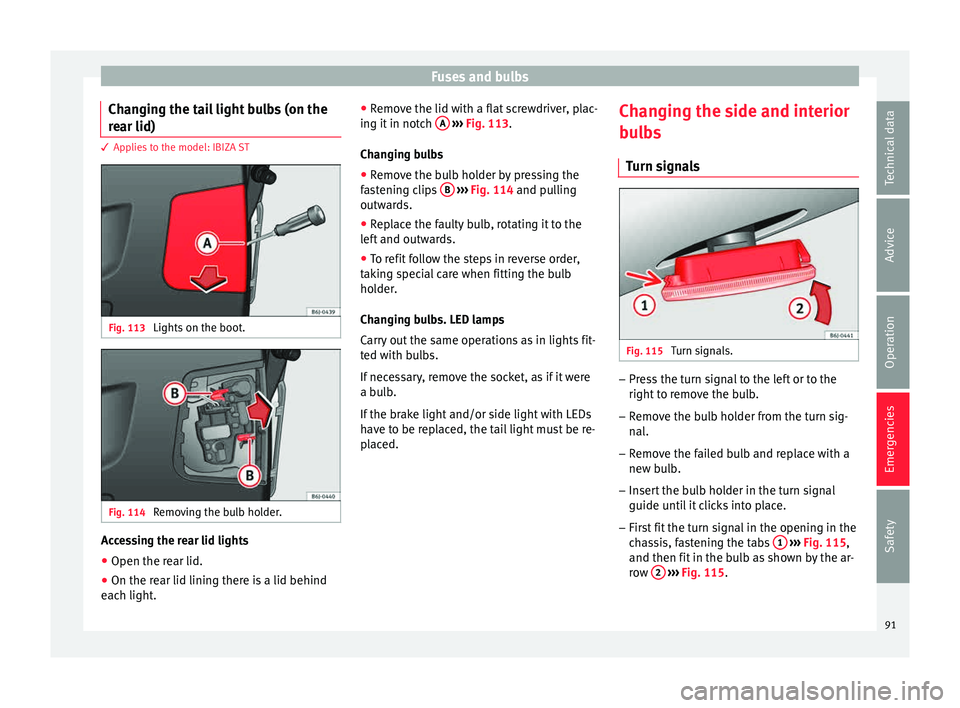
Fig. 113
Lights on the boot. Fig. 114
Removing the bulb holder. Accessing the rear lid lights
● Open the rear lid.
● On the rear lid lining there is a lid behind
e ac
h light
. ●
Remov
e the lid with a flat screwdriver, plac-
ing it in notch A
› ››
Fig. 113
.
Ch
anging bulbs
● Remove the bulb holder by pressing the
fas
tening clips B
› ››
Fig. 114
and p ulling
outwards.
● Replace the faulty bulb, rotating it to the
left
and outwards.
● To refit follow the steps in reverse order,
takin
g special care when fitting the bulb
holder.
Changing bulbs. LED lamps
Carry out the same operations as in lights fit-
ted with bulbs.
If necessary, remove the socket, as if it were
a bulb.
If the brake light and/or side light with LEDs
have to be replaced, the tail light must be re-
placed. Changing the side and interior
bul
bs
Turn signals Fig. 115
Turn signals. –
Press the turn signal to the left or to the
right t
o r
emove the bulb.
– Remove the bulb holder from the turn sig-
nal.
– R
emove the failed bulb and replace with a
new bul
b.
– Insert the bulb holder in the turn signal
guide until
it clicks into place.
– First fit the turn signal in the opening in the
cha
ssis, fastening the tabs 1
› ›
› Fig. 115 ,
and then fit in the bulb as shown by the ar-
row 2
› ›
› Fig. 115
.
91
Technical data
Advice
Operation
Emergencies
Safety
Page 94 of 248
Emergencies
Number plate light 3 Applies to the model: IBIZA/IBIZA SC
– Inser
t the flat part of a screwdriver into the
speci
al slot and remove the bulb.
– Remove the bulb holder, by turning it until
it is
free.
– Change the bulb.
– Replace the bulb holder, by turning it until
it fits f
ully.
– Fit the light into the space and press until
you he ar a “c
lick”.
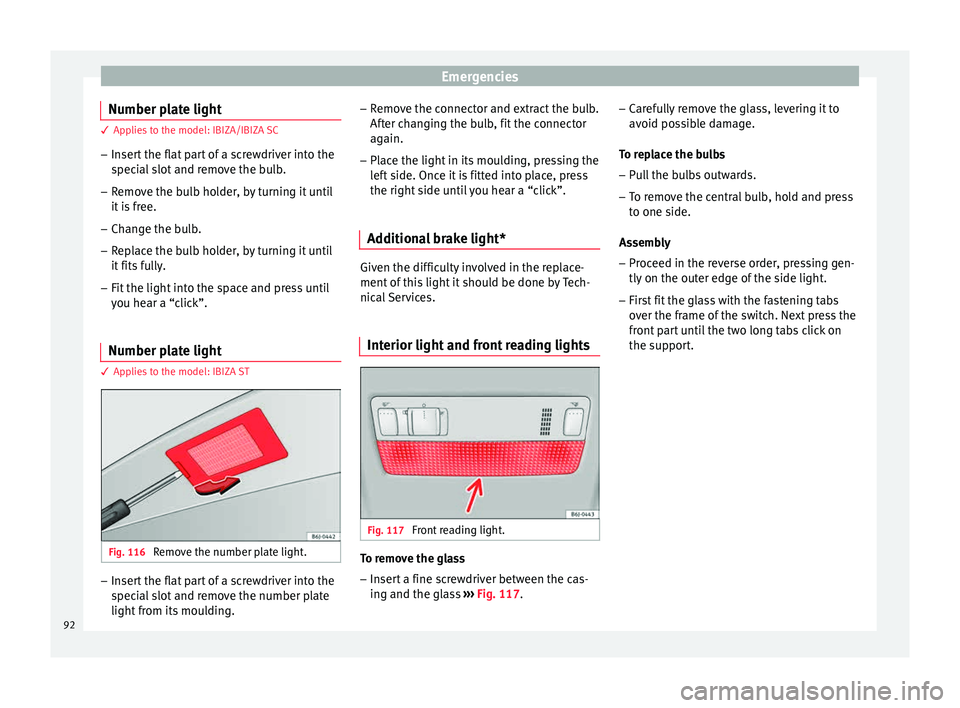
Number plate light 3 App
lies to the model: IBIZA ST Fig. 116
Remove the number plate light. –
Insert the flat part of a screwdriver into the
spec
i
al slot and remove the number plate
light from its moulding. –
Remov
e the connector and extract the bulb.
After changing the bulb, fit the connector
again.
– Place the light in its moulding, pressing the
left
side. Once it is fitted into place, press
the right side until you hear a “click”.
Additional brake light* Given the difficulty involved in the replace-
ment of
thi
s light it should be done by Tech-
nical Services.
Interior light and front reading lights Fig. 117
Front reading light. To remove the glass
– Insert a fine screwdriver between the cas-
ing and the gl
a
ss ››› Fig. 117. –
Caref
ully remove the glass, levering it to
avoid possible damage.
To replace the bulbs
– Pull the bulbs outwards.
– To remove the central bulb, hold and press
to one side.
As
sembly
– Proceed in the reverse order, pressing gen-
tly on the outer edg
e of the side light.
– First fit the glass with the fastening tabs
over the fr
ame of the switch. Next press the
front part until the two long tabs click on
the support.
92
Page 97 of 248
Controls and displays
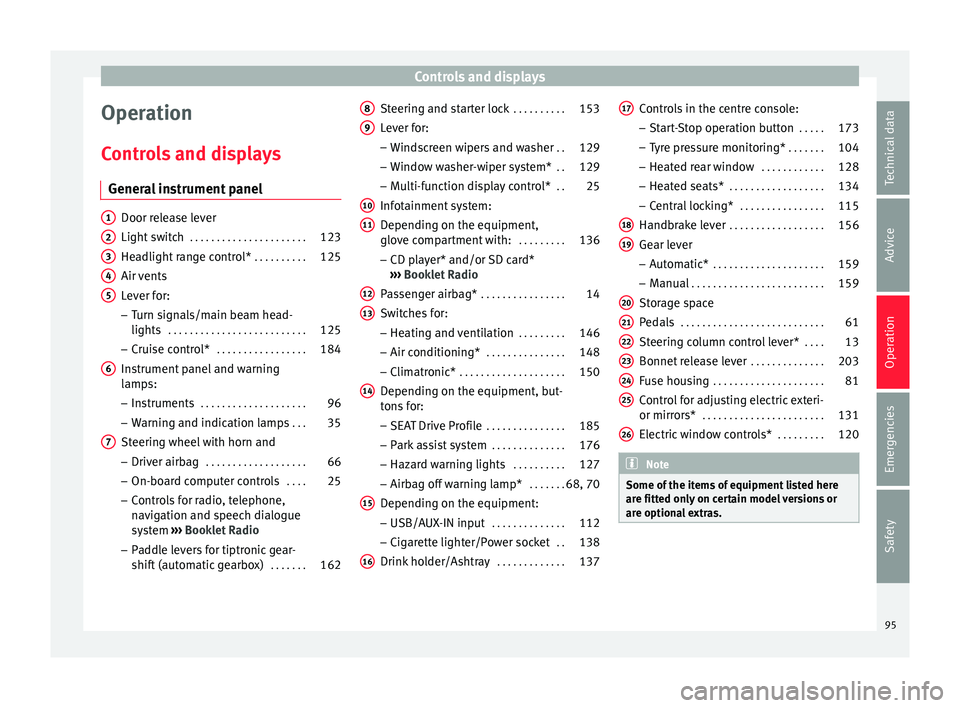
Operation
C ontr
o
ls and displays
General instrument panel Door release lever
Light sw
it
ch . . . . . . . . . . . . . . . . . . . . . . 123
Headlight range control* . . . . . . . . . .125
Air vents
Lever f
or:
– Turn signals/main beam head-
lights . . . . . . . . . . . . . . . . . . . . . . . . . . 125
– Crui se c
ontrol* . . . . . . . . . . . . . . . . . 184
Instrument panel and warning
lamp s:
– In
struments . . . . . . . . . . . . . . . . . . . . 96
– Warnin g and indic
ation lamps . . .35
Steering wheel with horn and – Driver airb ag . . . . . . . . . . . . . . . . . . . 66
– On-boar d c
omputer controls . . . .25
– Contro
ls for radio, telephone,
navigation and speech dialogue
system ›››
Booklet Radio
– Paddle levers for tiptronic gear-
shift (automatic gearbox) . . . . . . .162
1 2
3
4
5
6
7 Steering and starter lock
. . . . . . . . . .153
Lever for: – Wind
s
creen wipers and washer . .129
– Window w
asher-wiper system* . .129
– Multi-f
unction display control* . .25
Infotainment system:
Depending on the equipment,
glo
ve compartment with: . . . . . . . . .136
– CD pla
yer* and/or SD card*
››› Booklet Radio
Passenger airbag* . . . . . . . . . . . . . . . . 14
Switches for:
– Heating and
ventilation . . . . . . . . . 146
– Air conditionin g* . . . . . . . . . . . . . . . 148
– C
limatr
onic* . . . . . . . . . . . . . . . . . . . . 150
Depending on the equipment, but-
ton s
for:
– SEAT Drive Profile . . . . . . . . . . . . . . . 185
– Park a
ssist system . . . . . . . . . . . . . . 176
– Hazard w
arning lights . . . . . . . . . .127
– Airbag off w
arning lamp* . . . . . . .68, 70
Depending on the equipment:
– USB/AUX -IN inp
ut . . . . . . . . . . . . . . 112
– Cig ar
ette lighter/Power socket . .138
Drink holder/Ashtray . . . . . . . . . . . . .137
8 9
10
11
12
13
14
15
16 Controls in the centre console:
– St ar
t
-Stop operation button . . . . .173
– Tyr
e pressure monitoring* . . . . . . .104
– Heated r
ear window . . . . . . . . . . . . 128
– Heated se
ats* . . . . . . . . . . . . . . . . . . 134
– Central
locking* . . . . . . . . . . . . . . . . 115
Handbrake lever . . . . . . . . . . . . . . . . . . 156
Gear lever – Automatic* . . . . . . . . . . . . . . . . . . . . . 159
– M
anual . . . . . . . . . . . . . . . . . . . . . . . . . 159
Stor
age space
Pedal
s . . . . . . . . . . . . . . . . . . . . . . . . . . . 61
Steering column control lever* . . . .13
Bonnet release lever . . . . . . . . . . . . . .203
Fuse housing . . . . . . . . . . . . . . . . . . . . . 81
Control for adjusting electric exteri-
or mirrors* . . . . . . . . . . . . . . . . . . . . . . . 131
El
ectric window controls* . . . . . . . . .120 Note
Some of the items of equipment listed here
are fitt ed on
ly on certain model versions or
are optional extras. 17
18
19
20
21
22
23
24
25
26
95
Technical data
Advice
Operation
Emergencies
Safety
Page 102 of 248
Operation
●
Addition a
l lights and other accessories in
front of the air inlet reduce the cooling effect
of the coolant. At high outside temperatures
and high engine loads, there is a risk of the
engine overheating.
● The front spoiler also ensures proper distri-
bution of the c
ooling air when the vehicle is
moving. If the spoiler is damaged this can re-
duce the cooling effect, which could cause
the engine to overheat. Seek specialist assis-
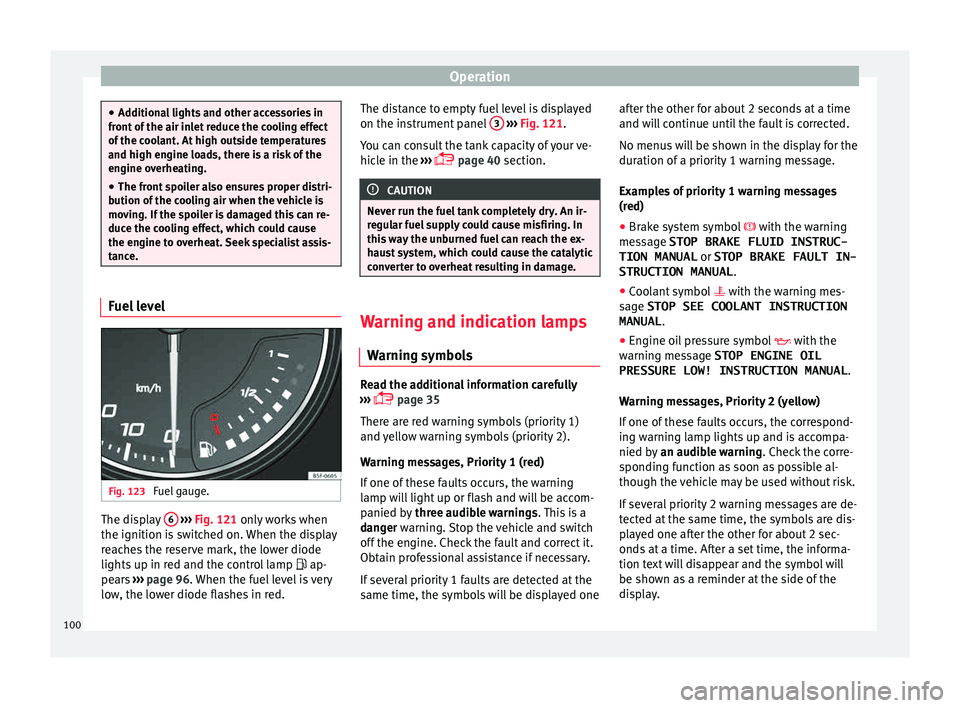
tance. Fuel level
Fig. 123
Fuel gauge. The display
6
› ›
› Fig. 121
only works when
the ignition is switched on. When the display
reaches the reserve mark, the lower diode
lights up in red and the control lamp ap-
pears ››› page 96. When the fuel level is very
low, the lower diode flashes in red. The distance to empty fuel level is displayed
on the instrument
panel 3
› ››
Fig. 121
.
Y
ou can consult the tank capacity of your ve-
hicle in the ›››
page 40 section. CAUTION
Never run the fuel tank completely dry. An ir-
re gu
lar fuel supply could cause misfiring. In
this way the unburned fuel can reach the ex-
haust system, which could cause the catalytic
converter to overheat resulting in damage. Warning and indication lamps
W arnin
g symbo
ls Read the additional information carefully
› ›
›
page 35
There are red warning symbols (priority 1)
and yellow warning symbols (priority 2).
Warning messages, Priority 1 (red)
If one of these faults occurs, the warning
lamp will light up or flash and will be accom-
panied by three audible warnings. This is a
danger warning. Stop the vehicle and switch
off the engine. Check the fault and correct it.
Obtain professional assistance if necessary.
If several priority 1 faults are detected at the
same time, the symbols will be displayed one after the other for about 2 seconds at a time
and wil
l continue until the fault is corrected.
No menus will be shown in the display for the
duration of a priority 1 warning message.
Examples of priority 1 warning messages
(red)
● Brake system symbol with the warnin
g
message STOP BRAKE FLUID INSTRUC-
TION MANUAL or STOP BRAKE FAULT IN-
STRUCTION MANUAL .
● Coolant symbol with the warnin
g mes-
sage STOP SEE COOLANT INSTRUCTION
MANUAL .
● Engine oil pressure symbol with the
warnin
g message STOP ENGINE OIL
PRESSURE LOW! INSTRUCTION MANUAL .
Warning messages, Priority 2 (yellow)
If one of these faults occurs, the correspond-
ing warning lamp lights up and is accompa-
nied by an audible warning. Check the corre-
sponding function as soon as possible al-
though the vehicle may be used without risk.
If several priority 2 warning messages are de-
tected at the same time, the symbols are dis-
played one after the other for about 2 sec-
onds at a time. After a set time, the informa-
tion text will disappear and the symbol will
be shown as a reminder at the side of the
display.
100
Page 103 of 248
Instruments and warning/control lamps
Priority 2 warning messages will not be
sho wn u
ntil all Priority 1 warning messages
have been dealt with!
Examples of priority 2 warning reports (yel-
low):*
● Fuel warning light with the information text
PLEASE REFUEL .WARNING
If the warning lamps and messages are ignor-
ed, the v ehic
le may stall in traffic, or may
cause accidents and severe injuries.
● Never ignore the warning lamps or text
mess
ages.
● Stop the vehicle safely as soon as possible.
● Park the vehicle away from traffic and en-
sure th
at there are no highly flammable ma-
terials under the vehicle that could come into
contact with the exhaust system (e.g. dry
grass, fuel).
● A faulty vehicle represents a risk of acci-
dent for the driv
er and for other road users. If
necessary, switch on the hazard warning
lamps and put out the warning triangle to ad-
vise other drivers.
● Before opening the bonnet, switch off the
engine and al
low it to cool.
● In any vehicle, the engine compartment is a
hazar
dous area and could cause severe inju-
ries ››› page 201. CAUTION
Failure to heed the control lamps and text
mes s
ages when they appear may result in
faults in the vehicle. Engine management*
This warning lamp monitors the engine man-
agement
sy
stem for petrol engines.
The warning lamp (Electronic Power Con-
trol) lights up when the ignition is switched
on while system operation is being verified. It
should go out once the engine is started.
If there is a fault in the electronic engine
management system while you are driving,
this warning lamp will light up. Stop the vehi-
cle and seek technical assistance.
Engine pre-heating/fault system* The warning lamp lights up to show that the
glo
w p
lug
s are preheating the diesel engine.
The control lamp lights up
If the control lamp lights up when the en-
gine is started it means that the glow plugs
are preheating. When the warning lamp goes
off, the engine should be started straight
away. Control lamp
flashe
s
If a fault develops in the engine management
system while you are driving, the glow plug
system lamp will flash . Take the vehicle to
a specialised workshop as soon as possible
and have the engine checked.
Accumulation of soot in the diesel en-
gine partic
ulate filter* If the control lamp
lights up
y
ou should
help the filter clean itself by driving in the ap-
propriate manner.
To do this, drive about 15 minutes in fourth
or fifth gear (automatic gearbox: S gear
range) at a minimum speed of 60 km/h
(37 mph), with the engine running at approxi-
mately 2,000 rpm. In this way, the soot build
up in the filter is burned. When cleaning is
successful, the control lamp turns off.
If the lamp does not turn off, or the three
lamps turn on (particulate filter , fault in
the emission control system and glow
plugs ), drive the vehicle to a specialised
workshop and have the fault repaired at the
earliest opportunity. »
101
Technical data
Advice
Operation
Emergencies
Safety
Page 104 of 248
Operation
WARNING
● Alw a
ys drive according to the road weather
conditions, the terrain and traffic. Driving rec-
ommendations should never lead to illegal
manoeuvres in surrounding traffic.
● The diesel engine particulate filter may
reac
h extremely high temperatures; in this
case the vehicle should be parked so that it
does not enter into contact with highly flam-
mable materials underneath the vehicle. Oth-
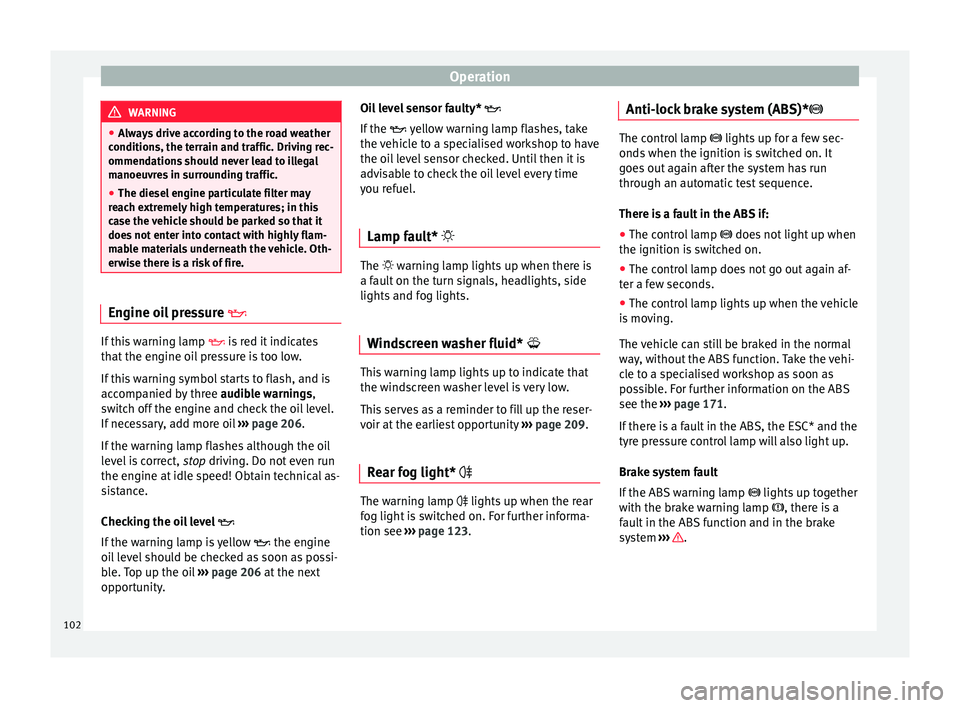
erwise there is a risk of fire. Engine oil pressure
If this warning lamp
is
r
ed it indicates
that the engine oil pressure is too low.
If this warning symbol starts to flash, and is
accompanied by three audible warnings,
switch off the engine and check the oil level.
If necessary, add more oil ›››
page 206.
If the warning lamp flashes although the oil
level is correct, stop driving. Do not even run
the engine at idle speed! Obtain technical as-
sistance.
Checking the oil level
If the warning lamp is yellow the engine
oil level should be checked as soon as possi-
ble. Top up the oil ›››
page 206 at the next
opportunity. Oil level sensor faulty*
If the
y
ellow warning lamp flashes, take
the vehicle to a specialised workshop to have
the oil level sensor checked. Until then it is
advisable to check the oil level every time
you refuel.
Lamp fault* The warning lamp lights up when there is
a f
au
lt on the turn signals, headlights, side
lights and fog lights.
Windscreen washer fluid* This warning lamp lights up to indicate that
the w
ind
s
creen washer level is very low.
This serves as a reminder to fill up the reser-
voir at the earliest opportunity ›››
page 209.
Rear fog light* The warning lamp lights
up when the r
e
ar
fog light is switched on. For further informa-
tion see ›››
page 123. Anti-lock brake system (ABS)* The control lamp
lights up for a f
ew sec-
onds when the ignition is switched on. It
goes out again after the system has run
through an automatic test sequence.
There is a fault in the ABS if:
● The control lamp does not
light up when
the ignition is switched on.
● The control lamp does not go out again af-
ter a few sec
onds.
● The control lamp lights up when the vehicle
is mo
ving.
The vehicle can still be braked in the normal
way, without the ABS function. Take the vehi-
cle to a specialised workshop as soon as
possible. For further information on the ABS
see the ›››
page 171.
If there is a fault in the ABS, the ESC* and the
tyre pressure control lamp will also light up.
Brake system fault
If the ABS warning lamp lights up together
with the brake warning lamp , there is a
fault in the ABS function and in the brake
system ››› .
102
Page 105 of 248
Instruments and warning/control lamps
WARNING
● Bef or
e opening the bonnet, read and ob-
serve the warnings ››› page 201, Working in
the engine compartment.
● If the brake system warning lamp should
light
up together with the ABS warning lamp
, stop the vehicle immediately and check
the brake fluid level in the reservoir
››› page 208, Brake fluid. If the brake fluid
level has dropped below the “MIN” mark you
must not drive on. Risk of accident. Obtain
technical assistance.
● If the brake fluid level is correct, the fault in
the brake sy
stem may have been caused by a
failure of the ABS system. This could cause
the rear wheels to lock quickly when you
brake. This could cause the rear to break
away. Risk of skidding. Stop the vehicle and
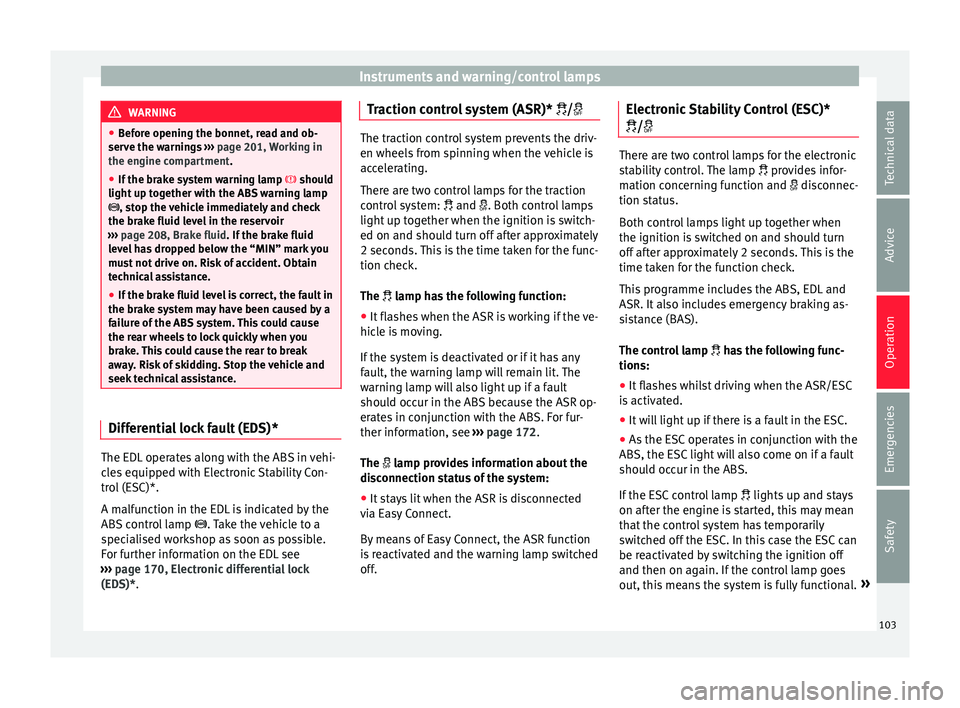
seek technical assistance. Differential lock fault (EDS)*
The EDL operates along with the ABS in vehi-
c
l
e
s equipped with Electronic Stability Con-
trol (ESC)*.
A malfunction in the EDL is indicated by the
ABS control lamp . Take the vehicle to a
specialised workshop as soon as possible.
For further information on the EDL see
››› page 170, Electronic differential lock
(EDS)*. Traction control system (ASR)* / The traction control system prevents the driv-
en wheels
fr
om spinning when the vehicle is
accelerating.
There are two control lamps for the traction
control system: and . Both control lamps
light up together when the ignition is switch-
ed on and should turn off after approximately
2 seconds. This is the time taken for the func-
tion check.
The lamp has the following function:
● It flashes when the ASR is working if the ve-
hicl e i
s moving.
If the system is deactivated or if it has any
fault, the warning lamp will remain lit. The
warning lamp will also light up if a fault
should occur in the ABS because the ASR op-
erates in conjunction with the ABS. For fur-
ther information, see ›››
page 172.
The lamp provides information about the
disconnection status of the system:
● It stays lit when the ASR is disconnected
via E
asy Connect.
By means of Easy Connect, the ASR function
is reactivated and the warning lamp switched
off. Electronic Stability Control (ESC)*
/ There are two control lamps for the electronic
st
ab
ility control. The lamp provides infor-
mation concerning function and disconnec-
tion status.
Both control lamps light up together when
the ignition is switched on and should turn
off after approximately 2 seconds. This is the
time taken for the function check.
This programme includes the ABS, EDL and
ASR. It also includes emergency braking as-
sistance (BAS).
The control lamp has the following func-
tions:
● It flashes whilst driving when the ASR/ESC
is activ
ated.
● It will light up if there is a fault in the ESC.
● As the ESC operates in conjunction with the
ABS, the ESC light
will also come on if a fault
should occur in the ABS.
If the ESC control lamp lights up and stays
on after the engine is started, this may mean
that the control system has temporarily
switched off the ESC. In this case the ESC can
be reactivated by switching the ignition off
and then on again. If the control lamp goes
out, this means the system is fully functional. »
103
Technical data
Advice
Operation
Emergencies
Safety