warning light Seat Ibiza 5D 2015 Workshop Manual
[x] Cancel search | Manufacturer: SEAT, Model Year: 2015, Model line: Ibiza 5D, Model: Seat Ibiza 5D 2015Pages: 248, PDF Size: 4.77 MB
Page 136 of 248
Operation
– Mak
e s
ure that the head restraint engages
securely in one of its positions ››› page 60.
Removing the head restraint – Push the head restraint up as far as it will
go.
– Pr
ess the button ›››
Fig. 141 (arrow).
– Pull head restraint out of fitting without re-
lea
sing the button.
Fitting the head restraint
– Insert the head restraint into the guides on
the corre
sponding backrest.
– Push head restraint down.
– Adjust the head restraint to suit body size
›››
page 60. WARNING
● Never driv e if
the head restraints have been
removed. Risk of injury.
● Never drive if the head restraints are in an
uns
uitable position (the lowest position) as
there is a risk of serious injury.
● After refitting the head restraint, you must
alwa
ys adjust it properly for height to achieve
optimal protection.
● Please observe the safety warnings in ›››
in Correct adjustment of front head restraints
on pag
e 60
. Note
● To fit and r
emove the rear head restraints,
gently tilt the seat backrest forwards.
● When fitting the head restraints again, in-
sert the t
ubes as far as possible into the
guides without pressing the button. Seat functions
Heat ed se
ats* Fig. 142
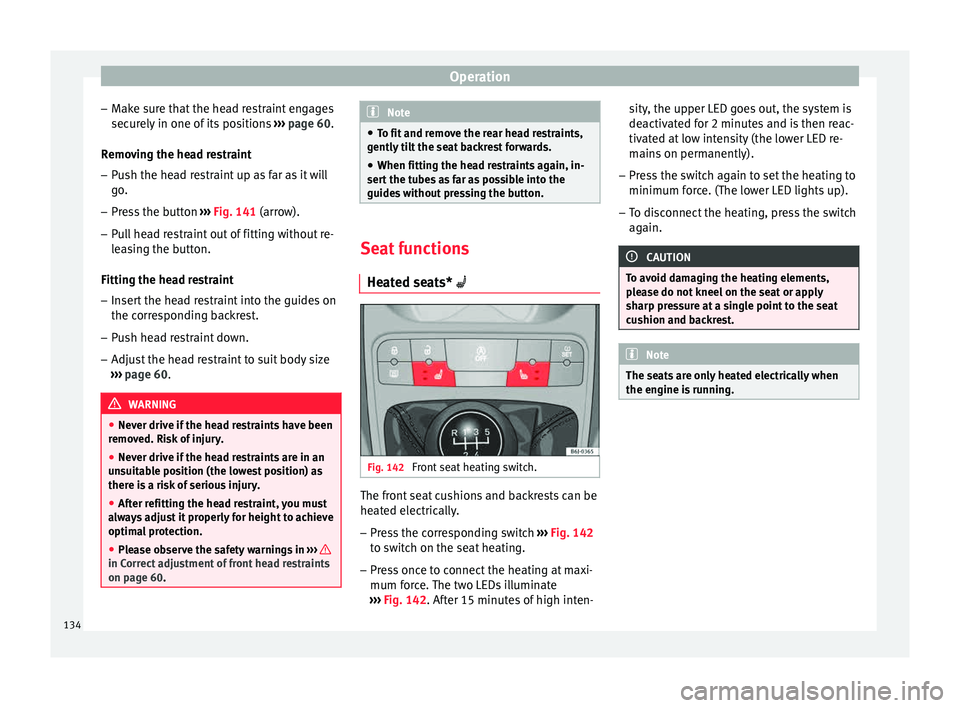
Front seat heating switch. The front seat cushions and backrests can be
he
at
ed el
ectrically.
– Press the corresponding switch ›››
Fig. 142
to switch on the seat heating.
– Press once to connect the heating at maxi-
mum forc
e. The two LEDs illuminate
››› Fig. 142. After 15 minutes of high inten- sity, the upper LED goes out, the system is
deactivat
ed for 2 minutes and is then reac-
tivated at low intensity (the lower LED re-
mains on permanently).
– Press the switch again to set the heating to
minimum forc
e. (The lower LED lights up).
– To disconnect the heating, press the switch
again. CAUTION
To avoid damaging the heating elements,
pl e
ase do not kneel on the seat or apply
sharp pressure at a single point to the seat
cushion and backrest. Note
The seats are only heated electrically when
the engine i s
running.134
Page 140 of 248
Operation
Front ashtray* Fig. 152
Front ashtray. Opening and closing the ashtray
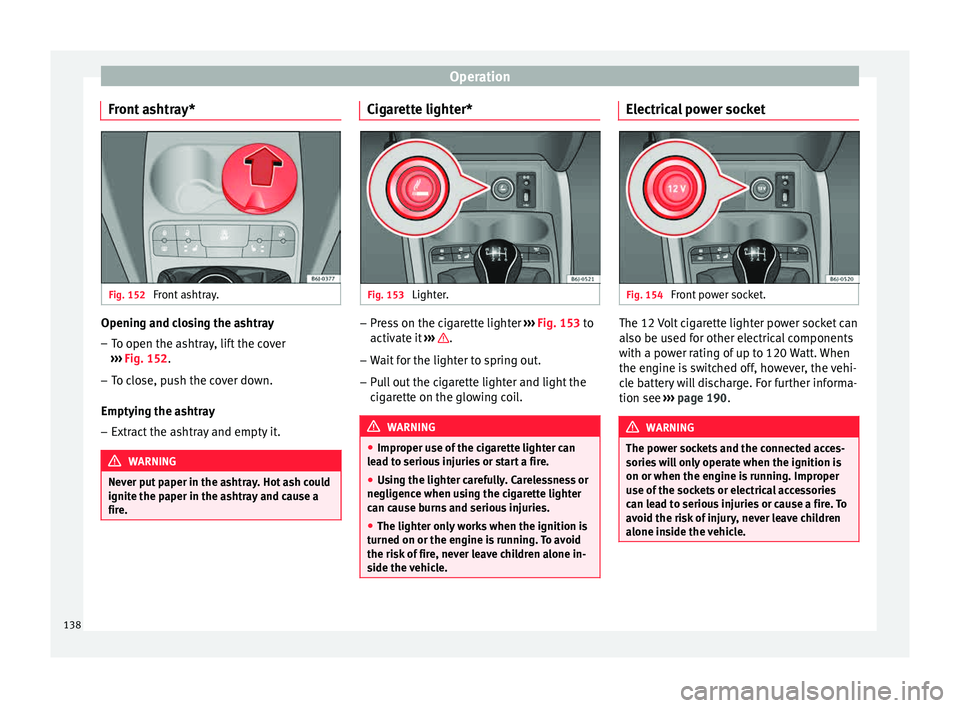
– To open the ashtray, lift the cover
› ›
›
Fig. 152.
– To close, push the cover down.
Emptying the a
shtray
– Extract the ashtray and empty it. WARNING
Never put paper in the ashtray. Hot ash could
ignite the p aper in the a
shtray and cause a
fire. Cigarette lighter*
Fig. 153
Lighter. –
Press on the cigarette lighter ››
›
Fig. 153 to
activate it ››› .
– Wait for the lighter to spring out.
– Pull out the cigarette lighter and light the
cig
ar
ette on the glowing coil. WARNING
● Improper u se of
the cigarette lighter can
lead to serious injuries or start a fire.
● Using the lighter carefully. Carelessness or
negligenc
e when using the cigarette lighter
can cause burns and serious injuries.
● The lighter only works when the ignition is
turned on or the engine i
s running. To avoid
the risk of fire, never leave children alone in-
side the vehicle. Electrical power socket
Fig. 154
Front power socket. The 12 Volt cigarette lighter power socket can
al
so be u
sed f
or other electrical components
with a power rating of up to 120 Watt. When
the engine is switched off, however, the vehi-
cle battery will discharge. For further informa-
tion see ››› page 190. WARNING
The power sockets and the connected acces-
sories w
ill only operate when the ignition is
on or when the engine is running. Improper
use of the sockets or electrical accessories
can lead to serious injuries or cause a fire. To
avoid the risk of injury, never leave children
alone inside the vehicle. 138
Page 143 of 248
Transport and practical equipment
Stretched luggage net* 3 Applies to the model: IBIZA ST
Fig. 158
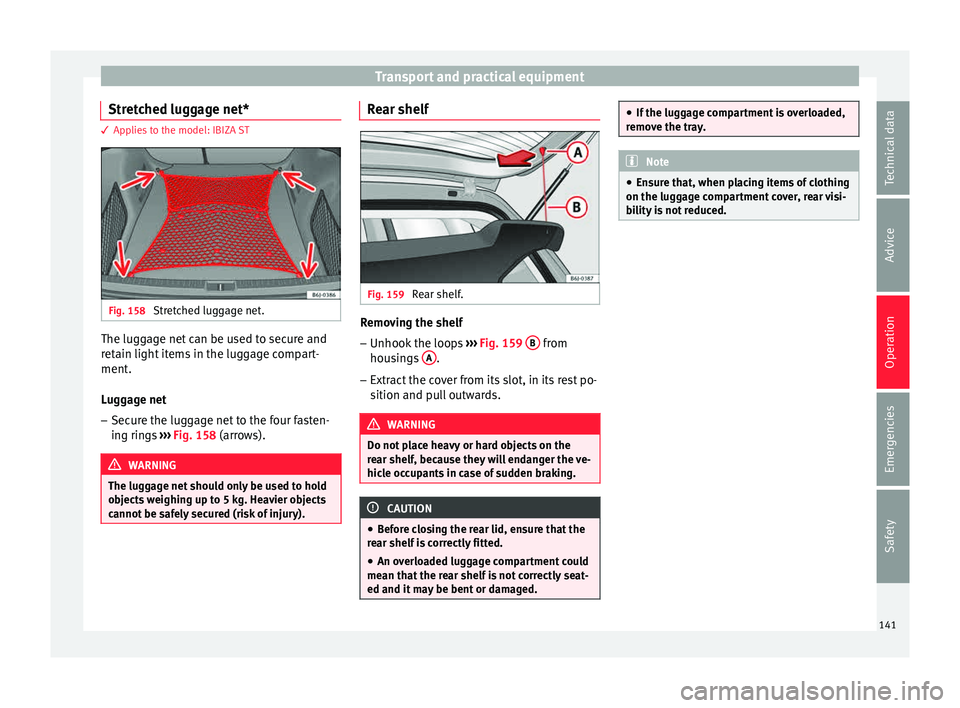
Stretched luggage net. The luggage net can be used to secure and
r
et
ain light
items in the luggage compart-
ment.
Luggage net
– Secure the luggage net to the four fasten-
ing ring
s ››› Fig. 158 (arrows). WARNING
The luggage net should only be used to hold
ob j
ects weighing up to 5 kg. Heavier objects
cannot be safely secured (risk of injury). Rear shelf
Fig. 159
Rear shelf. Removing the shelf
–
Unhook the loops ››
›
Fig. 159 B from
hou s
in
gs A .
– Extract the cover from its slot, in its rest po-
sition and p
u
ll outwards. WARNING
Do not place heavy or hard objects on the
re ar shelf
, because they will endanger the ve-
hicle occupants in case of sudden braking. CAUTION
● Bef or
e closing the rear lid, ensure that the
rear shelf is correctly fitted.
● An overloaded luggage compartment could
mean that
the rear shelf is not correctly seat-
ed and it may be bent or damaged. ●
If the lug g
age compartment is overloaded,
remove the tray. Note
● En sur
e that, when placing items of clothing
on the luggage compartment cover, rear visi-
bility is not reduced. 141Technical data
Advice
Operation
Emergencies
Safety
Page 144 of 248
Operation
Rear shelf with storage compartment* 3 Applies to the model: IBIZA ST
Fig. 160
Luggage compartment: removing
s t
or
age compartment. Fig. 161
Accessing storage compartment. To remove the storage compartment
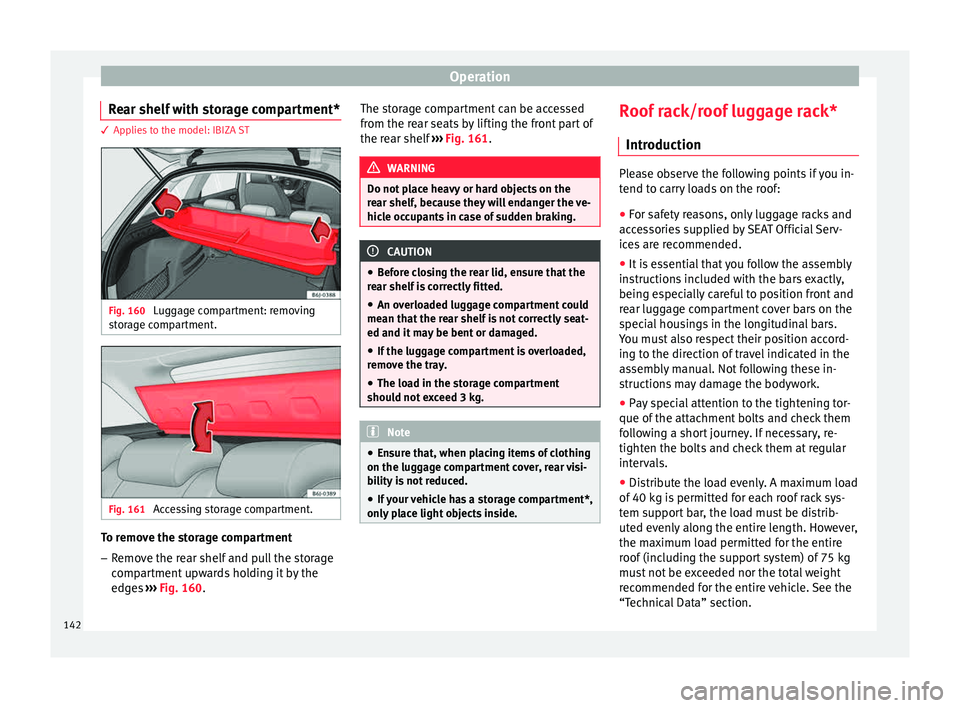
– Remove the rear shelf and pull the storage
comp
ar
tment upwards holding it by the
edges ››› Fig. 160. The storage compartment can be accessed
from the re
ar seats by lifting the front part of
the rear shelf ››› Fig. 161. WARNING
Do not place heavy or hard objects on the
re ar shelf
, because they will endanger the ve-
hicle occupants in case of sudden braking. CAUTION
● Bef or
e closing the rear lid, ensure that the
rear shelf is correctly fitted.
● An overloaded luggage compartment could
mean that
the rear shelf is not correctly seat-
ed and it may be bent or damaged.
● If the luggage compartment is overloaded,
remov
e the tray.
● The load in the storage compartment
should not
exceed 3 kg. Note
● Ens ur
e that, when placing items of clothing
on the luggage compartment cover, rear visi-
bility is not reduced.
● If your vehicle has a storage compartment*,
only p
lace light objects inside. Roof rack/roof luggage rack*
Intr oduction Please observe the following points if you in-
tend t
o c
arry loads on the roof:
● For safety reasons, only luggage racks and
acce
ssories supplied by SEAT Official Serv-
ices are recommended.
● It is essential that you follow the assembly
instruction
s included with the bars exactly,
being especially careful to position front and
rear luggage compartment cover bars on the
special housings in the longitudinal bars.
You must also respect their position accord-
ing to the direction of travel indicated in the
assembly manual. Not following these in-
structions may damage the bodywork.
● Pay special attention to the tightening tor-
que of the att ac
hment bolts and check them
following a short journey. If necessary, re-
tighten the bolts and check them at regular
intervals.
● Distribute the load evenly. A maximum load
of 40 k
g is permitted for each roof rack sys-
tem support bar, the load must be distrib-
uted evenly along the entire length. However,
the maximum load permitted for the entire
roof (including the support system) of 75 kg
must not be exceeded nor the total weight
recommended for the entire vehicle. See the
“Technical Data” section.
142
Page 148 of 248
Operation
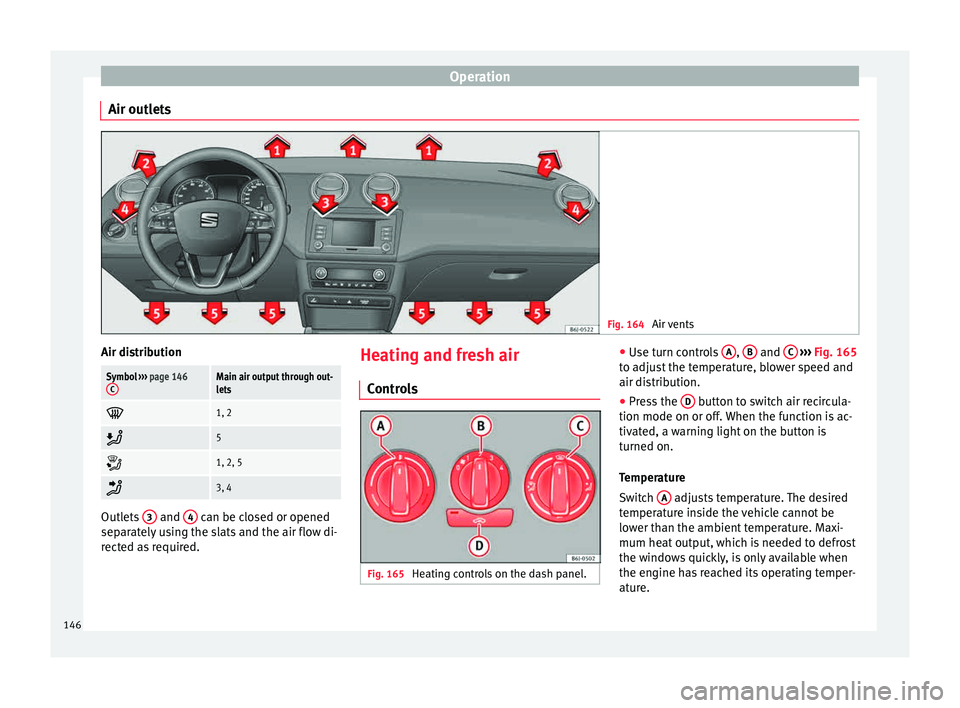
Air outlets Fig. 164
Air vents Air distributionSymbol
››› page 146
CMain air output through out-
lets
1, 2
5
1, 2, 5
3, 4
Outlets
3 and
4 can be closed or opened
separ at
ely using the slats and the air flow di-
rected as required. Heating and fresh air
Contr o
ls Fig. 165
Heating controls on the dash panel. ●
Use t
urn c
ontrols A ,
B and
C
› ››
Fig. 165
t o a
djust the temperature, blower speed and
air distribution.
● Press the D button to switch air recircula-
tion mode on or off .
When the f
unction is ac-
tivated, a warning light on the button is
turned on.
Temperature
Switch A adjusts temperature. The desired
t emper
at
ure inside the vehicle cannot be
lower than the ambient temperature. Maxi-
mum heat output, which is needed to defrost
the windows quickly, is only available when
the engine has reached its operating temper-
ature.
146
Page 150 of 248
Operation
– Open and t urn outl
et
4 towards the side
w indo
w
s.
Keeping the windscreen and the side win-
dows demisted
– Turn the temperature selector ›››
Fig. 165
A to the heating area.
– Turn blower switch B to any of the head
settin g
s
2 -3.
– Turn air distribution control to .
– Close outlets 3–
Open and turn outlets 4 towards side win-
do w
s.
Onc
e the windows are demisted and as a pre-
ventive measure, the control C can be set in
po s
ition
, thus obtaining greater comfort
while preventing the windows from misting
again.
Heating
Maximum heat output, which is needed to
defrost the windows quickly, is only available
when the engine has reached its operating
temperature. Note
Remember that the temperature of the engine
coo l
ant should be optimum to ensure that the
heating system functions correctly (except in
vehicles fitted with additional heating*). Air conditioning*
C ontr
o
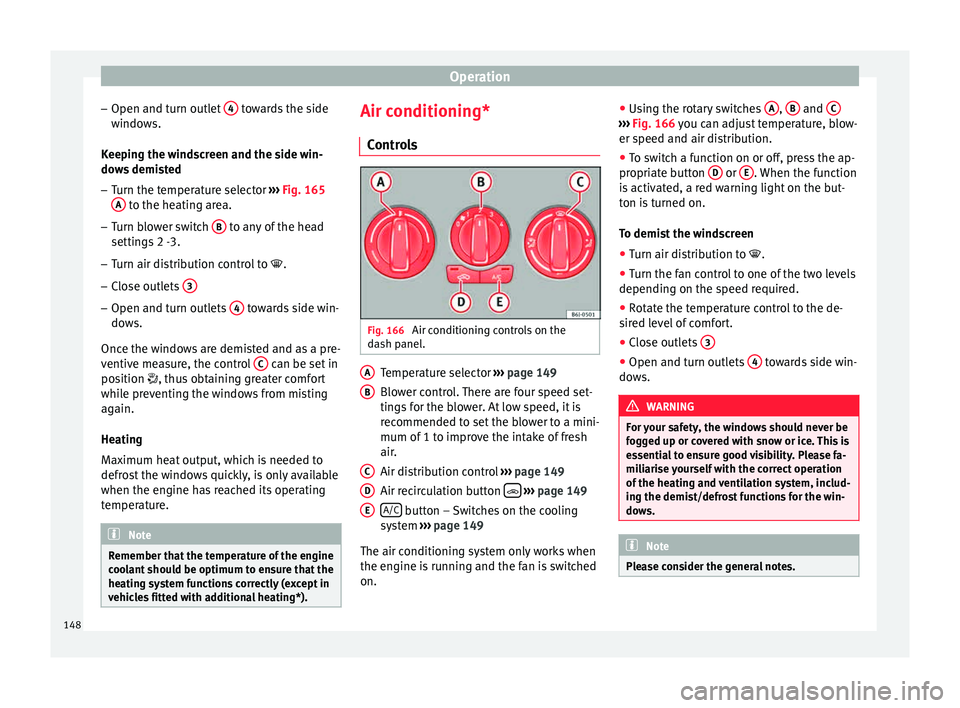
ls Fig. 166
Air conditioning controls on the
d a
sh p
anel. Temperature selector
››
›
page 149
Blower control. There are four speed set-
tings for the blower. At low speed, it is
recommended to set the blower to a mini-
mum of 1 to improve the intake of fresh
air.
Air distribution control ››› page 149
Air recirculation button
› ›
› p
age 149
A/C button – Switches on the cooling
sy s
t
em ››› page 149
The air conditioning system only works when
the engine is running and the fan is switched
on. A B
C
D
E ●
Us
in
g the rotary switches A ,
B and
C ›››
Fig. 166 y ou c
an a djust temperature, blow-
er speed and air distribution.
● To switch a function on or off, press the ap-
propriat
e button D or
E . When the function
i s
activ
ated, a red warning light on the but-
ton is turned on.
To demist the windscreen
● Turn air distribution to .
● Turn the fan control to one of the two levels
depending on the speed r
equired.
● Rotate the temperature control to the de-
sired l
evel of comfort.
● Close outlets 3 ●
Open and turn outlets 4 towards side win-
do w
s. WARNING
For your safety, the windows should never be
fog g
ed up or covered with snow or ice. This is
essential to ensure good visibility. Please fa-
miliarise yourself with the correct operation
of the heating and ventilation system, includ-
ing the demist/defrost functions for the win-
dows. Note
Please consider the general notes. 148
Page 152 of 248
Operation
WARNING
In air recirculation mode, no cold air from the
outs ide ent
ers the vehicle interior. If the air
conditioner is switched off, the windows can
quickly mist over. Therefore, never leave the
air recirculation mode switched on for a long
time (risk of accident). Note
● When eng agin
g reverse gear, the air recir-
culation is connected automatically to pre-
vent the entrance of exhaust gases in the ve-
hicle on travelling backwards. The control
lamp on the button does not light up.
● If the temperature control is turned to the
co l
dest setting (blue point) and the A/C but- ton is on, the “Air recirculation” function is
autom
atic
ally activated in order to cool the
vehicle faster using less energy, and its func-
tion control lamp will light up.
● If the function is not deactivated by press-
ing the butt
on, it will deactivate after approx-
imately 20 minutes. Climatronic*
Genera l
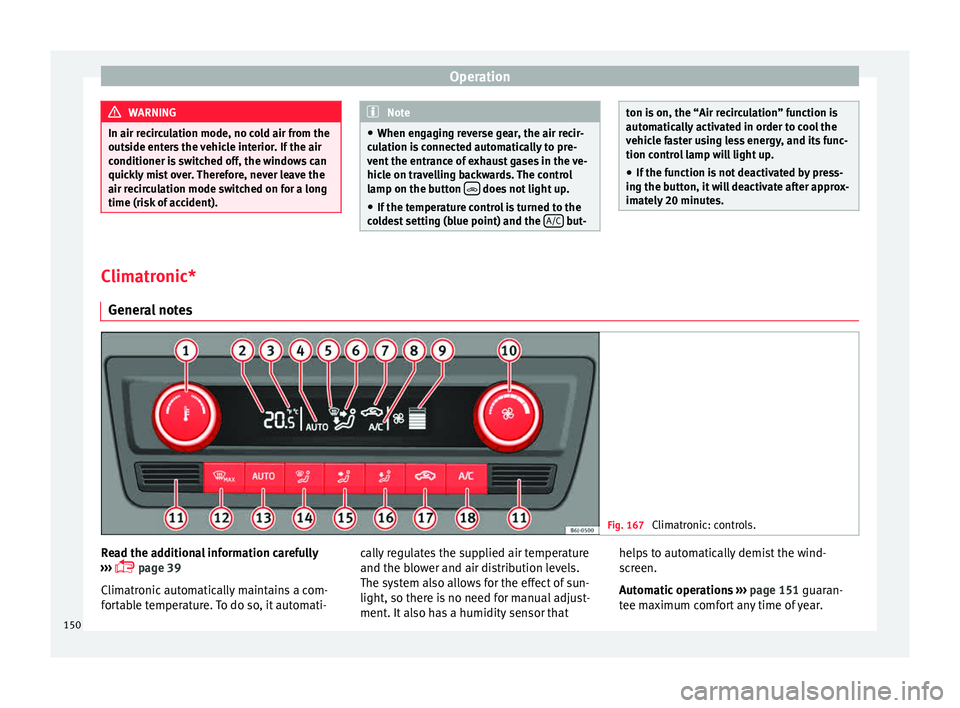
notes Fig. 167
Climatronic: controls. Read the additional information carefully
› ›
›
page 39
Climatronic automatically maintains a com-
fortable temperature. To do so, it automati- cally regulates the supplied air temperature
and the blow
er and air distribution levels.
The system also allows for the effect of sun-
light, so there is no need for manual adjust-
ment. It also has a humidity sensor that helps to automatically demist the wind-
scr
een.
Automatic operations ››› page 151 guaran-
tee maximum comfort any time of year.
150
Page 155 of 248
Driving
could be engaged and vehicle steering would
not w
ork. Note
The ignition of the vehicle being towed must
be sw itc
hed on to prevent the steering wheel
from locking and also to allow the use of the
turn signals, horn, windscreen wipers and
washers. Information relating to different vehi-
c
l
e pr
ocesses. In order to make the vehicle more difficult to
s
t
e
al, you should always lock the steering be-
fore leaving the vehicle.
Mechanical steering lock
The steering column is locked when the key
is removed from the ignition lock and the ve-
hicle is stationary.
Activating the steering lock
● Park the vehicle ›››
page 156.
● Remove the ignition key.
● Turn the steering wheel slightly until the
steerin
g lock has engaged. Deactivating the steering lock
●
Turn the steering wheel slightly to release
the lock.
● Inser
t the key in the ignition lock.
● Hold the steering wheel in this position
and switc
h on the ignition.
Electromechanical steering
In vehicles with electromechanical steering,
the assisted steering function automatically
adjusts according to vehicle speed, steering
wheel torque and wheel orientation. The
power steering only works when the engine
is running.
You should take into account that you will
need considerably more power than normal
to steer the vehicle if the power steering is
not working correctly or at all.
Power-assisted steering
Power-assisted steering helps the driver in
critical situations. In counter-steering, it as-
sists by applying additional torque ››› .
WARNING
Power-assisted steering, together with the
ESC, help s
the driver to control vehicle steer-
ing in critical situations. However, the driver
is ultimately responsible for steering the ve-
hicle at all times. Power-assisted steering
does not remove this responsibility. Starting and stopping the en-
gine
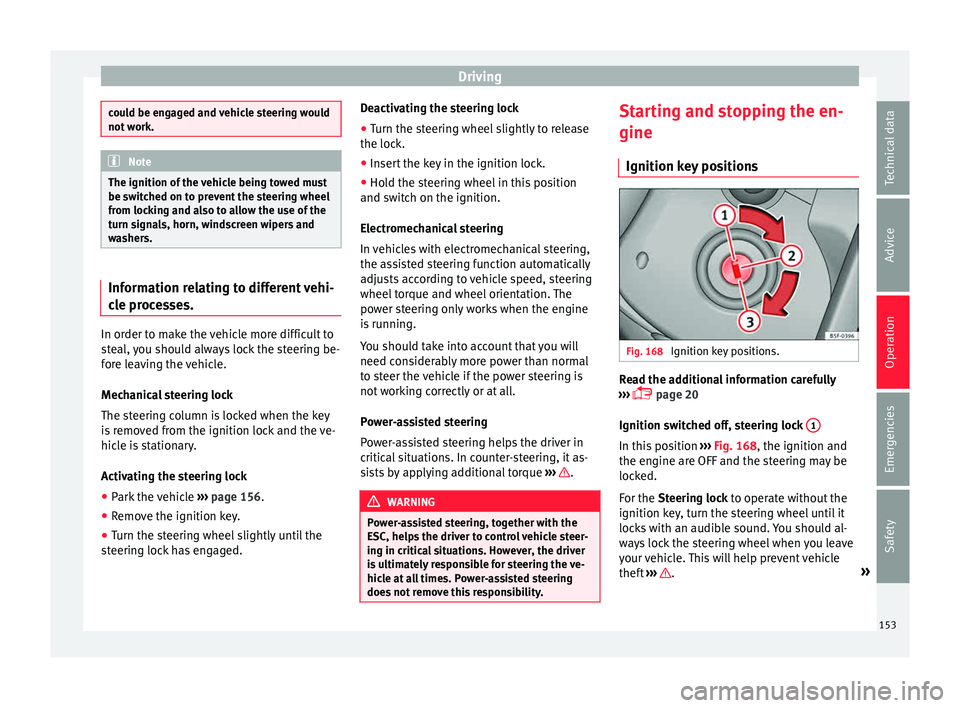
Ignition k ey
po
sitions Fig. 168
Ignition key positions. Read the additional information carefully
› ›
›
page 20
Ignition switched off, steering lock 1 In this position
››
›
Fig. 168, the ignition and
the engine are OFF and the steering may be
locked.
For the Steering lock to operate without the
ignition key, turn the steering wheel until it
locks with an audible sound. You should al-
ways lock the steering wheel when you leave
your vehicle. This will help prevent vehicle
theft ››› .
»
153
Technical data
Advice
Operation
Emergencies
Safety
Page 156 of 248
Operation
Switching the ignition or the glow plug sys-
t em on 2 Turn the ignition key to this position and re-
l
e
a
se it. If the key cannot be turned or it is
difficult to turn from position 1 to position
2 , move the steering wheel from one side to
the other; thi s
w
ill release it.
Starting 3The engine is started when the key is in this
po
s
ition. El
ectrical devices with high power
consumption are switched off temporarily at
the same time.
Each time that the vehicle is restarted, the ig-
nition key must be turned to position 1 . The
r epetitiv
e s
tart prevention lock of the igni-
tion prevents possible damage to the starter
motor if the engine is already running. WARNING
● The ignition key mu
st NOT be removed from
the lock until the vehicle comes to a stand-
still. Otherwise, the steering could be imme-
diately blocked- Risk of accident!
● Always remove the key from the ignition
when leav
ing the vehicle, even if only for a
short period. This is especially important if
children or disabled people are left alone in
the vehicle. They could accidentally start the
engine or work electrical equipment such as
the electric windows, resulting in an acci-
dent. ●
Uns uper
vised use of the key could start the
engine or any electrical system, such as the
electric windows. This could result in serious
injury. CAUTION
The starter motor will only work when the en-
gine i s s
topped (ignition key position 3 ).
Electronic immobiliser
The electronic immobiliser prevents unau-
thori
sed per
son
s from driving the vehicle.
Inside the key there is a chip that deactivates
the electronic immobiliser automatically
when the key is inserted into the ignition.
The electronic immobiliser will be activated
again automatically as soon as you pull the
key out of the ignition lock.
The engine can only be started using a genu-
ine SEAT key with its correct code. Note
A perfect operation of the vehicle is ensured
if g enuine
SEAT keys are used. Starting petrol engines
The engine can only be started using a genu-
ine S
EA
T key with its correct code.
– Move the gearbox lever to the neutral posi-
tion and depres
s the clutch pedal thor-
oughly and hold it in this position for the
starter to turn the engine on.
– Turn the ignition key to the starting posi-
tion ›››
page 153.
– Let go of the ignition key as soon as the en-
gine star
ts; the starter motor must not run
on with the engine.
After starting a very hot engine, you may
need to slightly press down the accelerator.
When starting a cold engine, it may be a little
noisy for the first few seconds until oil pres-
sure has built up in the hydraulic valve com-
pensators. This is quite normal, and no cause
for concern.
If the engine does not start immediately,
switch the starter off after 10 seconds and try
again after half a minute. If the engine still
does not start, the fuel pump fuse should be
checked ›››
page 81, Fuses.
154
Page 157 of 248
Driving
WARNING
● Never s t
art or run the engine in unventila-
ted or closed rooms. The exhaust gases con-
tain carbon monoxide, an odourless and col-
ourless poisonous gas. Risk of fatal acci-
dents. Carbon monoxide can cause loss of
consciousness and result in death.
● Never leave the vehicle unattended if the
engine is
running.
● Never use “cold start sprays”, they could
explode or c
ause the engine to run at high
revs. Risk of injury. CAUTION
● When the engine i s
cold, you should avoid
high engine speeds, driving at full throttle
and over-loading the engine. Risk of engine
damage.
● The vehicle should not be pushed or towed
more than 50 metr
es to start the engine. Un-
burnt fuel could enter the catalytic converter
and damage it.
● Before attempting to push-start or tow a ve-
hicle in or
der to start it, you should first try to
start it using the battery of another vehicle.
Please observe and follow the notes on the
››› page 52, How to jump start. For the sake of the environment
Do not warm-up the engine by running the
engine w ith the
vehicle stationary. Start off
immediately, driving gently. This helps the engine reach operating temperature faster
and reduc
e
s emissions. Starting diesel engines
The engine can only be started using a genu-
ine S
EA
T key with its correct code.
– Move the gearbox lever to the neutral posi-
tion and depres
s the clutch pedal thor-
oughly and hold it in this position for the
starter to turn the engine on.
– Turn the ignition key to position ›››
Fig. 168
2 . The warning lamp
wi
l l light for en-
gine pre-heating.
– When the lamp turns off, turn the ignition
key t
o position 3 to start the engine. Do
not pr
e
ss the accelerator.
– Release the ignition key as soon as the en-
gine star
ts. The starter motor should not
turn at the same time.
When starting a cold engine, it may be a little
noisy for the first few seconds until oil pres-
sure has built up in the hydraulic valve com-
pensators. This is quite normal, and no cause
for concern.
If there are problems starting the engine, see
the ›››
page 52. Glow plug system for the diesel engine
To avoid u
nnecessary discharging of the bat-
tery, do not use any other major electrical
equipment while the glow plugs are pre-heat-
ing.
Start the engine as soon as the glow plug
warning lamp goes out.
Starting a diesel engine after the fuel tank
has been completely run dry
If the fuel tank has been completely run dry,
it may take longer than normal (up to one mi-
nute) to start a diesel engine after refuelling.
This is because the fuel system must elimi-
nate air first. WARNING
Observe the safety warnings ›››
in Starting
petro l
engines on page 155. CAUTION
● When the engine i s
cold, you should avoid
high engine speeds, driving at full throttle
and over-loading the engine. Risk of engine
damage.
● The vehicle should not be pushed or towed
more than 50 metr
es to start the engine. Un-
burnt fuel could enter the catalytic converter
and damage it.
● Before attempting to push-start or tow a ve-
hicle in or
der to start it, you should first try to » 155
Technical data
Advice
Operation
Emergencies
Safety