towing Seat Ibiza SC 2015 User Guide
[x] Cancel search | Manufacturer: SEAT, Model Year: 2015, Model line: Ibiza SC, Model: Seat Ibiza SC 2015Pages: 248, PDF Size: 4.77 MB
Page 161 of 248
Driving
Manual gearbox Driv in
g w
ith manual gearboxRead the additional information carefully
›› ›
page 37
Certain versions of the model may include a
6-speed manual gearbox, and its diagram is
shown on the gearbox lever.
The reverse gear can only be engaged when
the car is stationary. When the engine is run-
ning and before engaging this gear, wait
about 6 seconds with the clutch pressed
down thoroughly in order to protect the gear-
box.
The reverse lights switch on when the reverse
gear is selected and the ignition is on. WARNING
● When the engine i s
running, the vehicle
will start to move as soon as a gear is engag-
ed and the clutch released.
● Never select the reverse gear when the ve-
hicle i
s in motion. Risk of accident. Note
● Do not r e
st your hand on the gear lever
while driving. The pressure of your hand
could cause premature wear on the selector
forks in the gearbox. ●
When ch an
ging gear, you should always
depress the clutch fully to avoid unnecessary
wear and damage.
● Do not “slip” the clutch to hold the vehicle
on a hill
. This causes premature wear and
damage to the clutch.
● Do not leave your foot on the clutch pedal;
although the pre
ssure may seem insignifi-
cant, it can cause the premature wear of the
clutch plate. Use the foot rest when you do
not need to change gear. Gear-change indicator
3 V
alid for vehicles: with a manual gearbox
The r
ecommended gear for saving fuel is in-
dicated on the dash screen of certain vehi-
cles during driving.
DisplayMeaning
The optimal gear is selected.
Changing to a higher gear is recommended.
Changing to a lower gear is recommended.
Information regarding the “cleanliness” of
the die
sel
p
articulate filter
The exhaust system manager detects that the
diesel particulate filter is nearly saturated
and contributes to self-cleaning by recom-
mending the optimal gear. For this purpose, it might be necessary to drive momentarily
with a high rpm
››
› page 101. WARNING
The gear change indicator is only an auxiliary
fu nction and in no c
ase should be a substi-
tute for careful driving.
● The responsibility of choosing the correct
gear dependin
g on the situation (e.g. over-
taking, driving up or down a slope or towing a
trailer) lies with the driver. For the sake of the environment
Selecting the correct gear can help to save
fuel . Note
The recommended gear display is switched
off when the c lut
ch pedal is pressed. Automatic gearbox*
Driv ing pr
ogrammes Read the additional information carefully
› ›
›
page 38
The automatic gearbox has got two gearbox
programmes. »
159
Technical data
Advice
Operation
Emergencies
Safety
Page 172 of 248
Operation
the button
and the function buttons
Set up and
E
SC
System .
WARNING
You should switch on the ESC Sport mode on-
ly if the tr
affic conditions and your driving
ability allow you to do so safely: risk of skid-
ding!
● With ESC in Sport mode, the stabilising
function w
ill be limited to allow for a sportier
drive. The driving wheels could spin and the
vehicle could skid. Note
If the ASR is disconnected or the ESC’s Sport
mode is sel
ected, cruise control* will be
switched off. Electronic Stability Control (ESC)*
This Electronic Stability System reduces the
ri
sk
of
skidding and improves the vehicle's
stability and ability to hold the road.
The Electronic Stability Control (ESC) contains
the electronic differential lock (EDL) and the
traction control system (ASR). The ESC works
together with the ABS. Both control lamps
will light up if the ESC or ABS systems are
faulty.
The ESC system is started automatically
when the engine is started. The ESC system is always active and cannot
be switc
hed off. With the Easy Connect sys-
tem it is only possible to deactivate the ASR
or else select Sport mode.
The ASR can be deactivated when wheel spin
is desirable ››› page 172.
For example:
● When driving with snow chains.
● When driving in deep snow or on loose sur-
face
s.
● When the vehicle is stuck, to rock it back-
ward
s and forwards.
Press the button to switch the ASR back on
when you no longer need wheel spin.
Electronic Stability Control (ESC)*
The ESC reduces the risk of skidding by brak-
ing the wheels individually.
The system uses the steering wheel angle
and road speed to calculate the changes of
direction desired by the driver, and constant-
ly compares them with the actual behaviour
of the vehicle. When irregularities occur, for
example, if the vehicle begins to skid, the
ESC brakes the appropriate wheel automati-
cally.
The forces acting on the braked wheel bring
the vehicle back to a stable condition. If the
vehicle tends to oversteer (the rear end slides out), the system will act on the front
wheel on the outside of
the turn. WARNING
● Do not f or
get that the electronic stability
control ESC cannot defy the laws of physics.
This should be kept in mind, particularly on
slippery and wet roads and when towing a
trailer.
● Always adapt your driving style to suit the
condition of the r
oads and the traffic situa-
tion. The greater safety provided by the ESC
should not encourage you to run any risks. CAUTION
● To en s
ure that the ESC works correctly, all
four wheels must be fitted with the same
tyres. Any differences in the rolling radius of
the tyres can cause the system to reduce en-
gine power when this is not desired.
● Any modifications made to the vehicle (for
examp
le, to the engine, brake system, run-
ning gear or to the combination of wheels
and tyres) may affect the operation of the
ABS, EDL, ESC and ASR. Electronic differential lock (EDS)*
EDL helps the vehicle to start moving, accel-
er
at
e and c
limb a gradient in slippery condi-
tions where this may otherwise be difficult or
even impossible.
170
Page 174 of 248
Operation
pressure to this wheel. The driver is made
a w
ar
e of this control process by a pulsating
of the brake pedal and audible noise. This is
a deliberate warning to the driver that one or
more of the wheels is tending to lock and the
ABS control function has intervened. In this
situation it is important to keep the brake
pedal fully depressed so the ABS can regu-
late the brake application. Do not “pump”.
If you brake hard on a slippery road surface,
the best possible control is retained as the
wheels do not lock.
However, ABS will not necessarily guarantee
shorter braking distances in all conditions.
Braking distance could even be further if you
brake on gravel or on fresh snow on a slip-
pery surface. WARNING
● The anti-lock br
ake system cannot defy the
laws of physics. Slippery and wet roads are
dangerous even with ABS! If you notice that
the ABS is working (to counteract locked
wheels under braking), you should reduce
speed immediately to suit the road and traffic
conditions. Do not let the extra safety fea-
tures tempt you into taking any risks when
driving.
● The effectiveness of ABS is also determined
by the ty
res fitted ››› page 212.
● If the running gear or brake system is modi-
fied, the effectivene
ss of the ABS could be se-
verely limited. Traction control system (ASR)*
The traction control system prevents the driv-
en wheels
fr
om spinning when the vehicle is
accelerating. This system always includes
ABS.
Description and operation of the traction
control system during acceleration (ASR
On front-wheel drive vehicles, the ASR sys-
tem intervenes, reducing engine power and
preventing the driven wheels from slipping
during acceleration. The system works in the
entire speed range in conjunction with ABS.
If a failure occurs in the ABS, the ASR will al-
so stop working.
TCS helps the car to start moving, accelerate
and climb a gradient in slippery conditions
where this may otherwise be difficult or even
impossible.
The ASR automatically switches on when the
engine is started. If necessary, it could be
connected or disconnected by means of the
Easy Connect system.
When the ASR is off, the warning lamp lights
up . The ASR should normally be left on.
Only in exceptional circumstances, when
wheel spin is required, can they be turned off
using the ESC button, for example:
● With compact temporary spare wheel.
● When using the snow chains. ●
When drivin g in deep s
now or on soft ter-
rain.
● When the vehicle is bogged-down, to free it
“by r
ocking it.”
The ASR should be switched on again as
soon as possible. WARNING
● Remember th at
not even the ASR can defy
the laws of physics. This should be kept in
mind, particularly on slippery and wet roads
and when towing a trailer.
● Always adapt your driving style to suit the
condition of the r
oads and the traffic situa-
tion. The greater safety provided by the ASR
should not encourage you to run any risks. CAUTION
● To en s
ure that the ASR works correctly,
identical tyres should be fitted on all four
wheels. Any differences in the rolling radius
of the tyres can cause the system to reduce
engine power when this is not desired.
● Any modifications made to the vehicle (for
examp
le, to the engine, brake system, run-
ning gear or to the combination of wheels
and tyres) may affect the operation of the
ABS and ASR. 172
Page 179 of 248
Driver assistance systems
–
Ob j
ects with certain surfaces or struc-
tures, such as wire mesh fences or pow-
der snow.
● Certain surfaces of objects and garments
do not refl
ect the ultrasound sensors' sig-
nals. The system cannot detect, at least cor-
rectly, these objects or people wearing such
clothes.
● Ultrasound sensor signals may be affected
by e
xternal sound sources. In certain circum-
stances this may prevent them from detect-
ing people or objects.
● Please note that low obstacles detected by
the syst
em may no longer be registered by
the sensors as the car moves closer, so the
system will not give any further warning. In
certain circumstances, objects such as high
kerbs that could damage the bottom of the
vehicle are not detected either.
● If the first warning from the Park Pilot is ig-
nored, the v
ehicle could suffer considerable
damage.
● The knocks or damage on the radiator
grill
e, bumper, wheel arch and vehicle under-
body can adjust the orientation of the sen-
sors. This can affect the parking aid function.
Have the function checked by a specialised
workshop. Note
● In cer t
ain situations, the system can give a
warning even though there is no obstacle in
the detected area, e.g: –
with r ough or c
obbled floors or ground
with long grass;
– with external ultrasound sources, such as
cleaning vehicles or other vehicles;
– In downpours, intense snow or dense ex-
haust gases;
– if the registration plate (front or rear) is
not properly affixed to the bumper sur-
face;
– or in locations such as the brow of a hill.
● In order to guarantee good system opera-
tion, keep the ultr
asound sensors clean, free
of snow or ice, and do not cover them with
adhesives or other objects.
● If you use high-pressure or vapour equip-
ment to c
lean the ultrasound sensors, apply
it directly only very briefly and always from a
distance of more than 10 cm.
● Retrofitting of accessories to the vehicle,
such a
s a bicycle carrier, may interfere with
the operation of the Parking Aid.
● In order to familiarise yourself with the sys-
tem, it i
s advised that you practice parking in
an area or car park that is free from traffic.
There must be good weather and light condi-
tions.
● The volume and tone of the warnings can
be modified, in addition t
o the indications
››› page 180.
● In vehicles without a driv
er information
system, these parameters can be modified in
a SEAT Official Service or in a specialised
workshop. ●
Ple a
se observe information on towing a
trailer ››› page 181.
● The display on the Easy Connect screen
shows
a slight time delay. Rear parking aid*
The rear Parking Aid assists the driver in
park
in
g by means of audible warning
sounds.
Description
There are sensors integrated in the rear
bumper. When the sensors detect an obsta-
cle, you are alerted by audible warnings.
Make particularly sure that the sensors are
not covered by adhesives, residues and the
like, as this could affect the system's opera-
tion. Cleaning instructions ››› page 194.
The approximate measurement range of the
rear sensors is:
side area0.60 m
central area1.60 m As you approach the obstacle, the time inter-
v
al
betw
een the audible warnings will be re-
duced. When you reach around 0.30 m the
warning will be constant: Do not continue to
move forward (or backward) ››› in General
»
177
Technical data
Advice
Operation
Emergencies
Safety
Page 183 of 248
Driver assistance systems
Parking System Plus*
If ther
e i
s a fault in the parking aid system a
message will appear on the instrument panel
indicating the error. In addition the key
LED will blink.
If there is a fault in a sensor, the symbol is
displayed on the Easy Connect display in
front of/behind the vehicle. If a rear sensor is
faulty, only the obstacles in the areas A and
B are displayed
››
›
Fig. 176. If a front sensor
is faulty, only the obstacles in the areas Cand
D are displayed.
Hav e the f
au
lt corrected by a specialised
workshop without delay.
Towing bracket In vehicles equipped with a towing bracket
dev
ic
e fr
om the factory, when the trailer is
connected electrically, the Parking Aid rear
sensors will not be activated when reverse
gear is engaged, when the selector lever is
turned to position R or when the button is
pressed.
Parking System Plus
The distance to possible obstacles at the rear
of the vehicle will not be displayed on the
screen and nor will it be indicated by means
of audible sound signals. The Easy Connect system screen will only dis-
pla
y objects detected at the front, and the ve-
hicle's trajectory will be hidden.
Rear Assist “Rear View Cam-
era”*
Operatin
g and safety warnings WARNING
● The Re ar As
sist does not make it possible
to precisely calculate the distance from ob-
stacles (people, vehicles, etc.) and nor can it
overcome the system's own limits, hence us-
ing it may cause serious accidents and inju-
ries if used negligently or without due care.
The driver should be aware of his/her sur-
roundings at all times to ensure safe driving.
● The camera lens expands and distorts the
field of
vision and displays the objects on the
screen in a different, vague manner. The per-
ception of distances is also distorted by this
effect.
● Some objects may, due to the resolution of
the disp
lay screen - not be displayed in a sat-
isfactory manner or may not be displayed at
all. Take special care with thin posts, fences,
railings or trees that might not be displayed
on screen and could damage the vehicle.
● The rear assist has blind spots where it is
not pos
sible to represent people or objects
(small children, animals and certain objects cannot be detected in its field of vision). Mon-
itor the
v
ehicle's surrounding area at all
times.
● Keep the camera lens clean, free of ice and
snow
, and do not cover it.
● The system is not a replacement for driver
awar
eness. Supervise the parking operation
at all times, as well as the vehicle's surround-
ing area. Adapt your speed and driving style
at all times to suit visibility, weather, road
and traffic conditions.
● Do not be distracted from the traffic by
looking at
the screen.
● The images on the rear assist screen are
only tw
o-dimensional. Due to a lack of spatial
depth, protruding parts or holes in the road,
for example, are more difficult to detect or
may not be seen at all.
● Vehicle load modifies the representation of
the orientation lines
displayed. The width
represented by the lines diminishes with ve-
hicle load. Pay special attention to the vehi-
cle's surroundings when the inside of the ve-
hicle of the luggage compartment is carrying
a heavy load.
● In the following situations, the objects or
other vehic
les shown in the navigation sys-
tem display appear to be further away or
closer than they really are: Pay special atten-
tion:
– On moving from a horizontal plane to a
slope.
– On moving from a slope to a horizontal
plane. » 181
Technical data
Advice
Operation
Emergencies
Safety
Page 189 of 248
Towing bracket device and trailer
Towing bracket device and
tr ai
l
er
Driving with a trailer What do you need to bear in mind
when towing a trailer? Your vehicle may be used to tow a trailer
when fitted w
ith the c
orrect equipment.
If the car is supplied with a factory-fitted tow-
ing bracket it will already have the necessary
technical modifications and meet the statuto-
ry requirements for towing a trailer. If you
wish to retrofit a towing bracket, consult
››› page 188.
Connectors
Your vehicle is fitted with a 12-pin connector
for the electrical connection between the
trailer and the vehicle.
If the trailer has a 7-pin plug you will need to
use an adapter cable. It is available at any
Technical Service.
Trailer weight/drawbar load
Never exceed the authorised trailer weight. If
you do not load the trailer up to the maxi-
mum permitted trailer weight, you can then
climb correspondingly steeper slopes. The maximum trailer weights listed are only
app
lic
able for altitudes up to 1000 m above
sea level. With increasing altitude the engine
power and therefore the vehicle climbing
ability are impaired because of the reduced
air density. The maximum trailer weight has
to be reduced accordingly. The weight of the
vehicle and trailer combination must be re-
duced by 10% for every further 1000 m (or
part thereof). The gross combination weight
is the actual weight of the laden vehicle plus
the actual weight of the laden trailer. When
possible, operate the trailer with the maxi-
mum permitted drawbar load on the ball joint
of the towing bracket, but do not exceed the
specified limit.
The figures for trailer weights and drawbar
loads that are given on the data plate of the
towing bracket are for certification purposes
only. The correct figures for your specific
model, which may be lower than these fig-
ures for the towing bracket, are given in the
vehicle documentation or in ››› chapter Tech-
nical Data .
Distributing the load
Distribute loads in the trailer so that heavy
objects are as near to the axle as possible.
Loads carried in the trailer must be secured
to prevent them moving. Tyre pressure
Set tyr
e pressure to the maximum permissi-
ble pressure shown on the sticker on the in-
side of the fuel tank flap. Set the tyre pres-
sure of the trailer tyres in accordance with the
trailer manufacturer's recommendations.
Exterior mirrors
Check whether you can see enough of the
road behind the trailer with the standard rear
vision mirrors. If this is not the case, you
should have additional exterior mirrors fitted.
Both exterior mirrors should be mounted on
hinged extension brackets. Adjust the mirrors
to give sufficient vision to the rear. WARNING
Never transport people in a trailer. This could
re s
ult in fatal accidents. Note
● To w
ing a trailer places additional demands
on the vehicle. We recommend additional
services between the normal inspection inter-
vals if the vehicle is used frequently for tow-
ing a trailer.
● Find out whether special regulations apply
to to
wing a trailer in your country. 187
Technical data
Advice
Operation
Emergencies
Safety
Page 190 of 248
Operation
Ball coupling of towing bracket* The ball coupling is provided with instruc-
tions
on fittin
g and removing the ball cou-
pling of the towing bracket. WARNING
The towing bracket ball coupling must be
st or
ed securely in the luggage compartment
to prevent them being flung through the vehi-
cle and causing injury. Note
● By l
aw, the ball coupling must be removed
if a trailer is not being towed if it obscures
the number plate. Driving tips
Driving with a trailer always requires extra
c
ar
e.
W
eight distribution
The weight distribution of a loaded trailer
with an unladen vehicle is very unfavourable.
However, if this cannot be avoided, drive ex-
tra slowly to allow for the unbalanced weight
distribution. Speed
The stab
ility of the vehicle and trailer is re-
duced with increasing speed. For this reason,
it is advisable not to drive at the maximum
permissible speed in an unfavourable road,
weather or wind conditions. This applies es-
pecially when driving downhill.
You should always reduce speed immediately
if the trailer shows the slightest sign of snak-
ing. Never try to stop the “snaking” by in-
creasing speed.
Always brake in due course. If the trailer has
an overrun brake, apply the brakes gently at
first and then, firmly. This will prevent the
jerking that can be caused by locking of trail-
er wheels. Select a low gear in due course
before going down a steep downhill. This en-
ables you to use the engine braking to slow
down the vehicle.
Reheating
At very high temperatures and during pro-
longed slopes, driving with a low gear and
high engine speed; always monitor whether
the excessive coolant temperature gauge is
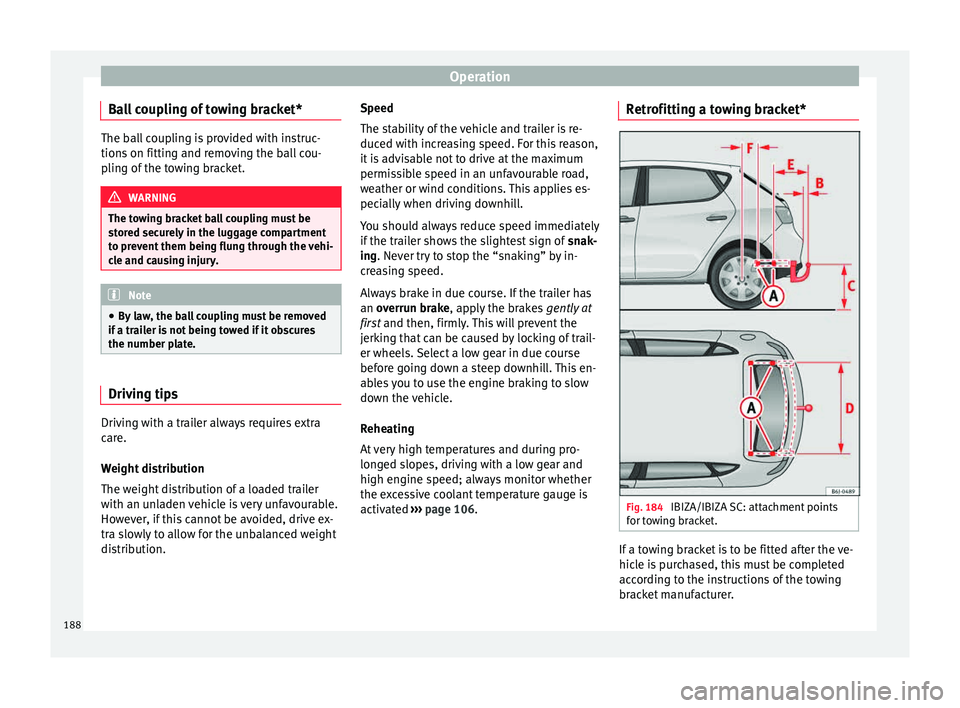
activated ››› page 106. Retrofitting a towing bracket*
Fig. 184
IBIZA/IBIZA SC: attachment points
f or t
o
wing bracket. If a towing bracket is to be fitted after the ve-
hic
l
e i
s purchased, this must be completed
according to the instructions of the towing
bracket manufacturer.
188
Page 191 of 248
Towing bracket device and trailer
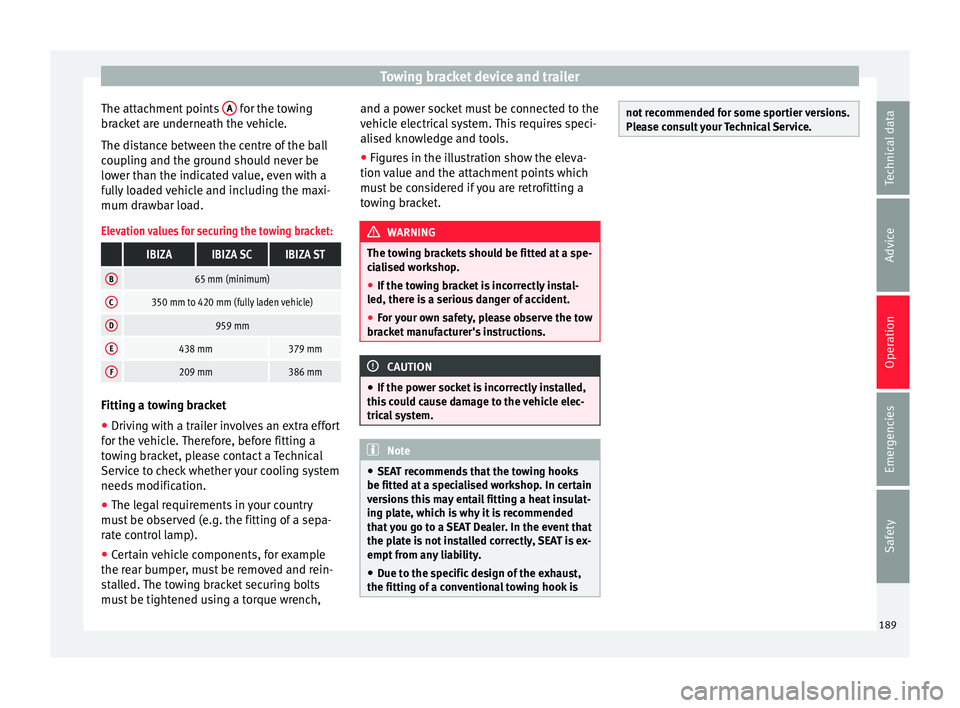
The attachment points A for the towing
br ac
k
et are underneath the vehicle.
The distance between the centre of the ball
coupling and the ground should never be
lower than the indicated value, even with a
fully loaded vehicle and including the maxi-
mum drawbar load.
Elevation values for securing the towing bracket:
IBIZAIBIZA SCIBIZA ST
B65 mm (minimum)
C350 mm to 420 mm (fully laden vehicle)
D959 mm
E438 mm379 mm
F209 mm386 mm Fitting a towing bracket
●
Driving with a trailer involves an extra effort
f or the
v
ehicle. Therefore, before fitting a
towing bracket, please contact a Technical
Service to check whether your cooling system
needs modification.
● The legal requirements in your country
must
be observed (e.g. the fitting of a sepa-
rate control lamp).
● Certain vehicle components, for example
the rear b
umper, must be removed and rein-
stalled. The towing bracket securing bolts
must be tightened using a torque wrench, and a power socket must be connected to the
vehicl
e electrical system. This requires speci-
alised knowledge and tools.
● Figures in the illustration show the eleva-
tion value and the att
achment points which
must be considered if you are retrofitting a
towing bracket. WARNING
The towing brackets should be fitted at a spe-
ci a
lised workshop.
● If the towing bracket is incorrectly instal-
led, there i
s a serious danger of accident.
● For your own safety, please observe the tow
brack
et manufacturer's instructions. CAUTION
● If the po w
er socket is incorrectly installed,
this could cause damage to the vehicle elec-
trical system. Note
● SEA T r
ecommends that the towing hooks
be fitted at a specialised workshop. In certain
versions this may entail fitting a heat insulat-
ing plate, which is why it is recommended
that you go to a SEAT Dealer. In the event that
the plate is not installed correctly, SEAT is ex-
empt from any liability.
● Due to the specific design of the exhaust,
the fitting of a c
onventional towing hook is not recommended for some sportier versions.
Ple
a
se consult your Technical Service. 189
Technical data
Advice
Operation
Emergencies
Safety
Page 221 of 248
Technical specifications
Special versions, optional equipment fittings
or r etr
o-fittin
g accessories will increase the
weight of the vehicle ››› .
WARNING
● Ple a
se note that the centre of gravity may
shift when transporting heavy objects; this
may affect vehicle handling and lead to an ac-
cident. Always adjust your speed and driving
style to suit road conditions and require-
ments.
● Never exceed the gross axle weight rating
or the gros
s vehicle weight rating. If the per-
missible axle load or the permissible total
weight is exceeded, the driving characteris-
tics of the vehicle may change, leading to ac-
cidents, injuries and damage to the vehicle. Driving with a trailer
Tr
ai
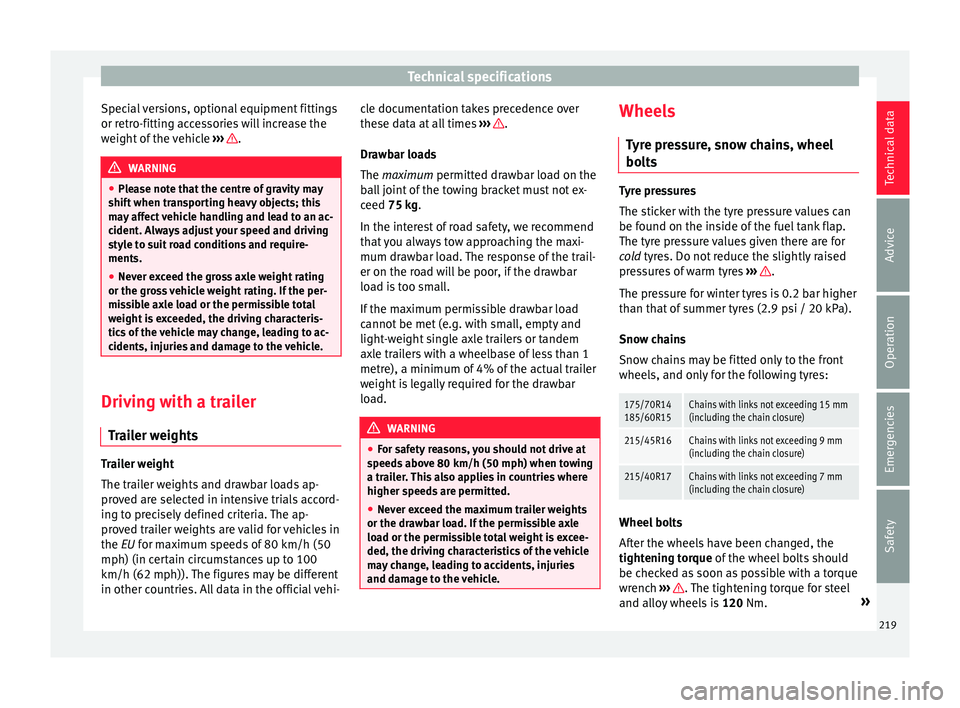
ler weights Trailer weight
The tr
ai
l
er weights and drawbar loads ap-
proved are selected in intensive trials accord-
ing to precisely defined criteria. The ap-
proved trailer weights are valid for vehicles in
the EU for maximum speeds of 80 km/h (50
mph) (in certain circumstances up to 100
km/h (62 mph)). The figures may be different
in other countries. All data in the official vehi- cle documentation takes precedence over
these dat
a at all times ››› .
Dr a
wb
ar loads
The maximum permitted drawbar load on the
ball joint of the towing bracket must not ex-
ceed 75 kg.
In the interest of road safety, we recommend
that you always tow approaching the maxi-
mum drawbar load. The response of the trail-
er on the road will be poor, if the drawbar
load is too small.
If the maximum permissible drawbar load
cannot be met (e.g. with small, empty and
light-weight single axle trailers or tandem
axle trailers with a wheelbase of less than 1
metre), a minimum of 4% of the actual trailer
weight is legally required for the drawbar
load. WARNING
● For s af
ety reasons, you should not drive at
speeds above 80 km/h (50 mph) when towing
a trailer. This also applies in countries where
higher speeds are permitted.
● Never exceed the maximum trailer weights
or the drawb
ar load. If the permissible axle
load or the permissible total weight is excee-
ded, the driving characteristics of the vehicle
may change, leading to accidents, injuries
and damage to the vehicle. Wheels
Ty
r
e pressure, snow chains, wheel
bolts Tyre pressures
The stic
k
er with the tyre pressure values can
be found on the inside of the fuel tank flap.
The tyre pressure values given there are for
cold tyres. Do not reduce the slightly raised
pressures of warm tyres ››› .
The pre s
sure for winter tyres is 0.2 bar higher
than that of summer tyres (2.9 psi / 20 kPa).
Snow chains
Snow chains may be fitted only to the front
wheels, and only for the following tyres:
175/70R14
185/60R15Chains with links not exceeding 15 mm
(including the chain closure)
215/45R16Chains with links not exceeding 9 mm
(including the chain closure)
215/40R17Chains with links not exceeding 7 mm
(including the chain closure) Wheel bolts
Af
t
er the wheel
s have been changed, the
tightening torque of the wheel bolts should
be checked as soon as possible with a torque
wrench ››› . The tightening torque for steel
and al lo
y
wheels is 120 Nm. »
219
Technical data
Advice
Operation
Emergencies
Safety
Page 240 of 248
Index
Electronic Stability Control . . . . . . . . . . . . . . . . . 170
El ectr
onic
Stability Control (ESC) . . . . . . . 103, 169
Emergencies . . . . . . . . . . . . . . . . . . . . . . . . . . . . . . 75 bulbs . . . . . . . . . . . . . . . . . . . . . . . . . . . . . . . . . . 45
changing a wheel . . . . . . . . . . . . . . . . . . . . . . . . 47
changing the battery . . . . . . . . . . . . . . . . . . . . 211
emergency towing of the vehicle . . . . . . . . . . . . 51
emergency warning triangle . . . . . . . . . . . . . . . 75
fire extinguisher . . . . . . . . . . . . . . . . . . . . . . . . . 75
first-aid kit . . . . . . . . . . . . . . . . . . . . . . . . . . . . . . 75
fuses . . . . . . . . . . . . . . . . . . . . . . . . . . . . . . . . . . 44
hazard warning lights . . . . . . . . . . . . . . . . . . . 127
Jump leads . . . . . . . . . . . . . . . . . . . . . . . . . . . . . 52
panoramic/tilting sunroof . . . . . . . . . . . . . . . . . 11
puncture . . . . . . . . . . . . . . . . . . . . . . . . . . . . . . . 45
replacing a blown fuse . . . . . . . . . . . . . . . . . . . . 44
Spare wheel . . . . . . . . . . . . . . . . . . . . . . . . . . . . 76
vehicle tools . . . . . . . . . . . . . . . . . . . . . . . . . . . . 75
Emergency operation selector lever . . . . . . . . . . . . . . . . . . . . . . . . . . . 38
Emergency warning triangle . . . . . . . . . . . . 75, 127
Emission control system control lamp . . . . . . . . . . . . . . . . . . . . . . . . . . . 106
Emissions data . . . . . . . . . . . . . . . . . . . . . . . . . . . 217
Engine assisted starting . . . . . . . . . . . . . . . . . . . . . . . . . 52
Running in . . . . . . . . . . . . . . . . . . . . . . . . . . . . . 165
Start-Stop system . . . . . . . . . . . . . . . . . . . . . . . 173
Engine compartment . . . . . . . . . . . . . . 10, 201, 204 battery . . . . . . . . . . . . . . . . . . . . . . . . . . . . . . . . 209
brake fluid . . . . . . . . . . . . . . . . . . . . . . . . . . . . . 208
closing . . . . . . . . . . . . . . . . . . . . . . . . . . . . . . . . 203
coolant . . . . . . . . . . . . . . . . . . . . . . . . . . . . . . . 207
engine oil . . . . . . . . . . . . . . . . . . . . . . . . . . . . . 206
opening . . . . . . . . . . . . . . . . . . . . . . . . . . . . . . . 203
safety notes . . . . . . . . . . . . . . . . . . . . . . . . . . . 201
windscreen washer liquid . . . . . . . . . . . . . . . . 209 Engine coolant . . . . . . . . . . . . . . . . . . . . . . . . . . . . 42
check ing level . . . . . . . . . . . . . . . . . . . . . . . . . . 207
G12 plus-plus . . . . . . . . . . . . . . . . . . . . . . . . . . . 42
G13 . . . . . . . . . . . . . . . . . . . . . . . . . . . . . . . . . . . 42
specifications . . . . . . . . . . . . . . . . . . . . . . . . . . . 42
Engine data . . . . . . . . . . . . . . . . . . . . . . . . . . . . . . 221
Engine fault control lamp . . . . . . . . . . . . . . . . . . . . . . . . . . . 101
Engine management control lamp . . . . . . . . . . . . . . . . . . . . . . . . . . . 101
Engine oil . . . . . . . . . . . . . . . . . . . . . . . . . . . 41, 204 changing . . . . . . . . . . . . . . . . . . . . . . . . . 204, 206
check oil level . . . . . . . . . . . . . . . . . . . . . . . . . . 206
consumption . . . . . . . . . . . . . . . . . . . . . . . . . . . 206
diesel . . . . . . . . . . . . . . . . . . . . . . . . . . . . . . . . . 204
engine oil dipstick . . . . . . . . . . . . . . . . . . . . . . 206
inspection service . . . . . . . . . . . . . . . . . . . . . . 204
maintenance intervals . . . . . . . . . . . . . . . . . . . 204
oil properties . . . . . . . . . . . . . . . . . . . . . . . . . . . 41
Specifications . . . . . . . . . . . . . . . . . . . . . . . . . . 204
temperature display . . . . . . . . . . . . . . . . . . . . . . 31
topping up . . . . . . . . . . . . . . . . . . . . . . . . . . . . 206
Engine oil pressure warning lamp . . . . . . . . . . . . . . . . . . . . . . . . . . 102
Environment ecological driving . . . . . . . . . . . . . . . . . . . . . . . 167
Environmental compatibility . . . . . . . . . . . . . . 165
Environmental tips refuelling . . . . . . . . . . . . . . . . . . . . . . . . . . . . . . 199
Equipment . . . . . . . . . . . . . . . . . . . . . . . . . . . . . . 190
ESC . . . . . . . . . . . . . . . . . . . . . . . . . . . . . . . 103, 170 electronic stability control . . . . . . . . . . . 103, 169
Sport Mode . . . . . . . . . . . . . . . . . . . . . . . . . . . . 169
see also Electronic Stability Control (ESC) . . . 170
Exhaust gas emission control system . . . . . . . . . 166
Extending the luggage compartment . . . . . . . . . . . . . . . . 135 Exterior lighting
chan ging a bulb . . . . . . . . . . . . . . . . . . . . . . . . . 83
Exterior mirrors . . . . . . . . . . . . . . . . . . . . . . . . . . . 131 adjusting . . . . . . . . . . . . . . . . . . . . . . . . . . . . . . . 13
control . . . . . . . . . . . . . . . . . . . . . . . . . . . . . . . . 131
folding in electrically . . . . . . . . . . . . . . . . . . . . 132
folding in manually . . . . . . . . . . . . . . . . . . . . . 131
heated . . . . . . . . . . . . . . . . . . . . . . . . . . . . . . . . 132
Exterior view . . . . . . . . . . . . . . . . . . . . . . . . . . . . . 5, 6
F Fabric: cleaning . . . . . . . . . . . . . . . . . . . . . . . . . . 197
Fastening rings . . . . . . . . . . . . . . . . . . . . . . . . . . . 140
Faulty bulbs changing a bulb . . . . . . . . . . . . . . . . . . . . . . . . . 83
Filling the tank . . . . . . . . . . . . . . . . . . . . . . . . . . . 199 fuel gauge . . . . . . . . . . . . . . . . . . . . . . . . . . . . . 100
Fire extinguisher . . . . . . . . . . . . . . . . . . . . . . . . . . . 75
First-aid kit . . . . . . . . . . . . . . . . . . . . . . . . . . . . . . . 75
Floor mats . . . . . . . . . . . . . . . . . . . . . . . . . . . . . . . . 61
Fog-light bulb FR version . . . . . . . . . . . . . . . . . . . . . . . . . . . . . . 88
Fog light bulb . . . . . . . . . . . . . . . . . . . . . . . . . . . . . 88
Front headrests . . . . . . . . . . . . . . . . . . . . . . . . . . . . . . 60
Front airbags . . . . . . . . . . . . . . . . . . . . . . . . . . 14, 69 safety instructions . . . . . . . . . . . . . . . . . . . . . . . 69
Front ashtray . . . . . . . . . . . . . . . . . . . . . . . . . . . . . 138
Front drink holder . . . . . . . . . . . . . . . . . . . . . . . . . 137
Front passenger front airbag control lamp . . . . . . . . . . . . . . . . . . . . . . . . . . . . 68
deactivation . . . . . . . . . . . . . . . . . . . . . . . . . . . . 14
Front seat manual adjustment . . . . . . . . . . . . . . . . . . . . . . 12
Front seat backrest folding . . . . . . . . . . . . . . . . . . . . . . . . . . . . . . . . 133
lifting . . . . . . . . . . . . . . . . . . . . . . . . . . . . . . . . . 133
238