turn signal SEAT IBIZA SC 2017 User Guide
[x] Cancel search | Manufacturer: SEAT, Model Year: 2017, Model line: IBIZA SC, Model: SEAT IBIZA SC 2017Pages: 248, PDF Size: 5.24 MB
Page 86 of 248
Emergencies
would vaporise as a result of the heat gener-
ated b
y
the bulb, they will be deposited on
the reflector and will impair its surface. Single headlight bulb change
Po s
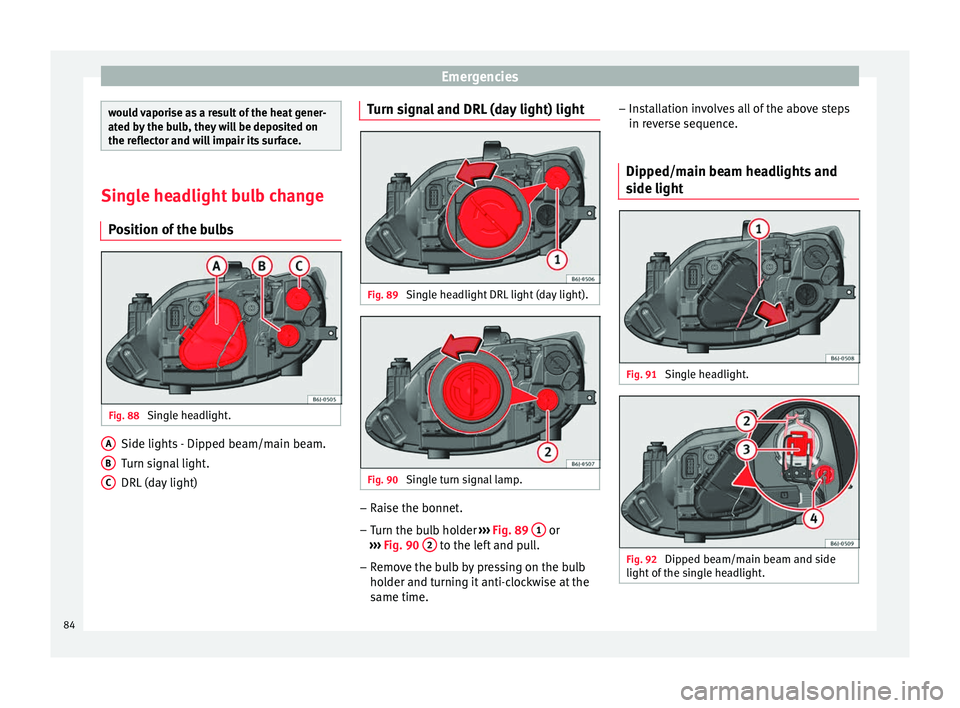
ition of the bulbs Fig. 88
Single headlight. Side lights - Dipped beam/main beam.
T
urn s
ign
al light.
DRL (day light)
A B
C Turn signal and DRL (day light) light
Fig. 89
Single headlight DRL light (day light). Fig. 90
Single turn signal lamp. –
Raise the bonnet.
– Turn the bulb holder ››
›
Fig. 89 1 or
› ›
›
Fig. 90 2 to the left and pull.
– Remove the bulb by pressing on the bulb
ho l
der and t
urning it anti-clockwise at the
same time. –
Inst
allation involves all of the above steps
in reverse sequence.
Dipped/main beam headlights and
side light Fig. 91
Single headlight. Fig. 92
Dipped beam/main beam and side
light of
the s
ingle headlight.84
Page 87 of 248
Fuses and bulbs
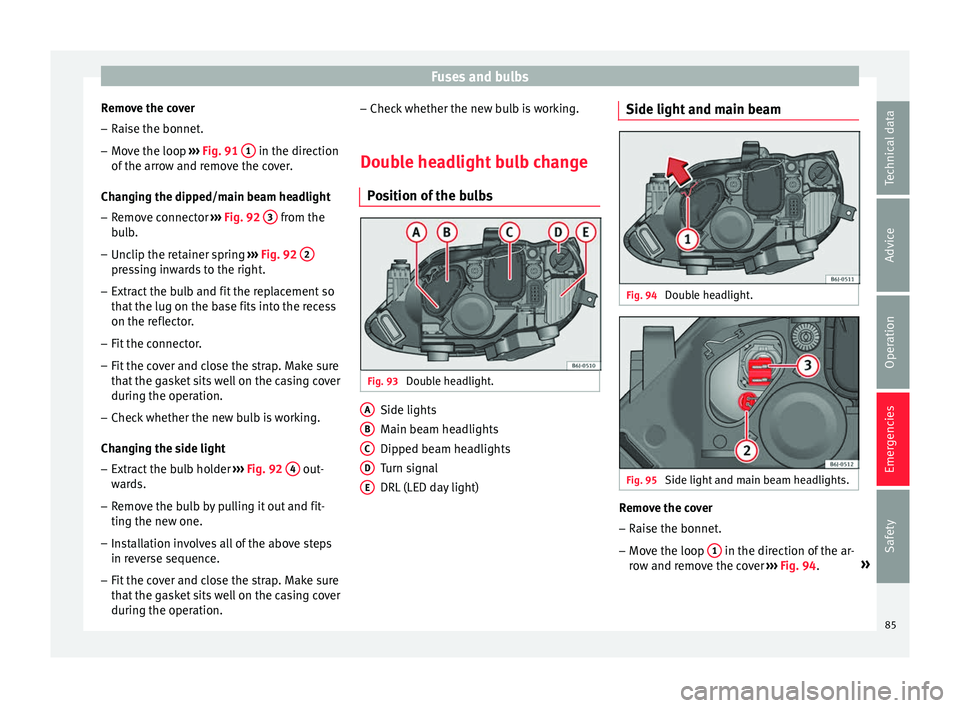
Remove the cover – Raise the bonnet.
– Move the loop ››
› Fig. 91 1 in the direction
of the arr
o
w and remove the cover.
Changing the dipped/main beam headlight – Remove connector ›››
Fig. 92 3 from the
b u
l
b.
– Unclip the retainer spring ›››
Fig. 92 2 pressing inwards to the right.
– Extract the bulb and fit the replacement so
th at
the lug on the b
ase fits into the recess
on the reflector.
– Fit the connector.
– Fit the cover and close the strap. Make sure
that the g
asket sits well on the casing cover
during the operation.
– Check whether the new bulb is working.
Changin
g the side light
– Extract the bulb holder ›››
Fig. 92 4 out-
w ar
d
s.
– Remove the bulb by pulling it out and fit-
ting the new one.
– Ins
tallation involves all of the above steps
in rever
se sequence.
– Fit the cover and close the strap. Make sure
that the g
asket sits well on the casing cover
during the operation. –
Check whether the new b
ulb is working.
Double headlight bulb change Pos
ition of the bulbs Fig. 93
Double headlight. Side lights
M
ain be
am he
adlights
Dipped beam headlights
Turn signal
DRL (LED day light)
A B
C
D
E Side light and main beam
Fig. 94
Double headlight. Fig. 95
Side light and main beam headlights. Remove the cover
– Raise the bonnet.
– Move the loop 1 in the direction of the ar-
r o
w and r
emove the cover ››› Fig. 94. »
85
Technical data
Advice
Operation
Emergencies
Safety
Page 88 of 248
Emergencies
Changing the side light
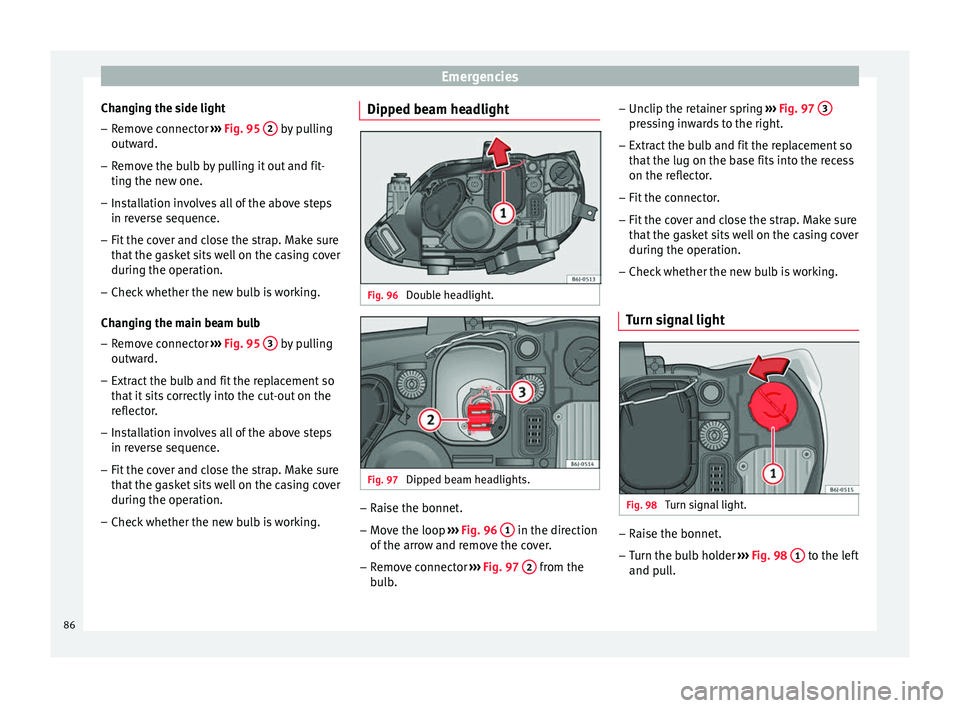
– Remove connector ››
› Fig. 95 2 by pulling
outw ar
d.
– R
emove the bulb by pulling it out and fit-
ting the new one.
– Ins
tallation involves all of the above steps
in rever
se sequence.
– Fit the cover and close the strap. Make sure
that the g
asket sits well on the casing cover
during the operation.
– Check whether the new bulb is working.
Changin
g the main beam bulb
– Remove connector ›››
Fig. 95 3 by pulling
outw ar
d.
– Extr
act the bulb and fit the replacement so
that it
sits correctly into the cut-out on the
reflector.
– Installation involves all of the above steps
in rever
se sequence.
– Fit the cover and close the strap. Make sure
that the g
asket sits well on the casing cover
during the operation.
– Check whether the new bulb is working. Dipped beam headlight
Fig. 96
Double headlight. Fig. 97
Dipped beam headlights. –
Raise the bonnet.
– Move the loop ››
›
Fig. 96 1 in the direction
of the arr
o
w and remove the cover.
– Remove connector ›››
Fig. 97 2 from the
b u
l
b. –
Unclip the ret
ainer spring ››› Fig. 97 3 pressing inwards to the right.
– Extract the bulb and fit the replacement so
th at
the lug on the b
ase fits into the recess
on the reflector.
– Fit the connector.
– Fit the cover and close the strap. Make sure
that the g
asket sits well on the casing cover
during the operation.
– Check whether the new bulb is working.
Turn signal light Fig. 98
Turn signal light. –
Raise the bonnet.
– Turn the bulb holder ››
›
Fig. 98 1 to the left
and p ul
l.
86
Page 89 of 248
Fuses and bulbs
– Remo
v
e the bulb by pressing on the bulb
holder and turning it anti-clockwise at the
same time.
– Installation involves all of the above steps
in rever
se sequence.
Changing the AFS headlight
bul
bs
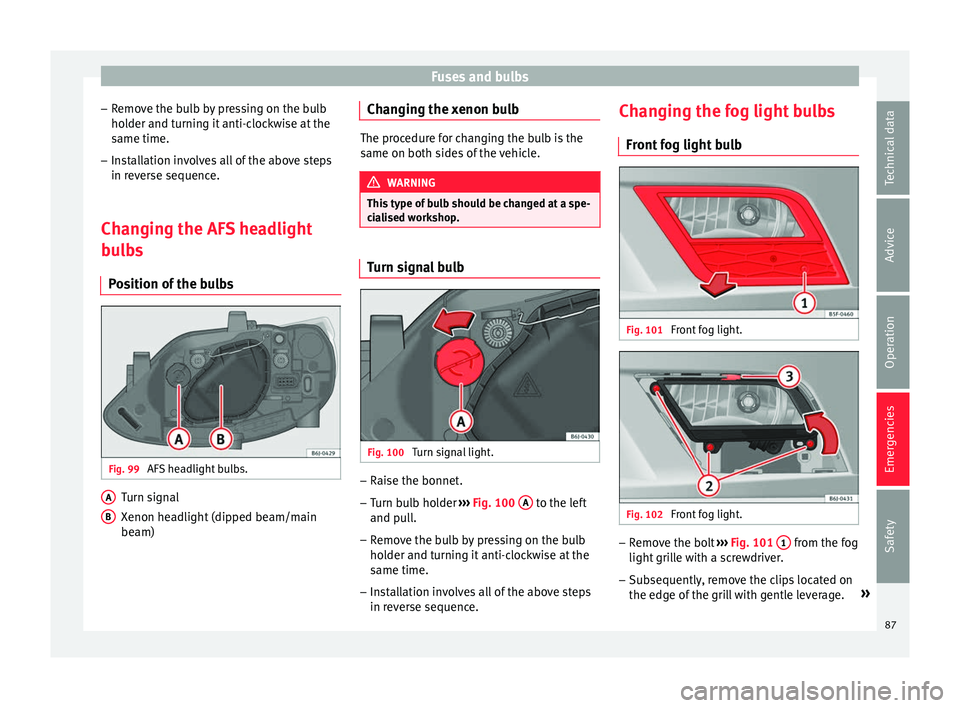
Position of the bulbs Fig. 99
AFS headlight bulbs. Turn signal
X
enon he
a
dlight (dipped beam/main
beam)
A B Changing the xenon bulb
The procedure for changing the bulb is the
same on both s
ide
s of the vehicle. WARNING
This type of bulb should be changed at a spe-
ci a
lised workshop. Turn signal bulb
Fig. 100
Turn signal light. –
Raise the bonnet.
– Turn bulb holder ››
›
Fig. 100 A to the left
and p u
l
l.
– Remove the bulb by pressing on the bulb
holder and t
urning it anti-clockwise at the
same time.
– Installation involves all of the above steps
in rever
se sequence. Changing the fog light bulbs
Front f
og light bulb Fig. 101
Front fog light. Fig. 102
Front fog light. –
Remove the bolt ››
›
Fig. 101 1 from the fog
light gri
l
le with a screwdriver.
– Subsequently, remove the clips located on
the edge of the gri
ll with gentle leverage. »
87
Technical data
Advice
Operation
Emergencies
Safety
Page 90 of 248
Emergencies
– Remo
v
e the 3 bolts ››› Fig. 102 2 to re-
mo v
e the f
og light.
– Remove the metal clip situated on the up-
per part
of the fog light by pulling towards
the exterior of the vehicle ››› Fig. 102 3 .
FR version fog-light bulb Fig. 103
Fog light: access to the connector
and t o the light
b
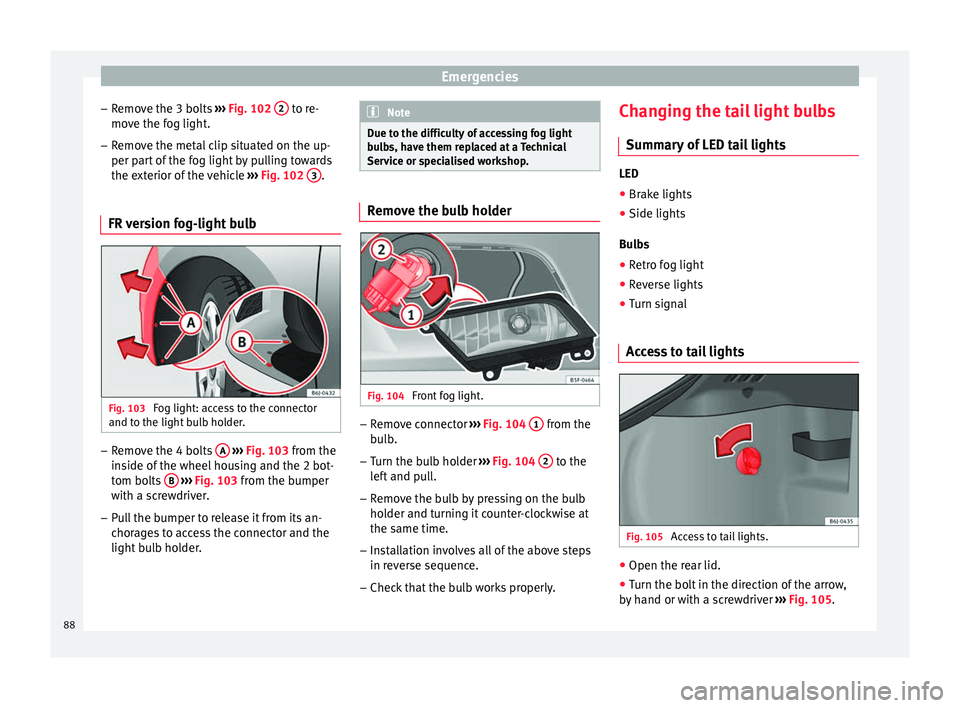
ulb holder. –
Remove the 4 bolts A
› ›
› Fig. 103
from the
inside of the wheel housing and the 2 bot-
tom bolts B
› ›
› Fig. 103
from the bumper
with a screwdriver.
– Pull the bumper to release it from its an-
chorag
es to access the connector and the
light bulb holder. Note
Due to the difficulty of accessing fog light
bu l
bs, have them replaced at a Technical
Service or specialised workshop. Remove the bulb holder
Fig. 104
Front fog light. –
Remove connector ››
›
Fig. 104 1 from the
b u
l
b.
– Turn the bulb holder ›››
Fig. 104 2 to the
l ef
t
and pull.
– Remove the bulb by pressing on the bulb
holder and t
urning it counter-clockwise at
the same time.
– Installation involves all of the above steps
in rever
se sequence.
– Check that the bulb works properly. Changing the tail light bulbs
Summar
y of LED tail lights LED
● Brake lights
● Side lights
Bu l
bs
● Retro fog light
● Reverse lights
● Turn signal
Access to tail lights Fig. 105
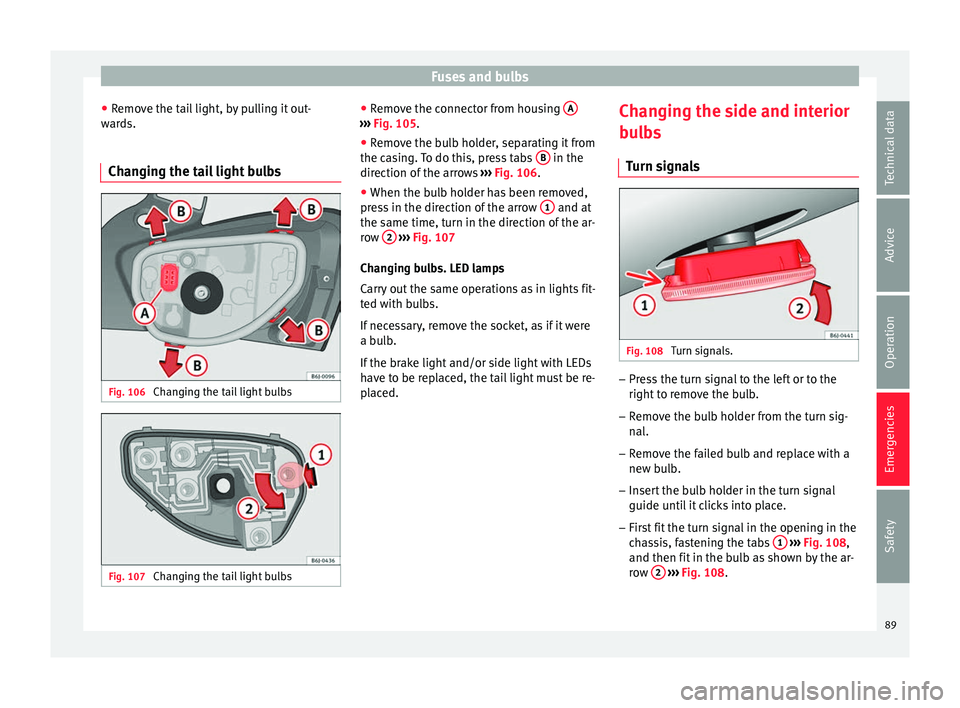
Access to tail lights. ●
Open the rear lid.
● Turn the bolt in the direction of the arrow,
b y h
and or with a screwdriver ››› Fig. 105.
88
Page 91 of 248
Fuses and bulbs
● Remo
v
e the tail light, by pulling it out-
wards.
Changing the tail light bulbs Fig. 106
Changing the tail light bulbs Fig. 107
Changing the tail light bulbs ●
Remo
v
e the connector from housing A ›››
Fig. 105.
● Remove the bulb holder, separating it from
the c a
s
ing. To do this, press tabs B in the
dir ection of
the arr
ows ››› Fig. 106.
● When the bulb holder has been removed,
pres
s in the direction of the arrow 1 and at
the s ame time, t
urn in the dir
ection of the ar-
row 2
› ››
Fig. 107
Ch an
ging bulbs. LED lamps
Carry out the same operations as in lights fit-
ted with bulbs.
If necessary, remove the socket, as if it were
a bulb.
If the brake light and/or side light with LEDs
have to be replaced, the tail light must be re-
placed. Changing the side and interior
bul
bs
Turn signals Fig. 108
Turn signals. –
Press the turn signal to the left or to the
right t
o r
emove the bulb.
– Remove the bulb holder from the turn sig-
nal.
– R
emove the failed bulb and replace with a
new bul
b.
– Insert the bulb holder in the turn signal
guide until
it clicks into place.
– First fit the turn signal in the opening in the
cha
ssis, fastening the tabs 1
› ›
› Fig. 108 ,
and then fit in the bulb as shown by the ar-
row 2
› ›
› Fig. 108
.
89
Technical data
Advice
Operation
Emergencies
Safety
Page 95 of 248
Controls and displays
Operation
C ontr
o
ls and displays
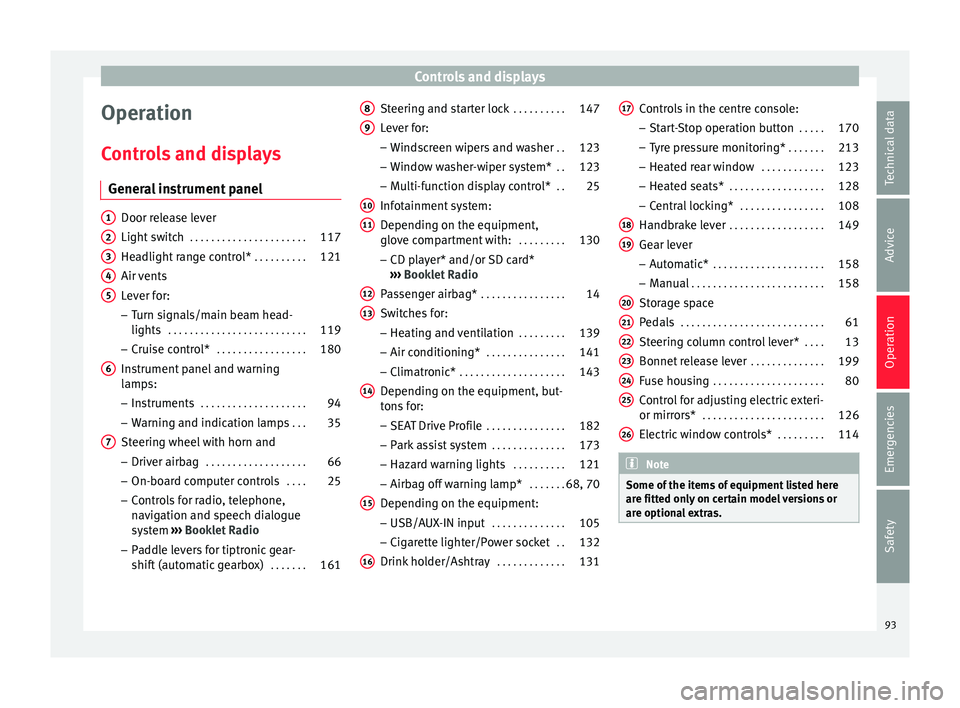
General instrument panel Door release lever
Light sw
it
ch . . . . . . . . . . . . . . . . . . . . . . 117
Headlight range control* . . . . . . . . . .121
Air vents
Lever f
or:
– Turn signals/main beam head-
lights . . . . . . . . . . . . . . . . . . . . . . . . . . 119
– Crui se c
ontrol* . . . . . . . . . . . . . . . . . 180
Instrument panel and warning
lamp s:
– In
struments . . . . . . . . . . . . . . . . . . . . 94
– Warnin g and indic
ation lamps . . .35
Steering wheel with horn and – Driver airb ag . . . . . . . . . . . . . . . . . . . 66
– On-boar d c
omputer controls . . . .25
– Contro
ls for radio, telephone,
navigation and speech dialogue
system ›››
Booklet Radio
– Paddle levers for tiptronic gear-
shift (automatic gearbox) . . . . . . .161
1 2
3
4
5
6
7 Steering and starter lock
. . . . . . . . . .147
Lever for: – Wind
s
creen wipers and washer . .123
– Window w
asher-wiper system* . .123
– Multi-f
unction display control* . .25
Infotainment system:
Depending on the equipment,
glo
ve compartment with: . . . . . . . . .130
– CD pla
yer* and/or SD card*
››› Booklet Radio
Passenger airbag* . . . . . . . . . . . . . . . . 14
Switches for:
– Heating and
ventilation . . . . . . . . . 139
– Air conditionin g* . . . . . . . . . . . . . . . 141
– C
limatr
onic* . . . . . . . . . . . . . . . . . . . . 143
Depending on the equipment, but-
ton s
for:
– SEAT Drive Profile . . . . . . . . . . . . . . . 182
– Park a
ssist system . . . . . . . . . . . . . . 173
– Hazard w
arning lights . . . . . . . . . .121
– Airbag off w
arning lamp* . . . . . . .68, 70
Depending on the equipment:
– USB/AUX -IN inp
ut . . . . . . . . . . . . . . 105
– Cig ar
ette lighter/Power socket . .132
Drink holder/Ashtray . . . . . . . . . . . . .131
8 9
10
11
12
13
14
15
16 Controls in the centre console:
– St ar
t
-Stop operation button . . . . .170
– Tyr
e pressure monitoring* . . . . . . .213
– Heated r
ear window . . . . . . . . . . . . 123
– Heated se
ats* . . . . . . . . . . . . . . . . . . 128
– Central
locking* . . . . . . . . . . . . . . . . 108
Handbrake lever . . . . . . . . . . . . . . . . . . 149
Gear lever – Automatic* . . . . . . . . . . . . . . . . . . . . . 158
– M
anual . . . . . . . . . . . . . . . . . . . . . . . . . 158
Stor
age space
Pedal
s . . . . . . . . . . . . . . . . . . . . . . . . . . . 61
Steering column control lever* . . . .13
Bonnet release lever . . . . . . . . . . . . . .199
Fuse housing . . . . . . . . . . . . . . . . . . . . . 80
Control for adjusting electric exteri-
or mirrors* . . . . . . . . . . . . . . . . . . . . . . . 126
El
ectric window controls* . . . . . . . . .114 Note
Some of the items of equipment listed here
are fitt ed on
ly on certain model versions or
are optional extras. 17
18
19
20
21
22
23
24
25
26
93
Technical data
Advice
Operation
Emergencies
Safety
Page 109 of 248
Opening and closing
On deactivating the “Safe” system, the alarm
v o
lumetric
sensor is also deactivated.
With the “Safe” switched off, doors can be
opened from the interior but not from the ex-
terior.
See “Selective unlocking system*”
“Safe” status
On the driver door, there is warning lamp visi-
ble from outside the vehicle through the win-
dow which shows the “Safe” system status.
We will know that “Safe” system is activated
by the flashing warning lamp. The indicator
will flash on all vehicles, fitted and nor fitted
with an alarm, until they unlock.
Remember:
Safe activated with or without an alarm:
warning lamp flashes continuously.
Safe deactivated without an alarm: the warn-
ing lamp stays off.
Safe deactivated with an alarm: the warning
lamp stays off. WARNING
No one should remain inside the vehicle if the
“Safe” sy s
tem is activated because opening
the doors will not be possible in the event of
an emergency neither from the inside nor the
outside and help from the outside is made difficult. Danger of death. Passengers could
become tr
ap
ped inside in case of emergency. Selective unlocking system*
This system allows to unlock either just the
driver door or al
l
the vehicle.
Driver door unlock button
Unlock once. Use either the key or the remote
control.
Once the key is inserted in the lock cylinder,
rotate once in the unlock direction. The driver
door will remain without “Safe” and un-
locked. In vehicles fitted with an alarm, see
the Anti-theft Alarm section ››› page 111.
Using the remote control, press the unlock
button on the remote once. The “Safe”
sy s
t
em for all the vehicle is deactivated, only
the driver door is unlocked and both the
alarm and the warning lamp are also turned
off.
Unlocking all doors and the luggage com-
partment
The unlock button on the remote control
must be pressed twice so that all doors
and the lug g
ag
e compartment can be
opened.
Press twice within 5 seconds to deactivate
the “Safe” system for all vehicle, to unlock all doors and to use the luggage compartment.
The warning l
amp and the alarm (only vehi-
cles fitted with one) are turned off.
Unlocking the luggage compartment
See ›››
page 9.
Activating the selective unlocking system*
With the door open, insert a key into the start
cylinder and start the ignition. Insert the oth-
er key into the driver door lock and turn in the
opening direction for at least 3 seconds. The
turn signals will flash twice.
Deactivating the selective unlocking system*
With the door open, insert a key into the start
cylinder and start the ignition. Insert the oth-
er key into the driver door lock and turn in the
locking direction for at least 3 seconds. The
turn signals will flash once.
Self-locking system to prevent invol-
untar
y unlocking It is an anti-theft system and prevents the un-
int
ention
al
unlocking of the vehicle.
If the vehicle is unlocked and none of the
doors (including the boot) are opened within
30 seconds, it re-locks automatically.
107
Technical data
Advice
Operation
Emergencies
Safety
Page 113 of 248
Opening and closing
The radio frequency remote control key is
u sed t
o loc
k and unlock the vehicle from a
distance.
By using button 4
› ››
Fig. 122
on the c
ontrol,
the key shaft is released.
Unlocking the vehicle
› ››
Fig. 122
1 .
L oc
k
ing the vehicle
› ››
Fig. 122
2 .
Un loc
k
ing the rear lid. Press button ›››
Fig. 122 3 until all the turn signals on the
v ehic
l
e flash briefly. When the unlocking but-
ton
3 is pressed, you have 2 minutes to
open the door . Onc
e thi
s time has passed, it
will lock again.
Moreover, the battery indicator on the key
››› Fig. 122 (arrow), will flash.
The remote control transmitter and the bat-
teries are integrated in the key. The receiver
is inside the vehicle. The maximum range de-
pends on different factors. The range is re-
duced as the batteries start to lose power. WARNING
Read and observe the relevant warnings ›››
in Set of keys on page 110.
Note
● The ra dio fr
equency remote control key
functions only when you are within range
››› Fig. 123. ●
If the v
ehicle cannot be unlocked or locked
by using the radio frequency remote control,
the remote control key will have to be re-
synchronised. For this, go to your technical
services. Replacing the battery
If the battery indicator does not flash when
the butt
on
s are pushed, the battery must be
replaced. CAUTION
The use of inappropriate batteries may dam-
age the r a
dio frequency remote control. For
this reason, always replace the dead battery
with another of the same size and power. For the sake of the environment
Used batteries must be disposed of at an ap-
propri at
e waste facility or through an author-
ised service, given that their components can
affect the environment. Synchronising the remote control key
If it is not possible to unlock or lock the door
w
ith the r
emot
e control, it should be re-
synchronised. While the vehicle is open:
– Press the button
2
› ››
Fig. 122
on the
r
emote control.
– Then close the vehicle using the key shaft
within one minute.
Whi
le the vehicle is closed:
– Press the button
1
› ››
Fig. 122
on the
r
emote control.
– Then close the vehicle using the key shaft
within one minute.
It
is possible that the vehicle could no longer
be opened and closed with the remote con-
trol if the button is repeatedly pressed
outs ide of
the eff
ective range of the radio fre-
quency remote control. The remote control
key will have to be resynchronised.
Spare remote control keys are available at
your Technical Service, where they must be
matched to the locking system.
Up to five remote control keys can be used.
Anti-theft alarm* Des
cription of anti-theft alarm sys-
tem* The anti-theft alarm makes it more difficult to
br
e
ak
into the vehicle or steal it. The system »
111
Technical data
Advice
Operation
Emergencies
Safety
Page 114 of 248
Operation
will initiate acoustic and optical warning sig-
n al
s
when your vehicle is tried to be forced.
The anti-theft alarm system is automatically
switched on when locking the vehicle. The
system is immediately activated and the turn
signal light located on the driver door will
flash along with the turn signals, indicating
that the alarm and the locking security sys-
tem (double lock) have been turned on.
If any of the doors or the bonnet are open,
they will not be included in the protection
zones of the vehicle when the alarm is con-
nected. If the door or the bonnet are subse-
quently closed, they will be automatically in-
cluded in the protection areas of the vehicle
and the turn signals will flash accordingly
when the doors close.
● The turn signal light will flash twice on
opening and deactiv
ating the alarm.
● The turn signal light will flash once on clos-
ing and activatin
g the alarm.
When does the system trigger an alarm?
The system triggers an alarm, if the following
unauthorised actions are carried out when
the vehicle is locked:
● Mechanical opening of the vehicle with the
vehicl
e key without switching on the ignition
in the next 15 seconds (in certain markets, such as the Netherlands, the alarm is activa-
ted immediat
ely).
● A door is opened.
● Opening the bonnet.
● The rear lid is opened.
● Ignition switched on with a non-validated
key.
● Mo
vements in the driving compartment
(vehicl
es with a volume sensor).
● Towing of the vehicle 1)
.
● Vehicle tilt angle 1)
.
● Undue manipulation of the alarm.
● Battery handling.
In this c
ase, the acoustic signals will go off
and the turn signal will flash for approximate-
ly 30 seconds. This cycle may be repeated up
to 10 times depending on the country.
Opening all the doors in manual mode
In vehicles without an alarm, when opening
the driver door manually, all doors are
opened.
How to switch the alarm off
To deactivate the anti-theft alarm, turn the
key in the opening direction, open the door and switch the ignition on, or press the un-
lock b
utton on the remote control.
In v
ehic
les equipped with an anti-theft alarm
system, you have 15 seconds to insert the
key in the ignition lock and activate the igni-
tion if the vehicle is opened using the driver
door key.
Otherwise, the alarm will trigger for 30 sec.
and the ignition will be blocked. Note
● Aft er 28 d
ays, the indicator light will be
switched off to prevent the battery from
draining if the vehicle has been left parked
for a long period of time. The alarm system
remains activated.
● The alarm will trigger again if attempts are
made t
o open another protection zone.
● The alarm system can be activated or deac-
tivated u
sing the radio frequency remote con-
trol ››› page 110.
● The anti-theft alarm is not activated when
the vehic
le is locked from within using the
central locking button .
● If the vehicle battery is run down or flat
then the anti-theft a
larm will not operate cor-
rectly.
● Vehicle monitoring remains active even if
the batter
y is disconnected or not working for
any reason. 1)
With vehicles fitted with a tow-away protection
112