lights SEAT IBIZA SC 2017 Owner's Manual
[x] Cancel search | Manufacturer: SEAT, Model Year: 2017, Model line: IBIZA SC, Model: SEAT IBIZA SC 2017Pages: 248, PDF Size: 5.24 MB
Page 87 of 248
Fuses and bulbs
Remove the cover – Raise the bonnet.
– Move the loop ››
› Fig. 91 1 in the direction
of the arr
o
w and remove the cover.
Changing the dipped/main beam headlight – Remove connector ›››
Fig. 92 3 from the
b u
l
b.
– Unclip the retainer spring ›››
Fig. 92 2 pressing inwards to the right.
– Extract the bulb and fit the replacement so
th at
the lug on the b
ase fits into the recess
on the reflector.
– Fit the connector.
– Fit the cover and close the strap. Make sure
that the g
asket sits well on the casing cover
during the operation.
– Check whether the new bulb is working.
Changin
g the side light
– Extract the bulb holder ›››
Fig. 92 4 out-
w ar
d
s.
– Remove the bulb by pulling it out and fit-
ting the new one.
– Ins
tallation involves all of the above steps
in rever
se sequence.
– Fit the cover and close the strap. Make sure
that the g
asket sits well on the casing cover
during the operation. –
Check whether the new b
ulb is working.
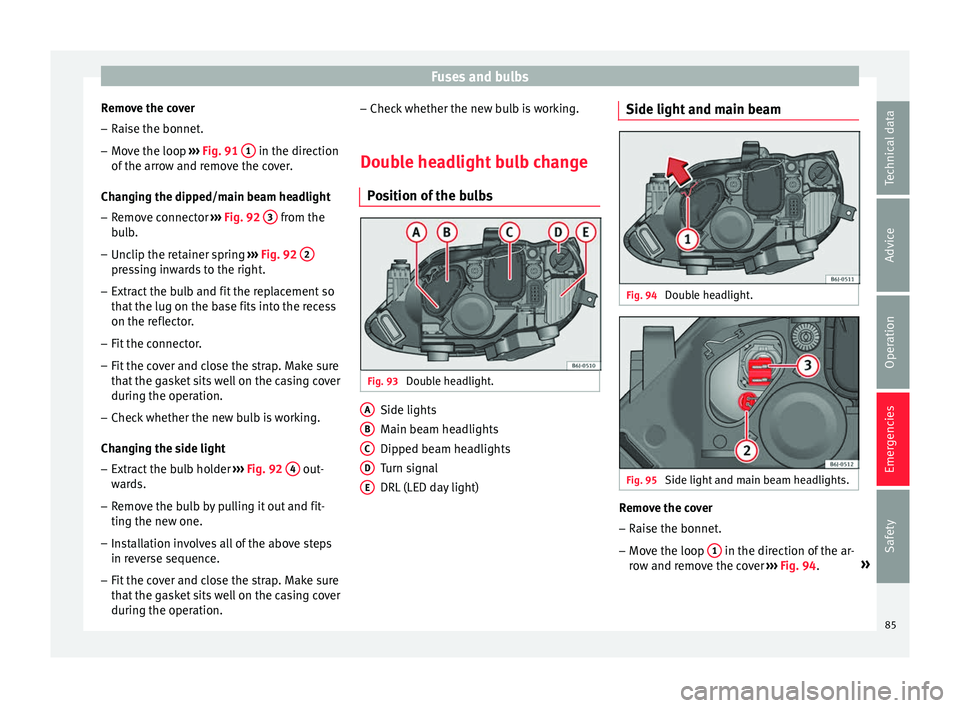
Double headlight bulb change Pos
ition of the bulbs Fig. 93
Double headlight. Side lights
M
ain be
am he
adlights
Dipped beam headlights
Turn signal
DRL (LED day light)
A B
C
D
E Side light and main beam
Fig. 94
Double headlight. Fig. 95
Side light and main beam headlights. Remove the cover
– Raise the bonnet.
– Move the loop 1 in the direction of the ar-
r o
w and r
emove the cover ››› Fig. 94. »
85
Technical data
Advice
Operation
Emergencies
Safety
Page 88 of 248
Emergencies
Changing the side light
– Remove connector ››
› Fig. 95 2 by pulling
outw ar
d.
– R
emove the bulb by pulling it out and fit-
ting the new one.
– Ins
tallation involves all of the above steps
in rever
se sequence.
– Fit the cover and close the strap. Make sure
that the g
asket sits well on the casing cover
during the operation.
– Check whether the new bulb is working.
Changin
g the main beam bulb
– Remove connector ›››
Fig. 95 3 by pulling
outw ar
d.
– Extr
act the bulb and fit the replacement so
that it
sits correctly into the cut-out on the
reflector.
– Installation involves all of the above steps
in rever
se sequence.
– Fit the cover and close the strap. Make sure
that the g
asket sits well on the casing cover
during the operation.
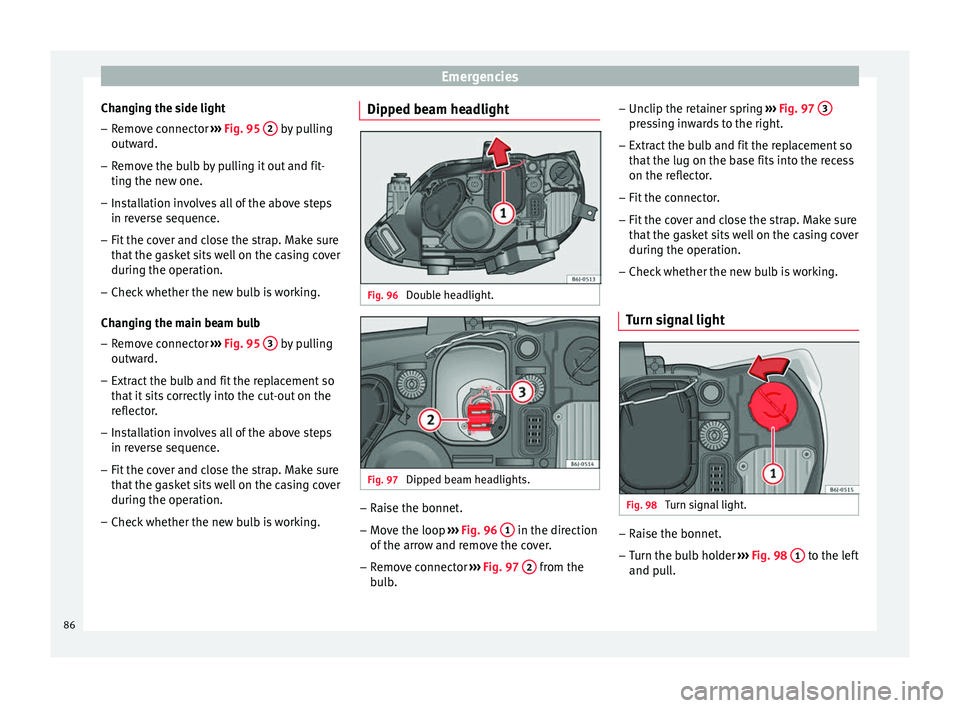
– Check whether the new bulb is working. Dipped beam headlight
Fig. 96
Double headlight. Fig. 97
Dipped beam headlights. –
Raise the bonnet.
– Move the loop ››
›
Fig. 96 1 in the direction
of the arr
o
w and remove the cover.
– Remove connector ›››
Fig. 97 2 from the
b u
l
b. –
Unclip the ret
ainer spring ››› Fig. 97 3 pressing inwards to the right.
– Extract the bulb and fit the replacement so
th at
the lug on the b
ase fits into the recess
on the reflector.
– Fit the connector.
– Fit the cover and close the strap. Make sure
that the g
asket sits well on the casing cover
during the operation.
– Check whether the new bulb is working.
Turn signal light Fig. 98
Turn signal light. –
Raise the bonnet.
– Turn the bulb holder ››
›
Fig. 98 1 to the left
and p ul
l.
86
Page 90 of 248
Emergencies
– Remo
v
e the 3 bolts ››› Fig. 102 2 to re-
mo v
e the f
og light.
– Remove the metal clip situated on the up-
per part
of the fog light by pulling towards
the exterior of the vehicle ››› Fig. 102 3 .
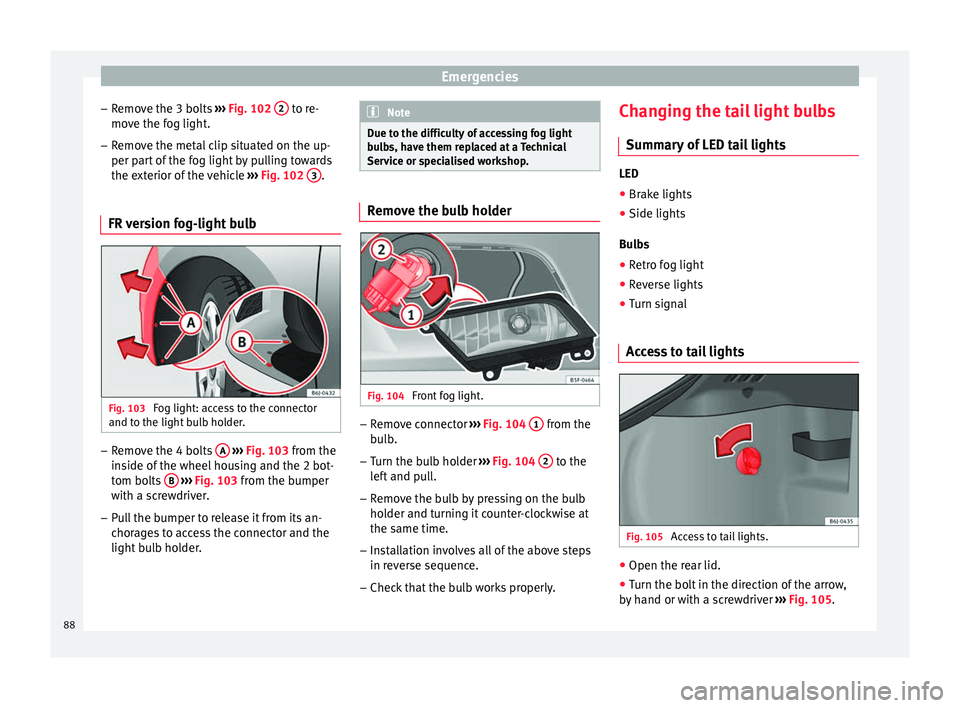
FR version fog-light bulb Fig. 103
Fog light: access to the connector
and t o the light
b
ulb holder. –
Remove the 4 bolts A
› ›
› Fig. 103
from the
inside of the wheel housing and the 2 bot-
tom bolts B
› ›
› Fig. 103
from the bumper
with a screwdriver.
– Pull the bumper to release it from its an-
chorag
es to access the connector and the
light bulb holder. Note
Due to the difficulty of accessing fog light
bu l
bs, have them replaced at a Technical
Service or specialised workshop. Remove the bulb holder
Fig. 104
Front fog light. –
Remove connector ››
›
Fig. 104 1 from the
b u
l
b.
– Turn the bulb holder ›››
Fig. 104 2 to the
l ef
t
and pull.
– Remove the bulb by pressing on the bulb
holder and t
urning it counter-clockwise at
the same time.
– Installation involves all of the above steps
in rever
se sequence.
– Check that the bulb works properly. Changing the tail light bulbs
Summar
y of LED tail lights LED
● Brake lights
● Side lights
Bu l
bs
● Retro fog light
● Reverse lights
● Turn signal
Access to tail lights Fig. 105
Access to tail lights. ●
Open the rear lid.
● Turn the bolt in the direction of the arrow,
b y h
and or with a screwdriver ››› Fig. 105.
88
Page 91 of 248
Fuses and bulbs
● Remo
v
e the tail light, by pulling it out-
wards.
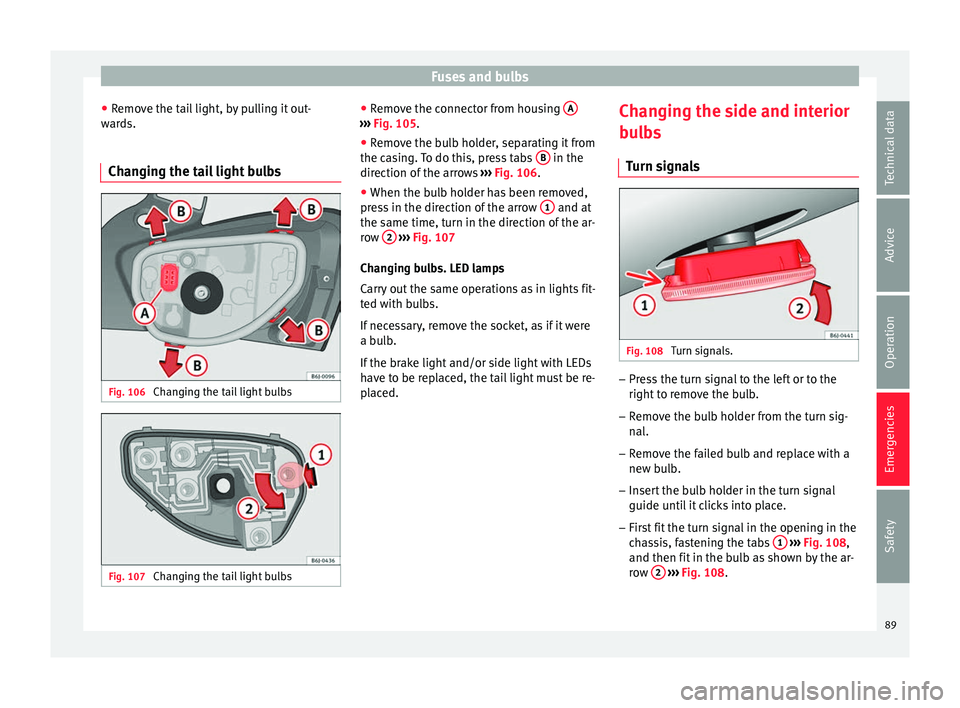
Changing the tail light bulbs Fig. 106
Changing the tail light bulbs Fig. 107
Changing the tail light bulbs ●
Remo
v
e the connector from housing A ›››
Fig. 105.
● Remove the bulb holder, separating it from
the c a
s
ing. To do this, press tabs B in the
dir ection of
the arr
ows ››› Fig. 106.
● When the bulb holder has been removed,
pres
s in the direction of the arrow 1 and at
the s ame time, t
urn in the dir
ection of the ar-
row 2
› ››
Fig. 107
Ch an
ging bulbs. LED lamps
Carry out the same operations as in lights fit-
ted with bulbs.
If necessary, remove the socket, as if it were
a bulb.
If the brake light and/or side light with LEDs
have to be replaced, the tail light must be re-
placed. Changing the side and interior
bul
bs
Turn signals Fig. 108
Turn signals. –
Press the turn signal to the left or to the
right t
o r
emove the bulb.
– Remove the bulb holder from the turn sig-
nal.
– R
emove the failed bulb and replace with a
new bul
b.
– Insert the bulb holder in the turn signal
guide until
it clicks into place.
– First fit the turn signal in the opening in the
cha
ssis, fastening the tabs 1
› ›
› Fig. 108 ,
and then fit in the bulb as shown by the ar-
row 2
› ›
› Fig. 108
.
89
Technical data
Advice
Operation
Emergencies
Safety
Page 92 of 248
Emergencies
Number plate light –
Insert the flat part of a screwdriver into the
spec i
al slot and remove the bulb.
– Remove the bulb holder, by turning it until
it is
free.
– Change the bulb.
– Replace the bulb holder, by turning it until
it fits f
ully.
– Fit the light into the space and press until
you hear a “c
lick”.
Additional brake light* Given the difficulty involved in the replace-
ment
of
thi
s light it should be done by Tech-
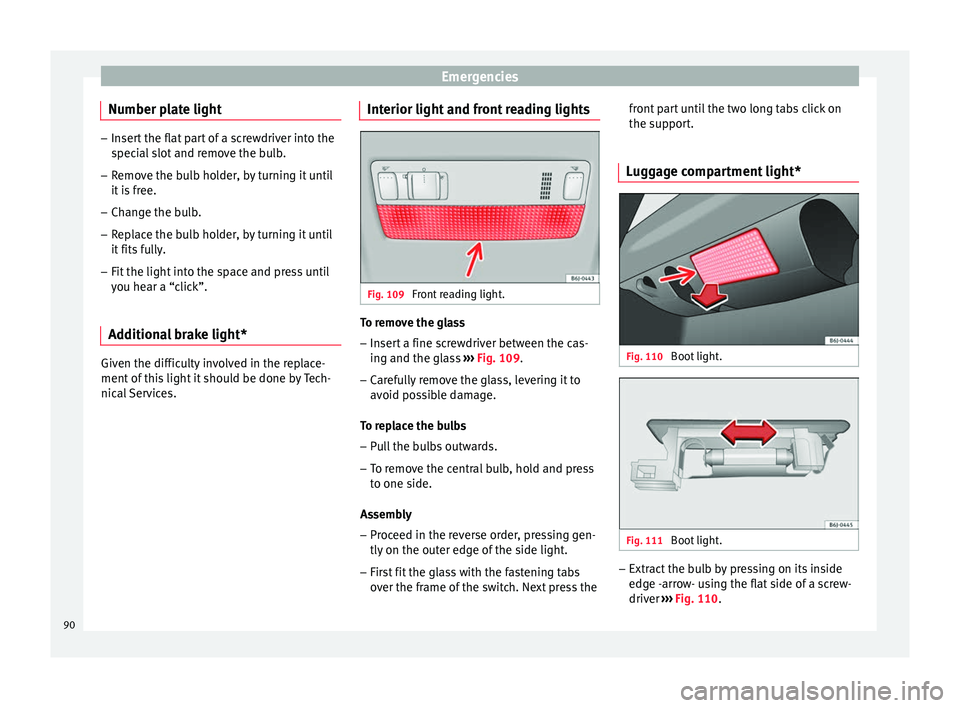
nical Services. Interior light and front reading lights Fig. 109
Front reading light. To remove the glass
– Insert a fine screwdriver between the cas-
ing and the gl
a
ss ››› Fig. 109.
– Carefully remove the glass, levering it to
avoid pos
sible damage.
To replace the bulbs
– Pull the bulbs outwards.
– To remove the central bulb, hold and press
to one side.
As
sembly
– Proceed in the reverse order, pressing gen-
tly on the outer edg
e of the side light.
– First fit the glass with the fastening tabs
over the fr
ame of the switch. Next press the front part until the two long tabs click on
the suppor
t.
Luggage compartment light* Fig. 110
Boot light. Fig. 111
Boot light. –
Extract the bulb by pressing on its inside
edg e -arr
ow- using the flat side of a screw-
driver ››› Fig. 110.
90
Page 95 of 248
Controls and displays
Operation
C ontr
o
ls and displays
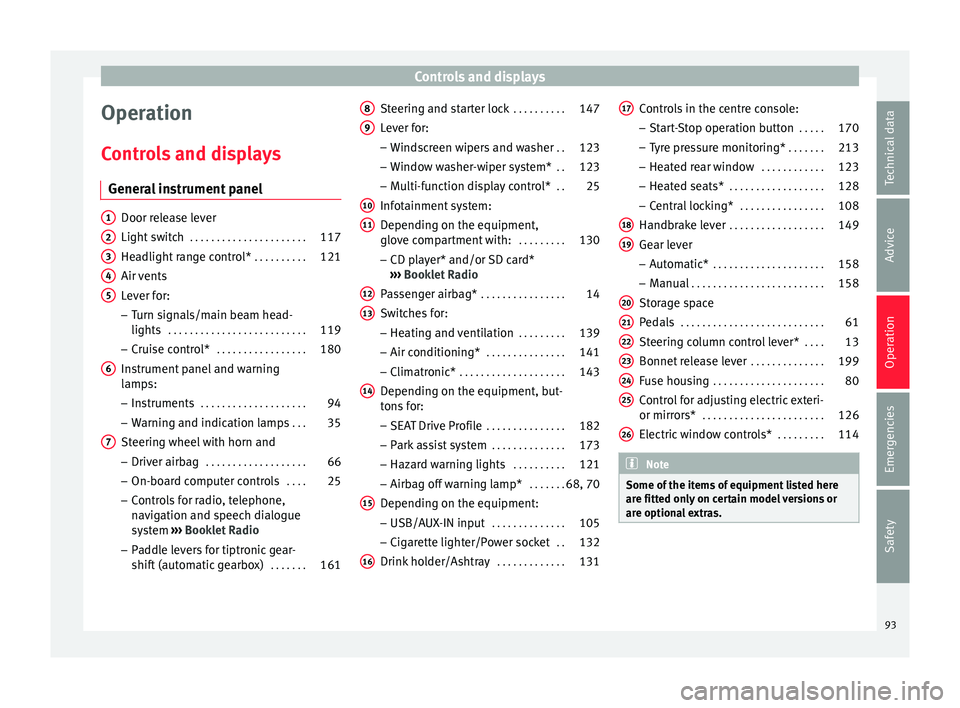
General instrument panel Door release lever
Light sw
it
ch . . . . . . . . . . . . . . . . . . . . . . 117
Headlight range control* . . . . . . . . . .121
Air vents
Lever f
or:
– Turn signals/main beam head-
lights . . . . . . . . . . . . . . . . . . . . . . . . . . 119
– Crui se c
ontrol* . . . . . . . . . . . . . . . . . 180
Instrument panel and warning
lamp s:
– In
struments . . . . . . . . . . . . . . . . . . . . 94
– Warnin g and indic
ation lamps . . .35
Steering wheel with horn and – Driver airb ag . . . . . . . . . . . . . . . . . . . 66
– On-boar d c
omputer controls . . . .25
– Contro
ls for radio, telephone,
navigation and speech dialogue
system ›››
Booklet Radio
– Paddle levers for tiptronic gear-
shift (automatic gearbox) . . . . . . .161
1 2
3
4
5
6
7 Steering and starter lock
. . . . . . . . . .147
Lever for: – Wind
s
creen wipers and washer . .123
– Window w
asher-wiper system* . .123
– Multi-f
unction display control* . .25
Infotainment system:
Depending on the equipment,
glo
ve compartment with: . . . . . . . . .130
– CD pla
yer* and/or SD card*
››› Booklet Radio
Passenger airbag* . . . . . . . . . . . . . . . . 14
Switches for:
– Heating and
ventilation . . . . . . . . . 139
– Air conditionin g* . . . . . . . . . . . . . . . 141
– C
limatr
onic* . . . . . . . . . . . . . . . . . . . . 143
Depending on the equipment, but-
ton s
for:
– SEAT Drive Profile . . . . . . . . . . . . . . . 182
– Park a
ssist system . . . . . . . . . . . . . . 173
– Hazard w
arning lights . . . . . . . . . .121
– Airbag off w
arning lamp* . . . . . . .68, 70
Depending on the equipment:
– USB/AUX -IN inp
ut . . . . . . . . . . . . . . 105
– Cig ar
ette lighter/Power socket . .132
Drink holder/Ashtray . . . . . . . . . . . . .131
8 9
10
11
12
13
14
15
16 Controls in the centre console:
– St ar
t
-Stop operation button . . . . .170
– Tyr
e pressure monitoring* . . . . . . .213
– Heated r
ear window . . . . . . . . . . . . 123
– Heated se
ats* . . . . . . . . . . . . . . . . . . 128
– Central
locking* . . . . . . . . . . . . . . . . 108
Handbrake lever . . . . . . . . . . . . . . . . . . 149
Gear lever – Automatic* . . . . . . . . . . . . . . . . . . . . . 158
– M
anual . . . . . . . . . . . . . . . . . . . . . . . . . 158
Stor
age space
Pedal
s . . . . . . . . . . . . . . . . . . . . . . . . . . . 61
Steering column control lever* . . . .13
Bonnet release lever . . . . . . . . . . . . . .199
Fuse housing . . . . . . . . . . . . . . . . . . . . . 80
Control for adjusting electric exteri-
or mirrors* . . . . . . . . . . . . . . . . . . . . . . . 126
El
ectric window controls* . . . . . . . . .114 Note
Some of the items of equipment listed here
are fitt ed on
ly on certain model versions or
are optional extras. 17
18
19
20
21
22
23
24
25
26
93
Technical data
Advice
Operation
Emergencies
Safety
Page 100 of 248
Operation
●
Addition a
l lights and other accessories in
front of the air inlet reduce the cooling effect
of the coolant. At high outside temperatures
and high engine loads, there is a risk of the
engine overheating.
● The front spoiler also ensures proper distri-
bution of the c
ooling air when the vehicle is
moving. If the spoiler is damaged this can re-
duce the cooling effect, which could cause
the engine to overheat. Seek specialist assis-
tance. Fuel level
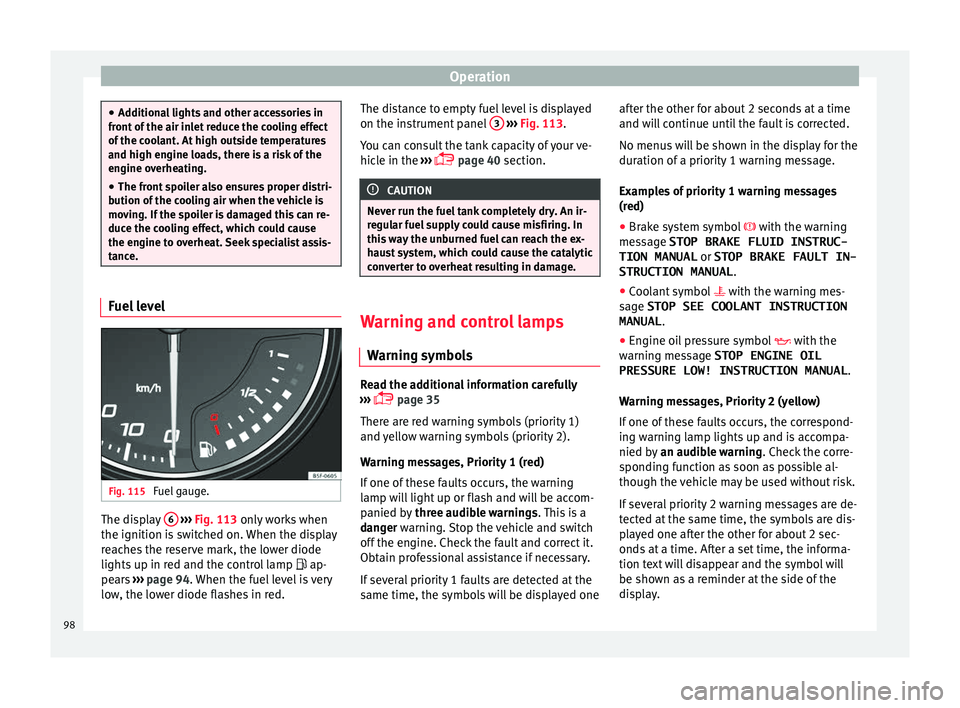
Fig. 115
Fuel gauge. The display
6
› ›
› Fig. 113
only works when
the ignition is switched on. When the display
reaches the reserve mark, the lower diode
lights up in red and the control lamp ap-
pears ››› page 94. When the fuel level is very
low, the lower diode flashes in red. The distance to empty fuel level is displayed
on the instrument
panel 3
› ››
Fig. 113
.
Y
ou can consult the tank capacity of your ve-
hicle in the ›››
page 40 section. CAUTION
Never run the fuel tank completely dry. An ir-
re gu
lar fuel supply could cause misfiring. In
this way the unburned fuel can reach the ex-
haust system, which could cause the catalytic
converter to overheat resulting in damage. Warning and control lamps
W arnin
g symbo
ls Read the additional information carefully
› ›
›
page 35
There are red warning symbols (priority 1)
and yellow warning symbols (priority 2).
Warning messages, Priority 1 (red)
If one of these faults occurs, the warning
lamp will light up or flash and will be accom-
panied by three audible warnings. This is a
danger warning. Stop the vehicle and switch
off the engine. Check the fault and correct it.
Obtain professional assistance if necessary.
If several priority 1 faults are detected at the
same time, the symbols will be displayed one after the other for about 2 seconds at a time
and wil
l continue until the fault is corrected.
No menus will be shown in the display for the
duration of a priority 1 warning message.
Examples of priority 1 warning messages
(red)
● Brake system symbol with the warnin
g
message STOP BRAKE FLUID INSTRUC-
TION MANUAL or STOP BRAKE FAULT IN-
STRUCTION MANUAL .
● Coolant symbol with the warnin
g mes-
sage STOP SEE COOLANT INSTRUCTION
MANUAL .
● Engine oil pressure symbol with the
warnin
g message STOP ENGINE OIL
PRESSURE LOW! INSTRUCTION MANUAL .
Warning messages, Priority 2 (yellow)
If one of these faults occurs, the correspond-
ing warning lamp lights up and is accompa-
nied by an audible warning. Check the corre-
sponding function as soon as possible al-
though the vehicle may be used without risk.
If several priority 2 warning messages are de-
tected at the same time, the symbols are dis-
played one after the other for about 2 sec-
onds at a time. After a set time, the informa-
tion text will disappear and the symbol will
be shown as a reminder at the side of the
display.
98
Page 102 of 248
OperationFunction buttons in the
vehicle settings
menuPage
ESC system››› page 152
Tyres››› page 213
Driver assistance››› table on page 24
Parking and manoeuvring››› page 173
Vehicle lights››› table on page 24
Mirrors and windscreen wipers››› table on page 24
Opening and closing››› table on page 24
Multifunction display››› table on page 24
Date and time››› table on page 24
Units››› table on page 24
Service››› page 95
Factory settings››› table on page 24 WARNING
Any distraction may lead to an accident, with
the risk of
injury. Operating the Easy Connect
system while driving could distract you from
traffic. 100
Page 116 of 248
Operation
WARNING
● Alw a
ys close the rear lid properly. Risk of
accident or injury.
● The rear lid must not be opened when the
rever
se or rear fog lights are lit. This may
damage the tail lights.
● Do not close the rear lid by pushing it down
with y
our hand on the rear window. The glass
could smash. Risk of injury!
● Ensure the rear lid is locked after closing it.
If not, it m
ay open unexpectedly while driv-
ing.
● Never allow children to play in or around
the vehic
le. A locked vehicle can be subjected
to extremely high and low temperatures, de-
pending on the time of year, thus causing se-
rious injuries/illness. It could even have fatal
consequences. Close and lock both the rear
lid and all the other doors when you are not
using the vehicle.
● Closing the rear lid without observing and
ensurin
g it is clear could cause serious injury
to you and to third parties. Make sure that no
one is in the path of the rear lid.
● Never drive with the rear lid open or half-
closed, e
xhaust gases may enter into the in-
terior of the vehicle. Danger of poisoning!
● If you only open the rear lid, do not leave
the key in
side. The vehicle cannot be opened
if the key is left inside. Electric windows
Openin g and c
lo
sing of the electric
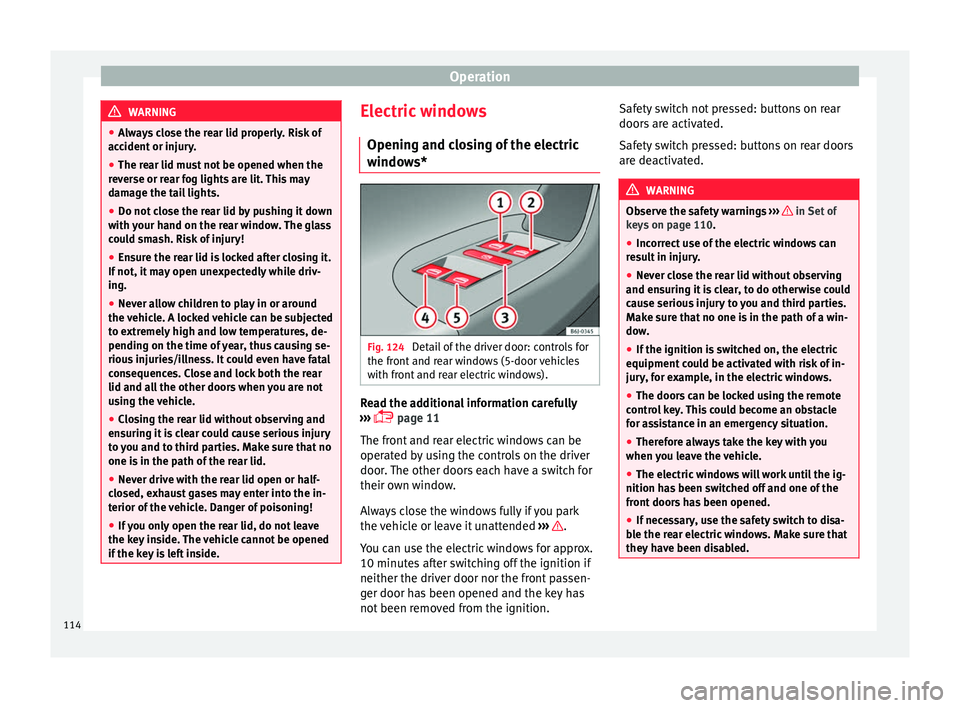
windows* Fig. 124
Detail of the driver door: controls for
the fr ont
and r
ear windows (5-door vehicles
with front and rear electric windows). Read the additional information carefully
› ›
›
page 11
The front and rear electric windows can be
operated by using the controls on the driver
door. The other doors each have a switch for
their own window.
Always close the windows fully if you park
the vehicle or leave it unattended ››› .
Y ou c
an u
se the electric windows for approx.
10 minutes after switching off the ignition if
neither the driver door nor the front passen-
ger door has been opened and the key has
not been removed from the ignition. Safety switch not pressed: buttons on rear
doors ar
e activated.
Safety switch pressed: buttons on rear doors
are deactivated. WARNING
Observe the safety warnings ›››
in Set of
key s on p
age 110.
● Incorrect use of the electric windows can
res
ult in injury.
● Never close the rear lid without observing
and ensurin
g it is clear, to do otherwise could
cause serious injury to you and third parties.
Make sure that no one is in the path of a win-
dow.
● If the ignition is switched on, the electric
equipment cou
ld be activated with risk of in-
jury, for example, in the electric windows.
● The doors can be locked using the remote
contro
l key. This could become an obstacle
for assistance in an emergency situation.
● Therefore always take the key with you
when you l
eave the vehicle.
● The electric windows will work until the ig-
nition has
been switched off and one of the
front doors has been opened.
● If necessary, use the safety switch to disa-
ble the r
ear electric windows. Make sure that
they have been disabled. 114
Page 119 of 248
Lights and visibility
Roll-back function of the tilting panor-
amic s
u
nroof* The tilting panoramic sunroof has a
rol
l-back
function which prevents larger objects get-
ting trapped when the roof is closed. The roll-
back function does not prevent fingers get-
ting pinched against the roof opening. The
tilting sunroof stops and opens again imme-
diately if it is obstructed when closing. Lights and visibility
Light s
C ontr
ol lamps
It lights up
Rear fog light switched on
››› page 118.
It lights up
Front fog lights* switched on
››› page 118.
It lights up
Left or right turn signal.
The control lamp flashes twice as fast when a turn signal
is faulty.
It lights up
Main beam on or flasher on
››› page 119. Several warning and control lamps light up
f
or a f
ew sec
onds when the ignition is switch-
ed on, signalling that the function is being
verified. They will switch off after a few sec-
onds. WARNING
Observe the safety warnings ›››
in Warning
symbol s on p
age 99. Switching lights on and off
Read the additional information carefully
›› ›
page 21
The legal requirements regarding the use of
vehicle lights in each country must be ob-
served.
The driver is personally responsible for the
correct use and adjustment of the lights in all
situations. WARNING
Never drive with just the side lights on, there
is a ri
sk of accident. The side lights are not
bright enough to illuminate the road ahead
and to ensure that other road users are able
to see you. Always use your dipped beam
headlights if it is dark or if visibility is poor. Note
● The dipped be am he
adlights will only work
with the ignition on. The side lights come on
automatically when the ignition is turned off.
● If the lights are left on after the key has
been taken out
of the ignition lock, an audi-
ble warning sounds while the driver door re-
mains open. This is a reminder to switch the
lights off.
● The rear fog light can dazzle drivers behind
you. Y
ou should use the rear fog light only
when visibility is very poor. For this reason,
when you exceed approximately 60 km/h (38 » 117
Technical data
Advice
Operation
Emergencies
Safety