tow SEAT IBIZA SC 2017 Owner's Manual
[x] Cancel search | Manufacturer: SEAT, Model Year: 2017, Model line: IBIZA SC, Model: SEAT IBIZA SC 2017Pages: 248, PDF Size: 5.24 MB
Page 129 of 248
Seats and head restraints
Seats and head restraints
Adju s
tin
g the seat and head re-
straints
Adjusting the front seats Read the additional information carefully
›› ›
page 12 WARNING
The safe driving chapter contains important
inform ation, tip
s, suggestions and warnings
that you should read and observe for your
own safety and the safety of your passengers
››› page 56. WARNING
● Never a dju
st the driver or front passenger
seat while the vehicle is in motion. While ad-
justing your seat, you will assume an incor-
rect sitting position. Risk of accidents. Adjust
the driver or front passenger seat only when
the vehicle is stationary.
● To reduce the risk of injury to the driver and
front p
assenger in case of a sudden braking
or an accident, never drive with the backrest
tilted towards the rear. The maximum protec-
tion of the seat belt can be achieved only
when the backrests are in an upright position
and the driver and front passenger have prop-
erly adjusted their seat belts. The further the backrests are tilted to the rear, the greater
the risk
of
injury due to improper positioning
of the belt web!
● Exercise caution when securing the seat
height into f
orwards/backwards position. In-
juries can be caused if the seat height is ad-
justed without due care and attention.
● To move the seat forwards and backwards,
pul
l upwards and not sideways on the lever,
as the force exerted on it in that direction
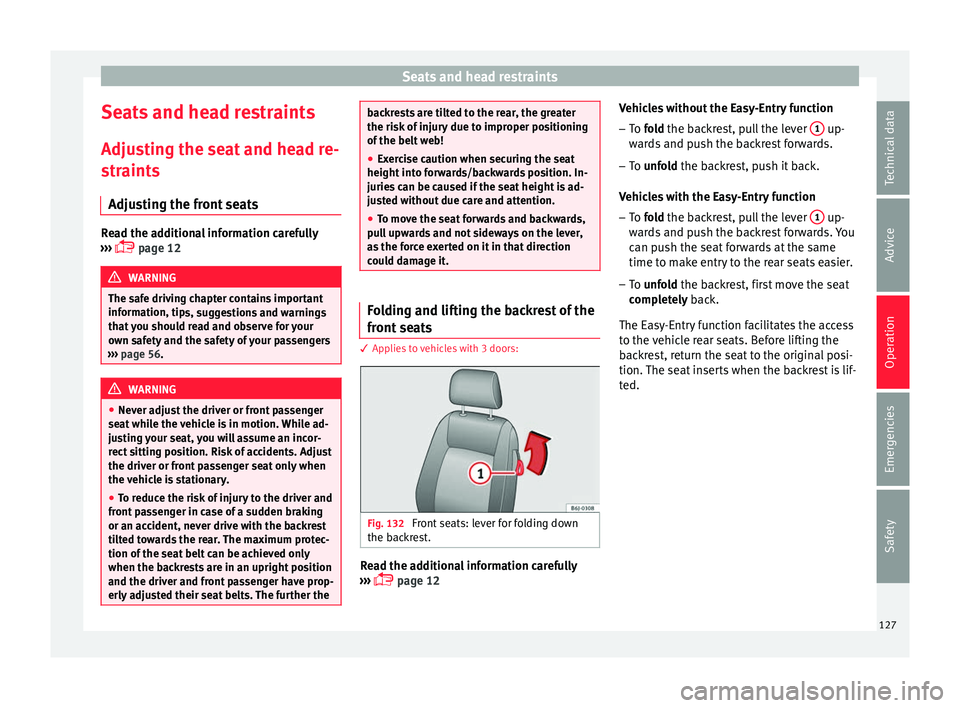
could damage it. Folding and lifting the backrest of the
fr
ont
se
ats 3 App
lies to vehicles with 3 doors: Fig. 132
Front seats: lever for folding down
the b ac
k
rest. Read the additional information carefully
› ›
›
page 12 Vehicles without the Easy-Entry function
– To fold the backrest, pull the lever 1 up-
w ar
d
s and push the backrest forwards.
– To unfold the backrest, push it back.
Vehic
les with the Easy-Entry function
– To fold the backrest, pull the lever 1 up-
w ar
d
s and push the backrest forwards. You
can push the seat forwards at the same
time to make entry to the rear seats easier.
– To unfold the backrest, first move the seat
comp
letely back.
The Easy-Entry function facilitates the access
to the vehicle rear seats. Before lifting the
backrest, return the seat to the original posi-
tion. The seat inserts when the backrest is lif-
ted.
127
Technical data
Advice
Operation
Emergencies
Safety
Page 135 of 248
Transport and practical equipment
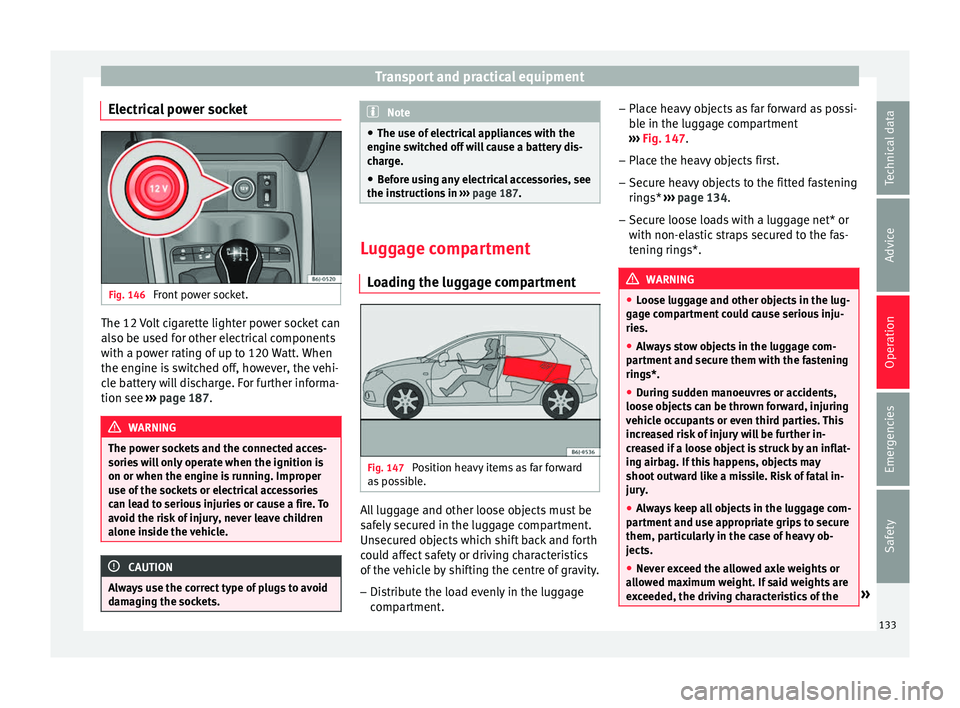
Electrical power socket Fig. 146
Front power socket. The 12 Volt cigarette lighter power socket can
al
so be u
sed f
or other electrical components
with a power rating of up to 120 Watt. When
the engine is switched off, however, the vehi-
cle battery will discharge. For further informa-
tion see ››› page 187. WARNING
The power sockets and the connected acces-
sories w
ill only operate when the ignition is
on or when the engine is running. Improper
use of the sockets or electrical accessories
can lead to serious injuries or cause a fire. To
avoid the risk of injury, never leave children
alone inside the vehicle. CAUTION
Always use the correct type of plugs to avoid
dam agin
g the sockets. Note
● The use of el
ectrical appliances with the
engine switched off will cause a battery dis-
charge.
● Before using any electrical accessories, see
the instruction
s in ››› page 187. Luggage compartment
Lo a
ding the luggage compartment Fig. 147
Position heavy items as far forward
a s
po
ssible. All luggage and other loose objects must be
s
af
ely
secured in the luggage compartment.
Unsecured objects which shift back and forth
could affect safety or driving characteristics
of the vehicle by shifting the centre of gravity.
– Distribute the load evenly in the luggage
compar
tment. –
Place he
avy objects as far forward as possi-
ble in the luggage compartment
››› Fig. 147.
– Place the heavy objects first.
– Secure heavy objects to the fitted fastening
rings* ›
›› page 134.
– Secure loose loads with a luggage net* or
with non-ela
stic straps secured to the fas-
tening rings*. WARNING
● Loo se lug
gage and other objects in the lug-
gage compartment could cause serious inju-
ries.
● Always stow objects in the luggage com-
partment
and secure them with the fastening
rings*.
● During sudden manoeuvres or accidents,
loose ob
jects can be thrown forward, injuring
vehicle occupants or even third parties. This
increased risk of injury will be further in-
creased if a loose object is struck by an inflat-
ing airbag. If this happens, objects may
shoot outward like a missile. Risk of fatal in-
jury.
● Always keep all objects in the luggage com-
partment
and use appropriate grips to secure
them, particularly in the case of heavy ob-
jects.
● Never exceed the allowed axle weights or
allo
wed maximum weight. If said weights are
exceeded, the driving characteristics of the » 133
Technical data
Advice
Operation
Emergencies
Safety
Page 141 of 248
Air conditioning
Air distributionSymbol ››› page 139
CMain air output through out-
lets
1, 2
5
1, 2, 5
3, 4
Outlets
3 and
4 can be closed or opened
separ at
ely using the slats and the air flow di-
rected as required.
Heating and fresh air
Contr o
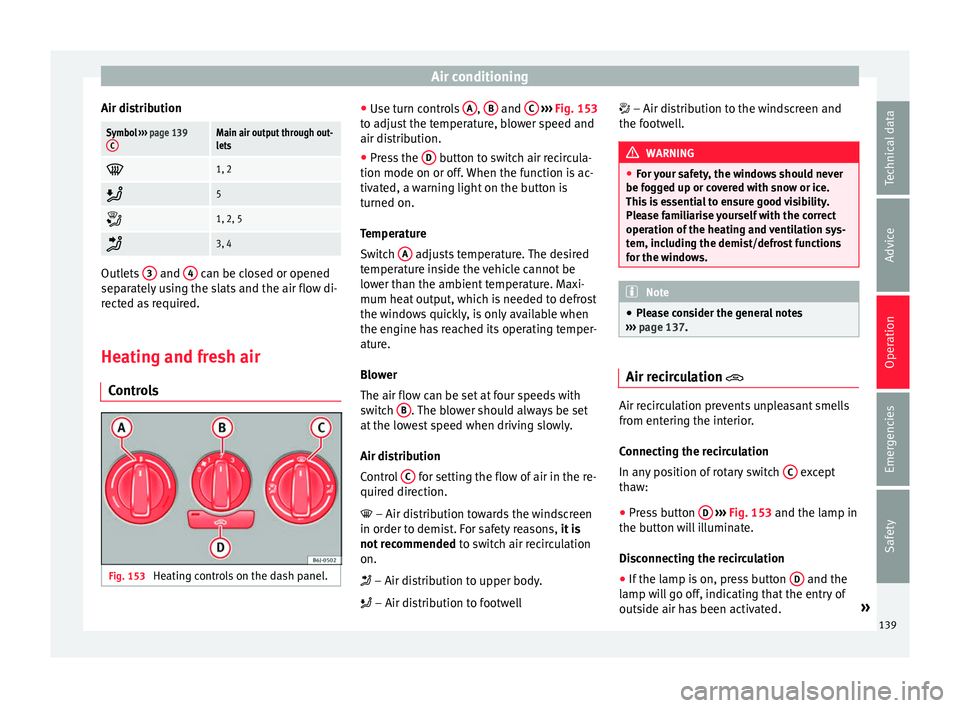
ls Fig. 153
Heating controls on the dash panel. ●
Use t
urn c
ontrols A ,
B and
C
› ››
Fig. 153
t o a
djust the temperature, blower speed and
air distribution.
● Press the D button to switch air recircula-
tion mode on or off .
When the f
unction is ac-
tivated, a warning light on the button is
turned on.
Temperature
Switch A adjusts temperature. The desired
t emper
at
ure inside the vehicle cannot be
lower than the ambient temperature. Maxi-
mum heat output, which is needed to defrost
the windows quickly, is only available when
the engine has reached its operating temper-
ature.
Blower
The air flow can be set at four speeds with
switch B . The blower should always be set
at the lo
w
est speed when driving slowly.
Air distribution
Control C for setting the flow of air in the re-
quir ed dir
ection.
– Air distribution towards the windscreen
in order to demist. For safety reasons, it is
not recommended to switch air recirculation
on.
– Air distribution to upper body.
– Air distribution to footwell – Air distribution to the windscreen and
the footw
ell. WARNING
● For y
our safety, the windows should never
be fogged up or covered with snow or ice.
This is essential to ensure good visibility.
Please familiarise yourself with the correct
operation of the heating and ventilation sys-
tem, including the demist/defrost functions
for the windows. Note
● Ple a
se consider the general notes
››› page 137. Air recirculation
Air recirculation prevents unpleasant smells
fr
om ent
erin
g the interior.
Connecting the recirculation
In any position of rotary switch C except
th a
w:
● Pr
ess button D
› ›
›
Fig. 153 and the lamp in
the button will illuminate.
Disconnecting the recirculation
● If the lamp is on, press button D and the
l amp w
i
ll go off, indicating that the entry of
outside air has been activated. »
139
Technical data
Advice
Operation
Emergencies
Safety
Page 142 of 248
Operation
If the rotary switch C
› ››
Fig. 153
i s in the
thaw position, the recirculation flap will al-
ways be open and air will always enter from
the outside.
If the rotary switch C is switched from any
po s
ition t
o the thaw position, recirculation
will be automatically deactivated. WARNING
● In air rec ir
culation mode, no cold air from
the outside enters the vehicle interior. The
windows can quickly fog over if the heating is
switched off. Therefore, never leave the air re-
circulation mode switched on for a long time
(risk of accident). Vehicle ventilation or heating
Ventilating the vehicle interior
– Turn the temperature selector ››
›
Fig. 153
A anticlockwise.
– Turn blower switch B to any of the head
settin g
s
1-4.
– Set the airflow to the desired direction us-
ing air dis
tribution control C .
– Open the relevant air outlets. Interior heating
– Turn the temperature selector ››
›
Fig. 153
A clockwise to select the desired tempera-
t ur
e.
– T
urn blower switch B to any of the head
settin g
s
1-4.
– Set the airflow to the desired direction us-
ing air dis
tribution control C .
– Open the relevant air outlets.
D efr
o
sting the windscreen
– Turn the temperature selector ›››
Fig. 153
A clockwise to reach the maximum tem-
per at
ur
e.
– Turn the blower switch B to setting 4.
– Turn air distribution control to .
– Close outlet 3 .
– Open and turn outlet 4 towards the side
w indo
w
s.
Keeping the windscreen and the side win-
dows demisted
– Turn the temperature selector ›››
Fig. 153
A to the heating area.
– Turn blower switch B to any of the head
settin g
s
2-3.
– Turn air distribution control to .
– Close outlets 3 –
Open and t urn outl
ets
4 towards side win-
do w
s.
Onc
e the windows are demisted and as a pre-
ventive measure, the control C can be set in
po s
ition
, thus obtaining greater comfort
while preventing the windows from misting
again.
Heating
Maximum heat output, which is needed to
defrost the windows quickly, is only available
when the engine has reached its operating
temperature. Note
Remember that the temperature of the engine
coo l
ant should be optimum to ensure that the
heating system functions correctly (except in
vehicles fitted with additional heating*). 140
Page 143 of 248
Air conditioning
Air conditioning* C ontr
o
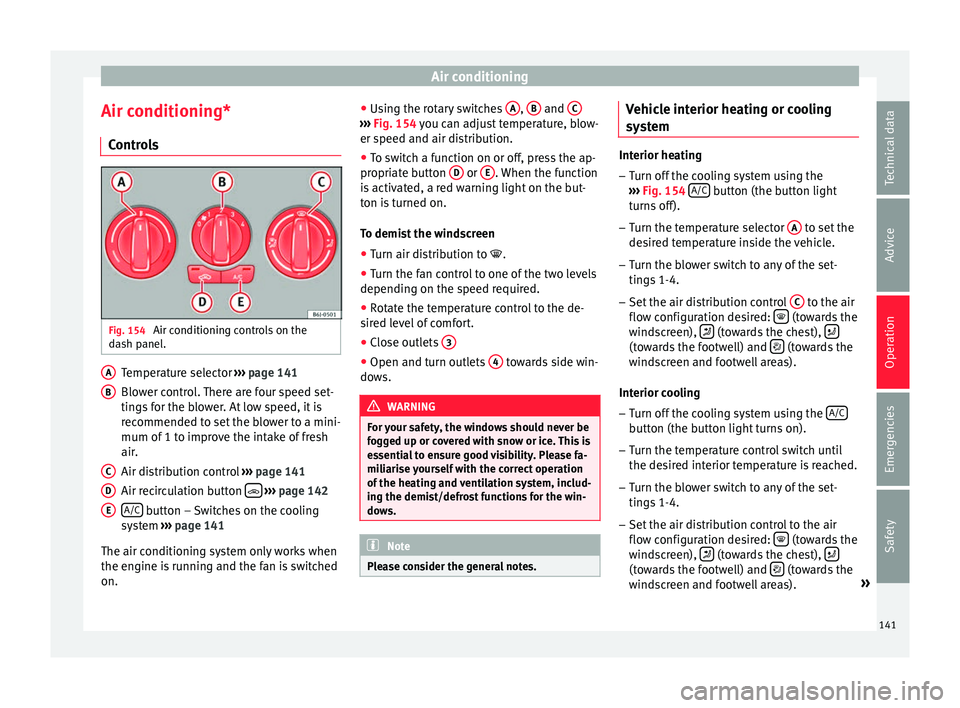
ls Fig. 154
Air conditioning controls on the
d a
sh p
anel. Temperature selector
››
›
page 141
Blower control. There are four speed set-
tings for the blower. At low speed, it is
recommended to set the blower to a mini-
mum of 1 to improve the intake of fresh
air.
Air distribution control ››› page 141
Air recirculation button
› ›
› p
age 142
A/C button – Switches on the cooling
sy s
t
em ››› page 141
The air conditioning system only works when
the engine is running and the fan is switched
on. A B
C
D
E ●
Us
in
g the rotary switches A ,
B and
C ›››
Fig. 154 y ou c
an a djust temperature, blow-
er speed and air distribution.
● To switch a function on or off, press the ap-
propriat
e button D or
E . When the function
i s
activ
ated, a red warning light on the but-
ton is turned on.
To demist the windscreen
● Turn air distribution to .
● Turn the fan control to one of the two levels
depending on the speed r
equired.
● Rotate the temperature control to the de-
sired l
evel of comfort.
● Close outlets 3 ●
Open and turn outlets 4 towards side win-
do w
s. WARNING
For your safety, the windows should never be
fog g
ed up or covered with snow or ice. This is
essential to ensure good visibility. Please fa-
miliarise yourself with the correct operation
of the heating and ventilation system, includ-
ing the demist/defrost functions for the win-
dows. Note
Please consider the general notes. Vehicle interior heating or cooling
sy
s
t
em Interior heating
– Turn off the cooling system using the
›› ›
Fig. 154 A/C button (the button light
turn s
off).
– Turn the temperature selector A to set the
des ir
ed temperature inside the vehicle.
– Turn the blower switch to any of the set-
tings
1-4.
– Set the air distribution control C to the air
flo w c
onfigur
ation desired: (towards the
w ind
s
creen), (towards the chest),
(towards the footwell) and
(towards the
w ind
s
creen and footwell areas).
Interior cooling
– Turn off the cooling system using the A/C button (the button light turns on).
– Turn the temperature control switch until
the de s
ir
ed interior temperature is reached.
– Turn the blower switch to any of the set-
tings
1-4.
– Set the air distribution control to the air
flow configur
ation desired: (towards the
w ind
s
creen), (towards the chest),
(towards the footwell) and
(towards the
w ind
s
creen and footwell areas). »
141
Technical data
Advice
Operation
Emergencies
Safety
Page 147 of 248
Driving
It is possible, however, to set the blower
s peed t
o s
uit requirements.
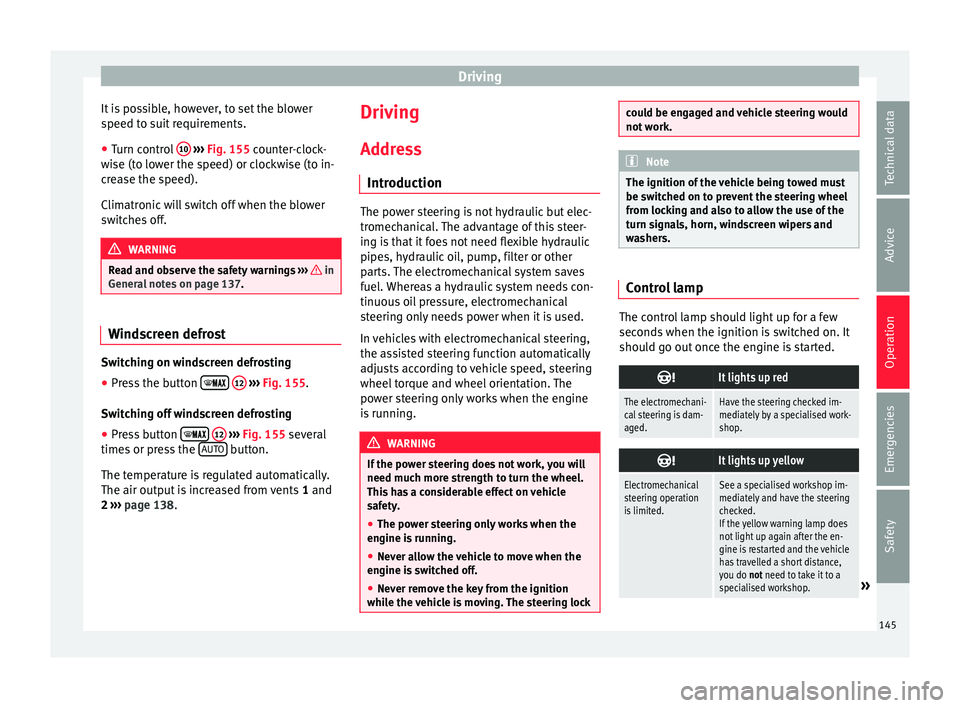
● Turn control 10
› ››
Fig. 155
c
ounter-clock-
wise (to lower the speed) or clockwise (to in-
crease the speed).
Climatronic will switch off when the blower
switches off. WARNING
Read and observe the safety warnings ›››
in
Genera l
notes on page 137. Windscreen defrost
Switching on windscreen defrosting
●
Press the button
12
› ›
›
Fig. 155.
Switching off windscreen defrosting
● Press button
12
› ›
›
Fig. 155 several
times or press the AUTO button.
The t emper
at
ure is regulated automatically.
The air output is increased from vents 1 and
2 ›››
page 138. Driving
Ad dr
e
ss
Introduction The power steering is not hydraulic but elec-
tromec
h
anical. The advantage of this steer-
ing is that it foes not need flexible hydraulic
pipes, hydraulic oil, pump, filter or other
parts. The electromechanical system saves
fuel. Whereas a hydraulic system needs con-
tinuous oil pressure, electromechanical
steering only needs power when it is used.
In vehicles with electromechanical steering,
the assisted steering function automatically
adjusts according to vehicle speed, steering
wheel torque and wheel orientation. The
power steering only works when the engine
is running. WARNING
If the power steering does not work, you will
need much mor e s
trength to turn the wheel.
This has a considerable effect on vehicle
safety.
● The power steering only works when the
engine is
running.
● Never allow the vehicle to move when the
engine is
switched off.
● Never remove the key from the ignition
while the
vehicle is moving. The steering lock could be engaged and vehicle steering would
not w
ork. Note
The ignition of the vehicle being towed must
be sw itc
hed on to prevent the steering wheel
from locking and also to allow the use of the
turn signals, horn, windscreen wipers and
washers. Control lamp
The control lamp should light up for a few
sec
ond
s
when the ignition is switched on. It
should go out once the engine is started.
It lights up red
The electromechani-
cal steering is dam-
aged.Have the steering checked im-
mediately by a specialised work-
shop.
It lights up yellow
Electromechanical
steering operation
is limited.See a specialised workshop im-
mediately and have the steering
checked.
If the yellow warning lamp does
not light up again after the en-
gine is restarted and the vehicle
has travelled a short distance,
you do not need to take it to a
specialised workshop.
» 145
Technical data
Advice
Operation
Emergencies
Safety
Page 150 of 248
Operation
Note
A perfect operation of the vehicle is ensured
if g enuine
SEAT keys are used. Starting petrol engines
The engine can only be started using a genu-
ine S
EA
T key with its correct code.
– Move the gearbox lever to the neutral posi-
tion and depres
s the clutch pedal thor-
oughly and hold it in this position for the
starter to turn the engine on.
– Turn the ignition key to the starting posi-
tion ››
›
page 147.
– Let go of the ignition key as soon as the en-
gine star
ts; the starter motor must not run
on with the engine.
After starting a very hot engine, you may
need to slightly press down the accelerator.
When starting a cold engine, it may be a little
noisy for the first few seconds until oil pres-
sure has built up in the hydraulic valve com-
pensators. This is quite normal, and no cause
for concern.
If the engine does not start immediately,
switch the starter off after 10 seconds and try
again after half a minute. If the engine still
does not start, the fuel pump fuse should be
checked ›››
page 80, Fuses. WARNING
● Never s t
art or run the engine in unventila-
ted or closed rooms. The exhaust gases con-
tain carbon monoxide, an odourless and col-
ourless poisonous gas. Risk of fatal acci-
dents. Carbon monoxide can cause loss of
consciousness and result in death.
● Never leave the vehicle unattended if the
engine is
running.
● Never use “cold start sprays”, they could
explode or c
ause the engine to run at high
revs. Risk of injury. CAUTION
● When the engine i s
cold, you should avoid
high engine speeds, driving at full throttle
and over-loading the engine. Risk of engine
damage.
● The vehicle should not be pushed or towed
more than 50 metr
es to start the engine. Un-
burnt fuel could enter the catalytic converter
and damage it.
● Before attempting to push-start or tow a ve-
hicle in or
der to start it, you should first try to
start it using the battery of another vehicle.
Please observe and follow the notes on the
››› page 52, How to jump start. For the sake of the environment
Do not warm-up the engine by running the
engine w ith the
vehicle stationary. Start off
immediately, driving gently. This helps the engine reach operating temperature faster
and reduc
e
s emissions. Starting diesel engines
The engine can only be started using a genu-
ine S
EA
T key with its correct code.
– Move the gearbox lever to the neutral posi-
tion and depres
s the clutch pedal thor-
oughly and hold it in this position for the
starter to turn the engine on.
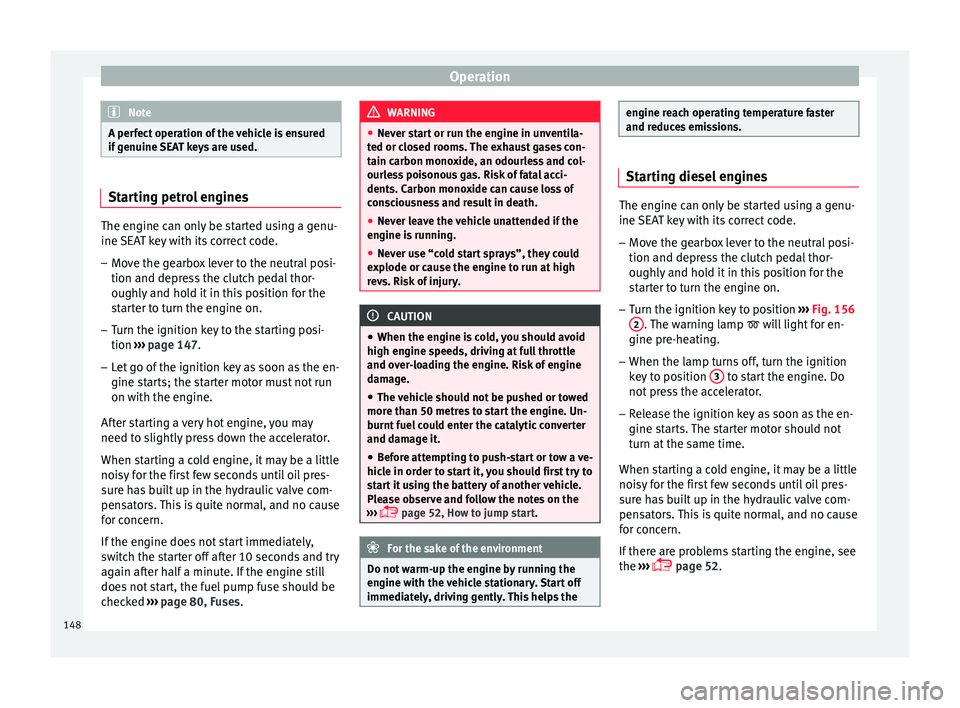
– Turn the ignition key to position ›››
Fig. 156
2 . The warning lamp
wi
l l light for en-
gine pre-heating.
– When the lamp turns off, turn the ignition
key t
o position 3 to start the engine. Do
not pr
e
ss the accelerator.
– Release the ignition key as soon as the en-
gine star
ts. The starter motor should not
turn at the same time.
When starting a cold engine, it may be a little
noisy for the first few seconds until oil pres-
sure has built up in the hydraulic valve com-
pensators. This is quite normal, and no cause
for concern.
If there are problems starting the engine, see
the ›››
page 52.
148
Page 151 of 248
Driving
Glow plug system for the diesel engine
T o av
oid u
nnecessary discharging of the bat-
tery, do not use any other major electrical
equipment while the glow plugs are pre-heat-
ing.
Start the engine as soon as the glow plug
warning lamp goes out.
Starting a diesel engine after the fuel tank
has been completely run dry
If the fuel tank has been completely run dry,
it may take longer than normal (up to one mi-
nute) to start a diesel engine after refuelling.
This is because the fuel system must elimi-
nate air first. WARNING
Observe the safety warnings ›››
in Starting
petro l
engines on page 148. CAUTION
● When the engine i s
cold, you should avoid
high engine speeds, driving at full throttle
and over-loading the engine. Risk of engine
damage.
● The vehicle should not be pushed or towed
more than 50 metr
es to start the engine. Un-
burnt fuel could enter the catalytic converter
and damage it.
● Before attempting to push-start or tow a ve-
hicle in or
der to start it, you should first try to
start it using the battery of another vehicle. Please observe and follow the notes on the
›› ›
page 52, How to jump start. For the sake of the environment
Do not warm-up the engine by running the
en gine w ith the
vehicle stationary. You
should drive off as soon as you start the en-
gine. This helps the engine reach operating
temperature faster and reduces emissions. Switching off the engine
–
Stop the vehicle.
– Turn the ignition key to position ››
›
Fig. 156
1 .
Af t
er sw
itching the engine off, the radiator
fan may run on for up to 10 minutes. It is also
possible that the fan turns itself on once
more if the coolant temperature increases
due to the heat accumulated in the engine
compartment or due to its prolonged expo-
sure to solar radiation. WARNING
● Never sw it
ch the engine off until the vehi-
cle is completely stationary.
● The brake servo works only when the en-
gine is ru
nning. With the engine switched off,
more strength is needed to brake. As normal brake operation cannot be performed, risk of
acc
ident
s and serious injury may exist.
● The steering lock can be immediately
block
ed once the key is removed from the ig-
nition. The vehicle cannot be steered. Risk of
accident.
● Power-assisted steering does not work
when the engine is
off, and more strength is
needed to turn the wheel.
● If the key is removed from the ignition lock
the steerin
g lock could be engaged and vehi-
cle steering would not work. CAUTION
When the engine has been running under a
heavy lo
ad for a long period, heat can accu-
mulate in the engine compartment and cause
engine damage. For this reason, idle the en-
gine for approximately 2 minutes before
switching it off. Braking and parking
Br ak
in
g capacity and braking distance The efficiency of the brakes depends directly
on the br
ak
e p
ad wear. This wear depends to
a great extent on the conditions under which
the vehicle is operated and the way the vehi-
cle is driven. If you often drive in town, drive
short distances or have a sporty driving style,
we recommend that you have the thickness »
149
Technical data
Advice
Operation
Emergencies
Safety
Page 154 of 248
Operation
Braking and stability systems El ectr
onic
Stability Control (ESC)*This Electronic Stability System reduces the
risk
of
skidding and improves the vehicle's
stability and ability to hold the road.
The Electronic Stability Control (ESC) contains
the electronic differential lock (EDL) and the
traction control system (ASR). The ESC works
together with the ABS. Both control lamps
will light up if the ESC or ABS systems are
faulty.
The ESC system is started automatically
when the engine is started.
The ESC system is always active and cannot
be switched off. With the Easy Connect sys-
tem it is only possible to deactivate the ASR
or else select Sport mode.
The ASR can be deactivated when wheel spin
is desirable ›››
page 153.
For example:
● When driving with snow chains.
● When driving in deep snow or on loose sur-
fac e
s.
● When the vehicle is stuck, to rock it back-
ward
s and forwards.
Press the button to switch the ASR back on
when you no longer need wheel spin. Electronic Stability Control (ESC)*
The ESC r
educes the risk of skidding by brak-
ing the wheels individually.
The system uses the steering wheel angle
and road speed to calculate the changes of
direction desired by the driver, and constant-
ly compares them with the actual behaviour
of the vehicle. When irregularities occur, for
example, if the vehicle begins to skid, the
ESC brakes the appropriate wheel automati-
cally.
The forces acting on the braked wheel bring
the vehicle back to a stable condition. If the
vehicle tends to oversteer (the rear end
slides out), the system will act on the front
wheel on the outside of the turn.
Control lamp
There are two control lamps for the electronic
stability control. The lamp provides infor-
mation concerning function and disconnec-
tion status.
Both control lamps light up together when
the ignition is switched on and should turn
off after approximately 2 seconds. This is the
time taken for the function check.
This programme includes the ABS, EDL and
ASR. It also includes emergency braking as-
sistance (BAS). The control lamp
has the following func-
tions:
● It flashes whilst driving when the ASR/ESC
is activ
ated.
● It will light up if there is a fault in the ESC.
● As the ESC operates in conjunction with the
ABS, the ESC light
will also come on if a fault
should occur in the ABS.
If the ESC control lamp lights up and stays
on after the engine is started, this may mean
that the control system has temporarily
switched off the ESC. In this case the ESC can
be reactivated by switching the ignition off
and then on again. If the control lamp goes
out, this means the system is fully functional.
The lamp provides information about the
disconnection status of the system:
● It stays lit when the ASR is disconnected on
pres
sing the switch or if we select ESC
Sport mode, only by means of Easy Connect. WARNING
● Do not f or
get that the electronic stability
control ESC cannot defy the laws of physics.
This should be kept in mind, particularly on
slippery and wet roads and when towing a
trailer.
● Always adapt your driving style to suit the
condition of the r
oads and the traffic situa-
tion. The greater safety provided by the ESC
should not encourage you to run any risks. 152
Page 155 of 248
Driving
CAUTION
● To en s
ure that the ESC works correctly, all
four wheels must be fitted with the same
tyres. Any differences in the rolling radius of
the tyres can cause the system to reduce en-
gine power when this is not desired.
● Any modifications made to the vehicle (for
examp
le, to the engine, brake system, run-
ning gear or to the combination of wheels
and tyres) may affect the operation of the
ABS, EDL, ESC and ASR. Traction control system (ASR)*
The traction control system prevents the driv-
en wheel
s
fr
om spinning when the vehicle is
accelerating. This system always includes
ABS.
Description and operation of the traction
control system during acceleration (ASR)
On front-wheel drive vehicles, the ASR sys-
tem intervenes, reducing engine power and
preventing the driven wheels from slipping
during acceleration. The system works in the
entire speed range in conjunction with ABS.
If a failure occurs in the ABS, the ASR will al-
so stop working.
TCS helps the car to start moving, accelerate
and climb a gradient in slippery conditions
where this may otherwise be difficult or even
impossible. The ASR automatically switches on when the
engine is
started. If necessary, it could be
connected or disconnected by means of the
Easy Connect system.
When the ASR is off, the warning lamp lights
up . The ASR should normally be left on.
Only in exceptional circumstances, when
wheel spin is required, can they be turned off
using the ESC button, for example:
● With compact temporary spare wheel.
● When using the snow chains.
● When driving in deep snow or on soft ter-
rain.
● When the v
ehicle is bogged-down, to free it
“by r
ocking it.”
The ASR should be switched on again as
soon as possible.
Control lamp
There are two control lamps for the traction
control system: and . Both control lamps
light up together when the ignition is switch-
ed on and should turn off after approximately
2 seconds. This is the time taken for the func-
tion check.
The lamp has the following function:
● It flashes when the ASR is working if the ve-
hicle i
s moving. If the system is deactivated or if it has any
fault, the w
arning lamp will remain lit. The
warning lamp will also light up if a fault
should occur in the ABS because the ASR op-
erates in conjunction with the ABS. For fur-
ther information, see ››› page 153.
The lamp provides information about the
disconnection status of the system:
● It stays lit when the ASR is disconnected
via E
asy Connect.
By means of Easy Connect, the ASR function
is reactivated and the warning lamp switched
off. WARNING
● Remember th at
not even the ASR can defy
the laws of physics. This should be kept in
mind, particularly on slippery and wet roads
and when towing a trailer.
● Always adapt your driving style to suit the
condition of the r
oads and the traffic situa-
tion. The greater safety provided by the ASR
should not encourage you to run any risks. CAUTION
● To en s
ure that the ASR works correctly,
identical tyres should be fitted on all four
wheels. Any differences in the rolling radius
of the tyres can cause the system to reduce
engine power when this is not desired. » 153
Technical data
Advice
Operation
Emergencies
Safety